


Why this matters
If you measure video quality, PSNR is the first number you will see and the first one you will be tempted to over-trust. It appears in encoder logs, in FFmpeg output, in vendor benchmark charts, and in academic tables — usually with no explanation of what it can and cannot tell you. This article gives you that explanation, so you can read a PSNR figure the way a skeptic would: knowing what it measures, which comparisons it is valid for, and the exact content where it will mislead you. It is the foundation for the perceptual metrics that come next — SSIM and VMAF — both of which exist precisely because PSNR was not good enough.
What PSNR actually measures
Start with the thing PSNR is built on, because the name hides it. Underneath the decibels, PSNR is a measurement of pixel error: how different is each pixel in the compressed video from the same pixel in the original, on average, squared.
Think of it as a spell-checker that counts wrong letters. Give it the original document and a copy, and it will tell you how many characters differ. What it will not tell you is whether the sentence still reads well — a typo in the headline and a typo in the footer count exactly the same. PSNR has the same blind spot. It counts how many pixel values changed and by how much, never asking whether those changes landed somewhere the eye is looking.
To measure that pixel error you need the pristine original, frame for frame. That makes PSNR a full-reference metric — a metric that compares the impaired video against the complete uncompressed master. If you do not have the original on disk, you cannot compute PSNR at all; on a live stream or a user-uploaded clip there is no master to reference, and the number simply does not exist. (The three reference setups — full, reduced, and no-reference — are covered in full-reference, reduced-reference, no-reference metrics; PSNR sits firmly in the first.)
From pixel error to decibels: the math, shown once
PSNR is computed in two steps. First you measure the raw error with the Mean Squared Error, almost always written MSE. Then you turn that error into decibels. Both steps are short, and seeing them once removes all the mystery.
The Mean Squared Error is exactly what its name says, read right to left: take the error at every pixel (original value minus compressed value), square it, then take the mean of all those squares across the whole frame. Squaring does two things: it makes every error positive so they do not cancel out, and it punishes big errors far more than small ones. For an image of width m and height n:
MSE = (1 / (m·n)) · Σ Σ [ I(i,j) − K(i,j) ]²
Here I is the original frame, K is the compressed frame, and the double sum runs over every pixel. An MSE of zero means the two frames are identical. A larger MSE means more error.
MSE on its own is awkward to read — its scale depends on the bit depth, and the numbers are unintuitive. So PSNR rescales it against the brightest possible pixel and takes the logarithm, which compresses a huge range of error into a friendly two-digit decibel number:
PSNR = 10 · log₁₀ ( MAX² / MSE ) [dB]
MAX is the largest value a pixel can take. For ordinary 8-bit video that is 255; for B bits per sample it is 2^B − 1 (1023 for 10-bit, 4095 for 12-bit). Because the formula divides MAX² by MSE, smaller error gives a larger PSNR — the scale runs the intuitive way, higher is better.
A worked example
Suppose you measure an 8-bit clip and find its MSE is 25. That means the average pixel is off by 5 levels (because 5² = 25) on a 0–255 scale — a small error. Plug it in:
PSNR = 10 · log₁₀ ( 255² / 25 )
     = 10 · log₁₀ ( 65025 / 25 )
     = 10 · log₁₀ ( 2601 )
     = 10 · 3.415
     = 34.15 dB
So a 5-level average error lands at about 34 dB. Now push the error up: an MSE of 100 (average error of 10 levels) gives 10 · log₁₀(65025 / 100) = 28.1 dB. And push it down to the smallest possible non-zero error, an MSE of 1, and you get 10 · log₁₀(65025) = 48.13 dB — which is the highest finite PSNR an 8-bit signal can reach short of a perfect match. A perfect match has MSE = 0, the division blows up, and PSNR is infinite.
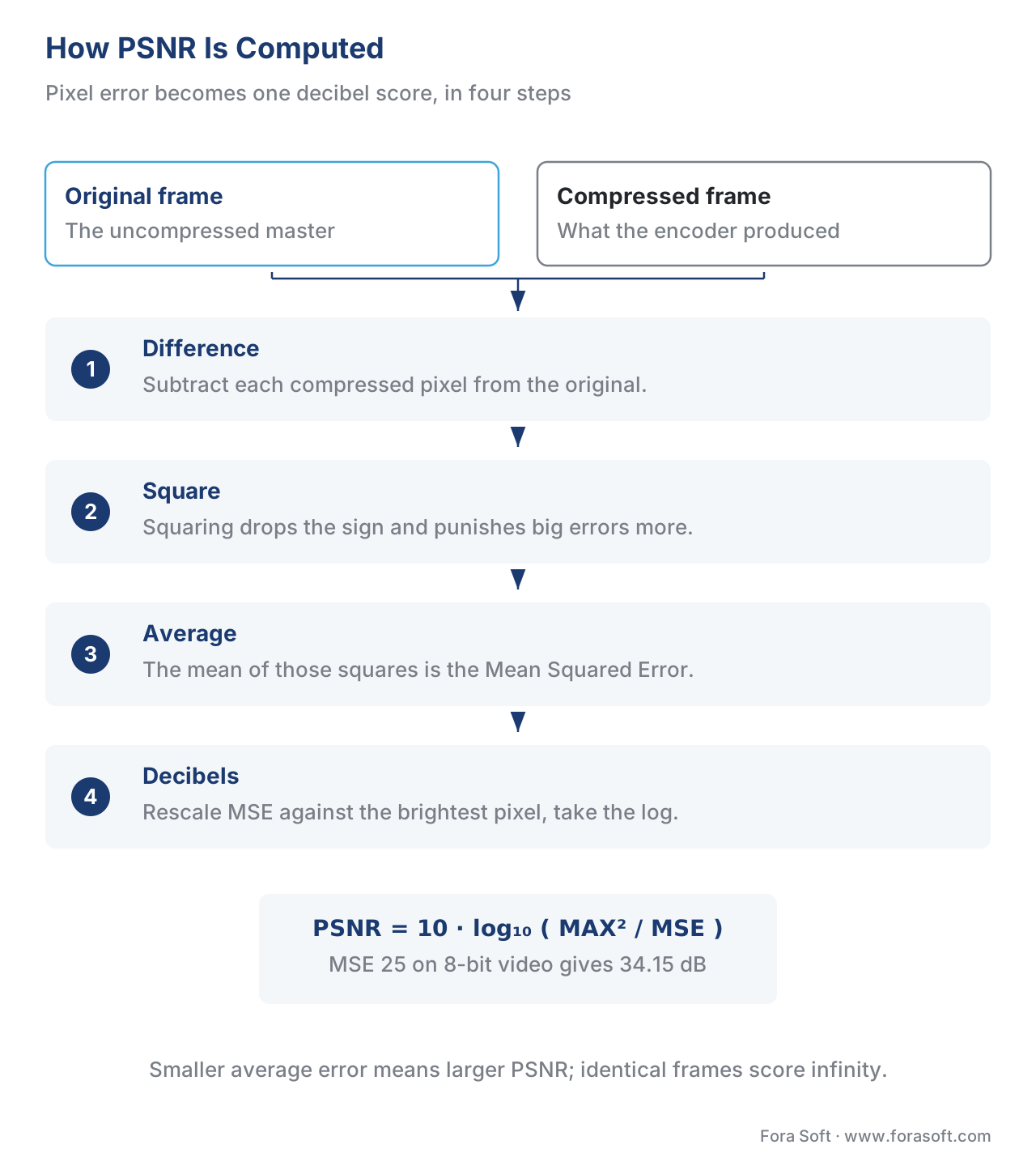 Figure 1. PSNR in four steps: difference, square, average (MSE), then convert to decibels. The metric never looks at where the errors are — only how big they are on average.
The one rule of thumb worth memorizing
Because PSNR is logarithmic, there is a clean shortcut: every halving of the error adds about 3 dB (since 10 · log₁₀ 2 ≈ 3.01), and every doubling subtracts about 3 dB. So if encoder A scores 36 dB and encoder B scores 39 dB on the same clip, B has roughly half the pixel error of A. That 3-dB-per-doubling intuition is the single most useful thing to carry out of the math.
Reading a PSNR number: the decibel scale
A PSNR figure means nothing until you know what range to expect. For 8-bit lossy video and image compression, real-world PSNR almost always lands between 30 and 50 dB, and the bands inside that range have rough, well-worn meanings.
Below about 30 dB, errors are usually visible — the picture looks degraded to an attentive viewer. From 30 to about 40 dB you are in the normal operating range of streaming-grade compression, where quality is acceptable to good and most viewers are content. Above 40 dB the compressed frame is close to the original, and approaching the 48 dB ceiling the difference is near-imperceptible for 8-bit content. Higher bit depths shift the whole scale up: high-quality 12-bit imagery is judged at 60 dB or above, and 16-bit data runs from roughly 60 to 80 dB, because more bits mean a higher MAX and a higher ceiling.
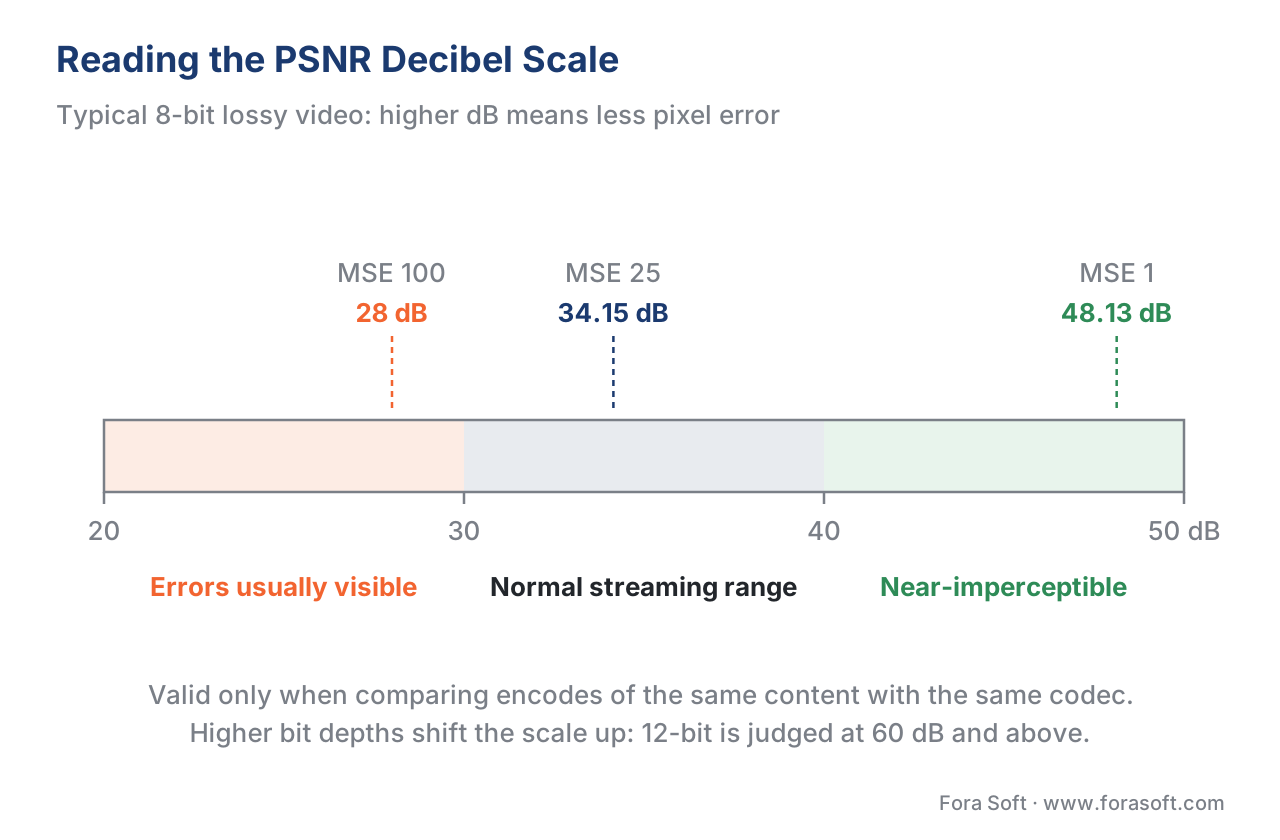 Figure 2. The 8-bit PSNR scale with the worked examples placed on it. The bands are rules of thumb, not guarantees — content and codec move them.
The caveat attached to that scale is the most important sentence in this article. A PSNR value is only conclusively valid when you compare results from the same codec and the same content (Huynh-Thu and Ghanbari, Electronics Letters, 2008). A 38 dB score on an animation clip and a 38 dB score on a film grain clip do not mean the two look equally good — they mean nothing relative to each other. Use PSNR to compare two encodes of the same source, and the comparison is sound. Use it to rank quality across different sources, resolutions, or codecs, and you are reading tea leaves.
Luma, chroma, and the "average" you actually quote
There is one more wrinkle between the formula and the number in your log. Video is not one channel; it is split into brightness (luma, the Y component) and color (chroma, the U and V components). PSNR is computed separately for each, so a tool reports psnr_y, psnr_u, psnr_v, and a combined psnr_avg.
The eye is far more sensitive to brightness than to color, which is why encoders spend most of their bits on luma. For the same reason, the luma PSNR (psnr_y) is the figure most engineers quote — it tracks the part of the picture viewers notice. The combined average is weighted by how many pixels each plane has, and because chroma is usually subsampled, luma dominates it anyway. When you read or report a PSNR number, say which one it is; "PSNR 38 dB" with no component named is a small but real ambiguity.
How to compute PSNR with FFmpeg
You will rarely write the formula yourself. The everyday tool is FFmpeg, whose psnr filter takes two video inputs — the distorted clip first, the reference second — and prints the per-component and average PSNR.
# PSNR between a distorted encode and its reference master.
# Output prints psnr_y, psnr_u, psnr_v and psnr_avg to the console.
ffmpeg -i distorted.mp4 -i reference.mp4 \
  -lavfi psnr -f null -
To capture a value per frame — useful for finding the worst moments, not just the average — write a stats file:
# Per-frame PSNR written to psnr.log (n, mse_avg, psnr_avg, per-plane values).
ffmpeg -i distorted.mp4 -i reference.mp4 \
  -lavfi "psnr=stats_file=psnr.log" -f null -
The shape of the command encodes the full-reference contract: it will not run without both files. If you want PSNR, SSIM, and VMAF in a single pass, the libvmaf filter can emit all three — that workflow, with model selection and output parsing, is covered in depth in measuring quality with FFmpeg and libvmaf, and the encoder-side quick reference lives in Video Encoding's FFmpeg cheat sheet.
To make the math concrete at your desk, we built a small, dependency-light script that computes PSNR between two image or frame files from first principles — MSE, then decibels — and prints every intermediate value so you can see exactly where the number comes from. Download the from-scratch PSNR calculator (Python) and run it against your own frames.
The alignment trap
PSNR assumes the two videos line up exactly: the same frame, at the same resolution, with the same brightness. Compare frame 100 of the encode against frame 98 of the master — a two-frame temporal slip — and PSNR reports a quality collapse the eye would never see. A one-pixel spatial shift or a small brightness offset does the same. This sensitivity is why the ITU standardized a dedicated alignment-compensated PSNR, ITU-T J.340 (2010), which corrects for constant spatial shift, temporal shift, and luminance gain before scoring. The practical rule: if a PSNR score looks shockingly bad, suspect misalignment before you suspect the encoder. Calibrate first, score second.
Why PSNR is a poor predictor of perceived quality
Here is the heart of the matter, and the reason every metric after PSNR exists. PSNR measures pixel error with perfect arithmetic and almost no understanding of vision. It has three blind spots that matter every day.
First, it treats every pixel as equally important. A pixel error in the sharp edge of a face and an identical error in a patch of flat sky contribute the same amount to the MSE, even though the eye forgives the sky and notices the face instantly. The metric has no idea where you are looking.
Second, it ignores structure and masking. Human vision hides errors in busy, textured, or high-contrast regions and exposes them in smooth ones — a property called visual masking. PSNR has no model of this, so it over-penalizes harmless noise in textured areas and under-penalizes banding in smooth gradients, exactly backwards from perception.
Third, it cannot tell two very different distortions apart if they have the same total error. A faint, even haze of noise spread across the whole frame and a chunk of ugly blocking concentrated in one corner can produce the same MSE — and therefore the same PSNR — while looking nothing alike to a viewer.
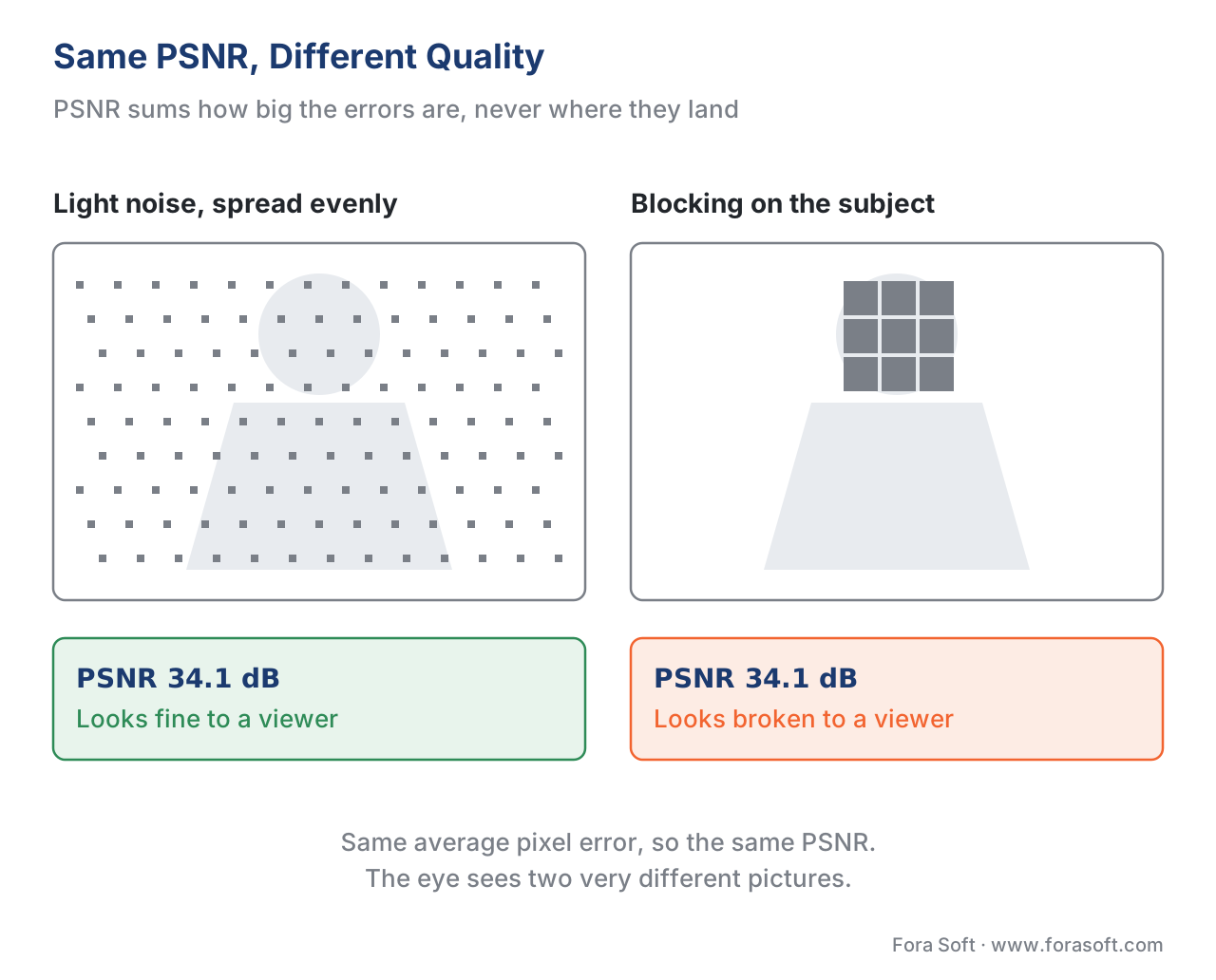 Figure 3. Same PSNR, different quality. PSNR sums pixel error and cannot see that one distortion lands where the eye is looking and the other does not.
This is not a fringe complaint. The defining academic study on the question, Huynh-Thu and Ghanbari's "Scope of validity of PSNR in image/video quality assessment" (2008), showed that PSNR's agreement with human opinion holds only within the same content and codec and breaks down across them. On large mixed test sets, PSNR's correlation with human Mean Opinion Scores typically trails the perceptual metrics by a wide margin — illustrative figures from modern streaming databases put PSNR's correlation well below SSIM's and VMAF's, though the exact gap depends on the database, so treat those as ordering, not grades. The honest framing is the one to carry: every objective metric, PSNR included, is a proxy for human opinion that gets graded against subjective tests, and PSNR is among the weakest proxies we have.
Where PSNR is still the right tool
If PSNR predicts perception poorly, why is it everywhere — and why do we still use it? Because for several specific jobs its weaknesses do not bite and its strengths are decisive.
It is fast and free. PSNR is a handful of arithmetic operations per pixel, with no model to load, no training data, and no license. It runs in real time on anything, which is why every video encoder uses MSE or PSNR inside its rate-distortion optimization — the inner loop that decides, thousands of times per frame, whether spending another bit is worth the error it removes. A perceptual metric is too slow to call in that loop; PSNR is perfect for it.
It is a clean signal for same-codec, same-content comparison. When you change one encoder setting and re-encode the same master, PSNR will faithfully tell you whether pixel error went up or down. That makes it a fine sanity check and a cheap regression gate: if a code change drops PSNR on your fixed test clips, something broke, and you want to know before perceptual scoring even runs.
It is the universal baseline. Because PSNR has been computed the same way for decades, it is the one number every paper, every codec, and every tool can produce, which makes it the common currency for BD-rate and other rate-distortion comparisons. And it is exact for verifying losslessness: an infinite PSNR proves two files are bit-identical, which is the right tool for confirming a transcode changed nothing.
The rule is simple. Reach for PSNR when you are comparing encodes of the same source, when you need speed, or when you need a baseline everyone recognizes. Reach for a perceptual metric when you are predicting how good the video will look to a viewer.
The perceptual cousins: PSNR-HVS, PSNR-HVS-M, and XPSNR
PSNR's weaknesses were obvious enough that researchers built perceptually weighted versions that keep its speed. PSNR-HVS weights the pixel errors by a model of human contrast sensitivity, so errors the eye barely sees count less. PSNR-HVS-M goes further and adds visual masking — the way busy regions hide errors — and in its 2007 evaluation it tracked human judgement far better than both PSNR and SSIM.
The newest and most practical of these is XPSNR, the Extended Perceptually Weighted PSNR from Fraunhofer HHI, added to FFmpeg in 2024. It is a low-complexity, psychovisually weighted PSNR whose values sit in the same decibel range as ordinary PSNR but follow perceived quality more closely; for modern high-resolution content it has been reported to correlate with subjective scores better than VMAF on VVC-coded UHD video. If you like PSNR's simplicity but want a number closer to the eye, xpsnr in a current FFmpeg build is worth knowing about:
# Extended perceptually weighted PSNR (Fraunhofer HHI, FFmpeg 2024+).
ffmpeg -i distorted.mp4 -i reference.mp4 -lavfi xpsnr -f null -
These variants matter because they show the real lesson of PSNR: the problem was never the decibel scale, it was treating all pixel errors as equal. Weight the errors by how the eye actually works, and a PSNR-style metric becomes useful again.
PSNR vs SSIM vs VMAF: when to reach for which
PSNR is one of three metrics you will meet constantly, and the fastest way to hold them in your head is side by side. The columns that matter are not just the scores but what each metric actually measures and where each one lies.
| Metric | Scale | What it measures | Where it lies (blind spot) | Best for |
|---|---|---|---|---|
| PSNR | dB (≈20–50, ∞ if identical) | Average pixel error vs the original | Ignores where errors are; same score for very different-looking distortions | Same-codec comparison, RDO, regression gates, lossless checks |
| SSIM | 0–1 (higher better) | Structural similarity — luminance, contrast, structure | Misses some color and temporal errors; still a spatial model | A better-than-PSNR perceptual proxy, per-frame structure |
| VMAF | 0–100 (higher better) | Fused, perception-trained quality (model-dependent) | Meaningless without the model named; gameable by sharpening | Predicting viewer-perceived streaming quality at scale |
Table 1. The three full-reference metrics at a glance. All need the original; they differ in how close they get to the eye and what they miss. Pick the row by the job, and always name the conditions.
The progression is the story of the field: PSNR measures error, SSIM measures structure, VMAF is trained directly on human scores. Each is a better perceptual proxy than the last, and each costs more to compute. None replaces a subjective test as ground truth. The full catalogue of where each objective metric misleads is in where objective metrics lie.
Common mistakes with PSNR
Free download: From-scratch PSNR calculatorA dependency-light Python script that computes PSNR between two image or frame files from first principles - Mean Squared Error, then the decibel conversion - printing every intermediate value, per-channel MSE, MAX, MSE and PSNR in dB, so you can see exactly where the number comes from.Mistake: comparing PSNR across different content, resolutions, or codecs. A 40 dB encode of a cartoon and a 34 dB encode of a grainy film do not tell you the cartoon "looks better" — PSNR is only valid comparing encodes of the same source. Cross-content PSNR rankings are the single most common abuse of the metric.
Mistake: quoting one PSNR number with no context. "PSNR 38" hides whether it is luma or average, mean-pooled or worst-case, and on what content. A single mean PSNR can hide a few terrible seconds inside an otherwise clean clip — which is why pooling matters. Report the component, the pooling, and the content.
Mistake: optimizing for PSNR instead of the viewer. Tuning an encoder to maximize PSNR can push it toward choices that score well on pixel error but look worse — over-smoothing detail, for instance. The metric is a proxy; optimizing the proxy past the point where it tracks perception is how teams ship video that scores high and looks flat.
Where Fora Soft fits in
Fora Soft has built video software since 2005 — streaming, WebRTC conferencing, OTT, e-learning, telemedicine, and surveillance — and PSNR is the first metric we compute on almost every encoding task, then the first one we refuse to trust on its own. We use it where it is strong: as a fast regression check that an encoder change did not increase pixel error, and as the baseline currency for rate-distortion comparison. We stop trusting it the moment the question becomes "how good does this look to the viewer," where we move to VMAF with its model named and pooling stated, anchored on real subjective testing. Our benchmark methodology documents which metric produced every number, and why PSNR was or was not the right one for that comparison.


The handbook
Fora Soft Video Engineering Handbook
We wrote a seven-volume handbook that takes the whole video stack apart across 9,000+ pages - encoding, delivery, audio and AI - so that an engineer who works through it can design and build the systems these decibels grade. Volume 1 runs from the quantizer that creates the pixel error to the metrics that score it, PSNR first and then the perceptual ones built because pixel error was not enough; volume 3 is where a quality target stops being a number and becomes an ABR ladder, a player and a CDN bill; volume 5 does the same job for sound, whose quality metrics have their own decibel history. Written by Nikolay Sapunov, CEO at Fora Soft.
Is the PSNR number in your pipeline answering the question you are actually asking?
Send us your test clips and the numbers your CI produces, and we will tell you which comparisons are sound, which ones are cross-content tea leaves, and which metric belongs in each gate. 250+ video products shipped since 2005.
See our case studies
Case study
Speed.Space
Remote production recording at 1080p and 8 Mbps for Netflix, Electronic Arts and HBO shoots - the master sits on disk, which is exactly the case where a same-source PSNR check is the right regression gate.
Case study
Worldcast Live
Concert streaming at 1.5 Gb/s with 0.4-0.5 s latency for 10,000 simultaneous viewers, quality dropped per viewer on weak connections - the moment the question turns from pixel error into what the viewer sees.
Case study
Mindbox
An AI video management system on RTSP, FFmpeg and HLS across 50+ deployments - live camera feeds with no master to compare against, so PSNR cannot be computed at all and no-reference scoring takes over.
What to read next
Metrics
VMAF Explained: Netflix's Perceptual Video Quality Metric
The metric built because pixel error was not enough: what VMAF fuses, and what it still misses.
Metrics
Where Objective Video Quality Metrics Lie (and Why)
The full catalogue of content and motion cases where the number and the eye part ways.
Tooling
FFmpeg VMAF: Measure Video Quality with libvmaf
One FFmpeg pass that emits PSNR, SSIM and VMAF together, with the model named and the output parsed.
Benchmarks
BD-Rate Explained: Bitrate Saving at Equal Quality
What PSNR is really for: the rate-distortion comparison that turns two curves into one percentage.
References
- Recommendation ITU-T J.340 (06/2010), Reference algorithm for computing peak signal to noise ratio of a processed video sequence with compensation for constant spatial shifts, constant temporal shift, and constant luminance gain and offset. International Telecommunication Union. Tier 1. The standardized alignment-compensated PSNR computation for video. https://www.itu.int/rec/T-REC-J.340
- Recommendation ITU-T P.1401 (01/2020), Methods, metrics and procedures for statistical evaluation, qualification and comparison of objective quality prediction models. International Telecommunication Union. Tier 1. Defines PCC, SROCC, and RMSE — how any objective metric, PSNR included, is graded against subjective scores. https://www.itu.int/rec/T-REC-P.1401
- Recommendation ITU-R BT.500-15 (2023), Methodologies for the subjective assessment of the quality of television images. International Telecommunication Union. Tier 1. The subjective ground truth against which objective metrics like PSNR are validated. https://www.itu.int/rec/R-REC-BT.500
- Q. Huynh-Thu and M. Ghanbari, "Scope of validity of PSNR in image/video quality assessment," Electronics Letters, vol. 44, no. 13, pp. 800–801, 2008. Tier 5 (peer-reviewed). The defining study showing PSNR is valid only within the same content and codec. https://doi.org/10.1049/el:20080522
- Q. Huynh-Thu and M. Ghanbari, "The accuracy of PSNR in predicting video quality for different video scenes and frame rates," Telecommunication Systems, vol. 49, no. 1, pp. 35–48, 2012. Tier 5 (peer-reviewed). Quantifies how PSNR's predictive accuracy varies with content and frame rate. https://doi.org/10.1007/s11235-010-9351-x
- K. Egiazarian, J. Astola, N. Ponomarenko, V. Lukin, F. Battisti, M. Carli, "New full-reference quality metrics based on HVS," Proc. 2nd Int. Workshop on Video Processing and Quality Metrics (VPQM), 2006. Tier 5. Introduces PSNR-HVS, weighting pixel error by human contrast sensitivity. http://www.ponomarenko.info/psnrhvsm.htm
- N. Ponomarenko, F. Silvestri, K. Egiazarian, M. Carli, J. Astola, V. Lukin, "On between-coefficient contrast masking of DCT basis functions," Proc. 3rd Int. Workshop on Video Processing and Quality Metrics (VPQM), 2007. Tier 5. Defines PSNR-HVS-M, adding visual masking; outperformed PSNR and SSIM in evaluation. http://www.ponomarenko.info/vpqm07_p.pdf
- C. R. Helmrich, M. Siekmann, S. Becker, S. Bosse, D. Marpe, T. Wiegand, "XPSNR: A Low-Complexity Extension of the Perceptually Weighted Peak Signal-to-Noise Ratio for High-Resolution Video Quality Assessment," Proc. IEEE ICASSP, 2020; and the Fraunhofer HHI XPSNR FFmpeg plug-in. Tier 5 / Tier 3. The perceptually weighted PSNR now integrated into FFmpeg (2024). https://github.com/fraunhoferhhi/xpsnr
- FFmpeg, psnr and xpsnr filter documentation, accessed 2026-06-23. Tier 3 (first-party tooling). The
psnrfilter (two inputs, per-plane and average output,stats_file) and thexpsnrfilter added in 2024. https://ffmpeg.org/ffmpeg-filters.html#psnr - Netflix, VMAF documentation and repository, accessed 2026-06-23. Tier 3 (first-party / metric-author). Netflix's rationale for building a perception-trained metric rather than relying on PSNR. https://github.com/Netflix/vmaf
- Z. Wang, A. C. Bovik, H. R. Sheikh, E. P. Simoncelli, "Image Quality Assessment: From Error Visibility to Structural Similarity," IEEE Transactions on Image Processing, vol. 13, no. 4, pp. 600–612, 2004. Tier 1 (metric-author). The SSIM paper, whose opening argument is precisely PSNR's failure to model perception. https://ece.uwaterloo.ca/~z70wang/publications/ssim.html
- "Peak signal-to-noise ratio," Wikipedia, accessed 2026-06-23. Tier 6 (educational, orientation only). Source for the typical dB ranges by bit depth and the finite-PSNR ceilings; primary claims are cited to the standards and papers above. https://en.wikipedia.org/wiki/Peak_signal-to-noise_ratio
