


Why this matters
Almost every quality number an engineer will ever produce comes out of this one tool, so the cost of using it wrong compounds across every encode you ship. This article is for the streaming or encoding engineer who has installed FFmpeg and now needs to measure an encode honestly: to compare two codecs, validate a bitrate ladder, or wire a quality gate into a build. The commands look short, which is exactly the danger — FFmpeg will happily compute VMAF between a 1080p master and a 480p encode and print "VMAF 71" without warning you that the comparison was invalid. Learning the four details that move the number is the difference between a measurement you can defend in a benchmark and a number that misleads your whole team. By the end you will be able to run the measurement, read every line of the output, and know exactly where the result can lie.
The mental model: FFmpeg is the engine, libvmaf is the metric library
Start with what the two names mean, because people use them interchangeably and they are not the same thing. FFmpeg is the general-purpose video tool — it decodes, scales, encodes, and pipes frames between filters. libvmaf is a separate library, written by Netflix, that takes two streams of frames and computes quality metrics on them. When you "measure quality with FFmpeg", FFmpeg is the engine that reads your files and feeds frames in pairs to libvmaf, and libvmaf is the part that actually produces the numbers.
That division matters because libvmaf computes more than VMAF. The library name carries the headline metric — VMAF, the perceptual score Netflix open-sourced — but the same library also computes the pixel-error measure called PSNR, the structural measure called SSIM, its multi-scale variant MS-SSIM, and a colour-difference measure called CIEDE2000. So one libvmaf pass can hand you four metrics at once. You do not run three separate tools; you ask one filter for several features. Each of those metrics has its own full article in this section — PSNR explained, SSIM explained, and VMAF explained — and this piece is about the tool that computes them, not the math inside each one.
One more framing before the commands. Every metric here is full-reference: it needs the pristine original — the master file — to compare the encode against, the way a proofreader needs the author's manuscript to catch every typo. If you have a master, these tools apply and they are the most accurate option. If you are scoring a live stream or a user upload with no master at the player, no FFmpeg command can compute VMAF, and you need the no-reference tools covered in no-reference quality for live and UGC. This whole article assumes you hold the original.
First, confirm your FFmpeg actually has libvmaf
Before any measurement, check that your FFmpeg build includes the library, because not all do. libvmaf is a compile-time option — FFmpeg must be configured with --enable-libvmaf — and a build without it will reject every command below with "No such filter: 'libvmaf'". One line tells you:
ffmpeg -hide_banner -filters | grep -E "vmaf|psnr|ssim"
If libvmaf, psnr, and ssim appear, you are ready. The standard FFmpeg releases ship with libvmaf enabled (release 8.1 "Hoare", March 2026, and the 8.1.2 point release of June 2026 both include it), as do the common Homebrew, apt, and Docker builds. If your build lacks it, the most reliable fix is the official Netflix VMAF Docker image or rebuilding FFmpeg with the flag; the tooling landscape article covers the install options. Record the versions you used — ffmpeg -version and the libvmaf version — because both change the result over time and a benchmark number is only reproducible with them attached.
Your first VMAF command, taken apart
Here is the command that computes VMAF between an encode and its master. Read it once, then we will take it apart piece by piece.
ffmpeg -i encoded.mp4 -i master.mp4 \
  -lavfi "[0:v]setpts=PTS-STARTPTS[dist]; \
          [1:v]setpts=PTS-STARTPTS[ref]; \
          [dist][ref]libvmaf=log_fmt=json:log_path=vmaf.json:n_threads=8" \
  -f null -
The -i encoded.mp4 -i master.mp4 part loads two inputs: input 0 is the encode you are scoring, input 1 is the pristine master. The -lavfi flag (short for -filter_complex) holds the filter graph in quotes. Inside it, [0:v] and [1:v] are the video of input 0 and input 1. The setpts=PTS-STARTPTS on each resets the presentation timestamp to zero so the two streams line up frame-for-frame; without it, a clip that does not start at timestamp zero will be measured against the wrong frames. The relabelled streams [dist] and [ref] are then fed to libvmaf. Finally, -f null - tells FFmpeg to throw away the video output — you want the score, not a re-encoded file.
The single most common mistake lives in one bracket: the distorted input goes first, the reference second. The filter reads [dist][ref]libvmaf, not [ref][dist]. Swap them and the score is still printed, sometimes looking plausible, but the metric was told the master is the encode and vice versa. Always put the file you are scoring first. This is the error that survives code review because nothing crashes — the only symptom is a wrong number.
![A bordered box holds the whole command across three lines: ffmpeg -i encoded.mp4 -i master.mp4 -lavfi, then the setpts=PTS-STARTPTS filter chain labelling the two inputs dist and ref, then [dist][ref]libvmaf with feature name=psnr and -f null -. An arrow leads down to the heading what each part does, above six numbered rows. One, -i encoded.mp4: input 0, the distorted file you are scoring. Two, -i master.mp4: input 1, the pristine reference master. Three, setpts=PTS-STARTPTS: reset timestamps so the two streams align frame for frame. Four, boxed in orange, [dist][ref]libvmaf: distorted first, reference second, the silent mistake number one. Five, feature='name=psnr': PSNR, SSIM and MS-SSIM come out of the same pass. Six, -f null -: throw the video output away and keep only the score. A closing line says a score is reportable only with its model, resolution and pooling named](https://cdn.prod.website-files.com/64e8910adc5a63966a68acea/6aae5b139b82767382100dc8_6aae59f08614e1f09d1cade6_08_2-measuring-quality-ffmpeg-libvmaf__01-command-anatomy.svg) Figure 1. The canonical measurement command, taken apart. The one detail to memorize: the distorted (encoded) stream is named first, the reference (master) second —
Figure 1. The canonical measurement command, taken apart. The one detail to memorize: the distorted (encoded) stream is named first, the reference (master) second — [dist][ref]libvmaf.
Run it, and FFmpeg prints a line like this while writing the full per-frame log to vmaf.json:
[libvmaf @ 0x55b3…] VMAF score: 93.241830
That 93.24 is the mean VMAF across every frame, on the default model, on a 0–100 scale. Before you trust it, you have to know four things about how it was produced.
The four details that decide whether the number is real
A VMAF score is meaningless without naming the model, the scale the frames were compared at, the alignment, and the pooling. These are not advanced options — they are the difference between a measurement and a guess. Take them in order.
1. Alignment: you must compare the same frames
The metric compares frame 1 of the encode to frame 1 of the master, frame 2 to frame 2, and so on. If the two files have different frame counts, different frame rates, or one starts a few frames late, the tool silently compares mismatched pairs and the score collapses for a reason that has nothing to do with quality. The setpts=PTS-STARTPTS shown above fixes a timestamp offset. If your inputs have different frame rates, force them equal by putting -r before each -i (FFmpeg synchronizes filters by timestamp, not frame index, so the frame rate has to match). The pre-flight habit that saves hours: confirm both files report the same number of frames with ffprobe -count_frames before you measure. A VMAF that comes back unexpectedly low — say 40 on a visually clean encode — is far more often a sync bug than a quality problem.
2. Scaling: measure at the reference resolution, and upscale the right way
This is the trap that produces the most wrong benchmark numbers. VMAF is designed to be computed at the resolution of the source, with both videos at the same dimensions. When you encode a 1080p master down to a 540p rendition, you cannot compare 540p pixels to 1080p pixels directly — they are different sizes. The correct procedure is to upscale the distorted rendition back to the master's resolution and compare there, because that mirrors what a viewer's player does when it stretches a 540p stream to fill a 1080p screen. Netflix's own guidance specifies bicubic as the upsampling method:
ffmpeg -i encoded_540p.mp4 -i master_1080p.mp4 \
  -lavfi "[0:v]scale=1920:1080:flags=bicubic,setpts=PTS-STARTPTS[dist]; \
          [1:v]setpts=PTS-STARTPTS[ref]; \
          [dist][ref]libvmaf=log_fmt=json:log_path=vmaf.json" \
  -f null -
Two scaling errors recur. The first is comparing at the encode's low resolution by downscaling the master instead — that flatters the encode, because shrinking the master hides the detail the encode failed to preserve. The second is letting libvmaf's own internal scaling kick in unexamined; be explicit with a scale filter so you control the algorithm and the target size. Always scale the distorted up to the reference, always with bicubic unless you have a documented reason, and state the resolution you measured at next to every score.
3. Model: a VMAF number without its model is unreadable
VMAF is not one number — it is a family of models trained for different viewing conditions, and the score changes with the model. The default model assumes a 1080p TV viewed at a normal distance. The phone model predicts how the same encode looks on a small handset screen, where compression artifacts are harder to see, so it returns higher scores for the same file. The 4K model is trained for 4K displays. Loading the default model syntax looks like this:
libvmaf=model=version=vmaf_v0.6.1:log_fmt=json:log_path=vmaf.json
The version=vmaf_v0.6.1 is the long-standing default model and can be omitted, but naming it explicitly is the honest habit. Here the tool is in the middle of a real change worth knowing. In June 2026 Netflix released VMAF v1, the first major model update since v0.6.1, which enables the no-enhancement-gain (NEG) variant by default, replaces the old phone-model polynomial with a contrast-sensitivity model of viewing distance, and adds banding and chroma features the v0 model was blind to. The v0 models still ship and stay the default in current FFmpeg builds, so for now you must name the model and its version in every report — "VMAF 93.2, model vmaf_v0.6.1" — and watch for builds that switch the default. The model nuance, the confidence interval, and why NEG exists are the subject of VMAF in depth.
4. Pooling: how per-frame scores become one number
libvmaf scores every frame, then pools those hundreds of numbers into the single score it prints. The default pooling is the arithmetic mean, and the mean has a specific blind spot: it hides short, severe drops. An encode that looks great for fifty-nine seconds and falls apart for one second can post a high mean VMAF while containing a visible glitch. libvmaf lets you choose the pooling method with pool=mean, pool=harmonic_mean, or pool=min, and the full per-frame data is in your JSON log regardless. The discipline this section teaches is to read the worst frames, not just the average — pool with the harmonic mean or read a low percentile from the per-frame log, because the one bad second is what a viewer remembers. Pooling: turning per-frame scores into one number covers the methods in full.
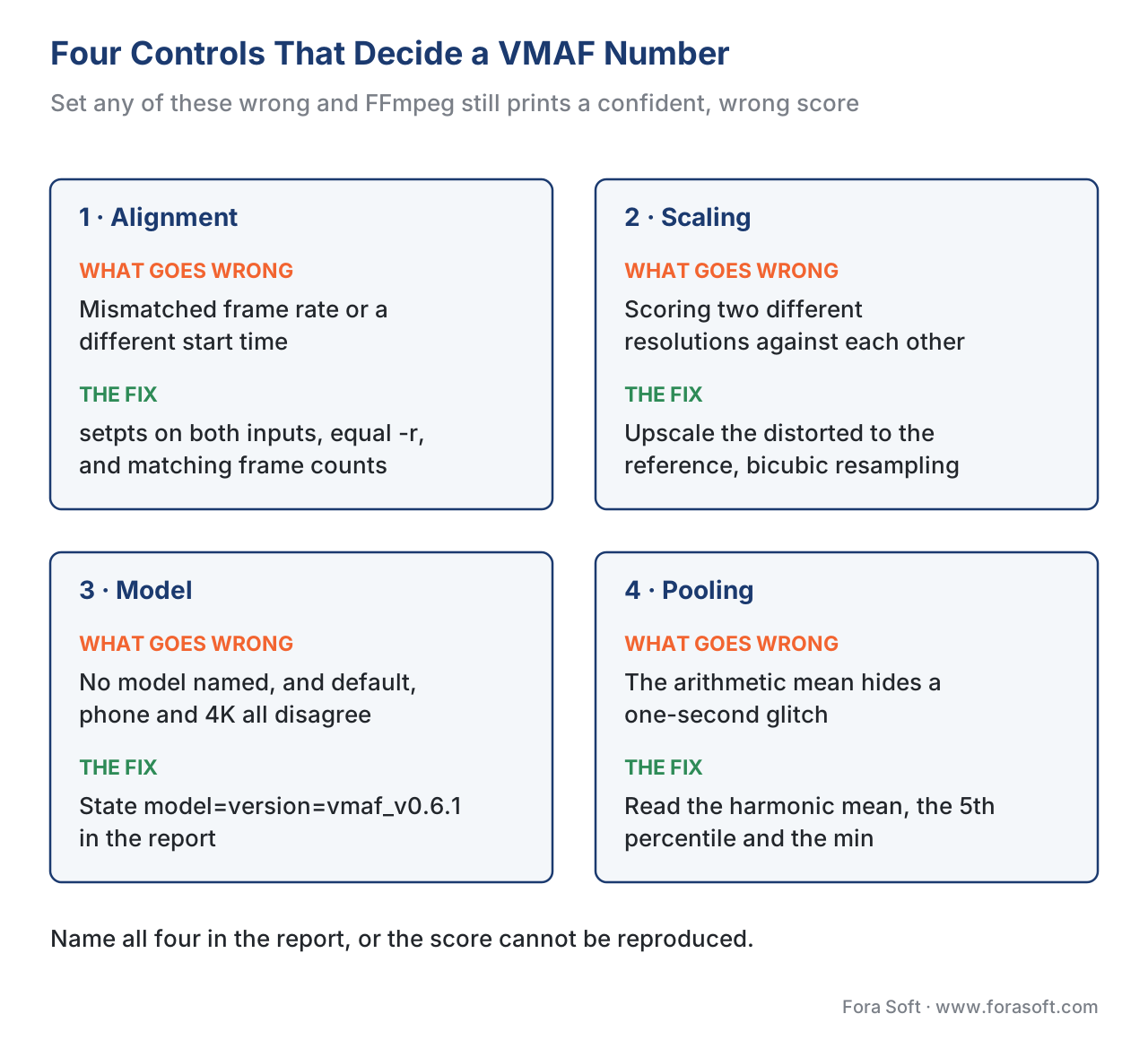 Figure 2. The four controls that decide whether a VMAF number is trustworthy. Each one can change the score by several points or invalidate it entirely, and none of them produces an error message when set wrong.
Getting PSNR, SSIM, and MS-SSIM in the same pass
You rarely want VMAF alone. PSNR and SSIM are cheap, universally understood, and useful as cross-checks, and modern libvmaf computes them as features inside the same run — no extra passes. You ask for them by name:
ffmpeg -i encoded.mp4 -i master.mp4 \
  -lavfi "[0:v]setpts=PTS-STARTPTS[dist]; \
          [1:v]setpts=PTS-STARTPTS[ref]; \
          [dist][ref]libvmaf=feature='name=psnr|name=float_ssim|name=float_ms_ssim':\
log_fmt=json:log_path=metrics.json" \
  -f null -
The feature='name=psnr|name=float_ssim|name=float_ms_ssim' clause adds the three extra metrics; the pipe | separates features. Your JSON now carries VMAF, PSNR, SSIM, and MS-SSIM per frame and pooled. If you only need PSNR or SSIM and not VMAF, FFmpeg also has standalone psnr and ssim filters that write a stats file:
ffmpeg -i encoded.mp4 -i master.mp4 \
  -lavfi "ssim=stats_file=ssim.log;[0:v][1:v]psnr=stats_file=psnr.log" \
  -f null -
A word on reading these, because the units differ and mixing them is a classic error. PSNR is in decibels (dB), higher is better, and it has no fixed ceiling — identical frames score infinite dB. SSIM and MS-SSIM run 0 to 1, where 1 is a perfect match. VMAF runs 0 to 100. These are three different scales and you can never compare a PSNR of 42 to a VMAF of 93 as if they lived on one ruler. Always carry the unit with the number.
A worked example: the PSNR decibel formula, out loud
PSNR is worth computing by hand once, because seeing the arithmetic demystifies the dB. The metric compares the encode to the master pixel by pixel, squares the differences, and averages them into a single number called the mean squared error (MSE). The dB formula then is:
PSNR = 10 · log10( MAX² / MSE )
where MAX is the largest possible pixel value — 255 for an 8-bit video. Suppose FFmpeg reports an MSE of 25 for the luma channel. Plug it in:
PSNR = 10 · log10( 255² / 25 )
     = 10 · log10( 65025 / 25 )
     = 10 · log10( 2601 )
     = 10 · 3.415
     = 34.15 dB
So a mean squared pixel error of 25 is 34.15 dB. That walk-through also shows why PSNR rises so slowly as quality improves: because it is logarithmic, halving the error adds only about 3 dB. It is why a 2 dB PSNR gain can be either trivial or meaningful depending on where you start, and why this section treats PSNR as a useful cross-check rather than the perceptual truth — the full argument is in PSNR explained.
Reading the output, and using the confidence interval
The console line gives you the pooled mean; the real information is in the log file. With log_fmt=json you get a structure with a frames array — one entry per frame, each carrying that frame's VMAF, PSNR, and SSIM — and a pooled_metrics summary with the mean, harmonic mean, min, and max. The per-frame array is what lets you find the exact frame where quality dropped and feed a per-frame quality plot. Choose log_fmt=csv instead if you are loading the data into a spreadsheet or a quick plot; choose xml for older tooling that expects it.
VMAF also reports a confidence interval, and using it is what separates a careful measurement from a misleading one. Because VMAF is a model fitted to human scores, every score carries uncertainty, which libvmaf can express as a 95% interval via bootstrapping. The practical rule: when you compare two encodes, if their confidence intervals overlap, you cannot declare a winner. Worked out — encode A scores VMAF 93.2 with a 95% interval of [92.4, 94.0], and encode B scores 93.6 with [92.8, 94.4]. The intervals overlap heavily, so the 0.4-point difference is inside the noise and the two are indistinguishable, no matter how confidently 93.6 beats 93.2 on paper. Roughly six VMAF points correspond to one "just-noticeable difference", so sub-point gaps almost never matter to a viewer.
Translating a VMAF gain into a bitrate saving
The reason teams measure at all is usually money: a better encode hits the same quality at a lower bitrate. The arithmetic is simple once you measure at a fixed quality target. Suppose your quality target is VMAF 95, your current encoder reaches it at 5.0 Mbps, and a new encoder reaches the same VMAF 95 at 3.5 Mbps. The saving is:
saving = (5.0 − 3.5) / 5.0 = 1.5 / 5.0 = 0.30 = 30%
That 30% is bandwidth you stop paying for on every stream, which is why a measured quality gain is a budget line, not a vanity metric. Comparing encoders properly across a whole bitrate ladder, rather than at one point, is the job of BD-rate and the convex hull; the single-point version above is the intuition behind it.
Speed: threads, subsampling, and GPU
VMAF is not cheap to compute, so three controls trade speed for completeness. n_threads spreads the work across CPU cores — set it to your core count (n_threads=8) for a near-linear speedup, with no effect on the score. n_subsample=N scores only every Nth frame, which cuts time roughly N-fold but means you might step over the one bad frame, so it is fine for a quick estimate and wrong for a final benchmark or a quality gate. The biggest lever is hardware: the CUDA build of VMAF, available through FFmpeg with an NVIDIA GPU, has been reported to raise throughput by up to 4.4× over CPU. For a one-off comparison, threads are enough; for measuring a catalog, subsampling and GPU acceleration are how you keep the bill sane, a scaling concern picked up in integrating quality measurement into CI/CD.
Common mistakes that produce confident, wrong numbers
Every trap in this article shares one feature: nothing crashes, so the number looks fine. Keep this list next to your first few measurements.
- Reversing the inputs.
[dist][ref]is the correct order;[ref][dist]measures backwards. No error, wrong score. - Comparing different resolutions without scaling, or downscaling the master. Always upscale the distorted to the reference resolution with bicubic. Downscaling the master inflates the score.
- Quoting a VMAF score with no model named. "VMAF 93" is unreadable; "VMAF 93.2, model vmaf_v0.6.1, measured at 1080p, mean pooling" is a measurement.
- Trusting the mean and never reading the worst frames. The mean hides one-second glitches; read the harmonic mean or a low percentile from the per-frame log.
- Misaligned frames from a frame-rate or timestamp mismatch. A surprisingly low score is usually a sync bug, not a quality problem — check frame counts first.
- Declaring a winner on overlapping confidence intervals. A 0.4-VMAF difference inside the error bars is not a difference.
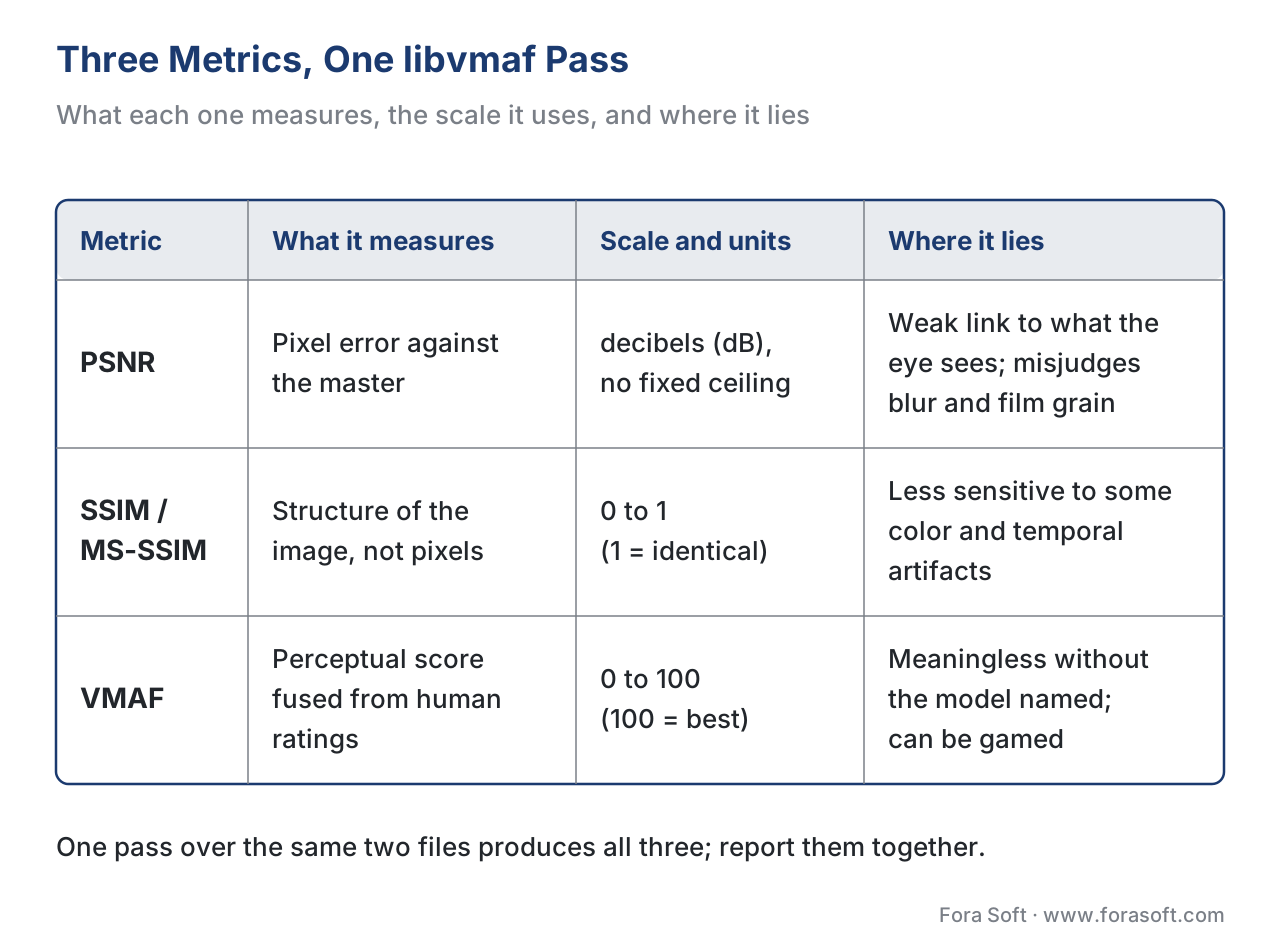 Figure 3. The three metrics one libvmaf pass produces, side by side. The "where it lies" column is the one to keep in mind: each metric has content it misjudges, so they cross-check each other rather than replace each other.
The reusable measurement script
Typing the full filter graph correctly every time is how the input-order and scaling bugs creep in, so this article ships a script that builds the command for you and guards the result. Download the FFmpeg + libvmaf measurement script — it is dependency-free Python (standard library only, Python 3.8+) and the section's cross-cutting asset B1. Give it the encode and the master, and it puts the distorted input first automatically, scales the distorted up to the reference resolution with bicubic, runs libvmaf for VMAF plus PSNR and SSIM, then parses the JSON and prints a clean report: the mean, the harmonic mean, the 5th-percentile floor, the min, and the per-metric scale with units. It refuses to print a bare "VMAF 93" — every number comes stamped with the model, the measurement resolution, and the pooling method, because a score without that context is exactly the kind of unreproducible figure this section exists to stamp out. Run --demo to reproduce the worked numbers in this article, including the 34.15 dB PSNR example, with a built-in self-check.
The script builds the command and parses the output; it does not reimplement the metrics — the math stays in libvmaf, which is the reference implementation. It is the safe front door to the tool, not a replacement for it.
Free download: FFmpeg + libvmaf measurement scriptA dependency-free Python wrapper (standard library only, Python 3.8+) that builds the command for you with the input order and the scale-to-reference rule already correct, runs libvmaf for VMAF plus PSNR and SSIM in one pass, then parses the JSON and prints the mean, the harmonic mean, the 5th-percentile floor and the min - each stamped with the model, the measurement resolution and the pooling method, so the figure can be reproduced. Run it with --demo to regenerate the 34.15 dB worked example from this article.Where Fora Soft fits in
Measuring delivered quality with FFmpeg and libvmaf is the routine that sits under every encoding and streaming decision we ship at Fora Soft, across video streaming, OTT, conferencing, e-learning, and telemedicine. When a client asks whether a codec change is worth the engineering cost, the answer is a measurement — the same VMAF, PSNR, and SSIM numbers this article produces, taken apples-to-apples at a fixed quality target with the model and resolution named. The discipline matters more than the tool: we report the confidence interval, read the worst frames, and never compare across mismatched scales, because a quality claim is only as good as the rigor behind it. Our benchmark methodology documents exactly how we run these measurements so the results are reproducible and citable.



The handbook
Fora Soft Video Engineering Handbook
We wrote a seven-volume handbook that walks the whole video stack, from a single pixel to a running production system, across more than 9,000 pages; an engineer who works through it can design and build a system like the ones we measure here. Volume 1, Video Encoding, is where the metrics behind this command are worked out in full - what PSNR, SSIM and VMAF each compute, why the model and the measurement resolution belong in every report, and how a quality target turns into an encoding ladder. Volume 3, Video Streaming, carries the same numbers through to ABR and playback, and Volume 6 covers the learned models that newer no-reference metrics are built on. Written by Nikolay Sapunov, CEO at Fora Soft.
Does anyone on your team know which model and resolution your VMAF numbers were taken at?
Send us the encoding ladder and the command you run today, and we will say where the alignment, scaling, model and pooling choices are quietly moving your scores, what a defensible quality target looks like for your content, and how to put the whole measurement behind a gate in CI so a regression stops the build instead of reaching viewers. 250+ video products shipped since 2005.
See our case studies
Case study
Speed.Space
Remote production recording at 1080p and 8 Mbps for Netflix, Electronic Arts and HBO shoots - a pipeline where the master is in hand, so every encode change can be scored against it before anyone sees the result.
Case study
Worldcast Live
Concert streaming at 1.5 Gb/s with 0.4-0.5 s latency for 10,000 simultaneous viewers - live, where there is no master to compare against and the quality budget has to be set from measured VMAF on rehearsal content beforehand.
Case study
Mindbox
An intelligent VMS with 50+ deployments pulling RTSP camera feeds through FFmpeg into HLS - hundreds of transcodes where a bitrate cut is only safe once the same libvmaf pass says what it costs.
What to read next
Metrics
VMAF explained: Netflix's perceptual quality metric
What the number this command prints is actually made of, and what it was trained on.
Models
VMAF in depth: models, 4K and confidence intervals
The model= argument in full: which one to name, and how wide the interval around a score is.
Pooling
Pooling: per-frame scores into one number
Why the mean hides the worst second, and what to report instead of it.
Reporting
Visualizing quality: heatmaps and rate curves
What to do with the per-frame JSON log once libvmaf has written it.
References
- FFmpeg Filters Documentation — libvmaf, psnr, ssim filters. FFmpeg Project (release 8.1 "Hoare", 2026-03-16; 8.1.2, 2026-06-17). First-party documentation of the filter options used throughout:
model,feature,pool,n_threads,n_subsample,log_fmt,log_path. Tier 3. https://ffmpeg.org/ffmpeg-filters.html#libvmaf - Using VMAF with FFmpeg (official guide). Netflix VMAF project,
resource/doc/ffmpeg.md. Metric-author guidance giving the canonical command, the[distorted][reference]input order, thesetpts=PTS-STARTPTSsynchronization, and the bicubic upsampling-to-reference example. Tier 1. https://github.com/Netflix/vmaf/blob/master/resource/doc/ffmpeg.md - VMAF — Video Multi-Method Assessment Fusion (repository). Netflix (Z. Li, C. Bampis, et al.), libvmaf v3.1.0 (2026-04). Metric-author defining implementation; documents that libvmaf computes VMAF plus PSNR, PSNR-HVS, SSIM, MS-SSIM, and CIEDE2000, and the feature/model API. Tier 1. https://github.com/Netflix/vmaf
- VMAF v1: Good Is Not Good Enough. C. G. Bampis, Z. Li, K. Swanson, et al., Netflix Technology Blog, 2026-06-20. Metric-author work announcing VMAF v1: NEG enabled by default, the CSF viewing-distance model replacing the v0 phone polynomial, CAMBI banding and chroma features, and the 1080p/phone/4K model set. Basis for the "name the model version" rule. Tier 1. https://medium.com/netflix-techblog/vmaf-v1-good-is-not-good-enough-60d7e4244ea8
- VMAF: The Journey Continues. Z. Li, C. Bampis, et al., Netflix Technology Blog, 2018. Metric-author guidance on computing VMAF at the right resolution and on the phone model; the source of the upscale-the-distorted-to-reference best practice. Tier 1. https://medium.com/netflix-techblog/vmaf-the-journey-continues-44b51ee9ed12
- VMAF model documentation (
models.md) and confidence-interval notes (conf_interval.md). Netflix VMAF project. Metric-author reference for the default/phone/4K models, the 0–100 scale, and the 95% bootstrapped confidence interval used in the overlap rule. Tier 1. https://github.com/Netflix/vmaf/tree/master/model - Calculating Video Quality Using NVIDIA GPUs and VMAF-CUDA. NVIDIA with Netflix, NVIDIA Technical Blog, 2024 (VMAF-CUDA in VMAF 3.0 / FFmpeg 6.1+). Credible-deployer source for the up-to-4.4× GPU throughput figure. Tier 4. https://developer.nvidia.com/blog/calculating-video-quality-using-nvidia-gpus-and-vmaf-cuda/
- Image Quality Assessment: From Error Visibility to Structural Similarity. Z. Wang, A. C. Bovik, H. R. Sheikh, E. P. Simoncelli, IEEE Transactions on Image Processing, 2004. The defining SSIM paper, basis for the 0–1 SSIM scale and the "structure not pixels" framing. Tier 1. https://www.cns.nyu.edu/~lcv/ssim/
- FFmpeg Filtering Guide and Scaling Guide. FFmpeg project wiki. First-party guidance on
filter_complex, stream labels, timestamp handling, and choosing a scaling algorithm. Tier 3. https://trac.ffmpeg.org/wiki/FilteringGuide - ffmpeg-quality-metrics. W. Robitza (slhck), open-source wrapper. Practitioner reference cross-checking the feature flags and JSON/CSV output structure parsed by the companion script. Tier 6. https://github.com/slhck/ffmpeg-quality-metrics
