


Why this matters
FFmpeg with the libvmaf filter gives you a number; a dedicated tool gives you an investigation. That difference matters the moment a clip fails a quality check and someone asks which frame, and caused by what. This article is for the engineer who already computes VMAF in a pipeline — a streaming or encoding lead, a QA engineer, a technical product owner — and now needs to look at quality, compare many encodes interactively, score HDR content, or hand a non-command-line colleague a tool they can drive. Pick the right dedicated tool and you find the failing frame in minutes. Pick the wrong one — or read its output on the wrong scale — and you ship a confident conclusion built on a misread plot.
A dedicated tool is a workbench, not a new metric
Start with the distinction that saves the most confusion. A metric is the math that estimates quality — the perceptual score called VMAF, the pixel-error measure called PSNR (Peak Signal-to-Noise Ratio, in decibels), the structural measure called SSIM (Structural Similarity, on a 0–1 scale). A tool is the program that computes that math and hands it to you. The deep dives on each metric live in VMAF explained and the rest of Block 2; this article is about the tools.
The point that trips people up: a dedicated tool does not give you a better metric. The VMAF that MSU VQMT computes is the same VMAF the FFmpeg-and-libvmaf workflow computes, because both call the same model. What a dedicated tool adds is everything around the number: more metrics computed in one pass, a plot of the score across every frame, the ability to click a low point and see the actual frame, a heatmap of where the two videos differ, GPU acceleration, and a graphical interface a non-engineer can use. Think of FFmpeg as a precise digital scale that prints a weight, and a dedicated tool as the full lab bench — the same scale, plus the magnifier, the calipers, and the chart recorder beside it.
First, untangle the name: there are two "VQMT"s
Before going further, clear up a collision that wastes afternoons. The string "VQMT" — Video Quality Measurement Tool — names two different programs from two different authors.
The one this article means is MSU VQMT, a large Windows and Linux application from the Moscow State University Graphics & Media Lab Video Group and the COMPRESSION.RU team (project lead: Dr. Dmitry Vatolin). It computes roughly two dozen metrics, has a full graphical interface, GPU acceleration, HDR metrics, and paid Pro and Premium tiers (MSU VQMT documentation, version 14, 2026).
The other is rolinh/VQMT, a small open-source command-line program written in C++ on top of OpenCV. It computes six classic full-reference metrics — PSNR, SSIM, MS-SSIM, VIFp, PSNR-HVS, and PSNR-HVS-M — from raw video, and it does not compute VMAF (rolinh/VQMT, GitHub). It is free and scriptable, but it is not the feature-rich application most articles mean when they write "VQMT." When you read a tutorial, check which one it is by whether VMAF and a GUI are on the table. If they are, it is the MSU tool.
What MSU VQMT adds over FFmpeg
Take the dedicated tool one capability at a time, because each answers a different "why would I leave FFmpeg" question.
More metrics in one run. MSU VQMT computes PSNR, MSE, MSAD, Delta and Delta ICtCp, SSIM, MS-SSIM, 3SSIM, the NTIA Video Quality Metric (VQM), VMAF, the no-reference NIQE, and the spatial- and temporal-information measures SI and TI, plus MSU's own no-reference blocking and blurring detectors — alongside HDR variants of several of these (MSU VQMT documentation, 2026). FFmpeg gives you PSNR, SSIM, MS-SSIM, and VMAF; VQMT gives you those plus a wider bench when you want a second or third opinion on the same pair of files.
It scores HDR correctly. Standard-dynamic-range metrics misread high-dynamic-range video, because HDR uses a different transfer function and color space with very different brightness levels, so an SDR metric does not "see" the pixels the way an HDR display would. VQMT added HDR-specific PSNR, SSIM, MS-SSIM, VQM, and Delta ICtCp for exactly this reason, and lets you set the input color space and simulate a display color space (MSU VQMT version 13 notes, via Streaming Learning Center, 2022). VMAF itself has no official HDR model, so this is a real gap a dedicated tool fills.
It runs on the GPU. VQMT implements its SSIM-family metrics on the GPU through OpenCL and CUDA, and accelerated VMAF through OpenCL that works on both AMD and NVIDIA cards. In one independent test, GPU acceleration computed VMAF 40–67% faster than the CPU path on the same machine, with identical scores (Jan Ozer, Streaming Learning Center, 2022).
It works in batches, regions, and three interfaces. VQMT runs as a Windows GUI (free and paid), a Windows-and-Linux command line (paid Pro tier), and a Python package, so the same engine serves both an interactive session and an automated job. It computes several metrics simultaneously, restricts measurement to a region of interest, exports to CSV or JSON, and can automatically save the "bad" frames where two encodes differ most — the frames you actually want to look at (MSU VQMT documentation, 2026).
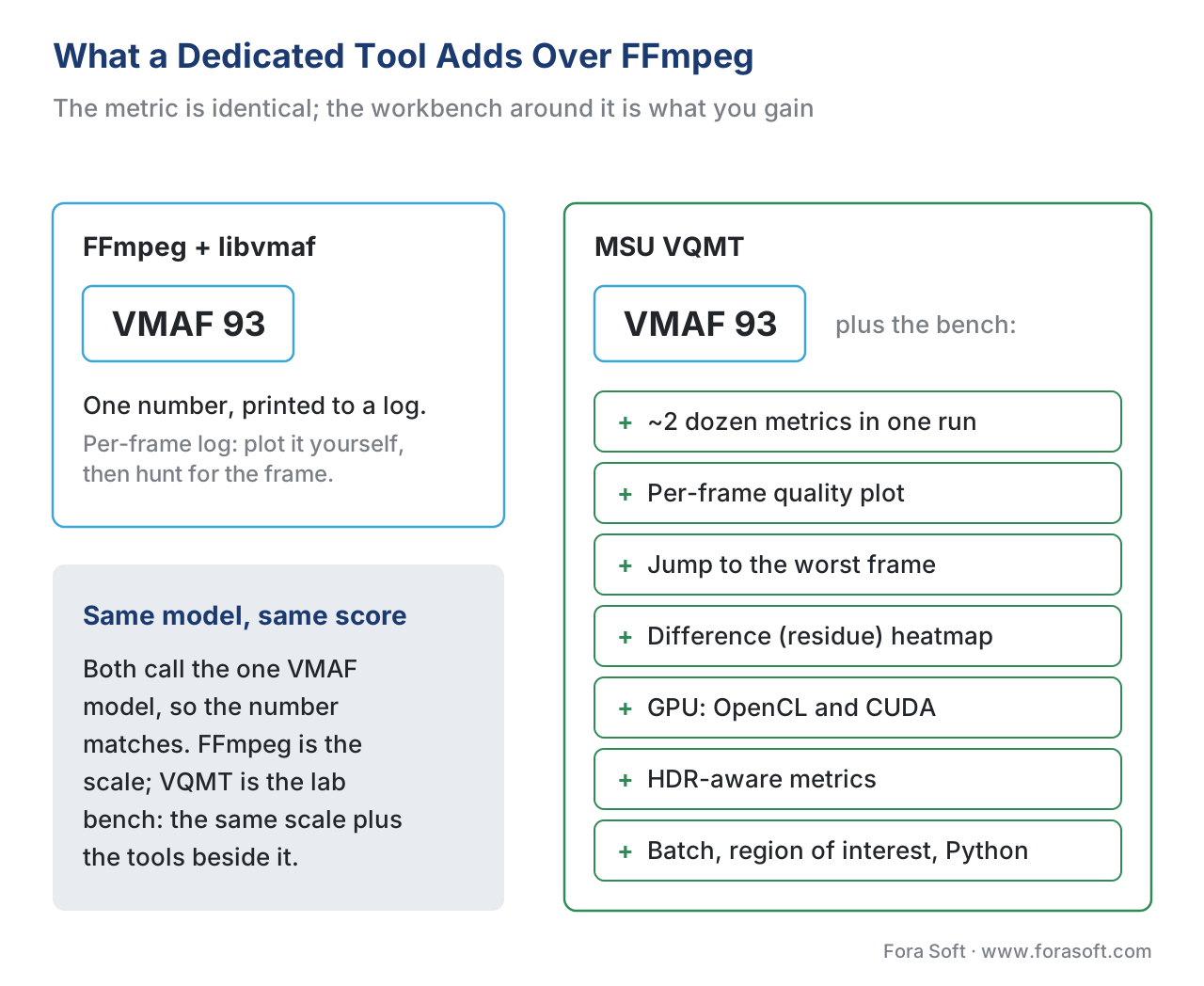 Figure 1. What a dedicated tool adds. FFmpeg computes the metric and prints a number; MSU VQMT computes the same metric and adds the workbench around it — more metrics, per-frame plots, frame inspection, a difference heatmap, GPU acceleration, and HDR-aware variants.
The capability that matters most: seeing the frame that failed
If a dedicated tool earns its place for one reason, this is it. FFmpeg's libvmaf can write a per-frame log, but you still have to plot it yourself and then go hunting for the matching frame. VQMT closes that loop inside one window. It draws a results plot — the quality score of one or two encodes across the whole clip — so a dip is visible at a glance. You move the playhead to the dip and show the source frame and the encoded frame side by side. Then a difference (residue) view paints where the two frames disagree, with the brighter areas marking larger distortion, so the artifact is not just a number on a chart but a region you can point at (MSU VQMT, Streaming Learning Center, 2022).
This is the daily reason engineers keep a dedicated tool next to their FFmpeg scripts. A single pooled VMAF score — the average across all frames — is a summary, and the mean is the summary most likely to hide a short, severe problem. Remember the rule from pooling per-frame scores: the average flatters, and a one-second collapse barely moves it. The per-frame plot is how you catch the collapse the average erased.
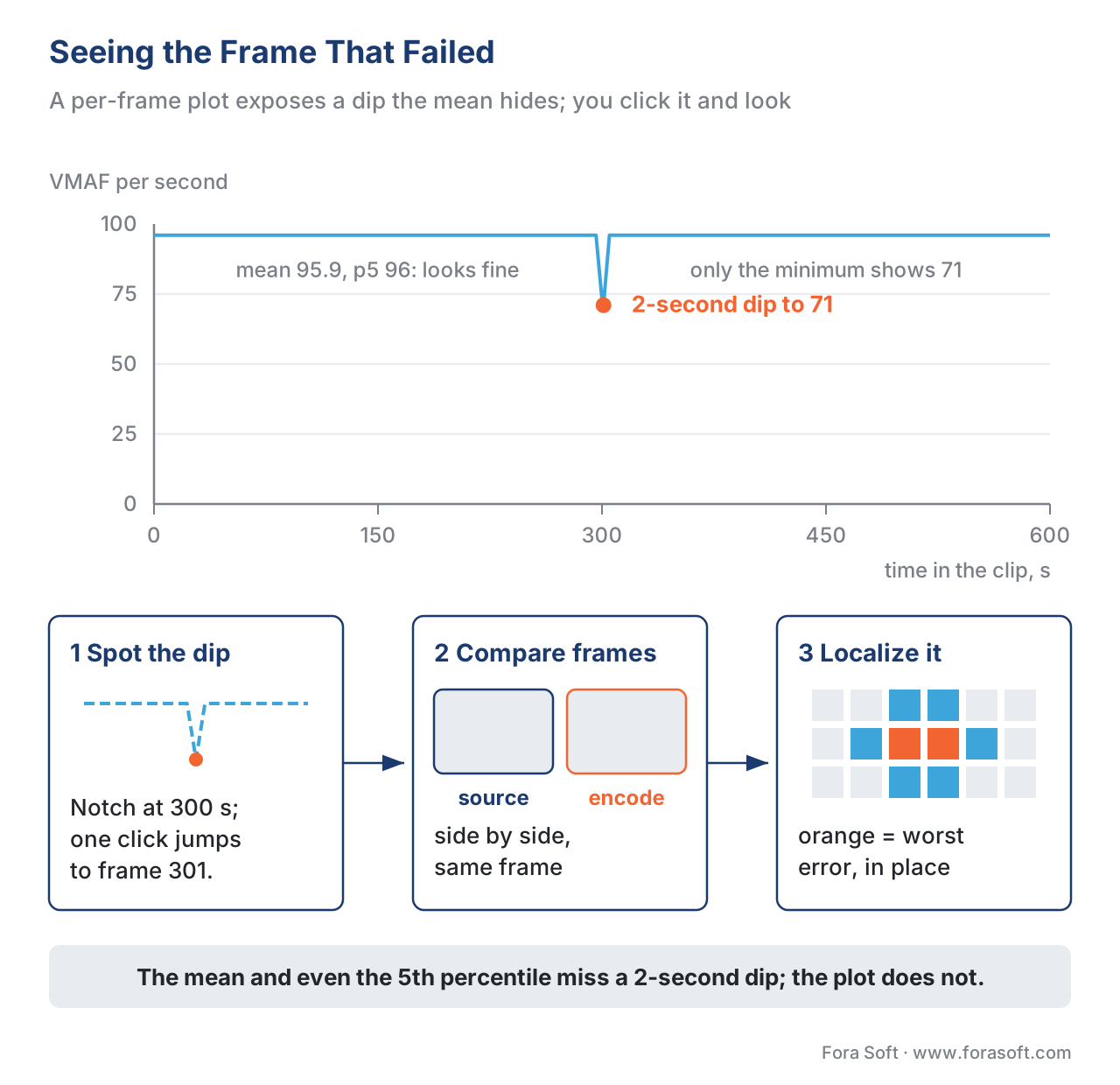 Figure 2. The find-the-bad-frame loop. A per-frame plot exposes a dip the mean hides; you jump to that frame, compare source and encode, and a difference heatmap localizes the artifact — the investigation a bare pooled number cannot give you.
A worked example makes the gap concrete. Suppose a 10-minute clip — 600 one-second samples — returns a mean VMAF of about 96, comfortably "good." The per-frame plot, though, shows the score holding near 96 for the whole clip except a two-second window where it falls to 71 during a hard cut. The mean barely noticed, and here is the sharper lesson: the dip is so short that even the 5th-percentile score misses it.
Mean VMAF      = (96 × 598 s + 73 + 71) ÷ 600 s = 95.9   ← still "good"
5th-percentile = 96    ← a 2-second dip is too short (≪ 5% of 600 s) to move it
Minimum frame  = 71    ← only the minimum, and the plot, expose the problem
This is the case for a per-frame visual tool, not just better pooling. Reading the low percentile and the minimum instead of the mean is the right habit — the discipline in reading a quality-metric report — but a short, severe dip can slip below even the percentile. The plot does not average anything away: the collapse is a visible notch you click straight to. That one-click jump to frame 301 is the capability you are buying.
When the speed knob is worth turning
Dedicated tools also expose performance controls FFmpeg hides. VQMT's subsampled mode scores every Nth frame instead of all of them. In one test, scoring two one-minute files on every frame took 131 seconds; scoring every fourth frame dropped that to 42 seconds — a 68% reduction — while neither the VMAF mean nor the low-frame score changed by a meaningful amount (Streaming Learning Center, 2022):
Full scan:        131 s  (every frame)
Every 4th frame:   42 s  → (131 − 42) ÷ 131 = 68% faster
Mean VMAF, low-frame VMAF: essentially unchanged
That is a useful trade when you are triaging a large catalog and want a fast first pass, with the caveat to confirm on your own content before trusting it, because subsampling can skip the exact frame you needed to see. Speed via subsampling, threads, or the GPU is a convenience; it never changes which metric or model produced the score — and the version still matters, as the June-2026 release of VMAF v1 made plain. A tool that quietly moves you from VMAF v0 to v1 will shift your numbers, so record the version every dedicated tool reports, exactly as VMAF in depth insists.
The peers worth knowing
MSU VQMT is the broadest dedicated tool, but four neighbors solve specific problems better or cheaper.
Apple AVQT (Advanced Video Quality Tool) is a macOS command-line tool that returns a single perceptual score from 1 to 5 — the same scale as a Mean Opinion Score from human raters — for content with compression and scaling artifacts. It is full-reference (it needs the original), handles SDR and HDR through the AVFoundation framework, uses the Metal GPU to run faster than real time, and lets you set viewing distance, display resolution, segment duration, and the temporal pooling method, writing results as JSON or CSV (Apple, WWDC21/WWDC22). Its 1-to-5 output is its trap: never compare an AVQT 4.2 to a VMAF 92 as if they sat on one scale. AVQT's place in the metric landscape is covered in beyond VMAF.
FFMetrics is the free shortcut to per-frame visualization. It is a Windows graphical front-end that runs FFmpeg under the hood and charts the PSNR, SSIM, VMAF, and XPSNR it computes, exporting averages and per-frame statistics to CSV and picking a VMAF model automatically (FFMetrics, GitHub). If your only reason to leave the command line is "I want to see the plot," FFMetrics gives you that without a license — you supply your own ffmpeg.exe.
Elecard Video Quality Estimator is a commercial graphical tool that measures PSNR, SSIM, VMAF (including the phone model), VQM, VIF, and more, with per-frame graphs you can navigate, zoom into a chosen score range, and hover for a frame's exact value (Elecard, 2026). It overlaps VQMT's interactive niche and is one option discussed in commercial quality suites.
rolinh/VQMT — the open-source namesake — is the lightweight pick when you want a few classic full-reference metrics computed fast from raw video with no GUI and no VMAF. Together with the broader blind-metric toolbox in open-source no-reference tools, it rounds out the free end of the bench.
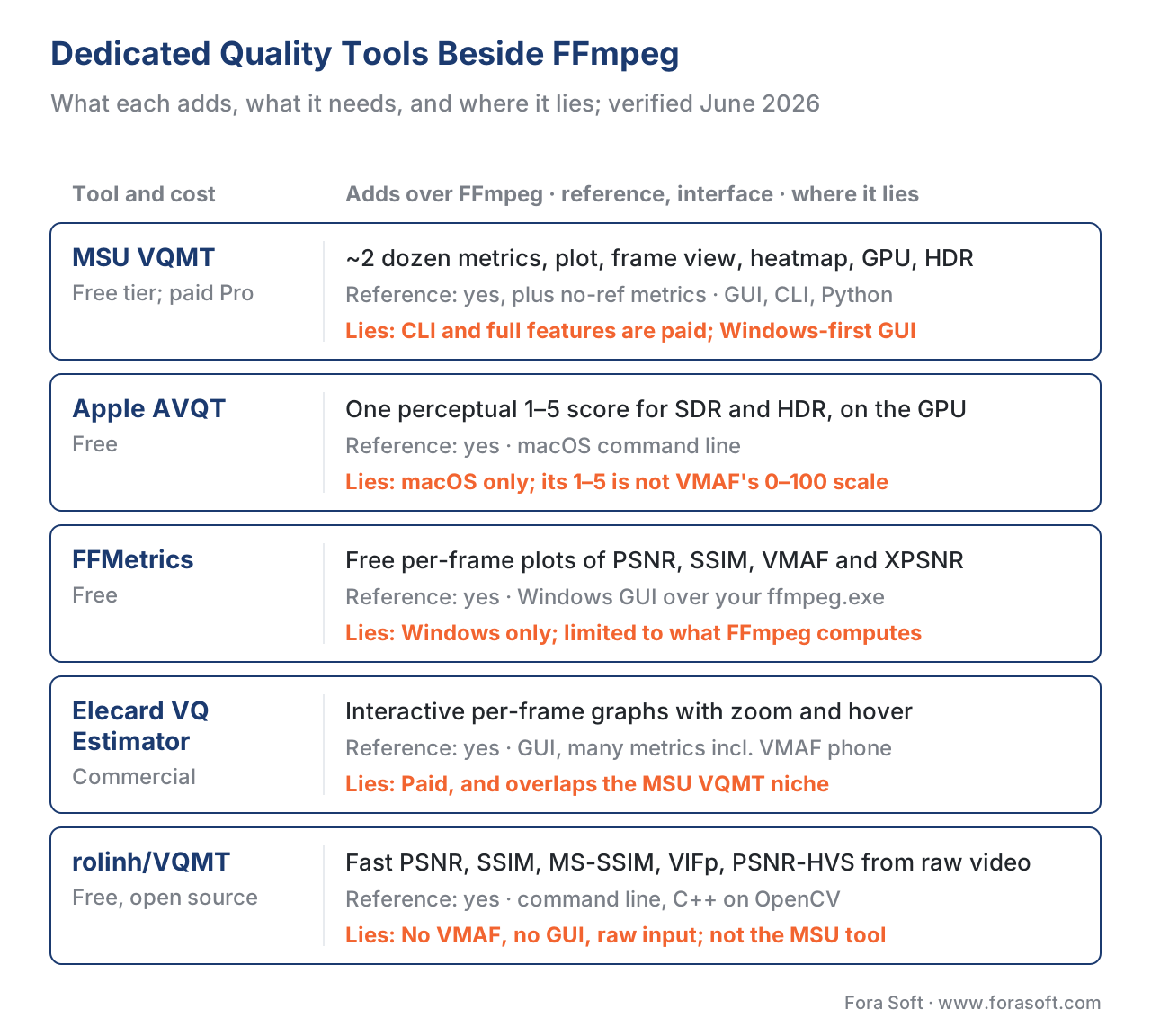 Figure 4. The five dedicated tools at a glance: what each adds over FFmpeg, whether it needs a reference, its interface and cost, and where it lies.
The same comparison in text, for when you are choosing. The "where it lies" column is the limitation to keep in mind — every tool has one.
| Tool | Adds over FFmpeg | Reference needed | Interface | Cost | Where it lies (limitation) |
|---|---|---|---|---|---|
| MSU VQMT | ~2 dozen metrics, per-frame plot, frame view, residue heatmap, GPU, HDR, batch | Yes (no-ref metrics also) | GUI (Win) + CLI (Win/Linux) + Python | Free tier; paid Pro/Premium | Full features and CLI are paid; Windows-first GUI |
| Apple AVQT | One perceptual 1–5 score, SDR+HDR, GPU, viewing-condition flags | Yes | macOS CLI | Free | macOS only; 1–5 scale, not comparable to VMAF 0–100 |
| FFMetrics | Free per-frame plots of FFmpeg's PSNR/SSIM/VMAF/XPSNR | Yes | Windows GUI | Free | Windows only; a front-end, so limited to what FFmpeg computes |
| Elecard VQ Estimator | Interactive per-frame graphs, zoom, hover, many metrics | Yes | GUI | Commercial | Paid; overlaps VQMT's niche |
| rolinh/VQMT | Fast PSNR/SSIM/MS-SSIM/VIFp/PSNR-HVS from raw video | Yes | CLI | Free (open source) | No VMAF, no GUI; raw input only; not the MSU tool |
Table 1. Dedicated quality tools beside FFmpeg. The first column is the reason to add each; the "where it lies" column is the limitation. Names and tiers verified against each tool's own documentation in June 2026.
When the extra capability is worth it
The decision is not "VQMT versus FFmpeg" — most teams keep both. It is when to reach for the dedicated tool. Reach for it when you need to look at quality, not just record it: to find and show the frame that failed, to score HDR content where VMAF has no model, to compute metrics FFmpeg does not, to hand a graphical tool to someone who does not live in a terminal, or to push throughput up with the GPU. Stay on the FFmpeg-and-libvmaf path when you need a scriptable number inside an automated gate, where a GUI is dead weight and free-and-headless is exactly right. The fastest sort is: automated pipeline number, use FFmpeg; human investigation or HDR, use a dedicated tool.
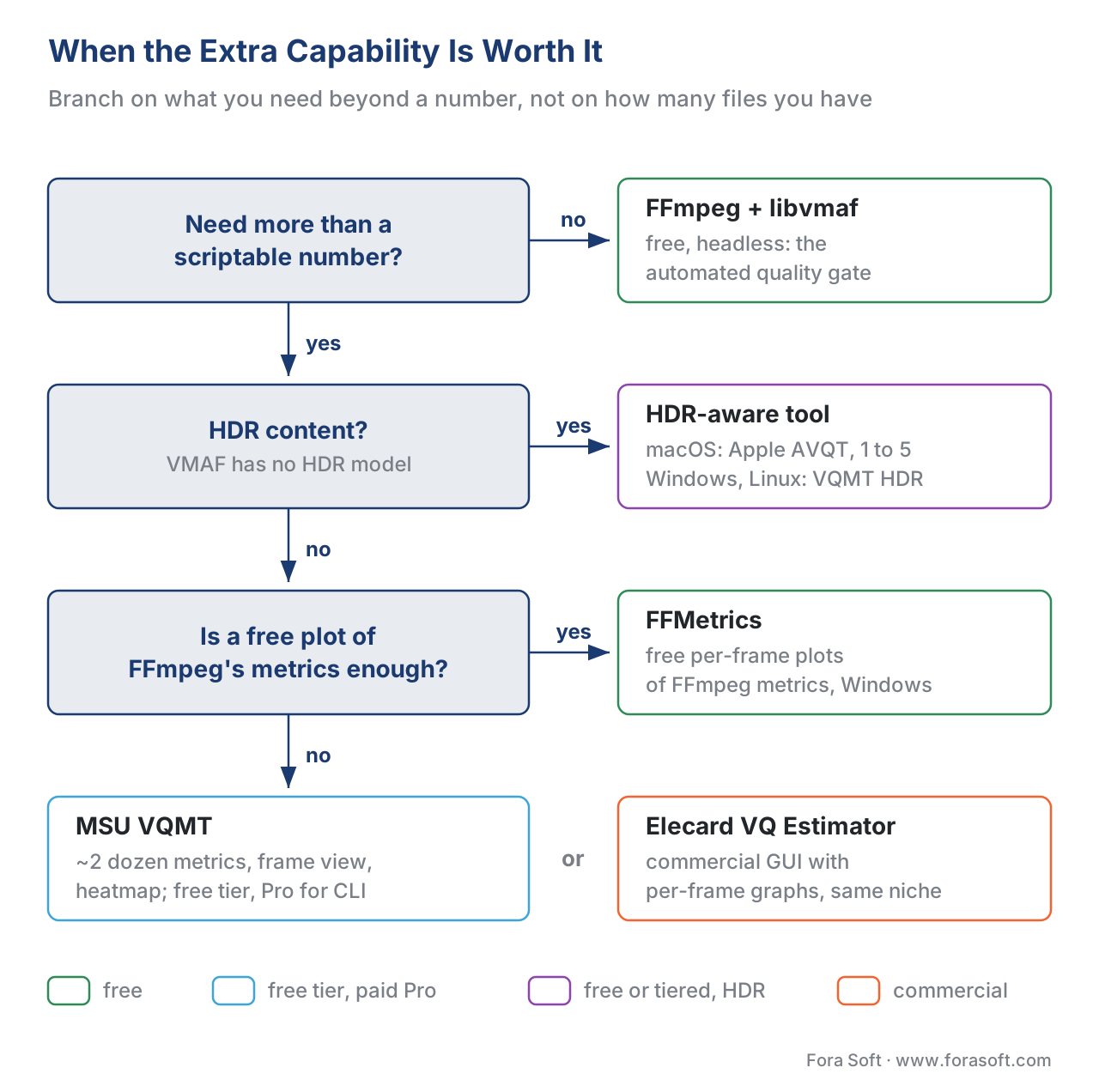 Figure 3. When the extra capability is worth it. The choice branches on whether you need to see quality or only record it, whether the content is HDR, which operating system you run, and whether a paid tier is justified — not on how many files you have.
Common mistake: reading two tools' numbers on one scale. A VMAF from FFmpeg, a VMAF from MSU VQMT, and a 1-to-5 score from Apple AVQT can all look like "the quality number," but only the two VMAFs are comparable — and only if the model, the version, and the scaling match. AVQT's 1–5 is a different scale entirely; mapping a 4.2 onto VMAF's 0–100 is meaningless. Two tools can also disagree on the same metric if one upscaled the encode to the source resolution and the other did not, or if one ran VMAF v0 and the other v1. Before comparing, confirm both tools used the same metric, the same model and version, and the same scaling — and never compare a score across two metrics as if they shared an axis.
How to read their output
Dedicated tools speak in three forms, and each has a reading rule. The per-frame table (CSV or JSON) is the raw record — sort it to find the worst frames, and report the 5th-percentile and minimum next to the mean, never the mean alone. The plot is for spotting where quality moved over time; trust the shape, but read the y-axis units, because a curve drawn on a 90–95 axis exaggerates a half-point wobble into a cliff. The difference heatmap localizes distortion in space, with brighter regions marking larger error — a guide to where the artifact sits, not a calibrated score, so treat its colors as a pointer, not a measurement. Turning this output into clean, honest pictures for a report is its own craft, covered in visualizing quality.
Free download: Dedicated quality-tool selectorA standard-library Python companion that computes no metric itself: it prints the capability matrix of MSU VQMT, Apple AVQT, FFMetrics, Elecard VQ Estimator and rolinh/VQMT beside the FFmpeg + libvmaf baseline, recommends a tool from what you need — per-frame view, HDR, operating system, budget — and reads a per-frame score file to report the mean, harmonic mean, 5th and 1st percentile, minimum and worst frame: the numbers a bare mean hides.Where Fora Soft fits in
Fora Soft has built video software since 2005 — streaming and OTT, video conferencing, e-learning, telemedicine, and surveillance — and our measurement bench has both kinds of tool on it. For the automated quality gate in a delivery pipeline we run FFmpeg with libvmaf, because it is free, headless, and scriptable. When an encode fails that gate, or a client asks why one preset looks softer than another, we open a dedicated tool to read the per-frame plot, jump to the failing frame, and show the difference heatmap so the answer is a picture, not an assertion. For HDR work we lean on the HDR-aware metrics a dedicated tool provides, since VMAF has no HDR model. The tool we recommend is the cheapest one that answers the actual question: FFmpeg for the number, a dedicated tool for the look. Our benchmark methodology documents exactly which tool, model, and version produced each figure.



The handbook
Fora Soft Video Engineering Handbook
We wrote a seven-volume handbook that works through the whole video stack — encoding, delivery, audio and AI — so an engineer who reads it can design and build a pipeline and prove its quality with the right tool. Volume 1 walks through VMAF, PSNR and SSIM, the per-frame logs behind them and the encoder settings that move each score. Volume 3 takes the same measurement into ABR ladders, players and HDR delivery, and Volume 6 covers the learned models that newer perceptual metrics are built on. Written by Nikolay Sapunov, CEO at Fora Soft.
Which frame is failing your quality gate, and which tool will show it?
Send us an encode that scores fine on average but looks wrong. We will run it through FFmpeg and a dedicated tool side by side, find the frames behind the dip, show you the difference heatmap, and tell you which tool your team needs for the next one. 250+ video products shipped since 2005.
See our case studies
Case study
Speed.Space
Remote production for Netflix, Electronic Arts and HBO shoots, recorded locally at 1080p / 8 Mbps — a clean reference you can hold every encode against frame by frame.
Case study
Worldcast Live
HD concert streams at 1.5 Gb/s and 0.4–0.5 s latency for 10,000 viewers — where a two-second collapse on a hard cut matters more than a good average.
Case study
TradeCaster
Live desktop streaming of charts and trades for 46,000+ users — thin lines and small text, the artifacts a difference heatmap points at before a pooled score notices.
What to read next
Tooling
Open-Source No-Reference Video Quality Tools
The free end of the bench when there is no source to compare against: blind metrics you can script.
Reporting
Visualizing Video Quality: Heatmaps & Rate Curves
Turning a dedicated tool’s plots and heatmaps into honest pictures for a report.
Objective metrics
Video Quality Pooling: Per-Frame to One Number
Why the mean flatters, and what the percentile and the minimum catch that it misses.
Reporting
Reading a Video Quality Report Without Fooling Yourself
Axis ranges, pooling and versions: the checks to run before you trust any tool’s number.
References
- MSU Video Quality Measurement Tool (VQMT) — Basic information, metrics, editions, and features. MSU Graphics & Media Lab Video Group / COMPRESSION.RU Team (project lead Dr. Dmitry Vatolin); online help version 14, 2026. Tier 3 (first-party tooling documentation). The authoritative source for VQMT's metric list (PSNR, MSE, MSAD, Delta, Delta ICtCp, SSIM, MS-SSIM, 3SSIM, VQM, NIQE, VMAF, SI, TI, MSU blocking/blurring, HDR variants), its GPU acceleration (OpenCL/CUDA), region of interest, CSV/JSON export, bad-frame saving, the three interfaces (GUI, CLI, Python), and the Free/Pro/Premium/SDK editions. Basis for the "what MSU VQMT adds" section. https://videoprocessing.ai/vqmt/basic
- VMAF — Video Multi-Method Assessment Fusion, Netflix, GitHub repository (libvmaf v3.1.0, 2026). Tier 1 (metric-author defining implementation). Documents that VMAF is computed by one shared model across the
vmafCLI, the libvmaf FFmpeg filter, and third-party tools — the basis for "a dedicated tool does not give you a better metric." https://github.com/Netflix/vmaf - Z. Wang, A. C. Bovik, H. R. Sheikh, E. P. Simoncelli, "Image Quality Assessment: From Error Visibility to Structural Similarity," IEEE Transactions on Image Processing, 13(4), 2004. Tier 1 (metric-author defining paper). The defining work for SSIM, one of the metrics every dedicated tool computes. https://ece.uwaterloo.ca/~z70wang/publications/ssim.html
- Recommendation ITU-T P.910, "Subjective video quality assessment methods for multimedia applications," International Telecommunication Union, 2023. Tier 1 (official standard). Defines the spatial-information (SI) and temporal-information (TI) measures VQMT reports as no-reference content descriptors, and the subjective methods all objective metrics are validated against. https://www.itu.int/rec/T-REC-P.910
- Evaluate videos with the Advanced Video Quality Tool (AVQT); What's new in AVQT. Apple, WWDC21 (session 10145) and WWDC22 (session 10149), Apple Developer. Tier 3 (first-party tooling). AVQT is a macOS command-line full-reference tool returning a 1–5 perceptual score for SDR and HDR via AVFoundation, with viewing-distance, display-resolution, segment-duration, and temporal-pooling flags, and JSON/CSV output. Basis for the AVQT entry. https://developer.apple.com/videos/play/wwdc2021/10145/
- FFMetrics — Visualizes video quality metrics (PSNR, SSIM, XPSNR & VMAF) calculated by ffmpeg.exe. fifonik/FFMetrics, GitHub, 2026. Tier 6 (expert-practitioner tool). A free Windows GUI front-end that charts FFmpeg's per-frame metrics, exports CSV, and auto-selects the VMAF model. Basis for the FFMetrics entry. https://github.com/fifonik/FFMetrics
- VQMT: Video Quality Measurement Tool. rolinh/VQMT, GitHub. Tier 6 (open-source tool). Fast C++/OpenCV command-line implementations of PSNR, SSIM, MS-SSIM, VIFp, PSNR-HVS, and PSNR-HVS-M from raw video; no VMAF, no GUI. Basis for the name-collision disambiguation. https://github.com/Rolinh/VQMT
- J. Ozer, "MSU Updates Video Quality Measurement Tool," Streaming Learning Center, 2022. Tier 6 (expert practitioner). Independent account of VQMT's GPU/OpenCL VMAF acceleration (40–67% faster, identical scores), the version-12 subsampled mode (131 s → 42 s on every-fourth-frame), the version-13 HDR metrics and AV1 input, and the residue-plot visualization. Basis for the speed and HDR worked figures. https://streaminglearningcenter.com/metrics/msu-updates-video-quality-measurement-tool.html
- Elecard Video Quality Estimator — product page and user guide, Elecard, 2026. Tier 6 (vendor). A commercial GUI tool measuring PSNR, APSNR, SSIM, Delta, MSE, MSAD, VQM, NQI, VMAF, VMAF phone, and VIF, with navigable, zoomable per-frame graphs and per-frame hover values. Basis for the Elecard entry. https://www.elecard.com/products/video-analysis/video-quality-estimator
- "Calculating Video Quality Using NVIDIA GPUs and VMAF-CUDA," NVIDIA Technical Blog (with Netflix), 2024. Tier 4 (credible deployer). Reports the CUDA path for VMAF in FFmpeg and its throughput gains; corroborates the GPU-acceleration point for dedicated and command-line tools alike. https://developer.nvidia.com/blog/calculating-video-quality-using-nvidia-gpus-and-vmaf-cuda/
- C. G. Bampis, Z. Li, et al., "VMAF v1: Good Is Not Good Enough," Netflix Technology Blog, 2026-06-20. Tier 1 (metric-author work). The June-2026 VMAF v1 release that makes recording the metric version mandatory when any tool reports a VMAF score. Basis for the version-discipline note. https://medium.com/netflix-techblog/vmaf-v1-good-is-not-good-enough-60d7e4244ea8
