


Why this matters
Most teams adopt VMAF, run libvmaf, and quote the single number it prints — the mean of the default model, with no error bar — as if that were "the quality." That habit produces three expensive mistakes: comparing a phone-model score against a default-model score and concluding the wrong encoder won, treating a sub-point difference as a real gain when it is inside the measurement noise, and shipping an encode whose mean looks fine while three seconds of it fall apart. This article is for the video engineer, encoding lead, or QA engineer who already knows what VMAF is and now has to use it to make real bitrate, encoder, and release decisions. It is the deep, operational layer beneath the encoder-side quality-metrics overview in our Video Encoding section, and it assumes you have read VMAF explained first.
The four things a VMAF score never tells you on its own
Start with the core idea of this whole article. A bare number — "VMAF 93" — is not a quality statement, because the same encode can legitimately produce several different VMAF numbers depending on choices that the number itself does not record. Four choices matter most, and every one of them changes the score:
The model decides which trained predictor ran, and therefore which viewing condition is assumed. The pooling method decides how a score-per-frame collapses into one score-per-clip. The confidence interval tells you how much of the difference between two numbers is real and how much is noise from a model trained on a finite sample of human opinions. And the content and alignment — same resolution, same frames, same reference — decide whether two numbers are even measuring the same thing.
This article takes the first three in turn (the fourth, apples-to-apples alignment, is the subject of reading a quality-metric report). The discipline they add up to is simple to state and hard to keep: never quote a VMAF score without its model, its pooling, and — when a difference is close — its confidence interval. Get that habit and VMAF becomes a reliable instrument. Skip it and VMAF becomes a number that confirms whatever you hoped.
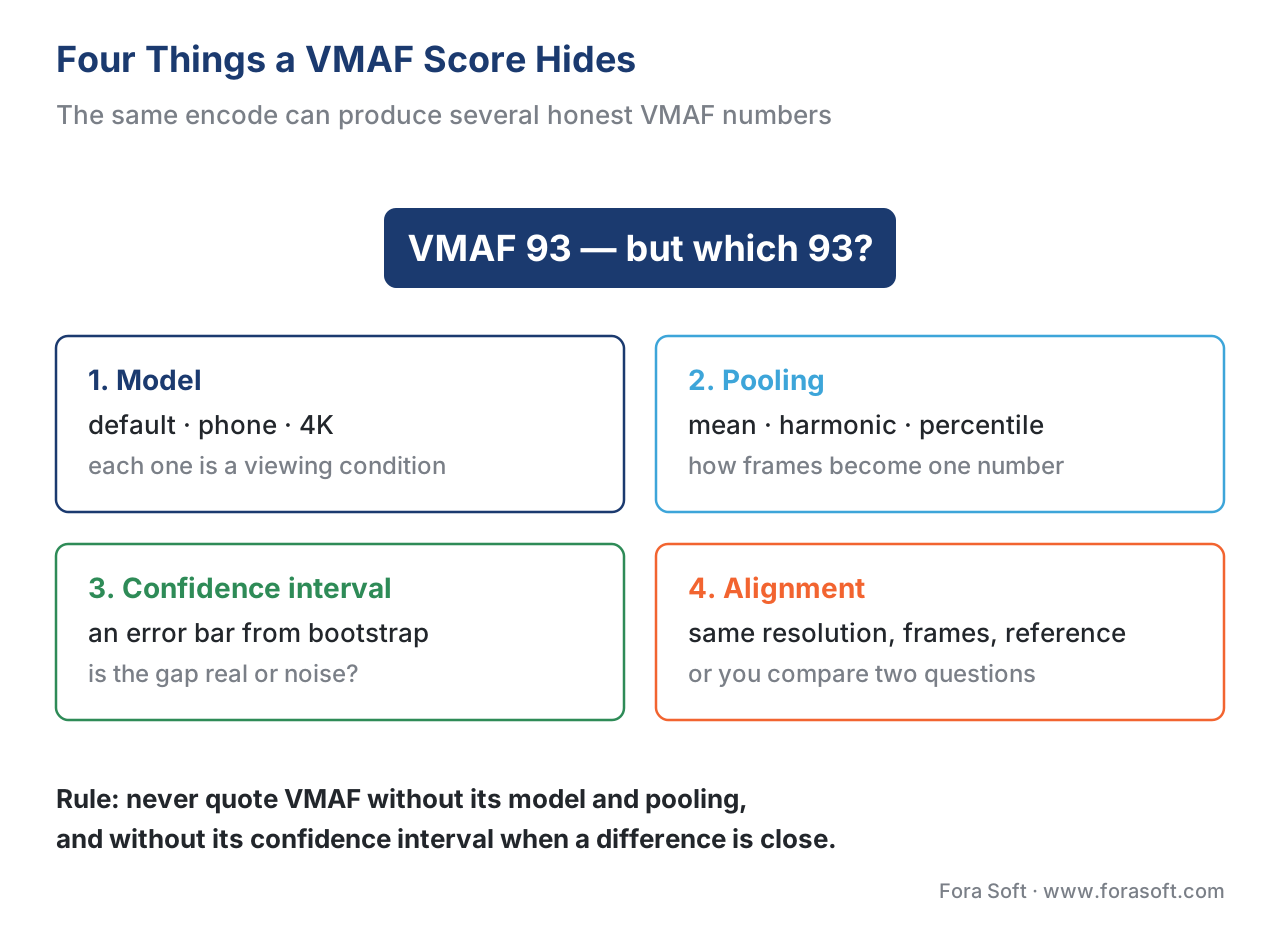 Figure 1. The same encode can produce several honest VMAF numbers. Four choices the bare score hides — model, pooling, confidence interval, and alignment — each change it.
Models: one encode, three correct scores
VMAF is not one predictor. It is a family of trained models, each fitted to human ratings collected under a specific viewing condition — a specific screen size and a specific distance from the viewer's eye. Because the same compression damage is more or less visible depending on how big the picture is and how close you sit, each model maps the same encode to a different score, and each is correct for its own condition.
The unit that ties this together is screen height, written "H": the viewing distance expressed as a multiple of the display's physical height. Sitting "at 3H" means your eye is three screen-heights away from the panel. The further away you sit in screen-heights, the less fine detail your eye can resolve, and the more forgiving you are of compression. That single idea explains the whole model lineup.
The default model — 1080p TV at 3H
The default model, the file vmaf_v0.6.1.json, predicts quality for a 1080p HDTV in a living-room setting, with the distorted video rescaled to 1080 and viewed from three times the screen height (Netflix VMAF model documentation, accessed 2026-06-23). The choice of 3H is not arbitrary: it is the distance at which a viewer can just appreciate the sharpness 1080p offers, per ITU-R BT.2022. This is the model you get when you name no model at all, and it is the right default for laptop and television streaming. Its training data were Netflix-catalogue clips, ten seconds each, rated on a continuous bad-to-excellent scale under the Absolute Category Rating method of ITU-T P.910, with "bad" mapped to roughly 20 and "excellent" to 100.
The phone model — a small screen reports higher
The phone model predicts quality on a handset. In the original v0 generation it is not a separate file but a transform applied to the default model, switched on with the --phone-model flag (or the equivalent libvmaf model option); the underlying subjective test was run on a Samsung S5 at 1080p with each viewer free to hold the phone at a comfortable distance (Netflix VMAF model documentation, accessed 2026-06-23). The defining fact about the phone model is that it reports higher scores than the default for the same encode. The reason is the geometry above: a phone is small and held relatively far away in screen-heights, so the same compression artifact is simply less visible, and once perceived quality hits 100 on a phone, spending more bitrate buys no further improvement a phone viewer could see. An encode that scores 88 on the default model can land in the mid-90s on the phone model — and both numbers are right, for their screens.
The 4K model — a big screen, viewed close
The 4K model, vmaf_4k_v0.6.1.json, added in June 2018, predicts quality on a 4K television viewed from 1.5 times the screen height (Netflix VMAF model documentation, accessed 2026-06-23). The close 1.5H distance is the point at which a viewer can actually resolve 4K detail; sit further back and 4K and 1080p look identical. Because the viewer is close to a large, high-resolution panel, this condition is the most demanding of the three, and it is the right model only when you are actually delivering and measuring 4K for a close-viewing condition.
When each model is correct
The rule for choosing is "match the model to where your viewer actually watches," and a comparison is valid only when every encode in it used the same model, computed by the same tool and version. Pick by the dominant viewing condition of your audience: the default model for laptop and TV streaming, the phone model when you are optimizing a mobile bitrate ladder and want credit for the lower visibility of artifacts on a handset, and the 4K model only for genuine close-viewed 4K. The mistake is never "using the phone model" — it is mixing it with another model in one comparison, or quoting its higher number without saying it is the phone model.
| VMAF model | Viewing condition (screen · distance) | Same encode scores | When it is the right model |
|---|---|---|---|
Default (vmaf_v0.6.1) |
1080p screen · 3H | 88 | Laptop and TV streaming — the safe default |
Phone (--phone-model) |
Handset · far in screen-heights | 96 (higher) | Mobile ladders, to credit lower artifact visibility |
4K (vmaf_4k_v0.6.1) |
4K TV · 1.5H | 85 (most demanding) | Only for true close-viewed 4K |
Table 1. One encode scores differently under each model because each predicts a different viewing condition. The 88 / 96 / 85 figures are illustrative; the rule is to compare only within one model, computed by the same tool and version.
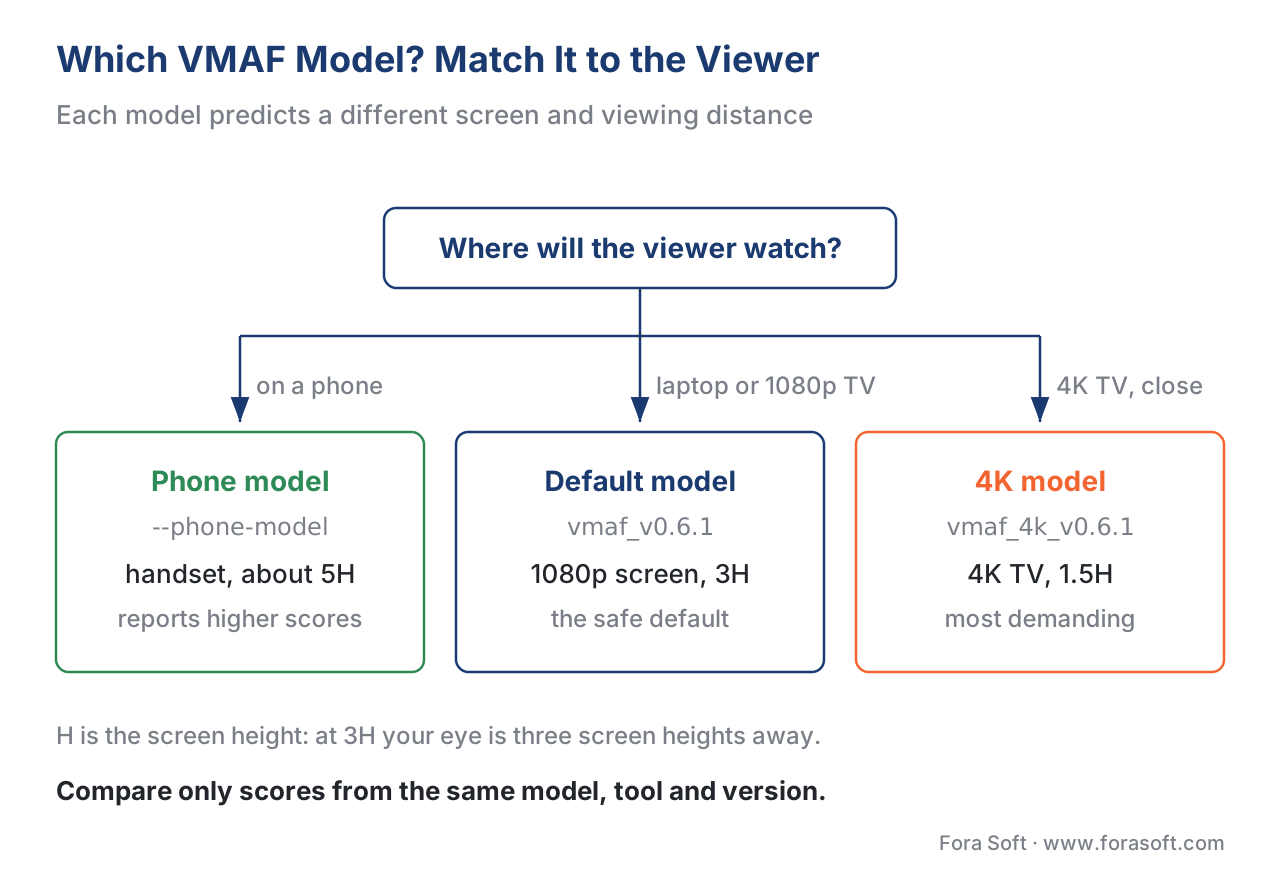 Figure 2. Pick the model by where your viewer actually watches. The score is only comparable when every encode in the comparison used the same model.
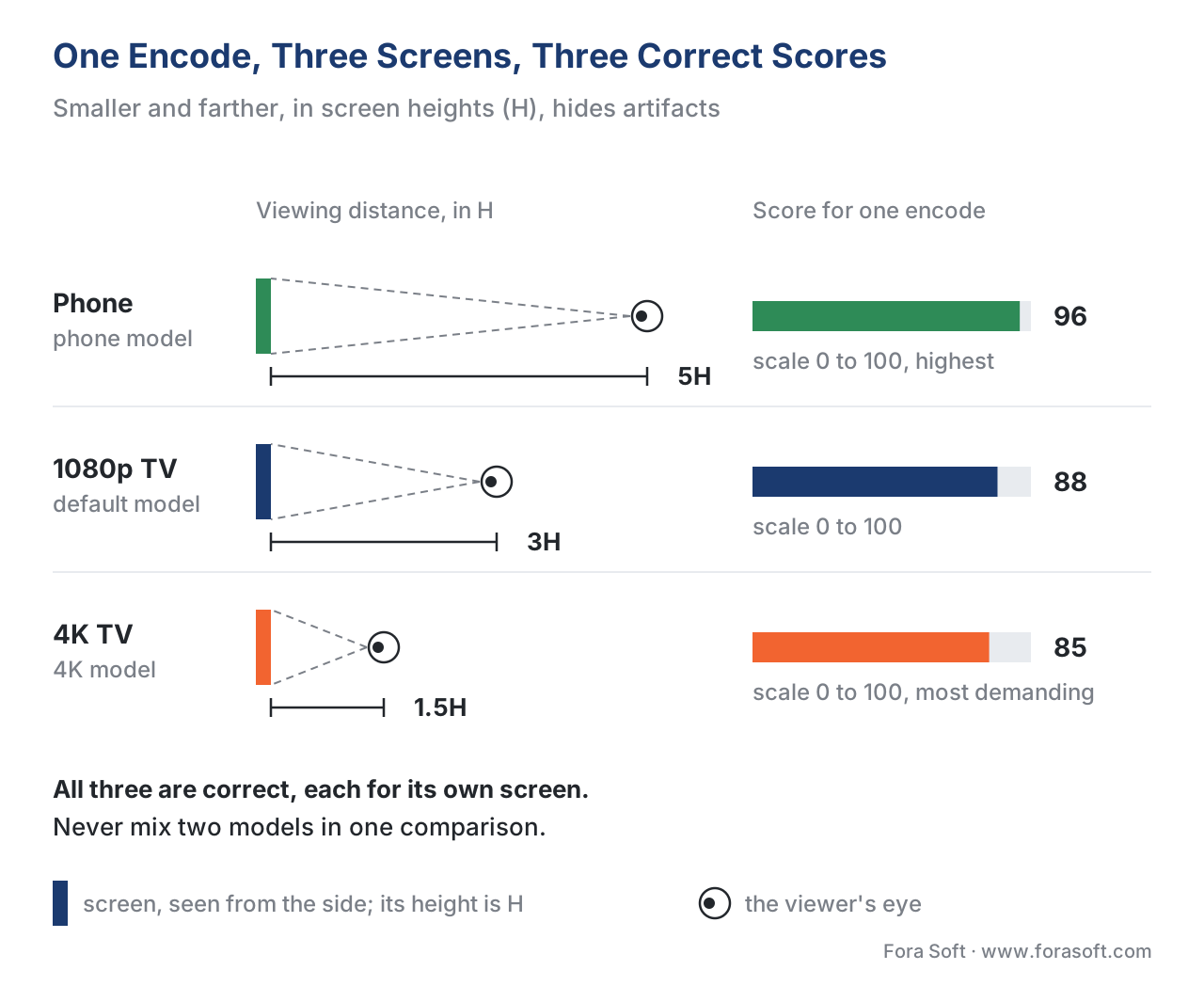 Figure 3. Why one encode scores differently per model: each predicts a different screen size and viewing distance in screen-heights (H). Smaller-and-further hides artifacts, so the phone score is highest.
What the 2026 v1 generation changes about models
The v1 models Netflix released in June 2026 change how viewing distance is handled, and it is worth knowing even if you are still on v0. Instead of bolting separate phone and 4K models onto the default after the fact, v1 folds the normalized viewing distance directly into its feature calculations, then trains one consistent model that is re-applied for the phone condition (set at 5H), for 4K at 1.5H, and for a consumer 4K-at-3H condition (Netflix Technology Blog, "VMAF v1: Good Is Not Good Enough", June 2026). The 4K-at-3H model uses an extended [0, 110] range rather than [0, 100], so it can quantify the extra benefit of 4K over 1080p when both are watched from the same distance. The practical headline is unchanged: name the model and the condition. If you are starting fresh in 2026, evaluate v1; if you have a history of v0 numbers, do not mix v0 and v1 in one comparison — re-baseline. The full v1 feature changes are covered in VMAF explained.
Confidence intervals: VMAF gives you error bars
Here is the fact most VMAF users never act on: the metric can tell you how much to trust its own number. Because every VMAF model was fitted to a sample of human opinions — not the whole population of all viewers who might ever watch — its prediction carries statistical uncertainty, and Netflix ships a way to measure it (Netflix VMAF confidence-interval documentation, since v1.3.7, June 2018).
What "bootstrapping" means, in plain language
The technique is called bootstrapping, and the idea is simpler than the name. Imagine you could re-run VMAF's training many times, each time on a slightly different reshuffle of the same human-rating data, drawing ratings at random with repeats allowed. Each reshuffle produces a slightly different trained model, and each model gives a slightly different score for your clip. If all those scores cluster tightly, the prediction is confident; if they spread out, it is shaky. The spread of those many predictions is the confidence interval (Netflix VMAF confidence-interval documentation, accessed 2026-06-23). Netflix did exactly this and shipped the result as bootstrap models — for example vmaf_b_v0.6.3 (plain bootstrapping) and vmaf_rb_v0.6.3 (residue bootstrapping). The documentation recommends plain bootstrapping: it produces a slightly larger, more conservative uncertainty, but it is unbiased with respect to the full model.
How to enable it and what comes back
You turn this on by measuring with a bootstrap model. On the command line tools the flag is --ci with a bootstrap model; in libvmaf you set enable_conf_interval to 1; the standalone vmaf executable auto-detects a bootstrap model and needs no extra flag (Netflix VMAF confidence-interval documentation, accessed 2026-06-23). What comes back is no longer a single number but a small set of fields. Here is the example straight from Netflix's documentation, for one clip:
"BOOTSTRAP_VMAF_score":           75.44   # the prediction you report
"BOOTSTRAP_VMAF_bagging_score":   74.96   # mean of the bootstrap models
"BOOTSTRAP_VMAF_stddev_score":     1.31   # spread of the bootstrap predictions
"BOOTSTRAP_VMAF_ci95_low_score":  72.99   # 2.5th percentile
"BOOTSTRAP_VMAF_ci95_high_score": 77.39   # 97.5th percentile
Read it like this. The score you quote is 75.44. The 95% confidence interval is [72.99, 77.39] — the 2.5th and 97.5th percentiles of the bootstrap predictions, which makes no assumption about the shape of the distribution. If you prefer the normal-distribution shortcut, the interval is the score plus or minus 1.96 times the standard deviation:
95% CI ≈ 75.44 ± 1.96 × 1.31
       = 75.44 ± 2.57
       = [72.87, 78.01]
Both readings say the same thing in plain terms: the true quality this model is trying to predict is very likely somewhere in a band roughly two-and-a-half points wide on each side of 75.4 — not exactly 75.44. One useful quirk: confidence intervals tend to be tighter at the high end of the scale than the low end, because VMAF's training data are denser there, so a 95 usually carries a smaller error bar than a 35 (Netflix VMAF confidence-interval documentation, accessed 2026-06-23).
Using the error bar to settle a comparison
This is where the confidence interval earns its keep. Recall the worked example from VMAF explained: Encode A at VMAF 95.2, Encode B at 93.4, a gap of 1.8 points, already below the roughly 6-point just-noticeable difference. Now add error bars. Suppose each score carries a 95% interval of about ±1.3 points:
Encode A: 95.2  →  [93.9, 96.5]
Encode B: 93.4  →  [92.1, 94.7]
Those intervals overlap across most of their width. A 1.8-point gap between two encodes whose error bars overlap that much is not a result you can stand behind — re-run on slightly different frames and the order could flip. The confidence interval turns "A beats B by 1.8" into the honest "A and B are statistically indistinguishable on this content." That is the difference between a measurement and a coin flip dressed up as a decimal.
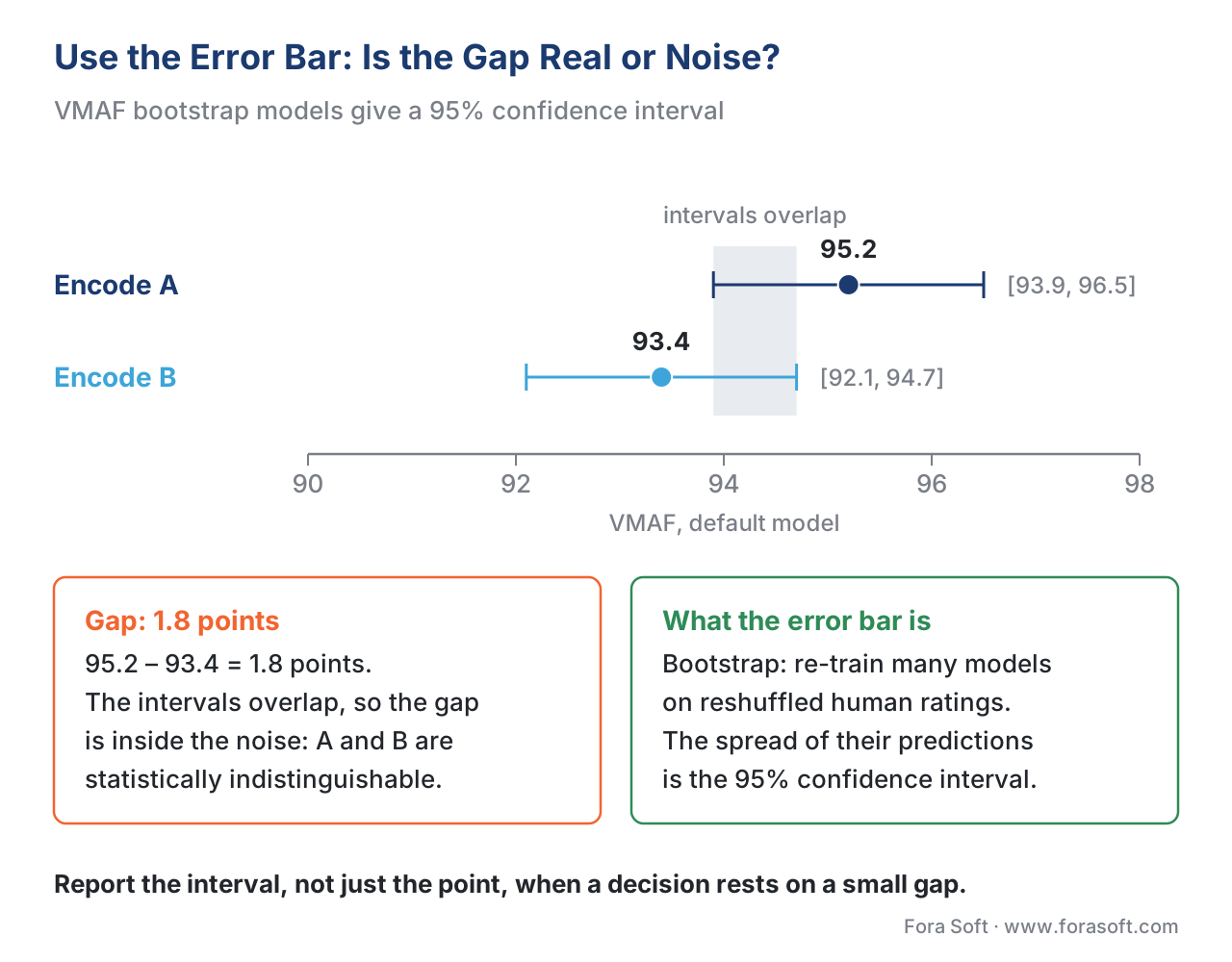 Figure 4. VMAF's bootstrap models give a 95% error bar. When two encodes' intervals overlap this much, the gap between their headline scores is inside the noise — not a real difference.
Pooling: how per-frame scores become one number
VMAF is computed per frame. A ten-second clip at 24 fps produces 240 VMAF scores, one per frame, and the single number you quote is a summary of those 240. How you summarize them — the pooling method — can change the story completely, and it is the step engineers most often get wrong by simply accepting the default.
The libvmaf pooling options are three: arithmetic mean (the default), harmonic mean, and minimum (FFmpeg libvmaf filter documentation, accessed 2026-06-23). The difference between them is entirely about how much weight the worst frames get.
A worked example: the mean hides the bad seconds
Take a short clip that is mostly clean but has a brief broken passage — say a hard scene cut the encoder handled badly. Ten representative frames score like this:
95, 96, 94, 95, 30, 28, 32, 95, 96, 94
Eight frames are excellent; three in the middle fell apart. Now pool them four ways.
The arithmetic mean adds them and divides by ten:
(95+96+94+95+30+28+32+95+96+94) / 10 = 755 / 10 = 75.5
The harmonic mean divides the count by the sum of reciprocals, which mathematically pulls the result toward the smallest values:
10 / (1/95 + 1/96 + 1/94 + 1/95 + 1/30 + 1/28 + 1/32 + 1/95 + 1/96 + 1/94) = 57.5
The 5th percentile — the "bad bits," the level 95% of frames beat — lands at about 28.9. The minimum, the single worst frame, is 28.
Look at the spread: the same clip is a "fair" 75.5 by arithmetic mean, a "poor" 57.5 by harmonic mean, and a near-broken 29 by the worst-frames readings. Nothing changed about the video; only the summary did. The arithmetic mean lets eight good frames outvote three terrible ones, which is exactly the wrong behavior when a viewer's memory of a clip is dominated by its worst moment. That is why harmonic mean and low-percentile pooling exist: they refuse to let a long clean stretch hide a short disaster.
Which pooling to use
Use the arithmetic mean for an overall quality summary across well-behaved content where you expect no localized failures, and because it is the default everyone else quotes — so it is the apples-to-apples choice for comparing against others' numbers. Use the harmonic mean or a low percentile (5th or 1st) when localized failures matter — a quality gate, a regression test, or any per-title encode where one broken shot can ruin a viewer's session. Always read the minimum or a low percentile alongside the mean when you are deciding whether an encode is safe to ship; the gap between the mean and the 5th percentile is a direct measure of how much the headline number is hiding. The deeper treatment of pooling, including percentile choices and temporal models, is in pooling: per-frame to one number.
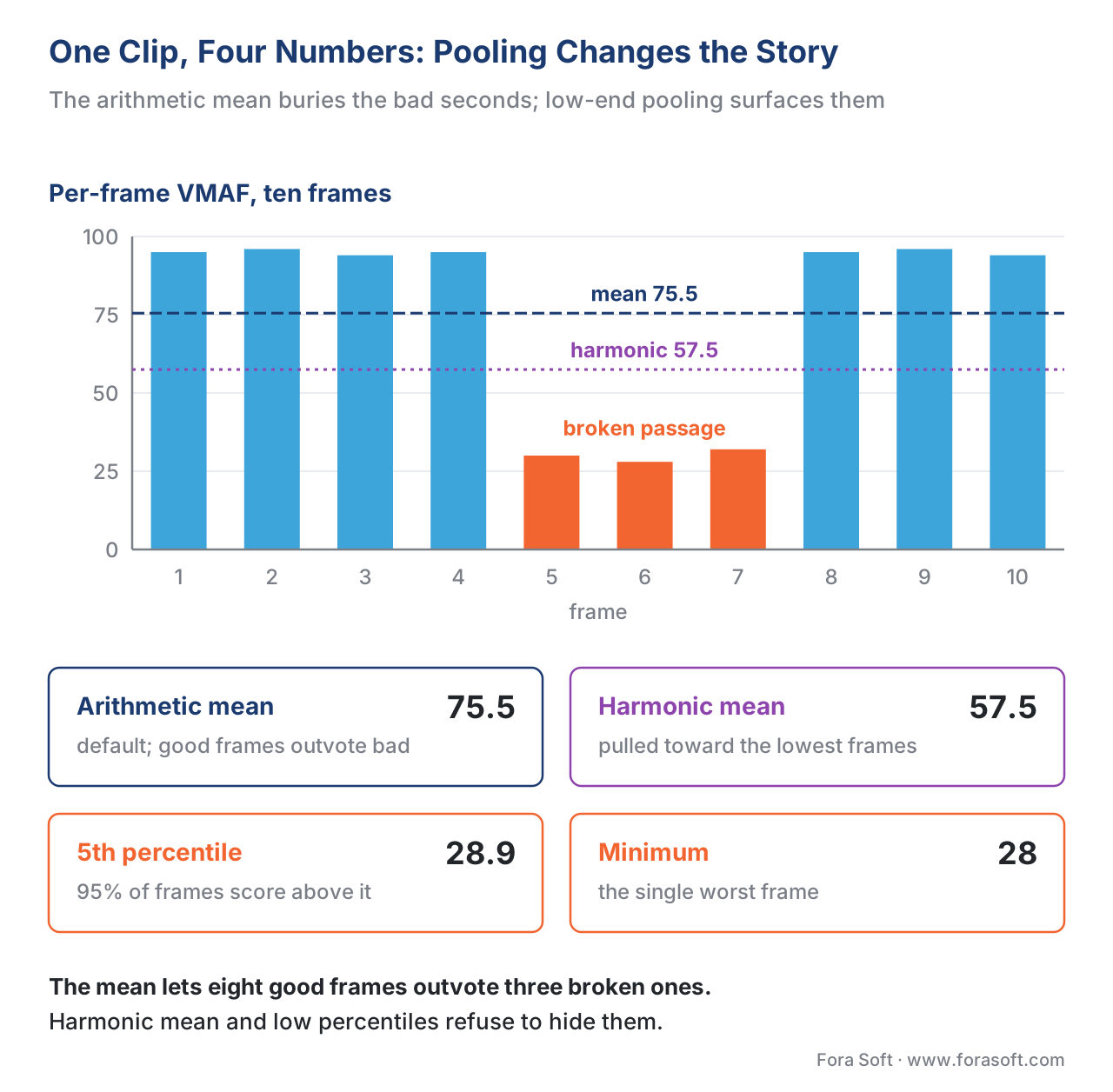 Figure 5. The same per-frame trace summarized four ways. Arithmetic mean lets eight good frames bury three broken ones; harmonic mean and low percentiles surface the bad seconds.
Per-frame vs per-clip: read the trace, not just the summary
The pooling example points at a larger habit: the most useful view of VMAF is often the per-frame trace, not the single pooled number. A pooled score answers "how good is this clip on average"; the per-frame trace answers "where, exactly, does this clip break" — and the second question is the one that fixes encodes.
When you keep the per-frame log, you can plot VMAF against time and see the shape of the quality. A flat line near 95 is a healthy encode. A line that sits high but plunges at every scene cut tells you the encoder is starving keyframes of bits. A slow sag across a high-motion passage tells you the bitrate ceiling is too low for the action. None of that survives pooling into one number; all of it is obvious in the trace. This is also how you localize a complaint: a viewer says "it looked bad around the goal," you pull the per-frame VMAF for that segment, and the dip is right there with a timestamp.
The practical rule is to always write the per-frame log and keep it, even when you report only the pooled score. The pooled number is for the dashboard; the per-frame trace is for the engineer who has to explain or fix a result. Turning that trace into a spatial picture — a heatmap of where in the frame quality dropped — is the subject of visualizing quality.
Computing all of this with FFmpeg and libvmaf
The everyday path to every number above is FFmpeg's libvmaf filter, which wraps Netflix's library. The 2.4 article covered the basic invocation; here is how to drive the model, the pooling, the per-frame log, and the confidence interval explicitly. The distorted clip is the first input, the reference the second, and the two must match in resolution and frame rate.
# Per-frame log + explicit model + harmonic-mean pooling.
# Distorted is the FIRST input, reference the SECOND.
ffmpeg -i distorted.mp4 -i reference.mp4 \
  -lavfi "libvmaf=model='version=vmaf_v0.6.1':pool=harmonic_mean:\
log_path=vmaf.json:log_fmt=json:n_threads=8" \
  -f null -
Three options are doing the work. model='version=vmaf_v0.6.1' names the model explicitly — swap in vmaf_v0.6.1neg for encoder comparisons (see VMAF-NEG) or a 4K model path for close-viewed 4K. pool=harmonic_mean sets the pooling for the single reported value (the choices are mean, harmonic_mean, and min). log_path/log_fmt write the per-frame JSON you should always keep. To get the confidence interval, point the filter at a bootstrap model:
# Confidence interval via a bootstrap model.
# The per-frame log then carries the bootstrap CI fields.
ffmpeg -i distorted.mp4 -i reference.mp4 \
  -lavfi "libvmaf=model='version=vmaf_b_v0.6.3':\
log_path=vmaf_ci.json:log_fmt=json" \
  -f null -
One real-world caution: across FFmpeg and libvmaf versions the in-filter pool flag has not always changed the aggregate the way users expect, and pooling logic has moved between the library and the filter. The safe habit — and the one our download script below uses — is to write the per-frame log and pool it yourself in code, so the number does not depend on which build of the filter you happened to run. The full FFmpeg-and-libvmaf workflow lives in measuring quality with FFmpeg and libvmaf; the encoder-side quick reference is Video Encoding's FFmpeg cheat sheet.
To make this concrete at your desk, we built a small, dependency-light script that reads a libvmaf JSON log (with or without the bootstrap CI fields), then reports the score pooled four ways — mean, harmonic mean, 5th percentile, and the single worst frame — alongside the confidence interval when present and a significance verdict for the gap between two clips read against both the error bars and the ~6-point just-noticeable difference. Download the VMAF model, pooling, and confidence-interval analyzer (Python) and run it on your own logs.
Common mistakes with VMAF models, pooling, and confidence intervals
Free download: VMAF model, pooling and confidence-interval analyzerA standard-library Python script that reads a libvmaf JSON log, pools it four ways — mean, harmonic mean, 5th percentile and the worst frame — prints the 95% confidence interval when a bootstrap model was used, and tells you whether the gap between two clips clears both the error bars and the ~6-point JND.Mistake: comparing scores from different models. A phone-model 96 and a default-model 88 describe the same encode on two different screens. Lining them up as if the phone encode "won" is comparing two different questions. Every number in a comparison must use the same model, tool, and version.
Mistake: treating a sub-interval gap as a real difference. If two encodes' 95% confidence intervals overlap, the gap between their headline scores is inside the measurement noise. Report the interval, not just the point, whenever a decision rests on a small difference.
Mistake: accepting the default mean on failure-prone content. Arithmetic mean lets a long clean stretch hide a short broken passage. For quality gates and regression tests, pool with the harmonic mean or a low percentile, and always read the minimum alongside the mean.
Mistake: throwing away the per-frame log. The pooled number cannot tell you where a clip breaks. Always write and keep the per-frame trace; it is the only artifact that localizes a quality drop to a timestamp.
Mistake: quoting VMAF to two decimals as if it were exact. A model trained on a finite human sample predicts a band, not a point. "VMAF 93.42" implies a precision the metric does not have; "VMAF 93.4, default v0.6.1, mean pooling, 95% CI ±1.3" is an honest report.
Where Fora Soft fits in
Fora Soft has built video software since 2005 — streaming, WebRTC conferencing, OTT, e-learning, telemedicine, and surveillance — and the way we quote VMAF is the way this article describes it. When we tune a bitrate ladder for a mobile-heavy audience we measure with the phone model and say so; when we set a release gate we pool with a low percentile so one broken shot cannot pass; and when a difference between two encoders is small we report the confidence interval rather than crown a winner the error bars do not support. We keep the per-frame trace for every measured clip, because a quality complaint is answered with a timestamped dip, not a shrug. Our benchmark methodology records the exact model, pooling, and interval behind every VMAF figure we publish, so the numbers are reproducible rather than decorative.



The handbook
Fora Soft Video Engineering Handbook
We wrote a seven-volume handbook that works through the whole video stack — encoding, delivery, audio and AI — so an engineer who reads it can design and build a pipeline and defend every quality number it reports. Volume 1 takes VMAF, PSNR and SSIM apart and shows how model and pooling choices move the score an encoder is tuned against. Volume 3 turns those scores into device-aware bitrate ladders, where the phone model and the 4K model earn their place, and Volume 6 covers the learned models and training data behind perceptual metrics. Written by Nikolay Sapunov, CEO at Fora Soft.
Is the 1.8-point win in your encoder test real, or inside the error bar?
Send us the per-frame VMAF logs you already have. We will re-pool them with the model named, add bootstrap confidence intervals, and tell you which comparisons hold up, which are noise, and where a low-percentile gate would have caught the bad seconds. 250+ video products shipped since 2005.
See our case studies
Case study
Worldcast Live
HD concert streams at 0.4–0.5 s latency for 10,000 simultaneous viewers on phones, laptops and TVs — an audience mix where the phone model and the default model give different answers for the same rung.
Case study
Speed.Space
Remote production for Netflix, Electronic Arts and HBO shoots, recorded locally at 1080p / 8 Mbps — the frame-aligned master every VMAF comparison needs before its model, pooling or interval mean anything.
Case study
VocalViews
A market-research platform with 800K+ verified panelists and 5K+ studies run on video — the kind of human-opinion sample whose finite size is exactly why a VMAF score carries a confidence interval.
What to read next
Objective metrics
Video Quality Pooling: Per-Frame to One Number
Percentile choices and temporal models: the full treatment of how per-frame scores collapse into one.
Reporting
Reading a Video Quality Report Without Fooling Yourself
Alignment, matched references and the checks that make two VMAF numbers comparable at all.
Tooling
FFmpeg VMAF: Measure Video Quality with libvmaf
The complete libvmaf workflow: input order, model files, threads and parsing the per-frame JSON log.
Subjective testing
The Statistics of Subjective Video Quality Data
MOS, standard deviation and confidence intervals on the human side that every VMAF model is trained on.
References
- Netflix/vmaf repository, "Models" documentation (
resource/doc/models.md), accessed 2026-06-23. Tier 1 (metric-author reference implementation). The default (vmaf_v0.6.1, 1080p at 3H), phone (--phone-model, Samsung S5, higher scores), and 4K (vmaf_4k_v0.6.1, 4KTV at 1.5H) models and their viewing conditions; the bad→20 / excellent→100 score mapping; NEG model files. https://github.com/Netflix/vmaf/tree/master/model - Netflix/vmaf repository, "VMAF Confidence Interval" documentation (
resource/doc/conf_interval.md), accessed 2026-06-23. Tier 1 (metric-author reference implementation). Bootstrapping since v1.3.7 (June 2018); plain (vmaf_b_v0.6.3) vs residue (vmaf_rb_v0.6.3) bootstrapping; the--ci/enable_conf_intervalswitches; the BOOTSTRAP_VMAF score/bagging/stddev/ci95 fields; the worked example (score 75.44, stddev 1.31, CI [72.99, 77.39]) and the 1.96·stddev normal shortcut; tighter CIs at the high end. https://github.com/Netflix/vmaf/blob/master/resource/doc/conf_interval.md - Netflix Technology Blog, "VMAF: The Journey Continues," October 25, 2018. Tier 1 (metric-author). The phone and 4K models, the bootstrapped 95% confidence interval (models 0.6.2/0.6.3), and best-practice pooling guidance. https://netflixtechblog.com/vmaf-the-journey-continues-44b51ee9ed12
- Netflix Technology Blog, "Toward a Practical Perceptual Video Quality Metric," June 6, 2016. Tier 1 (metric-author defining work). The launch of VMAF: the fusion idea, the SVM regressor, the VIF/DLM/motion features, and training on the NFLX subjective dataset under ACR. https://netflixtechblog.com/toward-a-practical-perceptual-video-quality-metric-653f208b9652
- Netflix Technology Blog, "VMAF v1: Good Is Not Good Enough," June 2026. Tier 1 (metric-author). The v1 generation's unified normalized-viewing-distance feature adjustment, the phone (5H), 4K (1.5H), and consumer 4K-at-3H conditions, and the extended [0, 110] range for 4K@3H. https://medium.com/netflix-techblog/vmaf-v1-good-is-not-good-enough-60d7e4244ea8
- FFmpeg, "libvmaf filter documentation," accessed 2026-06-23. Tier 3 (first-party tooling). The
libvmaffilter options:model(defaultversion=vmaf_v0.6.1),pool(min,harmonic_mean,mean),n_subsample,log_path/log_fmt,n_threads, and the distorted-then-reference input order with matched resolution/fps. https://ffmpeg.org/ffmpeg-filters.html#libvmaf - Recommendation ITU-R BT.2022 (2012), "General viewing conditions for subjective assessment of quality of SDTV and HDTV television pictures on flat panel displays." International Telecommunication Union. Tier 1. The viewing-distance basis (3H for 1080p, 1.5H for 4K) underlying the VMAF model conditions. https://www.itu.int/rec/R-REC-BT.2022
- Recommendation ITU-T P.910 (2023), "Subjective video quality assessment methods for multimedia applications." International Telecommunication Union. Tier 1. The Absolute Category Rating (ACR) method used to collect the subjective scores each VMAF model was trained on. https://www.itu.int/rec/T-REC-P.910
- Recommendation ITU-T P.1401 (01/2020), "Methods, metrics and procedures for statistical evaluation, qualification and comparison of objective quality prediction models." International Telecommunication Union. Tier 1. The statistical framework (PCC, SROCC, RMSE, confidence intervals) for evaluating a metric like VMAF against subjective MOS. https://www.itu.int/rec/T-REC-P.1401
- Netflix/vmaf repository (libvmaf), README, releases and CHANGELOG, accessed 2026-06-23. Tier 3 (metric-author tooling). The libvmaf
enable_conf_intervalargument, the built-in versioned models and bootstrap models, and the pooling implementation referenced by the FFmpeg filter. https://github.com/Netflix/vmaf/blob/master/resource/doc/libvmaf/README.md - J. Ozer, "The VMAF Phone Model and Saving on Streaming to Mobile Viewers," Streaming Learning Center, accessed 2026-06-23. Tier 6 (educational, orientation only). Accessible discussion of when the phone model is the right choice and the bitrate it can save on mobile ladders; the underlying model behavior is Netflix's. https://streaminglearningcenter.com/encoding/the-vmaf-phone-model-and-saving-on-streaming-to-mobile-viewers.html
- J. Ozer, "Finding the Just Noticeable Difference with Netflix VMAF," Streaming Learning Center, accessed 2026-06-23. Tier 6 (educational, orientation only). The widely-cited ~6-point JND rule of thumb used in the comparison example; the underlying guidance is Netflix's. https://streaminglearningcenter.com/codecs/finding-the-just-noticeable-difference-with-netflix-vmaf.html
