


Why this matters
If you compare two encoders, two codecs, or two preprocessing chains with VMAF, the standard model can hand the win to whichever pipeline sharpens hardest — not whichever compresses best. That is a direct path to choosing the wrong codec, paying for the wrong encoder, or shipping a sharpening filter that pleases the metric and annoys the viewer. This article is for the video engineer, encoding lead, or QA engineer who runs codec comparisons and quality gates and needs the number to reflect compression, not cosmetics. It assumes you have read VMAF explained and builds directly on the model and pooling discipline in VMAF in depth; the short encoder-side version of the metric lives in our Video Encoding section's quality-metrics overview.
The feature that makes VMAF special is also its weak spot
Start with the thing that makes VMAF different from the metrics that came before it. The oldest metric, the one that compares a compressed frame to the original pixel by pixel and reports the error in decibels, called PSNR (Peak Signal-to-Noise Ratio), only ever goes down when you change the picture — any deviation from the original is counted as damage. The same is broadly true of the metric that compares the structure of the two frames, called SSIM (Structural Similarity). VMAF — Video Multimethod Assessment Fusion, Netflix's machine-learned perceptual score on a 0–100 scale — does something neither of those does: it can register an improvement. If a processing step makes the picture look crisper or punchier to a human eye, VMAF can score it higher, because some of the features it was trained on respond positively to added contrast and detail.
That ability is useful. A good pre-processing step — a gentle sharpen that restores detail softened by scaling, for instance — really does improve what the viewer sees, and VMAF can give credit for it where PSNR and SSIM would only punish the change. Netflix designed this in on purpose, and it is part of why VMAF predicts human opinion better than the older metrics.
The problem is that the same door swings both ways. Because VMAF rewards added contrast and sharpness, you can raise a VMAF score by adding contrast and sharpness whether or not it helps the viewer — and you can do it in pre-processing, before the encoder runs, so the "gain" has nothing to do with how well the codec compressed anything. When the enhancement is overdone, it can actively degrade the picture — haloed edges, crushed highlights — while the VMAF number climbs. A metric you can move without improving quality is a metric you can game, and in codec comparisons, where careers and purchasing decisions ride on a fraction of a BD-rate point, a gameable metric is a real liability.
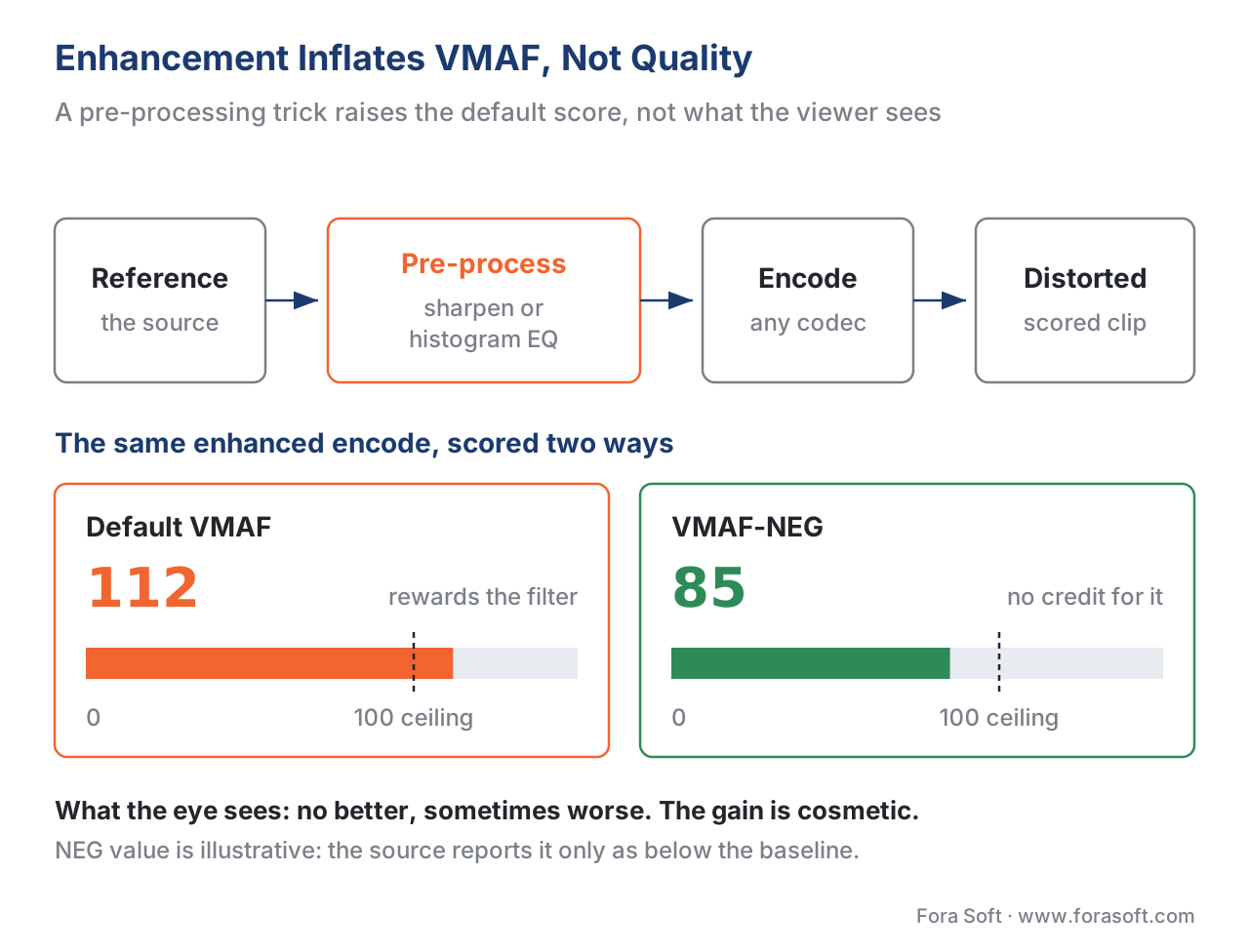 Figure 1. The gaming problem. Enhancement applied in pre-processing inflates the default VMAF score — even above 100 — without improving what the viewer sees. VMAF-NEG refuses to reward it.
How big is the problem, in real numbers
This is not a theoretical worry; it was demonstrated with numbers that are hard to argue with. In a 2020 technical report, Netflix's VMAF lead Zhi Li ran ordinary enhancement operations on a source clip and measured the default VMAF score before and after (reported by Jan Ozer, Streaming Learning Center, July 2020, attributing the data to Li's Netflix memo).
Sharpening alone pushed the VMAF score to about 112. Histogram equalization — a contrast-stretching operation — pushed it to about 144. Both numbers are on a scale whose maximum is supposed to be 100. A score above 100 is the metric waving a red flag: it is no longer measuring "how close to the original" but "how much more contrast than the original," which is a different and largely meaningless quantity for a fidelity metric.
The codec-comparison case is the one that should worry an encoding team. The AV1 reference encoder, libaom, ships a tune=vmaf mode that improves its VMAF score largely by sharpening each frame before it compresses it (Netflix Technology Blog, December 2020; libaom). In Li's measurements, an AV1 encode with tune=vmaf scored about 105, against a baseline encode's 95.1 — a apparent 10-point quality jump that is mostly the sharpening filter, not better compression. If you were comparing AV1 against another codec on default VMAF, that 10 points is enough to crown the wrong winner.
The fix Netflix shipped is VMAF-NEG. With enhancement gain disabled, those same gamed encodes score at or below the baseline, because the sharpening no longer earns any credit. There is a price, and it is worth stating plainly: turning off enhancement gain lowers every score slightly — Netflix reports the absolute VMAF "typically drops by 1 to 3 points" even on un-enhanced content — because the default model gives a little enhancement credit almost everywhere. NEG trades a small, uniform downward shift for a number you cannot inflate with a filter.
What NEG actually changes, inside the metric
To understand the fix you need a quick look under VMAF's hood. VMAF does not measure quality directly; it computes a handful of simpler "elementary features" on each frame and feeds them into a trained model — a support-vector regressor — that fuses them into the final 0–100 score (Netflix Technology Blog, June 2016). Three families of feature do the work: a measure of how much image information survives, called VIF (Visual Information Fidelity); a measure of how much detail was lost, called DLM (Detail Loss Metric, implemented in the code as ADM, the Additive Distortion Measure); and a motion feature that tracks frame-to-frame change.
Two of those features — VIF and the detail-loss feature — are the ones that over-respond to enhancement (Zhi Li, Netflix memo, 2020). When sharpening adds local contrast, both features can report a value that says the distorted frame carries more information or more detail than the reference. In their default form, they pass that surplus through as a bonus, and the fused score rises above what fidelity alone would give. Because both features misbehave, you have to correct both — fixing only one leaves the other inflating the score.
NEG corrects them with a cap called an enhancement-gain limit. The idea is one sentence: a feature may report that the distorted frame matches the reference, but never that it beats it. Concretely, each feature computes a ratio of distorted-to-reference energy; NEG clamps that ratio at 1.0, the point of parity (Netflix VMAF documentation; the command-line controls are vif_enhn_gain_limit=1.0 and adm_enhn_gain_limit=1.0). Below parity — where the distorted frame has lost information or detail — the feature behaves exactly as before and records the loss. At and above parity — where enhancement has pushed the distorted frame past the original — the feature is pinned to "equal." The metric stops paying for surplus contrast, so the sharpening trick earns nothing.
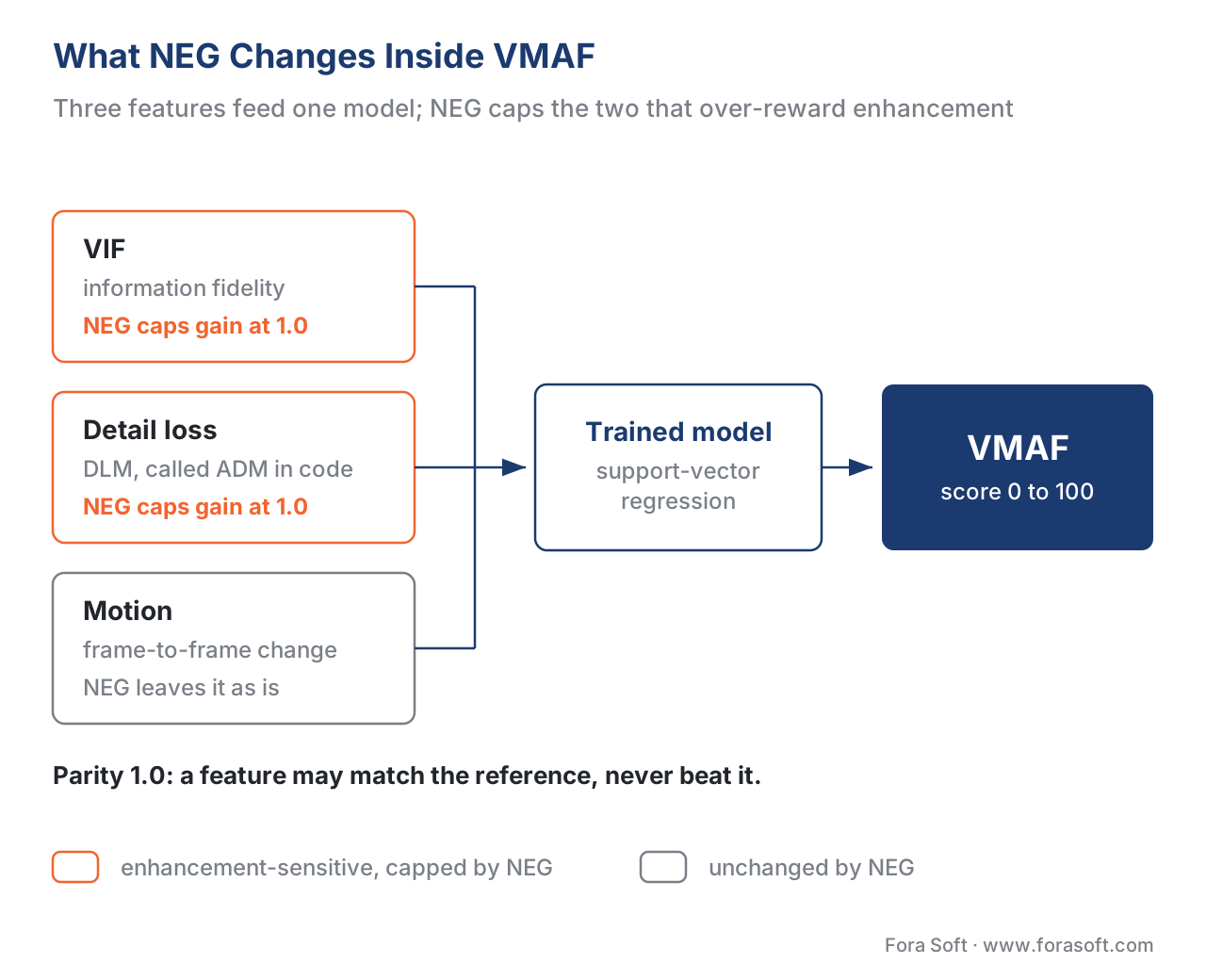 Figure 2. VMAF's elementary features feed a trained model. The two enhancement-sensitive features — VIF and detail loss — are where NEG applies its gain cap; the rest of the metric is unchanged.
The effect is easiest to see as a curve. Picture a feature's credit on the vertical axis and how much sharper-or-more-contrasty the distorted frame is than the reference on the horizontal axis. Up to parity, the default model and NEG agree exactly. Past parity, the default model keeps climbing — rewarding the surplus — while NEG runs flat, capped at the parity value. Everything to the left of parity, which is where honest compression lives (it removes information, it does not add it), is untouched. NEG is a one-sided cap that only bites when a frame claims to be better than the source.
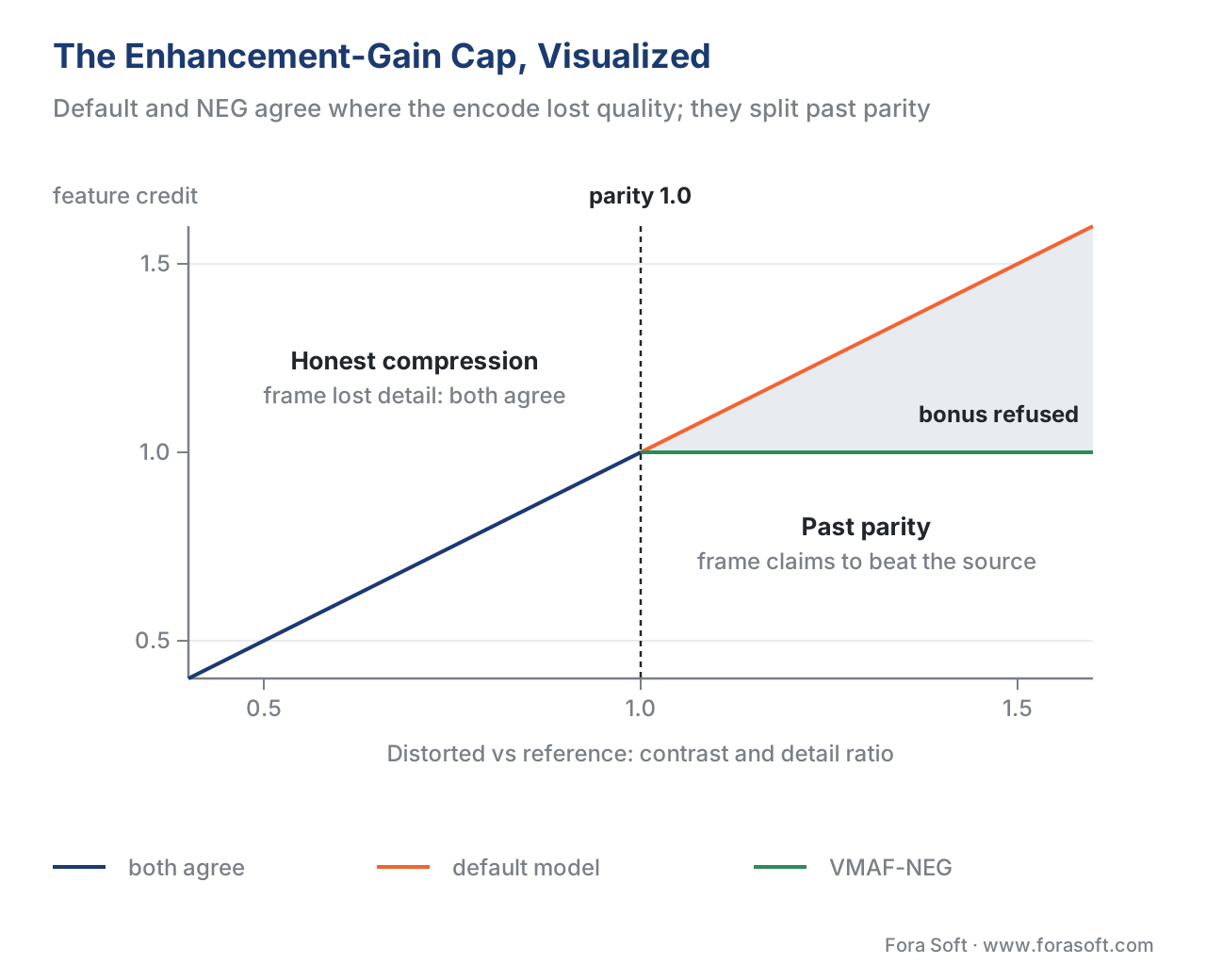 Figure 3. The enhancement-gain cap. NEG and the default model agree wherever the encode lost quality; they diverge only when enhancement pushes a frame past the reference, where NEG refuses the bonus.
A worked comparison: the same encodes, two ways
Put the numbers from above into one table. The "default" column is the standard VMAF model; the "NEG" column is the same content scored with enhancement gain disabled. The pattern is the whole argument for NEG.
| Encode | Default VMAF | VMAF-NEG | What the gap tells you |
|---|---|---|---|
| Baseline (no enhancement) | 95.1 | ~93 | NEG sits 1–3 points lower everywhere |
AV1 with tune=vmaf sharpening |
~105 | below ~93 | the +10 was sharpening, not compression |
| Source + heavy sharpening | ~112 | below baseline | over-100 score is a gaming red flag |
| Source + histogram equalization | ~144 | well below baseline | impossible on a 0–100 fidelity scale |
Read the rows. On the default model, every enhancement "wins," and the histogram-equalized clip looks like the best of the lot at VMAF 144 — which is nonsense, because a fidelity metric cannot meaningfully exceed 100. On NEG, the ranking flips to match reality: the un-enhanced baseline is the most faithful to the source, and every enhanced version scores lower because each one departed from the original. The single most useful diagnostic here is the gap between the default and NEG scores. A small gap (a point or two) means little enhancement is in play. A large gap means the default number is riding on enhancement, and you should not trust it for a compression comparison.
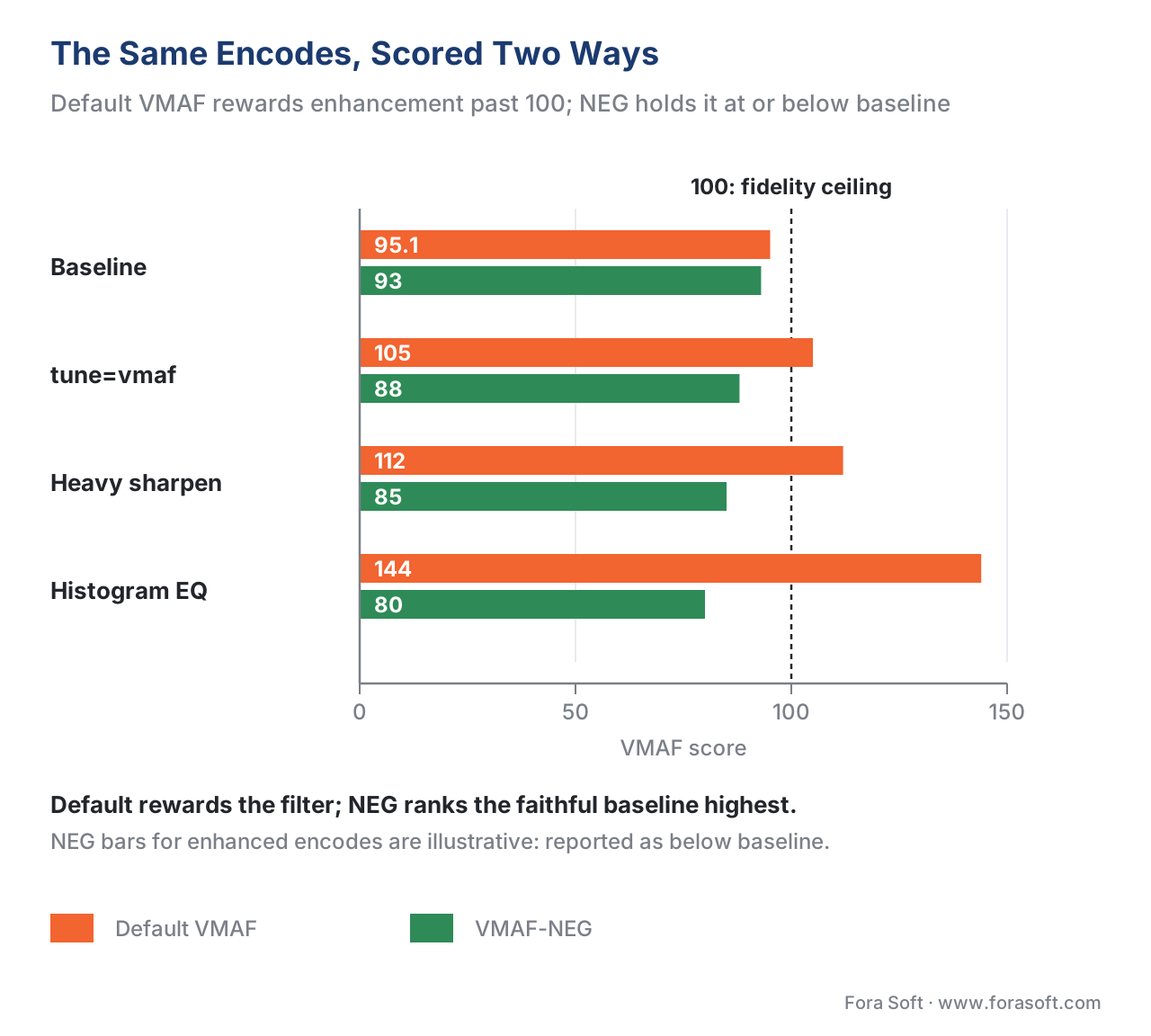 Figure 4. The same encodes scored two ways. Default VMAF rewards enhancement past the 100 ceiling; VMAF-NEG holds every enhanced encode at or below the faithful baseline.
When to report NEG, and when to report the default
NEG is not "the correct VMAF" that replaces the default everywhere. The two answer different questions, and Netflix is explicit about which to use (Netflix Technology Blog, December 2020).
Use NEG for codec and encoder evaluation — anything where you want the quality gain attributable to compression alone, with pre-processing held out. Codec comparisons (is AV1 beating HEVC on this content?), encoder comparisons (does this build of x265 beat the last one?), and any test where one side might apply sharpening are exactly the cases NEG was built for. It is also the honest choice for any public benchmark, because it removes the easiest way to put a thumb on the scale. Netflix itself uses VMAF-NEG as one of the metrics during codec development, including for the next-generation AV2 codec (Netflix Technology Blog, June 2026).
Use the default model when enhancement is truly part of the experience you are delivering and you want to credit it. If your production pipeline deliberately applies a tuned sharpening or detail-restoration step and you want a number that reflects what the viewer actually sees — enhancement included — the default model is the right one. Day-to-day encoder configuration, where you are tuning one encoder against itself and not trying to separate compression from pre-processing, is also fine on the default model. The rule of thumb: if anyone in the comparison could benefit from sharpening the picture, report NEG; if you are measuring the delivered experience as a whole, report the default — and either way, say which one you used.
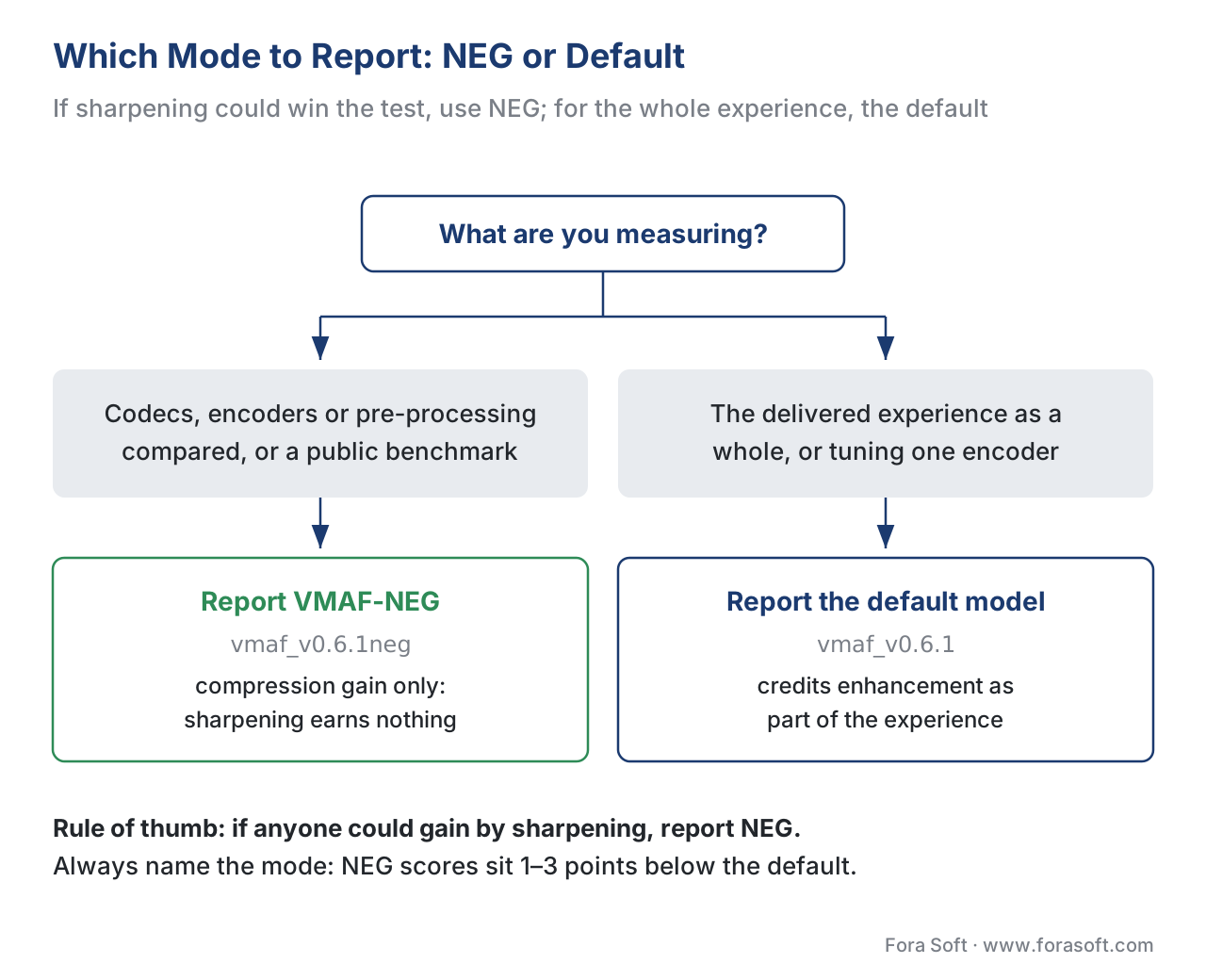 Figure 5. Which mode to report. If the test could be gamed by sharpening, use NEG; if you are measuring the whole delivered experience, use the default — and always name the mode.
How to compute VMAF-NEG with FFmpeg and libvmaf
The practical path is the same libvmaf filter you already use for VMAF, pointed at a NEG model. NEG model files are the ones whose names end in neg — for the default 1080p condition that is vmaf_v0.6.1neg — and they have shipped in libvmaf since version 2.0.0 (Netflix VMAF documentation; FFmpeg libvmaf filter documentation). The distorted clip is the first input, the reference the second, and the two must match in resolution and frame rate.
# Score with the NEG model (enhancement gain disabled).
# Distorted is the FIRST input, reference the SECOND.
ffmpeg -i distorted.mp4 -i reference.mp4 \
  -lavfi "libvmaf=model='version=vmaf_v0.6.1neg':\
log_path=vmaf_neg.json:log_fmt=json:n_threads=8" \
  -f null -
The most useful way to run it is to score the default and NEG models in the same pass, so you get both numbers — and therefore the enhancement-gain gap — for free. The filter takes multiple models separated by a pipe:
# Default AND NEG in one pass; the gap between them is the enhancement gain.
ffmpeg -i distorted.mp4 -i reference.mp4 \
  -lavfi "libvmaf=model='version=vmaf_v0.6.1\:name=vmaf|\
version=vmaf_v0.6.1neg\:name=vmaf_neg':\
log_path=vmaf_both.json:log_fmt=json" \
  -f null -
On VMAF v1, the model Netflix open-sourced in June 2026, you do not need a separate NEG model at all: the enhancement-gain limit is built in and enabled by default, so v1 behaves like NEG out of the box (Netflix Technology Blog, June 2026). If you are still on v0 — as most tooling is in 2026 — the neg model is how you get the same protection. The full FFmpeg-and-libvmaf workflow, including how to keep the per-frame log, is in measuring quality with FFmpeg and libvmaf; the encoder-side context for tune=vmaf and AV1 is in Video Encoding's state of AV1.
To make the gap easy to read, we built a small, dependency-light script that takes a libvmaf log containing both the default and NEG scores (or two separate logs), reports each pooled score, computes the per-frame and overall enhancement-gain gap, and flags any clip whose gap is large enough to suggest the default number is riding on enhancement — plus any frame that scored above 100. Download the VMAF-NEG enhancement-gain checker (Python) and run it on your own logs.
NEG is a cap, not a cure: the residual blind spot
Measurement-honesty requires naming where NEG still falls short, because it is not a force field. NEG removes the enhancement loophole — the credit for exceeding the reference — but it does not make VMAF impossible to manipulate. Independent researchers have shown that even with enhancement gain disabled, some pre-processing operations can still shift the VMAF-NEG score, though by far less than they move the default model ("Hacking VMAF and VMAF NEG: vulnerability to different preprocessing methods," Siniukov et al., 2021; the earlier "Hacking VMAF with Video Color and Contrast Distortion," Zvezdakova et al., 2019, measured roughly 5–6% gains on the default model from histogram equalization and unsharp masking).
There is also the caveat Netflix itself raised: in its regular mode VMAF can overpredict quality when oversharpening actually degrades the picture, and NEG is described as the first step toward limiting that, not the last word (Netflix Technology Blog, December 2020). The honest reading is that NEG closes the biggest and easiest hole, which is why it belongs in every codec comparison, but it does not retire the oldest rule in this field: when a decision matters, confirm the metric against a properly run subjective test, because the eye is the ground truth and every objective score — NEG included — is a proxy. The broader catalogue of where objective metrics mislead is in where objective metrics lie.
Common mistakes with VMAF-NEG
Free download: VMAF-NEG enhancement-gain checkerA standard-library Python script that reads a libvmaf JSON log holding both the default and NEG scores, pools each four ways — mean, harmonic mean, 5th percentile and the worst frame — computes the per-frame and overall enhancement-gain gap, and flags clips whose default score rides on sharpening, plus any frame scored above 100.Mistake: comparing codecs on the default model. If either pipeline sharpens, the default VMAF rewards the sharpening, not the compression. Use NEG for any codec or encoder comparison, and for any public benchmark.
Mistake: treating a score above 100 as "really good." A VMAF over 100 is not excellent quality; it is a gaming red flag. It means enhancement has pushed a feature past the reference. Re-score with NEG before you believe the number.
Mistake: mixing default and NEG scores in one comparison. A default 95 and a NEG 92 are not the same scale — NEG sits 1–3 points lower everywhere. Every number in a comparison must use the same mode, model, and tool version.
Mistake: assuming NEG makes VMAF un-gameable. NEG caps enhancement gain; it does not block every manipulation. For decisions that matter, confirm against a subjective test.
Mistake: using NEG to tune day-to-day and then wondering why scores dropped. NEG is for separating compression from enhancement, mainly in comparisons. For routine single-encoder tuning where you want the delivered look credited, the default model is fine — just stay consistent.
Where Fora Soft fits in
Fora Soft has built video software since 2005 — streaming, WebRTC conferencing, OTT, e-learning, telemedicine, and surveillance — and when we compare codecs or encoders for a client we report VMAF-NEG, not the default model, so a sharpening filter cannot decide which codec we recommend. We also report the gap between the default and NEG scores, because that gap is a fast, honest read on how much of a "quality win" is really pre-processing. When a client's production pipeline includes a deliberate enhancement step and they want the delivered experience scored as a whole, we switch to the default model and say so. Our benchmark methodology records the model, the mode, and the tool version behind every figure, so our codec comparisons are reproducible rather than flattering.



The handbook
Fora Soft Video Engineering Handbook
We wrote a seven-volume handbook that works through the whole video stack — encoding, delivery, audio and AI — so an engineer who reads it can design and build a pipeline and run a codec comparison nobody can game. Volume 1 covers VMAF and its NEG mode next to the encoder settings, like libaom’s tune=vmaf, that sharpen their way to a higher score. Volume 3 carries the same discipline into bitrate ladders and per-title decisions, and Volume 6 explains the learned models behind perceptual metrics. Written by Nikolay Sapunov, CEO at Fora Soft.
Is your codec comparison measuring compression, or the sharpening filter?
Send us the libvmaf logs from your last encoder or codec test. We will re-score them with the NEG model next to the default, show you the enhancement-gain gap per clip, and tell you which winners still win once sharpening earns nothing. 250+ video products shipped since 2005.
See our case studies
Case study
Speed.Space
Remote production for Netflix, Electronic Arts and HBO shoots, recorded locally at 1080p / 8 Mbps — the clean reference an honest NEG-versus-default comparison has to be scored against.
Case study
Worldcast Live
HD concert streams at 0.4–0.5 s latency for 10,000 simultaneous viewers — an encoder choice that has to be won on compression, not on a filter that flatters the metric.
Case study
TradeCaster
Live desktop streaming of charts and trades for 46,000+ users — sharp text and thin chart lines, exactly where oversharpening shows up as halos while default VMAF climbs.
What to read next
Tooling
FFmpeg VMAF: Measure Video Quality with libvmaf
Input order, model files, threads and the per-frame JSON log behind every NEG and default score.
Benchmarks
x264 vs x265 vs SVT-AV1 vs Hardware: Quality & Speed
An encoder comparison run the way this article argues for: one metric mode, stated up front.
Objective metrics
Where Objective Video Quality Metrics Lie (and Why)
Content, motion and edge cases where VMAF, NEG included, drifts away from what viewers see.
Subjective testing
Validating Video Quality Metrics Against Human Scores
How to check a metric against a subjective test when a decision rides on the number.
References
- Netflix/vmaf repository, "Models" documentation (
resource/doc/models.md), accessed 2026-06-23. Tier 1 (metric-author reference implementation). The "Disabling Enhancement Gain (NEG mode)" section: NEG is for comparing encoders, measures compression gain without pre-processing enhancement, and is invoked with model files ending inneg; the difficulty of separating an encoder from its pre-processing. https://github.com/Netflix/vmaf/tree/master/model - Netflix Technology Blog, "Toward a Better Quality Metric for the Video Community," December 7, 2020 (Z. Li, K. Swanson, C. Bampis, L. Krasula, A. Aaron). Tier 1 (metric-author defining work for NEG). The introduction of NEG: VMAF captures enhancement gain;
tune=vmafin libaom achieves BD-rate gain mainly by frame sharpening; NEG detects and subtracts the enhancement gain; use NEG for codec evaluation and the default for compression-plus-enhancement; NEG as a first step toward limiting overprediction from oversharpening. https://netflixtechblog.com/toward-a-better-quality-metric-for-the-video-community-7ed94e752a30 - Netflix Technology Blog, "VMAF v1: Good Is Not Good Enough," June 19, 2026 (C. G. Bampis, Z. Li, K. Swanson, N. Fons Miret, P. Madhusudanarao). Tier 1 (metric-author). NEG "serves as a conservative quality metric and helps preserve creative intent"; Netflix uses VMAF-NEG during codec development such as for AV2; "NEG is enabled by default for VMAF v1 without a need for a separate model"; v1's feature changes (AIM, CAMBI, chroma, motion threshold, VIF removed). https://medium.com/netflix-techblog/vmaf-v1-good-is-not-good-enough-60d7e4244ea8
- Netflix Technology Blog, "Toward a Practical Perceptual Video Quality Metric," June 6, 2016 (Z. Li, A. Aaron, I. Katsavounidis, A. Moorthy, M. Manohara). Tier 1 (metric-author defining work). VMAF's design: elementary features (VIF, DLM, motion) fused by a trained support-vector regressor into a 0–100 score — the basis for explaining which features NEG modifies. https://netflixtechblog.com/toward-a-practical-perceptual-video-quality-metric-653f208b9652
- Netflix/vmaf repository, FAQ and feature documentation (the
vif_enhn_gain_limit/adm_enhn_gain_limitcontrols and thenegmodels), accessed 2026-06-23. Tier 1 (metric-author reference documentation). The controls that disable enhancement gain (limit = 1.0) and thevmaf_v0.6.1negmodel availability since libvmaf v2.0.0. https://github.com/Netflix/vmaf/blob/master/resource/doc/faq.md - FFmpeg, "libvmaf filter documentation," accessed 2026-06-23. Tier 3 (first-party tooling). The
libvmaffiltermodeloption syntax, including selectingversion=vmaf_v0.6.1negand running multiple models in one pass with the pipe separator, and the distorted-then-reference input order. https://ffmpeg.org/ffmpeg-filters.html#libvmaf - S. Li, F. Zhang, L. Ma, K. N. Ngan, "Image Quality Assessment by Separately Evaluating Detail Losses and Additive Impairments," IEEE Transactions on Multimedia, vol. 13, no. 5, 2011. Tier 5 (peer-reviewed). The Detail Loss Metric (DLM / ADM) that VMAF uses as an elementary feature and that NEG's
adm_enhn_gain_limitconstrains. https://doi.org/10.1109/TMM.2011.2152382 - M. Siniukov, A. Antsiferova, D. Kulikov, D. Vatolin, "Hacking VMAF and VMAF NEG: vulnerability to different preprocessing methods," 2021 (MSU Graphics & Media Lab). Tier 5 (peer-reviewed / institutional). Evidence that NEG substantially reduces but does not fully eliminate susceptibility to pre-processing manipulation — the basis for the "cap, not a cure" section. https://arxiv.org/abs/2107.04510
- A. Zvezdakova, S. Zvezdakov, D. Kulikov, D. Vatolin, "Hacking VMAF with Video Color and Contrast Distortion," 2019 (MSU Graphics & Media Lab). Tier 5 (peer-reviewed / institutional). The original demonstration that color and contrast distortion (histogram equalization, unsharp masking) raise the default VMAF by ~5–6% without improving perceived quality. https://arxiv.org/abs/1907.04807
- J. Ozer, "Netflix Addresses VMAF Hackability with New Model," Streaming Learning Center, July 16, 2020. Tier 6 (educational, orientation only). Accessible report of Zhi Li's Netflix memo, including the worked numbers used in this article (sharpening → ~112, histogram equalization → ~144,
tune=vmafAV1 → ~105 vs baseline 95.1, ~1–3 point drop under NEG) and thevif_enhn_gain_limit/adm_enhn_gain_limitcontrols. The underlying data and design are Netflix's (refs 1, 2). https://streaminglearningcenter.com/blogs/netflix-addresses-vmaf-hackability-with-new-model.html - "Video Multimethod Assessment Fusion," Wikipedia, accessed 2026-06-23. Tier 6 (orientation only). Confirms VMAF's elementary features (VIF, DLM, MCPD motion) and notes that VMAF (including NEG) led the MSU metrics benchmark across H.265/VP9/AV1/VVC; underlying facts attributed to Netflix and the cited papers. https://en.wikipedia.org/wiki/Video_Multimethod_Assessment_Fusion
- libaom (Alliance for Open Media), AV1
tune=vmafchange, 2020. Tier 3 (first-party tooling). The AV1 reference-encoder mode that improves VMAF largely by pre-compression frame sharpening — the concrete codec-side example of enhancement gain that motivates NEG in comparisons. https://aomedia.googlesource.com/aom/+/615dc24579d531cb3a2c9627ab25a3026f9e2b47
