


Why this matters
Every metric in this section — the number that compares a compressed frame to the original pixel by pixel (PSNR), the structural-similarity score (SSIM), and the machine-learned perceptual score (VMAF) — collapses thousands of frames into one figure. That figure is what a quality gate checks and a benchmark reports, but it is not what an engineer debugs. This article is for the encoding lead, the QA engineer, and the technical product owner who has a folder of metric output and needs to turn it into a picture they can act on: find the two seconds that regressed, point at the region of the frame that fell apart, and read off how many bits the next quality step costs. Get the visualization right and the cause of a quality problem is usually obvious at a glance. Get it wrong — a truncated axis, a linear bitrate scale, a color-only heatmap — and the chart misleads more confidently than no chart at all.
From one number to a picture
A quality score answers "how good, overall?" Visualization answers the three questions that actually drive a fix: when, where, and how much. Each has its own picture, and they are not interchangeable.
The per-frame plot puts time on the horizontal axis and the score on the vertical axis, so you see the shape of quality across the clip — the dips, the recovery, the one bad shot. The spatial heatmap throws away time and instead colors a single frame by local quality, so you see which part of the picture failed while the rest held. The rate-quality curve throws away both time and space and plots one summary score against the bitrate that produced it, so you see the trade every encoding decision actually makes. A good quality investigation usually walks through all three in order: the per-frame plot tells you which frame to inspect, the heatmap tells you where in that frame to look, and the rate-quality curve tells you whether spending more bits would have helped.
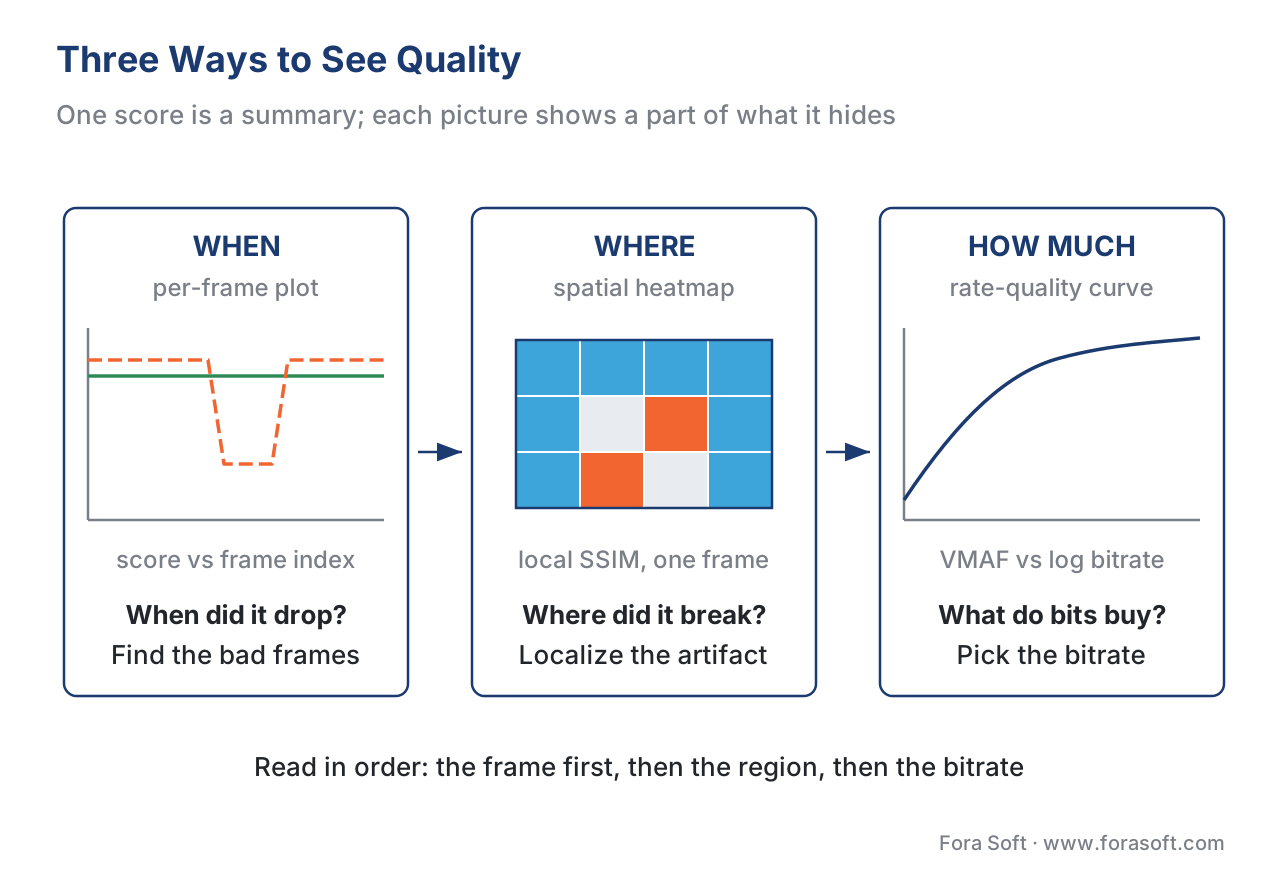 Figure 1. The three views answer different questions. Per-frame plot: when did quality drop? Spatial heatmap: where in the frame did it break? Rate-quality curve: how much quality does each extra bit buy? None replaces the others.
| View | Question it answers | Axes / form | Built from | What it can hide |
|---|---|---|---|---|
| Per-frame plot | When did quality drop? | Score (y) vs frame index (x) | Per-frame scores | Where inside each frame the damage is |
| Spatial heatmap | Where in the frame broke? | Color over one frame | A local metric map (e.g. SSIM windows) | When in time the drop happened |
| Rate-quality curve | How much quality per bit? | Quality (y) vs bitrate (log x) | One summary score per encode | All per-frame and per-region detail |
Table 1. The three views and what each one hides. Each picture is a deliberate projection that throws away one axis — time, space, or both — so reading only one leaves a blind spot the others cover.
A word on what these pictures are made of. Every full-reference metric — one that needs the pristine original to compare against — produces a score for every frame before anything averages them. That per-frame stream is the raw material for the first two pictures; the rate-quality curve is built from one summary score per encode across several encodes. So before any visualization, you need the per-frame numbers, and the tool you almost certainly already have produces them.
The per-frame plot: quality over time (the "when")
The per-frame plot is the most useful and most neglected picture in video quality. Time (or frame index) runs along the x-axis; the score runs up the y-axis. A flat line near the top is a clean encode. A line that plunges for a stretch and recovers is a clip that regressed for exactly those frames — almost always a hard-to-encode shot the encoder could not afford at the chosen bitrate.
Here is why the plot matters more than the average it summarizes. Take a 300-frame clip and two encodes with an identical arithmetic-mean VMAF of 94.8. Encode B holds a steady 94.8 across the whole clip. Encode A spends 270 frames at VMAF 97 and then collapses to VMAF 75 for a 30-frame action shot. The means are the same, but the experiences are not — Encode A visibly falls apart for one second, and the viewer remembers that second. The average is blind to it; the per-frame plot shows it immediately as a 30-frame canyon.
This is the single most common way a quality number deceives, and the open VMAF documentation says so plainly: averaging frame scores over a sequence "may hide the impact of difficult-to-encode frames" if those frames are infrequent (Netflix VMAF FAQ, 2026). Twitter's engineers measured the same effect at scale — an encode whose average VMAF was 97.7 still had a meaningful population of low-percentile frames worth fixing first (Twitter Engineering, 2020). The picture is what exposes the gap between the comfortable average and the frames a viewer actually notices.
Two summaries make the plot quantitative without throwing away the worst frames. The first is the harmonic mean, which weighs low scores more heavily than the ordinary average. For Encode A above, the harmonic mean is the frame count divided by the sum of reciprocals:
HM = n / Σ(1/score_i)
   = 300 / ( 270 × (1/97) + 30 × (1/75) )
   = 300 / ( 2.7835 + 0.4000 )
   = 300 / 3.1835
   = 94.24
The harmonic mean of 94.24 sits below the arithmetic mean of 94.8 — a small pull, because 30 bad frames out of 300 is still a minority. The second summary is blunter and more revealing: the 5th percentile, the score of the worst 5% of frames. For Encode A that is 75; for the flat Encode B it is about 94. The arithmetic means differ by zero, but the 5th percentiles differ by nineteen points — and that nineteen-point gap is the thing the viewer sees. Reading the worst frames rather than the mean is the whole subject of pooling per-frame scores into one number; the plot is its visual companion.
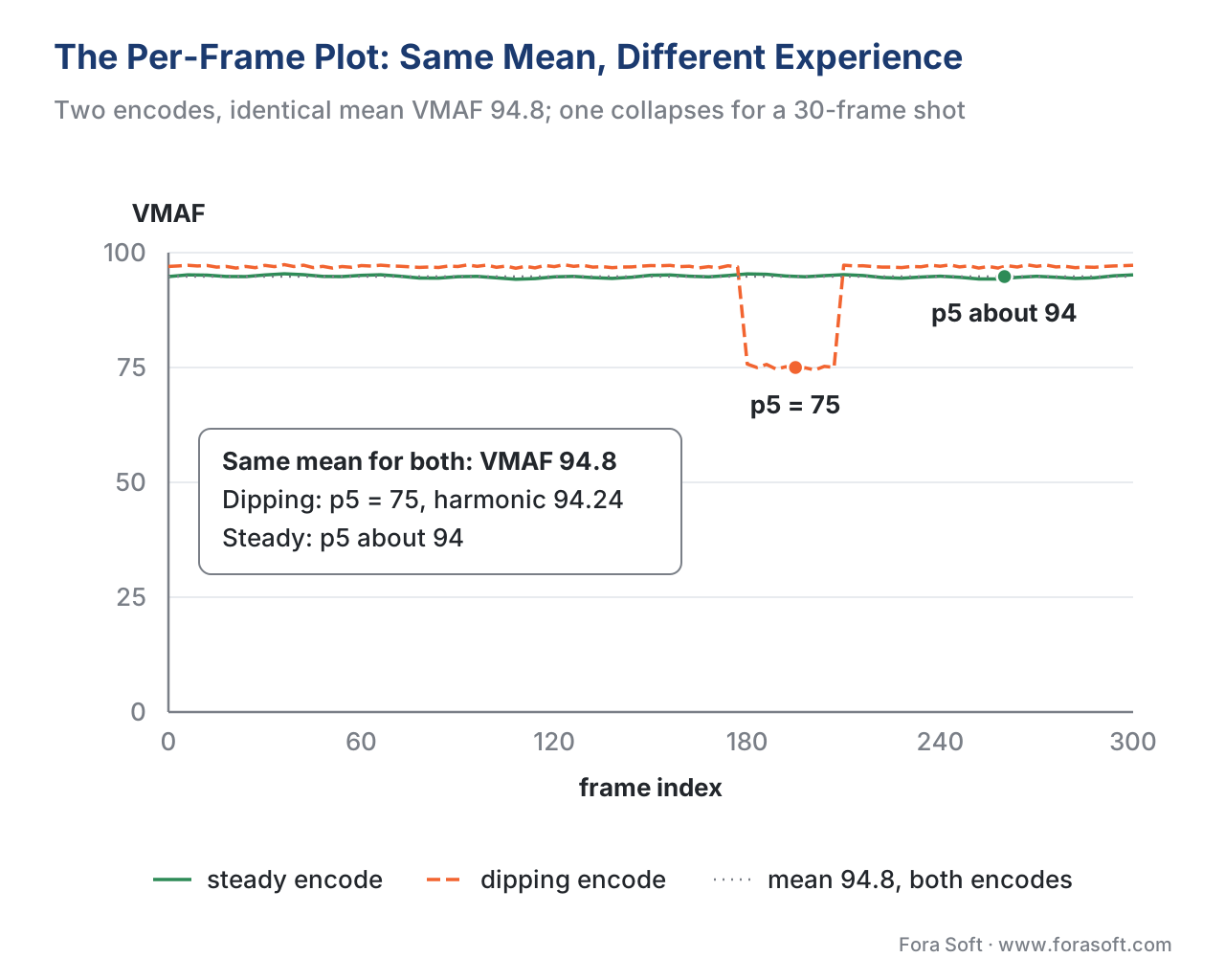 Figure 2. Two encodes, identical arithmetic-mean VMAF of 94.8. The flat encode (green) is fine; the dipping encode (orange) collapses to VMAF 75 for one action shot. The mean line hides the canyon; the 5th-percentile marker exposes it.
To produce the data behind this plot you do not need a new tool. The libvmaf filter in FFmpeg writes a per-frame log when you set log_path and log_fmt, where the format is one of json, csv, xml, or sub, with one row per frame (Netflix VMAF, Using VMAF with FFmpeg, 2026). A minimal invocation looks like this:
# Per-frame VMAF (+ PSNR and SSIM) to a JSON log, one record per frame.
ffmpeg -i distorted.mp4 -i reference.mp4 \
  -lavfi "libvmaf=feature=name=psnr|name=float_ssim:log_fmt=json:log_path=frames.json" \
  -f null -
The exact command, the alignment and scaling rules, and the model-selection pitfalls belong to measuring quality with FFmpeg and libvmaf; the general FFmpeg mechanics live in the Video Encoding section's FFmpeg cheat sheet. Here the point is only that the per-frame JSON the plot needs falls out of the measurement you already run.
The spatial heatmap: where quality broke (the "where")
The per-frame plot tells you which frame regressed. It says nothing about where in that frame the damage is. For that you need the second picture: a spatial heatmap that colors a single frame by local quality, so a blocky sky reads as a hot patch while a clean face stays cool.
The heatmap is possible because some metrics are computed locally before they are pooled into a frame score. SSIM, the structural-similarity metric, is the clearest case: it is calculated over small overlapping windows across the frame and only then averaged, so the intermediate per-window values form a quality map you can render directly (Wang, Bovik, Sheikh & Simoncelli, IEEE Transactions on Image Processing, 2004). Render that map as color over the frame and the metric stops being a number and becomes a diagnosis: the low-scoring blob sits exactly on the region that broke.
Reading the map is a skill worth naming. A dark, low-scoring blob in a detailed region usually means aggressive blur or compression noise — the encoder ran out of bits for texture. A low-scoring band along the top and bottom edges often is not a quality problem at all but a misaligned comparison: a letterbox or an aspect-ratio mismatch between reference and distorted, which makes the metric compare black bars against picture. That distinction matters, because one finding sends you to the encoder and the other sends you to your measurement setup. Dedicated tools surface these maps — the Video Quality Measurement Tool (VQMT) renders per-pixel metric maps, and research predictors such as ColorVideoVDP overlay a per-pixel distortion heatmap on the frame (VQMT project; Mantiuk et al., 2024). Where these tools sit relative to FFmpeg is the subject of VQMT and other dedicated quality tools.
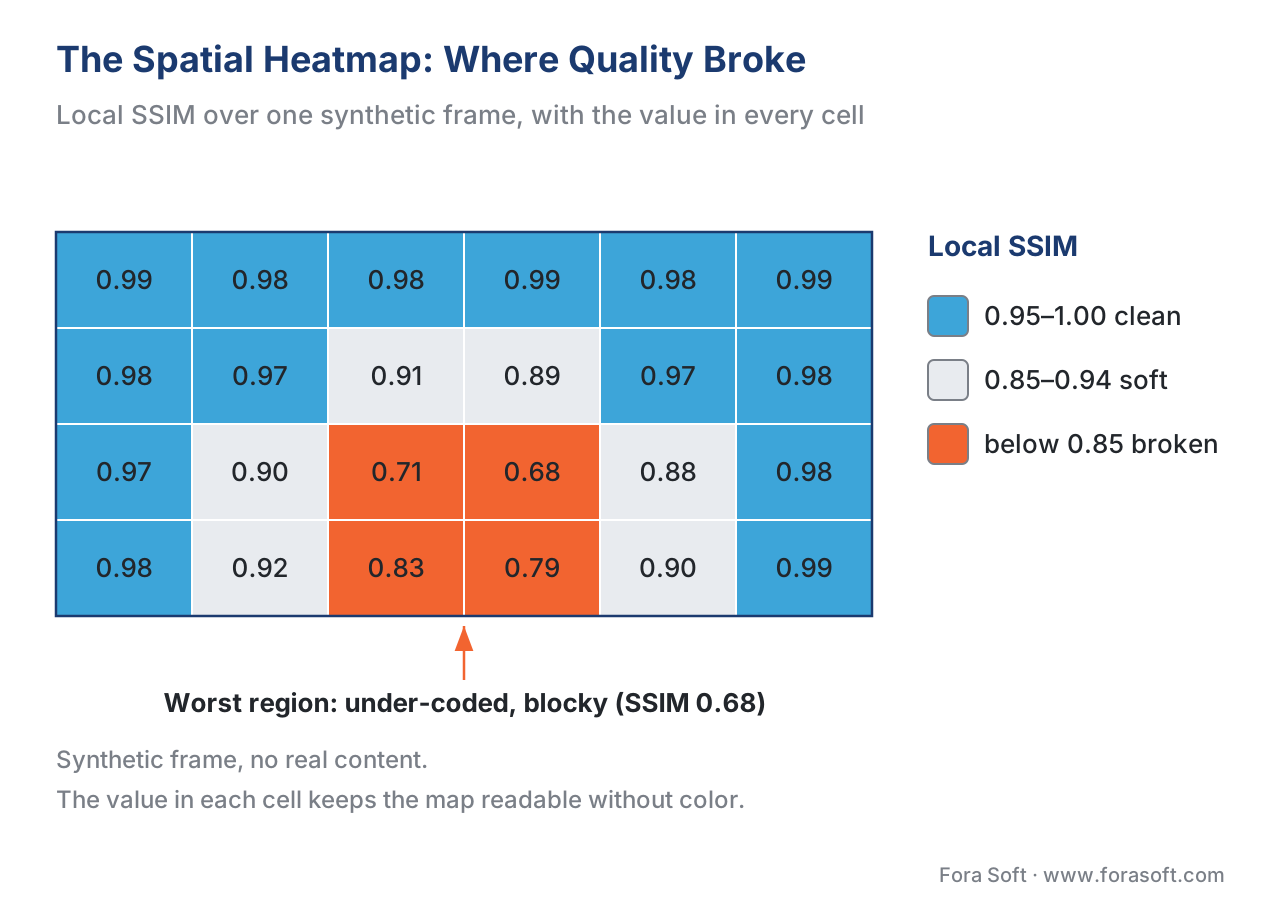 Figure 3. A spatial quality heatmap over a synthetic frame. Warm cells mark low local SSIM — here a blocky, under-coded region; cool cells are near-perfect. A labeled color scale is mandatory: without it, the colors mean nothing.
Once the heatmap has localized the damage, naming the artifact is the next step, and that vocabulary — blocking on the transform grid, banding in gradients, ringing around edges — lives in the compression artifact field guide. The heatmap points; the artifact gallery names. One firm rule for the picture itself: color must never be the only thing carrying meaning. Pair the scale with numbers, label the worst region, and choose a scale that survives a grayscale print, because a reader who cannot distinguish your red from your green gets nothing from a color-only map.
The rate-quality curve: how much quality for how many bits (the "how much")
The third picture steps back from a single encode and asks the question every encoding decision turns on: for this content, how much quality does each additional bit actually buy? The rate-quality curve — the perceptual cousin of the classic rate-distortion curve — answers it. Bitrate runs along the x-axis, almost always on a logarithmic scale; the quality score (VMAF 0–100, or SSIM 0–1) runs up the y-axis. Each point is one encode of the same content at a different bitrate, and the points trace a curve.
The shape is the lesson. Rate-quality curves are convex and flatten as they climb: a small bitrate increase down in the low range buys a large quality jump, while the same increase up in the high range buys almost nothing (the diminishing-returns property of rate-distortion, well established in the coding literature). Walk a concrete curve. Going from 1.0 to 2.0 Mbps might lift VMAF from 80 to 92 — twelve points for one megabit. Going from 4.0 to 5.0 Mbps on the same content might lift VMAF from 97 to 98 — one point for the same megabit. Identical spend, twelve times the return at the bottom. The knee of the curve, where it bends from steep to flat, is where a sensible operating point sits: far enough up that quality is good, not so far that you are paying for points no viewer will notice. That "no viewer will notice" threshold has a name, the just-noticeable difference (JND), and a good bitrate ladder spaces its rungs about one JND apart.
The logarithmic x-axis is not decoration. Bitrate spans orders of magnitude — 300 kbps to 8 Mbps in a single ladder — and on a linear axis the low-bitrate rungs, where quality is decided, would crush into the left margin while the high-bitrate rungs sprawl across the page. A log axis spaces the rungs evenly and makes the curve's shape readable. Label it as logarithmic, always, because a viewer who assumes a linear axis will badly misjudge the spacing.
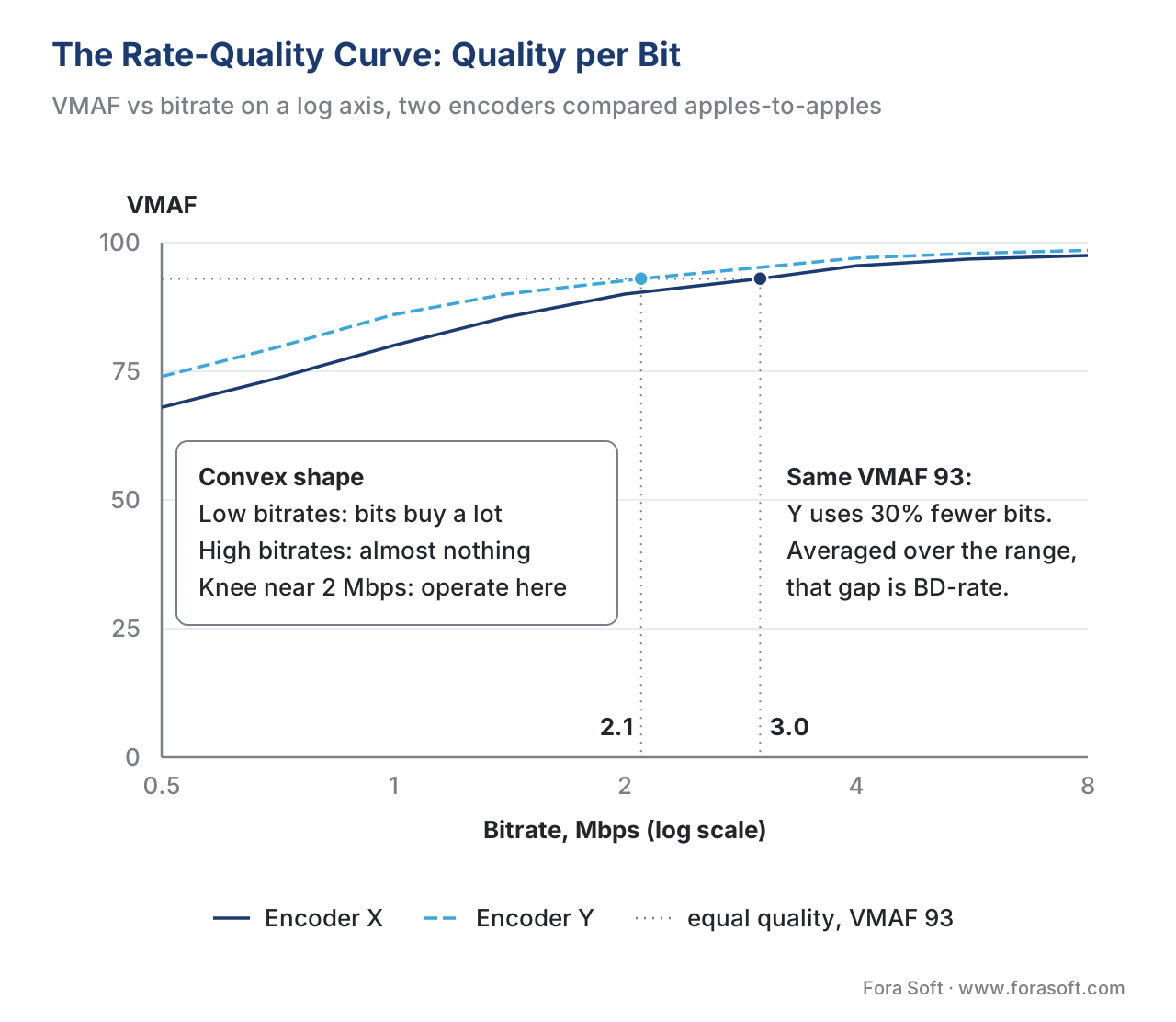 Figure 4. A rate-quality curve. Bitrate (log scale) on the x-axis, VMAF on the y-axis. The convex shape shows diminishing returns; the knee marks a sensible operating point. Two encoders are compared apples-to-apples — same content, resolution, reference, and model.
One discipline governs every rate-quality comparison: apples-to-apples or nothing. Two curves can be compared only if they were measured on the same content, at the same resolution, against the same reference, with the same metric, the same model, and the same pooling. Change any one and the curves are no longer about the encoder — they are about your inconsistent setup. This is the same constraint that governs a quality gate and a benchmark, and it is the reason our benchmark methodology stamps every published curve with its full provenance.
From curves to decisions: the convex hull and BD-rate
Two of this section's most-cited tools are just rate-quality curves read a particular way.
The convex hull appears when you plot a rate-quality curve for each resolution of the same content on one chart. At low bitrates a lower resolution looks better, because the encoder can spend its few bits on a smaller frame; at high bitrates a higher resolution wins. The curves cross. The upper envelope across all of them — the convex hull — is the set of resolution-and-bitrate points that are never beaten, and it is the backbone of a per-title bitrate ladder. The full treatment, including why every lower-resolution encode must be upscaled to the source before scoring, is in the convex hull and bitrate-resolution selection. The picture there is a rate-quality plot; the decision is which point to keep.
The Bjontegaard Delta rate (BD-rate) is the number you get by comparing two rate-quality curves. Proposed by Gisle Bjontegaard in 2001, it reports the average difference in bitrate between two encoders at equal quality, computed as the area between their curves over a shared quality range (Bjontegaard, VCEG-M33, 2001). The intuition is readable straight off the chart: if at a target VMAF of 93 encoder X needs 3.0 Mbps and encoder Y needs 2.1 Mbps, encoder Y delivers the same quality for 30% fewer bits at that point, and BD-rate averages that saving across the whole range. A negative BD-rate means the new encoder is more efficient. The critical thing to keep straight: BD-rate is a bitrate saving at matched quality, not a quality score. It does not say one encoder "looks better"; it says one encoder reaches the same quality for fewer bits. The worked arithmetic, with our own measured numbers, is in BD-rate explained with our numbers.
There is a fourth picture worth a mention, because streaming quality is not only about the encode. A QoE timeline plots playback events — startup time, rebuffering stalls, bitrate switches — along the wall-clock of a session, turning delivery quality into something as readable as a per-frame plot turns encode quality. That picture belongs to the delivery side and is covered in streaming QoE metrics; this article stays with the quality of the pixels themselves.
Building the plots: from metric output to picture
None of these pictures needs a heavy toolchain. The per-frame JSON or CSV from libvmaf is enough to draw the first two, and a handful of summary points is enough for the third. The ecosystem offers three levels of effort.
At the lightest, a small script reads the per-frame log and emits a plot — vmaf-plot does exactly this for libvmaf JSON, and the quality plot renderer shipped with this article does it with no third-party dependencies, producing the per-frame line plot, the heatmap strip, and the rate-quality curve as clean SVG. At the middle, a wrapper such as ffmpeg-quality-metrics runs PSNR, SSIM, and VMAF in one pass and hands back tidy per-frame JSON and CSV ready to feed a plotter (Robitza, ffmpeg-quality-metrics, 2026). At the heaviest, a graphical tool does the measuring and the charting together: FFMetrics builds interactive per-frame graphs for PSNR, SSIM, VMAF, and XPSNR, lets you zoom into the curve, export it as SVG or PNG, and even extract the worst frames as images for inspection (FFMetrics, v1.7.0, 2026); VQMT adds the per-pixel spatial maps. Where each of these sits in the wider landscape is mapped in the video-quality tooling landscape.
Whatever draws the picture, the discipline is the same one that governs the numbers. Plot the worst-frame summaries beside the mean, label the axes with units and scale, and keep the comparison apples-to-apples. A chart inherits the honesty of the measurement behind it — and, as the next section shows, it can also lose that honesty in a few careless strokes.
A common mistake: the chart that lies
The fastest way to mislead a room is a quality chart with a dishonest axis, and it usually happens without intent. The most frequent offender is the truncated y-axis: plot VMAF from 90 to 100 instead of 0 to 100 and a one-point difference balloons into a cliff, making two near-identical encodes look worlds apart. The second is the linear bitrate axis, which crushes the low-bitrate rungs — exactly where quality is decided — into an unreadable sliver. The third is comparing curves that are not apples-to-apples: two encoders measured at different resolutions, or with different VMAF models, drawn on one chart as if the gap between them meant something. The fourth is the color-only heatmap, unreadable to a colorblind engineer or on a grayscale print. The fifth is the quietest: a mean-only plot that omits the worst-frame summaries, reproducing on the chart the very blindness the chart was supposed to cure. Each of these is fixable in one stroke — full-range y-axis, log bitrate axis, one resolution and model per comparison, a labeled scale plus shape, and the percentile lines drawn alongside the mean. A chart that follows those five rules is hard to lie with.
Free download: Quality plot rendererA dependency-free Python script that turns your libvmaf per-frame log and a handful of summary points into the three pictures from this article — the per-frame plot with worst-frame markers, a heatmap strip and a rate-quality curve on a log axis — as clean SVG.Where Fora Soft fits in
Fora Soft has built video streaming, OTT, conferencing, e-learning, surveillance, and telemedicine systems since 2005, and on every product with its own encoding pipeline the visualizations described here are how we turn a wall of metric output into a decision. We wire the per-frame plot and the worst-frame summaries into the same report a quality gate produces, so a regression shows up as a labeled dip an engineer can click rather than a number in a log; we use spatial heatmaps to localize an artifact to a region before tracing it to a cause; and we read rate-quality curves and their convex hull to set a bitrate ladder that spends bits where viewers notice. Where a project needs the curves behind a specific codec-and-content decision, our measured benchmarks (see our benchmark methodology) supply them with full provenance. The aim is plain: a picture that makes the right call obvious and the wrong call hard to defend.



The handbook
Fora Soft Video Engineering Handbook
We wrote a seven-volume handbook that works through the whole video stack — encoding, delivery, audio and AI — across more than 9,000 pages, so an engineer who reads it can design and build the pipeline behind every chart in this article. Start with Volume 1: rate-distortion theory, PSNR, SSIM and VMAF from the inside, and the encoder decisions a rate-quality curve and its convex hull are drawn to make. Volume 3 turns those curves into a bitrate ladder, ABR logic and QoE monitoring, and Volume 6 covers the learned models behind perceptual scores and per-pixel quality maps. Written by Nikolay Sapunov, CEO at Fora Soft.
Can your team see which two seconds regressed, or only that the average moved?
Send us a clip and the metric output you already have, and we will come back with the three pictures your quality reviews are missing: a per-frame plot with worst-frame markers, a heatmap that points at the region, and a rate-quality curve with its knee marked for your ladder. 250+ video products shipped since 2005.
See our case studies
Case study
Speed.Space
Remote content production for Netflix, Electronic Arts and HBO shoots, recording locally at 1080p / 8 Mbps so the network cannot cut a dip into the footage — the kind of promise a per-frame plot checks shot by shot, not on average.
Case study
TradeCaster
Live desktop streaming for 46,000+ traders, where the picture is charts, tickers and small text — screen content that breaks at the edges of a price line first, exactly where a spatial heatmap points before a viewer complains.
Case study
Worldcast Live
Concert streaming at 0.4–0.5 s latency for 10,000 simultaneous viewers, with quality that steps down on a weak connection — every step a point on a rate-quality curve, and the knee decides where the rungs belong.
What to read next
Objective metrics
Video Quality Pooling: Per-Frame to One Number
The math behind the worst-frame markers in Figure 2: harmonic mean, percentiles and why the average hides a dip.
Encoding decisions
Convex Hull Encoding: Optimal Bitrate-Resolution
One rate-quality curve per resolution on a single chart, and the upper envelope that becomes your bitrate ladder.
Our benchmarks
BD-Rate Explained: Bitrate Saving at Equal Quality
The gap between two curves in Figure 4 turned into one number, worked through with our own measurements.
Artifacts
Video Compression Artifacts: The Visual Field Guide
The heatmap points at a region; this guide names what went wrong there: blocking, banding, ringing, blur.
References
- Netflix / VMAF project. "VMAF FAQ" (
resource/doc/faq.md). Accessed 2026-06-26. Tier 1 (metric-author primary). States that averaging per-frame VMAF over a sequence may hide the impact of infrequent difficult-to-encode frames, that optimal temporal pooling is an open problem, and documents the--pooloptions (mean, harmonic_mean, median, min, perc5, perc10, perc20). Basis for the worst-frame argument and the harmonic-mean/percentile summaries. https://github.com/Netflix/vmaf/blob/master/resource/doc/faq.md - Netflix / VMAF project. "Using VMAF with FFmpeg" (
resource/doc/ffmpeg.md). Accessed 2026-06-26. Tier 1 (metric-author primary). The libvmaf filter, thelog_path/log_fmtoptions (json, csv, xml, sub) that emit one row per frame, and the additionalpsnr/ssimfeatures. Basis for the per-frame data-extraction command. https://github.com/Netflix/vmaf/blob/master/resource/doc/ffmpeg.md - Wang, Z., Bovik, A. C., Sheikh, H. R., & Simoncelli, E. P. "Image Quality Assessment: From Error Visibility to Structural Similarity." IEEE Transactions on Image Processing, 13(4), 2004. Tier 1 (metric-author primary). SSIM is computed over local overlapping windows and pooled to a frame score; the intermediate map is the basis for the spatial heatmap. Basis for the per-pixel quality-map section. https://www.cns.nyu.edu/pub/eero/wang03-reprint.pdf
- Bjontegaard, G. "Calculation of average PSNR differences between RD-curves." ITU-T SG16 VCEG, document VCEG-M33, Austin, 2001. Tier 1 (metric-author primary). Defines BD-rate as the average bitrate difference between two rate-distortion curves at equal quality, computed as the area between curves via polynomial interpolation. Basis for the BD-rate framing and the "saving, not a score" rule. https://www.itu.int/wftp3/av-arch/video-site/0104_Aus/VCEG-M33.doc
- Twitter Engineering. "Introducing VMAF percentiles for video quality measurements." 2020. Tier 4 (credible deployer). An encode averaging VMAF 97.7 still carries low-percentile frames worth fixing first; percentile (centile) plots expose the worst frames the mean hides; the VMAF Centile Plot and its relation to rate-distortion plots. Basis for the per-frame "mean hides bad frames" evidence and the percentile-plot idea. https://blog.x.com/engineering/en_us/topics/infrastructure/2020/introducing-vmaf-percentiles-for-video-quality-measurements
- Mantiuk, R. K., et al. "ColorVideoVDP: A visual difference predictor for image, video and display distortions." 2024. Tier 5 (peer-reviewed/institutional). A perceptual difference predictor that overlays a per-pixel distortion heatmap on the frame to localize where quality is lost. Basis for the spatial-heatmap tooling beyond per-pixel SSIM. https://arxiv.org/pdf/2401.11485
- Robitza, W. (slhck). "ffmpeg-quality-metrics." GitHub / PyPI, accessed 2026-06-26. Tier 3 (first-party tooling). Runs PSNR, SSIM, VMAF, and VIF in one FFmpeg pass and emits per-frame and aggregate JSON/CSV ready to plot. Basis for the mid-effort plotting path. https://github.com/slhck/ffmpeg-quality-metrics
- fifonik. "FFMetrics" (v1.7.0, 2026-05-06). GitHub, accessed 2026-06-26. Tier 6 (expert practitioner). A FFmpeg GUI that builds interactive per-frame graphs for PSNR/SSIM/VMAF/XPSNR, supports zoom/pan, SVG/PNG export, per-frame CSV, mean vs harmonic-mean pooling, and extraction of the worst frames as images. Basis for the heavy-effort GUI path. https://github.com/fifonik/FFMetrics
- rolinh. "VQMT: Video Quality Measurement Tool." GitHub, accessed 2026-06-26. Tier 3 (first-party tooling). Fast implementations of PSNR, SSIM, MS-SSIM, VIFp, PSNR-HVS, and PSNR-HVS-M, with visualization of per-pixel metric maps. Basis for the dedicated spatial-heatmap tool reference. https://github.com/rolinh/VQMT
- Recommendation ITU-R BT.500-15. "Methodologies for the subjective assessment of the quality of television pictures." International Telecommunication Union, 2023. Tier 1 (official standard). The subjective ground truth every objective score plotted here is a proxy for; the reason a picture is read as evidence about perception, not as perception itself. https://www.itu.int/rec/R-REC-BT.500
