


Why this matters
You can pick the right metric and still pick the wrong tool to compute it, and the wrong tool wastes weeks. This article is for the engineer standing at the start of that decision: a streaming or encoding lead choosing how to measure quality, a QA engineer wiring a check into a pipeline, or a technical product owner weighing whether to script it or buy a product. The catalogue of options is genuinely confusing — open-source command-line filters, paid desktop applications, cloud QC services, and browser dashboards all claim to "measure video quality," but they answer different questions and run in different places. Get the map right and you reach for the correct tool on the first try instead of the third. Get it wrong and you compute a full-reference metric on a live stream that has no reference, or pay for a suite to do what one FFmpeg command already does.
A tool is not a metric, and a suite is not a tool
Start with three words that get used interchangeably and should not be. A metric is the number — the formula that estimates quality, like the pixel-error measure called PSNR or the perceptual measure called VMAF. A tool is the program that computes that number and hands it to you. A suite is a packaged product that wraps one or more tools with a user interface, a database, reporting, and support. The metric is the math; the tool is the engine; the suite is the car built around the engine.
This matters because the same metric can come out of very different tools, and the tool decides almost everything about your day — how fast it runs, whether it has a graphical interface, whether it scales to a catalog, and what it costs. VMAF, the perceptual metric Netflix open-sourced, is computed identically by the vmaf command-line tool, by FFmpeg's libvmaf filter, and inside the paid MSU VQMT application. The number should agree; the experience of getting it does not. So the landscape below organizes tools by what they do and where they run, not by which metric they happen to print.
The first question: do you have the original?
Before anything else, answer one question, because it eliminates half the catalogue. A full-reference tool needs the pristine original — the master file — to compare the encode against, the way a proofreader needs the author's manuscript to catch every typo. A no-reference tool scores a video on its own, with no original in hand, the way an editor judges whether a page reads well without ever seeing the first draft. (There is a middle setup, reduced-reference, that ships a few compact features of the original instead of the whole file; it is rare in practice and covered in full-, reduced-, and no-reference metrics.)
The reason this comes first: your situation often makes the choice for you. If you encode a movie from a studio master, you have the original, so full-reference tools apply and they are more accurate. If you monitor a live stream or score user-generated uploads, there is no pristine master at the player, so a full-reference tool simply cannot run — you need a no-reference tool (no-reference quality for live and UGC covers that hard case). Reaching for VMAF on a live channel is the single most common tooling mistake, and it is impossible by definition, not merely inadvisable.
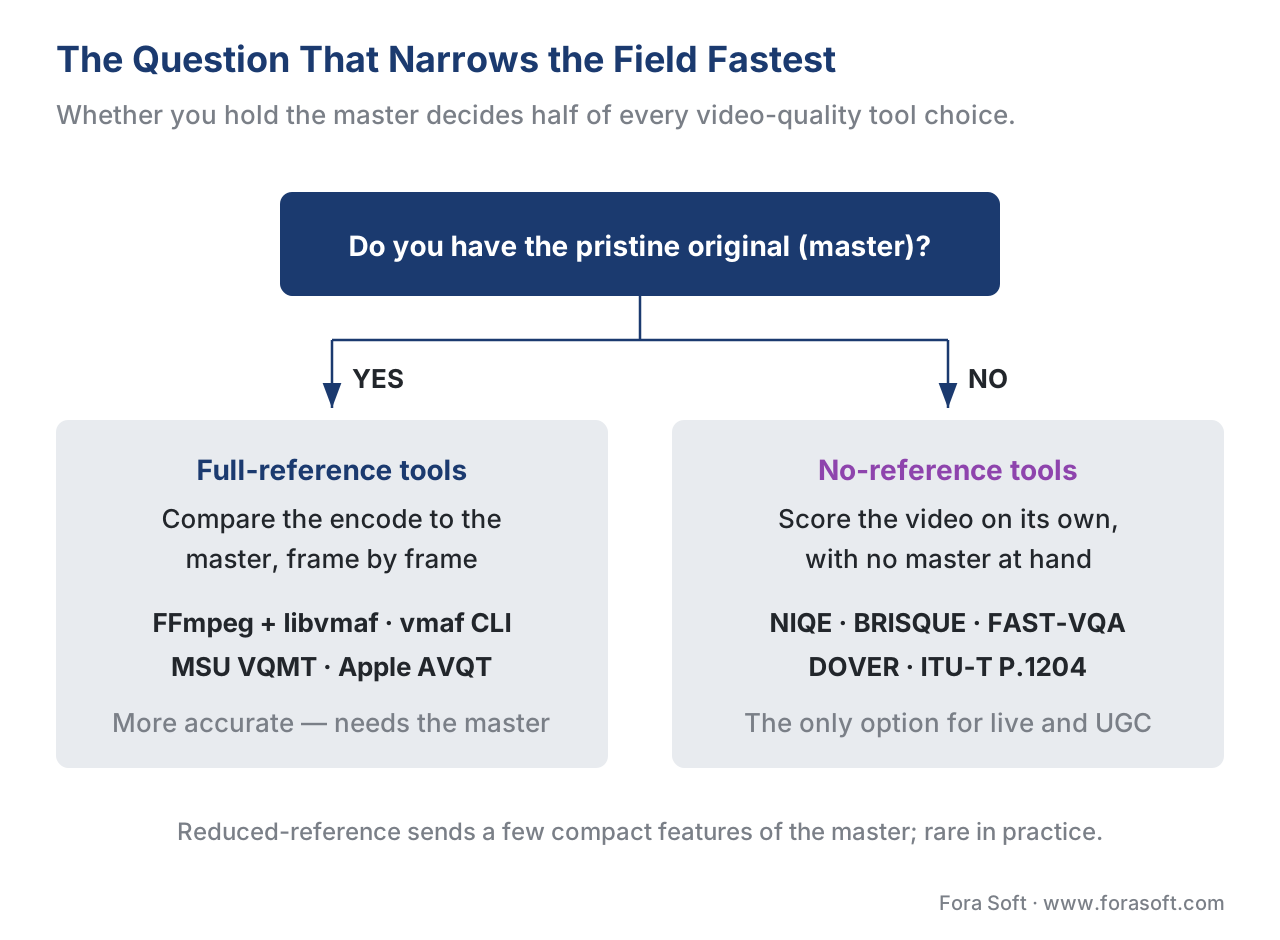 Figure 1. The question that narrows the field fastest. Having the master file routes you to accurate full-reference tools; a live stream or a user upload has no master at the player, so only no-reference tools can run.
The four families of video-quality tools
With that question answered, the whole landscape sorts into four families. The first two compute a picture-quality number; the third bundles that into a broadcast-grade product; the fourth measures something different — the delivered experience, not the picture.
Family 1 — Full-reference metric engines. These are the workhorses, and most are free. FFmpeg with the libvmaf library is the default: it computes PSNR, SSIM, MS-SSIM, and VMAF from one command, ships in the standard FFmpeg build (version 8.1 "Hoare", March 2026, configured with --enable-libvmaf), and is the tool the rest of the industry assumes you are using. Netflix's own vmaf command-line tool is the reference implementation of VMAF and also prints PSNR, SSIM, and MS-SSIM (libvmaf v3.1.0, April 2026). MSU VQMT is a dedicated application that computes around two dozen metrics with GPU acceleration and per-frame visualization. Apple AVQT is a macOS command-line tool that returns a single perceptual score on a 1-to-5 scale. The FFmpeg-and-libvmaf workflow and VQMT and dedicated tools get their own articles.
Family 2 — No-reference (blind) tools. When there is no original, you need a tool that judges the video alone. The classic open-source options come from natural-scene-statistics research: NIQE and BRISQUE score how far an image's statistics drift from those of clean, natural images. The modern, learned options are built for user-generated content: FAST-VQA samples small fragments of the video for speed, and DOVER scores aesthetic and technical quality separately. A parallel approach skips the pixels entirely — bitstream models in the ITU-T P.1204 series read the encoded stream's metadata to estimate quality without a reference. These live in open-source no-reference tools.
Family 3 — File-based QC suites (mostly commercial). Broadcast and streaming delivery need more than a quality score: they need to confirm the file conforms to a spec — right codec, right loudness, no black frames, valid captions — and they need a non-engineer to operate it. Products like Interra Systems BATON, Telestream (Qualify and Vidchecker), Venera Pulsar, and SSIMPLUS (from SSIMWAVE, now part of IMAX) bundle perceptual scoring with hundreds of conformance checks, a graphical interface, dashboards, and a support contract. Commercial quality suites: when to buy covers the trade-off, and the broader pipeline context is in automated quality control.
Family 4 — Production QoE / analytics stacks. These measure a different thing, and confusing them with the families above is a frequent error. Conviva, Mux Data, Bitmovin Analytics, and similar stacks instrument the player to measure the delivered session — startup time, rebuffering, bitrate switches — not the picture quality of the encode. They answer "did the viewer have a good experience?", which depends on the network as much as the encode. They belong to the streaming side and are covered in player-side quality metrics; name them here only so you do not mistake a QoE dashboard for a picture-quality tool.
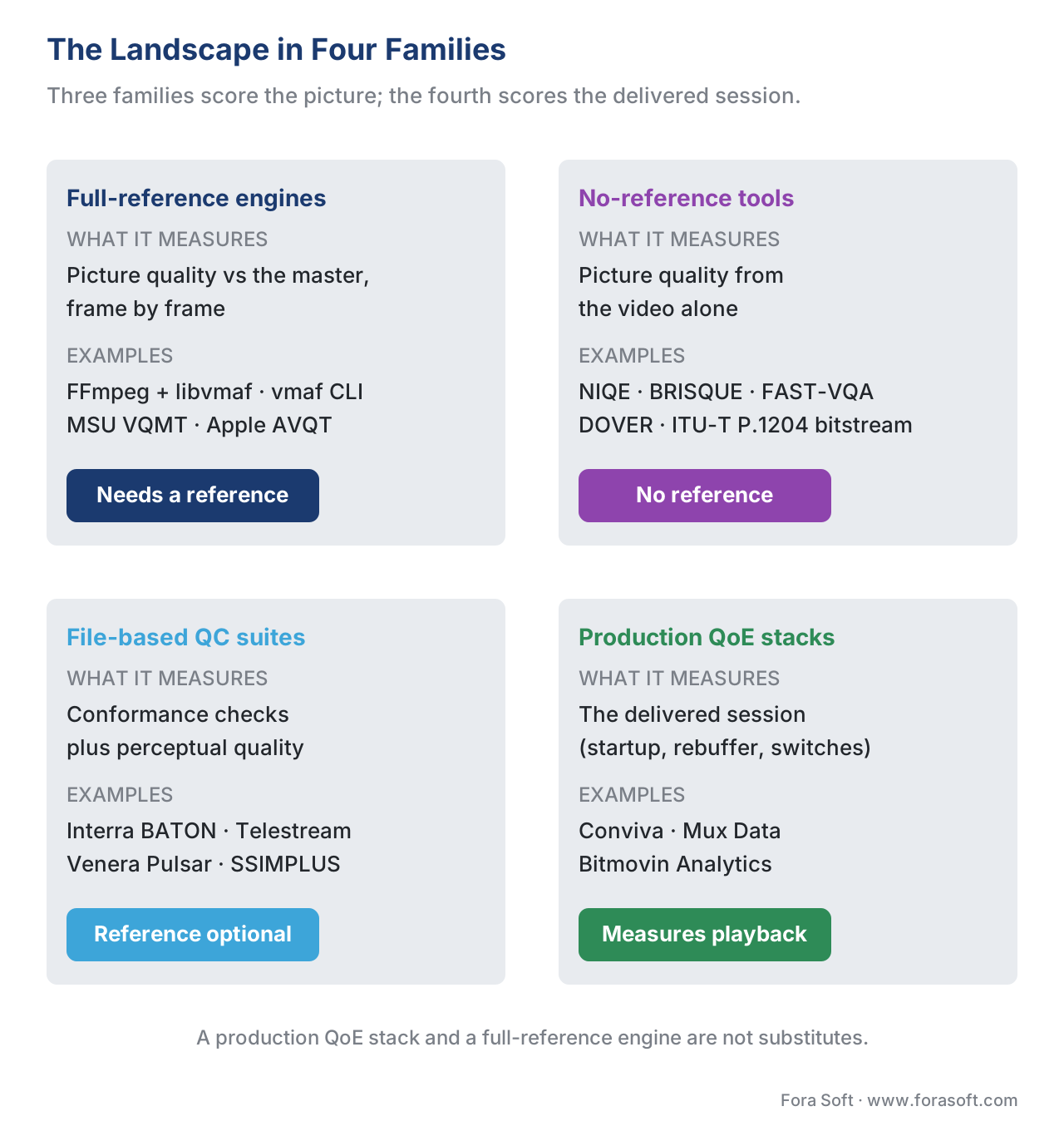 Figure 2. The landscape in four families. Full-reference engines and no-reference tools each compute a picture number; file-based QC suites wrap that in a broadcast-grade product; production analytics stacks measure the delivered session instead of the picture.
The table below is the same map in a form you can scan when you are choosing. Note the "where it lies" column — every tool family has a blind spot, and naming it is the difference between a measurement and a guess.
| Tool family | What it measures | Reference needed | Interface | Where it lies (blind spot) | Example tools |
|---|---|---|---|---|---|
| Full-reference engines | Picture quality vs the master, per frame | Yes — the original | Command line (some GUI) | Useless without a master; a high score still needs the model named | FFmpeg+libvmaf, vmaf, MSU VQMT, AVQT |
| No-reference tools | Picture quality from the video alone | No | Command line / library | Less accurate; many collapse on content unlike their training set | NIQE, BRISQUE, FAST-VQA, DOVER, P.1204 |
| File-based QC suites | Conformance + perceptual quality | Optional | GUI / SaaS | Cost and lock-in; the perceptual score is still one of the metrics above | BATON, Telestream, Pulsar, SSIMPLUS |
| Production QoE stacks | The delivered session (startup, rebuffer, switches) | No — measures playback | Dashboard / SDK | Says nothing about picture quality of the encode | Conviva, Mux, Bitmovin |
Table 1. The four families side by side. The first column is the question each family answers; the "where it lies" column is the blind spot to keep in mind. A production QoE stack and a full-reference engine are not substitutes — they measure different things.
The other two axes: open-source vs commercial, command-line vs GUI
Two more distinctions cut across the four families and shape day-to-day use. The first is open-source versus commercial. The open-source tools — FFmpeg, libvmaf, the vmaf tool, the no-reference research code — are free, scriptable, and auditable, and they are what most engineering teams build on. The commercial tools cost money and add the things open source does not give you for free: a polished interface, vendor support, service-level guarantees, and turnkey scale. You are not paying for better math; the VMAF inside a paid suite is the same VMAF. You are paying for the wrapper, the support, and the time you do not spend building them.
The second axis is command-line versus graphical. Command-line tools (FFmpeg, vmaf) are built to be scripted into a pipeline and run unattended on a server — exactly what you want for quality gates in CI/CD. Graphical tools (MSU VQMT, the free FFMetrics front-end, the commercial suites) are built for a human to drive interactively, inspect a per-frame quality plot, and find the exact frame where quality dropped. Most serious workflows use both: a command-line tool for the automated gate, and a graphical tool when a human needs to look at why a clip failed. Turning per-frame numbers into pictures is its own discipline, covered in visualizing quality.
The current state: VMAF v1 changes the ground under the tools
One development from this month matters for every tool in Family 1. On 20 June 2026, Netflix open-sourced VMAF v1, the first major revision of its perceptual metric since the original (now called v0) (Netflix Technology Blog, 2026). It is more than a tune-up. VMAF v1 adds sensitivity to blockiness, finally detects banding by folding in the CAMBI banding index, scores chroma artifacts that v0 ignored, and replaces the old phone-model workaround with a single model adjusted by viewing distance — with separate 1080p, phone, and two 4K variants. It also runs faster, having dropped the expensive VIF feature, and its scores are calibrated to stay close to v0's so the familiar numbers keep their meaning.
For tool choice the lesson is concrete: the tool now has a metric version, and you must name it. A VMAF 93 from v0 and a VMAF 93 from v1 are not guaranteed to be the same judgment of the same clip, especially on content with banding or chroma artifacts. Any quality gate, any benchmark, any regression baseline you keep must record which VMAF version and which model produced it — exactly the discipline in VMAF in depth. A tool upgrade that silently moves you from v0 to v1 will shift your scores, and a baseline that does not record the version will read that shift as a quality regression that never happened.
A worked example: build with FFmpeg or buy a suite?
The most common real decision in this landscape is build versus buy, and a little arithmetic settles most cases. Take the build path first. Suppose you encode 200 clips a day and want a VMAF score on each, offline, against the master you already hold. FFmpeg with libvmaf is free; the only cost is compute time. A 10-minute 1080p clip at 30 frames per second is 18,000 frames. If your machine computes VMAF at roughly 150 frames per second — a conservative single-machine figure for the 1080p model — that clip takes:
18,000 frames ÷ 150 frames/second = 120 seconds = 2 minutes per clip
200 clips × 2 minutes = 400 minutes ≈ 6.7 machine-hours per day
That fits comfortably on a single server overnight, for the price of the hardware you already own. (The figure is illustrative; throughput swings with the model and the machine, and the VMAF-CUDA GPU path reports up to a 4.4× speedup, which would cut that 6.7 hours to about 1.5 — Netflix/NVIDIA, 2024.) At this scale, building with FFmpeg plainly wins. You would not pay for a suite to do what one command and a cron job already do.
Now change the situation, not the volume. Suppose you are monitoring a live UGC platform: no master file at the player, thousands of concurrent streams, a contractual uptime requirement, and an operations team that is not made of video engineers. None of that is an FFmpeg problem. You need no-reference scoring (no master exists), real-time monitoring at scale, dashboards your operators can read, and a vendor who answers the phone at 3 a.m. That is precisely what a commercial suite or a managed QoE stack sells. The crossover is not really about how many assets — it is about whether you have a reference, whether it is live, who operates the tool, and whether you need compliance and support. Volume alone rarely justifies buying; the absence of a reference, a live requirement, or a non-engineer operator usually does.
 Figure 3. Build or buy. The decision turns on whether you have a reference, whether the source is live, who operates the tool, and whether you need broadcast compliance or a support contract — not on asset volume alone.
Free download: Video-Quality Tool SelectorA dependency-free Python script that answers the question this article maps: do you have the master, is the source live, does a non-engineer operate it, do you need broadcast compliance checks, do you need a support contract — five answers, and it names the tool family to start from.Common mistake: comparing scores from two different tools as if they were one scale. A VMAF from FFmpeg's libvmaf, a VMAF from MSU VQMT, and a "quality score" from a commercial suite can all look like numbers on a screen, but they are only comparable when the metric, the model, the version, and the settings match exactly. Two tools can disagree because one upsampled the distorted video to the source resolution and the other did not, or because one ran VMAF v0 and the other v1, or because a suite reports its own proprietary score that is not VMAF at all. Pick one tool and one configuration for any comparison you will act on, record the version, and never read a bare "quality: 93" without knowing which engine and model produced it.
Where Fora Soft fits in
Fora Soft has built video software since 2005 — streaming and OTT, video conferencing, e-learning, telemedicine, and surveillance — and across those products we have used most of this landscape. For offline encode validation we reach for FFmpeg and libvmaf first, because it is free, scriptable, and the same engine everyone else cites; we add a dedicated tool like MSU VQMT when an engineer needs to see the per-frame plot and find the frame that failed. For live and user-generated systems, where no master exists at the player, we move to no-reference scoring and player-side session metrics instead. The tool we recommend to a client is the cheapest one that answers their actual question — which is usually an open-source command-line tool wired into their pipeline, and occasionally a commercial suite when live monitoring, compliance, or a non-engineer operator makes the wrapper worth paying for. Our benchmark methodology runs on exactly this open-source stack.



The handbook
Fora Soft Video Engineering Handbook
We wrote a seven-volume handbook, 9,000+ pages, that works through the whole video stack from the pixel to production — encoding, delivery, audio and AI — so the tool you pick here sits in a pipeline you can design end to end. Volume 1 is the closest to this article: compression, the quality metrics these engines compute, and how to read a PSNR, SSIM or VMAF number without fooling yourself. Volume 3 covers the delivery side a QoE stack instruments — ABR, CDNs and players — and volume 6 covers the learned models behind the no-reference tools. Written by Nikolay Sapunov, CEO at Fora Soft.
Not sure which of the four families your pipeline actually needs?
Tell us where your video comes from and who has to read the score, and we will place it on this map with you — an FFmpeg and libvmaf gate you own outright, a no-reference path for live and user-generated streams, or the one case where a paid suite earns its licence — and cost the build before you commit to it. 250+ video products shipped since 2005.
See our case studies
Case study
Speed.Space
The full-reference case. A remote production platform recording at 1080p and 8 Mbps — over 5x standard conferencing quality — on shoots for Netflix, Electronic Arts and HBO: the master is recorded locally, so every encode can be scored against it.
Case study
Mindbox
The build path in production. An RTSP to FFmpeg to HLS video management system with 50+ deployments since 2020, where the same FFmpeg that moves the video is the tool that measures it — no licence, one command in the pipeline.
Case study
WorldCast Live
The no-reference case. Concert streaming at 0.4-0.5 s latency and 1.5 Gb/s for 10,000 concurrent viewers: no master exists at the player, so blind scoring and player-side session metrics are the only things that can tell you what the audience saw.
What to read next
Dedicated tools
VQMT and Dedicated Quality Tools
When you need the per-frame plot and the frame that failed, not one number.
Suites
Commercial Quality Suites: When to Buy
The other half of the build-versus-buy call, and what the licence actually buys.
No-reference
Open-Source No-Reference Tools
What to run when there is no master: NIQE, BRISQUE, FAST-VQA, DOVER.
QoE stacks
Player-Side Quality Metrics
Family 4 in full: what the player measures that the encode never can.
References
- FFmpeg Filters Documentation —
psnr,ssim,libvmaffilters, FFmpeg Project (FFmpeg 8.1 "Hoare", released 2026-03-16; 8.1.2, 2026-06-17). Tier 3 (first-party tooling documentation). Defines the command-line filters that compute PSNR, SSIM, MS-SSIM, and VMAF, and the--enable-libvmafbuild option. Basis for the Family 1 full-reference engines and the FFmpeg-default claim. https://ffmpeg.org/ffmpeg-filters.html - VMAF — Video Multi-Method Assessment Fusion, Netflix, GitHub repository (libvmaf v3.1.0, 2026-04-02). Tier 1 (metric-author defining implementation). Documents the
vmafcommand-line tool, the libvmaf C library, the Python library, the FFmpeg filter, Docker image, and AOM CTC usage; libvmaf also implements PSNR, PSNR-HVS, SSIM, MS-SSIM, and CIEDE2000. Basis for thevmaftool description and the "same metric, different tools" point. https://github.com/Netflix/vmaf - C. G. Bampis, Z. Li, K. Swanson, N. Fons Miret, P. Madhusudanarao, "VMAF v1: Good Is Not Good Enough," Netflix Technology Blog, 2026-06-20. Tier 1 (metric-author defining work). Announces and describes VMAF v1: the AIM additive-impairments feature, CSF-based viewing-distance modeling replacing the v0 phone polynomial, CAMBI banding integration, chroma features via modified SpEED-QA, NEG enabled by default, the revised motion feature, the 1080p/phone/4K model set, removal of VIF for speed, and the v0-aligned score calibration. Basis for the "current state" section. https://medium.com/netflix-techblog/vmaf-v1-good-is-not-good-enough-60d7e4244ea8
- MSU Video Quality Measurement Tool (VQMT), MSU Video Group / videoprocessing.ai (reviewed v14.x). Tier 6 (vendor / expert-practitioner tool). A dedicated application computing ~two dozen reference and no-reference metrics (VMAF, PSNR, SSIM, MS-SSIM, VQM, NIQE, VIFp, PSNR-HVS) with CUDA/OpenCL GPU acceleration (reported up to 11.7×) and per-frame low-quality-frame visualization; free non-commercial tier plus paid Pro/Premium licenses. Basis for the dedicated-tool description. https://videoprocessing.ai/vqmt/
- Recommendation ITU-T P.1204, "Video quality assessment of streaming services over reliable transport for resolutions up to 4K," International Telecommunication Union, 2020 (P.1204.3 bitstream, P.1204.5 hybrid no-reference). Tier 1 (official standard). The bitstream/parametric model family that estimates quality with no pixel reference. Basis for the no-reference bitstream-model entry. https://www.itu.int/rec/T-REC-P.1204
- Apple, "Evaluate videos with the Advanced Video Quality Tool (AVQT)," WWDC21 / Apple Developer documentation, 2021 (updated WWDC22). Tier 3 (first-party tooling). AVQT is a macOS command-line full-reference tool returning a 1–5 perceptual score for content with compression and scaling artifacts. Basis for the AVQT entry and the full-reference classification. https://developer.apple.com/videos/play/wwdc2021/10145/
- Z. Ying et al., "Patch-VQ / FAST-VQA" and H. Wu et al., "DOVER: Disentangling Aesthetic and Technical Quality for UGC," plus A. Mittal, R. Soundararajan, A. C. Bovik, "Making a Completely Blind Image Quality Analyzer (NIQE)," IEEE SPL 2013, and A. Mittal, A. K. Moorthy, A. C. Bovik, "BRISQUE," IEEE TIP 2012. Tier 5 (peer-reviewed). The open-source no-reference image/video quality tools cited in Family 2. https://github.com/VQAssessment/DOVER
- VQEG NORM (No-Reference Metrics) project resources, Video Quality Experts Group. Tier 5 (institutional). Catalogues no-reference metric tools, datasets, and evaluation practice; orientation for the no-reference family. https://vqeg.org/projects/norm-resources/
- Interra Systems BATON (AI-powered automated media QC) and Telestream QC (Qualify, Vidchecker), product documentation, 2026 (BATON shown at NAB 2026). Tier 6 (vendor). File-based QC suites bundling conformance checks with perceptual scoring, GUI/SaaS, and support; basis for the Family 3 suite descriptions. https://www.interrasystems.com/Media-QC.php
- "Calculating Video Quality Using NVIDIA GPUs and VMAF-CUDA," NVIDIA Technical Blog, 2024 (VMAF-CUDA in VMAF 3.0 / FFmpeg 6.1). Tier 4 (credible deployer). Reports up to 4.4× VMAF throughput speedup with CUDA in FFmpeg; basis for the GPU-acceleration figure in the worked example. https://developer.nvidia.com/blog/calculating-video-quality-using-nvidia-gpus-and-vmaf-cuda/
