


Why this matters
You have met the metrics — PSNR, SSIM, and VMAF — and you can compute them. The question that stalls most teams is not what each metric is but which one to use right now, for the decision in front of them. This article is for the encoding lead choosing a codec, the QA engineer building a regression gate, the streaming engineer reporting delivered quality, and the product owner who has to trust the number on the dashboard. Pick the wrong metric and you optimize for the wrong thing — you ship an encoder that "won on PSNR" but looks worse, or you fail a release a viewer would have passed. Choosing well costs nothing extra and removes a whole class of expensive mistakes.
There is no best metric — only the best metric for a question
Start with the idea that fixes everything else. A quality metric is not a verdict on a video; it is an answer to one narrow question. PSNR — Peak Signal-to-Noise Ratio, the number that compares two frames pixel by pixel and reports their difference in decibels — answers "how much do the pixels disagree?" SSIM — the Structural Similarity Index, which compares local luminance, contrast, and structure on a 0-to-1 scale — answers "is the structure preserved?" VMAF — Video Multimethod Assessment Fusion, Netflix's 0-to-100 metric trained on human ratings — answers "how would a viewer in a known setup rate this?" Those are different questions, so the metrics are not competitors on one leaderboard. They are different instruments.
The mistake is to ask "which metric is most accurate?" as if accuracy were a single property. A bathroom scale is more accurate than a tape measure for weight and useless for length; neither is "better". The right question is "what do I need to know, and what is the cheapest instrument that tells me honestly?" Everything below is a way of answering that question for the jobs you actually face.
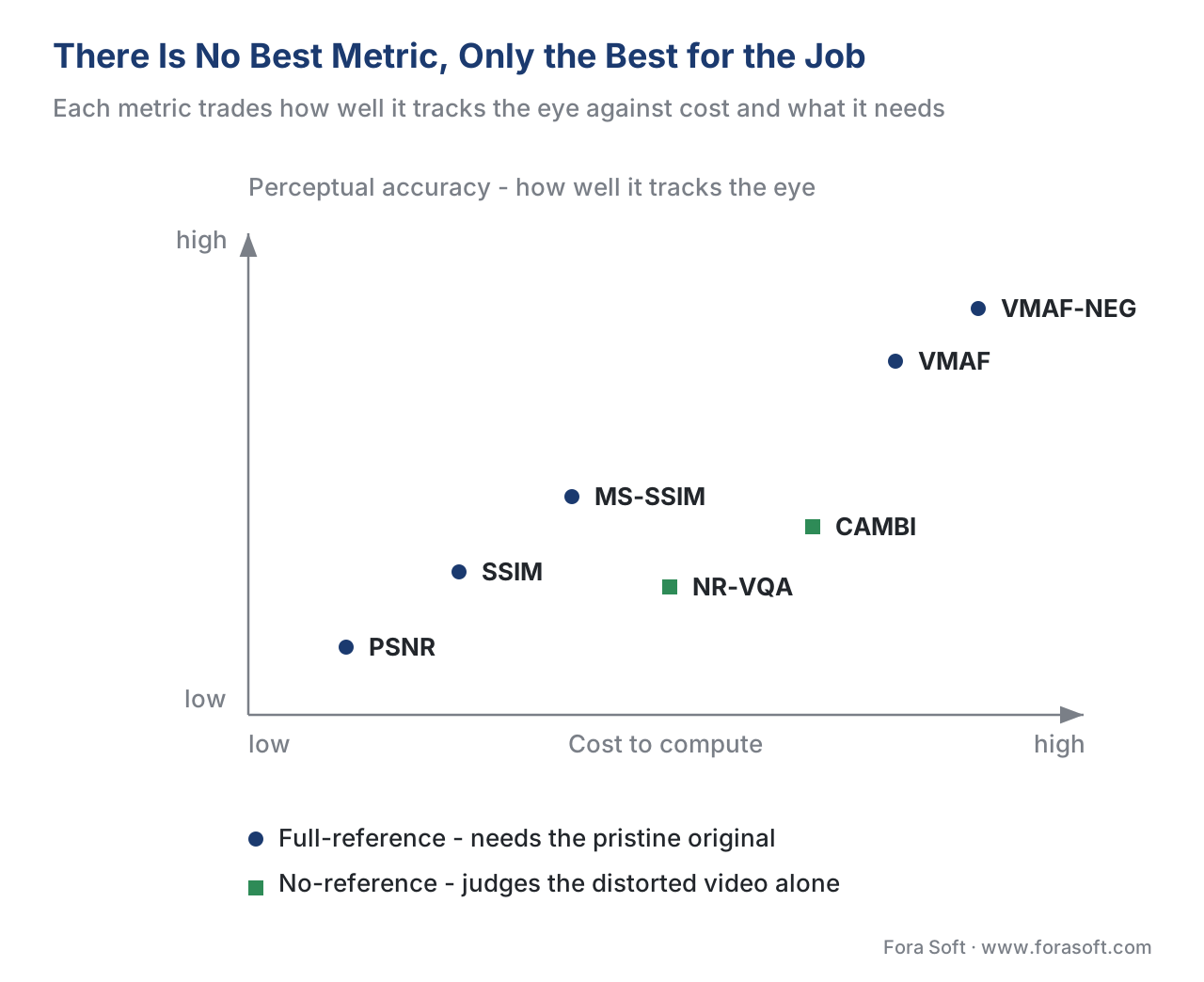 Figure 1. No single winner. Each metric trades perceptual accuracy against cost and against how much it needs — the pristine original, a model, or nothing. The right pick depends on the job, not on a leaderboard.
The first fork: do you even have the original?
Before the job matters, one fact decides half the question for you: do you have the pristine source to compare against? This is the full-reference, reduced-reference, no-reference split, and it is a hard wall, not a preference.
A full-reference metric — PSNR, SSIM, MS-SSIM, and VMAF all are — needs the original, undistorted video sitting next to the distorted one, frame-aligned, so it can measure the difference. If you are encoding a master file in a pipeline you control, you have the original, and every metric is available to you. If you are measuring a live broadcast, a user upload, or a stream you only see after delivery, you do not have the original, and a full-reference metric is simply not applicable — there is nothing to subtract from. Quoting VMAF on live UGC with no reference is not a weak measurement; it is an impossible one. For those cases you need a no-reference metric, which judges quality from the distorted video alone. The no-reference quality for live and UGC article covers that branch in full.
So the first question is never "PSNR or VMAF?" It is "do I have the original?" Answer that, and you have already cut the field in half.
The jobs, and the metric each one wants
With the reference question settled, the job picks the metric. Here are the jobs you will actually meet.
Regression gate — "did anything in the pipeline change?"
You changed a library, a setting, or a server, and you want to know whether the output is still identical to a known-good golden reference. This is the regression-testing job, and it does not want a perceptual metric at all. You are not asking "does this look good?" — you already know the golden looks good — you are asking "did this change anything?" The cheapest honest answer is PSNR, or even a frame hash. PSNR's weakness as a perceptual measure (it reacts to any pixel difference, perceptible or not) is exactly its strength here: it is fast, deterministic, and sensitive to the smallest drift. A drop from "infinite / identical" to any finite PSNR tells you the output moved. Use VMAF here and you pay far more compute to answer a yes/no question, and its perceptual smoothing can hide a small but real change.
Encoder or codec comparison — "which compresses better at equal quality?"
You are comparing H.264 against HEVC against AV1, or x264 against SVT-AV1, and you want to know which delivers the same quality for fewer bits. This is the headline use case VMAF was built for, because it correlates with the eye far better than PSNR across codecs and content. But two cautions decide whether your comparison is trustworthy. First, use the No Enhancement Gain model, VMAF-NEG. Netflix's own guidance is explicit: for comparing encoders, NEG measures the gain from compression alone and strips the gain an encoder can manufacture by sharpening or contrast tricks, which would otherwise let a codec "win" by gaming the metric (Netflix VMAF models documentation, 2026; "Toward a Better Quality Metric", Netflix Tech Blog). VMAF-NEG is on by default in VMAF v1. Second, do not compare single scores — compare rate-quality curves and report the bitrate saving at equal quality, the BD-rate. And because metrics have versions and pooling choices that change the result, a careful codec comparison uses a panel and names every setting (Antsiferova et al., "Objective video quality metrics application to video codecs comparisons", 2021). The VMAF-NEG article explains why the default model is gameable and NEG is not.
Per-title and ladder optimization — "what is the best bitrate-resolution point?"
You are building an adaptive bitrate ladder and want the resolution and bitrate that maximize quality at each rung. This wants VMAF too, but used differently: you compute a rate-quality curve per resolution and keep the points on the convex hull — the outer envelope where each extra bit buys the most quality. The metric's job here is to rank candidate encodes consistently, so a single named VMAF model, applied identically across every candidate, is what you need. The mechanics of building the ladder live in the Video Encoding section's per-title encoding treatment; this section covers how the quality target drives it.
Delivered-quality report — "what did the viewer actually receive?"
You want to report the quality your audience experienced, on the device class they watched on. This wants VMAF with the right model named explicitly: the default model assumes a 1080p TV at three times screen height, the phone model assumes a cellular screen and reads several points higher, and the 4K model assumes a 4K TV at 1.5 times screen height (Netflix VMAF models documentation, 2026). Reporting a phone-model VMAF as if it were the TV number overstates quality. And because a viewer remembers the worst moments, do not report the mean alone — pool for the worst case with a low percentile so a short bad stretch cannot hide. A delivered-quality report is "mean 92, 5th-percentile 74, phone model", never a bare "VMAF 92".
Live, UGC, or anything with no master — "how good is this, with no original to compare?"
No reference, so no PSNR/SSIM/VMAF. You need a no-reference metric, and for banding specifically Netflix's CAMBI (the Contrast Aware Multiscale Banding Index) is a no-reference detector you can run on the delivered signal. No-reference metrics are less mature than full-reference ones and carry more uncertainty, so treat them as indicators and confirm the hard cases by eye. The no-reference quality for live and UGC article is the home for this branch.
Academic or publishable comparison — "will this survive peer review?"
You are publishing a result, so the bar is reproducibility and statistical rigor, not a single convenient number. Report a panel of objective metrics, and validate them against a properly run subjective test — the eye is the ground truth every objective metric only approximates. Use the recognized methods for the subjective test (ITU-T P.910 and ITU-R BT.500) and the recognized statistics for comparing a metric to human scores: Pearson and Spearman correlation and RMSE, following the evaluation procedure in ITU-T P.1401. A published comparison without a subjective anchor and these statistics will not survive review.
Banding-, grain-, or dark-content jobs — "the headline metric is blind here"
Some content breaks the metric regardless of the job. Smooth skies and gradients band in a way PSNR, SSIM, and VMAF v0 barely register; film grain and heavy texture confuse full-reference metrics; dark and HDR scenes hide errors the eye sees. When your content is one of these, add a specialized check (CAMBI for banding) or weight a subjective spot-check toward the hard scenes. The full catalogue of where each metric lies is in where objective metrics lie.
Audio note: this section measures video quality only. If your job is audio quality — codecs, loudness, speech — use the audio metrics (PESQ, POLQA) covered in the Audio for Video section, not any metric on this page.
The job-to-metric table
Keep this beside your pipeline. Read the recommended column as the starting point and the "watch out" column as the rule that keeps it honest.
| The job | Have the original? | Recommended metric | Why | Watch out |
|---|---|---|---|---|
| Regression / golden-reference gate | Yes | PSNR (or frame hash) | Fast, deterministic, sensitive to any change | Not perceptual — for "did it change?", not "does it look good?" |
| Encoder / codec comparison | Yes | VMAF-NEG + BD-rate | Tracks the eye across codecs; NEG resists gaming | Compare curves, not single scores; name model + version |
| Per-title / ladder optimization | Yes | VMAF (one named model) | Ranks candidate encodes consistently on the convex hull | Apply the identical model to every candidate |
| Delivered-quality / QoE report | Yes | VMAF (device model) + worst-case pool | Reports what the viewer's device class received | Name phone/TV/4K model; report a low percentile, not just the mean |
| Live / UGC, no master | No | No-reference metric (+ CAMBI for banding) | Only option without a reference | Less mature; confirm hard cases by eye |
| Academic / publishable | Yes | Panel + subjective ground truth | Reproducible, peer-review-ready | Needs ITU-T P.910/BT.500 test + P.1401 statistics |
| Banding / grain / dark content | Either | Add CAMBI / subjective spot-check | Headline metrics are blind to these | A high VMAF can still hide banding |
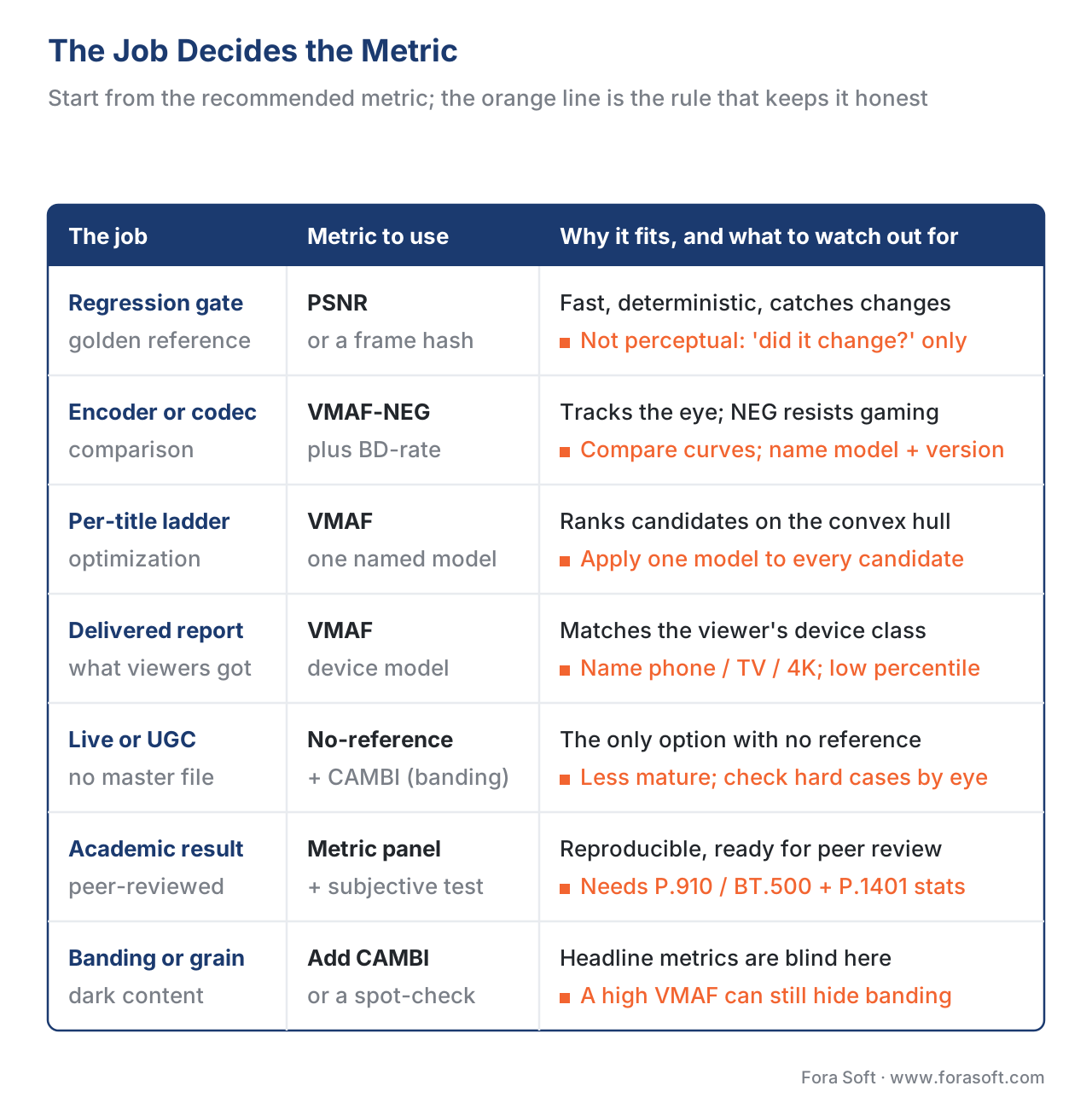 Figure 2. The job decides the metric. Each row pairs a common measurement job with the metric to start from and the rule that keeps the answer honest.
A worked example: why an encoder comparison needs more than one number
Suppose you are comparing two encoders on the same master, at 1080p, measuring with the same named VMAF model and the same pooling. You read two single scores:
Encoder A : VMAF 93 at 5.0 Mbps
Encoder B : VMAF 94 at 5.0 Mbps
It is tempting to declare B the winner. But a VMAF score carries a confidence interval — the 0.6.2 and 0.6.3 models compute a 95% interval by bootstrapping (Netflix VMAF models documentation, 2026), and on typical content it spans several points. If both scores sit inside each other's interval, the one-point "win" is noise, not a result. The honest comparison fixes the quality and reads the bitrate instead:
At equal quality (VMAF 93):
   Encoder A reaches it at 5.0 Mbps
   Encoder B reaches it at 3.5 Mbps

   Bitrate saving = (5.0 − 3.5) / 5.0
                  = 1.5 / 5.0
                  = 0.30
                  = 30% fewer bits for the same quality
That 30% is a real, reportable result: at matched quality, encoder B needs 30% fewer bits. Generalized across the whole quality range rather than one point, this is exactly what BD-rate computes. The lesson for choosing a metric: for an encoder comparison, the useful quantity is a bitrate saving at equal quality with its confidence interval, not a single score whose difference may be inside the error bars.
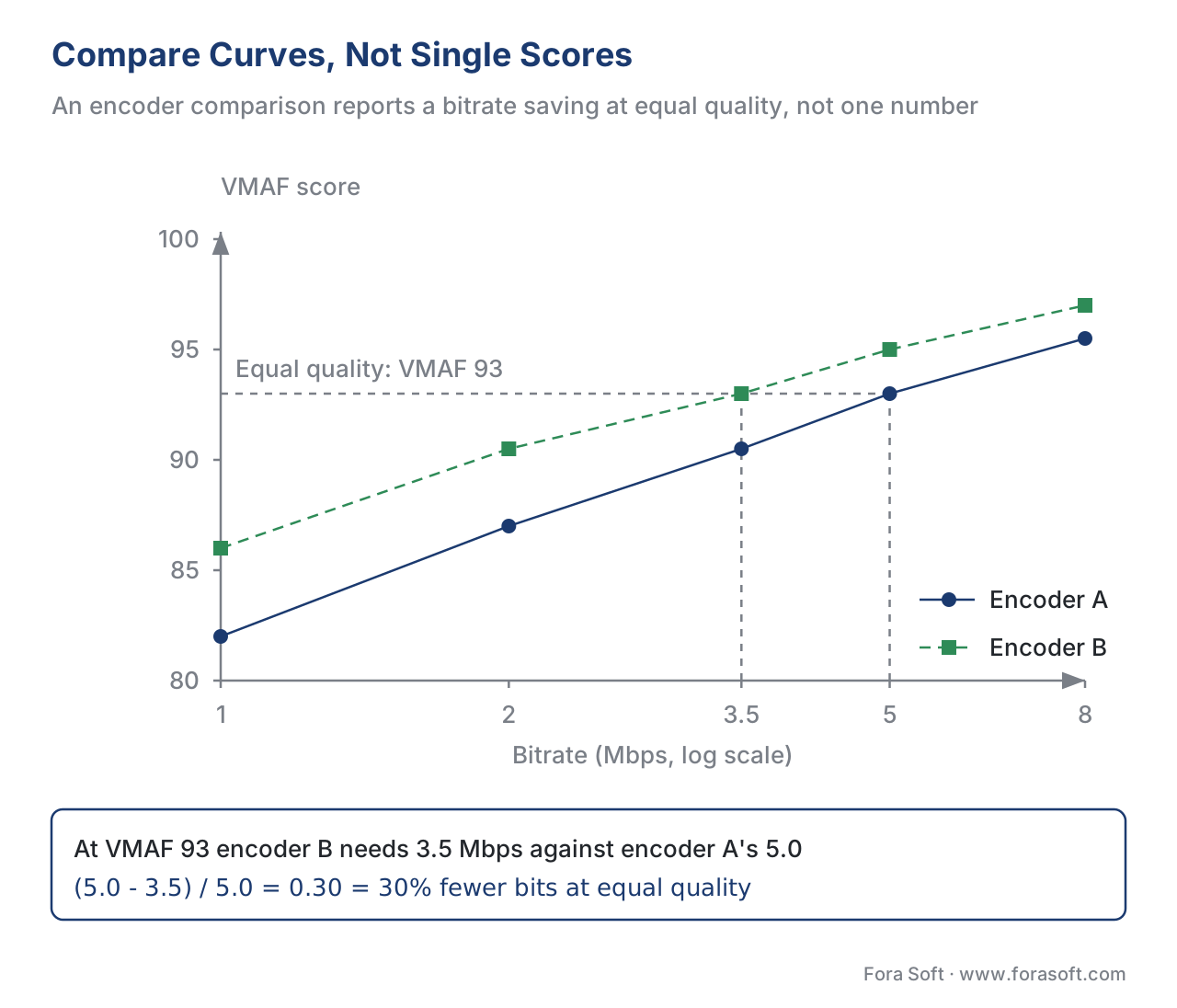 Figure 4. Compare curves, not single scores. At equal quality (VMAF 93) encoder B reaches the target at 3.5 Mbps against encoder A's 5.0 — a 30% bitrate saving, which BD-rate generalizes across the whole quality range.
How to actually compute each
Choosing the metric is the decision; computing it is one command. With a current FFmpeg build the modern libvmaf filter computes VMAF, VMAF-NEG, PSNR, and SSIM in a single pass (the older standalone psnr and ssim options are deprecated in favor of feature sub-options):
# Distorted vs reference, in one pass: VMAF default + VMAF-NEG + PSNR + SSIM
ffmpeg -i distorted.mp4 -i reference.mp4 -lavfi "
  libvmaf=model='version=vmaf_v0.6.1\:name=vmaf|version=vmaf_v0.6.1neg\:name=vmaf_neg':
  feature='name=psnr|name=float_ssim':log_path=scores.json:log_fmt=json:n_threads=8
" -f null -
The full, current syntax — installing libvmaf, picking models, parsing the JSON log, and plotting curves — is the subject of measuring quality with FFmpeg and libvmaf, and the wider tooling landscape covers VQMT and the commercial suites for when you need more than FFmpeg gives.
Common mistakes when picking a metric
The one-metric-for-everything trap. The most common error is choosing a favorite metric and using it for every job. VMAF is excellent for an encoder comparison and the wrong tool for a regression gate; PSNR is right for a gate and misleading as a quality verdict; no full-reference metric works on a reference-free live stream. Pick by the job, not by habit.
A second mistake is comparing across metrics as if they shared a scale — "SSIM 0.95 beats VMAF 90" is meaningless, because 0–1 structural similarity and 0–100 perceptual prediction are different rulers. A third is reading a VMAF number with no model named: "VMAF 95" could be the phone model (optimistic) or the TV model, mean- or percentile-pooled, and those are different claims, as reading a quality-metric report details. The fourth is optimizing an encoder against the default VMAF and discovering you trained it to sharpen rather than to preserve — the reason VMAF-NEG exists. In every case the fix is the same: name the metric, the model, the pooling, and the job out loud, and the right choice usually becomes obvious.
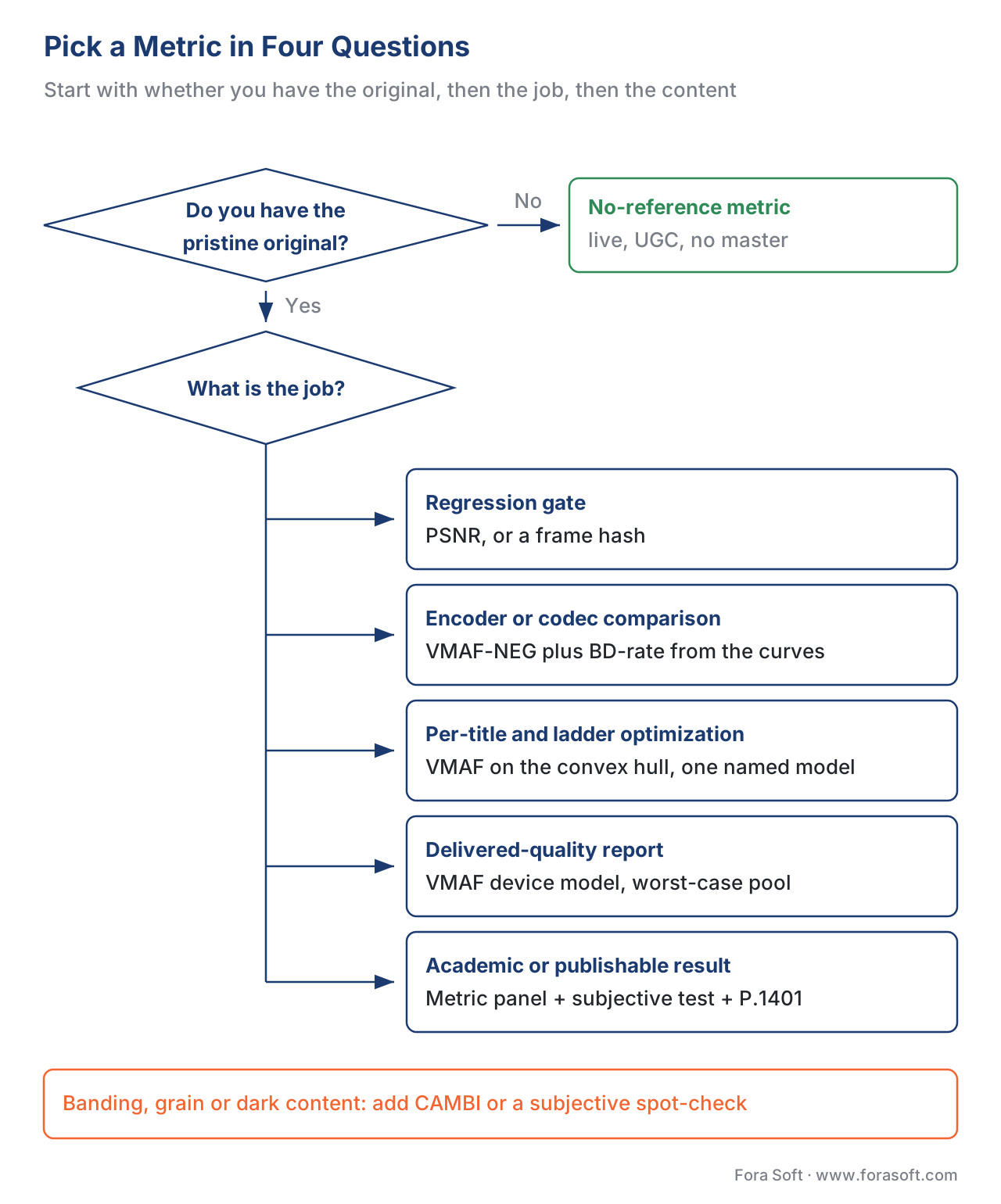 Figure 3. Four questions to a metric. Start with whether you have the original, then the job, then the content and device — each branch ends at a concrete recommendation.
Where Fora Soft fits in
Fora Soft has built video software since 2005 — streaming, WebRTC conferencing, OTT, e-learning, telemedicine, and surveillance — and each of those products poses a different measurement job. A surveillance pipeline we control gets a full-reference VMAF-NEG comparison when we tune its encoder; a live conferencing stream with no master gets no-reference checks and QoE monitoring; an OTT catalogue gets per-title VMAF on the convex hull with a worst-case pool. We do not have a house metric; we have a house rule — pick the metric by the question, name the model and pooling on every figure, and confirm the hard cases by eye. When the job is a codec or encoder decision, we lean on the reproducible, dated measurements documented in our benchmark methodology so the choice rests on numbers a reader can check.



The handbook
Fora Soft Video Engineering Handbook
We wrote a seven-volume handbook that works through the whole video stack — encoding, delivery, audio, and AI — across 9,000+ pages, so a metric choice sits inside the system it is there to judge. Volume 1 works through PSNR, SSIM, VMAF and the encoding decisions they grade, which is where the first three rows of the table above live; volume 3 covers the ABR ladders, players and delivery economics behind a delivered-quality report; volume 6 covers the models that no-reference and learned metrics are built from. Written by Nikolay Sapunov, CEO at Fora Soft.
Which metric should your pipeline actually be reporting?
Tell us what you measure today, which stages still have the master file and which do not, and we will map each decision you make to the metric, the named model, and the pooling that answers it — and to the command that computes it. 250+ video products shipped since 2005.
See our case studies
Case study
Mindbox
RTSP to FFmpeg to HLS across 50+ deployments, where no master file exists at the point of delivery — the no-reference branch of the tree, run in production.
Case study
Speed.Space
Records at 1080p / 8 Mbps for Netflix, Electronic Arts, and HBO productions — a quality target fixed as a number and checked against the master on every take.
Case study
Worldcast Live
HD concert streaming at 1.5 Gb/s with 0.4–0.5 s latency for 10,000 simultaneous viewers — delivered quality, where the device model and the worst-case pool decide what the report says.
What to read next
Foundations
Full-, reduced-, no-reference metrics
The first fork of this page, in full: what each class can measure and what it cannot.
Metrics
VMAF-NEG explained
Why the default model is gameable, and why an encoder comparison uses NEG.
Benchmarks
BD-rate explained, with our numbers
The 30% of Figure 4, generalized across the whole quality range.
Tooling
Measuring quality with FFmpeg and libvmaf
Once the metric is chosen, the one-pass command that computes it.
References
- Netflix, "VMAF Models" (resource/doc/models.md), Netflix/vmaf GitHub repository, accessed 2026-06-23. Tier 1 (metric-author primary). Documents the default 1080p-HDTV-at-3H model, the
--phone-model(reads higher), and the 4K-at-1.5H model, and states that for comparing encoders VMAF offers the No Enhancement Gain (NEG) mode to measure compression gain without enhancement gain; also that models 0.6.2/0.6.3 add a bootstrapped confidence interval. The controlling source for model selection, the NEG-for-codec-comparison rule, and the confidence-interval point. https://github.com/Netflix/vmaf/tree/master/model - Z. Li, A. Aaron, I. Katsavounidis, A. Moorthy, M. Manohara, "Toward a Better Quality Metric for the Video Community," Netflix Technology Blog, accessed 2026-06-23. Tier 1 (metric-author primary). Explains that VMAF captures enhancement gain and that in codec evaluation it is often desirable to measure compression gain alone — the reasoning behind using VMAF-NEG for encoder comparison. https://netflixtechblog.com/toward-a-better-quality-metric-for-the-video-community-7ed94e752a30
- Z. Wang, A. C. Bovik, H. R. Sheikh, E. P. Simoncelli, "Image Quality Assessment: From Error Visibility to Structural Similarity," IEEE Transactions on Image Processing, vol. 13, no. 4, pp. 600–612, 2004. Tier 1 (metric-author defining work). Defines SSIM on luminance, contrast, and structure and motivates it by PSNR/MSE's failure to track perception — the basis for "different metrics answer different questions". https://www.cns.nyu.edu/pub/eero/wang03-reprint.pdf
- Recommendation ITU-T P.1401, "Methods, metrics and procedures for statistical evaluation, qualification and comparison of objective quality prediction models," International Telecommunication Union, 2020. Tier 1 (official standard). The standard procedure (PCC, SROCC, RMSE) for evaluating an objective metric against subjective scores — the statistics an academic comparison must report. https://www.itu.int/rec/T-REC-P.1401
- Recommendation ITU-T P.910, "Subjective video quality assessment methods for multimedia applications," International Telecommunication Union, 2023. Tier 1 (official standard). Defines ACR, DCR, and pair-comparison subjective methods and viewing conditions — the recognized basis for the subjective anchor in a publishable comparison. https://www.itu.int/rec/T-REC-P.910
- Recommendation ITU-R BT.500-15, "Methodologies for the subjective assessment of the quality of television images," International Telecommunication Union, 2023. Tier 1 (official standard). The companion television-assessment methodology cited alongside P.910 for subjective tests that serve as ground truth. https://www.itu.int/rec/R-REC-BT.500
- G. Bjøntegaard, "Calculation of average PSNR differences between RD-curves," ITU-T SG16 VCEG, document VCEG-M33, Austin, 2001. Tier 1 (defining note). Defines the Bjøntegaard Delta method for computing the average bitrate difference between two rate-quality curves at equal quality — the basis for reporting an encoder comparison as a BD-rate saving rather than a single score. https://www.itu.int/wftp3/av-arch/video-site/0104_Aus/VCEG-M33.doc
- A. Antsiferova, S. Lavrushkin, M. Smirnov, A. Gushchin, D. Vatolin, D. Kulikov, "Objective video quality metrics application to video codecs comparisons: choosing the best for subjective quality estimation," arXiv:2107.10220, 2021. Tier 5 (peer-reviewed/institutional). A systematic comparison (MSU) of metric versions and pooling/color-summation choices to find the most relevant versions for codec comparisons; supports using a panel of metrics, naming every setting, and the YUV summation caveat for BD-rate. https://arxiv.org/abs/2107.10220
- FFmpeg, "libvmaf" filter (ffmpeg-filters documentation), accessed 2026-06-23. Tier 3 (first-party tooling). Current
libvmaffilter syntax:model='version=...',feature='name=psnr|name=float_ssim'(the standalonepsnr/ssimoptions are deprecated),n_threads, and JSON logging — the source for the one-pass measurement command. https://ffmpeg.org/ffmpeg-filters.html#libvmaf - Netflix, "CAMBI" (resource/doc/cambi.md), Netflix/vmaf GitHub repository, accessed 2026-06-23. Tier 1 (metric-author primary). Defines CAMBI as a no-reference banding detector and states that PSNR, SSIM, and VMAF are not designed to identify banding — the basis for adding a specialized check on banding-prone content and for the no-reference live branch. https://github.com/Netflix/vmaf/blob/master/resource/doc/cambi.md
