


Why this matters
The moment a team's quality work outgrows a script, someone asks whether to pay for a suite, and the honest answer is rarely "because the metric is better." This article is for the streaming or encoding lead, the head of operations, the QA manager, or the technical product owner who has to sign a purchase order — or defend not signing one. Buy the wrong thing and you pay enterprise money for a VMAF you already had for free. Skip the right thing and you ship content that fails a broadcaster's delivery spec, breaches a loudness regulation, or triggers a photosensitive-epilepsy complaint — failures a free script never even checked for. The decision deserves the same rigor as the measurement itself.
The thing you are buying is not a better number
Start with the distinction that decides most of the argument. A metric is the math that estimates quality. A tool or suite is the software that runs that math and wraps services around it. The deep dives on each metric live in VMAF explained and the rest of Block 2; this article is about the suites.
Here is the point a sales deck will not lead with: the open metrics are free, and they are identical across tools. The VMAF a $50,000-a-year suite reports is computed by the same Netflix model that the free FFmpeg-and-libvmaf workflow runs, because both call the same code (Netflix VMAF repository, 2026). A suite cannot sell you a more accurate VMAF, because there is only one VMAF. The same is true of PSNR and SSIM. So if a vendor's pitch is "our quality numbers are better," read it carefully — they may mean their own proprietary metric (IMAX's SSIMPLUS is a real example), but they cannot mean a better version of the open ones.
What a commercial suite actually sells is the work around the number. Think of the free metric as the engine and the suite as the whole car: the engine is the same one you could buy on its own, but you are paying for the chassis, the dashboard, the warranty, and the dealer who answers the phone. Concretely, that is six things — scale, support, compliance, live no-reference monitoring, device-specific models, and dashboards — and the rest of this article is about which of them are worth paying for, and when.
Four families of commercial suite
"Commercial quality suite" covers four quite different kinds of product. Buying well starts with knowing which family solves your problem, because a tool from the wrong family will not do the job at any price.
 Figure 1. The four families of commercial quality suite. Each solves a different problem — measuring perceived picture quality at scale, certifying files against delivery specs, monitoring the live viewer experience, and testing on real devices — so the first decision is which family you need.
Perceptual-quality engines. These compute a perceptual quality score at scale, sometimes with their own metric. The reference example is IMAX VisionScience, the technology formerly called SSIMPLUS from SSIMWAVE, which IMAX acquired in 2022 (IMAX Technology Blog, 2024). Its SSIMPLUS Viewer Score is device-specific: because a screen's size and viewing distance change what the eye notices, the same encode can score lower on a 27-inch monitor than on a phone — one published example put a file at 89 on a monitor and 96 on an iPhone (Streaming Learning Center, 2022). That device awareness is something the standard VMAF model does not give you out of the box, and it is a real reason some teams pay. The paid tiers of MSU VQMT, the dedicated tool from the previous article, also sit here — its Premium licence starts around \$299 (MSU VQMT documentation, 2026).
File-based QC and compliance suites. These inspect finished files against a specification before delivery or archive, and they are the family most likely to be a genuine must-buy. Interra Systems' BATON and Telestream's Vidchecker (and its cloud successor Qualify) are the leaders. They check far more than a quality score: loudness, color gamut, dead pixels, black frames, caption presence, file structure, and — critically — regulatory items like photosensitive-epilepsy flashing, against built-in test plans for delivery specs such as DPP, IMF, Netflix, and CableLabs (Interra Systems; Telestream, 2026). The next section explains why this family wins the buy argument outright.
Production QoE analytics. These measure the live viewer experience from player telemetry, with no reference video at all — the world of streaming quality of experience. Conviva, Mux Data, and Bitmovin are the names here; they collect startup time, rebuffering, bitrate, and errors from millions of real sessions and surface them on real-time dashboards (Conviva; Mux; Bitmovin, 2026). You buy these when you operate a service and need to know what viewers are living through right now, not what an encode scored last night.
Active-test robots. These drive real consumer devices — set-top boxes, smart TVs, phones — like a human would, and measure the result with no reference, using psycho-visual analysis to estimate a Mean Opinion Score plus startup and buffering (Witbe, 2026). Witbe is the established name. You buy this when you must verify the experience on the actual hardware your viewers use, which a server-side metric can never see.
The clearest reason to buy: compliance you cannot legally skip
If you take one decision rule from this article, take this one. The strongest case for buying is not quality at all — it is compliance, and it is close to non-negotiable.
A free FFmpeg script computes VMAF beautifully. It does not tell you whether your program will trigger a seizure. Flashing and certain patterns can provoke photosensitive epilepsy, and the broadcast world regulates this through Recommendation ITU-R BT.1702 (latest edition BT.1702-3, 2023), which underpins Ofcom's guidance and limits, for example, flashes to no more than three per second (ITU-R BT.1702-3, 2023). The original Harding FPA test for this has largely been replaced by the photosensitive-epilepsy check built into suites like BATON and Vidchecker (industry practice, 2026). You cannot responsibly ship regulated content without this check, and you are not going to build a certified flashing detector yourself over a weekend.
The same logic applies across the compliance surface. Loudness is regulated: European delivery targets −23 LUFS (loudness units relative to full scale) under EBU R128, which is built on the measurement method in ITU-R BS.1770, with ATSC A/85 playing the equivalent role in the United States (EBU R128, 2023; ITU-R BS.1770). Air-ready broadcast masters must conform to delivery specifications such as AMWA AS-11 / DPP, and the DPP runs an Auto QC certification program that products like BATON have passed (DPP / AMWA, 2026). A homegrown pipeline can fake a loudness meter, but it cannot produce a certified, audited compliance report that a broadcaster's ingest will accept.
Common mistake: paying a suite for a "better metric" while ignoring what you actually need it for. Teams sometimes buy an enterprise suite expecting more accurate quality scores, then discover the VMAF is the same one they had for free — and separately discover, after a delivery is rejected, that the thing they truly needed was the compliance test plan they never switched on. Buy a suite for the services only it can provide (certified compliance, live monitoring at scale, an SLA), not for a quality number that open tools already compute identically.
The other reasons to buy
Compliance is the cleanest trigger, but four more genuinely justify the spend.
Scale and reliability. Checking a handful of files a week is a script's job. Validating thousands of assets a day, or running twenty-four-hour linear channels, needs a system with parallel processing, queue management, and high availability so one server's failure does not stop delivery — exactly what suites like BATON advertise (Interra Systems, 2026). Building that operational robustness yourself is a project, not a script.
Support with a service-level agreement. When a quality gate blocks a release at 2 a.m. during a live event, an open-source tool gives you a GitHub issue tracker; a commercial contract gives you someone whose job is to answer. For revenue-critical or contractually-bound delivery, that guaranteed response is often the whole reason to buy (Bitmovin, 2026).
Live, no-reference monitoring. At the player there is no pristine master to compare against, so full-reference metrics like VMAF cannot run — the situation covered in no-reference quality for live and UGC. Production QoE platforms and active-test robots are built for exactly this blind spot, and replicating their device coverage and collector SDKs in-house is a major undertaking.
Dashboards non-engineers can act on. A suite turns metric output into a view an operations manager or an executive can read without a terminal. That is not a luxury when the people who must act on quality data do not write code — and the analytics vendors emphasize that their dashboards serve business teams, not just engineers (Bitmovin, 2026).
When not to buy
The honest counterweight: for a large set of jobs, you should not buy anything.
If what you need is a scriptable quality number inside an automated gate — fail the build when VMAF drops below a threshold — then FFmpeg with libvmaf is free, headless, and exactly right, and a paid suite adds nothing but a bill. If you have no regulatory mandate, modest volume, and engineers comfortable on the command line, the open stack plus a little glue code covers automated quality control and CI/CD integration without a license. And you should never buy a suite hoping for a more accurate open metric, because — to repeat the one rule that matters — there is only one VMAF, and it is free. Reach for open-source no-reference tools before assuming the no-reference job requires a vendor.
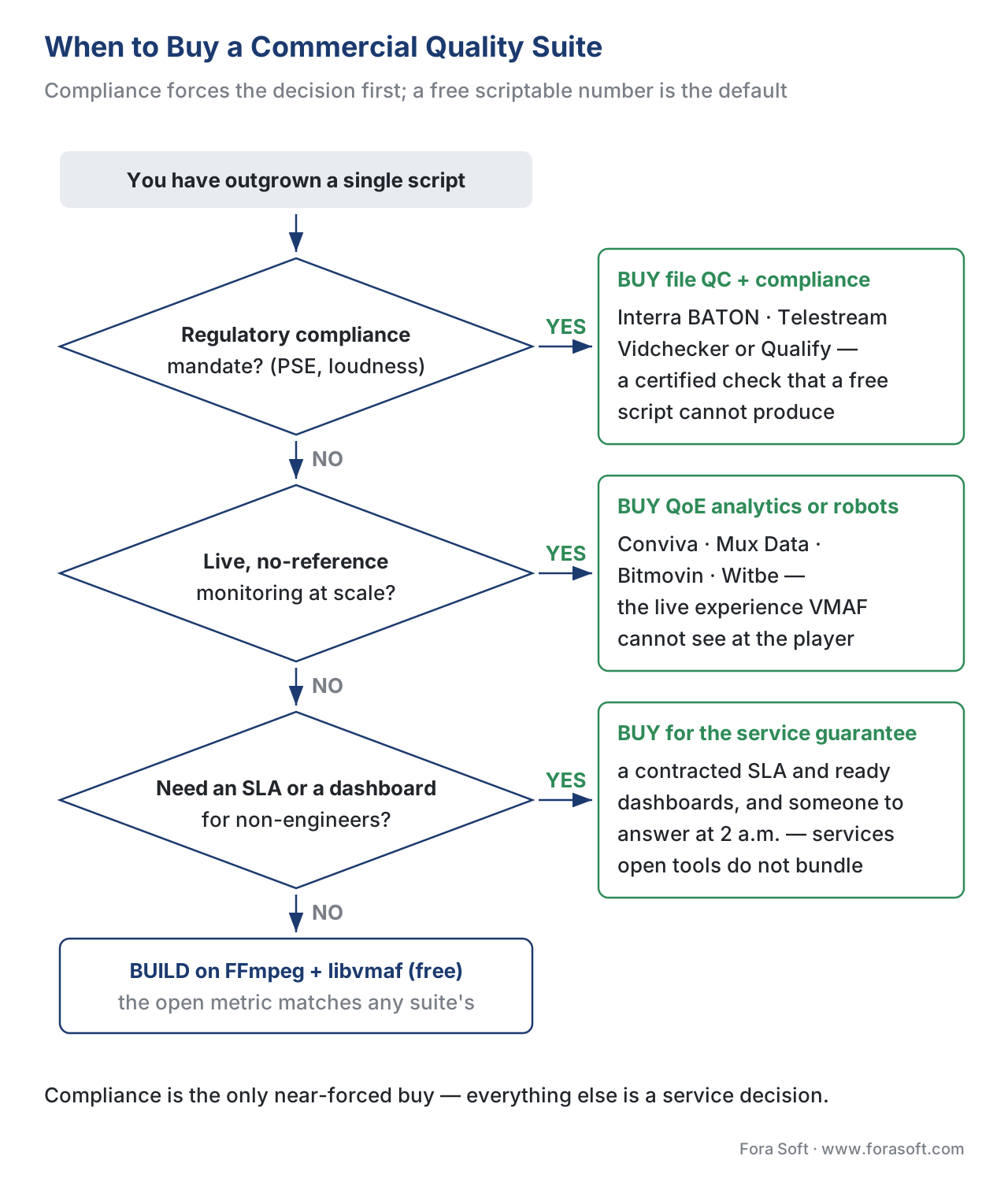 Figure 2. When to buy. The decision branches first on compliance — a regulatory mandate is close to a forced buy — then on live monitoring at scale, the need for a guaranteed SLA, and finally whether a free scriptable number already does the job. Most teams that buy are answering "yes" to compliance or live scale, not to "is the metric better."
The build-versus-buy arithmetic
When cost is the deciding factor, do the arithmetic over a multi-year horizon, because a build is mostly upfront and a buy is mostly recurring. The hidden costs of building are real: a credible in-house system needs engineers who understand player events and metric pooling, it is hard to scale during peak traffic, and it must be rebuilt as formats and players change (Bitmovin, 2026). Those costs do not show up in the first sprint, which is why build-versus-buy comparisons that count only the prototype always flatter the build.
Here is a worked example with illustrative-but-plausible numbers; plug your own into the downloadable calculator below. Suppose building an in-house file-QC pipeline costs about \$150,000 in engineering up front, then \$30,000 a year to maintain. A commercial suite that does the same job, with support, costs about \$60,000 a year. The cumulative cost after t years is:
Build(t) = 150,000 + 30,000 × t
Buy(t)   =            60,000 × t

Crossover:  150,000 + 30,000 × t = 60,000 × t
            150,000 = 30,000 × t
            t = 150,000 ÷ 30,000 = 5.0 years
So for the first five years, buying is cheaper. Only past a five-year horizon of stable requirements does the build pay back — and even then the build never produces the DPP-certified compliance report or the 2 a.m. SLA that came bundled with the suite. That is the measurement-honest framing: the cost math sets the floor, but the things money cannot quickly build — certification, support guarantees, device-specific perceptual models — often decide the question before the crossover year ever arrives.
 Figure 3. Build versus buy over five years. The in-house line starts high (the upfront build) and rises slowly; the suite line starts at zero and rises with the annual licence. They cross at year five — but the suite's bundled compliance certification and SLA sit outside the chart, and they often decide the case on their own.
The suites at a glance
The four families and their representative products, with what you pay for and where each leaves a gap. The "where it lies" column is the limitation to keep in mind — every option has one.
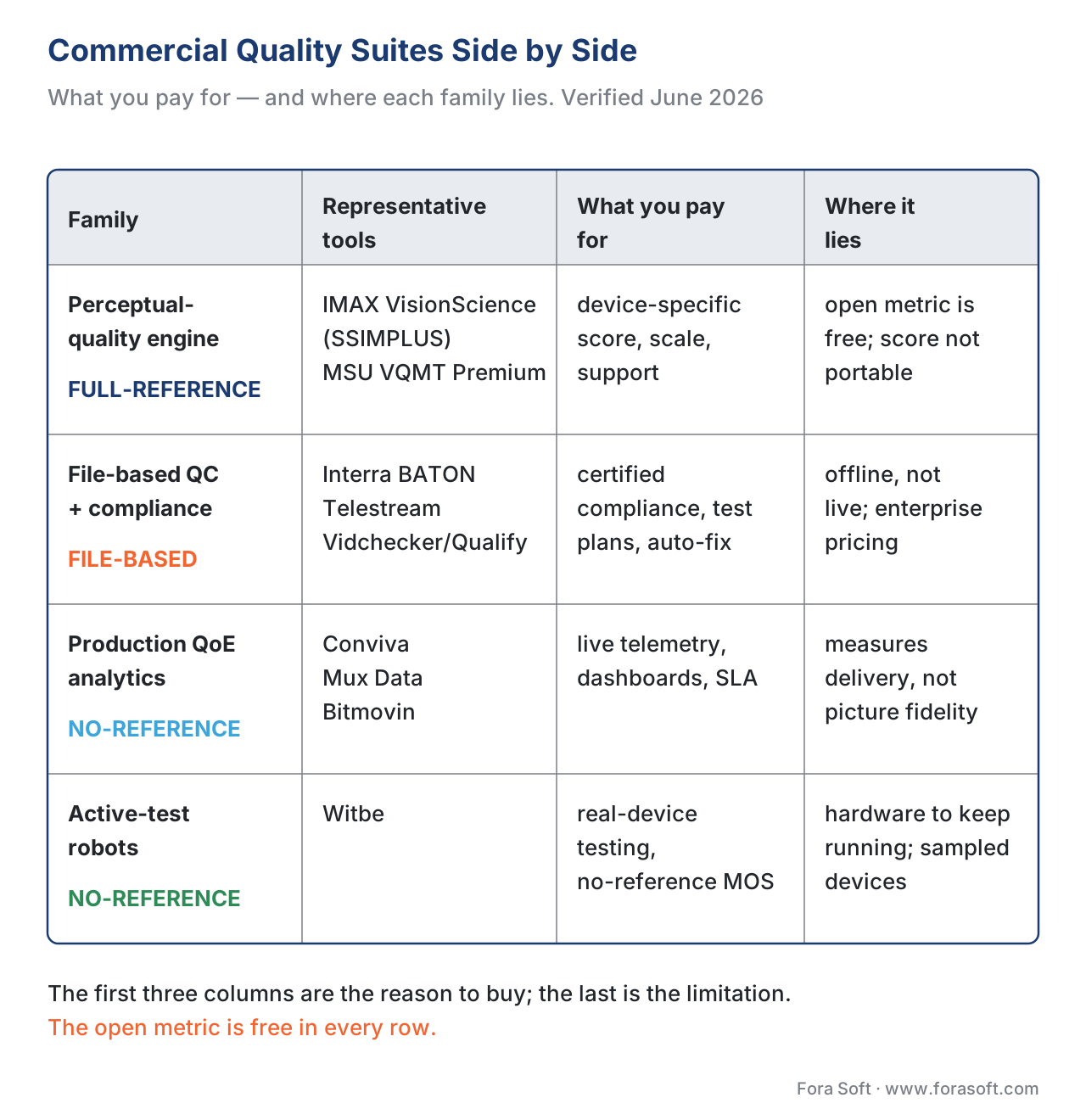 Figure 4. The four families side by side: representative tools, what you are actually paying for, whether the approach needs a reference video, and where each one lies.
| Family | Representative tools | What you pay for | Reference needed | Where it lies (limitation) |
|---|---|---|---|---|
| Perceptual-quality engine | IMAX VisionScience (SSIMPLUS); MSU VQMT Pro/Premium | Device-specific perceptual score, scale, support | Yes (full-reference) | Open metrics are free; a proprietary score is not portable or citable |
| File-based QC + compliance | Interra BATON; Telestream Vidchecker / Qualify | Certified compliance, deliverable test plans, auto-correction, scale | Yes (file-based) | Offline, not live; enterprise pricing; broadcast-shaped workflow |
| Production QoE analytics | Conviva; Mux Data; Bitmovin | Live session telemetry, real-time dashboards, SDKs, SLA | No (no-reference) | Measures delivery, not picture fidelity; usage-based cost |
| Active-test robots | Witbe | Real-device testing, no-reference MOS, end-to-end coverage | No (no-reference) | Hardware to run and maintain; sampled devices, not every viewer |
Table 1. Commercial quality-suite families. The first columns are the reason to buy; the last is the limitation. Names and facts verified against each vendor's own documentation in June 2026; pricing is by quote except where noted.
How to read a suite's quality numbers without fooling yourself
Once a suite is in place, the same reading discipline from the rest of this section still applies — the wrapper does not change the rules. A suite still reports a pooled number, so read the low percentile and the worst frame, not the mean alone, exactly as pooling per-frame scores and reading a quality-metric report insist. If the suite reports a proprietary score like SSIMPLUS's 1–100 Viewer Score, never place it on the same axis as VMAF's 0–100 — different scales, even at the same range, are not comparable. And when a vendor cites an accuracy study, check who funded it: the University of Waterloo result that SSIMPLUS beats VMAF is real but vendor-associated, so treat it as a claim to verify on your own content, not a settled fact (Streaming Media, 2018). The suite buys you services, not an exemption from thinking.
Free download: Commercial-suite advisor + build-vs-buy TCO calculatorA dependency-free Python companion that computes no metric of its own:--families prints the four families with what each one costs you and where it lies, --recommend turns your actual needs (compliance, live monitoring, volume, SLA) into a buy-or-build verdict, and the TCO mode finds your own crossover year instead of the illustrative five.
Where Fora Soft fits in
Fora Soft has built video software since 2005 — streaming and OTT, video conferencing, e-learning, telemedicine, and surveillance — and our default bench is the free stack: FFmpeg with libvmaf for the automated quality gate, because the metric math is identical to any suite's and the price is zero. We recommend buying when the job genuinely needs it: a regulatory compliance mandate (photosensitive-epilepsy or loudness checks a script cannot certify), live no-reference monitoring across many real devices, or a 24/7 delivery operation that needs a vendor SLA. For clients in regulated broadcast or large-scale OTT, that often means a file-QC suite or a QoE-analytics platform alongside our own measurement; for everyone else, the open tools are enough. Our benchmark methodology documents which tool produced every figure, so the choice is always visible.



The handbook
Fora Soft Video Engineering Handbook
We wrote a seven-volume handbook, 9,000+ pages, that works through the whole video stack from the pixel to production, so that someone who reads it can design and build a system like the one a suite would sit inside. Volume 1, Video Encoding, takes apart the metrics this article says you cannot buy a better version of — PSNR, SSIM, and VMAF, what each one measures and where it misreads. Volume 3 covers the delivery side the QoE-analytics family watches: ABR, CDNs, players, and the economics of streaming; volume 4 covers the audio side of a compliance check, including loudness to EBU R128 and ITU-R BS.1770. Written by Nikolay Sapunov, CEO at Fora Soft.
About to sign for a suite you may not need?
Send us the quote and the job you want it to do, and we will tell you which part of it a free FFmpeg-and-libvmaf gate already covers, which part only a certified compliance or live-monitoring product can do, and what the crossover year looks like on your own volumes. 250+ video products shipped since 2005.
See our case studies
Case study
Worldcast Live
1.5 Gbit/s of live video at 0.4–0.5 s latency for up to 10,000 concurrent viewers — the scale at which the live, no-reference branch of the tree stops being optional and a QoE platform starts paying for itself.
Case study
Speed.Space
Remote production recording at 1080p and 8 Mbps for Netflix, Electronic Arts, and HBO shoots — clients whose delivery specs are written down, which is exactly the case a certified file-QC report answers and a homegrown script does not.
Case study
Mindbox
RTSP to FFmpeg to HLS across 50+ deployments — a pipeline with no regulatory mandate and engineers on the command line, where the free stack does the whole job and a licence would add a bill, not a capability.
What to read next
Tooling
Measuring Quality with FFmpeg and libvmaf
The default this article keeps pointing back to: the same VMAF a suite reports, run from the command line for nothing.
Tooling
The Video Quality Tooling Landscape
The whole map, free and paid together, so you can see what a licence sits next to before you compare prices.
Metrics
No-Reference Quality for Live and UGC
The blind spot behind the second branch of the tree: how quality is scored at the player when there is no master to compare against.
Automation
Integrating Quality Measurement into CI/CD
What the build-it answer actually looks like in practice — a scriptable gate that fails the build, with no licence behind it.
References
- VMAF — Video Multi-Method Assessment Fusion, Netflix, GitHub repository (libvmaf, 2026). Tier 1 (metric-author defining implementation). Establishes that VMAF is computed by one shared model across FFmpeg's libvmaf filter, the
vmafCLI, and third-party suites — the basis for "a suite cannot sell you a more accurate VMAF." https://github.com/Netflix/vmaf - Recommendation ITU-R BT.1702-3, "Guidance for the reduction of photosensitive epileptic seizures caused by television," International Telecommunication Union, 2023. Tier 1 (official standard). The controlling standard for photosensitive-epilepsy (PSE) flashing limits that file-QC suites check and that a homegrown script does not. Basis for the compliance-as-buy-trigger section. https://www.itu.int/rec/R-REC-BT.1702
- EBU R 128, "Loudness normalisation and permitted maximum level of audio signals," European Broadcasting Union, 2023 revision; built on Recommendation ITU-R BS.1770. Tier 1 (official standard). Defines the −23 LUFS broadcast loudness target measured by BS.1770 — a regulated compliance check QC suites perform. Basis for the loudness-compliance example. https://tech.ebu.ch/publications/r128
- AMWA AS-11 / DPP delivery specifications and the DPP Auto QC certification program, Digital Production Partnership / Advanced Media Workflow Association, 2026. Tier 1 (industry delivery standard). Air-ready master delivery specs that QC suites certify against; BATON and Vidchecker hold DPP/AMWA certification. Basis for the certified-deliverable point. https://www.thedpp.com/specs/as-11
- Interra Systems BATON — AI-powered automated media quality control platform (Media QC product pages and datasheet). Interra Systems, 2026. Tier 6 (vendor documentation). The authoritative source for BATON's content-aware QC, compliance/regulatory checks (HDR, PSE, loudness, captions), built-in delivery test plans (DPP, IMF, Netflix, CableLabs), cloud/on-prem deployment, scalability, and high availability. Basis for the file-QC family description. https://www.interrasystems.com/Media-QC.php
- Telestream Vidchecker and Qualify — automated file-based quality control and correction (product overview and specifications). Telestream, 2026. Tier 6 (vendor documentation). Vidchecker checks file/video/audio parameters and auto-corrects errors (levels, RGB gamut, dead pixels, PSE flashing per Ofcom/ITU); Qualify is the cloud-native/hybrid successor launched 2021. Basis for the Telestream entries. https://www.telestream.com/qualify/
- "IMAX VisionScience: The most accurate video quality measurement," IMAX Technology Blog, 2024; and SSIMWAVE (an IMAX company) product material. Tier 4/6 (vendor engineering blog). Documents the SSIMPLUS-to-VisionScience rebrand after IMAX's 2022 acquisition of SSIMWAVE, the device-specific SSIMPLUS Viewer Score, and live/VOD monitoring. Basis for the perceptual-engine family and the device-specific score. https://medium.com/imaxtechnology/imax-visionscience-the-most-accurate-video-quality-measurement-985829006b39
- J. Ozer, "The VMAF phone model and saving on streaming to mobile viewers" and related SSIMPLUS coverage, Streaming Learning Center, 2022. Tier 6 (expert practitioner). Source for the device-specific score behavior (a file scoring 89 on a monitor and 96 on a phone) and the device-preset bitrate-optimization angle. Basis for the device-awareness example. https://streaminglearningcenter.com/encoding/the-vmaf-phone-model-and-saving-on-streaming-to-mobile-viewers.html
- "SSIMPLUS Outperforms Netflix's VMAF," Streaming Media (press release citing University of Waterloo study), 2018. Tier 7 (vendor-associated press release). Cited only as a claim to verify — the basis for the "check who funded the accuracy study" caution, not as settled fact. https://www.streamingmedia.com/PressRelease/SSIMPLUS-Outperforms-Netlixs-VMAF_45138.aspx
- J. Varndell, "Should You Build or Buy Video Observability? The TCO for Streaming Services and OEMs," Bitmovin blog, 2026. Tier 4 (credible deployer). The build-versus-buy framing: in-house gives control but carries hidden engineering, scaling, and rebuild costs; commercial offers pre-built collectors, SLAs, and dashboards for technical and business teams. Basis for the build-versus-buy section and the analytics family. https://bitmovin.com/blog/build-vs-buy-video-analytics-tco/
- Conviva and Mux Data — streaming QoE analytics platforms (product overviews). Conviva; Mux, 2026. Tier 6 (vendor documentation). Real-time, no-reference player-telemetry analytics (startup, rebuffering, bitrate, errors) at the scale of the largest live events. Basis for the production-QoE-analytics family. https://www.conviva.com/ and https://data.mux.com/
- Witbe — QoE monitoring robots and no-reference video quality testing (product material). Witbe, 2026. Tier 6 (vendor documentation). Active, non-intrusive robots that drive real consumer devices and measure no-reference MOS, startup, and rebuffering. Basis for the active-test-robot family. https://www.witbe.net/
- MSU Video Quality Measurement Tool — Pro/Premium editions and pricing, MSU Graphics & Media Lab / COMPRESSION.RU, 2026. Tier 3 (first-party tooling documentation). The paid tiers of the dedicated tool from article 8.3; Premium licence from ~\$299. Basis for the perceptual-engine pricing anchor. https://videoprocessing.ai/vqmt/
