


Why this matters
The single most important number an encoder operator sets is the quantization parameter, often abbreviated QP (the codec setting that controls how aggressively coefficients are rounded). When a streaming platform halves its bitrate to save on CDN bills, the saving comes almost entirely from a higher QP — not from a smarter codec, not from a better algorithm, not from new hardware. A product manager who can read a QP value off an FFmpeg log and predict whether the result will look fine or look broken can shut down half the bad ideas in an encoding road map before they hit production. A founder who can explain to investors why a "30% bitrate cut" sometimes ships clean and sometimes ships blocky understands the single source of perceptual risk in the whole video pipeline. A technical lead who knows when to use a flat quantization matrix and when to ship a custom one can win 1–2 VMAF points on a streaming service that serves a million hours a day, which is worth real money.
What happens at quantization, in one paragraph
After the prediction stage produces a residual block and the transform spreads its energy across a grid of coefficients — we cover those steps in intra-frame coding, inter-frame coding and motion estimation, and transform coding, — the encoder divides every coefficient by a step size and rounds the result to the nearest whole number. That is quantization. The step size is a single number under the operator's control; a small step keeps most of the precision and produces a big bitstream, a large step zeros out most of the coefficients and produces a small bitstream. When the decoder rebuilds the block it multiplies the surviving whole numbers by the same step size, but the rounding error is gone forever. That rounding error is the only place in the entire codec where information is destroyed; everything else, in principle, can be undone.
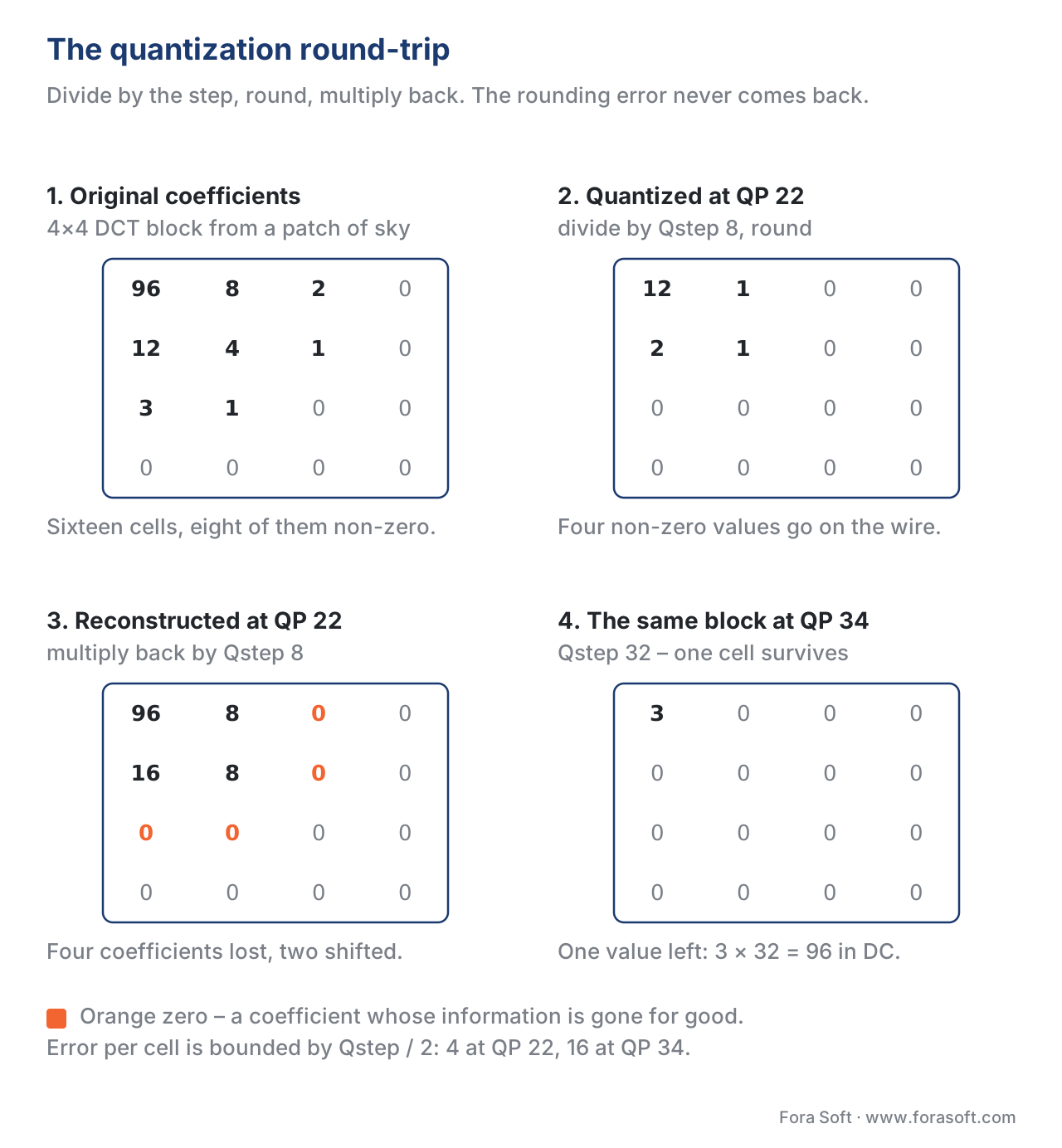 Figure 1. The quantization round-trip. The encoder rounds each coefficient to the nearest multiple of the step size; the decoder multiplies back. Small coefficients fall to zero and never come back.
The quantization step — what the number actually means
The step size, often written Qstep, is the gap on the number line between two values the codec can represent. If Qstep is 8 and a coefficient is 21, the encoder rounds 21 ÷ 8 to 3, transmits the integer 3, and the decoder multiplies back to 24 — an error of 3. If Qstep is 32 and the same coefficient is 21, the encoder rounds 21 ÷ 32 to 1, the decoder produces 32, and the error is 11. The bigger the step, the bigger the average error per coefficient, but the smaller the integers the entropy coder has to send.
The arithmetic is short:
quantized = round(coefficient / Qstep)        # encoder
recovered = quantized × Qstep                  # decoder
error     = recovered − coefficient            # always |error| ≤ Qstep / 2
Plug in a coefficient of 87 and Qstep = 16:
quantized = round(87 / 16) = round(5.4375) = 5
recovered = 5 × 16 = 80
error     = 80 − 87 = −7
The error is bounded by half the step size — in this case half of 16, which is 8 — and the bound is tight. Every cell in the transform block gets an independent error inside that bound, and the sum of those errors, viewed through the inverse transform, is what the viewer eventually sees as a quality drop.
Why does this turn into smaller files? Because most of the cells in a typical transform block carry small numbers, and once Qstep gets larger than twice those small numbers, they round to zero. An entropy coder spends almost no bits sending a long run of zeros. The big numbers in the top-left corner of the block survive — they carry the structural energy — and the cost of the block collapses from "16 integers" to "two non-zero coefficients plus a flag saying the rest are zero".
The quantization parameter — one knob, a logarithmic scale
Modern codecs do not expose Qstep directly. They expose a small integer called the quantization parameter — QP in H.264, HEVC, VP9, and VVC; qindex in AV1 — and derive Qstep from a fixed mathematical relationship. The relationship is logarithmic on purpose: a viewer's eye reacts to relative changes in error, not absolute ones, so doubling Qstep should map to a single perceptual "click", not to fifty.
In H.264, HEVC, VP9, and VVC, the rule is the same: Qstep doubles every six steps of QP. Concretely:
Qstep(QP) = 2 ** ((QP − 4) / 6)
That fixes Qstep to 1 at QP = 4, 2 at QP = 10, 4 at QP = 16, 8 at QP = 22, 16 at QP = 28, 32 at QP = 34, and so on. The lowest QP in the standard is 0 — for 8-bit content the H.264 / HEVC range is 0 to 51, with extended ranges for 10-bit (0 to 63) and 12-bit (0 to 75) profiles. Every increase of one in QP increases the step by roughly 12.2%, and every increase of six exactly doubles it. The encoder picks QP, the decoder reads QP, both compute Qstep the same way.
The doubling rule is what makes QP intuitive once you live with it. Going from QP 23 to QP 29 doubles the average quantization error; going from QP 23 to QP 35 quadruples it. A streaming engineer who learns the four anchor points — QP 23 for "transparent quality", QP 28 for "good", QP 33 for "watchable on a small screen", QP 38 for "noticeably soft" — can predict the look of a transcode without running it.
AV1 uses a finer scale called qindex that runs from 0 to 255. The mapping from qindex to step size is not a clean power of two; it is a lookup table calibrated to give the encoder smoother control near the high-quality end and a wider range than the 0-to-51 codecs above. As a rough rule of thumb, qindex ≈ 4 × QP, so AV1's qindex 100 roughly matches HEVC's QP 25. The lookup is split per coefficient type — separate tables for DC and AC, and per colour plane (luma and chroma) — which gives AV1 a finer-grained control over how much error to spend where.
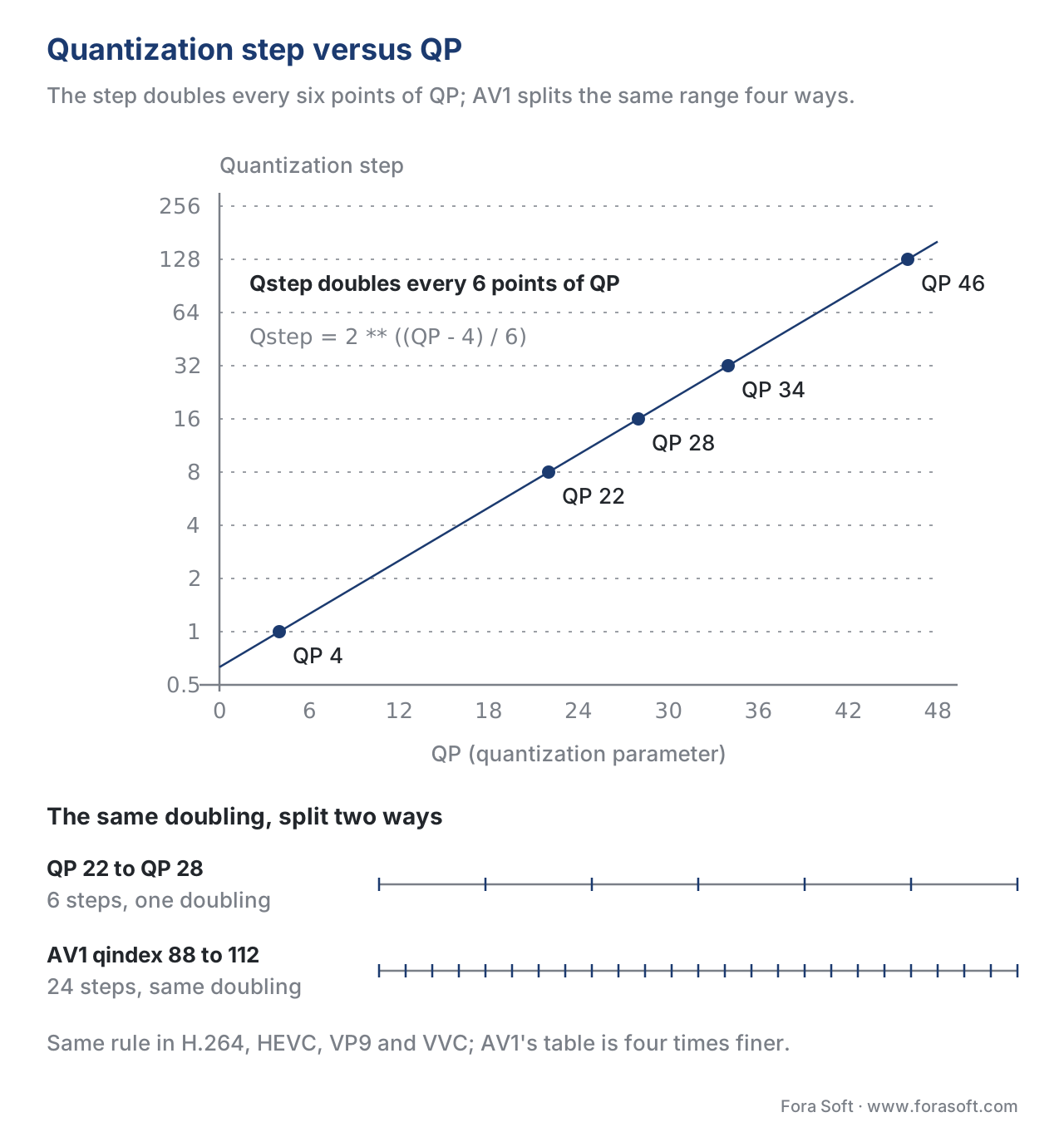 Figure 2. Quantization step versus QP. The curve doubles every six units of QP; AV1's qindex offers four times the granularity at every step.
A worked example — one block, one QP
Take a 4×4 transform block from a smooth piece of sky after intra prediction. The DCT coefficients might look like this (numbers chosen to be readable; real values are typically larger):
 96   8   2   0
 12   4   1   0
  3   1   0   0
  0   0   0   0
At QP = 22 the step size is 8. Divide each cell by 8 and round to the nearest integer:
 12   1   0   0
  2   1   0   0
  0   0   0   0
  0   0   0   0
Sixteen cells went in; four non-zero cells come out. The entropy coder sends those four numbers plus a short flag — perhaps fifteen bits total instead of the few hundred a raw block would have needed. The decoder multiplies back:
 96   8   0   0
 16   8   0   0
  0   0   0   0
  0   0   0   0
Compared with the original, the bottom-left "12" became "16" — an error of 4 — the second-column "4" stayed at "8", the top-row "2" disappeared, and so on. The errors are bounded by 4 (half of the step). After the inverse transform, the block looks indistinguishable to a viewer from the original sky.
Now run the same block at QP = 34. Step size is 32:
 3  0  0  0
 0  0  0  0
 0  0  0  0
 0  0  0  0
One cell survived. The bitstream is fifteen bits shorter than at QP 22. The decoder rebuilds the block as a flat patch with value 3 × 32 = 96 in the DC position and zeros everywhere else — a perfectly uniform 4×4 sub-block at the average brightness. The original had some gentle variation across the four rows and four columns; that variation is now lost forever. On a flat sky, the viewer would not notice. On a face, the same QP would make the cheek look like a paintbrush smear. That is the entire art of choosing a QP.
The dead zone — a small trick that matters
A real codec does not use the textbook rule quantized = round(coefficient / Qstep). It uses an asymmetric version in which small positive coefficients are biased toward zero. The interval [−Qstep/2, +Qstep/2] that maps to zero in the textbook gets widened to something like [−2·Qstep/3, +2·Qstep/3]. This widened interval is called the dead zone, and inside it every coefficient — small positive or small negative — rounds to zero instead of to ±1.
Why the asymmetry? Because zero is special. A run of zeros costs almost no bits to transmit; a single ±1 in the middle of a run breaks the run and costs a real bit. Pushing small coefficients into the dead zone trades a tiny extra distortion for a real bit saving, and on natural content the trade is almost always worth it.
The dead-zone width is a hidden encoder parameter — the decoder does not know or care what width the encoder used, because the decoder only ever multiplies the integer back by Qstep. H.264 reference software uses a dead zone of roughly Qstep × 5/6 for intra blocks and Qstep × 2/3 for inter blocks; AV1 uses a slightly different shape. Tuning the dead zone is one of the simpler psy-visual knobs an encoder team has, and the gains are real — five to ten percent bitrate at the same VMAF on a well-tuned dead zone.
Quantization matrices — different precision for different frequencies
The eye is more forgiving of error in high-frequency coefficients than in low-frequency ones. Quantization at a flat Qstep wastes precision on the high-frequency cells where the viewer cannot see it. Every modern codec lets the encoder ship a quantization matrix — a per-cell multiplier on top of Qstep — that loosens the step for high frequencies and tightens it for low frequencies.
For an 8×8 block, a default JPEG-style quantization matrix might look like:
16  11  10  16   24   40   51   61
12  12  14  19   26   58   60   55
14  13  16  24   40   57   69   56
14  17  22  29   51   87   80   62
18  22  37  56   68  109  103   77
24  35  55  64   81  104  113   92
49  64  78  87  103  121  120  101
72  92  95  98  112  100  103   99
The top-left cell has multiplier 16; the bottom-right has 99. With a base Qstep of 8, the effective step in the bottom-right is 8 × 99 / 16 ≈ 49 — about six times coarser than the textbook step — while the top-left stays close to the textbook value. The viewer never sees the loss in the high-frequency cells because the eye does not resolve detail at those frequencies.
H.264, HEVC, and VVC let the encoder choose between flat matrices (all cells multiplied by the same value, equivalent to no matrix), default matrices baked into the standard, and custom matrices sent in the bitstream. AV1 uses fixed matrices defined by the standard that depend on transform size; the encoder cannot override them but can pick from a small built-in set. VP9 ships only flat quantization.
The practical advice for streaming engineers is that flat matrices are good for inter frames and rough drafts. Default matrices win on intra frames and on slower presets. Custom matrices win only when you have ground-truth content of a specific kind — animation, screen capture, sports — and a measurable target.
Dependent quantization — VVC's half-step trick
VVC, finalised in 2020 and ratified as ITU-T H.266 in 2020, added a new tool called dependent quantization that gives the encoder effectively half a step of extra precision without doubling the integer scale. The idea, originally proposed by Heiko Schwarz and colleagues at the Heinrich Hertz Institute, is to alternate between two quantizers with reconstruction levels offset by half a step, switching between them based on the parity of previous coefficients in the scan order.
In a normal codec, the reconstruction levels for Qstep = 8 are 0, ±8, ±16, ±24, and so on. Dependent quantization adds a second set offset by half a step — 0, ±4, ±12, ±20 — and lets the encoder pick which set each coefficient belongs to, with the rule that the choice depends on the previous coefficient. A small state machine — four states — encodes which quantizer is active at each step.
The result is a denser reconstruction lattice. The encoder finds combinations of reconstruction values that approximate the source block more closely than a single-quantizer approach can, and the entropy coder spends only one extra bit per block on the state-machine signalling. Dependent quantization saves between 3% and 5% of bitrate at the same quality on a typical VVC encode and is on by default in most production VVC encoders.
Pitfall callout. Some teams disable dependent quantization in VVC because they read the spec and decide it sounds expensive. On natural content the gain is real and the encoder cost is one or two percent — not enough to justify dropping it. Disable it only for low-power decoders that explicitly do not support the tool.
Adaptive quantization — spending the bits where the eye looks
Frame-level QP is too blunt. A frame has flat regions where high QP is invisible and detailed regions where high QP is obvious; spending the same number of bits on both regions is wasteful. Every modern encoder supports adaptive quantization — a per-block QP offset that lowers QP in detailed or perceptually important blocks and raises it in flat ones.
The simplest scheme is variance-based adaptive quantization, sometimes shipped under the flag aq-mode=1. The encoder computes the variance of each macroblock (or CTU, or superblock) and lowers QP where the variance is high. A more refined scheme, aq-mode=2, uses a "spatial complexity" model that handles both very flat regions (where banding shows up) and very textured regions (where the eye does not resolve detail) more carefully. x264, x265, libvpx, libaom, and SVT-AV1 all ship variants of these schemes; the names and defaults differ but the principle does not.
A second axis is temporal adaptive quantization, sometimes called MB-tree in x264 and x265. The encoder runs a backward pass to estimate how much each block in a reference frame will be referenced by later blocks, and lowers QP on the blocks that will be referenced most. The investment pays back across many frames. MB-tree is the single largest reason a modern x265 encode at the same QP looks better than the same encode with the feature off; gains of 10–20% in PSNR-equivalent bitrate are common.
The third axis is psycho-visual quantization, the family of tricks built around the observation that the eye prefers preserved high-frequency "energy" over flat smoothing. The x264/x265 --psy-rd and --psy-rdoq flags adjust the rate-distortion cost of quantization choices so the encoder favours blocks that retain visible texture even at the cost of slightly higher numerical distortion. The output scores worse on PSNR but better in subjective tests and in VMAF on tuned models. We cover this in more depth in quality metrics: PSNR, SSIM, VMAF.
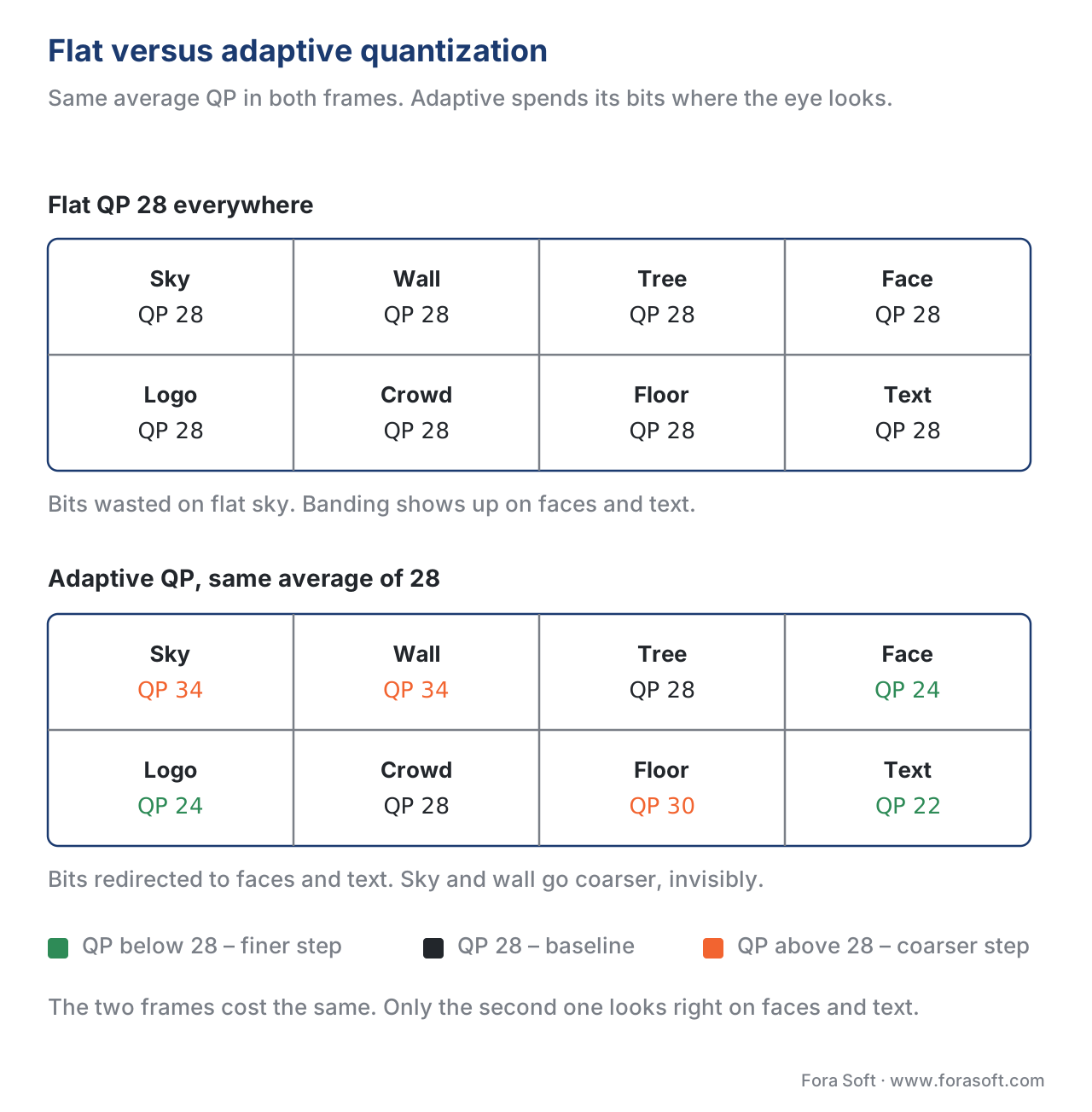 Figure 3. Flat versus adaptive quantization. The average QP is the same in both halves; the perceived quality is very different because the bottom encode spent its budget on the regions the eye notices.
How the codecs compare — a single table
The table below lines up the main quantization features across the codecs we have shipped or seen in production at Fora Soft. Read it left to right: codec, QP scale, step rule, matrix support, dependent quantization, adaptive quantization tooling.
| Codec | QP scale | Step rule | Matrices | Dependent Q | Adaptive Q |
|---|---|---|---|---|---|
| H.264 / AVC | 0–51 (8-bit) | doubles every 6 | Default + custom | No | Encoder-side (x264) |
| H.265 / HEVC | 0–51 (8-bit), extended to 63/75 | doubles every 6 | Default + custom, per-block delta | No | Encoder-side (x265, MB-tree) |
| VP9 | 0–255 qindex | calibrated table | Flat only | No | Encoder-side (libvpx) |
| AV1 | 0–255 qindex | calibrated table, per DC/AC and per plane | Built-in set, no override | No | Built-in segment maps + encoder logic |
| VVC / H.266 | 0–63 (8-bit), extended to 75 (10-bit) | doubles every 6 | Default + custom + LFNST-aware | Yes (on by default) | Encoder-side + tools-aware |
The pattern across the generations is clear: the step rule is essentially unchanged from H.264 onward, but each generation adds finer-grained control — per-block delta QP, per-plane tables, frequency-dependent matrices, dependent quantization — that lets the encoder spend bits more accurately. Quantization is the same idea, applied with more surgical precision.
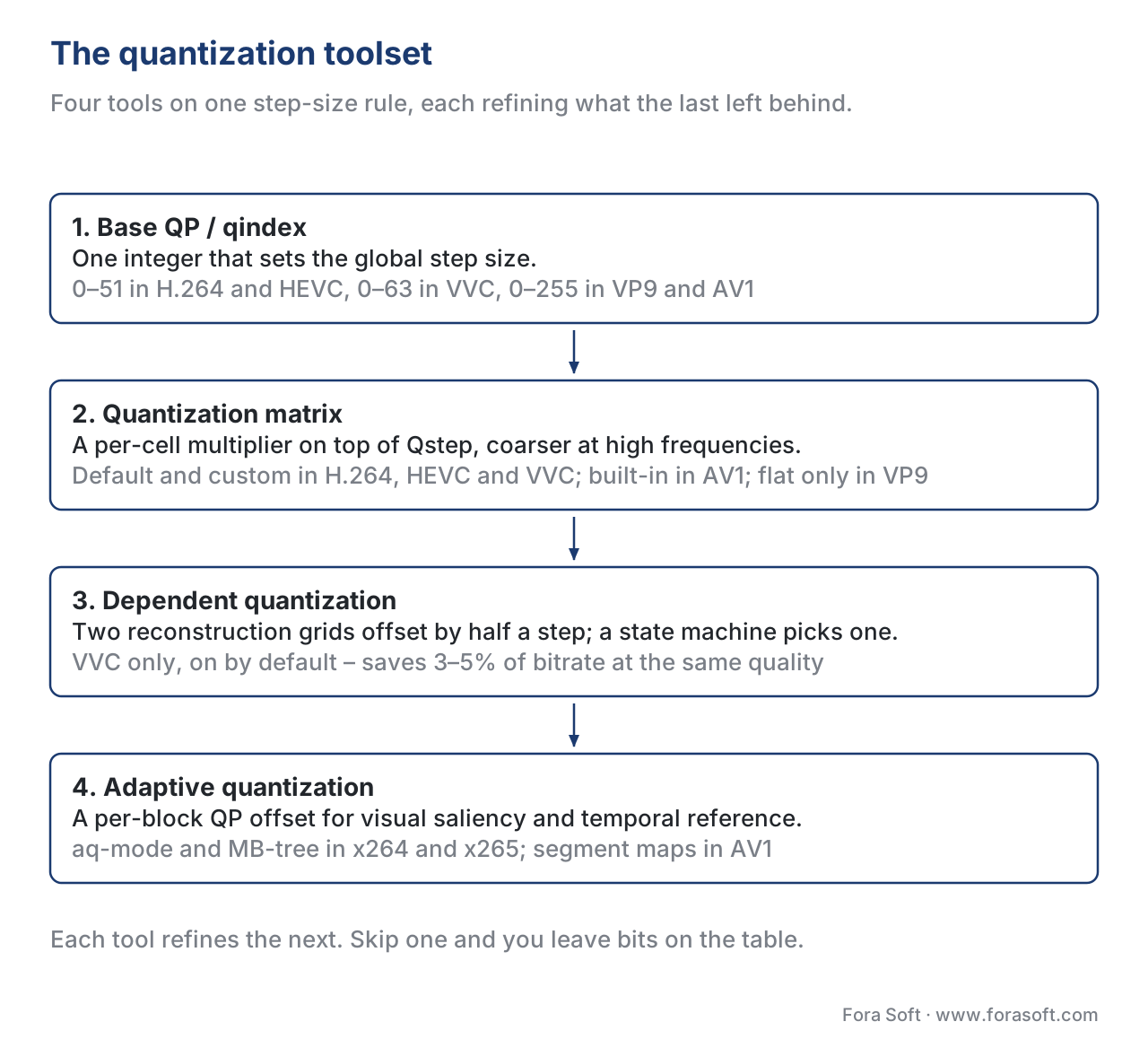 Figure 4. The four tools every modern codec layers on top of the same step-size rule. The table above says which codec ships which of them.
CRF, CBR, VBR — quantization in disguise
Most of the encoder flags streaming engineers actually touch — CRF (Constant Rate Factor), CBR (Constant Bit Rate), VBR (Variable Bit Rate), ABR (Average Bit Rate) — are control loops that adjust QP on the fly to hit a target. We unpack each in rate control: CBR, VBR, CRF.
CRF is the simplest to reason about: the encoder picks a base QP that targets a constant perceptual quality, then applies adaptive quantization to vary QP per block. CRF 23 in x264 maps roughly to the average QP an encoder would settle on if you asked it to hit a 1080p movie at "transparent quality"; CRF 28 in x265 maps to roughly the same point. The number on the slider is not literally a QP, but it controls the same underlying knob.
CBR and VBR add a buffer model on top of CRF logic. CBR clamps the encoder's QP to whatever value will hit the target bit budget every second; VBR allows the encoder to spend more bits during action scenes and fewer during static ones, again by varying QP. The QP scale is the substrate; the rate control mode is the policy that picks where on the scale to sit.
The implication for product decisions is short. Every "lower the bitrate" decision is a "raise the QP" decision underneath. If the QP gets too high, blocks come out flat, edges come out blurry, gradients come out as steps. There is no rate-control magic that hides the loss; rate control only chooses where in time to spread it.
Common artefacts caused by quantization
When a viewer complains about a stream looking bad, the cause is almost always quantization spending bits in the wrong places. Five symptoms in particular trace back to a single root.
Blockiness is the visible boundary between transform blocks. When QP is too high, each block reconstructs as a near-constant patch, and the discontinuity between adjacent patches becomes visible. Modern codecs run an in-loop deblocking filter to smooth those boundaries — covered in in-loop filtering — but the filter has limits. Above QP 38 on H.264 the filter cannot keep up.
Banding is the visible step in a gradient — a sunset, a smoke trail, a blue wall — where the original had a smooth ramp and the encode shows two or three uniform bands. The cause is quantization at low frequencies on a smooth source; the DC coefficient of each block rounds to a different integer, and the rounding step shows up as a stripe. Banding is the canonical 8-bit problem and the canonical argument for 10-bit encoding even on SDR content; we unpack it in 8-bit vs 10-bit encoding.
Blurring is the loss of high-frequency detail — text becomes fuzzy, hair becomes a soft mass, grass becomes paint. The cause is the quantization matrix pushing high-frequency coefficients to zero. Above a certain QP, the matrix's high-frequency cells produce zero output even for legitimate edges, and the inverse transform reconstructs a low-pass version of the block.
Ringing is a halo of wavy artefacts around a sharp edge. The cause is asymmetric quantization on the high-frequency coefficients that the DCT spreads around the edge; if a few of them survive but most are zeroed, the reconstructed block shows the surviving ones as visible ripples. Ringing is the canonical complaint about DCT-only codecs on cartoon and text content, and the canonical motivation for the DST and ADST variants we covered in transform coding.
Mosquito noise is rapidly changing fine artefacts around moving edges. The cause is that quantization decisions differ from frame to frame, so the surviving high-frequency coefficients around an edge flicker. The fix is at the encoder — better rate control, lower QP variation between adjacent frames — not at the decoder.
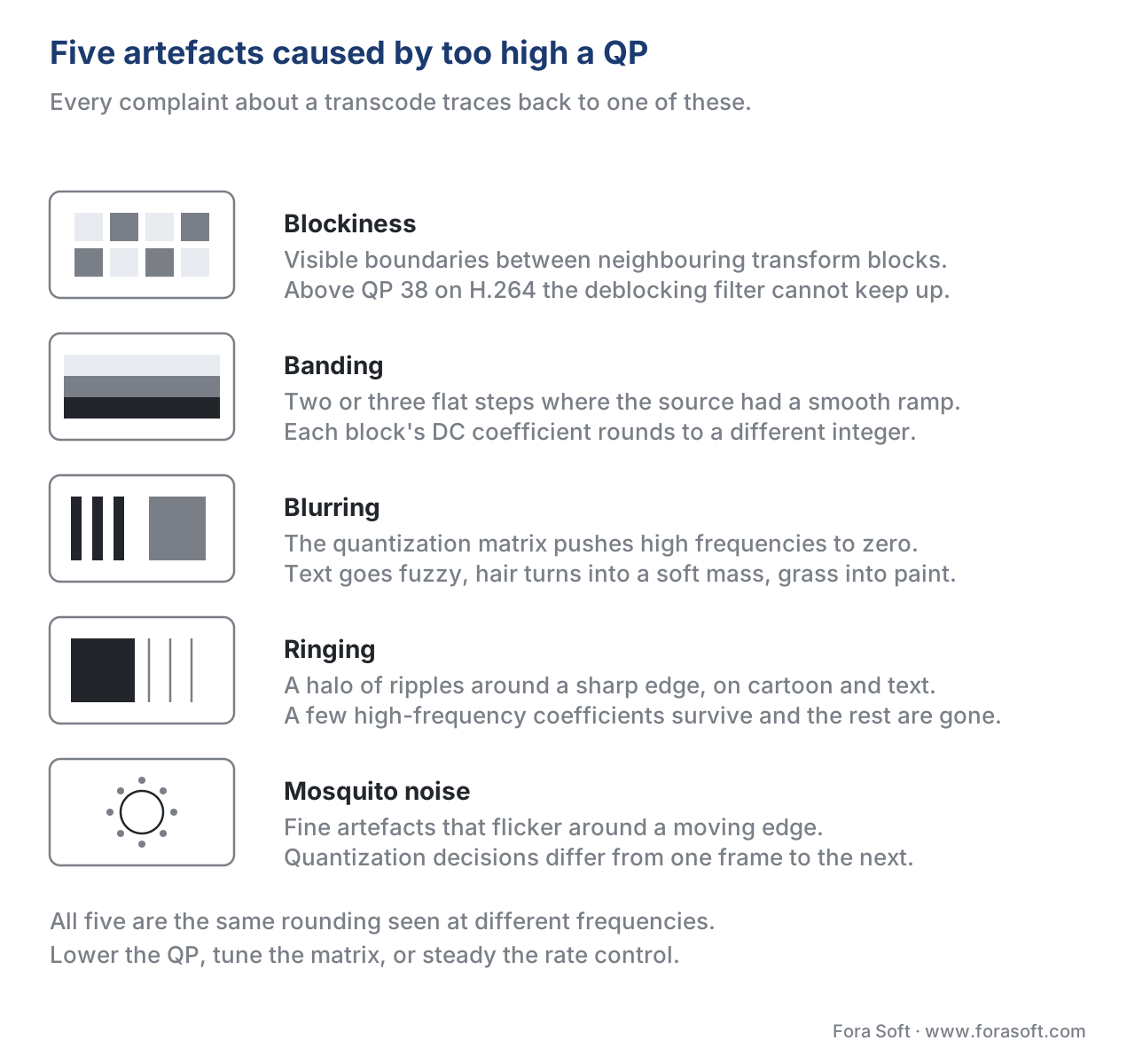 Figure 5. The five complaints and what each one looks like. All of them are the same rounding, seen at different frequencies.
Where Fora Soft fits in
We have shipped quantization tuning on production encodes in video streaming, OTT, video conferencing and video surveillance projects since 2010. The cost-saving moves are almost always the same shape: pick the right CRF or qindex anchor for each content class, validate adaptive quantization is turned on and tuned for the content (sport, talking-head, animation, screen capture), ship a small custom quantization matrix for the worst content type if numbers justify it, and gate every change behind an A/B comparison on real client devices. On WebRTC SFUs we have driven 20–30% bandwidth savings at no measurable quality cost by tuning the encoder's QP behaviour on talking-head content alone.
The book
Video Encoding: A Complete Guide to Video Compression
This article stops at the four tools; the book works through the arithmetic behind each of them — the integer scaling tables that turn QP into Qstep in H.264 and HEVC, the AV1 qindex lookup per plane and per coefficient type, dead-zone width, the default and custom matrices, VVC's dependent quantization state machine, and how aq-mode and MB-tree pick a per-block offset. It also carries the chapters on either side of quantization: the transform that feeds it and the rate control that drives it. Volume 1 of the seven-volume Fora Soft Video Engineering Handbook, 1,522 pages, written by Nikolay Sapunov, CEO at Fora Soft.
What QP are your streams actually running at?
Send us one hour of your worst-looking content and the encoder command line behind it, and we will come back with three numbers: the QP your rate controller settles on per scene class, what turning on or retuning adaptive quantization is worth in VMAF at the same bitrate, and how much bitrate you can take out before the artefacts above show up on a real device. The arithmetic runs on your own content, not on a reference test set. 250+ video products shipped since 2005.
See our case studies
Case study
Worldcast Live
Concert streaming at 1.5 Gb/s with 0.4–0.5 s latency to 10,000 simultaneous viewers. At that latency the rate controller has a fraction of a second of buffer to play with, so the QP it picks for the next frame is the whole quality budget — there is no second pass to fix a bad guess.
Case study
Speed.Space
Remote production recording at 1080p and 8 Mb/s for Netflix, Electronic Arts and HBO shoots, where creators pick resolution, fps, codec and bitrate per stream. Every one of those choices lands on the QP scale: the bitrate target is the ceiling the rate controller raises QP to reach.
Case study
Mindbox
An AI video management system on RTSP, FFmpeg and HLS with 50+ deployments across transport, pharma and gated communities. Surveillance is where adaptive quantization earns its keep: hours of static scene at a coarse QP, and a face or a plate that has to stay readable when something finally moves.
What to read next
Rate control
Rate Control: CBR, VBR, CRF, ABR, Capped CRF
The policy layer on top of the knob in this article: how CRF, CBR and VBR decide which QP to sit on, second by second, and why the same target gives you different files.
Mode decision
Mode Decision and Rate-Distortion Optimization
Where QP becomes lambda. J = D + λR is how the encoder trades the distortion quantization adds against the bits it saves, tens of thousands of times per frame.
In-loop filters
In-Loop Filtering: Deblocking, SAO, ALF, and CDEF
The clean-up crew for the first two artefacts above: what deblocking, SAO, ALF and CDEF can hide, and the QP above which they stop keeping up.
Quality metrics
Objective Quality Metrics: PSNR, SSIM, MS-SSIM, VMAF
How to measure what a higher QP cost you, and why psy-rd tuning scores worse on PSNR while viewers prefer it.
References
- Wiegand, T., Sullivan, G. J., Bjøntegaard, G., Luthra, A. "Overview of the H.264/AVC Video Coding Standard." IEEE Transactions on Circuits and Systems for Video Technology, 13(7), 2003. https://ieeexplore.ieee.org/document/1218189
- Sullivan, G. J., Ohm, J.-R., Han, W.-J., Wiegand, T. "Overview of the High Efficiency Video Coding (HEVC) Standard." IEEE Transactions on Circuits and Systems for Video Technology, 22(12), 2012. https://ieeexplore.ieee.org/document/6316136
- Bross, B., Wang, Y.-K., Ye, Y., et al. "Overview of the Versatile Video Coding (VVC) Standard and its Applications." IEEE Transactions on Circuits and Systems for Video Technology, 31(10), 2021. https://ieeexplore.ieee.org/document/9503377
- Schwarz, H., Coban, M., Karczewicz, M., et al. "Quantization and Entropy Coding in the Versatile Video Coding (VVC) Standard." IEEE Transactions on Circuits and Systems for Video Technology, 31(10), 2021. http://www.ecodis.de/video/schwarz_tcsvt_vvc_rev2.pdf
- Chen, Y., Murherjee, D., Han, J., et al. "An Overview of Core Coding Tools in the AV1 Video Codec." IEEE Picture Coding Symposium, 2018. https://arxiv.org/pdf/2008.06091
- AOMedia. "AV1 Bitstream & Decoding Process Specification." Version 1.0.0 Errata 1, 2024. https://aomediacodec.github.io/av1-spec/
- Richardson, I. E. "H.264/AVC 4×4 Transform and Quantization." Vcodex, 2024. https://www.vcodex.com/h264avc-4x4-transform-and-quantization
- Joint Video Experts Team. "Versatile Video Coding (Recommendation ITU-T H.266)." ITU-T, 2020 (revised 2024). https://www.itu.int/rec/T-REC-H.266
- ITU-T. "Advanced video coding for generic audiovisual services (Recommendation H.264)." Edition 14, 2021. https://www.itu.int/rec/T-REC-H.264
- Marpe, D., Schwarz, H., Wiegand, T. "Context-Based Adaptive Binary Arithmetic Coding in the H.264/AVC Video Compression Standard." IEEE Transactions on Circuits and Systems for Video Technology, 13(7), 2003. https://ieeexplore.ieee.org/document/1218195
- Wang, M., et al. "Visual Attention Guided Adaptive Quantization for x265 HEVC Encoder." KTH MSc Thesis, 2023. https://kth.diva-portal.org/smash/get/diva2:1788172/FULLTEXT01.pdf
- x264 development team. "x264 Settings — Advanced Encoding Guide." silentaperture.gitlab.io, accessed 2026-05-17. https://silentaperture.gitlab.io/mdbook-guide/encoding/x264.html
- x265 development team. "x265 Settings — Advanced Encoding Guide." silentaperture.gitlab.io, accessed 2026-05-17. https://silentaperture.gitlab.io/mdbook-guide/encoding/x265.html
- MainConcept. "VVC/H.266 SDK Datasheet: Improved compression and visual quality for broadcast and OTT." 2025. https://www.mainconcept.com/hubfs/PDFs/Datasheets/VVC_SDK_datasheet.pdf
