


Why this matters
When a viewer says "the video doesn't work", what they almost always mean is that one of seven sub-systems failed — the manifest didn't parse, the segment fetcher timed out, the adaptive bitrate logic picked the wrong rendition, the buffer ran dry, the decoder rejected the codec, the digital-rights handshake failed, or the telemetry pipeline never sent the event so nobody knew. If you ship video at any scale you will read this stack trace, write a Jira ticket about this stack trace, and explain this stack trace to a customer — so the seven names should already be in your head. The article is written for the product manager, founder, or marketing lead who needs to talk to engineers about player problems without sounding lost, and for the engineer joining a player team who wants the map before the territory. You do not need any prior knowledge of streaming protocols. By the end you should be able to look at any open-source player's source tree and recognise which file owns which sub-system.
A player is a state machine, not a button
The mental model many readers walk in with is: the player is the play button. Press it, video comes out, press it again, video stops. That model is wrong in a useful way — it captures the user-facing contract but hides the seven sub-systems that make the contract work.
A better mental model is: a streaming player is a state machine that pulls media off the internet a few seconds at a time, hands those few seconds to the browser's built-in video engine, and listens for events that say "I need more" or "I broke". The browser's video engine itself has five readiness states defined by the WHATWG HTML Standard — HAVE_NOTHING, HAVE_METADATA, HAVE_CURRENT_DATA, HAVE_FUTURE_DATA, HAVE_ENOUGH_DATA — and the player's job is to push the engine from one to the next without ever letting it slip back. When the engine slips from HAVE_FUTURE_DATA down to HAVE_CURRENT_DATA, that is the moment a viewer sees the spinning circle and a rebuffer event lands in your analytics dashboard.
So the rest of this article is a tour of the seven sub-systems that keep the state machine moving forward. They are general — every browser-based streaming player has all seven, whether it ships HLS, MPEG-DASH, CMAF, or Media over QUIC. The names of the JavaScript files differ between hls.js, Shaka Player, dash.js, and Video.js v10, but the seven jobs are identical.
 Figure 1. The seven sub-systems of a streaming video player. Every open-source player you can ship in 2026 implements all seven; the file names differ, the jobs do not.
Sub-system 1 — The manifest fetcher
Before the player can fetch a single byte of video it has to fetch a small text file called the manifest, which is a phone-book of every quality level and every segment of the content. The two manifest formats that dominate the open web are the .m3u8 playlist of HTTP Live Streaming (HLS) and the .mpd Media Presentation Description of MPEG-DASH; both are defined in normative documents (IETF RFC 8216 for HLS, ISO/IEC 23009-1 for DASH).
A typical HLS multi-variant playlist is a dozen lines of plain text. It lists the available renditions — the player's name for a single quality, like "1080p at 5 Mbps using H.264" — and points each rendition at its own media playlist, which in turn lists the segment URLs. A typical DASH MPD is a few kilobytes of XML that does the same job with more structure: a top-level Period, one AdaptationSet per media type (video, audio, captions), and inside each adaptation set one Representation per rendition.
The manifest fetcher's job sounds trivial — download a text file, parse it, hand the parsed structure to the rest of the player. In practice it is the source of the most common production failures for a single reason: the manifest is the only object in the entire pipeline whose loss is fatal. If the player cannot reach the manifest, there is no fallback — playback simply never starts. So the fetcher is the layer with the most retry logic, the most aggressive cache-buster headers, and the most "we tried five CDNs in parallel" failover code in production stacks. Every player exposes a manifest-load timeout (usually 10 to 20 seconds) and a configurable retry-with-back-off policy.
For live streams the fetcher does not run once — it runs forever. Every few seconds the player refetches the manifest to learn that new segments have appeared at the live edge. Low-Latency HLS adds a "blocking reload" hint to the playlist that tells the server to hold the connection open until the next part is ready, but the basic refetch loop is the same in all live formats.
Sub-system 2 — The segment fetcher
Once the manifest is parsed the player knows the URL of every media segment in the show. The segment fetcher is the layer that actually downloads them. A segment is a short piece of video, usually two to six seconds long for live and ten seconds for video-on-demand, packaged in an ISO Base Media File Format (fragmented MP4) or an MPEG-2 Transport Stream container. The fetcher makes one HTTPS request per segment.
The two design decisions that define a good fetcher are parallelism and request priority. A naive fetcher downloads segments one at a time, end-to-end serially; a production fetcher keeps two or three segments in flight at once so the throughput-versus-latency curve looks reasonable. The priority logic decides what to fetch first when the player is starting up — the lowest-bitrate first segment, so playback can start as fast as possible, then a higher-bitrate second segment to take advantage of the network the first request just measured.
The fetcher is also where Common Media Client Data (CMCD) is added — a small set of key-value pairs the player attaches to every segment request to tell the content delivery network what the player is doing: which session this is, which buffer length the player has, which bitrate it is targeting, whether this is the first request after a startup. CMCD is defined in CTA-5004 and was substantially extended in CTA-5004-A (CMCDv2, February 2026). It is one of the cheapest reliability upgrades a streaming product can ship: the player gains nothing locally, but every CDN log line now carries the context an incident-response engineer needs to debug a rebuffer in production.
Sub-system 3 — The adaptive bitrate controller
Adaptive bitrate (ABR) is the algorithm that decides, before every segment download, which rendition to ask for next. The job statement is small and the implementation is the most variable piece of any player. A small change in the ABR logic moves the rebuffer ratio and the average bitrate by measurable amounts on a million-session A/B test, so every serious streaming team has either tuned a stock ABR or written their own.
There are four families of ABR algorithms in production. Throughput-based algorithms estimate the network's recent bandwidth and pick the highest rendition whose bitrate fits under it — the simplest design, and still the default in many players. Buffer-based algorithms ignore throughput and look only at how much video is sitting in the playback buffer; the BOLA algorithm published by Spiteri et al. in 2016 is the open reference implementation. Hybrid algorithms blend the two; the Model Predictive Control (MPC) family, and dash.js's "DYNAMIC" mode, are common examples. Neural / learning-based algorithms — Pensieve, Comyco, Kairos — train a small reinforcement-learning policy on a corpus of session traces and use it as the ABR; they are now in production at a handful of large operators.
Every ABR algorithm has the same input: a stream of recent download durations and a current buffer level. Every algorithm has the same output: an integer index into the rendition list. The controller does not need to "know" anything about codecs, containers, or transport — it is a pure function from network and buffer state to a quality decision. That is why an ABR can be swapped in a single file in every major open-source player.
The controller is also where the most common production tuning lives. A typical product ships with two or three ABR overrides: cap the maximum rendition on cellular networks, hold the rendition steady across the first three segments to avoid a flicker of low quality at startup, and switch to a buffer-based mode once playback is established. None of that is in the published algorithm papers — it is the lore of running a player against a real audience.
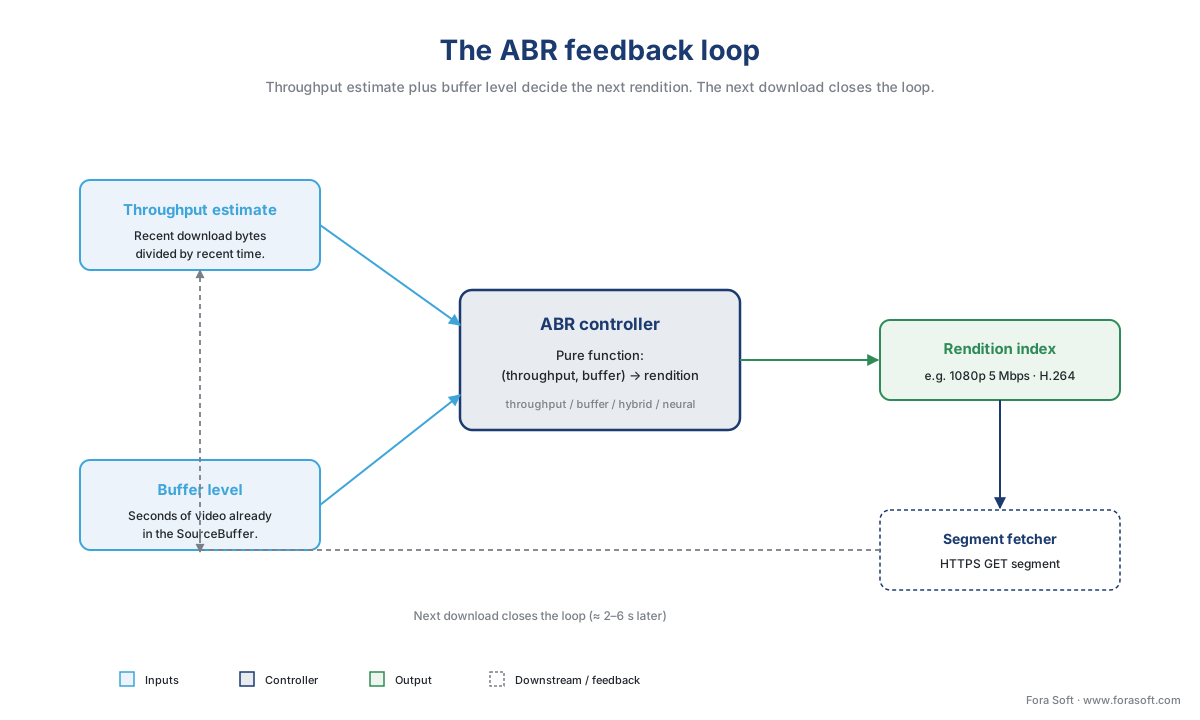 Figure 2. The ABR feedback loop. The controller reads recent throughput and buffer level, picks a rendition, and the fetcher's next download closes the loop a few seconds later.
Sub-system 4 — The buffer manager and the source buffer
Once a segment is downloaded the player has a problem: the browser's element does not know how to "receive a chunk of MP4". The element knows how to play a complete file via the src attribute, but a streaming player builds the file incrementally, in memory, as the show progresses. That problem is solved by Media Source Extensions (MSE), a W3C specification (currently a Working Draft dated 4 November 2025, with the latest formal Recommendation from 17 November 2016) that gives JavaScript an API for appending bytes into the browser's media pipeline.
MSE introduces two objects. A MediaSource is a JavaScript-side proxy for the browser's media stream; you create one, attach it to the element by setting video.src = URL.createObjectURL(mediaSource), and the element treats it as a real video source. A SourceBuffer is the JavaScript-side handle on a buffer of decoded-ready media inside the browser; you call sourceBuffer.appendBuffer(arrayBuffer) with the bytes of a downloaded segment, and the browser parses them, decodes them, and adds them to the playable timeline.
The buffer manager is the player code that decides which segments to append, in which order, and when to remove old ones. A live player typically keeps thirty seconds of video in the source buffer; a video-on-demand player may keep one to two minutes. When the user seeks past the current buffer window the manager flushes the buffer and starts again from the seek point.
The buffer manager is also where gap handling lives. Segments occasionally have one-frame timestamp gaps caused by a packager bug or an encoder boundary, and a naive player will sit forever at a gap waiting for video that never arrives. Every production buffer manager has a "if currentTime has not advanced for N seconds and the next sample is within K milliseconds, jump forward" rule; the exact constants are a small but well-tuned piece of every player's source.
One 2026 update is worth calling out. Chrome 108 and later allow MSE to be used inside a dedicated Worker — segment parsing and buffer math run off the main UI thread, so 4K playback no longer fights the page's JavaScript for CPU. The W3C MSE specification added a MediaSourceHandle object that crosses the Worker boundary and can be attached to a via video.srcObject on the main thread. Players that adopt Worker-MSE see a measurable drop in rebuffer events on lower-end laptops.
The other 2026 update is Apple's Managed Media Source (MMS), shipped in Safari 17.0 on iPad and Mac and Safari 17.1 on iPhone. MMS keeps the MSE API surface but moves the bandwidth and memory-management decisions back to the browser — the browser can ask the player to stop fetching, or evict old segments, when battery, memory, or network conditions degrade. The upgrade path is unobtrusive: a player can feature-detect MMS, fall back to MSE on other browsers, and ship one code path that runs power-efficiently on every Apple device.
Sub-system 5 — The decoder pipeline
The buffer manager does not actually decode video — it hands bytes to the browser, and the browser's built-in media engine takes over from there. The decoder pipeline is the chain of components inside the browser that turn an MP4 segment into pixels on screen: a demuxer that splits audio from video, a video decoder that turns compressed frames into raw frames, an audio decoder that turns compressed samples into raw samples, a renderer that pushes the frames to the GPU, and a clock that keeps audio and video in sync.
For a streaming player developer the decoder pipeline is mostly invisible — the bytes go in via MSE, the pixels come out on the element, and the browser handles every step in between. The thing the player developer cares about is codec support, which varies across browsers and operating systems and changes more often than most teams realise. A player's startup logic queries the browser for the codecs it can decode (MediaSource.isTypeSupported('video/mp4; codecs="avc1.640028,mp4a.40.2"')), picks renditions whose codec strings match, and silently filters out renditions the browser will refuse to play.
The decoder pipeline is also where hardware acceleration matters. On a modern device with a hardware H.264 or HEVC or AV1 decoder, the browser routes the bytes to silicon that can decode 4K at 60 fps while using less than five percent of the CPU. Without hardware support — common for AV1 on older laptops in 2026 — the browser falls back to a software decoder and the CPU pegs at one-hundred percent. This is one of the most common production issues that looks like a "player bug" but is actually a hardware-codec gap; the only fix is to filter AV1 renditions out of the manifest for devices that lack the silicon.
A small but growing class of players bypass MSE entirely and use the WebCodecs API instead, decoding frames in JavaScript at the per-frame level and rendering them to a . WebCodecs (published as a W3C Candidate Recommendation Snapshot) is essential for two use cases: sub-second-latency live streaming, where the buffering MSE inserts is too expensive, and any application that needs per-frame access to the decoded pixels (in-browser editing, AI-driven effects, screen-share scenarios where the encoder's output goes straight to a WebTransport upstream). For mainstream HLS or DASH playback, MSE remains the right tool — WebCodecs gives up too much for too little gain.
Sub-system 6 — The DRM bridge
If the content is protected, the player has a sixth job: convince the browser's Content Decryption Module (CDM) that this session is allowed to decrypt the segments. The mechanism is the W3C Encrypted Media Extensions (EME) API.
EME is not a digital-rights management (DRM) system. It is a standardised messaging channel between the player's JavaScript and the browser's native CDM, plus a tiny state machine for license requests. The browser's CDM — Widevine on Chrome and Firefox and Edge, FairPlay on Safari, PlayReady on legacy Edge and Windows — is a closed binary that does the actual decryption inside a sandbox; the player's job is to ferry messages between it and the license server you operate.
The five steps of an EME session are simple to state and surprisingly stable to implement: navigator.requestMediaKeySystemAccess(keySystem, configurations) asks the browser whether it has a CDM that can handle the codec, container, and DRM the player wants; createMediaKeys() instantiates the CDM session; setMediaKeys() attaches it to the element; generateRequest() produces the license-request payload the player POSTs to the license server; the license response is fed back to the CDM and decryption begins. Every line of that flow is in the W3C EME Recommendation.
The complexity in production is not the EME API — it is the matrix of three DRM systems times every device on earth. Widevine alone has three security levels (L1, L2, L3) that determine whether the browser will play 4K, 1080p, or only 480p of a protected stream, and the level is a property of the device the user owns. FairPlay is mandatory on iOS Safari for any protected content. PlayReady is mandatory on Xbox and on a long tail of smart-TV platforms. A modern OTT player must support all three, must request them in the right order, and must surface a clear error when none of them is available.
DRM is a topic large enough to fill an entire block of articles (Block 9, articles 9.1–9.5). For this article, the takeaway is the placement: the DRM bridge lives between the buffer manager and the decoder pipeline, intercepting each appended buffer just before it reaches the decoder, so the unencrypted bytes never leave the CDM's sandbox.
 Figure 3. The five-step Encrypted Media Extensions license flow. The player is a message relay; the CDM is the trust boundary.
Sub-system 7 — Telemetry and error recovery
The seventh sub-system has the most direct effect on the customer's revenue, and is the first one most teams under-build. Telemetry is the layer that listens to every event the previous six sub-systems emit — segment downloaded, segment failed, buffer level changed, ABR rendition switched, license request returned, decoder error thrown, playback stalled — and forwards them, in real time, to an analytics platform.
The four metrics that matter most are: video startup time (how long from user click to first frame on screen), rebuffer ratio (the percentage of intended watch time that the user spent watching the spinner), playback failure rate (the percentage of sessions that never produced a first frame), and exit-before-video-start (the percentage of users who give up before they ever press play). Mux Data, Conviva, Bitmovin Analytics, Datazoom, and NPAW all expose these four as their headline dashboard tiles, because every viewer-abandonment study published in the last fifteen years has shown them to be the four most predictive variables for engagement.
A reasonable target for rebuffer ratio is below one percent; below half a percent is what a tuned product achieves; anything over three percent is broken in a way the team should treat as a production incident. The math is small but worth showing out loud the first time. If a user watches a forty-five-minute episode and rebuffers for sixty seconds total, the ratio is 60 / (45 × 60) which equals 60 / 2700 which equals 0.022 or roughly two-point-two percent. Two-point-two percent is twice the acceptable upper bound; the team would expect to see an above-baseline exit rate on those sessions.
The error-recovery half of the sub-system is the small set of automatic recoveries the player runs before it gives up and shows a red error screen. The common ones are: retry the manifest with exponential back-off if the first fetch failed; retry a failed segment up to N times; re-create the MediaSource and re-attach to the element if the buffer state becomes inconsistent; jump over a one-frame gap if currentTime has been stationary for two seconds; fall back to the next available CDN URL if the current one returns 5xx errors. None of these is in any specification — they are the accumulated production wisdom of every player team that has ever been on call during a Super Bowl.
Native versus JavaScript players: when each one wins
The seven sub-systems describe how a JavaScript player works in a browser. There is a second, simpler shape that also ships in production: a native player that hands a manifest URL to the operating system's built-in video pipeline and lets the OS do everything.
The textbook example is iOS Safari, where assigning an HLS manifest URL to the src attribute of a element triggers AVPlayer underneath, and Apple's own implementation handles the manifest fetcher, segment fetcher, ABR, buffer manager, decoder pipeline, DRM bridge (via FairPlay), and even much of the telemetry. The player JavaScript shrinks to "set the src, attach a few event listeners, render a custom UI on top". The native player wins on battery life, on first-frame latency (Apple's decoder pipeline is faster than any JavaScript one), and on AirPlay support that no MSE player can easily replicate.
The native player also loses in three concrete ways. It only speaks the protocols the operating system understands — HLS on iOS Safari, HLS and DASH on Android, neither on a smart-TV platform that has not shipped that codec. It exposes very little of its internal state — a Mux Data integration on a native iOS player has fewer dimensions to slice on than the same integration on a Shaka Player session. And it ships on Apple's release cadence, not yours, so a bug fix to the native HLS engine is six to twelve months out.
The choice in 2026 is rarely "JavaScript player on every platform" or "native player on every platform". Most production stacks ship both: hls.js or Shaka in Safari only when MSE is available and the team wants tighter control, native HLS in Safari otherwise; Shaka Player in Chrome on Android; ExoPlayer on Android TV; AVPlayer on tvOS; a per-platform native player on each smart-TV operating system. The decision per platform is a function of MSE support, codec coverage, telemetry needs, and the team's willingness to maintain a player port.
iOS Safari, Managed Media Source, and the mobile-power story
For a long time iOS Safari did not support MSE at all, which is why every video stack of the 2010s eventually had an "iOS path" that handed the HLS manifest to the native player and an "everything else" path that ran hls.js or Shaka. Safari 17.0 changed that on iPad and Mac in September 2023, and Safari 17.1 on iPhone in October 2023 — but the change came with a constraint: iOS Safari ships Managed Media Source, not classic MSE.
The difference matters for one reason. Classic MSE puts the player's JavaScript in full control of fetching, appending, and evicting media; the player can keep two minutes of buffered video on the user's device whether the user's battery is at one percent or one hundred percent. Managed Media Source inverts the control: the browser keeps a memoryUsage budget and emits events (startstreaming, endstreaming) telling the player when to fetch and when to stop. The player still does the work — the browser only signals intent — but the signals are aggressive enough that an MMS player on iPhone uses measurably less battery than an MSE player would.
Apple also added one capability MSE could never have: AirPlay over MMS. A 2024 WebKit feature lets an MMS-backed player hand the protected stream off to an Apple TV via AirPlay, with FairPlay license re-issuance handled by the system. Classic MSE could never do this; the moment the player attached a MediaSource to the element, AirPlay was disabled. For any product that wants iPhone-to-Apple-TV casting of protected content, MMS is the only path.
The practical advice in 2026 is: feature-detect ManagedMediaSource first, fall back to MediaSource second, and let the same player code path run everywhere. hls.js, Shaka, and Video.js v10 all ship the feature-detect logic out of the box.
Smart TV: why the same hls.js does not ship there
The seven-sub-system architecture is universal in concept. The implementation is not. Smart TVs — Samsung Tizen, LG webOS, Roku, Android TV, Amazon Fire TV, Apple tvOS, Hisense Vidaa, plus a long tail of regional platforms — each ship a different runtime that supports a different subset of the web platform.
Some of them ship a real browser. Samsung Tizen and LG webOS run a WebKit fork that supports MSE and EME, so a JavaScript player like hls.js or Shaka can run there with platform-specific tweaks (smaller buffers, conservative codec choices, restricted use of newer APIs). Other platforms — Roku is the canonical example — ship a domain-specific scripting language (BrightScript) and do not run JavaScript at all; the player on Roku is a Roku SDK component, not a JavaScript library. Android TV uses ExoPlayer, a native Kotlin/Java library, not any of the browser players. tvOS uses AVPlayer with a native Swift wrapper.
The implication for a streaming product is that "the player team" is rarely a single team. A typical OTT or e-learning stack has at least three: a web player team that owns the JavaScript stack across Chrome, Firefox, Edge, and Safari; a mobile player team that owns ExoPlayer on Android and AVPlayer on iOS; and a TV player team that owns the per-platform integration on Tizen, webOS, Roku, tvOS, Android TV, Fire TV, and Vidaa. Each team has its own codec matrix, its own DRM matrix, its own telemetry integration, and its own bug backlog. The seven sub-systems are the same; the source trees are very different.
What changed in 2026
Four 2026 updates are worth singling out because they reshape what a player can ship.
MSE-in-Workers is no longer the experimental option. Chrome 108 made it stable, the latest MSE Working Draft (4 November 2025) makes the MediaSourceHandle cross-Worker pattern normative, and hls.js, Shaka, and dash.js all support it as a configuration flag. Moving segment parsing into a Worker drops main-thread CPU pressure measurably and improves rebuffer ratios on lower-end devices.
Common Media Client Data version 2 (CTA-5004-A, February 2026) extends the original CMCD spec with a larger set of keys and a clearer schema for live-edge reporting. Players that adopt CMCDv2 ship richer per-request context to their CDNs and to their analytics platforms.
WebCodecs is now broadly usable across Chrome, Edge, and Firefox, with Safari supporting VideoDecoder though not the full encoder side. Production WebCodecs players are still rare for mainstream HLS or DASH, but for low-latency live (sub-500 ms), in-browser editing, and any product that needs per-frame access, WebCodecs is the layer to learn.
Media over QUIC (MoQ) is the protocol the player team has not had to think about yet but will in twelve to eighteen months. The IETF MoQ Working Group's draft-ietf-moq-transport is iterating roughly every two months; reference players exist in Cloudflare's moq-rs and at Meta. The MoQ-aware player architecture is the seven sub-systems above with two changes: the manifest fetcher disappears (MoQ pushes a "track catalog" instead of pulling a manifest), and the segment fetcher becomes a QUIC stream subscriber instead of an HTTPS GET loop. Everything from sub-system 3 onward stays the same.
Where Fora Soft fits in
We have shipped player integrations in every shape this article describes: hls.js and Shaka in the web product, AVPlayer on iOS and ExoPlayer on Android in the mobile companion, and per-platform native shells on Tizen, webOS, and Roku for OTT clients. The teams that ship the cleanest stacks treat the seven sub-systems as a contract — one ABR controller, one buffer manager, one EME bridge — and write platform shims around them, rather than rewriting the seven sub-systems from scratch on every device. We have used that pattern in OTT broadcast, telemedicine recording playback, e-learning lecture replay, video surveillance review consoles, and conference recording players inside WebRTC stacks where the recording is then re-encoded to LL-HLS for replay.
Common pitfalls, in one paragraph
Two pitfalls catch every new player team. The first is to assume the seven sub-systems are seven JavaScript classes — they are not, they are seven responsibilities, and in any production player at least two of them span multiple files and at least one of them is shared with the browser. The second is to treat telemetry as a Phase 2 deliverable. You will not know whether sub-systems one through six are working without telemetry, and the cost of bolting telemetry on after a launch is invariably ten times the cost of building it into the first version of the player. Make the seventh sub-system a peer to the other six from day one.
What to read next
- Media Source Extensions (MSE): how every web player works under the hood — sub-system 4 in full detail.
- Encrypted Media Extensions (EME): how DRM lives in a browser — sub-system 6 in full detail.
- hls.js in depth — the most-used JavaScript player, source-tree by source-tree.
- Adaptive bitrate streaming explained — sub-system 3 in full detail.
- Player observability and the metrics that ship in production — sub-system 7 in full detail.
- HLS in depth: m3u8, segments, multi-variant playlists — what sub-system 1 actually parses.
Talk to a streaming engineer · See our case studies · Download the cheatsheet
Talk to a streaming engineer about your player stack, see our case studies in OTT, telemedicine, e-learning, conferencing, and surveillance, or download the Streaming Player Anatomy Cheatsheet — a one-page reference covering the seven sub-systems and the JavaScript object that owns each one in hls.js, Shaka Player, dash.js, and Video.js v10.
References
- W3C Media Source Extensions™. W3C Working Draft, 4 November 2025 (latest formal Recommendation: 17 November 2016). https://www.w3.org/TR/media-source-2/ — defines
MediaSource,SourceBuffer,MediaSourceHandle, and the cross-Worker attachment pattern. - W3C Encrypted Media Extensions. W3C Recommendation, 18 September 2017. https://www.w3.org/TR/encrypted-media/ — defines
requestMediaKeySystemAccess,MediaKeys,MediaKeySession, and the license-message lifecycle. - WHATWG HTML Standard, §4.8.10 (Media elements). Living Standard. https://html.spec.whatwg.org/multipage/media.html — defines
HTMLMediaElement,readyState,buffered,currentTime, and the seek algorithm. - CTA-5004 / CTA-5004-A: Web Application Video Ecosystem — Common Media Client Data (CMCD). Original specification CTA-5004 (September 2020); CMCDv2 published as CTA-5004-A, February 2026. https://cdn.cta.tech/cta/media/media/resources/standards/pdfs/cta-5004-final.pdf — defines the four CMCD key classes (Request, Object, Status, Session) and the header / query-string transmission modes.
- IETF RFC 8216 — HTTP Live Streaming. R. Pantos, W. May. August 2017. https://datatracker.ietf.org/doc/html/rfc8216 — the canonical HLS playlist and segment format. Apple HLS Authoring Specification (revision 2025-09, https://developer.apple.com/documentation/http-live-streaming/) layers Low-Latency HLS and authoring constraints on top.
- ISO/IEC 23009-1:2022 — Dynamic adaptive streaming over HTTP (DASH). https://www.iso.org/standard/79329.html — defines the MPD, Periods, AdaptationSets, Representations.
- W3C WebCodecs. W3C Candidate Recommendation Snapshot. https://www.w3.org/TR/webcodecs/ — defines
VideoDecoder,AudioDecoder,VideoFrame, and the codec configuration model. - Spiteri, K., Urgaonkar, R., and Sitaraman, R. K. — BOLA: Near-Optimal Bitrate Adaptation for Online Videos. IEEE INFOCOM 2016. https://ieeexplore.ieee.org/document/7524428 — the open reference buffer-based ABR algorithm shipped in dash.js.
- Mao, H., Netravali, R., and Alizadeh, M. — Neural Adaptive Video Streaming with Pensieve. ACM SIGCOMM 2017. https://dl.acm.org/doi/10.1145/3098822.3098843 — the canonical learning-based ABR.
- Apple WebKit blog — "Explore media formats for the web" (WWDC 2023) and "How to use Media Source Extensions with AirPlay" (2024). https://webkit.org/blog/ — defines the Managed Media Source memory budget and the AirPlay-over-MSE pattern.
- Mux — "Quality of Experience (QoE) in Video Streaming". https://www.mux.com/articles/qoe — startup time, rebuffer ratio, playback failure rate, and the under-1% rebuffer benchmark.
- Chrome for Developers — "Media Source Extensions in Workers" (Chrome 108 stable). https://chromestatus.com/feature/5177263249162240 — defines the
MediaSourceHandlecross-Worker pattern in Chromium.


