


Why This Matters
If your product serves video to a phone, a tablet, a Mac laptop, an Apple TV, or a CarPlay screen, you cannot route around Apple's media stack — every byte of decoded video on a current Apple device passes through the system frameworks Apple ships in the operating system, and your application's job is to pick which of the three public surfaces talks to those frameworks for you. Picking wrong makes the rest of your streaming architecture harder than it has to be: you ship MPEG-DASH manifests no iPhone Safari user can play, you spend a sprint on an autoplay bug that turns out to be a missing HTML attribute, you implement Widevine DRM and then discover your iPad customers cannot watch a single protected title, you order a 0.5-second live-latency target and find iOS Safari refuses to honour it without Apple's bespoke Low-Latency HLS profile. The article gives you the structural picture — what runs on what surface, what the surface allows, what it forbids — so the product decision and the architecture decision get made together, on the first try, with no expensive iOS-only rework two milestones from launch.
The One Rule You Have to Accept First
Before anything else, accept this rule: on iOS and iPadOS, video decoding is done by the system, not by your application. Apple's App Store guidelines require this, and the Web Content Filter rules in WebKit require this too — every browser shipped in the App Store, no matter who built it, has historically used WebKit underneath, which means that Chrome for iOS, Firefox for iOS, Edge for iOS, and every other "browser" you can install from the App Store have all been WebKit-on-iOS wearing a different skin. The EU's Digital Markets Act, abbreviated DMA, opened a narrow door in iOS 17.4 for alternative browser engines inside the European Union, but as of the end of 2025 no commercial browser had shipped on iOS with anything other than WebKit (Open Web Advocacy, Apple's Browser Engine Ban Persists Even Under the DMA, 2025). For practical 2026 purposes you should plan for WebKit on iOS everywhere.
The architectural consequence is large. You do not get to ship libwebrtc on iOS Safari. You do not get to decode AV1 on every iPhone simply by shipping an AV1 decoder in JavaScript — you get whatever the system supports on the hardware in front of you. You do not get to mix and match decoders the way you can on Linux desktop. You get three public ways to ask the system to play video, and that is what the rest of this article catalogues.
The Three Playback Surfaces
The three surfaces correspond to three different software layers an Apple device exposes to your code. The first surface is the <video> HTML element in mobile Safari. The second surface is the Managed Media Source API, also accessed from the same <video> element but only on iOS 17.1 and newer, that lets a JavaScript library feed segments byte-by-byte instead of pointing at a URL. The third surface is AVPlayer inside a native iOS or iPadOS or tvOS application written in Swift or Objective-C, which is the only surface that exposes the full system capability — picture-in-picture handled by the OS, FairPlay DRM with a hardware-backed key path, Spatial Audio, Now Playing integration on the lock screen and on AirPlay. Pick one before you write the architecture document.
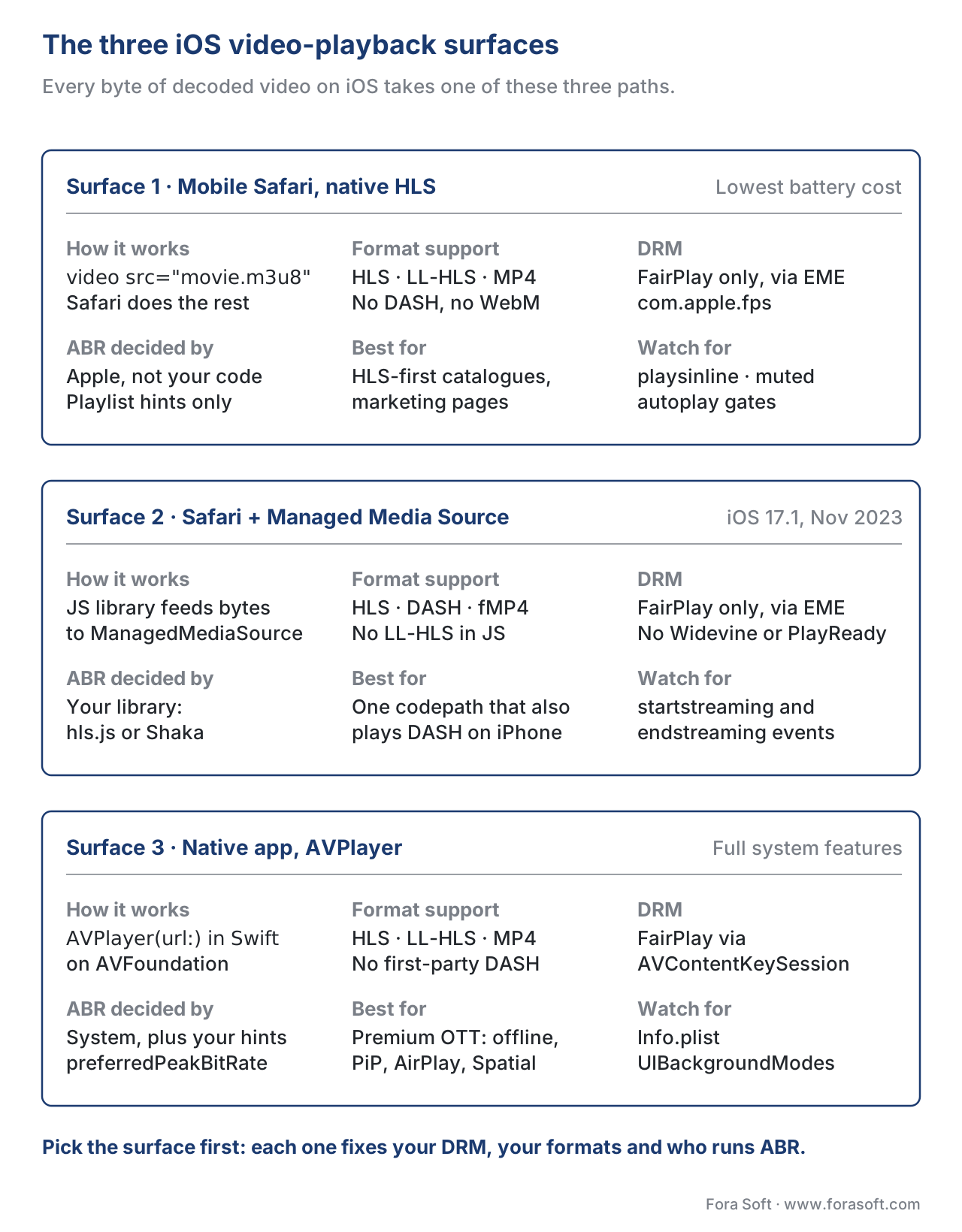 Figure 1. The three video-playback surfaces on iOS in 2026. Native HLS in Safari is the simplest path; Managed Media Source extends Safari to non-HLS formats; AVPlayer in a native app is the only path with full system features and full DRM control.
The rest of this article walks down the three surfaces in order, then puts them back together as a decision frame at the end.
Surface 1 — Native HLS in Mobile Safari
The first surface is the one Apple expects most websites to use, which is also the simplest one to ship: write a standard HTML <video> element, point its src attribute at an HTTP Live Streaming manifest URL (the small text file with the .m3u8 extension that lists the available qualities and segments), and let Safari handle the rest. This is the path Apple optimised for sixteen years ago when it shipped the first version of HLS in 2009, the path it documents in the HTTP Live Streaming Authoring Specification for Apple Devices (revised regularly; the version current at this writing is from September 2025), and the path that pays the lowest battery cost of the three surfaces because the playback pipeline never leaves Apple's own decoder, demuxer, and adaptive-bitrate controller.
The mechanism is exposed to JavaScript via the canPlayType method on a video element. Calling video.canPlayType('application/vnd.apple.mpegurl') on a current mobile Safari returns the string "maybe" or "probably", which is the standard signal across browsers that the media engine will accept the format. Inside Apple's own apps, the same path is reached by handing an HLS URL to AVPlayer; the underlying decoder is the same.
The trade you make in return for "Safari does the work for you" is that you give up four things web developers expect on every other platform. The first one is the variant-selection algorithm — Safari runs Apple's adaptive-bitrate logic, you do not get to override it, and the choice of which rendition to play next is decided by code inside the operating system that you can influence only with playlist-level hints such as the VIDEO-RANGE, RESOLUTION, and BANDWIDTH attributes in the master playlist. The second one is fine-grained telemetry — you get the standard HTML5 media events (loadedmetadata, playing, waiting, stalled, ended, error) and the webkit-playback-target-availability-changed AirPlay event, but you do not get a per-segment fetch hook the way you do with hls.js, and the metrics surface you can attach to a Mux Data or Conviva sensor is narrower. The third one is format coverage — native Safari plays HLS, and only HLS; it does not play DASH (MPEG Dynamic Adaptive Streaming over HTTP), it does not play progressive WebM, and a <video src="manifest.mpd"> simply fails to load. The fourth one is encryption — Safari's only supported web DRM is FairPlay Streaming, applied to HLS content using the EXT-X-KEY tag in the playlist with a key method of com.apple.streamingkeydelivery. There is no Widevine in Safari, on iOS or anywhere else; there is no PlayReady. If your catalogue is multi-DRM, your iOS path is FairPlay.
Two of these four limits — Apple's own ABR and FairPlay-only DRM — are policy choices the rest of the industry has learnt to live with, because they come bundled with very real benefits: native power efficiency, picture-in-picture, AirPlay 2 to an Apple TV, Spatial Audio, and the entire iOS accessibility stack including VoiceOver-friendly captions and audio descriptions. The other two — the missing telemetry surface and the HLS-only format coverage — are the reason the second surface exists.
The Playback-Attribute Cliff
There is a class of bug every team learns about by shipping it: a video that plays in the Safari simulator on a Mac, plays in Safari on a different iPhone for testing, and then refuses to play autoplay-muted-inline on a real iPhone for an end user. The cause is one of three HTML attributes that the wider web treats as suggestions and that mobile Safari treats as gates.
playsinline is the first one. Without it, an iPhone Safari video defaults to fullscreen playback the instant the user taps play — the page disappears, the system controls take over, and any custom controls or overlays your design built around the video are gone. Adding <video playsinline> (or, in modern HTML, just the boolean attribute without a value) restores the in-page behaviour the rest of the web platform defaults to (WebKit Blog, New <video> Policies for iOS, 2016). On iPadOS Safari and on macOS Safari the attribute is unnecessary, because their full-screen-on-play behaviour was always opt-in; the attribute is iPhone-specific.
muted is the second one. iOS Safari refuses to autoplay any video that carries audio unless the audio is muted at the element level, no matter what user-gesture API you call. Adding <video autoplay muted playsinline> is therefore the canonical recipe for a hero-style background video on a marketing page. If a real user clicks play, they can unmute, and the muted-on-load state is the entry condition Safari requires before it will allow play() to resolve without throwing.
preload="auto" is the third one, and this one is a performance gate rather than a correctness gate. iPhone Safari aggressively rate-limits preload requests on cellular connections, so even if you set preload="auto" on the element the browser may decide to fetch only the first segment until the user taps play. This is correct behaviour for the user — it saves their data plan — but it surprises teams who profile a video on Wi-Fi, see a fast start, and ship without testing on a metered connection.
A fourth quirk worth knowing is that the <source> child element is the right way to specify an HLS URL when you also want to fall back to MP4 for non-Safari browsers — <source src="movie.m3u8" type="application/vnd.apple.mpegurl"> followed by <source src="movie.mp4" type="video/mp4"> lets the browser pick the format it supports. Putting the HLS URL on the <video src> attribute works on Safari, but the browser does not skip a missing MP4 fallback the same way.
Low-Latency HLS on iOS Safari
Apple introduced Low-Latency HLS — referred to as LL-HLS in the rest of the industry — in 2019, then quietly removed the HTTP/2 server-push requirement from the authoring specification in the September 2023 revision (Apple, HLS Authoring Specification for Apple Devices, revision 2025-09). On mobile Safari the LL-HLS receiver is built into the same <video> element you already use; you do not opt in. If your manifest carries the EXT-X-SERVER-CONTROL, EXT-X-PART, EXT-X-PRELOAD-HINT, and EXT-X-RENDITION-REPORT tags, and the underlying media is partial-segment-capable, the iPhone player will fetch part segments and meet a sub-three-second glass-to-glass target on a good network. If your manifest is plain HLS, the player runs at a fifteen-to-thirty-second target instead. This is the only path to sub-three-second live on iPhone Safari without writing a native app — Safari refuses to give you the building blocks to implement your own low-latency receiver in JavaScript, because Managed Media Source (the next surface) is not yet capable enough for that profile.
Surface 2 — Managed Media Source for the <video> Element
The second surface is the Managed Media Source API, abbreviated MMS, which Apple shipped in Safari 17.1 in November 2023 on iPhone after holding the line for years on the older Media Source Extensions API the rest of the web had been using since 2013 (Apple, Safari 17.1 Release Notes, November 2023; Bitmovin, Apple's New Managed Media Source: Everything You Need to Know, 2023). The MMS surface gives JavaScript libraries a path to feed segment bytes into the <video> element instead of pointing at a URL — the same building block hls.js, Shaka Player, dash.js, and Video.js have used on every other modern browser for a decade, finally on iPhone.
Two things are worth understanding about the MMS surface. The first is what it is for, which is to allow non-HLS sources to play on iPhone for the first time — DASH manifests, fragmented-MP4 progressive sources, and any other format the library knows how to demux into a CMAF chunk. The second is what it is, which is a power-managed variant of the Media Source Extensions, abbreviated MSE, with two structural differences. MMS lets the operating system tell the JavaScript when to back off — when the device is on cellular, when the screen is locked, when the user has switched to another tab — through the new MediaSource.streaming property and the startstreaming and endstreaming events. And MMS keeps the source-buffer's automatic buffer-eviction logic tighter than MSE's, so iPhone Safari does not accumulate a 60-second buffer on a low-end iPhone with limited memory.
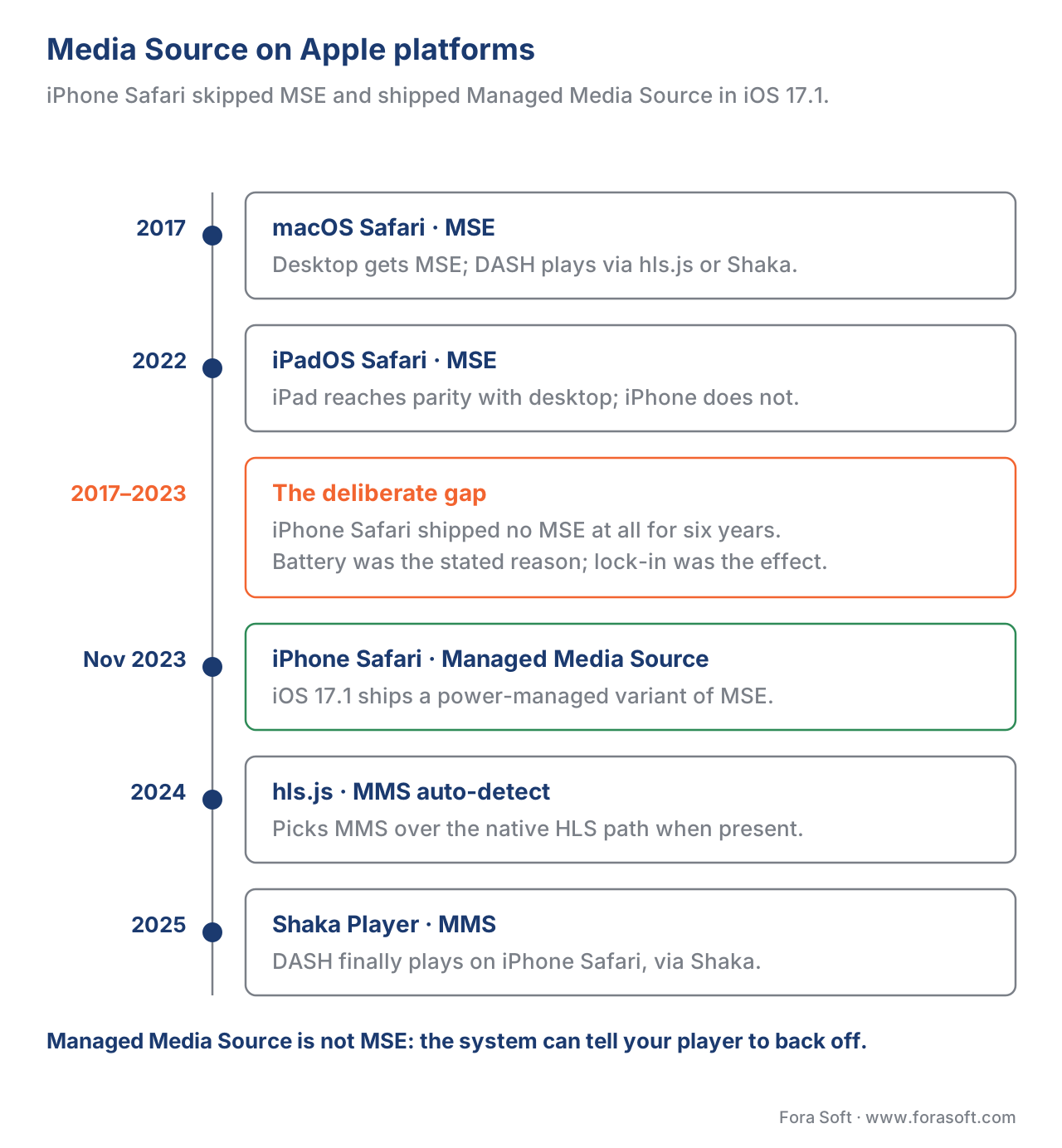 Figure 2. The Media Source family across Apple platforms. iPhone Safari skipped MSE entirely and shipped Managed Media Source instead in iOS 17.1; the major JavaScript players auto-detect MMS in 2024 and 2025.
The library support arrived quickly. hls.js, the most-used HLS player in the JavaScript world with around five million weekly downloads, gained MMS support in late 2023 and now auto-detects the MMS path on iOS Safari without configuration — if window.ManagedMediaSource is defined, hls.js will prefer it over the native <video src="m3u8"> path on the same device (hls.js GitHub, Issue #6161 — hls.js on iOS > 17.1, 2023-2024). Shaka Player added the same detection during 2024.
What MMS does not give you, in 2026:
- It does not unlock Widevine or PlayReady on iOS Safari. The only DRM available on Safari is still FairPlay, applied through the Encrypted Media Extensions (EME) layer Safari has supported on macOS and now extends to iOS. If your library feeds an encrypted CMAF source through MMS, the key request is satisfied through a FairPlay license server using the
com.apple.fpskey system identifier, not Widevine. - It does not give you LL-HLS in JavaScript. Apple did not expose the low-latency receiver to MSE-style libraries; LL-HLS on iPhone Safari still goes through the native
<video src="m3u8">path or through AVPlayer in a native app. - It does not give you live-streaming WebRTC at scale. Browsers without full WebRTC support are not the topic here; iOS Safari does ship WebRTC, but the topic of this article is the media-element path, and that path is HLS-and-fMP4 only.
The practical conclusion: if you ship MPEG-DASH for the rest of the web and you want one player codepath to cover iPhone Safari too, MMS plus hls.js or Shaka is the 2026 way to do it. If your catalogue is HLS-only anyway, the older native <video src="m3u8"> path remains simpler and lighter on battery, and most teams continue to use it.
Surface 3 — AVPlayer in a Native iOS App
The third surface is AVPlayer, the system video-playback class inside Apple's AVFoundation framework, used by Apple's own apps (the TV app, the Apple Music app, Safari itself for the video element under the hood) and by every shipped third-party iOS video app of any size. AVPlayer is the only surface with full control over the playback pipeline — full FairPlay key delivery through AVContentKeySession, full picture-in-picture managed by the OS, AirPlay 2 to an Apple TV, Spatial Audio, Apple TV-style Top Shelf integration, Now Playing on the lock screen and on a connected CarPlay screen, Background Audio with proper iOS audio-session handling, and a fully programmable adaptive-bitrate strategy through AVPlayerItem.preferredPeakBitRate and AVPlayerItem.preferredMaximumResolution.
The shape of the API has been stable for a decade. The minimum AVPlayer setup in Swift is three lines:
let url = URL(string: "https://example.com/manifest.m3u8")!
let player = AVPlayer(url: url)
let controller = AVPlayerViewController()
controller.player = player
present(controller, animated: true) { player.play() }
AVPlayerViewController is the system-provided view controller with the standard playback chrome (the play button, the timeline scrubber, the captions menu, the AirPlay route picker). You can build your own controls instead with AVPlayerLayer and a custom UIView, which is what most production apps do once the design team gets involved, but the system controller is the right starting point.
For HLS the URL can be a live manifest or an on-demand manifest; AVPlayer adapts. For LL-HLS Apple shipped the receiver in AVPlayer in 2019 and refined it in iOS 14, 15, 16, 17, and 18; the only "configuration" is the manifest tags themselves. For FairPlay protected content the model is to attach an AVAssetResourceLoaderDelegate (legacy) or, on iOS 11 and newer, an AVContentKeySession (modern) that handles the key request, sends it to your FairPlay license server, and returns the Content Key Context, abbreviated CKC, that lets the decoder play the segments. The application certificate Apple issues to each FairPlay deployment is the only credential the system requires; everything else is your own server-side glue.
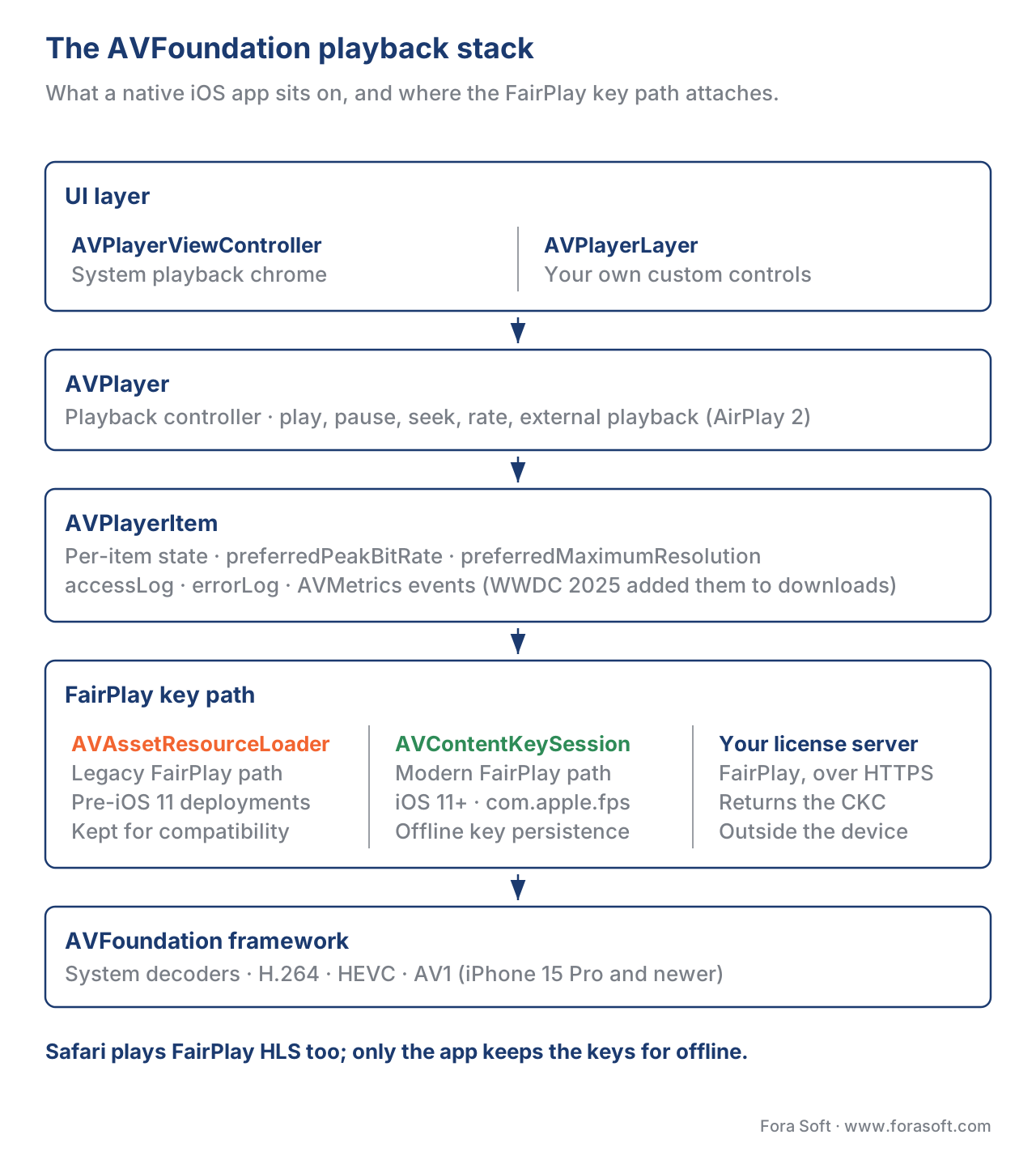 Figure 3. The AVFoundation playback stack inside a native iOS app. AVPlayer sits on top of AVFoundation; AVPlayerItem holds the per-item state; the modern FairPlay path uses AVContentKeySession; the UI is AVPlayerViewController or a custom layer over AVPlayerLayer.
A few production points are worth knowing:
WWDC 2025 added AVMetrics to the progressive download playback path and to HLS offline downloads (Apple, What's New in HTTP Live Streaming, WWDC 2025, June 2025). The same AVMetricEvent classes you already had on HLS are now available on a URLSession download path through a new urlSession:assetDownloadTask:didReceiveMetricEvent: callback in AVAssetDownloadDelegate. If your app does offline-first video for a course platform or a travel app, your QoE telemetry now covers both paths with the same event schema.
Picture-in-picture is a single line. Setting AVPlayerViewController.allowsPictureInPicturePlayback = true is the entire opt-in for PiP on iOS 14 and newer, with one caveat — your app's Info.plist needs audio and voip in the UIBackgroundModes array, and on the iPhone (as opposed to the iPad) the user has to enable picture-in-picture system-wide in Settings → General → Picture in Picture. The setting is on by default since iOS 17; older users may have turned it off.
FairPlay is not optional for premium HLS catalogues. If your studio contracts require Widevine L1 on Android and FairPlay on Apple, the iOS app is the only path to ship the FairPlay half. Safari can also play FairPlay-protected HLS through the EME com.apple.fps key system, but the certificate-issuance dance is identical, and most premium-catalogue teams prefer the native-app path on Apple platforms because it also unlocks offline downloads with FairPlay key persistence.
Background audio playback survives a lock-screen. A native app with the audio UIBackgroundMode and a configured AVAudioSession keeps audio playing when the screen locks. Safari does not — pause-on-lock is the WebKit default for tab playback. Podcast-style products therefore ship a native app even when their video is HLS that would otherwise work in Safari.
The Format and DRM Matrix in 2026
The same content needs to play across all three surfaces if your product is cross-platform. The matrix below shows what each surface accepts as input, and what it does not.
| Surface | HLS | LL-HLS | DASH | Progressive MP4 | FairPlay | Widevine | PlayReady |
|---|---|---|---|---|---|---|---|
Safari <video src=> (HLS native) | yes | yes | no | yes (non-streaming) | yes (EME com.apple.fps) | no | no |
| Safari + MMS (hls.js / Shaka) | yes | no, falls back to vanilla HLS | yes (via library) | yes | yes (EME) | no | no |
| Native app AVPlayer | yes | yes | no (no first-party DASH support — community libraries exist) | yes | yes (AVContentKeySession) | no | no |
| Third-party iOS app via WKWebView | inherits Safari above | inherits Safari above | inherits Safari above | inherits Safari above | inherits Safari above | no | no |
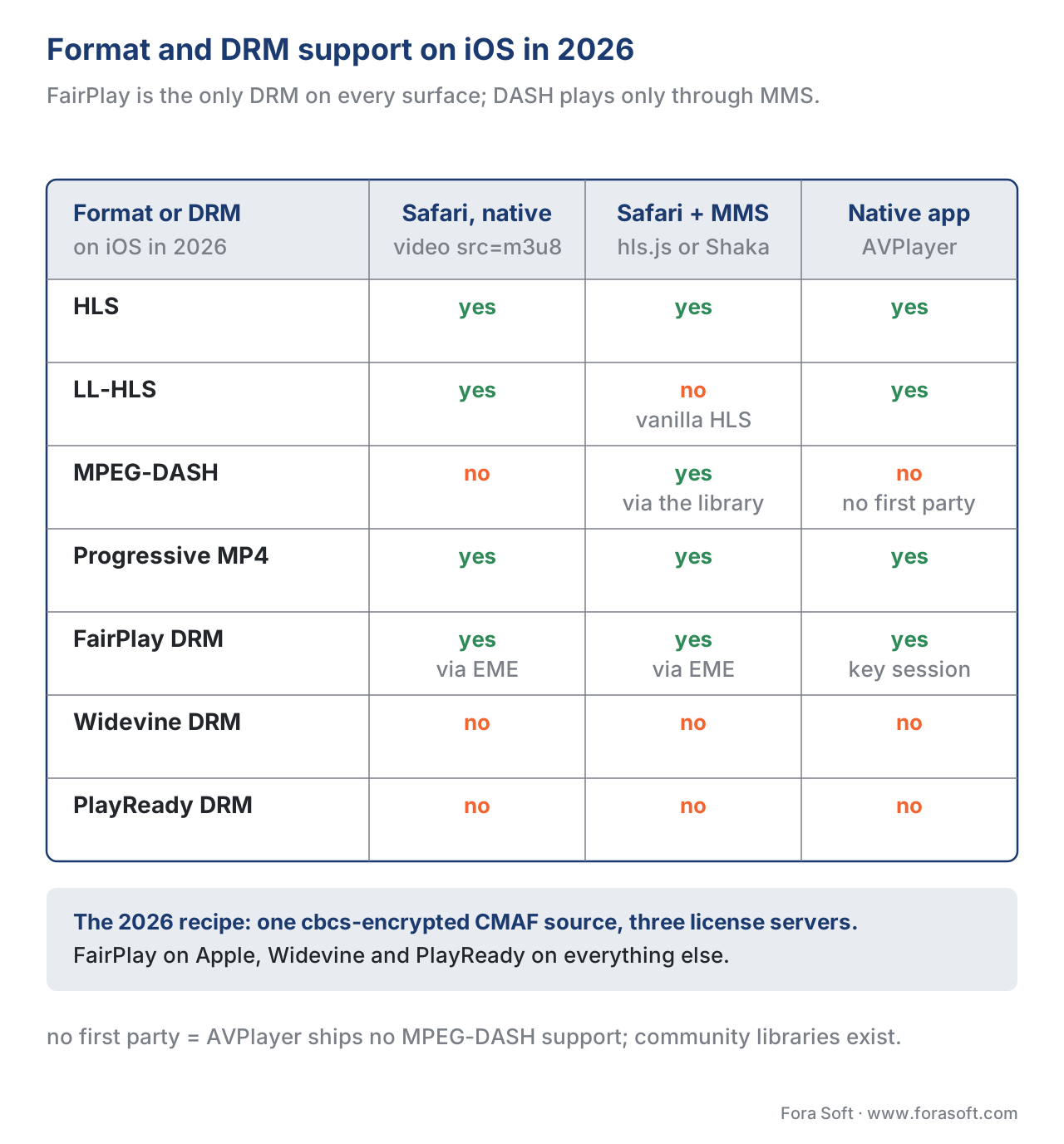 Figure 4. Format and DRM support for the three iOS playback surfaces in 2026. Widevine and PlayReady are unavailable on every iOS surface; FairPlay is the only DRM. DASH plays only through the Managed Media Source path with a JavaScript library.
Two implications fall out of the matrix.
First, multi-DRM with the cbcs encryption mode is the only way to share an encrypted file across Apple and non-Apple platforms. ISO/IEC 23001-7 Common Encryption (CENC) defines two encryption modes — cenc (CTR-mode, AES-128, the older one) and cbcs (CBC-mode subsample, the newer one). Apple's FairPlay implementation accepts only cbcs; Widevine and PlayReady both accept cbcs since 2018. The 2026 standard is therefore a cbcs-encrypted CMAF source served to all three DRMs from the same file, with three different license servers issuing keys (PallyCon, EZDRM, Axinom, BuyDRM, and AWS each offer this as a managed service). The encoding-side decision lives in the CMAF article and the FairPlay deep dive; the player-side decision lives here.
Second, if your only requirement on iOS Safari is "HLS plays", the simplest player is no player at all. A bare <video src="manifest.m3u8" controls playsinline> in your HTML, with FairPlay handled through your EME license callback, gets you native ABR, native LL-HLS, native AirPlay, native PiP, and the lowest battery drain of the three surfaces. Reach for hls.js or Shaka with Managed Media Source only when you also need DASH, or when you need a finer telemetry hook than the native HTML5 media events expose.
A Common Mistake — Treating iOS as a "Polyfill Target"
The most consequential architecture mistake we see in product reviews is treating iOS Safari as a target the rest of the web's player can be polyfilled onto. The instinct is reasonable — most engineering teams build the player for Chrome and Firefox first, where MSE and Widevine are available, then ask "what do we do for iOS". The wrong answer is to write a heroic shim that tries to make iOS behave like every other platform. The right answer is to accept that the three surfaces above are the entire iOS playback story, design the architecture around what they can do, and treat the rest of the web as the "extension" rather than the other way around.
In concrete terms: build the master playlist as HLS with cbcs encryption, package CMAF segments that work for both HLS and DASH from the same encrypted files, run FairPlay license issuance on Apple platforms and Widevine plus PlayReady on every other platform, point Safari at the HLS master playlist directly, point Android and desktop Chrome at the DASH manifest through Shaka or dash.js, and ship a native iOS app for the FairPlay-with-offline use cases your studio contracts require. The HLS-first architecture is the cheapest path through Apple's policy choices, and it gets you a working iOS player on day one instead of a working iOS player on milestone three.
Where Fora Soft Fits In
We have shipped video pipelines for OTT, telemedicine, e-learning, video surveillance, and AR/VR customers since 2005, and the iOS playback surface is the part of the stack we have refactored the most often for clients who started Android-first. The pattern repeats — a team adopts MPEG-DASH for the web, builds a Widevine-only license server, and then has to add a parallel HLS-plus-FairPlay path for the iOS half of the audience. We map the catalogue onto a cbcs-encrypted CMAF source once, attach FairPlay to the iOS app and Widevine plus PlayReady to the rest, and the same content plays everywhere from one packager output. The architectural saving compounds across every studio contract that follows. Our OTT and Internet TV development team builds that one-packager, three-DRM setup end to end, and our mobile app development team ships the AVPlayer-based iOS client with FairPlay and offline downloads.

The book
Video Streaming: A Complete Guide to Video Delivery: From ABR and CDNs to Players, WebRTC, DRM, and the Economics of Streaming
This article maps the three iOS surfaces and what each one forbids. Book 3 is the player half of the handbook: how a player buffers and recovers from a stall, what MSE and EME actually do under hls.js and Shaka, how FairPlay, Widevine and PlayReady differ at the key-request level, and how to build one cbcs-encrypted CMAF source that all three license servers can unlock. It is part of a seven-volume handbook that covers the whole video stack from the pixel to production, so an engineer who works through it can design and build a system like this one. Written by Nikolay Sapunov, CEO at Fora Soft.
Does your player stack still assume iOS behaves like Chrome?
Tell us what your catalogue is packaged as, which DRM your studio contracts require, and whether you ship a native app, and we will tell you which of the three surfaces you need, what the FairPlay half costs to add, and what can be dropped. 250+ video products shipped since 2005.
See our case studies
Case study
VALT
Recording and observation for 770+ US organisations and 50,000+ active users, built on RTMP and HLS with AVFoundation and AVKit on the iOS side — the native-app surface doing the work Safari will not do.
Case study
TapeReal
A creator video platform with 52,000+ members and 650,000+ plays, shipping the same catalogue through Swift with AVKit on iPhone and through the browser on the web — two surfaces, one library.
Case study
Sprii
Danish live shopping with 72,000+ live events and 21M products sold across web, iOS and Android — every stream has to reach the iPhone audience on Apple's terms, not the web player's.
What to read next
Players
Media Source Extensions (MSE): How Every Web Player Works Under the Hood
The API iPhone Safari skipped for six years, and what Managed Media Source kept and changed when it finally arrived.
DRM
Encrypted Media Extensions (EME): How DRM Lives in a Browser
The layer that carries the FairPlay key request on both Safari surfaces, step by step from the encrypted event to the licence.
DRM
FairPlay Streaming in Depth
The only DRM on any iOS surface: the application certificate, the SPC and CKC exchange, and what offline key persistence costs you.
Players
hls.js in Depth
The library that auto-detects Managed Media Source on iOS 17.1 and newer, and how it decides to prefer it over the native path.
References
- Apple, HTTP Live Streaming (HLS) Authoring Specification for Apple Devices, revision 2025-09. https://developer.apple.com/documentation/http-live-streaming/hls-authoring-specification-for-apple-devices. Tier 1 — the controlling document for HLS conformance on Apple platforms; cited for the LL-HLS tag set (EXT-X-PART, EXT-X-PRELOAD-HINT, EXT-X-RENDITION-REPORT, EXT-X-SERVER-CONTROL) and for the September 2023 removal of HTTP/2 server push from LL-HLS.
- Apple, Safari 17.1 Release Notes, November 2023. https://webkit.org/blog/14787/release-notes-for-safari-17-1/. Tier 1 — the source of the Managed Media Source ship date on iPhone.
- Apple, What's New in HTTP Live Streaming — WWDC 2025, June 2025. https://developer.apple.com/streaming/Whats-new-HLS.pdf. Tier 1 — the AVMetrics expansion to progressive download and offline HLS download paths.
- R. Pantos, W. May, RFC 8216 — HTTP Live Streaming, August 2017. https://www.rfc-editor.org/rfc/rfc8216.html. Tier 1 — the HLS base specification consumed by every iOS playback surface; cited for the EXT-X-KEY tag and the
com.apple.streamingkeydeliverykey method. - ISO/IEC, ISO/IEC 23001-7:2023, Information technology — MPEG systems technologies — Part 7: Common encryption in ISO base media file format files, 2023. https://www.iso.org/standard/84637.html. Tier 1 — the controlling document for the
cencandcbcsencryption modes. Spec text is paywalled; the Apple FairPlay constraint oncbcs-only is documented in Apple's HLS Authoring Specification. - W3C, Encrypted Media Extensions, W3C Recommendation, 18 September 2017. https://www.w3.org/TR/encrypted-media/. Tier 1 — the EME spec Safari implements; cited for the
com.apple.fpskey system identifier path. - W3C, Media Source Extensions™, W3C Recommendation, 17 November 2016. https://www.w3.org/TR/media-source/. Tier 1 — the MSE base specification that Managed Media Source extends with power-management semantics.
- WebKit Blog, New
<video>Policies for iOS, 2016. https://webkit.org/blog/6784/new-video-policies-for-ios/. Tier 3 — the canonical first-party explanation of theplaysinline,muted-required-for-autoplay, and inline-by-default policy changes. - Bitmovin, Apple's New Managed Media Source: Everything You Need to Know, 2023. https://bitmovin.com/blog/managed-media-source/. Tier 4 — production-deployer summary of the Managed Media Source surface; used for the API-surface description and the streaming-control event names.
- hls.js GitHub, Issue #6161 — hls.js on iOS > 17.1 (Simulator), 2023–2024. https://github.com/video-dev/hls.js/issues/6161. Tier 3 — the maintainer thread documenting hls.js Managed Media Source auto-detection on iOS 17.1 and newer.
- Open Web Advocacy, Apple's Browser Engine Ban Persists, Even Under the DMA, 2025. https://open-web-advocacy.org/blog/apples-browser-engine-ban-persists-even-under-the-dma/. Tier 4 — the secondary source for the 2025 status of alternative browser engines on iOS under the EU Digital Markets Act.
