


Why This Matters
If you ship paid video to Windows, Xbox, Roku, or any major Smart TV platform, you ship PlayReady. Safari does not run PlayReady (you fall back to FairPlay Streaming), desktop Chrome runs Widevine by default, but the moment your audience touches Microsoft Edge, an Xbox, a Smart TV in a hotel room, or — increasingly — Chrome on Windows 11 wanting hardware-secure 4K, PlayReady is the only DRM that will play your stream. A product manager reading this article will leave knowing why "we'll just use Widevine on Smart TVs" almost always fails review (Smart TVs ship PlayReady natively; Widevine support varies by vendor and year) and why studios writing 4K licensing contracts in 2026 still write the requirement as "Widevine L1 OR PlayReady SL3000". An engineer will leave with the on-the-wire SOAP exchange, the WRMHEADER syntax, the EME key-system strings, and the four production bugs that block launch the week before launch. A founder will leave with a concrete answer to "how is PlayReady different from Widevine?" — short version: structurally similar (both grade clients into security levels, both encrypt with Common Encryption, both negotiate a license over HTTPS), commercially different (PlayReady's reach is widest on the device classes that ship Windows or use a third-party silicon vendor with a PlayReady TEE, which now means almost every Smart TV chipset on the market).
This article is the fourth and final part in a four-piece DRM mini-series — DRM 101: why three systems, and why you ship all three is the pillar, Common Encryption (CENC) in depth is the packaging layer, Widevine Security Levels: L1, L2, L3 is Google's side, FairPlay Streaming in depth is Apple's. Read this one to understand Microsoft.
What PlayReady Actually Is
Before the wire format, the definition. PlayReady is a content-header format plus a license-acquisition protocol plus a client porting kit plus a server SDK plus a multi-tier licensing programme. The pieces fit together as follows.
The content header, called the WRMHEADER, is a small XML document the packager produces at encryption time and the player picks up at playback time. It names the content's Key Identifier (KID), the encryption algorithm, and — optionally — the License Acquisition URL. The packager embeds the WRMHEADER inside a pssh (Protection System Specific Header) box at the top of every MPEG-4 / fMP4 / CMAF asset, and inside a #EXT-X-SESSION-KEY tag for HLS deliveries that use Common Encryption.
The license-acquisition protocol is a SOAP-over-HTTPS exchange between the client and your license server. The client sends a base64-encoded challenge (an XML document signed with the client's certificate), the server responds with a base64-encoded response containing one or more licenses — each license is itself an XML document signed by the server. The client validates the signature, extracts the content key, and decryption begins. The whole conversation happens inside a single HTTPS POST.
The client porting kit, called the PlayReady Device Porting Kit (PK), is the C source code Microsoft licenses to device manufacturers so they can implement the PlayReady stack inside their silicon. Microsoft does not ship a binary client; the manufacturer ports the PK into their Trusted Execution Environment (TEE), passes a robustness audit, and ships a device with a baked-in client certificate whose Security Level is set during manufacturing.
The server SDK, called the PlayReady Server SDK, is a .NET library that license-server operators (you) integrate into a web service. As of April 2026 it ships in two flavours: a legacy .NET Framework edition for Windows-only deployments and a .NET 8.0 .NET Core edition that runs anywhere (Linux containers included). The Server SDK does the cryptographic heavy lifting — challenge parsing, signature verification, license signing — and exposes a small surface for your business logic to plug into.
The licensing programme is the legal layer. Microsoft licenses PlayReady to two distinct audiences: client implementers (silicon vendors, app developers, browser teams) and server implementers (streaming services, license-server vendors). Both sign a compliance and robustness agreement; the client agreement includes the SL3000 self-assessment Microsoft introduced in April 2015 to align with Hollywood's 4K and HDR robustness expectations.
Two consequences of this design shape every PlayReady decision your team will make.
First, PlayReady's reach is silicon-deep, not browser-deep. A device runs PlayReady because its System-on-Chip ships a PlayReady TEE implementation, not because its operating system bundles a software CDM. That is why almost every Smart TV on the market — Tizen, webOS, Vidaa, Android TV, Roku, Fire TV — plays PlayReady content out of the box: the chipsets from MediaTek, Realtek, Amlogic, Broadcom, and Sigma all license the porting kit and ship a SL2000 or SL3000 client. It is also why Widevine adoption on Smart TVs is so uneven by comparison.
Second, PlayReady on a personal computer means Edge, and increasingly Chrome on Windows 11. Desktop Safari does not run PlayReady. Desktop Firefox does not run PlayReady. Desktop Chrome historically did not run PlayReady — but as of late 2024 / early 2025, Chrome on Windows 11 (build 22000 or later, Chrome 140 or later) gained SL3000 hardware-DRM support through Microsoft's Edge-derived Content Decryption Module, so a Chrome browser on a recent Windows machine with a compatible GPU is now a legitimate PlayReady SL3000 surface. The legacy com.microsoft.playready EME key-system string still works for software clients; the new com.microsoft.playready.recommendation string is the one to use for any client that might want hardware-secure 4K.
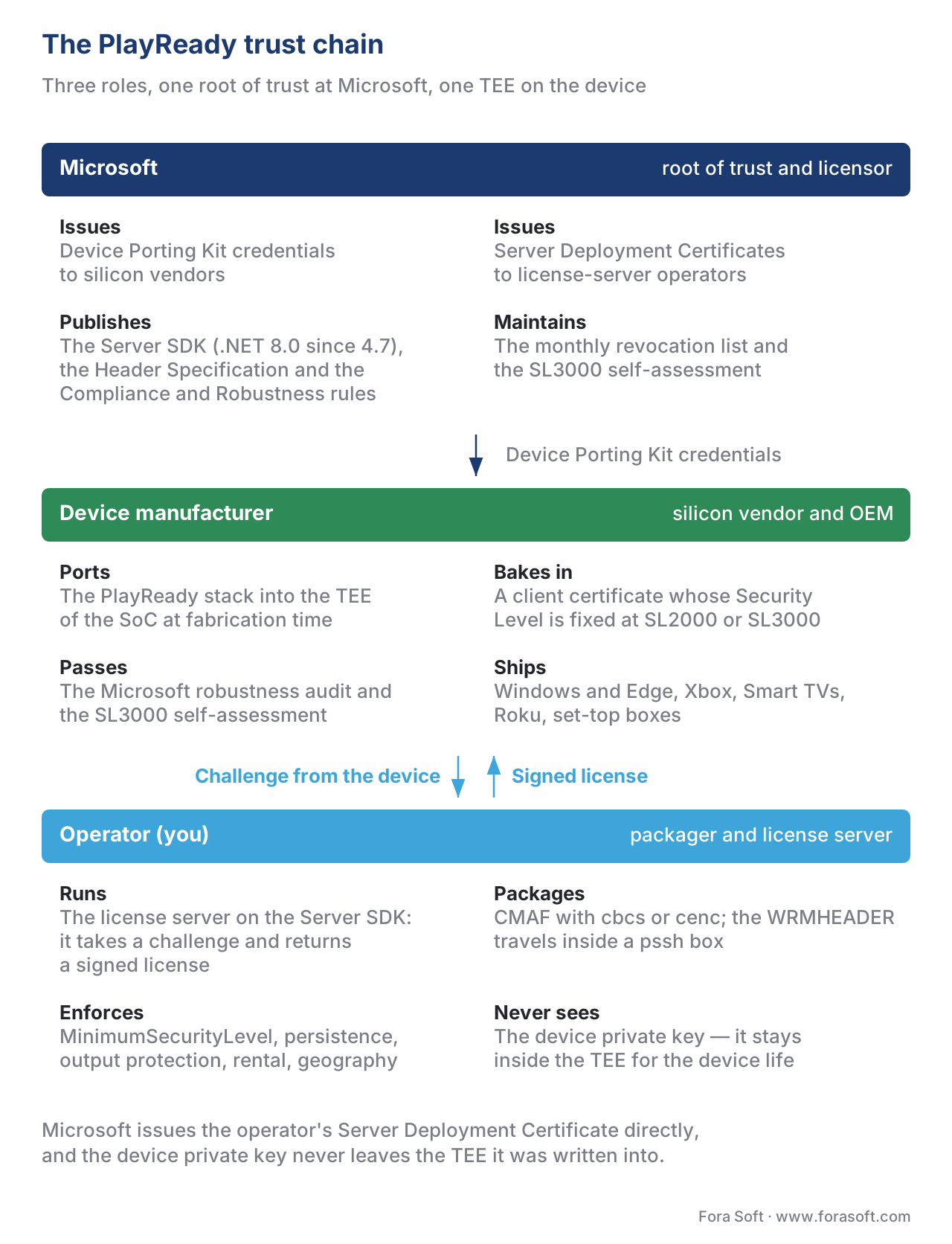 Figure 1. The three-party trust chain. Microsoft issues credentials to manufacturers and to license-server operators; the device manufacturer bakes a SL2000 or SL3000 client into silicon during the porting-kit integration; you run the license server and the packager and never see the device's private key.
The On-The-Wire Protocol: Challenge and Response
A PlayReady license acquisition is a two-message HTTPS exchange. Both messages are SOAP-XML documents wrapped in a base64-encoded blob; from the player's perspective they are opaque, but for a license-server engineer they are perfectly readable.
Message 1 — Challenge. When a player decides it needs a license, it asks the PlayReady client to generate a challenge. The client gathers: the WRMHEADER from the pssh box (so the server knows which KID to look up), the client certificate chain (so the server can verify the client's Security Level), a list of supported features (so the server knows whether the client can handle PlayReady 4.6's multi-key-algorithm licenses or only the older single-algorithm form), an anti-replay nonce, and a client-info block that names the operating system, the porting-kit version, and any policy hints. The client signs the challenge with its device private key, base64-encodes the result, and the player POSTs it to your license URL — typically as Content-Type: text/xml with a SOAP-action header naming the operation (AcquireLicense, AcknowledgeLicense, or JoinDomain).
Message 2 — Response. Your PlayReady License Server receives the challenge, hands it to the Server SDK, and the SDK:
- Verifies the client's signature against its certificate chain, walks the chain back to Microsoft's root, and confirms the certificate has not been revoked (the SDK consults the global revocation list Microsoft publishes monthly).
- Reads the WRMHEADER to learn the
KID, looks up the actual content key in your database. - Reads the client's Security Level from the certificate (150, 2000, or 3000), confirms it meets the policy your business logic requires for this content.
- Applies your business rules — is this user authorised, has the rental window expired, is the user inside a permitted geography, should the license carry HDCP enforcement, output protection, persistence, or a play-count cap.
- If all rules pass, the SDK builds one or more licenses (each one an XML document, signed by your server's deployment certificate, that wraps the content key under a session key the client provided in the challenge), assembles them into a response, and signs the envelope.
The response goes back to the player, the player hands it to the PlayReady client, the client verifies the server signature against your Server Deployment Certificate (Microsoft issued it to your team during license-server provisioning), unwraps the content key, and decryption begins. Like FairPlay and Widevine, the content key never appears in clear text on the wire — it is wrapped under a session key the client supplied in the challenge, and the session key only ever existed for this one license response on this one device.
A SOAP envelope that carries a PlayReady challenge looks, abbreviated, like this:
<?xml version="1.0" encoding="utf-8"?>
<soap:Envelope xmlns:soap="http://schemas.xmlsoap.org/soap/envelope/">
  <soap:Body>
    <AcquireLicense xmlns="http://schemas.microsoft.com/DRM/2007/03/protocols">
      <challenge>
        <Challenge xmlns="http://schemas.microsoft.com/DRM/2007/03/protocols/messages">
          <LA xmlns="http://schemas.microsoft.com/DRM/2007/03/protocols" Id="SignedData" xml:space="preserve">
            <Version>1</Version>
            <ContentHeader>
              <WRMHEADER xmlns="http://schemas.microsoft.com/DRM/2007/03/PlayReadyHeader" version="4.3.0.0">
                <DATA>
                  <PROTECTINFO>
                    <KIDS><KID ALGID="AESCBC" VALUE="base64-KID"/></KIDS>
                  </PROTECTINFO>
                  <LA_URL>https://license.example.com/playready</LA_URL>
                </DATA>
              </WRMHEADER>
            </ContentHeader>
            <CLIENTINFO>...</CLIENTINFO>
            <RevocationLists>...</RevocationLists>
            <LicenseNonce>base64-anti-replay-nonce</LicenseNonce>
            <ClientTime>2026-05-25T12:00:00Z</ClientTime>
            <EncryptedData>...</EncryptedData>
          </LA>
          <Signature>...</Signature>
        </Challenge>
      </challenge>
    </AcquireLicense>
  </soap:Body>
</soap:Envelope>
The PlayReady team's License Server documentation and the Header Specification define the byte-level grammar in full; the example above is the orientation, not the spec.
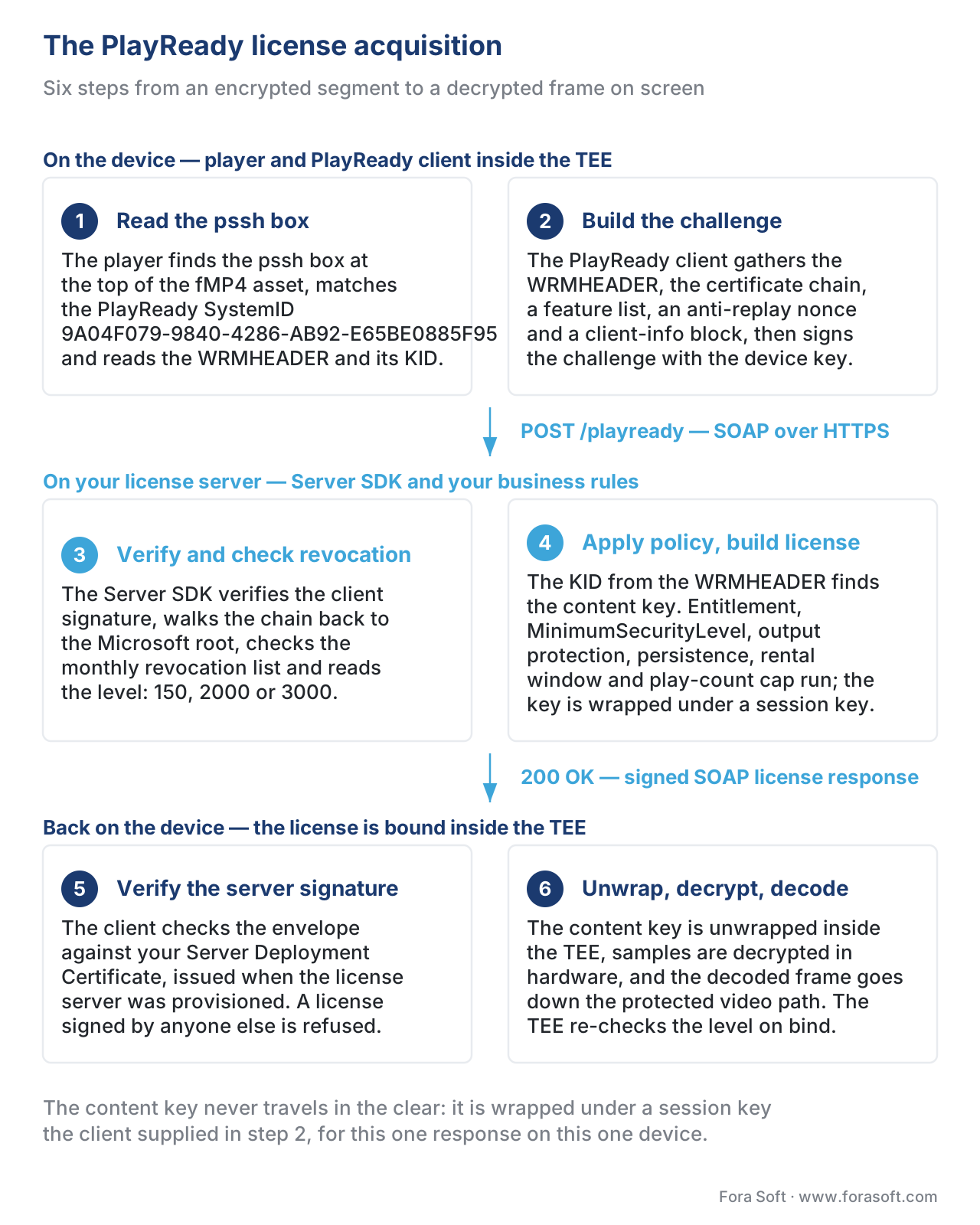 Figure 2. The PlayReady license acquisition — six steps from "encrypted segment encountered" to "decrypted frame on screen", with the certificate chain and revocation check shown explicitly.
The WRMHEADER and the PSSH Box
A PlayReady-protected DASH manifest looks almost identical to a clear one. The two changes are the addition of a ContentProtection element naming PlayReady and — if you embed the WRMHEADER inline rather than relying on the pssh box inside the segments — a base64-encoded pro element carrying the header.
The WRMHEADER is the single XML document every PlayReady client needs to start a license acquisition. Its version attribute follows a MAJOR.MINOR.0.0 pattern; the versions in active use today are 4.0.0.0, 4.1.0.0, 4.2.0.0, and 4.3.0.0. The Microsoft PlayReady Header Specification documents each version's grammar in full; the practical orientation is:
4.0.0.0— single-KID, AES-CTR only. Use only when you must support legacy SL2000 clients that predate 2017.4.1.0.0— adds custom data and extended attributes; still single-KID.4.2.0.0— adds multiple-KID support inside the same WRMHEADER. Required for the common multi-period DASH and multi-track CMAF case where audio and video carry different keys.4.3.0.0— addscbcs(ALGID="AESCBC") alongsidecenc(ALGID="AESCTR"), and lets you omit theCHECKSUMattribute when the algorithm isAESCBC(the checksum was an artefact ofAESCTR's deterministic-counter behaviour and does not apply to CBC). Use this version whenever your packaging produces CMAF for FairPlay-and-PlayReady-on-one-asset playout.
A minimum WRMHEADER 4.3.0.0 with one AESCBC key looks like:
<WRMHEADER xmlns="http://schemas.microsoft.com/DRM/2007/03/PlayReadyHeader" version="4.3.0.0">
  <DATA>
    <PROTECTINFO>
      <KIDS>
        <KID ALGID="AESCBC" VALUE="base64-KID-16-bytes"/>
      </KIDS>
    </PROTECTINFO>
    <LA_URL>https://license.example.com/playready</LA_URL>
    <DS_ID>base64-Domain-Service-ID</DS_ID>
  </DATA>
</WRMHEADER>
The packager wraps the WRMHEADER inside a PlayReady Object (a small binary container the spec defines), and the PlayReady Object goes inside a pssh box at the top of the MPEG-4 file. The pssh box's SystemID for PlayReady is the fixed UUID 9A04F079-9840-4286-AB92-E65BE0885F95 — that is the magic constant every player uses to recognise a PlayReady-protected stream. Players keep looking for the box across DASH segments, CMAF fragments, and HLS fMP4 segments; once they find one with this SystemID, they hand the contents to their PlayReady client and the acquisition starts.
For HLS deliveries that target PlayReady (typical for Smart TVs that prefer HLS over DASH), the WRMHEADER also travels in the playlist via:
#EXT-X-SESSION-KEY:METHOD=SAMPLE-AES,KEYFORMAT="com.microsoft.playready",KEYFORMATVERSIONS="1",URI="data:text/plain;charset=UTF-16;base64,<base64-WRMHEADER>"
The KEYFORMAT string com.microsoft.playready is the PlayReady-on-HLS magic constant; players that do not recognise it skip the tag and look for another DRM line in the same playlist. This is how a single HLS multi-variant playlist can ship FairPlay (com.apple.streamingkeydelivery) and PlayReady (com.microsoft.playready) side by side, with each player picking the line its native DRM understands.
CMAF, CENC, and the Encryption Mode That Unified the Three DRMs
For ten years, the multi-DRM economy ran on duplication: every premium streaming service packaged its catalogue twice, once with cenc (AES-128 in counter mode, the encryption scheme PlayReady and Widevine consumed) and once with cbcs (AES-128 in cipher-block-chaining mode with a pattern, the only scheme FairPlay accepted). Two copies of every encoded asset on every CDN edge — and proportional bandwidth, storage, and packaging cost.
That changed in October 2017 with PlayReady 4.0, which added cbcs support alongside cenc. From that point on, a single CMAF master that was encrypted once in cbcs could be wrapped in a DASH manifest for PlayReady playback, in another DASH manifest for Widevine playback, and in an HLS playlist for FairPlay playback — three DRMs, three manifests, one set of encrypted segments on the CDN. The economics flipped. Storage halved. Packaging time halved. The seventy-five percent of CDN cost that was content-egress was unchanged (because viewers fetched one of the three streams either way), but the twenty-five percent that was storage-plus-packaging dropped sharply. ISO/IEC 23001-7:2023 is the umbrella standard that defines both schemes; ISO/IEC 23000-19 (the CMAF specification) requires every encrypted CMAF track sample to use one of CENC's two schemes.
The catch: every PlayReady client that consumes cbcs must be on PlayReady 4.0 or higher. Xbox One reached PlayReady 4.0 in firmware update 1709 (November 2017); modern Smart TVs all ship 4.0 or higher; Windows 10 1709 and later support cbcs. Devices older than that — a small minority in 2026 but still present in some long-tail catalogues — need cenc packaging. The pragmatic 2026 default is "cbcs for everything new; keep one legacy cenc package only if your audience analytics still show pre-2017 device traffic in non-trivial volume".
 Figure 3. One CMAF asset, three DRMs. PlayReady 4.0+ added
 cbcs support; from October 2017 onward, the industry's "encrypt once, license thrice" pattern became economically viable.
Security Levels: SL150, SL2000, SL3000 — What They Actually Mean
PlayReady grades clients into three Security Levels. Each level is a property of the client certificate, baked in at manufacturing time, and visible to every license server the client ever talks to. The license server can reject a license request whose Security Level is below the content's MinimumSecurityLevel policy, and the client refuses to bind to a license whose MinimumSecurityLevel is above the client's level — symmetric protection on both sides.
SL150 — Development and Test. SL150 means "nothing is hardened". The client may run entirely in user-space code, key material is unprotected, the device certificate is not anchored in hardware. SL150 is the level a player developer uses on a workstation while integrating with the porting kit; Microsoft's own SL150 documentation is blunt that this level is "not suitable for commercial content". A license server in production should reject SL150 challenges unless they came from a known internal IP range.
SL2000 — Software-DRM. SL2000 is the lowest level acceptable for commercial content. Assets, client secrets, and content secrets are protected through "software or hardware means" — the standard reading is that SL2000 clients run a hardened software implementation, with code-signing, anti-debugging, and obfuscation, but without a hardware Trusted Execution Environment. Desktop Edge in software mode, the older com.microsoft.playready key system without the .recommendation suffix, and many Android STBs without a hardware DRM TEE all run at SL2000. SL2000 unlocks SD and HD content under the standard Hollywood agreements; it does not unlock 4K, HDR, or other "Enhanced Content".
SL3000 — Hardware-DRM. SL3000 is the level Hollywood's 4K and HDR licensing contracts demand. The PlayReady stack must run inside a Trusted Execution Environment (TEE) of the processor — a hardware-isolated execution domain (ARM TrustZone, Intel SGX/TDX, Microsoft Pluton, AMD Platform Security Processor, or a silicon-vendor proprietary TEE such as MediaTek's TEE, Realtek's TEE, or Amlogic's TEE) inside which both the cryptographic stack and the video decode path execute. Key material — private keys, content keys, derived keys — never leaves the TEE; decrypted compressed samples never appear in normal system memory; the decode-to-display path uses a protected video path so an attacker who roots the device cannot screen-capture the output. SL3000 also requires conformance to a superset of PlayReady's Compliance and Robustness rules, including the April 2015 update that introduced the Enhanced Content Protection rules for 4K and HDR. SL3000 is the only level that unlocks UHD content for almost every premium streaming service today, with the partial exception of Widevine L1 on Android — and the studios' standard 4K clause reads "Widevine L1 or PlayReady SL3000", so even an Android-first product still ships PlayReady for the rest of the device fleet.
A worked example of how this plays out in a license server's policy code:
if content.label == "UHD_4K_HDR":
    minimum_security_level = 3000
elif content.label == "HD_1080p":
    minimum_security_level = 2000
else:
    minimum_security_level = 2000

if client.security_level < minimum_security_level:
    return DenyLicense(reason="security_level_below_content_policy")
In real deployments the policy is more layered — output protection (HDCP 2.2 enforcement for 4K, HDCP 1.4 for HD), persistence (some 4K rentals must not be persistable), play-count caps, and rental windows all live next to the Security Level check — but the Security Level test is always the first gate. The license response sets MinimumSecurityLevel to the same value, and the client's TEE re-verifies on bind.
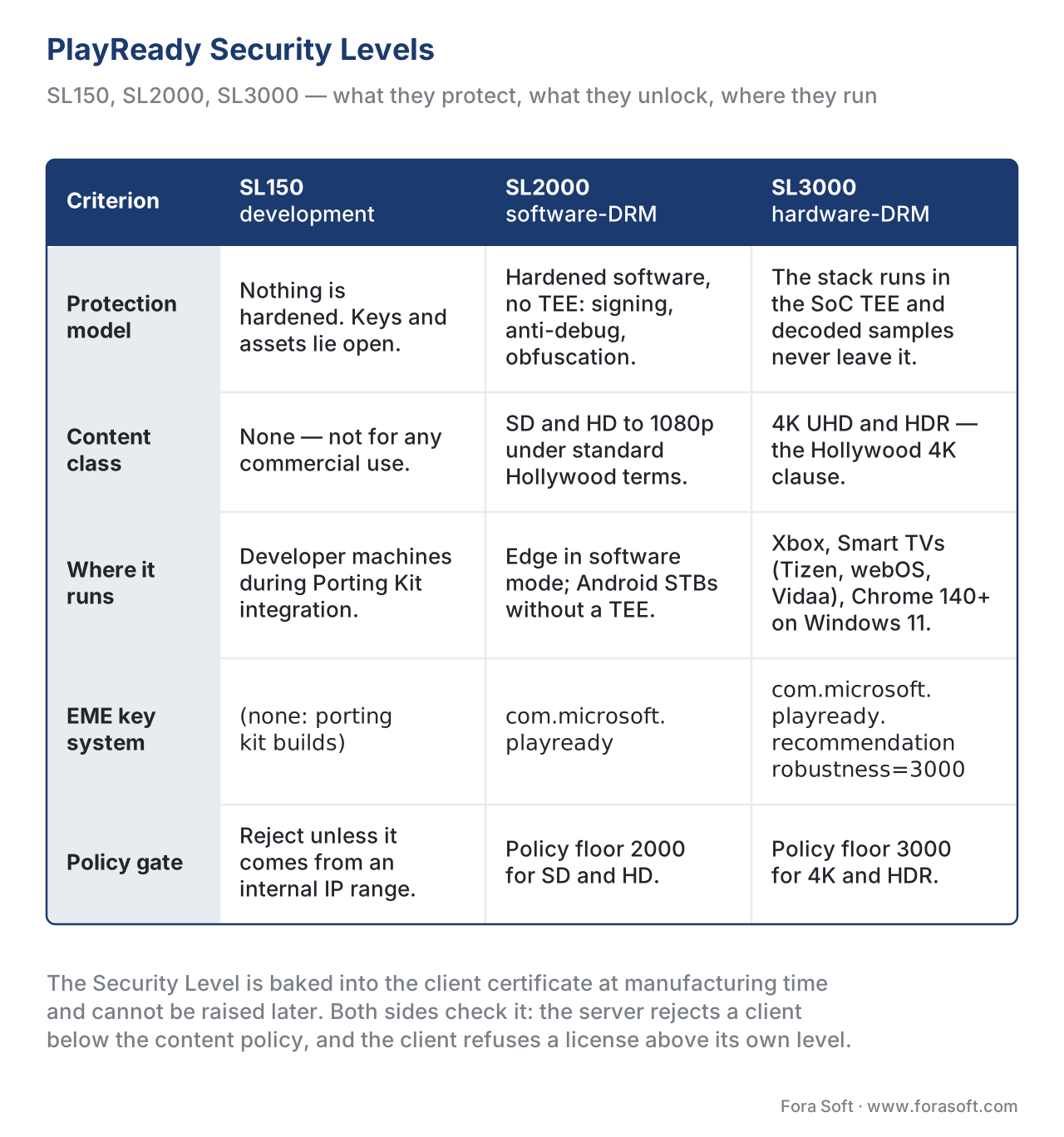 Figure 4. PlayReady Security Levels. SL150 is for development only. SL2000 is the production floor for SD/HD. SL3000 is the only level that unlocks 4K and HDR — and the only PlayReady level that satisfies the standard Hollywood 4K licensing clause.
What Changed in PlayReady 4.6, 4.7, and 4.8
PlayReady's evolution in the last four years has been quiet but real. Three releases matter for any team building or maintaining a license server today.
PlayReady 4.6 (December 2022) introduced multi-algorithm Key Exchange licenses: a single license response can now carry multiple content keys with different algorithms — useful when the content uses one key algorithm for video and another for audio, or when a track switches schemes mid-period. PlayReady 4.6 also migrated the .NET Core Server SDK to .NET 6.0 and added an IPackagingDataAcquisitionHandler for license servers that need to fetch packaging metadata at acquisition time.
PlayReady 4.7 (August 2025) added counter-signed (dual-signed) certificates — the most consequential server-side change in three years. A counter-signed certificate carries two signatures: the original Microsoft signature and an additional signature from a designated counter-signer. The mechanism gives Microsoft a path to roll authority without invalidating the entire device fleet: a counter-signature can be added to existing certificates rather than requiring the device to renew its credentials from scratch. PlayReady 4.7 also migrated the .NET Core Server SDK to .NET 8.0 (which is the long-term-support .NET release through November 2026), added a LicenseResponse.ForceSignature property so operators can force-sign non-persistent license responses for audit purposes, and embedded the Server SDK version in every response so client telemetry can track operator compliance with the latest releases. The 4.7.8120 patch added Server Authorization Key history (so a server certificate can roll without restarting the service) and resolved a Device Credentials Renewal issue after a TEE key roll.
PlayReady 4.8 (April 2026) is the current release as of this article's publication. The Microsoft PlayReady Product Versions catalogue is the authoritative changelog; the high-level shape of 4.8 is incremental on top of 4.7 (continued .NET Core Server SDK refinement on .NET 8.0, Device Porting Kit refresh, no new wire-protocol breaking changes). Teams that are still on 4.5 or 4.6 in production should plan a 4.8 upgrade against .NET 8.0's November 2026 LTS milestone; teams on 4.7 can move when convenient.
Common Mistakes and Production Pitfalls
Four production failures show up repeatedly in PlayReady integrations. Each one has burned at least one team I have worked with.
Pitfall one: shipping a stream with only cenc to a fleet that includes Smart TVs. Smart TVs ship PlayReady 4.0 or higher and support cbcs natively; encoding twice (once for FairPlay-compatible cbcs, once for PlayReady-compatible cenc) doubled your packaging cost for no benefit. The fix: encode once in cbcs, package three manifests (DASH for PlayReady, DASH for Widevine, HLS for FairPlay), point every player at the manifest its native DRM understands.
Pitfall two: using com.microsoft.playready instead of com.microsoft.playready.recommendation for an EME client that wants 4K on Chrome / Edge. The legacy key-system string locks you to SL2000-equivalent behaviour even on a SL3000-capable device. The fix: use com.microsoft.playready.recommendation and set the robustness string to 3000 in the EME capability negotiation. Older browsers that do not recognise .recommendation fall back gracefully; newer ones unlock hardware-DRM. dash.js issue #3852 tracked this for the dash.js project specifically and is now the canonical reference.
Pitfall three: forgetting to verify the client revocation list on the server side. The Server SDK does it automatically when you let it; some teams disable revocation checks during development and forget to re-enable them in production. The result is a license server that hands keys to compromised devices Microsoft already revoked, which is exactly the failure mode that blows a robustness audit. The fix: never disable revocation checks in production; let the SDK pull Microsoft's monthly revocation list and reject any challenge from a revoked certificate. (The certificate's revocation status is one of the things Hollywood auditors will check against your access logs.)
Pitfall four: hard-coding the pssh SystemID and breaking when the spec moves. Almost — the PlayReady SystemID has been the same UUID since 2008 and shows no sign of changing. But teams who hard-code it as a literal in one file and then re-hard-code it in another (the packager, the license server's WRMHEADER parser, the test harness's mock player) will discover the day the constant is wrong in one place that they have to grep three repositories. The fix: name the constant once in a shared library, import it everywhere. The full PlayReady SystemID is 9A04F079-9840-4286-AB92-E65BE0885F95.
PlayReady vs Widevine vs FairPlay: The Practical Comparison
The pillar article DRM 101: why three systems, and why you ship all three treats the comparison in full. The orientation table below gives the practical-decision view.
| Dimension | PlayReady | Widevine | FairPlay |
|---|---|---|---|
| Owner | Microsoft | Apple | |
| Reach | Windows, Edge, Chrome on Windows 11 (4K), Xbox, Smart TVs (Tizen, webOS, Vidaa, Android TV, Fire TV, Roku) | Android, Chrome (desktop and Android), Chromecast, ChromeOS, many Android-based STBs and TVs | Safari, iOS, iPadOS, tvOS, watchOS, visionOS |
| Levels | SL150 / SL2000 / SL3000 | L1 / L2 / L3 | None published; either supported or not |
| 4K / HDR floor | SL3000 | L1 | Default (all FairPlay devices use Secure Enclave) |
| Encryption schemes | cenc (since 2008), cbcs (since 4.0 / 2017) | cenc, cbcs | cbcs only (sample-aes for legacy MPEG-TS) |
| License protocol | SOAP-XML over HTTPS | Protobuf over HTTPS | SPC / CKC binary over HTTPS |
| Header format | WRMHEADER inside pssh (UUID 9A04F079-…-5F95) | pssh with Widevine SystemID and protobuf-encoded payload | None (FairPlay puts the key ID in EXT-X-KEY URI) |
| EME key system (web) | com.microsoft.playready.recommendation (new), com.microsoft.playready (legacy) | com.widevine.alpha | com.apple.fps.1_0 |
| Server SDK | Microsoft Server SDK (.NET 8.0 since 4.7) | Google Widevine License SDK (C++) | Apple FPS Server SDK (NDA) |
| Current version (2026-05-25) | 4.8 (April 2026) | Latest CDM rolling release | SDK 5 default, SDK 26 in launch window through Sept 2026 |
cbcs; once you understand that, you understand why one CMAF master and one packager output can serve all three.
Free download: PlayReady Deployment ChecklistOne page: the server certificate request flow, the SL2000 and SL3000 policy decisions, the EME key-system choice, and the four pitfalls that reach production.
Where Fora Soft Fits In
Fora Soft has shipped multi-DRM stacks for OTT, e-learning, and telemedicine products since 2015 — across web, iOS, Android, Smart TVs (Tizen, webOS, Vidaa), Roku, and game consoles. PlayReady appears in essentially every Smart-TV-and-Windows product we have launched, paired with FairPlay on the Apple devices and Widevine on Android. We have worked through SDK 3.0 -> 4.0 -> 4.5 -> 4.7 upgrades on the server side, the cenc -> cbcs consolidation, and the com.microsoft.playready.recommendation migration on browser clients. In WebRTC and video-conferencing projects, PlayReady is rarely the protection model of choice (real-time content uses DTLS-SRTP plus session-level access control instead), but on the OTT, video-surveillance review-VOD, and broadcast-grade verticals where premium content meets a wide device fleet, PlayReady is part of the standard answer. Our OTT and Internet TV development team ships PlayReady, FairPlay and Widevine together with the Smart TV and console apps, and our video streaming software development work handles the packager, key server and license-proxy side.

The book
Video Streaming: A Complete Guide to Video Delivery: From ABR and CDNs to Players, WebRTC, DRM, and the Economics of Streaming
This article stops at the edge of the PlayReady wire; volume 3 carries it through the rest of the delivery stack. Its DRM chapters put PlayReady, Widevine and FairPlay on one cbcs asset, walk a multi-DRM key server from the challenge to the signed license, and price license traffic once the audience is real. The player chapters next door cover dash.js, hls.js and the Smart TV players that will carry your PlayReady stream. Written by Nikolay Sapunov, CEO at Fora Soft.
Shipping paid video to Windows, Xbox and Smart TVs?
Tell us what you are launching and we will scope the PlayReady side with you: the server certificate, the license server on the Server SDK, the cbcs packaging that feeds all three DRMs, and the device matrix from SL2000 to SL3000. 250+ video products shipped since 2005.
See our case studies
Case study
Worldcast Live
Pay-per-view concerts at 0.4–0.5 s latency for 10,000 simultaneous viewers at 1.5 Gb/s — paid live video whose audience arrives on Windows machines and Smart TVs as much as on phones.
Case study
Speed.Space
Remote production at 1080p / 8 Mbps for Netflix, Electronic Arts and HBO shoots — the content class that arrives with a security-level clause attached to it.
Case study
Sprii
Live shopping on web, iOS and Android with 72,000+ live events and €365M+ in sales — one packaged asset, a different DRM on each device class.
What to read next
DRM
DRM 101: why three systems, and why you ship all three
The pillar of this mini-series: what each system covers, and why the production answer is all three.
Packaging
Common Encryption (CENC) in depth
The pssh, tenc and cbcs plumbing that lets one encrypted CMAF file answer to three key systems.
DRM
Widevine Security Levels: L1, L2, L3
Google's side of the 4K clause: what L1 buys you, and why studios write it next to SL3000.
DRM
FairPlay Streaming in depth
Apple's side: the SPC and CKC handshake, the Secure Enclave, and the certificate that takes two weeks.
References
- Microsoft. PlayReady Product Versions. https://learn.microsoft.com/en-us/playready/overview/product-versions — accessed 2026-05-25. The authoritative version catalogue; PlayReady 4.8 (April 2026) is the current release, 4.7 (August 2025) added counter-signed certificates, 4.6 (December 2022) added multi-algorithm key exchange. Tier-1 official source.
- Microsoft. Security Level — PlayReady. https://learn.microsoft.com/en-us/playready/overview/security-level — accessed 2026-05-25. The definitions of SL150, SL2000, SL3000, the relationship to the client certificate, and how the License Server's
MinimumSecurityLevelpolicy interacts with the client's level. Tier-1 official source. - Microsoft. What's New in PlayReady Version 4.7. https://learn.microsoft.com/en-us/playready/overview/what-is-new/what-is-new-4-7 — accessed 2026-05-25. Counter-signed certificate support, .NET 8.0 migration, the 4.7.8120 patch's Server Authorization Key history. Tier-1 official source.
- Microsoft. PlayReady Header Specification. https://learn.microsoft.com/en-us/playready/specifications/playready-header-specification — accessed 2026-05-25. The WRMHEADER grammar for versions 4.0.0.0, 4.1.0.0, 4.2.0.0, 4.3.0.0 inclusive. Tier-1 official source.
- Microsoft. PlayReady License Server. https://learn.microsoft.com/en-us/playready/overview/license-server — accessed 2026-05-25. The SOAP envelope grammar, the AcquireLicense / AcknowledgeLicense / JoinDomain operations, the Server SDK's role. Tier-1 official source.
- ISO/IEC. ISO/IEC 23001-7:2023 — Common Encryption in ISO Base Media File Format Files. https://www.iso.org/standard/84637.html — accessed 2026-05-25. The
cencandcbcsencryption schemes that PlayReady (along with Widevine and FairPlay) consumes. Paywalled; the article relies on the catalogue page's normative summary plus DASH-IF's open implementation guidelines. Tier-1 official source. - Microsoft. PlayReady EME Key System Strings. https://learn.microsoft.com/en-us/playready/overview/key-system-strings — accessed 2026-05-25. The
com.microsoft.playreadyvscom.microsoft.playready.recommendationdistinction and the SL3000 robustness string. Tier-1 official source. - Microsoft. PlayReady Content Encryption Modes. https://learn.microsoft.com/en-us/playready/packaging/content-encryption-modes — accessed 2026-05-25. PlayReady 4.0's addition of
cbcssupport; the Xbox One 1709 firmware that broughtcbcsto the console. Tier-1 official source. - Microsoft. Developing SL3000 Clients. https://learn.microsoft.com/en-us/playready/overview/developing-sl3000-products — accessed 2026-05-25. The SL3000 self-assessment Microsoft introduced in April 2015 alongside the Enhanced Content Protection rules. Tier-1 official source.
- W3C. Encrypted Media Extensions, W3C Recommendation 18 September 2017. https://www.w3.org/TR/encrypted-media/ — accessed 2026-05-25. The
requestMediaKeySystemAccessAPI and the key-system-string negotiation that PlayReady on the web depends on. Tier-1 official source. - Dash-Industry-Forum. PlayReady SL3000 support requires com.microsoft.playready.recommendation key system, GitHub issue #3852. https://github.com/Dash-Industry-Forum/dash.js/issues/3852 — accessed 2026-05-25. The canonical reference for the legacy-vs-recommendation key-system migration on dash.js. Tier-3 first-party implementer reference.
