

Key takeaways
• Hybrid is an engineering problem, not a feature toggle. The hard part is the physical room: capturing the stage and feeding it to a remote audience that stays in step with people sitting ten feet from the speaker.
• Two planes, not one. Video rides a slow CDN plane (LL-HLS, 2–8 s); polls, Q&A and chat ride a fast plane (WebRTC data or WebSocket, <1 s) so remote answers land on time.
• The in-room capture layer is what SaaS skips. SRT for contribution, NDI inside the venue, Dante for audio — the plumbing a webinar tool never sees.
• Buy under a few thousand remote; build when it recurs. A quote-based SaaS covers a one-off; a custom hybrid event platform pays back on a repeating flagship or a white-label product.
• Parity is the metric that matters. If remote attendees feel second-class, the event failed for half its audience — and that is a design choice you make in week one, not launch week.
Why Fora Soft wrote this hybrid-event guide
Search “hybrid event platform” and you get product pages. Whova, Cvent, Eventbrite, vFairs — every result sells you a subscription, and not one explains what happens between the camera in the room and the browser at home. That gap is where hybrid events break, so that gap is what this guide covers.
Fora Soft has built real-time video products since 2005 — 250+ projects, 50 in-house engineers, and a specialisation that sits exactly where hybrid lives: streaming to a big remote crowd and running live interaction at the same time. We built TradeCaster, where one presenter streams live to 46,000+ traders with charts and chat on the same screen. We built ProVideoMeeting, where people join one room by browser, by phone, or by SIP dial-in. The dual-plane pattern under both is the backbone of a hybrid event.
This is the playbook we hand a team before they sign a platform contract or brief a custom build. If your event is fully online with no physical room to bridge, our virtual events multimedia playbook is the better read. If you are putting people in a hall and streaming to everyone else, keep going.
Bridging a room and a remote crowd for the first time?
30 minutes with Vadim to map your venue, concurrency and engagement plan before you commit to a platform.
Hybrid isn’t virtual with a camera in the room
A hybrid event platform runs one event for two audiences at once: people in a physical room and people watching remotely, sharing the same agenda, the same speakers, and the same Q&A. That last clause is the whole job. Pointing a webcam at a stage gives you a virtual event with a worse camera. Hybrid means the two audiences experience one event, not two events that happen to share a title.
Virtual events solved a clean problem: everyone is remote, everyone is equal, everyone gets the same stream. Hybrid breaks that symmetry. The in-room audience sees the speaker with zero latency and can raise a hand. The remote audience sees a stream that is seconds behind and types into a chat box. Left alone, those two experiences drift apart, and the remote half quietly checks out.
The demand for getting this right is real. Around 123 million hybrid events were hosted globally in 2025, and 63% of event planners expect hybrid to be the most common format by 2027 (industry roundups, 2026). Attendees want the choice: surveys put roughly 84% in favour of being able to attend in person or remotely. The format is not a pandemic leftover; it is how a growing share of conferences, town halls and product launches now run.
So the engineering brief is specific. Capture the room cleanly. Get it to a remote audience at a latency they can interact at. Run one engagement layer that both rooms share. Keep the two in sync so a poll closes at the same moment for everyone. Do it without a 30-second outage killing the broadcast. Everything below is how each of those gets built.
Reach for a hybrid build when: you run the event more than once, the in-room production matters to the brand, and remote headcount is large enough that “good enough” streaming loses you sponsors or students.
The parity problem: why remote attendees feel second-class
Remote attendees feel second-class because, by default, they are: they get the event late, they can’t be seen, and their questions arrive after the moment has passed. Fixing that is the central design task of a hybrid platform, and it’s mostly about time and attention, not video quality.
Three failures show up again and again. First, latency drift: the remote feed trails the room by several seconds, so a remote question about slide 4 arrives while the speaker is on slide 6. Second, invisibility: remote people can see the room, but the room can’t see them, so they stop contributing. Third, split engagement: the room runs a live poll on a screen while remote people get a different link, and the results never merge. Networking is the sharpest version of this — 56% of virtual attendees say making connections is their biggest problem (industry surveys, 2026), and that gets worse when half the crowd is shaking hands in a hall.
The fix is a set of deliberate choices we’ll build out below: a fast interactive plane that doesn’t wait for the video, return feeds so remote faces and voices land in the room, and one shared engagement system with a single source of truth. None of it is exotic. All of it has to be decided before you pick hardware, because retrofitting parity onto a finished stream is the expensive way to learn this lesson.
A reference architecture for a hybrid event platform
Under every hybrid event platform is the same shape: capture in the venue, contribute one clean feed to the cloud, package it for a remote crowd, and run a separate real-time plane for interaction. Knowing that shape up front saves weeks of rework, because each layer has its own protocol and its own failure mode.
Walk it left to right. In the room, cameras and microphones feed a switcher (hardware, or software such as vMix or OBS) that cuts the program feed. An encoder wraps that feed and sends it out over the public internet using SRT — sub-second and resilient to the packet loss you always get on venue Wi-Fi. In the cloud, that contribution feed is transcoded into an adaptive-bitrate ladder and packaged as Low-Latency HLS for the main audience and, where breakouts need real conversation, as WebRTC for small interactive rooms. A CDN fans the LL-HLS feed out to thousands of viewers. Alongside all of it runs the data plane: polls, chat, Q&A, reactions and stage cues, carried over WebSockets or a WebRTC data channel, deliberately kept off the video path.

Figure 1. The hybrid signal flow. One clean program feed leaves the venue over SRT; the cloud splits it into an LL-HLS broadcast plane and a WebRTC interactive plane, while the data plane runs separately so interaction never waits on video.
The detail that separates a working platform from a demo is that the video plane and the data plane are independent. Video can afford to be a few seconds late; a poll result cannot. We come back to that split in the sync section, because it is the single most important decision in the stack. For the deeper streaming-side reference, our WebRTC architecture guide covers the real-time layer in production terms, and our video streaming course is the primer if this stack is new to your team.
The in-room capture and contribution layer
The capture layer is the part a webinar tool never touches, and it’s where hybrid earns its production quality. It moves signal around the venue and pushes one clean feed to the cloud, using three families of transport that each do one job. Get the boundaries right and the room looks broadcast-grade; get them wrong and you ship a shaky laptop webcam to a paying audience. This capture-to-cloud work sits at the core of our video and audio streaming development.
Inside the venue: NDI and SMPTE ST 2110. NDI carries compressed video over ordinary Ethernet between cameras, switchers and graphics machines on a managed local network — the practical default for most conference rooms. When the production is bigger and runs on a dedicated broadcast fabric, SMPTE ST 2110 carries uncompressed video, audio and data as separate IP streams with precise timing, the modern replacement for SDI cabling. Most hybrid events live on NDI; ST 2110 shows up at the flagship end.
In-room audio: Dante. 70% of attendees say audio quality matters more than video (industry surveys, 2026), and Dante is how the room’s microphones reach the encoder cleanly. It carries many channels of low-latency audio over IP and now interoperates with the AES67 and ST 2110-30 standards, so the sound desk and the stream share one source of truth instead of a re-recorded room mic. Dante scales from a two-microphone panel to festival-grade rigs like Coachella’s; a 400-seat conference sits comfortably inside that range.
Out of the venue: SRT. The program feed leaves the building over SRT, which sends compressed video across the public internet at sub-second latency and recovers from the packet loss that venue connections always produce. Its tunable latency buffer is the knob you trade against reliability: a bigger buffer survives a worse network at the cost of a few hundred milliseconds. RTMPS still works as a legacy fallback, but SRT is the current default for contribution.
Reach for SRT contribution when: your feed crosses the public internet from a venue you don’t control (hotel Wi-Fi, a convention centre, a remote speaker’s home), and a dropped packet can’t be allowed to freeze the broadcast.
Latency and protocol choice for hybrid
Pick the protocol first, because it fixes your latency, your scale and most of your cost. For hybrid the rule is a split: Low-Latency HLS for the main broadcast to the remote crowd, and WebRTC for the small breakout rooms where people actually talk back. There is no single protocol that does both well, and pretending otherwise is the most common way hybrid platforms fail.
The numbers set the boundaries. WebRTC delivers glass-to-glass latency under a second, often near 500 ms, but a single SFU room tops out around 500 participants and viewer-side cost climbs fast beyond that. LL-HLS lands at 2–8 seconds and rides a CDN to 100,000+ concurrent viewers cheaply. Plain HLS sits at 10–30 seconds and scales to a million as a fallback. On the contribution side, SRT and WHIP keep the venue-to-cloud hop under a second or two. Turn-taking in conversation breaks past roughly 1.2 seconds, which is exactly why breakouts can’t run on the broadcast plane.
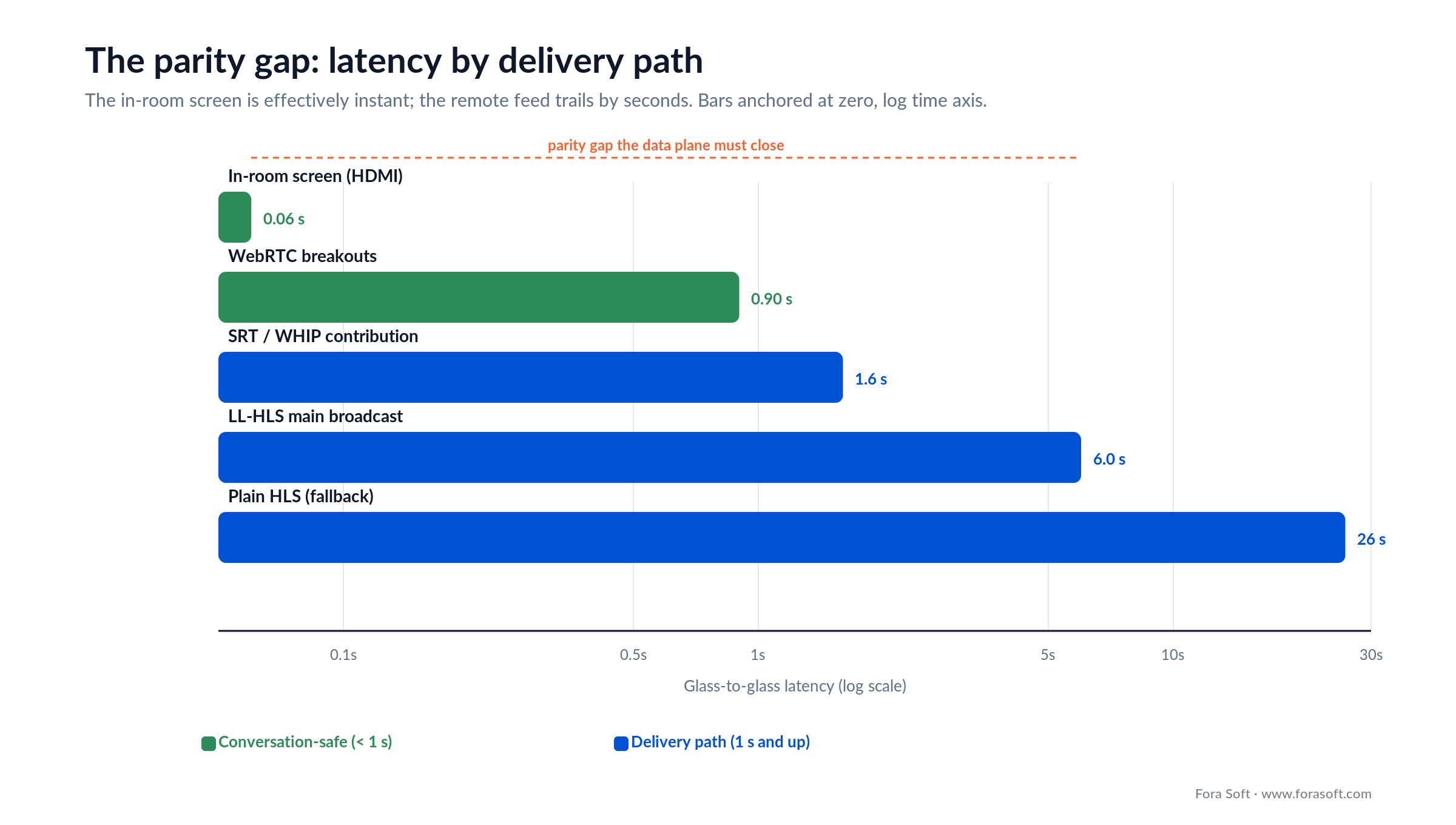
Figure 2. Latency by path. The in-room screen is effectively instant; the remote LL-HLS feed trails by seconds. That difference is the parity gap the data plane has to close.
The hybrid twist that a virtual event never faces: the in-room projector is fed directly from the switcher over HDMI, so it’s effectively instant, while the remote feed is 2–8 seconds behind. If a quiz or a live vote rides the video plane, the room answers seconds before remote viewers even see the question. That’s the parity gap in one sentence, and the next section is how to close it. Our WebRTC vs HLS breakdown goes deeper on the trade-off.
Keeping in-room and remote in sync
You keep the two audiences in sync by running interaction on a fast plane that ignores the video delay, and by adding controlled delay where a shared moment has to be fair. The video will never be perfectly aligned across a room screen and a CDN; the trick is to stop caring about that and synchronise the things that actually need it.
Split the planes. Send polls, Q&A, reactions and stage cues over a WebSocket or WebRTC data channel that reaches every device in well under a second. When a host opens a poll, it opens for the room screen and every remote browser at nearly the same instant, regardless of where each viewer sits on the 2–8-second video curve. The video can lag; the interaction does not.
Add delay on purpose where it matters. For a prize draw or a timed vote, a few seconds of intentional delay on the in-room trigger (holding the “results” reveal until the slowest remote viewer has caught up) is fairer than letting the room win every time. This is a deliberate buffer, tuned to your measured remote latency, not an accident.
Give the room a return feed. Parity runs both ways. Pipe a remote question (as text on a lower third, or live audio and video on a confidence monitor) back into the hall so the speaker answers a face, not a chat log. This is the single change that most convinces remote attendees they are part of the event, and it is cheap to build once the data plane exists.
Reach for a separate data plane when: any interaction has to feel simultaneous across both audiences (live polling, gamified Q&A, prize draws, applause meters), which for a real hybrid event is all of them.
One engagement layer for both audiences
The engagement layer has to treat a person in the hall and a person at home as equal participants in one system, with one source of truth for every poll, question and connection. The moment the room and the remote audience run different tools, you get two datasets that never reconcile and two audiences that never mix. Interactive elements lift engagement by around 45% (industry surveys, 2026) — but only if everyone is in the same interaction.
Unified polling and Q&A. One question bank, one live tally. An in-room attendee scans a QR code and votes on the same backend a remote viewer hits from a browser. Q&A uses a moderator queue (approve, merge, reject) so the speaker sees one ranked list, not a room mic competing with a chat feed.
Cross-audience networking. This is the hard one, and the one that pays. Matchmaking that pairs an in-room attendee with a remote one for a scheduled video chat turns two separate crowds into a single network. It won’t happen by itself; it has to be a feature, with a schedule, a video room, and a nudge. TradeCaster is proof the remote-interaction engine scales — 46,000+ traders following live streams with chat and data overlays running together.
One analytics spine. A single engagement score per attendee (poll votes, questions asked, chat activity, dwell time, booth visits), computed the same way for both audiences. Sponsors buy the report; if in-room and remote engagement live in different systems, you can’t produce it. Our work on live streaming platform development covers the interaction backend in more depth.
Worried remote attendees are getting the worse half of your event?
We’ll audit your latency split, data plane and return feeds against the parity checklist in this guide.
On-site production and redundancy
On-site, the one thing that ends an event is losing the feed, so redundancy at the venue is not optional — it’s the price of going live. A virtual event can restart a dropped stream; a hall full of people watching a frozen screen cannot be paused. Every single point of failure between the stage and the cloud needs a backup that fails over inside seconds.
Dual contribution paths. The venue’s wired internet is your primary uplink; a bonded-cellular modem (several SIMs aggregated) is the automatic fallback. When the convention centre’s network hiccups (and it will), SRT rides the second path without the audience noticing. Two encoders, two uplinks, one virtual output.
Bandwidth headroom, measured in advance. A single 1080p contribution feed needs 6–10 Mbps of reliable upstream, doubled for a hot-standby encoder. Venue Wi-Fi rarely delivers that under load, so a wired drop, tested the day before rather than the morning of, is the difference between a clean show and an apology email. Never trust a network you haven’t measured with the room full.
Multi-CDN on the delivery side. One CDN outage takes the remote audience offline. A primary plus a secondary with DNS-weighted or origin failover inside a two-minute window cuts that risk sharply for a single-digit-percent cost bump. For the scaling math behind large remote audiences, see our guide on scaling video streaming to a million viewers.
Accessibility, consent and compliance
Accessibility and data rules apply to both audiences, and for a public-facing event they’re enforceable law, not polish. Scope them in week one; retrofitting captions and consent flows in launch week is how budgets blow up.
Captions and WCAG 2.2 AA. Live captions on every session, keyboard navigation, 4.5:1 contrast and screen-reader support for the agenda, chat and polls are the baseline. WCAG 2.1 AA is the level written into current accessibility law across the EU, the UK, Canada and the US public sector, and WCAG 2.2 AA is the newer W3C standard to build to. Either version governs the remote UI and any in-room second screen. Streaming automatic speech recognition into a captions track runs a few cents per minute and doubles as multi-language subtitles.
Recording consent and GDPR. A hybrid event records faces and voices from both rooms. You need explicit recording consent, a data-processing agreement with every vendor in the chain, and a retention policy pinned to the right region — EU attendees to an EU region by default. SOC 2 Type 2 is the expected bar for any platform an enterprise will let inside its perimeter. Our note on video conferencing cost touches the compliance surface that drives a lot of the budget.
Build vs buy a hybrid event platform
Buy a SaaS hybrid event platform for a one-off or an early programme; build a custom one when the event recurs, the brand demands its own experience, or you need to own the data and the IP. The honest split is about cadence and control, not company size.
SaaS platforms (Whova, Cvent, vFairs, Bizzabo and the rest) get you live fast with registration, an app, streaming and engagement in one contract. What they don’t give you is deep control of the in-room production, a custom parity design, or your attendee data in a form you own. For most first-time or once-a-year events, that trade is correct: rent the platform, focus on the content.
A custom build earns its cost when you run flagship events on a repeat schedule, when the hybrid experience is itself the product (a training platform, a trading community, a paid virtual venue), or when compliance and white-labelling push you off the shelf. The table below is the four honest options, and the callout after it is the one-line rule.
| Option | In-room control | Remote scale | Parity & data | Cost shape |
|---|---|---|---|---|
| DIY (Zoom + YouTube) | Manual | High (YouTube) | Poor, no shared data | Lowest, per event |
| Event SaaS (Whova, Cvent) | Limited | Vendor-capped | Built-in, data rented | Quote, per event/year |
| Streaming SaaS + integrator | Good | High | Custom, you wire it | Usage + build |
| Custom build | Full | Designed to target | Full, you own it | Build + ops, you own IP |
Four honest paths. Most programmes start one row up from where they end — a SaaS pilot, then a custom build once the event proves it will recur.
Reach for a custom build when: the event runs on a repeating schedule, the hybrid experience is the product itself, or you need to own attendee data and white-label the whole thing for partners.
What hybrid event platforms cost
Most hybrid event platforms don’t publish a price — they quote per event or per year after a form, and the number scales with attendee count, event days and add-ons. When we checked the major vendors on 13 July 2026, Whova, Cvent and vFairs all gated pricing behind a quote request rather than a public rate card, so treat any specific figure you see in a listicle as an estimate, not a rate.
The shape is predictable even when the number is hidden. Event SaaS bundles registration, the attendee app, streaming and engagement into one contract that typically lands in the low five figures for a serious multi-day flagship, more with premium branding, immersive booths or large concurrency. That price buys speed and support; it does not buy deep in-room control or ownership of your data. The honest way to compare is to run your own delivery math — which is the next section — and set it against the quotes you collect.
A custom build inverts the curve. You pay more up front and little per event after. With our Agent-Engineering workflow, a focused first version — LL-HLS main feed, WebRTC breakouts, one unified engagement layer, and on-site encoder integration — typically runs well under the $150k–$800k range quoted across the market for full event platforms, and the per-event cost afterwards is mostly delivery and ops. On a programme that runs quarterly, that break-even arrives fast.
Cost math: streaming to 5,000 remote attendees
Streaming to 5,000 concurrent remote attendees for a six-hour day costs roughly $3,400 in CDN egress at a conservative bitrate — a number worth computing yourself, because it’s the part of a hybrid budget vendors bury. Here’s the arithmetic, out loud.
Assume 5,000 viewers on an adaptive-bitrate ladder averaging 3 Mbps sustained — most viewers sit below the 1080p top rung, so this is deliberately conservative. Aggregate egress is 5,000 × 3 Mbps = 15 Gbps. Over an hour that’s 15 Gbps × 3,600 s ÷ 8 = 6,750 GB. A six-hour event day is 6,750 × 6 = 40,500 GB, about 40.5 TB.
At AWS CloudFront’s first-tier US rate of $0.085/GB (verified 26 June 2026), 40,500 GB × $0.085 ≈ $3,443 for the day. (CloudFront’s per-GB rate steps down above 10 TB, so at real volume the marginal cost drops; this first-tier figure is the conservative ceiling.) Add a second CDN for failover and the cloud transcode that feeds the ladder, and a realistic delivery budget lands near $4,500–$5,200 for the remote side of a 5,000-attendee day. Double the bitrate assumption to a 6 Mbps top-rung average and the CDN line roughly doubles — which is why measuring your real audience mix matters more than any headline price.
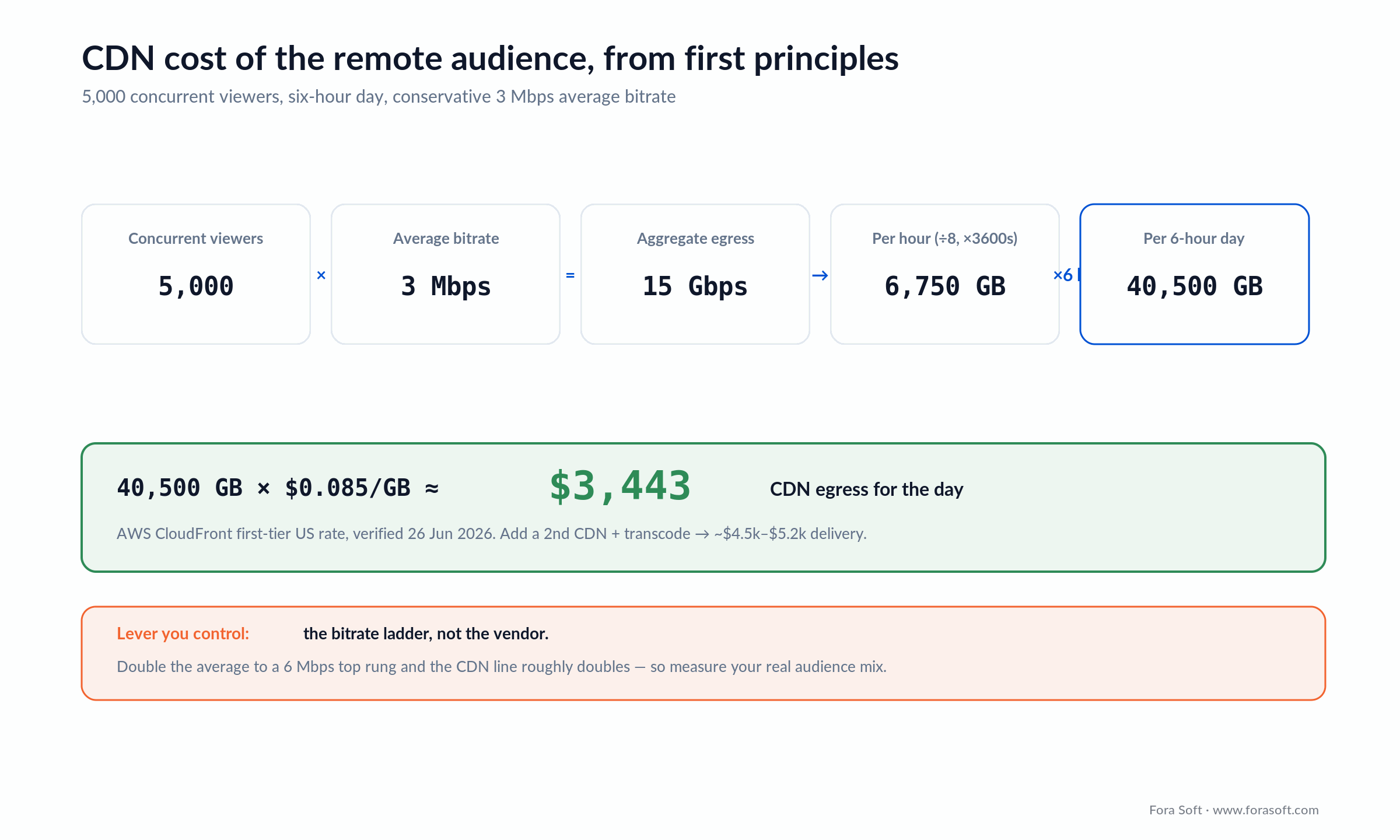
Figure 3. The remote-delivery cost, computed from first principles. CDN egress scales linearly with concurrent viewers and bitrate, so the lever you control is the bitrate ladder, not the vendor.
That figure is only the pipe. On top sit the in-room production (cameras, switcher, encoders, redundancy), the engagement backend, captions and the platform itself. But knowing the delivery number stops you overpaying: if a quote is many times your computed egress with no in-room production included, you’re paying for someone else’s margin. Our low-latency streaming guide covers the delivery engineering behind these numbers.
Mini case: TradeCaster streams one trader to 46,000+
Situation. Sean, a professional stock trader in the US, came to us to teach others by showing his screen live — not a webinar now and then, but a running video community where he streams his trades and answers questions as they happen. The remote-audience half of a hybrid event, in other words: one presenter, a large crowd, live interaction, and data on screen the whole time. Off-the-shelf webinar tools couldn’t carry the concurrency or wire in the trading widgets.
Plan. We built TradeCaster on the same dual-plane pattern a hybrid event needs: a low-latency video plane for the live desktop stream, and a separate real-time plane carrying chat, subscriber alerts and TradingView-powered chart widgets, so the data never waited on the video. An on-demand library caught the best sessions for replay, and a subscription tier ($99–$119/month) turned the audience into revenue.
Outcome. The platform now carries 46,000+ traders streaming and watching live, with charts and chat running alongside the video instead of behind it. As the client, Sean Dekmar, put it: “I liked how well they took direction. Any vision I had, they made it happen.” The same engine — one source, a large interacting remote audience, data in sync — is exactly what powers the remote side of a hybrid event. Want a similar assessment for your event? Book 30 minutes with Vadim.
Need a remote audience engine that scales like TradeCaster?
Bring your concurrency target and engagement plan; we’ll scope the architecture that keeps both audiences in one event.
A decision framework in five questions
Five questions collapse the whole hybrid decision. Answer them in order and the platform, protocol and build-vs-buy call fall out.
1. How often does this event run? Once, or once a year → buy SaaS. Quarterly or monthly → a custom build starts paying back inside the first year.
2. How many concurrent remote attendees at peak? Under a few thousand → almost anything works. Tens of thousands → LL-HLS on a multi-CDN backbone. Interactive breakouts of 50–500 → WebRTC islands regardless of the main number.
3. How much does in-room production quality matter? A single laptop and a webcam → SaaS is fine. Multi-camera, proper audio, a branded stage → you need the NDI/Dante/SRT capture layer, which pushes you toward a custom or integrator build.
4. Do you need to own the data and the brand? No → rent a platform. Yes, because sponsors, compliance or white-labelling demand it → build, so the attendee data and the experience are yours.
5. How strict is compliance? Standard corporate → enterprise SaaS. GDPR with data residency, or regulated verticals → a build inside your own cloud is the safer answer.

Figure 4. The build-vs-buy decision tree. Cadence and control decide it; concurrency and compliance shape the build.
Pitfalls to avoid
1. Running interaction on the video plane. If polls and Q&A ride the 2–8-second broadcast feed, the room always answers first and remote always loses. Split the planes from day one.
2. Treating the remote audience as a broadcast target. No return feed, no way to be seen, no cross-room networking — and remote attendees disengage by the second session. Parity is a feature you build, not a setting you enable.
3. Trusting venue Wi-Fi. The convention centre network that tested fine at 8am buckles when 400 phones join at 9. Wired primary, bonded-cellular backup, tested with the room full.
4. Re-recording room audio through a camera mic. The single fastest way to make a stream sound amateur. Pull audio from the sound desk over Dante, not from whatever the camera picked up.
5. Running two engagement tools. One system for the room, another for remote, and the datasets never merge — so you can’t show a sponsor a single engagement number. One backend, both audiences, from the start.
KPIs: what to measure
Quality KPIs. Remote glass-to-glass latency (target LL-HLS p95 under 6 s), stream start time under 2.5 s, rebuffering ratio under 0.5%, and the measured gap between the in-room screen and the remote feed — the parity number itself. Track per region, not as a single global average.
Business KPIs. Remote-to-in-room engagement ratio (are remote attendees voting and asking at a comparable rate?), cross-audience meetings booked, session attendance held across the day, and sponsor-facing engagement score per attendee. If remote engagement runs far below in-room, parity is failing whatever the video looks like.
Reliability KPIs. Contribution uptime through the whole show, failover time on both the venue uplink and the CDN (target under two minutes, verified in rehearsal), and zero unconsented recordings. Reliability is measured in the last rehearsal, not hoped for on the day.
When not to build a custom hybrid platform
Don’t build when the event won’t recur and the remote audience is small — the economics don’t work, and honesty here saves you six figures. A one-off with 300 remote viewers and no premium sponsors is a job for Zoom Webinar plus a YouTube fallback, not a custom stack. A $120k build that serves one event returning $60k is bad math, and we’ll tell you so on the first call.
Some events also shouldn’t go hybrid at all. Board meetings, sensitive negotiations and small executive offsites lose more from a mediated remote channel than they gain in reach; the cost of a misread room outweighs the saved travel. And if your “hybrid” plan is really a virtual event with a token in-person panel, build the virtual event well and skip the venue complexity — our virtual events playbook is the right starting point. And when the audience is entirely internal — a company town hall or all-hands — our webcasting software guide covers broadcasting to a whole company at scale. Hybrid is worth its engineering only when both audiences are real and the event repeats.
FAQ
What is a hybrid event platform?
A hybrid event platform runs one event for two audiences at once — people in a physical room and people watching remotely — sharing the same agenda, speakers and interaction. The engineering job is capturing the room, delivering it to the remote crowd at an interactive latency, and running one engagement layer both audiences share.
Which protocol should a hybrid event use?
Split it: Low-Latency HLS (2–8 s) for the main broadcast to the remote audience because it scales cheaply on a CDN to 100,000+ viewers, and WebRTC (under 1 s) for interactive breakout rooms of 50–500 people. Contribution from the venue rides SRT. No single protocol handles both broadcast scale and conversation, so hybrid platforms run both.
How much does a hybrid event platform cost?
SaaS platforms quote per event or per year and typically land in the low five figures for a serious multi-day flagship, more with premium features. Delivery alone — streaming to 5,000 remote viewers for six hours — is roughly $3,400 in CDN egress. A custom build runs higher up front but little per event after, which pays back on a recurring programme.
How do you keep in-room and remote audiences in sync?
Run interaction on a separate fast plane — WebSocket or WebRTC data channel — so polls and Q&A reach every device in under a second regardless of the 2–8-second video delay. Add controlled delay on the in-room trigger for timed moments like prize draws, and pipe a return feed of remote questions back into the hall so parity runs both ways.
What’s the difference between a hybrid and a virtual event platform?
A virtual event platform serves one remote audience where everyone is equal. A hybrid platform adds a physical room, which breaks that symmetry: it needs an in-room capture layer (NDI, Dante, SRT), a parity design so remote attendees aren’t second-class, and synchronisation between a near-instant room screen and a delayed remote feed. Hybrid is virtual plus the whole venue-side engineering problem.
What causes the delay between the room and remote viewers?
The in-room screen is fed straight from the switcher over HDMI, so it’s effectively instant. The remote feed is encoded, contributed over SRT, transcoded in the cloud, packaged as LL-HLS and delivered through a CDN — each step adds time, totalling 2–8 seconds. That gap is unavoidable on the video plane, which is why interaction runs on a separate fast plane.
Can a custom hybrid platform integrate with our AV equipment?
Yes. A custom build takes the program feed from your switcher over NDI or SDI, pulls clean audio from the sound desk over Dante, and pushes one contribution feed to the cloud over SRT. That’s the advantage over a webinar tool: it wires into professional venue gear instead of relying on a laptop webcam and microphone.
How long does it take to build a hybrid event platform?
A focused first version — LL-HLS main feed, WebRTC breakouts, a unified engagement layer and on-site encoder integration — is a matter of a few months with our Agent-Engineering workflow, faster than typical market timelines. Regulated verticals with data-residency and audit requirements take longer. The honest scope depends on concurrency target and compliance, which is what a scoping call settles.
What to read next
Virtual events
Multimedia Solutions for Virtual Events
The fully-online sibling: features, platforms and CDN math when there’s no room to bridge.
Scale
Scaling Video Streaming to 1M Viewers
Multi-CDN, failover and the math behind large remote audiences.
Architecture
WebRTC Architecture for Business 2026
The real-time layer behind breakouts and interactive rooms.
Cost
What a Video Conferencing App Costs
Line-item budgeting for the interactive side of hybrid.
Ready to run one event for two audiences?
Hybrid comes down to a handful of decisions made early. Capture the room properly with NDI, Dante and SRT. Split the video plane from the interaction plane so remote answers land on time. Build parity in on purpose — return feeds, shared polls, cross-audience networking — instead of bolting it on at the end. Buy a platform for a one-off; build one when the event recurs or the experience is the product.
Get those right and both audiences leave feeling they attended the same event, because they did. That’s the whole promise of a hybrid event platform, and it’s the architecture we ship — from a 46,000-trader live community to multi-modal video conferencing that lets anyone join the same room. When you’re ready to scope one, we’re one call away.


The handbook · 7 volumes
Fora Soft Video Engineering Handbook
A hybrid event works when the in-room feed reaches remote viewers fast and in sync. We wrote a seven-volume handbook on the video stack behind it, from encoding and delivery to audio and AI. Event platform teams can start with Volume 2 on contribution, SRT, RTMP and latency budgets, then Volume 1 on encoding and Volume 3 on CDNs and players. Written by Nikolay Sapunov, CEO at Fora Soft.
Browse the handbook on Amazon →7 volumes · 9,000+ pages · Kindle & paperback
Let’s scope your hybrid event platform
30 minutes with Vadim. Bring your venue, concurrency target and compliance regime; leave with a concrete build-vs-buy recommendation.

