


Why this matters
If you build conferencing, streaming, OTT, surveillance, or telemedicine products, "the audio is fine at first but drifts out over twenty minutes" is one of the most common — and most misdiagnosed — complaints you will hear. It is almost never a codec bug or a network fault; it is two clocks running at slightly different speeds and a receiver that handles the mismatch crudely. A product manager reading this will understand why the symptom is time-dependent and what the engineering trade-off actually is. An engineer will get a clear map of when to reach for resampling and when frame drop or insertion is acceptable. The whole point of drift correction is that the reader never notices it — so the people who build it have to understand it deeply.
 Figure 1. Two independent clocks, one buffer between them. When the producer ticks even slightly faster than the consumer, the buffer slowly fills until something has to give.
The root cause: two clocks, never the same
Start with the one fact that explains everything else. Every device that captures or plays audio keeps time with a small quartz crystal that vibrates at a fixed rate. That crystal drives the analog-to-digital converter on the capture side and the digital-to-analog converter on the playback side. The problem is that no two crystals are identical. A crystal rated for 48,000 Hz might actually run at 48,000.5 Hz on one device and 47,999.5 Hz on another. Each is within spec; neither is wrong. They are simply not the same.
The size of the mismatch is measured in parts per million, written ppm. One part per million is one tick of error for every million ticks. Consumer-grade crystals are typically rated at ±20 to ±50 ppm, so two ordinary devices can differ from each other by as much as 100 ppm in the worst case. That sounds tiny, and per second it is. Over the length of a meeting or a film, it is not.
Here is why the mismatch cannot be ignored. The capture device produces samples at its rate, the playback device consumes them at its rate, and a buffer sits between the two to smooth out network jitter. If the producer runs faster than the consumer, the buffer slowly fills and eventually overflows. If the producer runs slower, the buffer slowly empties and eventually runs dry, producing silence. Either way, the receiver is forced to act. Drift correction is the name for what it does.
A worked example: how fast does drift build up?
Numbers make this concrete, so let us put real arithmetic on the page. Suppose the capture clock and the playback clock differ by 50 parts per million — a realistic figure for two consumer devices.
Step one, turn 50 ppm into a fraction. Fifty parts per million is 50 divided by one million:
50 ppm = 50 / 1,000,000 = 0.00005
Step two, find how much time the two clocks gain or lose against each other per second of playback:
0.00005 × 1 second = 0.00005 seconds = 0.05 milliseconds per second
Step three, accumulate over a one-hour call, which is 3,600 seconds:
0.05 ms/second × 3,600 seconds = 180 milliseconds
So after one hour, the audio and video are 180 milliseconds out of step. Now compare that against the lip-sync tolerance the human eye actually enforces. ITU-R BT.1359-1 puts the threshold of acceptability at audio leading video by 90 milliseconds or lagging by 185 milliseconds; beyond that, viewers judge the sync unacceptable. An uncorrected 50 ppm mismatch lands right at that edge by the end of a one-hour call. Translate the same drift into raw samples and the pressure on the buffer becomes obvious: at a 48,000 Hz sample rate, 0.00005 of every second means the buffer gains or loses 2.4 samples every second — about 8,640 samples, or 180 ms of audio, over the hour. Something must absorb those samples, and that something is drift correction.
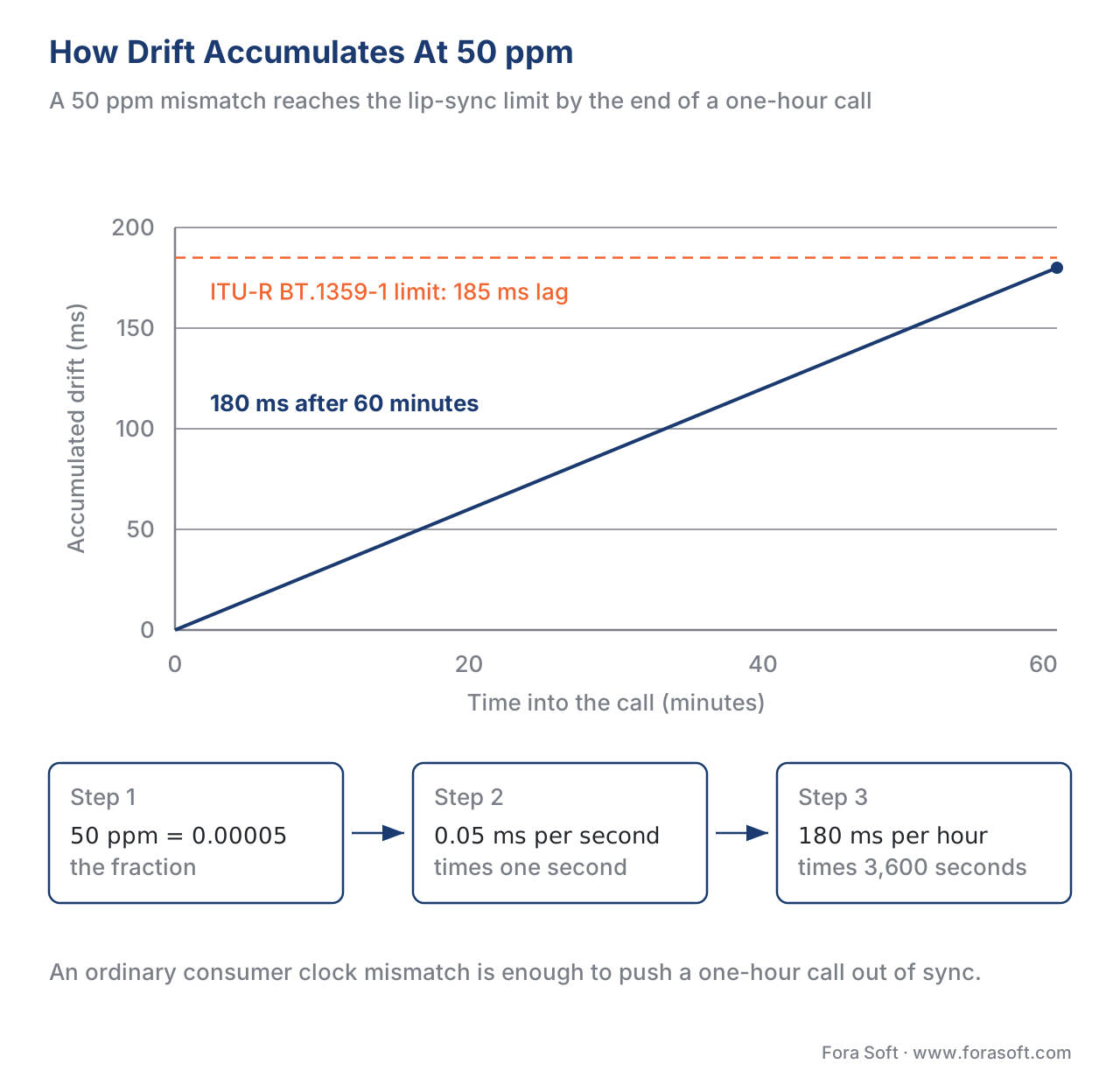 Figure 2. The same arithmetic as a picture: a steady 50 ppm mismatch walks the audio 180 ms away from the video over a one-hour call, landing on the lip-sync limit.
The soft option: continuous resampling
The good way to correct drift is to change the audio's sample rate by a microscopic amount, continuously, so the consumed rate exactly matches the produced rate. This is called resampling, and when it is done well the listener hears nothing.
The idea is simple even if the mathematics is not. Resampling, also called sample-rate conversion, takes a stream of samples produced at one rate and reconstructs what the same sound would have looked like if it had been sampled at a slightly different rate. To correct a 50 ppm drift where the playback side is too slow, the receiver resamples the incoming 48,000 Hz audio to roughly 48,002.4 Hz — adding about 2.4 samples per second spread evenly through the signal — so playback consumes the buffer at the same rate the sender fills it.
The key word is spread evenly. Instead of dropping one big chunk of audio once a second, a resampler nudges the timing of every sample by a fraction. No single sample is removed; the whole waveform is gently stretched or compressed. Because the change per sample is far below the threshold of hearing, and because the resampler uses a smooth interpolation filter rather than a crude copy, the correction is inaudible. This is the technique professional systems use. A fractional resampler actively corrects timing drift in response to a control signal, applying arbitrary, sub-sample timing adjustments to the incoming stream.
There is a second, related technique worth knowing, used inside real-time engines where re-running a full resampler on every block is too expensive: time stretching that preserves pitch. WebRTC's jitter buffer, NetEQ, does exactly this. When its buffer holds more audio than the target delay, it runs an operation called Accelerate that shortens the playout of a block; when the buffer is running low, it runs PreemptiveExpand to lengthen it. Both share a time-stretch algorithm that compresses or expands the audio on the time axis without changing pitch, so the voice does not turn into a chipmunk or a slow drawl. NetEQ compares its current buffer level against the target on every cycle and stretches the contents of its sync buffer up or down to keep the level steady — which is drift correction, applied in tiny continuous doses, by a different mechanism than classic resampling but with the same goal.
 Figure 3. The same drift, two responses. Resampling spreads the correction across every sample and stays silent; dropping a whole frame concentrates it into one audible discontinuity.
The hard option: drop and insert whole frames
The crude way to correct drift is to wait until the buffer is too full or too empty and then remove or duplicate a whole chunk of audio at once. When the buffer is overflowing, the receiver drops a frame — it throws away, say, 10 or 20 milliseconds of samples. When the buffer is starving, it inserts a frame — it repeats the last chunk, or inserts silence, to buy time.
This works, in the narrow sense that the buffer stays within bounds. The cost is that the listener hears it. Removing 10 milliseconds of a continuous waveform leaves a discontinuity — the sample before the cut and the sample after it do not line up, and that sudden jump in the signal is a click or a pop. Inserting a repeated chunk or a stretch of silence produces a hiccup or a momentary stutter. Each correction event is a small audible defect, and at 50 ppm of drift the system has to do one roughly every half-second, so the defects come often enough to annoy.
Why does anyone use the hard option, then? Because it is cheap and simple. A frame drop or insert is a few lines of code and almost no CPU. A continuous, pitch-preserving resampler is real signal-processing work. On a constrained embedded device — a cheap IP camera, a low-cost set-top box — the hard option may be the only one the hardware can afford. It is also acceptable when the corrections are rare and small enough to fall below notice, which is the case when the two clocks are very close. The failure mode is the badly-tuned system that uses frame drop under heavy drift and clicks audibly every second.
What about video? Drop and repeat are the only options
Audio has the luxury of resampling because audio is a smooth, continuous waveform you can gently stretch. Video is a sequence of discrete still frames, and you cannot show three-quarters of a frame. So for video, the only drift corrections are the hard ones: drop a frame or repeat a frame.
The good news is that the eye is far more forgiving of this than the ear is of an audio click. Dropping or repeating one video frame out of thirty is, for most content, invisible — a single 33-millisecond frame shown twice, or skipped, rarely registers. This asymmetry — the ear is fussy, the eye is relaxed — drives the dominant architecture for synchronization in media players, called audio master. In an audio-master design, the audio plays out at its own steady rate and is treated as the reference timeline; the video is then nudged to follow it by dropping or repeating whole frames as needed. Humans notice a 10-millisecond gap in audio far more readily than a duplicated video frame, so the system protects the audio at the expense of the video. That is the right trade-off, and it is why most players are built this way.
There is a subtlety in modern streaming. In a player consuming HLS or DASH, the audio and video are separate tracks decoded against a shared presentation clock, and the player keeps a running drift estimate. When the accumulated drift crosses a threshold, the player either rewrites a frame's timestamp and duration so it displays for two frame intervals, duplicates a frame if the device is running fast, or drops a frame if it is running slow. The mechanism is the same drop-or-repeat logic; what differs is that the player has the full timestamp metadata to decide exactly when to act.
The two strategies compared
Read the table one row at a time. Each row is a single dimension on which the soft and hard approaches differ.
| Dimension | Soft: continuous resampling | Hard: frame drop / insert |
|---|---|---|
| What it changes | A fraction of a sample, every sample | A whole frame (10–20 ms), occasionally |
| Audibility | Inaudible when done well | Click, pop, gap, or stutter |
| When it acts | Continuously, pre-emptively | Reactively, when buffer hits a limit |
| CPU cost | Higher — real DSP work | Very low — copy or discard |
| Works for video? | No (frames are discrete) | Yes — the only video option |
| Typical home | High-quality audio engines, WebRTC NetEQ | Constrained devices, video lanes |
| Failure mode | None audible; just more CPU | Audible defects under heavy drift |
The honest summary: resampling is the correct default for audio and is what every quality real-time and streaming engine uses; frame drop and insert are unavoidable for video and acceptable for audio only on hardware that cannot afford the alternative, or when drift is small enough that corrections almost never fire.
A special case: drift inside echo cancellation
One place drift bites that surprises engineers is acoustic echo cancellation. An echo canceller works by lining up the audio it sent to the speaker against the audio it picked up on the microphone, then subtracting the first from the second. That subtraction only works if both streams stay perfectly aligned in time. But the speaker (render) path and the microphone (capture) path can run on different clocks — and clock drift compensation may be needed even when capture and render sit on the same device, if they run at different sample rates or on separate codec clocks. As the two paths drift apart, the echo canceller's reference falls out of alignment, and echo that was being cancelled cleanly starts leaking back into the call. The fix is the same family: the AEC continuously resamples or re-aligns its render reference so it stays slaved to the capture timeline. It is drift correction, hidden inside a feature most people never think of as a clock problem.
The common mistakes that turn drift into a bug
The same handful of errors account for most production drift complaints, and each is a misunderstanding of the clock problem.
The "it must be the network" mistake. Engineers see audio drifting out of sync and reach for packet captures and jitter graphs. But jitter scrambles arrival times symmetrically — it does not produce a steady, one-directional pull. The tell-tale of drift is exactly that steadiness: sync fine at the start, predictably worse over time. A slow, monotonic slide is always a clock mismatch, never network jitter.
The reactive-only buffer. A receiver that never resamples and only acts when the buffer hits empty or full will, under any real clock mismatch, click or stutter on a fixed schedule. The fix is to correct continuously and pre-emptively, long before the buffer reaches a limit.
The pitch-shifting resampler. A naive drift fix changes the playback rate without preserving pitch, so correcting a slow clock raises the pitch of every voice slightly. Over a long call this is fatiguing even when listeners cannot name what is wrong. Quality engines use pitch-preserving time stretching for exactly this reason.
The frame drop on the audio master. If a player drops audio frames to follow the video instead of dropping video frames to follow the audio, it has the master backwards. Audio should be the reference; video should yield. Getting this inverted produces audible audio gaps in service of perfectly smooth video that nobody asked for.
Free download: Drift Correction Decision Cheat SheetOne page: the root cause (two clocks), the ppm-to-drift arithmetic, the soft-vs-hard comparison table, the audio-master rule for video, and the four common mistakes that turn drift into a bug.Where Fora Soft fits in
We have built the audio playback and synchronization path in conferencing platforms, OTT and Internet-TV services, e-learning systems, telemedicine apps, and video surveillance products since 2005. Drift correction is one of the quietest parts of that work and one of the most consequential: in real-time products we tune the resampling and the NetEQ time-stretch behaviour so long calls stay locked without audible artefacts; in streaming and OTT players we set the drop-and-repeat thresholds so the audio-master timeline holds across hours of playback. When a client reports "the sound drifts out over time", this is the layer we reach for — and the cause is almost always a clock mismatch handled too crudely, not a deeper fault. That fix usually arrives through our video and audio software troubleshooting work on existing products, and in new builds our audio and video processing development team designs the resampling path in from the start.
The book
Audio for Video: A Complete Guide to Sound in Video Products: From Jitter Buffers and Lip Sync to Atmos, Quality Metrics, and Neural Codecs
Volume 5 takes the clock mismatch this article opens with and follows it through the whole receive path: the jitter buffer and NetEQ that absorb the first few milliseconds, the timestamps and clock domains that decide what "in sync" even means, and the lip-sync tolerance windows the 180 ms figure above is measured against. It covers the neighbours of drift as well — packet loss concealment, FEC and RED, and incident write-ups that start from the symptom a user reports rather than the cause. Written by Nikolay Sapunov, CEO at Fora Soft.
Does your audio slide out of sync the longer a session runs?
Tell us what your receiver does when the buffer fills — resample, drop a frame, or nothing until it hits a limit — and we will point at the step that is producing the clicks or the slide. 250+ video products shipped since 2005.
See our case studies
Case study
Worldcast Live
Concert streaming at 1.5 Gb/s with 5 audio channels, 0.4–0.5 s latency and 10,000 simultaneous viewers — a path where an uncorrected clock mismatch would be audible before the set ends.
Case study
TransLinguist
A WebRTC interpretation platform with 75+ languages and 30,000+ certified interpreters, where the interpreter's audio, the floor audio and the video all have to hold their alignment for the length of a session.
Case study
VALT
A recording and observation platform used by 770+ US organizations and 50,000+ users, where hours-long sessions are replayed by timestamp and any drift that accumulated during capture shows up on playback.
What to read next
Jitter buffer
Jitter Buffer: NetEQ, the Brain of WebRTC Audio
The component that runs Accelerate and PreemptiveExpand to hold the level steady.
Sync
What In Sync Means: ITU-R BT.1359 and Lip-Sync Windows
Where the 90 ms and 185 ms thresholds in the chart above come from.
Timestamps
The End-to-End Timestamp Diagram, From Capture to Render
Every clock a sample crosses on its way from a microphone to a speaker.
Streaming
Lip-Sync in HLS and DASH: Where It Usually Goes Wrong
The same drop-or-repeat logic, in a player that has the full timestamp metadata.
References
- IETF RFC 3550, "RTP: A Transport Protocol for Real-Time Applications", §6.4.1 (RTCP Sender Report NTP/RTP pair used to recover the sender clock), July 2003. https://www.rfc-editor.org/rfc/rfc3550.html — primary source for how a receiver recovers the sender's timeline before correcting drift against it.
- IETF RFC 7587, "RTP Payload Format for the Opus Speech and Audio Codec", §4.1 (Opus uses a 48,000 Hz RTP clock regardless of internal sample rate), June 2015. https://www.rfc-editor.org/rfc/rfc7587.html — establishes the 48 kHz audio clock used in the worked sample-count arithmetic.
- ITU-R BT.1359-1, "Relative Timing of Sound and Vision for Broadcasting", Table 1 (acceptability threshold: audio +90 ms lead / −185 ms lag), 1998. https://www.itu.int/rec/R-REC-BT.1359 — the lip-sync tolerance window the 180 ms drift example is measured against. ITU full text is paywalled; thresholds taken from the recommendation's normative summary.
- ITU-T G.711, "Pulse Code Modulation (PCM) of Voice Frequencies" (8,000 Hz narrowband sampling), 1988 (reaffirmed). https://www.itu.int/rec/T-REC-G.711 — basis for the narrowband sample-rate figures used when discussing sample-loss cadence at low rates.
- WebRTC NetEQ design documentation (Chromium / libwebrtc), "NetEq" — Accelerate and PreemptiveExpand time-stretch operations, target-delay comparison, and clock-drift handling in the sync buffer. https://chromium.googlesource.com/external/webrtc/+/master/modules/audio_coding/neteq/g3doc/index.md — first-party engineering documentation for the pitch-preserving time-stretch drift correction used in WebRTC. Tier 3 (maintainer documentation); used for the NetEQ mechanism description.
- "How WebRTC's NetEQ Jitter Buffer Provides Smooth Audio", webrtcHacks. https://webrtchacks.com/how-webrtcs-neteq-jitter-buffer-provides-smooth-audio/ — corroborating engineering explanation of NetEQ Accelerate/PreemptiveExpand behaviour. Tier 4; used only where it agrees with the libwebrtc documentation.
- "On Dealing with Sampling Rate Mismatches in Blind Source Separation and Acoustic Echo Cancellation" — peer-reviewed treatment of clock/sample-rate mismatch and its effect on echo cancellation. https://www.researchgate.net/publication/4295706 — academic source for the AEC clock-drift section. Tier 5.
- US Patent 7,970,086, "System and method for clock drift compensation" — describes the ppm-to-sample-error relationship (a missing or redundant sample every Nth sample at a given offset) underpinning the sample-count arithmetic. https://image-ppubs.uspto.gov/dirsearch-public/print/downloadPdf/7970086 — engineering source for the soft-vs-hard compensation framing and the audible-click consequence of dropped samples. Tier 4.
- US Patent 12,462,829, "Audio resampling for media synchronization" — describes a fractional resampler that applies arbitrary sub-sample timing adjustments to correct drift in response to a control signal. https://image-ppubs.uspto.gov/dirsearch-public/print/downloadPdf/12462829 — engineering source for the continuous-resampling mechanism. Tier 4.
