


Why this matters
If you build video calling, telemedicine, contact-centre, or online-classroom software, the single most common complaint your users will file is "the audio was choppy" or "there was a delay". Almost every one of those complaints traces back to the jitter buffer's behaviour under a bad network — and in WebRTC that buffer is NetEQ, a component you do not write but absolutely must understand. This article is for the product manager, founder, or operations lead who needs to grasp the trade-off NetEQ manages — smoothness against delay — well enough to read a diagnostic stat and ask an engineer a precise question. A senior engineer will also find every claim traced to the WebRTC source documentation, the RTP specification, or the maintainers' own published deep-dive.
The problem: a steady sender, an unsteady network
Start with what the sender does. The microphone captures sound continuously, the encoder chops it into small chunks — typically 20 milliseconds of audio each, called a frame — and the system wraps each frame in a packet and sends it. Twenty milliseconds per frame means the sender emits one packet every 20 milliseconds, like a metronome: tick, tick, tick, fifty times a second, perfectly evenly spaced.
The internet does not preserve that even spacing. Packets travel across routers, switches, Wi-Fi links, and cellular hops, and each hop adds a delay that changes from moment to moment. So the packets that left the sender 20 milliseconds apart arrive at the receiver at uneven intervals — 18 milliseconds apart, then 35, then two of them at once, then a 60-millisecond gap. That variation in arrival time is called jitter — literally, the jitteriness of the packet arrival schedule.
The Meta engineer who maintains the WebRTC audio resilience code describes three shapes this takes in the real world. The most common, surprisingly, is bursty arrival: the receiver hears nothing for a while, then several packets land at once. Then there is minor jitter: a packet or two arrive a little late and the next ones quickly catch up. And there is a permanent delay change: from one moment on, every packet simply takes longer, with no jitter afterward — for example when your phone hands off from Wi-Fi to cellular (webrtcHacks, "How WebRTC's NetEQ Jitter Buffer Provides Smooth Audio", June 2025).
On top of jitter, packets sometimes never arrive at all — that is packet loss — or arrive out of order. The speaker, meanwhile, is merciless: it demands a fresh, unbroken 10 milliseconds of audio to play, on time, every 10 milliseconds, forever. If the audio is not there, the listener hears a gap. The component that stands between the unsteady network and the merciless speaker, and makes the second one happy despite the first, is the jitter buffer.
What a jitter buffer is, in one analogy
A jitter buffer is like the waiting area at an airport gate. Passengers (packets) arrive at the gate on irregular schedules — some early, some late, some in a rush together. The waiting area holds them so that boarding (playback) can proceed on a smooth, predictable schedule rather than lurching every time the arrivals bunch up. The longer you let people wait, the more buffering you have against a late arrival — but the longer everyone's total journey takes.
That is the whole trade-off in one image. A bigger buffer holds more packets, so it can ride out a longer network hiccup without running dry — but it adds delay to the conversation. A smaller buffer keeps the conversation snappy — but the first network burst that exceeds its holding time produces an audible gap. Get it too small and you get choppy audio; get it too big and people start talking over each other because the round-trip feels sluggish.
For real-time conversation, the ceiling on delay is strict. A natural back-and-forth falls apart once the one-way trip climbs past roughly 200 milliseconds and becomes genuinely difficult past about 500 milliseconds — beyond that, people interrupt each other because the gap before a reply feels like hesitation (webrtcHacks, June 2025). Compare that with watching a video on a streaming service, where the player happily buffers several seconds because you never notice a delay you have no reference for. A movie player can hold minutes; a live-streaming app holds seconds; a real-time call must hold only a few hundred milliseconds at most. This is why the WebRTC jitter buffer cannot simply be made large and safe — it lives inside a tight latency budget.
The naive answer, and why it fails
The simplest possible jitter buffer is a fixed one: always hold, say, 100 milliseconds of audio before you start playing, and never change. This is easy to build and it works fine on a stable network. It fails on a real one for two opposite reasons.
If the network is calmer than 100 milliseconds of jitter, the fixed buffer adds 100 milliseconds of delay that the conversation did not need — pure waste, felt as sluggishness. If the network gets worse than 100 milliseconds of jitter, the buffer runs dry mid-sentence and the listener hears a gap. A fixed buffer is therefore wrong almost all the time: too big for good networks, too small for bad ones. The only buffer that is right is one that changes its own size to match the network it is actually on, right now. That is what "adaptive" means, and it is the entire reason NetEQ is complex.
Meet NetEQ
NetEQ — the name is a contraction of "Network Equalizer" — is the adaptive audio jitter buffer and packet-loss concealer inside libWebRTC, the open-source WebRTC implementation that ships in Chrome, Edge, and most native voice apps. It originated at Global IP Solutions (GIPS), the company Google acquired in 2011 to build WebRTC, and it has been quietly refined ever since. Its stated goal, in the WebRTC project's own documentation, is "to ensure a smooth playout of incoming audio packets from the network with a low amount of audio artifacts while at the same time keep the delay as low as possible" (WebRTC NetEq documentation, chromium.googlesource.com). Those two goals — smooth and low-delay — pull in opposite directions, and managing that tension is NetEQ's whole job.
NetEQ has just two public entry points, and understanding them is most of the battle.
The first is InsertPacket: the network hands NetEQ a freshly arrived RTP packet, and NetEQ files it away. The second is GetAudio: the audio device asks NetEQ for the next slice of sound to play, and NetEQ must hand back exactly 10 milliseconds of audio — no more, no less — and it is called to do so 100 times every second, on a strict schedule (WebRTC NetEq documentation). InsertPacket runs whenever a packet shows up, on the network's irregular schedule. GetAudio runs like clockwork, 100 times a second, on the speaker's steady schedule. NetEQ is the gearbox that connects the irregular input shaft to the steady output shaft.
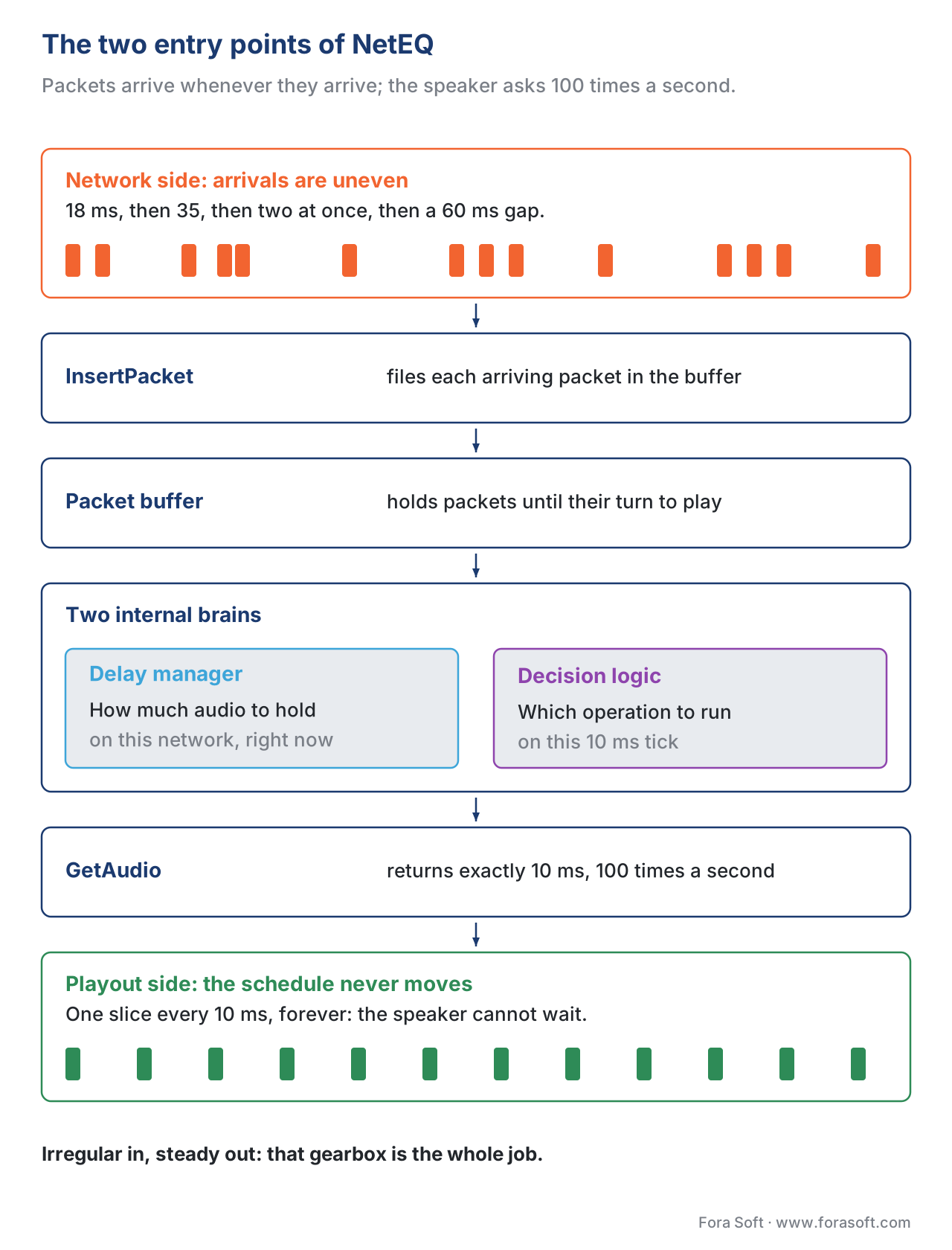 Figure 1. NetEQ connects an irregular input (packets arriving from the network) to a steady output (10 ms of audio pulled by the speaker 100 times a second).
What happens on every tick: the five (and a bit) operations
Here is the heart of it. Every 10 milliseconds, the speaker calls GetAudio, and NetEQ must produce 10 milliseconds of sound. To do that it consults two internal brains — a delay manager that estimates how much buffering the network currently demands, and a decision logic that picks what to actually do this tick — and then it performs exactly one of a small set of operations. Naming these operations is the most useful thing in this article, because every audio symptom your users report maps to one of them happening too often.
Normal. The expected packet is sitting in the buffer, on time. NetEQ decodes it and plays it at its natural speed. Nothing clever happens. On a healthy network, almost every tick is Normal, and that is exactly what you want to see.
Acceleration. The buffer is holding more audio than the network currently justifies — packets have been arriving early or in a calm patch — so the conversation has drifted a little behind real time. NetEQ speeds the audio up by a microscopic amount to drain the excess and catch up, using a time-stretching technique that shortens the sound without raising its pitch, so the speaker does not turn into a chipmunk (WebRTC NetEq documentation). You would never hear a single Acceleration; you would hear thousands of them as a faint, unnatural quickening.
Preemptive expand (deceleration). The opposite case: the buffer is running low and there is a real risk it will be empty on the next tick. NetEQ slows the audio down by a microscopic amount — stretching the sound slightly longer without lowering its pitch — to buy time for the next packet to arrive (WebRTC NetEq documentation). Heard in bulk, this is a faint dragging.
Expand (packet-loss concealment). The packet NetEQ needs has not arrived — it is either lost or simply late — and there is nothing to decode. Rather than play silence, NetEQ manufactures a plausible continuation of the sound: it extrapolates from the audio it already has, repeating and fading the recent waveform, or it asks the codec's own concealment routine to generate it (WebRTC NetEq documentation). A little of this is inaudible. A lot of it is the robotic, watery, smeared sound everyone associates with a bad call.
Merge. When a real packet finally shows up right after NetEQ has been manufacturing fake audio with Expand, the two cannot simply be stapled together — the seam would click. Merge stitches the concealment output smoothly into the freshly decoded real audio so the join is inaudible (WebRTC NetEq documentation).
There is a sixth, special operation for silence. When the sender is using discontinuous transmission — deliberately not sending packets during silence to save bandwidth — NetEQ does not treat the gap as loss. Instead it generates comfort noise: a faint, matched hiss so the line does not sound dead (WebRTC NetEq documentation). We cover that mechanism in depth in our article on voice activity detection and DTX; here it is enough to know NetEQ has a dedicated path for it and does not confuse intentional silence with a dropped packet.
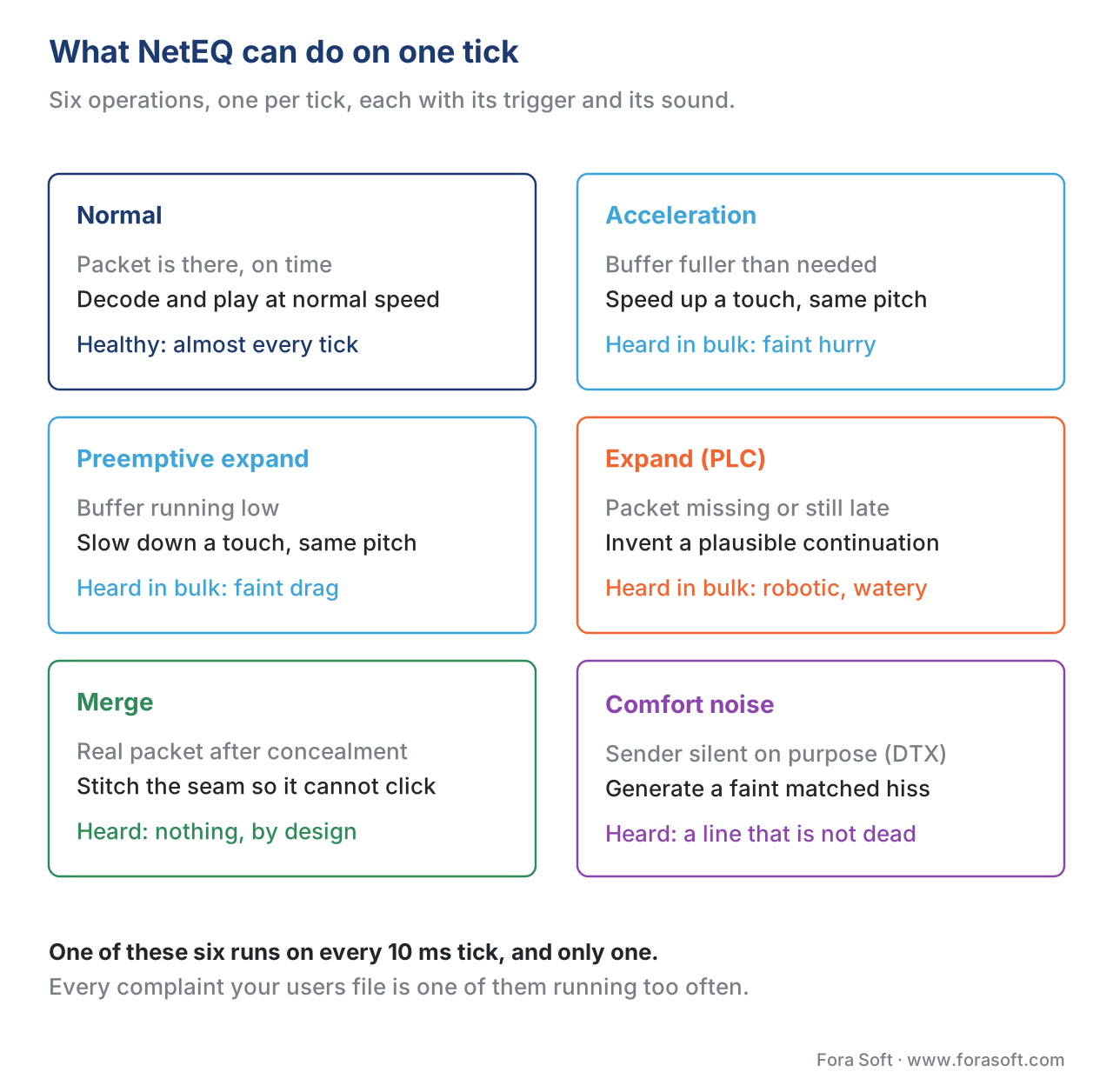 Figure 2. The operations NetEQ can output on any 10 ms tick, and the buffer condition that triggers each one.
How NetEQ decides how much to buffer
The two stretching operations — Acceleration and Preemptive expand — only make sense if NetEQ knows how much audio it should be holding. That number is the target delay (in the source code, the "target level"), and computing it well is the difference between a buffer that floats gracefully with the network and one that lurches.
The old, intuitive method was to measure the gap between consecutive packets — the inter-arrival delay — and size the buffer to the worst gap seen. This works for simple jitter but breaks under accumulating delay, where each successive packet is a little later than the last. The Meta deep-dive walks through exactly this failure: with inter-arrival measurement the buffer keeps running 40 milliseconds short on every packet during a slow build-up, producing repeated underruns even though the algorithm "thinks" its target is correct (webrtcHacks, June 2025).
In 2022 WebRTC replaced this with relative delay. Instead of comparing each packet to its immediate predecessor, NetEQ picks the single fastest packet seen in a recent time window — the one that took the shortest trip — and measures every other packet's delay relative to that anchor (webrtcHacks, June 2025). Anchoring to the fastest packet means a slow, accumulating build-up is measured against the genuinely quick baseline, so the target delay grows enough to cover the whole build-up instead of chronically lagging it. The time window that defines "recent" defaults to 2 seconds in libWebRTC, a deliberately chosen heuristic that separates temporary jitter (worth buffering against) from a permanent one-off delay shift (not worth buffering against, because it will not recur) (webrtcHacks, June 2025).
The delay manager does not simply take the largest relative delay it has ever seen — that would make one freak packet inflate the buffer forever. Instead it keeps a histogram: a running tally of how often each delay value occurs, where every new measurement nudges the tally and old measurements slowly fade. The fade is governed by a forget factor, hardcoded to 0.983 by default, chosen so the histogram remembers low-frequency events without clinging to ancient ones (webrtcHacks, June 2025). NetEQ then reads a high percentile off that histogram — for example, set the target so that 95 percent of recent packets would have arrived in time. A higher percentile means a safer, larger buffer; a lower one means a snappier, riskier buffer. That percentile is one of the few genuine tuning knobs a native application can turn.
There is a second histogram, the reorder optimizer, that handles out-of-order and retransmitted packets. Because a retransmitted audio packet in WebRTC looks identical to a normal one — they share the same stream identifier, so the receiver cannot tell them apart — late retransmissions naturally look like jitter and gently enlarge the buffer (webrtcHacks, June 2025). The reorder optimizer balances the value of recovering those packets against the latency cost of waiting for them, using an explicit cost function rather than a fixed percentile. The delay manager takes whichever of the two histograms demands more buffering and uses that as the final target.
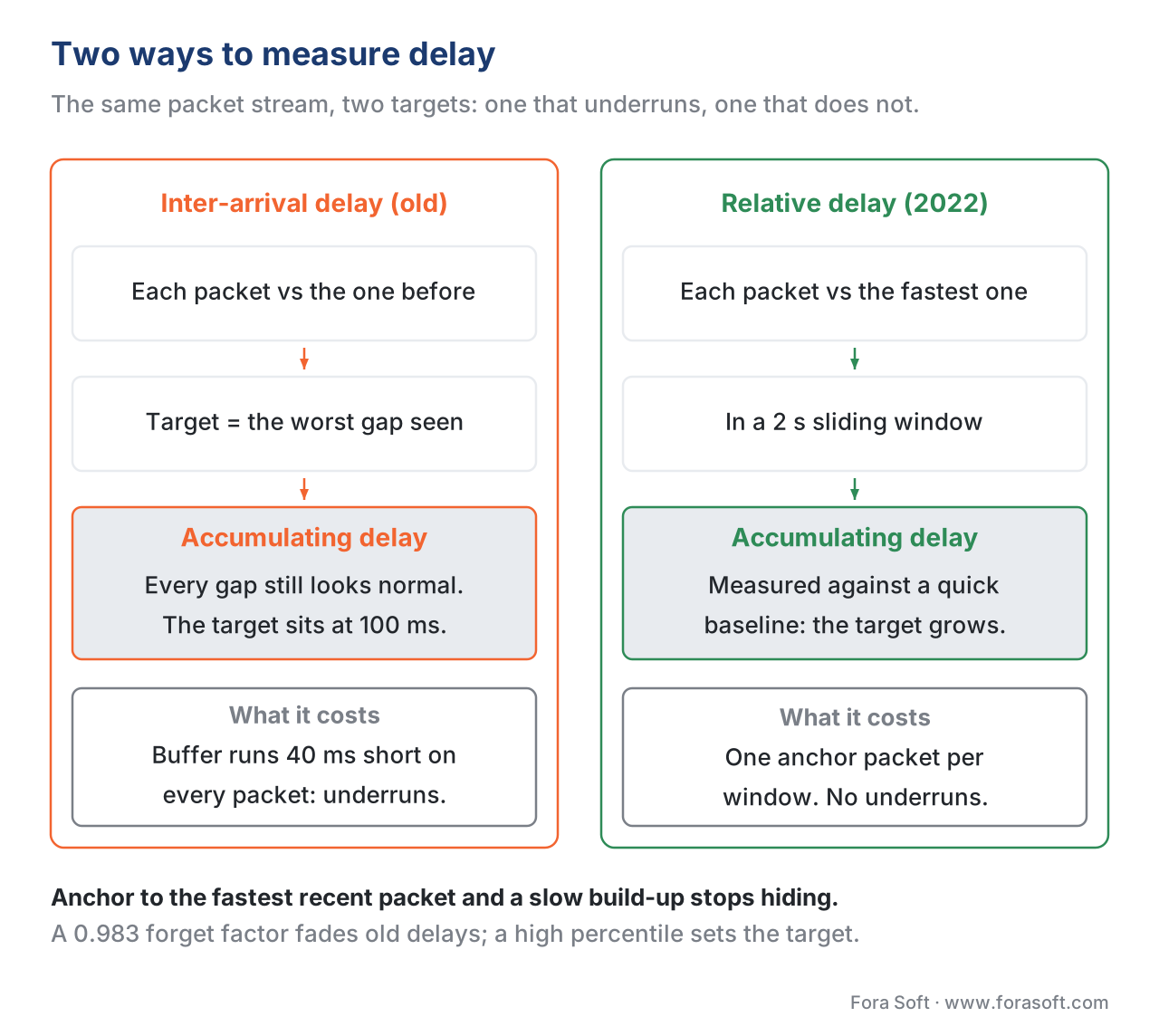 Figure 3. Why relative delay (2022) beats the older inter-arrival method: anchoring to the fastest recent packet covers accumulating delay that inter-arrival measurement misses.
A worked example: turning jitter into a buffer size
Numbers make this concrete. Suppose your audio uses 20-millisecond frames, so the sender emits 50 packets per second. You watch the arrivals for two seconds and find that, relative to the fastest packet in that window, the delays break down like this: most packets arrive within 20 milliseconds of the anchor, but a meaningful fraction lag further behind.
Say the histogram of relative delays comes out as: 60 percent of packets within 20 ms, 20 percent within 40 ms, 10 percent within 60 ms, 6 percent within 80 ms, and 4 percent within 100 ms. To cover 95 percent of packets, NetEQ reads up the histogram until the cumulative share first crosses 0.95:
within 20 ms:  0.60   (cumulative 0.60)
within 40 ms:  0.20   (cumulative 0.80)
within 60 ms:  0.10   (cumulative 0.90)
within 80 ms:  0.06   (cumulative 0.96)  ← first bucket past 0.95
within 100 ms: 0.04   (cumulative 1.00)
The cumulative share first exceeds 0.95 at the 80-millisecond bucket, so NetEQ sets its target delay to 80 milliseconds. The reading: holding 80 milliseconds of audio means 96 percent of packets on this network will be in the buffer when their turn to play arrives; the remaining 4 percent — the worst stragglers — will trigger an Expand. If you raised the percentile to 0.99, the target would jump to 100 milliseconds: safer against the stragglers, but 20 milliseconds more delay on every word. That single arithmetic step — pick a percentile, read the buffer size — is the trade-off NetEQ makes thousands of times a call, and it is the trade-off you are tuning when you touch the knob.
The statistics every engineer should watch
You cannot see NetEQ working, but you can read its diagnostics. The browser exposes them through the standard getStats() API, defined in the W3C WebRTC Statistics specification, and these few fields are the ones worth putting on a dashboard. Each lives on the inbound audio stream report (W3C webrtc-stats, Candidate Recommendation).
The most important is average jitter buffer delay. The spec gives you two raw counters — jitterBufferDelay, the total seconds of buffering summed over every emitted sample, and jitterBufferEmittedCount, the number of samples emitted — and you divide the first by the second to get the average delay each sample sat in the buffer (W3C webrtc-stats). This is the headline number: how much latency NetEQ is currently adding. There is also jitterBufferTargetDelay, the target the delay manager is aiming for based purely on network conditions, separate from any extra delay added for audio-video sync (W3C webrtc-stats, RTCInboundRtpStreamStats).
Next are the concealment counters. concealedSamples counts samples that were faked because a packet was missing, and concealmentEvents counts how many distinct times concealment had to start — a useful proxy for how often the buffer ran dry (W3C webrtc-stats). A handful of concealment events on a long call is normal; a rate that climbs into the percent of total samples is audible as choppiness.
Finally, the time-stretch counters. insertedSamplesForDeceleration counts samples added when NetEQ slowed playout down (Preemptive expand), and removedSamplesForAcceleration counts samples dropped when it sped playout up (Acceleration) (W3C webrtc-stats). When these climb together it usually signals an unstable buffer that is constantly hunting — slowing down, then speeding up — which points at a noisy network estimate rather than a single clean problem.
Statistic (getStats) |
What it tells you | Healthy direction |
|---|---|---|
jitterBufferDelay / jitterBufferEmittedCount |
Average ms each sample waited in the buffer | Low and stable |
jitterBufferTargetDelay / jitterBufferEmittedCount |
Buffer size NetEQ is aiming for | Tracks network, not spiking |
concealmentEvents |
How often the buffer ran dry and faked audio | Near flat over time |
concealedSamples |
Volume of faked audio | Tiny fraction of total samples |
insertedSamplesForDeceleration |
Audio added by slowing down | Low; rising = underrun pressure |
removedSamplesForAcceleration |
Audio dropped by speeding up | Low; rising with the above = hunting |
To watch NetEQ live, open chrome://webrtc-internals during any WebRTC call in Chrome and find the inbound audio section — every counter above is plotted there in real time, which makes it the fastest way to confirm whether a "bad audio" report is really a jitter-buffer problem or something upstream. For offline analysis, the WebRTC project ships a tool called neteq_rtpplay that replays a captured RTP dump or PCAP file through NetEQ and prints the aggregated statistics, so you can reproduce a customer's bad call on your desk (WebRTC NetEq documentation).
A common pitfall: blaming NetEQ for an upstream problem
The most expensive mistake teams make with jitter-buffer diagnostics is treating a high concealment rate as proof that "the jitter buffer is broken". NetEQ is downstream of everything: the encoder, the network, the congestion controller, and the audio device. A flood of Expand operations almost always means packets are genuinely not arriving — because of real network loss, a congestion-control collapse, or a sender that throttled its bitrate — not because NetEQ chose badly. Fixing NetEQ's percentile when the real problem is 8 percent packet loss just adds latency without removing the gaps.
A second, subtler trap is the audio-video sync interaction. NetEQ can be deliberately instructed to increase its delay to keep audio lined up with a slower video pipeline (WebRTC NetEq documentation). If your video path is laggy, NetEQ will hold audio back to match it, and your jitter-buffer delay stat will look high through no fault of the network. The fix lives in the video path, not the audio buffer. This is why the jitterBufferTargetDelay stat is worth watching separately — it shows the network-driven target before any sync padding, so you can tell a true network problem from a sync adjustment.
A third trap is over-tuning. NetEQ's defaults — the 0.983 forget factor, the 2-second window, the high percentile — were chosen against enormous, varied traffic. They are not optimal for every product, but they are a strong baseline, and a team that starts twisting knobs before it has read the stats usually makes things worse. Measure first; the right move is almost always to fix the upstream network or device issue the stats are pointing at.
How this connects to packet loss and redundancy
NetEQ's Expand operation is the last line of defence, and on purpose it is the worst one — manufactured audio is never as good as the real thing. Everything the rest of the WebRTC audio stack does to avoid needing Expand is therefore upstream of NetEQ and well worth understanding alongside it. Packet-loss concealment is the family of algorithms that make Expand sound less broken; modern codecs and deep-learning models have pushed this surprisingly far, which we cover in our article on packet loss concealment. Forward error correction sends a little redundant data so a lost packet can be reconstructed without retransmission, and NetEQ explicitly splits out and prioritises that redundancy when it arrives (WebRTC NetEq documentation); we cover the trade-offs in forward error correction, in-band FEC, and RED redundancy. The three topics — jitter buffering, concealment, and redundancy — are the complete "what to do about imperfect delivery" toolkit, and they are tuned together.
Free download: NetEQ tuning & diagnostics cheat sheetOne page with the six NetEQ operations, the delay-manager knobs (relative delay, the 2 s window, the 0.983 forget factor, the target percentile, the underrun and reorder histograms), thegetStats fields worth a dashboard, the histogram-to-target worked example, and the rules for telling a buffer problem from an upstream one.
Where Fora Soft fits in
Fora Soft has built real-time audio into video conferencing, telemedicine, e-learning, and live-shopping products since 2005, and NetEQ behaviour is a routine part of how we diagnose and tune those systems. When a customer reports choppy audio, the first move is almost never to touch the buffer — it is to read the getStats concealment and delay counters and decide whether the problem is the network, the device, the congestion controller, or genuinely the buffer estimate. A telemedicine call on a hospital Wi-Fi network and a 500-person webinar on mixed consumer connections want different buffer behaviour, and the right setting comes from the measured jitter profile, not a guess. We instrument those stats from the start so that "the audio is broken" becomes a number we can read rather than a mystery we have to reproduce. That tuning is everyday work for our WebRTC development team, and our audio and video processing development covers the echo cancellation, noise suppression and codec work around the buffer.
The book
Audio for Video: A Complete Guide to Sound in Video Products: From Jitter Buffers and Lip Sync to Atmos, Quality Metrics, and Neural Codecs
This article gives NetEQ one pass; volume 5 opens with the jitter buffer and stays with it for a chapter, then follows the same packet through concealment, FEC and RED, bitrate and topology decisions, and an incident walk-through that starts from the symptom your users actually report. It is part of a seven-volume series that takes the whole video stack from the pixel to production, and someone who works through it can design and build a system like this rather than guess at it. Volume 4 covers the capture chain that feeds the encoder before any of this. 1,288 pages, written by Nikolay Sapunov, CEO at Fora Soft.
Users say the audio is choppy, and nobody can tell you whether it is the buffer or the network?
Tell us what your calls look like — hospital Wi-Fi, a 500-person webinar, interpreters on four continents — and we will instrument the getStats counters that separate a real network loss from a buffer estimate, read them on your own traffic, and tell you which of the two is costing you the complaints. 250+ video products shipped since 2005.
See our case studies
Case study
TransLinguist
Remote simultaneous interpretation on mediasoup for 30,000+ certified interpreters in 75+ languages, carrying the NHS national framework — the hardest case for a jitter buffer, because an interpreter works inside the same 200 ms conversational window the buffer is spending.
Case study
WorldCast Live
Concert streaming at 0.4–0.5 s end-to-end for 10,000 simultaneous viewers on 1.5 Gbit/s of WebRTC, with musicians in different cities playing together — every millisecond the buffer holds comes straight out of that budget.
Case study
CirrusMed
HIPAA-compliant browser telemedicine licensed in 48+ US states with 20+ physicians — patients join from home broadband and clinic Wi-Fi in the same week, which is exactly the varied jitter profile an adaptive buffer exists for.
What to read next
Real time
The WebRTC audio pipeline end-to-end
The whole chain NetEQ sits at the receiving end of.
Resilience
Forward error correction, in-band FEC, and RED redundancy
The redundancy that keeps Expand from being needed at all.
Real time
Bitrate and bandwidth control in real-time audio
The congestion controller upstream that a flood of Expand usually blames.
Support
Diagnosing audio problems in production: a runbook
Turning “the audio was choppy” into a counter you can read.
References
- WebRTC project, NetEq (g3doc), chromium.googlesource.com — the canonical maintainer documentation: the InsertPacket / GetAudio API, the six output operations (Normal, Acceleration, Preemptive expand, Expand, Merge, Comfort noise), the GetAudio decision sequence, the NetworkStatistics / GetLifetimeStatistics interfaces, the
neteq_rtpplaytool, and the AV-sync responsibility. Tier 2 (reference implementation documentation), and the controlling source for what NetEQ actually does. https://chromium.googlesource.com/external/webrtc/+/master/modules/audio_coding/neteq/g3doc/index.md - IETF RFC 3550, RTP: A Transport Protocol for Real-Time Applications (H. Schulzrinne et al.), July 2003 — defines interarrival jitter and its smoothed estimator J(i) = J(i−1) + (|D(i−1,i)| − J(i−1))/16 (§6.4.1, Appendix A.8), the basis for how jitter is reported in RTCP. Standards-track; obsoletes RFC 1889. https://www.rfc-editor.org/rfc/rfc3550
- W3C, Identifiers for WebRTC's Statistics API (
webrtc-stats), Candidate Recommendation — definesjitterBufferDelay,jitterBufferEmittedCount,jitterBufferTargetDelay,concealedSamples,concealmentEvents,insertedSamplesForDeceleration, andremovedSamplesForAccelerationon the inbound RTP stream report. The controlling source for the production statistics in this article. https://www.w3.org/TR/webrtc-stats/ - IETF RFC 7587, RTP Payload Format for the Opus Speech and Audio Codec, June 2015 — §3.1.3 on discontinuous transmission (whole-frame dropping, DTX-vs-loss detection) underpinning NetEQ's comfort-noise path; the Opus payload NetEQ most often carries. https://www.rfc-editor.org/rfc/rfc7587
- webrtcHacks, How WebRTC's NetEQ Jitter Buffer Provides Smooth Audio (Fengdeng Lyu, Meta), June 2025 — the maintainer-grade deployer deep-dive: bursty/minor/permanent jitter taxonomy, the 2022 move from inter-arrival to relative delay, the 2-second history window, the 0.983 forget factor, underrun vs reorder histograms, percentile-based target selection, and the decision-logic state machine. Tier 3–4; where it touches a spec fact, the spec governs. https://webrtchacks.com/how-webrtcs-neteq-jitter-buffer-provides-smooth-audio/
- MDN Web Docs, RTCInboundRtpStreamStats: jitterBufferTargetDelay and RTCRtpReceiver: jitterBufferTarget — practical descriptions of the target-delay statistics and the application-settable jitter-buffer target, used to corroborate the W3C spec wording. https://developer.mozilla.org/en-US/docs/Web/API/RTCInboundRtpStreamStats/jitterBufferTargetDelay
- ACM, Improved Jitter Buffer Management for WebRTC (peer-reviewed) — academic analysis of WebRTC jitter-buffer adaptation under varied network conditions, supporting the underrun/delay trade-off framing. https://dl.acm.org/doi/fullHtml/10.1145/3410449
- IETF RFC 6716, Definition of the Opus Audio Codec (J.-M. Valin, K. Vos, T. Terriberry), September 2012 — the Opus codec whose decoder NetEQ drives, including the built-in packet-loss-concealment path NetEQ can invoke for Expand. Updated by RFC 8251 (2017). https://www.rfc-editor.org/rfc/rfc6716
