

Key takeaways
• Webcasting is one-to-many, and the hard part is distribution. A town hall isn’t a big meeting; it’s one presenter broadcasting to thousands who mostly watch. The engineering lives in getting that stream to everyone at once without the network buckling.
• The eCDN is the whole game at scale. Ten thousand employees on one unicast stream is 30 Gbps of internal traffic. An enterprise CDN—multicast, peer-to-peer or caching—cuts that by up to 98% (Microsoft, 2026), which is why every serious platform has one.
• Two planes, not one. Video rides a CDN plane (LL-HLS, 2–8 s); Q&A, polls and reactions ride a fast data plane (WebSocket or WebRTC, under a second) so interaction never waits on the broadcast.
• Buy when Teams is enough; build when it isn’t. Native Teams town halls cover a lot. A custom platform earns its cost when you need your own branding, data ownership, integrations, or a viewer experience the shelf products can’t give you.
• Confidential broadcast is a security problem, not just a video one. SSO, role-based access, audience restriction and audit logging matter as much as bitrate when the CEO is talking about layoffs or unreleased numbers.
Why Fora Soft wrote this webcasting guide
Search “webcasting software” and Google hands you two things: streaming tools like OBS and Wirecast, and listicles ranking eight platforms by feature checklist. Neither tells you what actually happens when 10,000 employees press Play on the CEO’s all-hands at 9:00 sharp and the office network falls over. That gap—between the tool and the system that survives real scale—is what this guide is about.
Fora Soft has built video and real-time software since 2005—250+ projects, 50+ in-house specialists—and the exact pattern a webcast needs is the one we ship most: broadcasting one source to a large audience while live interaction runs alongside it. We built BrainCert, a virtual-classroom platform that runs an interactive SFU plane and a low-latency broadcast plane together at 99.995% uptime. We built TradeCaster, where one presenter streams live to 46,000+ viewers with chat and data on the same screen. Same shape as a company town hall: one to many, live, at scale.
This is the playbook we’d hand an internal-comms or IT team before they sign a platform contract or brief a custom build. If your event puts people in a physical room and streams to everyone else, our hybrid event platform guide is the better read—that’s a different problem. This one is about broadcasting inside the company, to a screen at every desk.
Broadcasting to the whole company for the first time?
30 minutes with Vadim to size your audience, network and eCDN choice before you commit to a platform.
What webcasting software actually is (and isn’t)
Webcasting software broadcasts one live video source to a large, mostly passive audience over the internet—one presenter or a small panel, thousands or tens of thousands watching. That one-to-many shape is what separates it from the two tools it gets confused with. A meeting is many-to-many: everyone can talk, and it falls apart past a few dozen people. A webinar is a smaller interactive session, usually with sales or training intent. A webcast is a broadcast: think the CEO’s quarterly all-hands, a leadership address, or a compliance briefing going out to the entire company.
Enterprise webcasting narrows it further: the audience is internal, the content is often confidential, and the delivery happens across a corporate network with real constraints. The platform’s job is four things stacked in order. Capture a clean feed from the studio or stage. Package it for a large audience at a latency people can tolerate. Distribute it inside the network without saturating the pipes. And run one layer of interaction—Q&A, polls, reactions—so a broadcast doesn’t feel like television.
Here’s the honest part most listicles skip: for a lot of companies, the webcasting software you already own—Microsoft Teams town halls, Zoom Webinars—is genuinely good enough. The reason to look past it is specific, and we’ll get to it. But the anatomy below is the same whether you buy it or build it, so it’s worth understanding before you spend a cent.
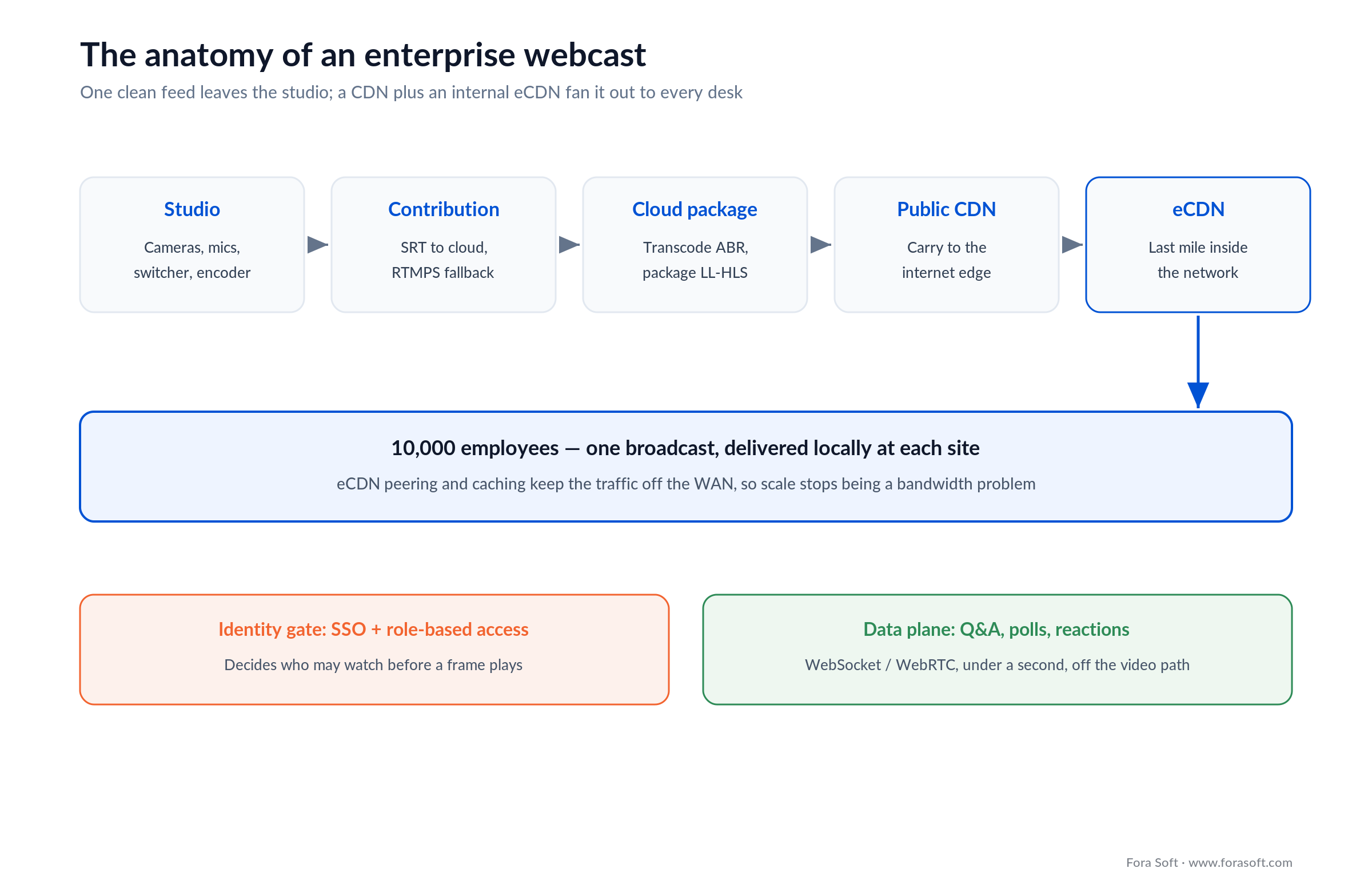
Figure 1. The anatomy of an enterprise webcast. One clean feed leaves the studio over SRT; the cloud packages it as LL-HLS; a public CDN and an internal eCDN together fan it out to every desk, while an SSO gate controls who gets in and a separate data plane carries Q&A and polls.
The real problem: 10,000 people press Play at once
The defining problem of enterprise webcasting is a concurrency spike: thousands of employees start the same stream in the same sixty seconds, and every one of them, by default, pulls a separate copy of the video down the same pipes. This is where a webcast is nothing like a meeting, and where the wrong platform gets exposed in public, in front of the whole company.
The arithmetic is unforgiving. Video from a Teams town hall or live event is delivered as adaptive bitrate streaming over a unicast connection—each viewer gets their own stream from the internet (Microsoft, 2026). Without help, budget about 2 Mbps per viewer per location, or 3 Mbps for 1080p, and keep a 3:1 bandwidth-to-bitrate ratio so the link doesn’t choke (Microsoft, 2026). Do that math for a single office of 2,000 people on 3 Mbps and you need 6 Gbps of clean, sustained downstream for one meeting—far more than most corporate internet links carry. The stream stutters, the VPN saturates, and the help desk lights up while the CFO is mid-sentence.
So the central design question of an enterprise webcasting platform isn’t “what features does it have.” It’s “how does it deliver one stream to ten thousand people without ten thousand streams crossing the network.” The answer is the enterprise CDN, and it’s the next section—because everything else is table stakes next to getting this right.
Reach for a real webcasting platform when: your live audience is in the thousands, they’re spread across offices and home networks, and a failed broadcast is a company-wide event, not a rescheduled call.
eCDN: how you stream to a whole company without melting the network
An enterprise content delivery network (eCDN) is the piece that makes internal video at scale possible: instead of every viewer pulling the stream across the WAN, the eCDN delivers it once to each site or segment and lets local machines share it. The savings are dramatic—Microsoft’s own eCDN reports cutting network load by up to 98%, and partner networks like Hive and Kollective claim 99% and roughly 1% of the original bandwidth respectively (vendor figures, 2026). There are three ways to do it, and real deployments mix all three.
Multicast. The network delivers one copy of the stream per segment, and every viewer on that segment reads the same packets. Ramp’s Multicast+ describes the ceiling well: you consume the bandwidth of a single viewer whether 100, 10,000 or 100,000 people watch (Ramp, 2026). It’s the most efficient approach by far—but it needs multicast-enabled switches and routers end to end, which rules out most WANs and every home worker.
Peer-to-peer (WebRTC mesh). Viewers relay video segments to nearby peers over WebRTC, so one machine per office pulls from the CDN and the rest pull from each other. Microsoft eCDN works exactly this way—a WebRTC mesh over the LAN, no install, with automatic site, VPN and NAT detection (Microsoft, 2026), built on the Peer5 technology Microsoft acquired. It’s software-only, so it works across sites and even for remote staff, which is why it’s become the default.
Caching proxy. A local cache or edge appliance at each site pulls the stream once and serves everyone behind it. Ramp’s OmniCache is this pattern; it shines at large sites with predictable topology, and it pairs well with the other two. The practical answer is a per-site profile: multicast where the LAN supports it, P2P for branch offices and remote workers, caching for big campuses. If you are choosing a vendor rather than a method, we put Microsoft eCDN, Hive, Kollective and Ramp side by side, with pricing models and the questions to ask before rollout.
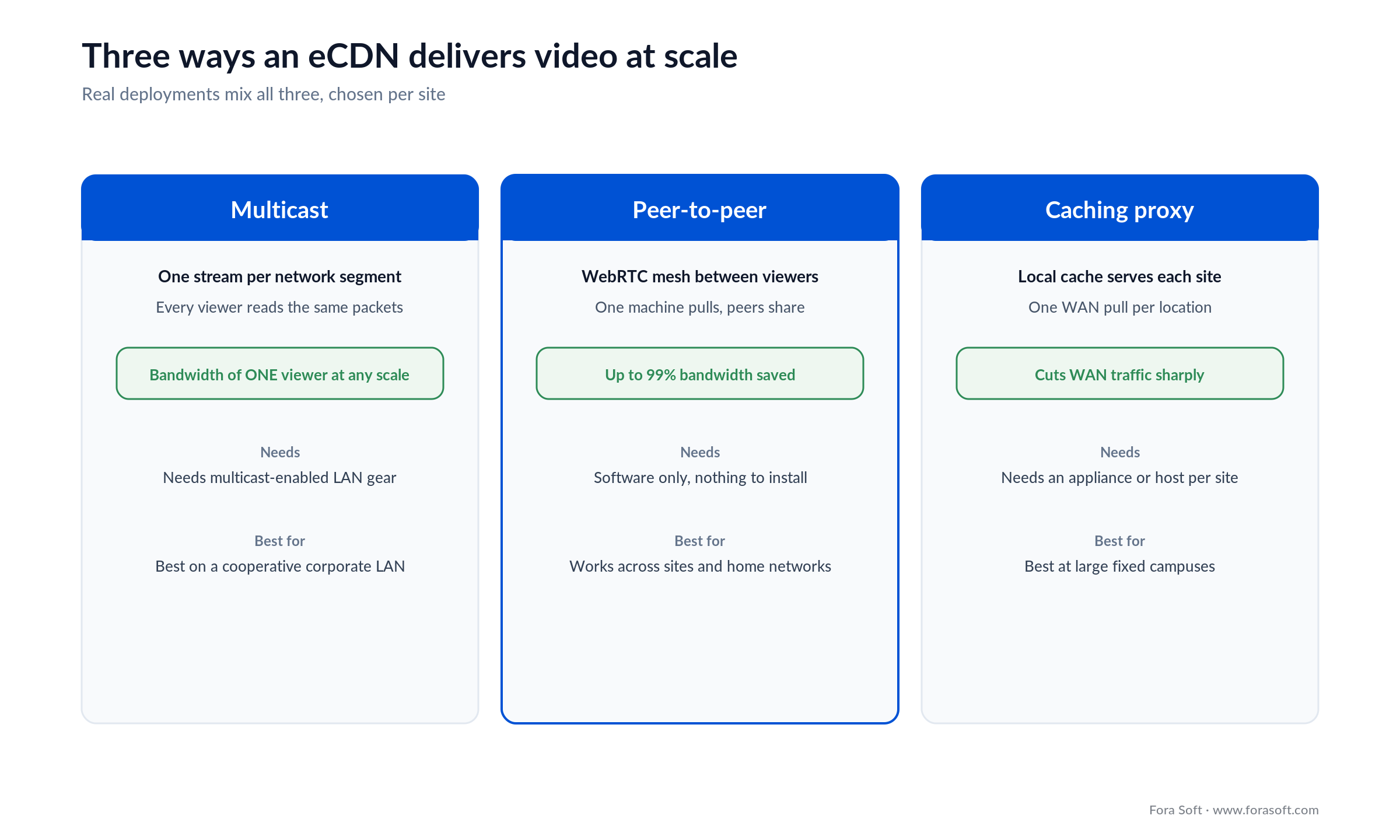
Figure 2. The three eCDN families. Multicast is the most efficient but needs a cooperative network; P2P mesh is software-only and works anywhere; caching suits large fixed sites. A real platform picks per site, not one for all.
Reach for peer-to-peer eCDN when: your audience spans branch offices and home networks you don’t control, and you can’t rely on multicast-enabled hardware everywhere. It’s the one approach that needs nothing but the viewers’ browsers.
Is your Teams or Zoom town hall already enough?
Often, yes—and a good consultant says so before quoting a build. Microsoft Teams town halls now scale to large internal audiences, ship with Microsoft eCDN included in Teams Enterprise, and support partner eCDNs (Hive, Kollective, Ramp) for tougher networks (Microsoft, 2026). Zoom Webinars and Events cover the same ground for Zoom shops. If your only requirement is “broadcast the all-hands reliably to staff who already live in Teams,” the native tool is the right call, and we’ll tell you that on the first call.
The native tools start to pinch on a predictable set of needs. You want the webcast embedded in your own portal or product, fully branded, not inside a Teams window. You need integrations the shelf product won’t do—your LMS, your SSO edge cases, your data warehouse for engagement analytics. You’re broadcasting to an external audience (customers, investors, a franchise network) where handing everyone a Teams link is awkward. Or compliance demands the video, the recordings and the viewer data stay in infrastructure you control. Any one of those pushes you toward a dedicated platform—bought or built.
Between “native Teams” and “custom build” sits a market of enterprise webcasting platforms—Kaltura, Vbrick Rev, Panopto, Brightcove, Notified’s GlobalMeet, ON24, Vimeo Enterprise. They add branding, portals, eCDN, analytics and security on top of the raw stream. The build-vs-buy section below is about when even those stop fitting, and our note on enterprise video collaboration platforms covers the many-to-many side that sits next to broadcast.
A reference architecture for an enterprise webcasting platform
Under every webcasting platform is the same left-to-right shape: capture, contribute, package, distribute, interact—with an identity gate wrapped around the whole thing. Knowing that shape up front tells you which layer each vendor is strong or weak in, and where a custom build actually adds value.
Start at the studio. Cameras and microphones feed a switcher (hardware, or software such as vMix or OBS) that cuts the program feed. An encoder wraps it and pushes one clean contribution feed to the cloud over SRT—sub-second and resilient to packet loss—with RTMPS as the legacy fallback. In the cloud, that feed is transcoded into an adaptive-bitrate ladder and packaged as Low-Latency HLS. A public CDN carries it to the internet edge; the eCDN carries it the last mile inside the corporate network. And an identity layer—SSO plus role-based access—decides who is allowed to watch before a single frame plays.
The detail that separates a working platform from a demo is that interaction runs on its own plane. Q&A, polls and reactions travel over a WebSocket or WebRTC data channel that reaches every viewer in under a second, independent of the 2–8-second video path. We come back to that split below, because it’s the single decision that makes a broadcast feel live. For the real-time layer in production terms, our WebRTC architecture guide goes deeper, and our video streaming course is the primer if this stack is new to your team. This capture-to-delivery work is the core of our video and audio streaming development.
Delivery protocols and latency for a webcast
Pick the protocol first, because it fixes your latency, your scale and most of your cost. For a webcast the default is Low-Latency HLS on a CDN, and the reason is simple: it scales to 100,000+ concurrent viewers cheaply while landing latency in the 2–8-second range, which is fine for a broadcast where nobody needs to interrupt the speaker mid-word.
The alternatives mark the boundaries. WebRTC delivers sub-second, near-500 ms latency, but a single SFU room tops out around 500 participants and gets expensive fast past that—so WebRTC belongs in the interactive breakout or the P2P eCDN transport, not the main broadcast. Plain HLS sits at 10–30 seconds and scales toward a million as a fallback. On the contribution side, SRT keeps the studio-to-cloud hop under a second or two. The trap is using one protocol for everything: try to run a 10,000-person broadcast on WebRTC and the cost and the SFU limits break you; try to run interactive Q&A on 20-second HLS and every answer lands after the moment has passed.
That’s why the honest answer is a split, which the next section builds out. If you want the full latency-versus-scale trade-off, our guide on minimizing latency for mass streams and our piece on scaling video to a million viewers cover the delivery engineering in depth.
Reach for Low-Latency HLS when: you’re broadcasting one source to thousands and a few seconds of delay is acceptable. Reserve WebRTC for the small interactive rooms and the peer-to-peer distribution layer, where sub-second latency actually earns its cost.
Q&A, polls and one engagement layer
A broadcast without interaction is corporate television, and people tune it out. The fix is a single engagement layer that runs on a fast data plane, independent of the video, so a question or a poll reaches everyone in under a second while the stream itself lags by several. This is the same dual-plane pattern that powers a live hybrid event, applied to a one-to-many webcast.
Moderated Q&A. A webcast to 10,000 people can’t open every microphone, so questions come in as text through a moderator queue—submit, upvote, approve, merge—and the host sees one ranked list instead of chaos. The upvote is the key: it surfaces what the room actually cares about, which for a town hall is often the question leadership would rather not take.
Live polls and pulse checks. One question bank, one live tally, results on screen in seconds. For an all-hands, a quick sentiment poll after a hard announcement tells leadership more than a follow-up survey ever will—and it tells them while they can still respond.
Reactions and presence. Lightweight reactions and a live viewer count give a speaker the feedback a broadcast normally strips away. None of this is exotic; it’s a WebSocket backend and a thin UI. But it has to be designed as one system with a single source of truth, or you end up with engagement data scattered across three tools and no way to report it. TradeCaster is proof the pattern scales: 46,000+ viewers with chat and data overlays running alongside the video, not behind it.
Worried your all-hands will buckle at scale?
We’ll pressure-test your delivery plan—eCDN, protocol split and data plane—against the numbers in this guide.
SSO, RBAC and confidential-broadcast security
Internal webcasts carry the most sensitive content a company produces—earnings before release, reorganizations, layoffs, legal briefings—so security is a first-class requirement, not a checkbox. The controls that matter are about who gets in and what happens to the recording, and they should be scoped before you pick a platform.
Identity and access. Single sign-on through your identity provider (SAML or OIDC) so only employees authenticate, plus role-based access control to restrict a broadcast to a region, a department or a named group. A leadership session for VPs shouldn’t be one forwarded link away from the whole company. Audience restriction is the difference between a controlled broadcast and a leak.
Protection and audit. Encryption in transit and at rest, watermarking for the truly sensitive sessions, an audit log of who watched what and when, and a retention policy that deletes recordings on schedule rather than leaving them forever. For regulated organizations, data residency—keeping EU viewers’ data in an EU region—and SOC 2 Type 2 are the expected bar. A build inside your own cloud is often the cleanest way to satisfy a strict security review, because the data never leaves infrastructure you control. Our note on video conferencing cost touches the compliance surface that drives a lot of the budget.
Captions, accessibility and compliance
Accessibility isn’t polish on an internal webcast; for many organizations it’s enforceable law, and it’s the right thing for the deaf employee watching the all-hands. Scope it in from the start, because retrofitting captions and keyboard access late is how a launch date slips.
Live captions on every session are the baseline—streaming automatic speech recognition into a captions track runs a few cents per minute and doubles as multi-language subtitles for a global workforce. Beyond captions, WCAG 2.2 AA is the standard to build the viewer UI to: keyboard navigation, 4.5:1 contrast, and screen-reader support for the player, the Q&A and the polls. WCAG 2.1 AA is already written into accessibility law across the EU, the UK, Canada and the US public sector, so for most enterprises this is a compliance line, not a nice-to-have. The same recording that satisfies accessibility—captioned, transcribed, searchable—also becomes the on-demand asset employees who missed the live broadcast actually watch.
Build vs buy a webcasting platform
Use what you own for the occasional all-hands; buy a platform when you run webcasts regularly and need branding, analytics and eCDN in one place; build when the webcast is embedded in your own product, the data has to be yours, or the integrations and experience push you off the shelf. The split is about frequency and control, not company size—a 500-person startup with a customer-facing broadcast product needs a build; a 40,000-person enterprise running four town halls a year on Teams does not.
The table is the four honest options, and the callout after it is the one-line rule.
Where a build does win, it usually looks less like a town hall and more like a product: our custom remote video production platform case study tracks a studio that left conferencing tools because the recorded master, not the live audience, was the deliverable.
| Option | Branding & embed | eCDN & scale | Data & control | Cost shape |
|---|---|---|---|---|
| Native (Teams, Zoom) | In-app only | Built-in eCDN | Vendor holds it | Included in licence |
| Enterprise SaaS (Kaltura, Vbrick) | Portal + branding | Native eCDN | Rented, exportable | Quote, annual |
| Streaming APIs + integrator | Full, you wire it | You choose eCDN | Mostly yours | Usage + build |
| Custom build | Full, in your product | Designed to target | Full, you own IP | Build + ops |
Four honest paths. Most companies start at the top and only move down when a real requirement—branding, data, integration—forces it.
Reach for a custom build when: the webcast lives inside your own product or portal, you need to own the viewer data and recordings, or the integrations and security review rule out every shelf product.
What webcasting software costs
Most enterprise webcasting platforms quote per event or per year rather than publishing a rate card, and the number scales with peak audience, event count and add-ons like captions and managed production. When we checked the aggregator listings for Notified’s GlobalMeet Webcast on 16 July 2026, managed events were listed around $4,000–$10,000 per event and annual licences around $30,000–$90,000 depending on the attendee tier (1,000 / 5,000 / 50,000) and feature set (TrustRadius, Capterra listings, 2026). Treat any single figure as an estimate, not an official price—the honest move is to collect quotes and set them against your own delivery math.
The shape is predictable even when the number is hidden. A SaaS platform bundles the portal, eCDN, analytics, security and support into one contract that lands in the five-to-six-figure range annually for a serious internal-comms programme. That price buys speed and a support line for the day the CEO’s stream drops; it doesn’t buy deep control of the experience or ownership of your data.
A custom build inverts the curve: more up front, little per event after. With our Agent-Engineering workflow, a focused first version—LL-HLS broadcast, an eCDN integration, an SSO-gated branded viewer and a moderated Q&A layer—runs well below the six-figure-and-up range quoted across the market for full enterprise video platforms, and the per-event cost afterwards is mostly delivery and ops. On a company that webcasts weekly, that break-even arrives fast. We keep those estimates conservative on purpose; the next section shows the one number you can compute yourself.
Cost math: broadcasting to 10,000 employees
Broadcasting to 10,000 concurrent employees at 3 Mbps is 30 Gbps of video—the number that decides whether you need an eCDN or just a credit card. Here’s the arithmetic, out loud, because it’s the part vendors bury.
Ten thousand viewers on a 3 Mbps stream is 10,000 × 3 Mbps = 30 Gbps of aggregate demand. If every one of them pulls that stream across your WAN and internet links—the unicast default—you need 30 Gbps of clean, sustained bandwidth for the duration, which no normal corporate network has. That’s the wall. Now apply an eCDN: at Microsoft’s reported 98% offload, local peering and caching carry the bulk, and only about 2% — roughly 0.6 Gbps — actually crosses the expensive links (Microsoft figure, 2026). The same broadcast goes from impossible to comfortable on the network you already own.
For any external or remote viewers who fall back to the public CDN, the egress is easy to price. A six-hour broadcast day for 10,000 external viewers at 3 Mbps is 10,000 × 3 Mbps × 3,600 s ÷ 8 = 13,500 GB per hour, or about 81,000 GB across six hours. At AWS CloudFront’s first-tier US rate of $0.085/GB (verified 26 June 2026), that’s roughly $6,900 — and it steps down above 10 TB, so at real volume the marginal cost drops. The lesson: eCDN is what makes the internal audience nearly free, and CDN egress is what you pay for the slice that lives outside the firewall.
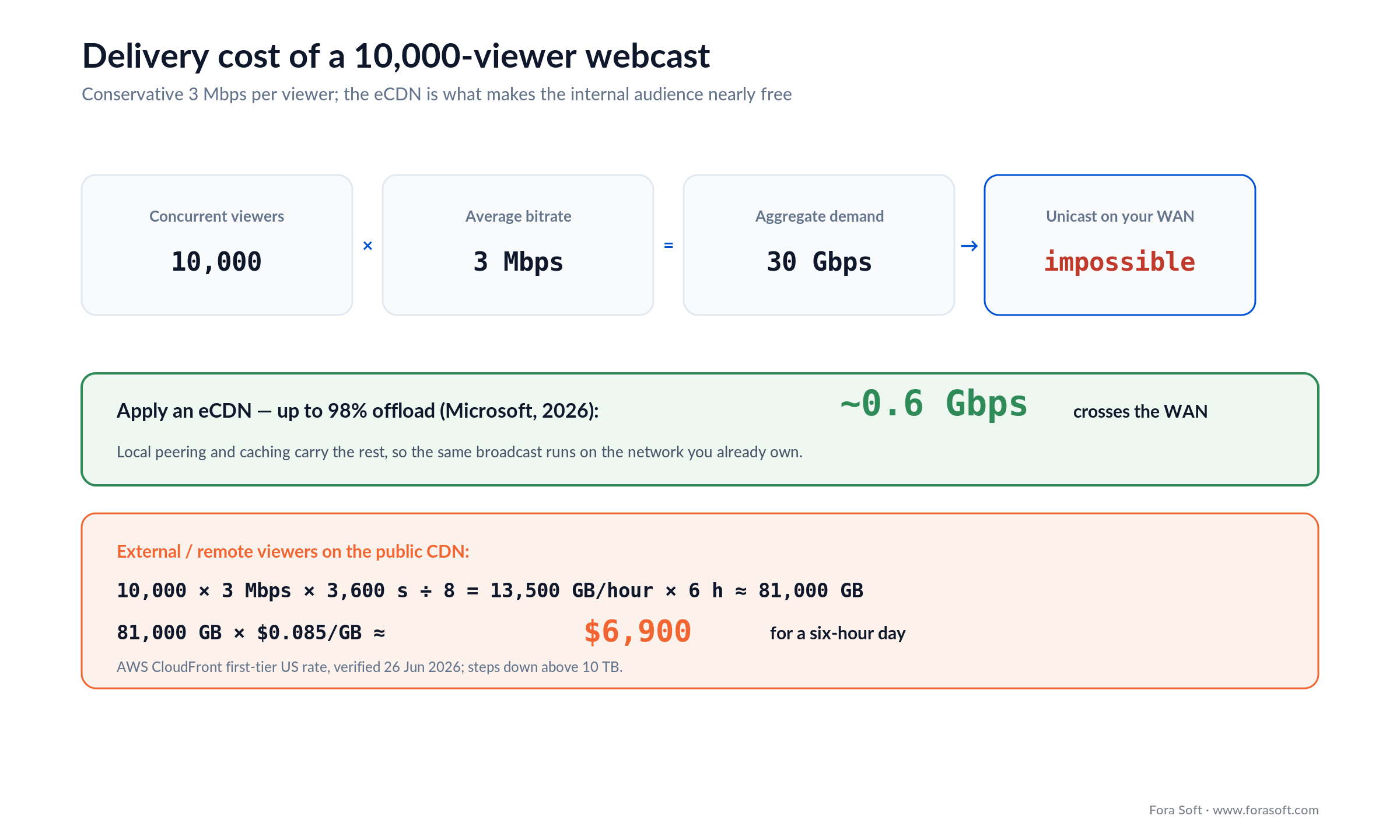
Figure 3. The delivery cost, from first principles. Without an eCDN, 10,000 viewers is 30 Gbps of internal traffic; with one, roughly 98% is offloaded to local peering, and only external viewers hit the metered CDN.
Mini case: BrainCert broadcasts at scale, 99.995% uptime
Situation. BrainCert needed a virtual-classroom and training platform that could run interactive sessions and large broadcasts on the same stack, for a global customer base, without the reliability wobble that kills trust in live video. That’s the webcasting problem in a different suit: one source, a large audience, live interaction, and a hard requirement that it simply does not go down while thousands watch.
Plan. We built BrainCert on the exact dual-plane pattern an enterprise webcast needs: a MediaSoup SFU for the interactive rooms where people talk, and a Low-Latency HLS plane for the plenary broadcast to the large audience, with the two kept independent so scale on one never starves the other. Security and compliance were designed in from day one—SOC 2, ISO 27001, HIPAA and GDPR—the same bar an internal corporate broadcast has to clear.
Outcome. The platform has carried 500M+ classroom minutes at 99.995% uptime for 100k+ customers. The number that matters for a town hall isn’t the minutes—it’s the uptime: a broadcast platform is judged on the one day it can’t fail, and this one earns that trust at scale. The same engine—an SFU plane for interaction, an LL-HLS plane for broadcast, compliance baked in—is what powers a webcast to 10,000 staff. Want the same assessment for your all-hands? Book 30 minutes with Vadim.
Need a broadcast platform that can’t fail on the day?
Bring your audience size and compliance regime; we’ll scope an architecture that scales like BrainCert.
A decision framework in five questions
Five questions collapse the whole decision. Answer them in order and the platform, protocol and build-vs-buy call fall out.
1. How often do you webcast? A few times a year → use native Teams or Zoom. Monthly or weekly, or it’s a product → a dedicated platform or a build starts paying back.
2. How big is the concurrent audience, and where is it? Under a thousand in one office → almost anything works. Tens of thousands across sites and homes → you need a serious eCDN strategy, and that constrains the platform.
3. Does the webcast need your branding or your product? Inside a Teams window is fine → native. Embedded in your portal or app, fully branded → SaaS with a portal, or a build.
4. Do you need to own the data and recordings? No → rent. Yes, because of analytics, integrations or IP → build, so the viewer data and the video are yours.
5. How strict is compliance? Standard corporate → enterprise SaaS. Data residency, audit, regulated content → a build inside your own cloud is the safer answer.
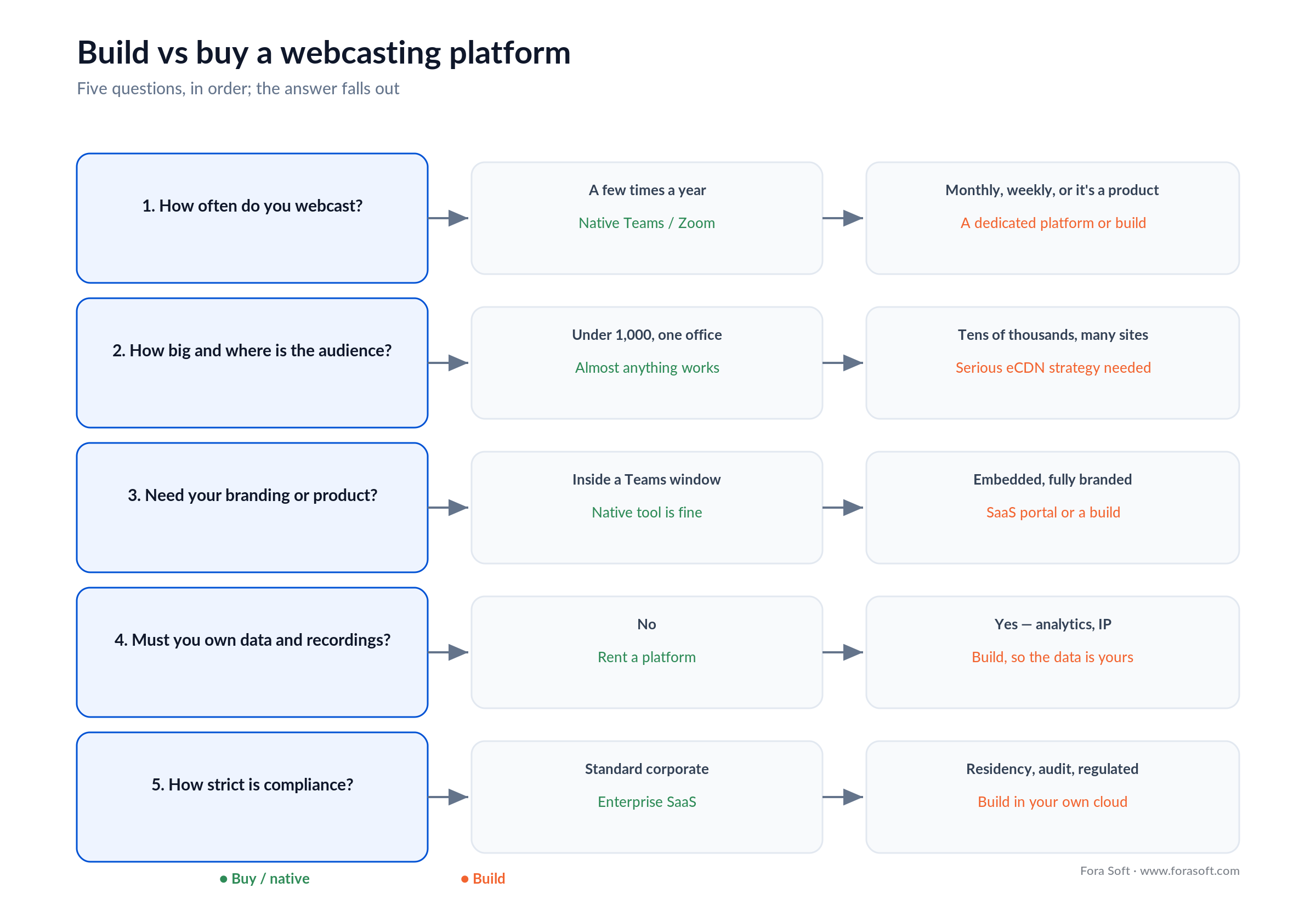
Figure 4. The build-vs-buy decision tree. Frequency and control decide it; audience size and compliance shape the build.
Pitfalls to avoid
1. Skipping the eCDN and hoping. A stream that tested fine with the IT team of five falls over when 8,000 people join at once. Plan the eCDN before the first company-wide broadcast, not after the first failure.
2. Running interaction on the video plane. If Q&A and polls ride the 2–8-second broadcast feed, answers land after the moment. Split the planes from day one.
3. Treating security as a setting. A confidential broadcast one forwarded link away from the whole company is a leak waiting to happen. SSO and audience restriction are architecture, not a toggle.
4. Never rehearsing at scale. The only test that counts is a silent, full-scale dry run on the real network—Microsoft’s eCDN even ships a silent-testing tool for exactly this. Rehearse with the load, not with five laptops.
5. Forgetting the on-demand life of the recording. Most employees watch the town hall later, not live. If the recording isn’t captioned, searchable and easy to find, you built half a platform.
KPIs: what to measure
Quality KPIs. Rebuffering ratio (target under 0.5%), stream start time under 2.5 s, LL-HLS latency p95 under 8 s, and—the one unique to enterprise—the eCDN offload ratio: what share of traffic stayed local versus crossing the WAN. If offload is low, your network is one big broadcast away from trouble.
Engagement KPIs. Live concurrent peak, average watch time, questions submitted and upvoted, poll participation, and live-versus-on-demand split. For an all-hands, a low question rate isn’t quiet approval—it’s usually a sign people have stopped expecting answers.
Reliability KPIs. Uptime through the whole broadcast, failover time on the contribution path (target under two minutes, verified in rehearsal), and help-desk tickets per event. A webcasting platform is measured on the day it can’t afford to fail, so measure it there.
When not to build a custom webcasting platform
Don’t build when your native tools already do the job—and for a lot of companies, they do. If you run four town halls a year, everyone lives in Microsoft Teams, and Microsoft eCDN handles the network, a custom platform is money spent on a problem you don’t have. We’ll say that plainly on the first call rather than sell you a build you’ll regret.
The line moves when a real requirement appears: a customer-facing broadcast product, a strict data-residency review, an integration the shelf products won’t do, or a branded viewer experience that a Teams window can’t deliver. Until then, buy the cheapest thing that broadcasts reliably and put the budget into content. And if your event actually mixes a physical room with a remote audience, that’s a different build—our hybrid event platform guide is the right starting point, and our virtual events playbook covers the fully-online case.
FAQ
What is webcasting software?
Webcasting software broadcasts one live video source to a large, mostly passive audience over the internet—one presenter to thousands of viewers. In an enterprise, it powers town halls, all-hands meetings and leadership briefings delivered across the corporate network. It differs from a meeting (many-to-many, small) and a webinar (smaller, interactive) by its one-to-many broadcast shape and its need to scale distribution.
What is an eCDN and do I need one?
An enterprise content delivery network (eCDN) delivers a stream once to each site or segment and lets local machines share it, instead of every viewer pulling a separate copy across the WAN. You need one whenever a large internal audience watches at the same time—it cuts network load by up to 98% (Microsoft, 2026) using multicast, peer-to-peer or caching. Below a thousand concurrent viewers you can often skip it; above that, it’s essential.
How much does webcasting software cost?
Enterprise platforms quote per event or per year. Aggregator listings for Notified’s GlobalMeet Webcast on 16 July 2026 showed managed events around $4,000–$10,000 and annual licences around $30,000–$90,000 by attendee tier. Delivery cost you can compute yourself: an eCDN makes the internal audience nearly free, and public CDN egress for 10,000 external viewers over six hours is roughly $6,900 at CloudFront’s first-tier rate. A custom build costs more up front but little per event after.
Is Microsoft Teams enough for a company town hall?
Often, yes. Teams town halls scale to large internal audiences and include Microsoft eCDN with Teams Enterprise, with partner eCDNs available for tougher networks. Look past it when you need your own branding and portal, integrations the shelf product won’t do, an external audience, or data and recordings held in infrastructure you control. Any one of those points toward a dedicated platform, bought or built.
What’s the difference between webcasting and a webinar?
A webinar is a smaller, interactive session—often sales or training—where the audience is expected to participate and the numbers stay in the hundreds. A webcast is a broadcast: one source to a large, mostly passive audience, often thousands or tens of thousands, with interaction limited to moderated Q&A and polls. The distinction matters technically, because a webcast’s scale forces an eCDN and a broadcast protocol a webinar tool never needs.
Which protocol should an enterprise webcast use?
Low-Latency HLS (2–8 s) for the main broadcast, because it scales cheaply on a CDN to 100,000+ viewers. Reserve WebRTC (under 1 s) for interactive breakout rooms and for the peer-to-peer eCDN transport. Contribution from the studio rides SRT. No single protocol handles both broadcast scale and real conversation, so a real platform runs a split.
How do you keep an internal webcast secure?
Authenticate viewers through your identity provider with SSO (SAML or OIDC), restrict each broadcast to the right audience with role-based access control, encrypt in transit and at rest, and keep an audit log of who watched. For sensitive sessions add watermarking and a retention policy; for regulated organizations, data residency and SOC 2 Type 2 are the expected bar. A build inside your own cloud is often the cleanest way to pass a strict security review.
How long does it take to build a custom webcasting platform?
A focused first version—LL-HLS broadcast, an eCDN integration, an SSO-gated branded viewer and a moderated Q&A layer—is a matter of a few months with our Agent-Engineering workflow, faster than typical market timelines. Regulated verticals with data-residency and audit requirements take longer. The honest scope depends on audience size and compliance, which is what a scoping call settles.
What to read next
Hybrid events
Hybrid Event Platform Development
When the audience is split between a physical room and remote viewers.
Scale
Scaling Video Streaming to 1M Viewers
Multi-CDN, failover and the math behind very large audiences.
Collaboration
Enterprise Video Collaboration Platform
The many-to-many side that sits next to one-to-many broadcast.
Cost
What a Video Conferencing App Costs
Line-item budgeting for the interactive side of enterprise video.
Ready to broadcast to the whole company?
Enterprise webcasting comes down to a few decisions made early. Understand that it’s one-to-many, so distribution is the hard part. Plan the eCDN before the first company-wide broadcast, because 10,000 unicast streams is 30 Gbps your network doesn’t have. Split the video plane from the interaction plane so Q&A lands on time. Gate the whole thing behind SSO and role-based access, because the content is your most sensitive. And buy what you own when it’s enough—build only when branding, data or integrations force it.
Get those right and a town hall to ten thousand people feels as steady as a call to ten—which is the whole point. That’s the architecture we ship, from a 46,000-viewer live community to a classroom platform at 99.995% uptime, and it’s the same backbone behind our video conferencing work. When you’re ready to scope one, we’re one call away.

The handbook · 7 volumes
Fora Soft Video Engineering Handbook
A town hall for 10,000 staff is a delivery problem dressed as an events product. We wrote a seven-volume handbook on the full video stack: encoding, delivery, audio and AI. Start with Volume 3 on CDN, ABR and players, then Volume 2 on HLS and the latency budget, and Volume 4 on loudness, captions and accessibility. Written by Nikolay Sapunov, CEO at Fora Soft.
Browse the handbook on Amazon →7 volumes · 9,000+ pages · Kindle & paperback
Let’s scope your webcasting platform
30 minutes with Vadim. Bring your audience size, network and compliance regime; leave with a concrete build-vs-buy recommendation.

