

Key takeaways
• AI mobile app development is a revenue lever, not a feature badge. Consumers spent $5B+ inside gen-AI apps in 2025 (+273% year-on-year) and 48 billion hours using them. But AI pays off only when the model is tied to a measurable KPI from day one.
• Most apps should go hybrid, not cloud-only. Run on-device models (Core ML, LiteRT, MediaPipe, Gemini Nano, Apple Foundation Models on iOS 26) for latency-critical and privacy-sensitive tasks; call a cloud LLM only when reasoning depth justifies the extra 1–3 s and the per-token cost.
• Budget realistically. A first AI feature lands at roughly $30K–$80K with Agent Engineering, a full hybrid production build at $150K–$300K, and monthly inference runs from $0 on-device to tens of thousands once a cloud LLM sits in the hot path at scale.
• Five pitfalls kill most projects. Data-privacy gaps, biased models, p95 latency above three seconds, battery drain on older devices, and vendor lock-in to a single LLM provider. Each one is avoidable with the pre-launch checklist below.
• Do not add AI everywhere. With no baseline to A/B against, no labelled data, or a strict offline sub-100 ms requirement a model can’t meet on device, defer the feature and ship the non-AI version first.
This guide explains AI mobile app development the way a production engineering team actually does it in 2026 — with real numbers, a specific decision framework, and the trade-offs that matter. It is written for product leaders, CTOs, and founders weighing whether to add AI to an iOS, Android, or cross-platform app, how much it will cost, and which architecture pattern to pick. Every section answers a question you would otherwise spend a week researching.
The short version: AI in a mobile app is no longer optional. Consumers spent more than $5 billion inside generative-AI apps in 2025 (a 273% jump year-on-year) and logged 48 billion hours using them, roughly 3.6× the 2024 total. Downloads doubled to 3.8 billion, and analysts expect gen-AI app spending to clear $10 billion in 2026. The question is no longer whether to add AI. It is what, where, and how much.
Why Fora Soft wrote this playbook
Fora Soft is a software development company that has built AI-enabled mobile and cross-platform products since 2005: 20+ years, 250+ projects, and 50 in-house engineers. This playbook is written by the engineering team that shipped them, not a content desk. We built the first WebRTC HTML5 virtual classroom for BrainCert, an AI video-interpretation network of 700+ certified interpreters in 169 languages for Video Interpretations, an AI HDR image pipeline that turns three raw photos into a corrected neural-network render for LAYRS, and an AI video-surveillance platform with real-time anomaly detection for MindBox. AI features ride on top of that product work through our AI integration service.
We work in Agent Engineering mode: our senior engineers ship alongside AI coding agents that handle boilerplate, generate tests, and accelerate refactors. Across our own delivery data that pulls timelines and cost bands roughly 15–30% below typical agency quotes — a first on-device AI feature ships in 4–8 weeks and a hybrid MVP in 8–14, not the longer timelines you will see elsewhere. We also refuse to pad estimates, so the dollar figures below are conservative and defensible.
Scoping AI features for your mobile app?
Book a 30-minute call and we’ll map your use case to an on-device, cloud, or hybrid plan with a dollar-accurate estimate — no sales pitch.
The 2026 state of AI in mobile apps — numbers that matter
Before you pick a framework, anchor the conversation in what actually shipped. These five numbers set the baseline for every AI feature decision you’ll make in 2026.
| Signal | 2025–26 number | What it means for you |
|---|---|---|
| Gen-AI app consumer spend | $5B+, +273% YoY (2025) | A standalone AI app is now a viable SKU, not a feature. |
| Time in gen-AI apps | 48B hours (3.6× 2024) | User habit has formed — assistants compete with your app for session time. |
| Gen-AI app downloads | 3.8B, doubled YoY | Distribution is proven; the category jumped from #10 to a top-tier download rank. |
| 2026 spend projection | > $10B expected | The window to ship a differentiated AI feature is now, not next year. |
| Gartner forecast | Mobile app usage −25% by 2027 | Apps without AI will leak sessions to Apple Intelligence, Gemini, and Copilot. |
Read the Gartner line carefully. Apps that fail to adopt AI won’t just stagnate — they’ll lose a quarter of their sessions to system assistants by 2027. Embedding AI is a defensive move as much as an offensive one. (Market figures: Sensor Tower 2026 State of Mobile; usage forecast: Gartner, January 2025.)
The five categories of AI features that actually move the needle
Roughly 90% of successful AI mobile features fall into one of five buckets. Pick a bucket before you pick a framework.
Personalization and recommendations
Netflix has repeatedly credited its recommendation system with driving about 80% of watched content. Duolingo’s adaptive-learning model and Starbucks’ Deep Brew personalisation engine are cited by both companies as material drivers of retention and per-user spend. Recommendation engines remain the highest-ROI AI feature you can ship in 2026, and they map cleanly to the recommendation patterns we use in streaming apps.
Reach for personalization when: you already have behavioural data on ≥ 10,000 monthly users and at least one measurable conversion event (purchase, lesson completion, subscription renewal).
Conversational AI and LLM agents
Chatbots built on a frontier LLM — GPT-5, Claude, or Gemini — replace form-driven flows with natural dialogue, cut support volume, and can run as real-time participants in calls (see our guide to video AI agents). The trap is cost: a chatbot at 1M DAU can burn hundreds of thousands of dollars a month in tokens unless you cache prompts and route easy queries to cheaper tiers.
Reach for an LLM agent when: the task involves free-form text, multi-step reasoning, or summarisation — and you can tolerate 1–3 s p95 latency and a fraction of a cent per interaction.
Computer vision
Object detection, OCR, barcode scanning, face landmarking, pose estimation, segmentation, and AR overlays. Google Lens, Apple Visual Look Up, TikTok effects, and Snap filters all run variants of these models. Modern mobile NPUs (Apple Neural Engine, Qualcomm Hexagon) process a 640×640 frame in under ~20 ms, so real-time camera features are effectively free latency-wise when you use MediaPipe or Core ML.
Reach for on-device computer vision when: the feature is camera-driven, privacy-sensitive, or expected to run offline — for anything else, cloud APIs like AWS Rekognition are faster to ship but cost roughly $0.001–$0.012 per image.
Voice, audio and emotion
Real-time speech-to-text (Whisper, Apple SpeechAnalyzer, Android SpeechRecognizer), text-to-speech, keyword spotting, and real-time emotion recognition. Whisper runs on-device near real time on an iPhone 14 Pro or better; voice-emotion classification runs in well under 100 ms on any 2023+ flagship. The same audio-AI groundwork shows up across our AI-for-video engineering curriculum. Pair it with a video-conferencing app and you can auto-summarise calls, flag customer frustration, or translate 30+ languages without a server round-trip.
Reach for voice AI when: hands are busy, accessibility matters, or the user’s input is long-form and typing is the friction point.
Predictive analytics and fraud detection
Churn prediction, purchase propensity, session-completion forecasting, dynamic pricing, fraud scoring, and anomaly detection. American Express and Mastercard both run real-time transaction scoring at enormous scale — Mastercard applies its Decision Intelligence models to well over 100 billion transactions a year. These models are usually small, cheap to train, and run server-side with the mobile app surfacing the verdict.
Reach for predictive analytics when: you have ≥ 50,000 historical events labelled with the target outcome and the decision the model informs has a clear financial consequence.
On-device, cloud, or hybrid? A decision you should not delegate
The short answer for most teams: go hybrid. This is the single most consequential architectural choice in an AI mobile app — pick wrong and you’ll either blow your cloud budget, ship a feature that drains batteries, or rebuild the stack in year two. The chart below shows why hybrid wins.
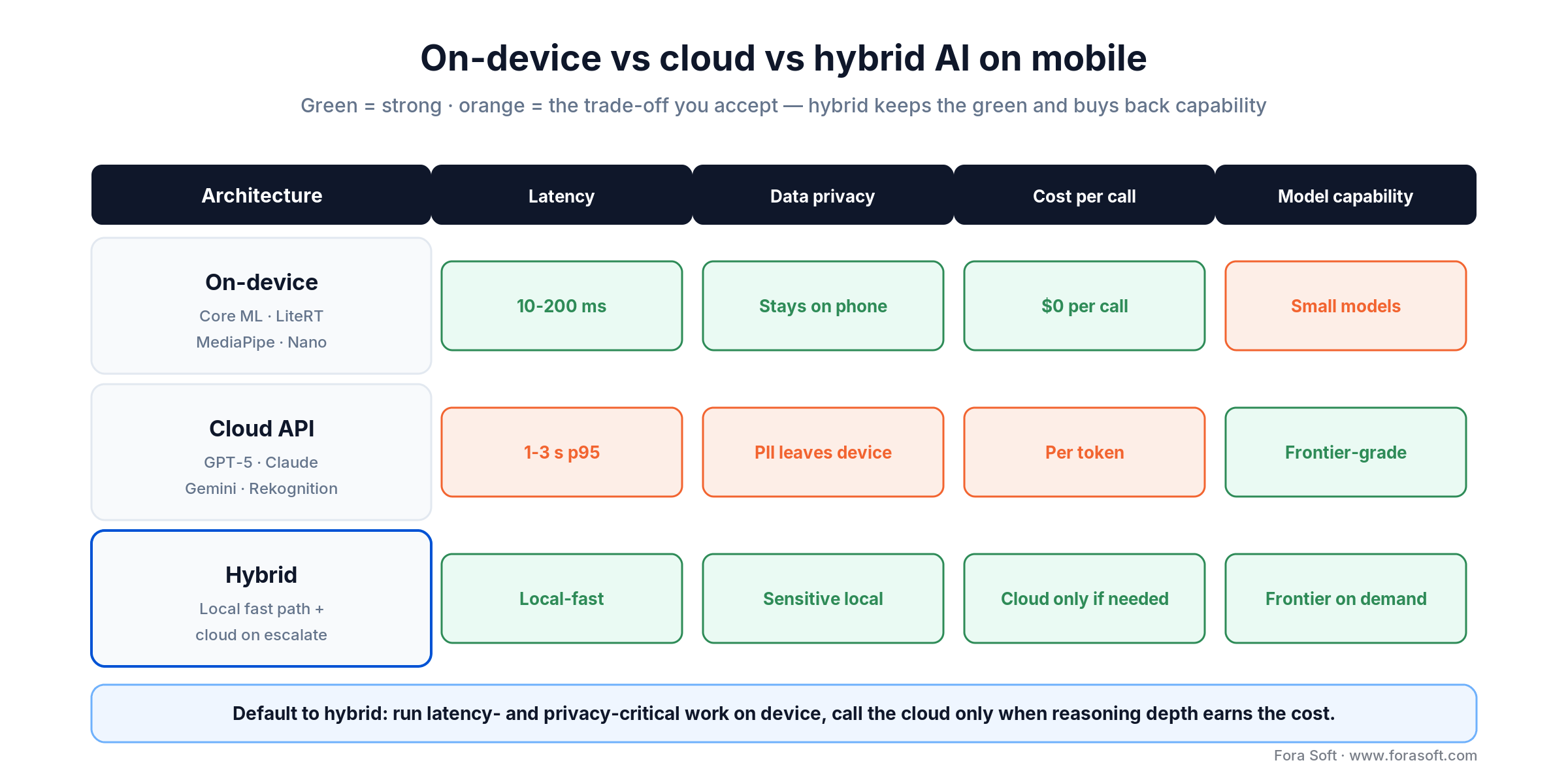
Figure 1. On-device is fast, private and free but capped on capability; cloud is frontier-grade but slow, costly and leaks PII. Hybrid keeps the green and buys back capability.
On-device AI
The model ships inside the app bundle (or downloads on first run) and runs locally on the device’s NPU. Inference is 10–200 ms, private by construction, offline-capable, and free per inference. The ceiling is model size and capability: under 50 MB for most apps, up to a few gigabytes for on-device foundation models like Apple Foundation Models (the 3-billion-parameter on-device model exposed to apps in iOS 26) or Gemini Nano (Pixel 8 Pro and later, Samsung Galaxy S24 and later).
Cloud AI (API-based)
You call OpenAI, Anthropic, Google, AWS, or Azure from your backend and relay the result to the app. You get state-of-the-art capability and instant model upgrades, but you pay per token or per request, you add 1–3 s of p95 latency, and you leak PII to a third party unless you encrypt and contract carefully. Ballpark: a mid-size LLM feature at 100K DAU with five calls per user per day runs into the tens of thousands of dollars a month on current GPT-5 pricing (worked out below).
Hybrid — the right default for 2026
Most production apps should be hybrid: on-device for low-latency, privacy-sensitive, and offline scenarios; cloud for heavy reasoning and knowledge retrieval. A banking app flags suspicious transactions on device in under 50 ms, then escalates to a cloud fraud model for full investigation. An e-commerce app recognises a product from a photo on device, then queries a cloud recommender to rank related items.
Framework and API comparison matrix
Twelve serious options, one page of trade-offs. This is the cheat-sheet we use inside Fora Soft when scoping a new AI mobile feature. Prices are current as of July 2026; frontier tiers move fast, so treat the cloud rows as a snapshot and check the vendor’s pricing page before you commit.
| Framework / API | Platform | Best for | Typical latency | Cost shape |
|---|---|---|---|---|
| Core ML | iOS, macOS, watchOS | On-device vision & NLP on the Apple Neural Engine | < 100 ms | One-time, in-app |
| Apple Foundation Models | iOS 26+, macOS 26+ | On-device LLM: summarisation, extraction, writing tools | < 500 ms | Free (OS-bundled) |
| LiteRT (ex-TensorFlow Lite) | Android, iOS, Web | Cross-platform on-device ML | < 200 ms | One-time, in-app |
| MediaPipe | Android, iOS, Web | Pose, hand, face, gesture, segmentation | < 100 ms | One-time, in-app |
| ML Kit (Google) | Android, iOS | Text recognition, barcode, translation, face detection | 50 ms–2 s | Free tier + per-request |
| Gemini Nano (AICore) | Android (Pixel 8 Pro+, Galaxy S24+) | On-device LLM: summarisation, reply suggestions | < 1 s | Free (OS-bundled) |
| ONNX Runtime Mobile | Android, iOS, Web | Portable models across frameworks | < 300 ms | One-time, in-app |
| OpenAI API (GPT-5 family) | Cloud | State-of-the-art reasoning, coding, vision | 1–3 s | ~$1.25–$10 / 1M tokens (GPT-5) |
| Anthropic Claude API | Cloud | Long-context reasoning, analysis, code | 1–3 s | ~$1–$25 / 1M tokens (−50% batch) |
| Google Gemini API | Cloud | Multimodal; cost-efficient text & vision | 1–2 s | $0.10–$12 / 1M tokens (Flash-Lite–Pro) |
| AWS Rekognition | Cloud | Image / video analysis, moderation | 500 ms–2 s | $0.001–$0.012 / image |
| Azure AI services | Cloud | Enterprise vision, speech, language | 500 ms–2 s | Per-request + subscription |
Rule of thumb: start with the most opinionated framework that fits your platform (Core ML on iOS, ML Kit on Android) and only step down to LiteRT or ONNX when you need a model you can’t get elsewhere. Step up to a cloud API only when the task genuinely requires frontier reasoning.
A reference architecture for a hybrid AI mobile app
Every AI mobile app we ship follows the same five-layer pattern. The layers are technology-agnostic — you can swap Swift for Kotlin, Core ML for LiteRT, or GPT-5 for Claude without changing the shape.
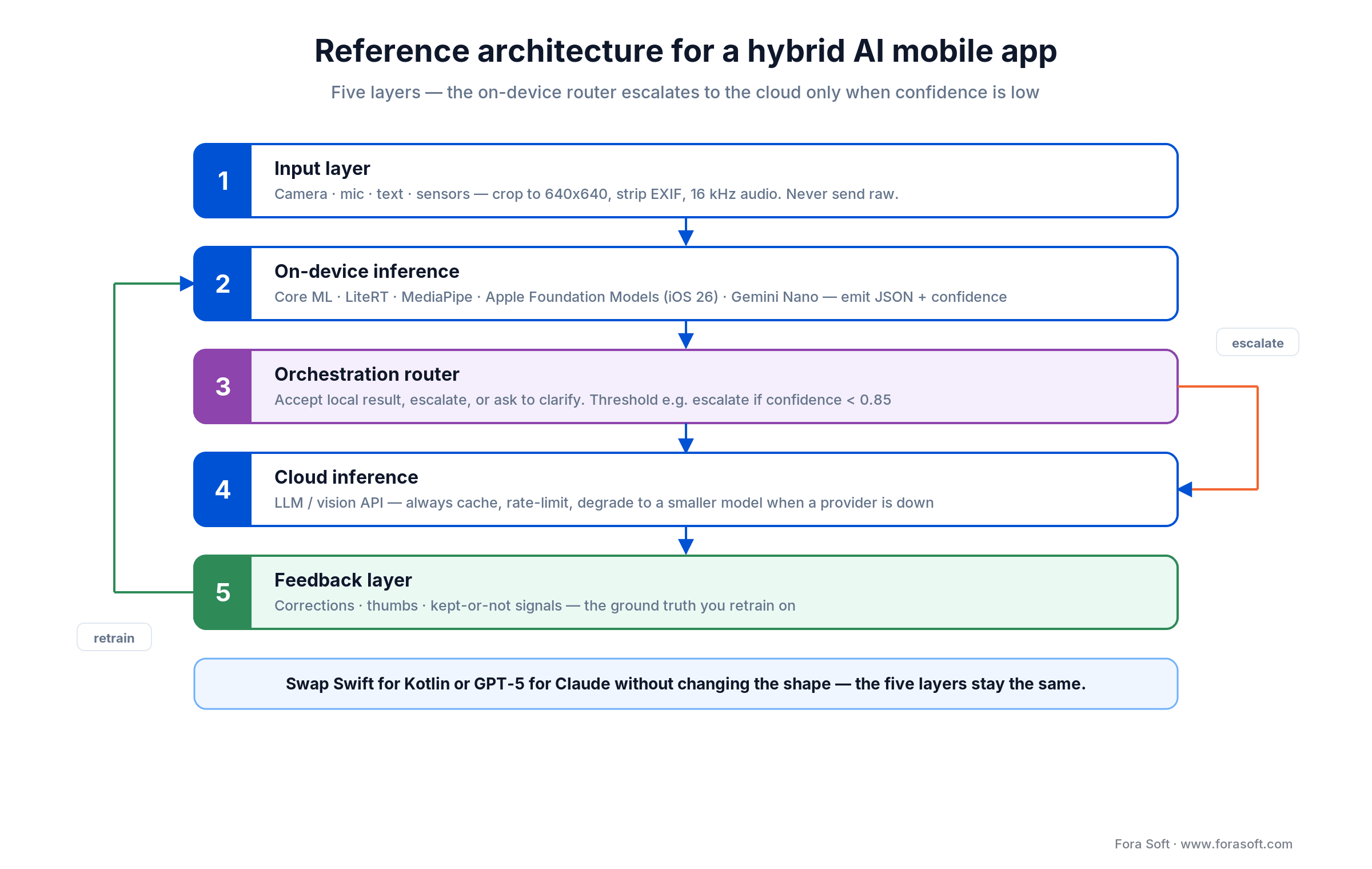
Figure 2. The on-device router escalates to the cloud only when confidence is low; the feedback layer feeds corrections back into retraining.
1. Input layer. Camera, microphone, text field, sensors. Do local preprocessing here — crop to 640×640, strip EXIF, downsample audio to 16 kHz. Never send raw data to the cloud.
2. On-device inference layer. Core ML, LiteRT, MediaPipe, Apple Foundation Models, Gemini Nano. Handle everything latency- or privacy-critical. Emit a structured result (JSON) and a confidence score.
3. Orchestration layer. A thin on-device router decides: accept the local result, escalate to the cloud, or ask the user to clarify. Use confidence thresholds (for example, escalate if the score < 0.85).
4. Cloud inference layer. Your backend calls the LLM or vision API. Always cache. Always rate-limit. Always degrade gracefully when a provider is down — keep a fallback to a smaller, cheaper model.
5. Feedback layer. Log user corrections, thumbs up/down, explicit ratings, and implicit signals (did they keep the suggested output?). This is the ground truth you retrain on.
Need a second opinion on on-device vs cloud?
Send us your use case — we’ll reply within a business day with a framework recommendation, a latency budget, and a three-line architecture diagram.
Cost model — what an AI mobile app actually costs in 2026
Budgets are where most AI mobile projects come unstuck. There are two line items: the build, and the monthly inference bill. Treat them separately.
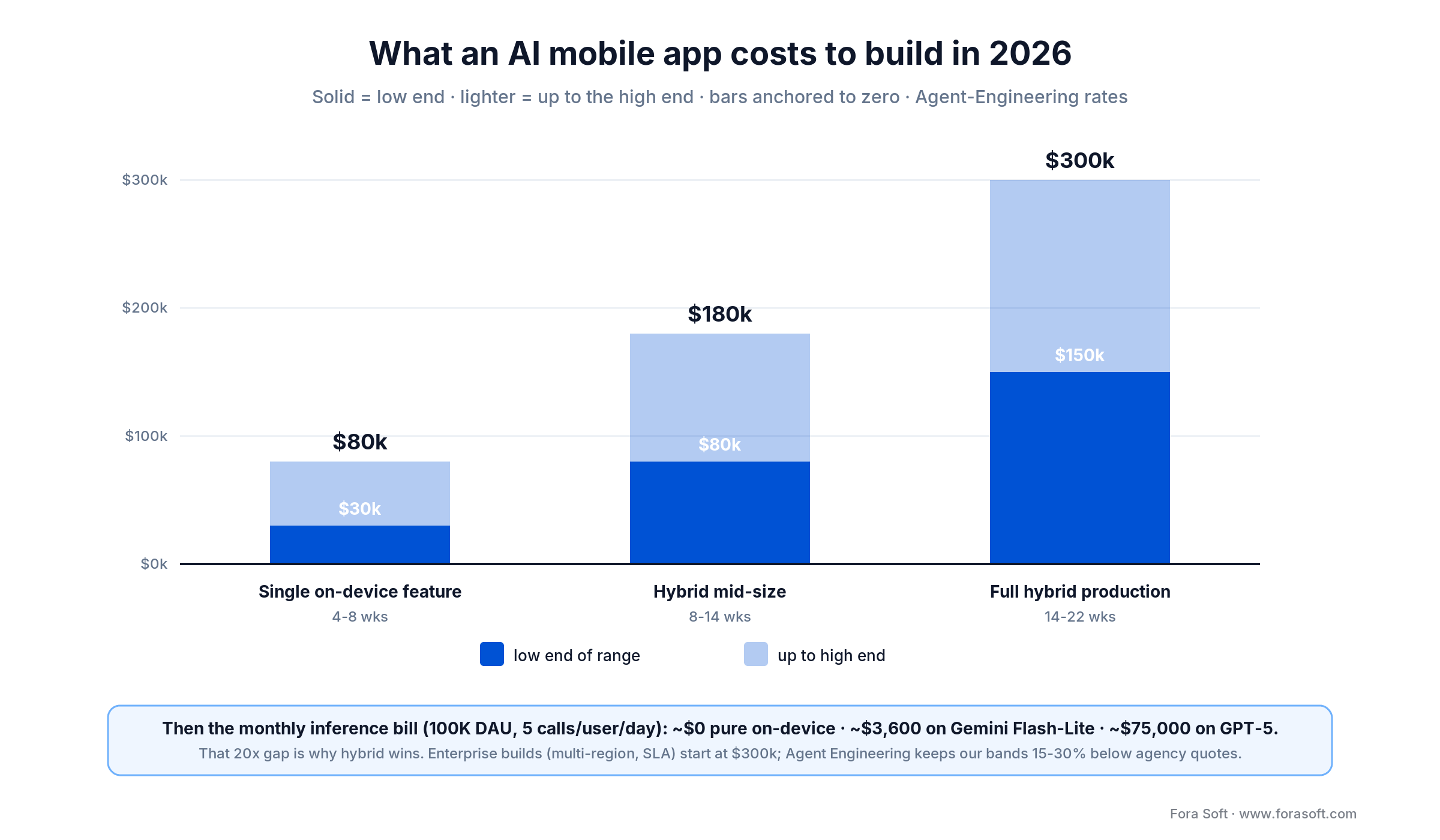
Figure 3. Build cost by scope, at Agent-Engineering rates. Bars are anchored to zero; the note strip shows the separate monthly inference bill.
One-off build cost (our Agent-Engineering rates)
| Scope | Example feature | Timeline | Ballpark cost |
|---|---|---|---|
| Single on-device feature | Document scan + OCR | 4–8 weeks | $30K–$80K |
| Hybrid mid-size | On-device vision + cloud LLM chat | 8–14 weeks | $80K–$180K |
| Full hybrid production | Multi-model orchestration, RAG, monitoring | 14–22 weeks | $150K–$300K |
| Enterprise platform | Regulated vertical (health / fintech), multi-region, SLA | 22+ weeks | $300K+ |
Monthly inference cost — a worked example
Assume an app with 100,000 DAU, each making five LLM calls a day. That is 500,000 calls a day, or 15 million a month. At 800 input and 400 output tokens per call, you are buying 12 billion input tokens and 6 billion output tokens a month. Here is the arithmetic, spelled out — and it is why cloud-only rarely survives contact with a real DAU curve.
On GPT-5 ($1.25 per 1M input, $10 per 1M output): 12,000 × $1.25 + 6,000 × $10 = $15,000 + $60,000 = $75,000/month. Turn on 50% prompt caching and the input halves to $7,500, for roughly $67,500/month. Route the 70% of easy queries to a cheaper tier and a realistic blended bill lands in the low tens of thousands. Output tokens, not input, dominate at this scale — optimise them first.
On a cheap tier such as Gemini Flash-Lite (about $0.10 input / $0.40 output per 1M): 12,000 × $0.10 + 6,000 × $0.40 = $1,200 + $2,400 = $3,600/month. Flash-Lite is weaker on multi-step reasoning, so you mix it in through the router rather than replace a frontier model outright.
Pure on-device (Apple Foundation Models or Gemini Nano): $0 per inference. You pay only for hosting, telemetry, and the model-update pipeline, typically $300–$1,500/month. The 20× gap between that and a cloud-only bill is the whole argument for hybrid.
Mini case — scaling Video Interpretations to 700+ interpreters
A US-based interpretation company came to us with a web-only booking tool and a fragile WebRTC call layer. Healthcare customers demanded HIPAA compliance; legal customers needed sub-second connect times; interpreters wanted to work from their phones.
Our 12-week plan: rebuild the mobile app with WebRTC + on-device speech-to-text, add a BAA-covered cloud pipeline for call-summary generation, and layer an AI-driven routing engine that matches a caller’s language to the nearest available certified interpreter in milliseconds.
Outcome: the platform now runs 700+ certified interpreters across 169 languages, including American Sign Language, with HIPAA-compliant video, automatic session transcripts, and an interpreter workforce that operates entirely from mobile. The on-device speech layer removed a server round-trip from every call, and the AI routing engine connects a caller to a matching interpreter in under a second. Full write-up on the Video Interpretations case study. Want a similar assessment for your app?
How to implement AI in your mobile app, step by step
Treat AI as a four-phase delivery programme, not a sprint. Each phase has a clear exit gate.
Phase 1 — Discovery (1–2 weeks)
Pick a single user friction point. Quantify the baseline (average time-on-task, drop-off rate, support-ticket volume). Write down the target KPI and the minimum detectable effect. If you can’t answer those three questions, the project isn’t ready.
Phase 2 — Proof of concept (2–4 weeks)
Wire up the simplest possible pipeline with pre-built APIs. Test on 50–100 real users’ data. Measure accuracy, latency (p50/p95), cost per inference, and subjective satisfaction. Decide: go, pivot, or kill.
Phase 3 — Pilot (4–8 weeks)
Ship to 5–10% of users behind a feature flag. Run an A/B test against a non-AI control. Watch p95 latency, crash rate, inference cost, and the primary KPI. Keep a fallback path that disables AI if any threshold breaks.
Phase 4 — Scale and maintain (ongoing)
Ramp to 100% over 2–4 weeks. Stand up model-drift monitoring, alerting, and a retraining pipeline. Set cost caps. Review KPIs monthly, retrain quarterly, and audit for bias twice a year.
Model optimisation for mobile — quantisation, pruning, distillation
On-device AI lives or dies by model size. Three techniques get a bulky research model down to the 5–20 MB you can realistically ship in an app bundle.
Quantisation converts 32-bit floats to 8-bit or 4-bit integers. That alone shrinks model size roughly 4–8×. Quantisation-aware training (QAT) typically holds accuracy loss under 2%.
Pruning removes low-weight connections. Around 30–60% sparsity usually preserves accuracy while cutting inference time meaningfully.
Knowledge distillation trains a small “student” model to imitate a large “teacher”. A well-distilled student can match most of a much larger teacher’s quality on a narrow task at a fraction of the memory footprint.
Combined, these three techniques routinely take a 200 MB research model down to 5–15 MB with 1–3% accuracy loss. That’s the difference between a research prototype and a feature you can ship.
Privacy, GDPR, HIPAA, and the EU AI Act
AI features that touch personal data are regulated. Four rules keep you out of trouble.
1. Consent and minimisation. Collect only the data the model needs. Show a plain-language consent screen. Let users opt out and delete.
2. On-device for sensitive data. Health, financial, biometric, and minors’ data should stay on the device whenever the model can fit. This is also the simplest path toward HIPAA compliance — no PHI leaves the phone — though it isn’t the whole of it (see the FAQ).
3. BAAs and DPAs with every vendor. If you send PHI or EU personal data to OpenAI, Anthropic, AWS, Azure, or Google, sign the Business Associate Agreement (HIPAA) and Data Processing Addendum (GDPR). No signed agreement, no sent data.
4. EU AI Act readiness. Classify your feature (minimal, limited, high, or unacceptable risk). General-purpose-AI obligations began in August 2025 and core transparency duties apply from August 2026, while the 2025 Digital Omnibus pushed the high-risk-system deadlines to December 2027 (standalone Annex III systems) and August 2028 (AI embedded in regulated products). High-risk features (healthcare diagnostics, credit scoring, biometric identification) still need documented impact assessments, human oversight, and bias audits, so start the paperwork before you code — the official EU AI Act text tracks the live timeline.
A decision framework — pick the right AI feature in five questions
Stop debating frameworks. Answer these five questions first — the flowchart condenses the first three into a go/no-go you can run in a planning meeting.
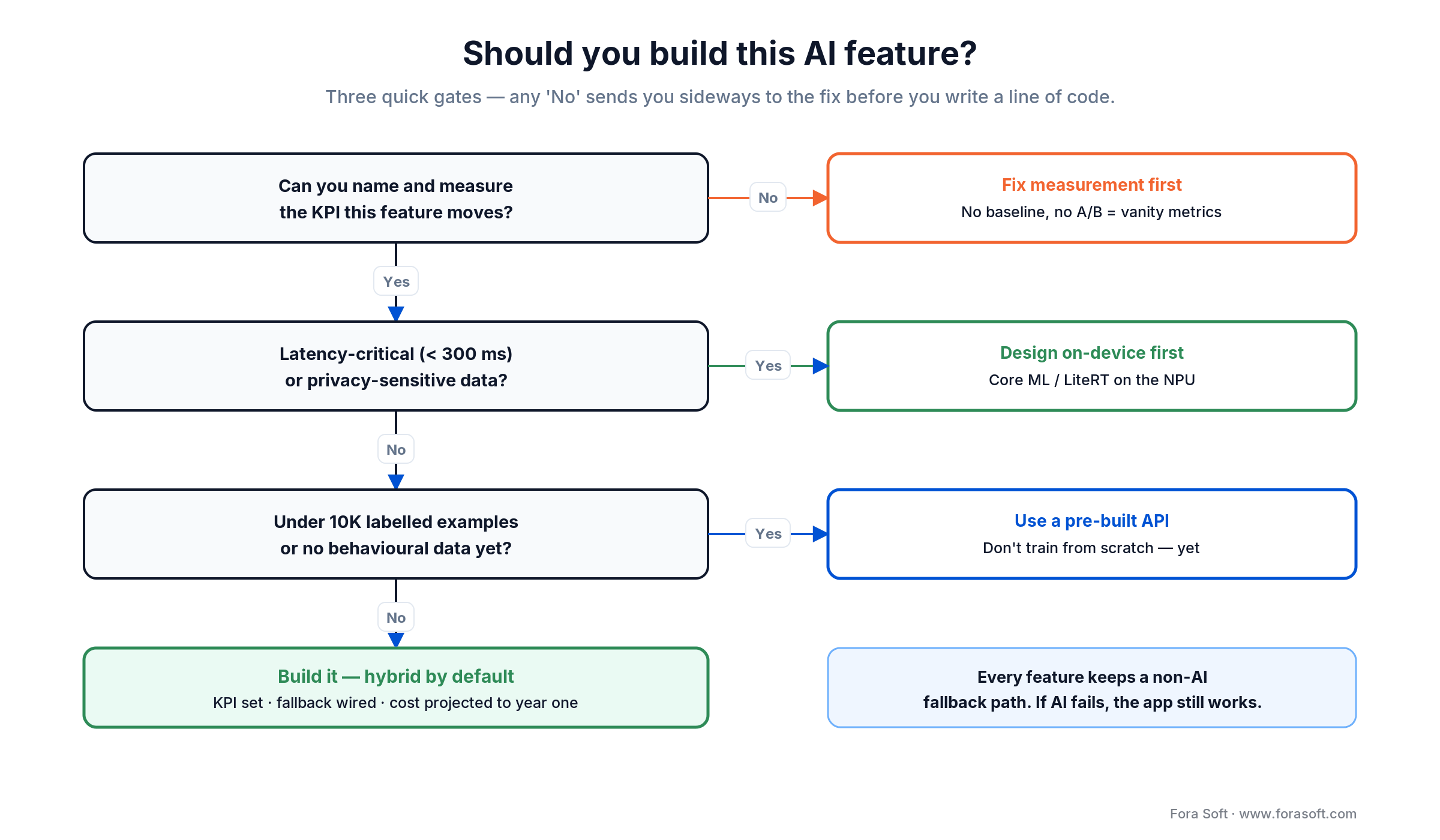
Figure 4. Any ‘No’ sends you sideways to the fix — measurement, on-device design, or a pre-built API — before you write a line of code.
1. What measurable KPI will this feature move? If you can’t name it and measure it today, don’t build the feature.
2. Is the task latency-critical (< 300 ms) or privacy-sensitive? If yes, design for on-device inference first. If no, a cloud API is usually faster to ship.
3. Do you have ≥ 10,000 labelled examples? Below that, use a pre-built API or a pretrained open model — don’t train from scratch.
4. What is the cost per inference at target DAU? Project 12 months out. If the monthly bill at year-one scale exceeds 15% of revenue, the architecture is wrong.
5. What is the fallback when AI fails? If the non-AI path doesn’t exist, the AI feature is fragile. Build both.
Five pitfalls that sink AI mobile projects
1. Data-privacy gaps. Sending raw PII or PHI to a cloud API without a BAA/DPA is the fastest way to turn a launch into a lawsuit. GDPR fines reach €20M or 4% of global revenue; HIPAA penalties run into the millions per incident. Mitigation: on-device for sensitive data, signed vendor agreements, documented DPIAs.
2. Biased or inaccurate models. Models trained on skewed data discriminate against underrepresented groups — and that now has teeth under the EU AI Act. Mitigation: slice accuracy by demographic (age, gender, skin tone, dialect), publish a model card, use Fairlearn or AI Fairness 360.
3. Latency that breaks UX. If p95 latency goes above 2–3 s on a foreground interaction, a large share of users abandon the feature. Mitigation: measure p95, not average; move latency-critical work on device; add a 2 s timeout with a non-AI fallback path.
4. Battery drain on older devices. Running unoptimised models on the CPU/GPU instead of the NPU noticeably drains battery per hour of use. That produces one-star reviews. Mitigation: quantise, target the NPU explicitly, profile power on real devices, add a “Lite” toggle for older hardware.
5. Vendor lock-in. A chatbot pinned to a single LLM provider is one pricing change away from destroying your unit economics. Mitigation: abstract the provider behind an interface, keep a second provider wired up for fallback, use ONNX where possible for on-device portability, and cap monthly spend per vendor.
KPIs — what to measure, from day one
Three buckets, nine metrics, no more.
Quality KPIs. Accuracy (overall and per subgroup), precision, recall. Thresholds depend on the task, but ship at ≥ 90% on vision, ≥ 80% on NLP classification, and ≥ 0.8 F1 on anything where both false positives and false negatives hurt. Audit subgroup accuracy quarterly.
Business KPIs. Conversion lift versus control, feature-adoption rate, day-2 / day-7 / day-30 retention, average order value, and reduction in support tickets. Target +10% on whichever is your primary KPI; below that, the AI isn’t paying for itself.
Reliability KPIs. p50, p95, p99 latency; inference cost per session; model uptime (≥ 99.5%); crash rate on AI code paths (< 0.1%); and model drift (retrain if accuracy drops below 90% of launch-day score).
Pre-launch checklist — the twelve items we never skip
Before any AI mobile feature goes to 100% rollout, we walk through these twelve checks. If any fail, the release is blocked.
- Target KPI is instrumented and the baseline is captured.
- A/B test framework is live with at least a 10% holdout group.
- p95 latency on the oldest supported device is under budget.
- Battery impact is measured and < 5% extra per hour of active use.
- Accuracy is measured across at least three demographic slices.
- Fallback path exists and triggers automatically on timeout or error.
- Vendor BAA / DPA is signed and stored.
- PII / PHI handling is documented in a DPIA.
- Monthly inference cost is projected at year-one DAU and has a hard cap alert.
- Model-drift monitoring runs with an alert below 90% of launch accuracy.
- User feedback collection (thumbs / corrections) is wired to the retraining pipeline.
- A “kill switch” feature flag can disable the AI feature remotely without a new release.
When not to add AI to your mobile app
Four situations where skipping AI is the right call.
A simpler fix is cheaper. If a redesigned form, a default value, or a shorter onboarding flow solves the problem, do that first. AI is overhead you don’t need.
You have no data and no way to get it. Below 1,000 labelled examples, even pretrained models underperform. Spend the quarter instrumenting your app and collecting events before you train anything.
The decision is too high-stakes for partial automation. Medical diagnosis, legal verdicts, credit decisions — AI can assist, but it shouldn’t decide alone. If you can’t afford a human in the loop, defer the feature.
You can’t measure impact. With no A/B infrastructure, no baseline KPI, and no minimum detectable effect, an AI feature is vanity metrics in a fancy wrapper. Fix measurement first.
Six mobile AI features worth copying in 2026
Rather than invent a new AI feature from scratch, start from the ones that already earn money on someone else’s P&L. These six patterns are proven, documented, and translate cleanly to most B2B and B2C apps.
1. Netflix-style content ranking. Per-user ranking of a catalogue against engagement signals — the pattern behind roughly 80% of what people watch on Netflix. The mobile-side trick: pre-compute the ranked list on the server, then re-rank the top 200 items on device using the last ten user actions, so scrolling feels instant even on a poor connection.
2. Duolingo-style adaptive difficulty. A lightweight model predicts which word or concept the user will forget next and schedules the review. It’s cheap to build, fits any gamified experience, and runs fine on device.
3. Starbucks-style personalised offers. Per-user offer generation informed by transaction history and context (time, weather, location). On mobile, surface the offer as the first card on app open — the empty state is your highest-engagement real estate.
4. Amex-style fraud scoring. Real-time transaction scoring that blocks bad transactions before checkout completes. On mobile, run a lightweight device-behaviour classifier (typing rhythm, navigation pattern) on device and relay a confidence score to the cloud scorer for the final call.
5. TikTok-style on-device video effects. MediaPipe segmentation plus a generative effects shader produces filters that feel alive. The pattern: use the NPU for segmentation masks, keep every frame on device, and send only a thumbnail to the cloud when the user publishes. Use it as a template for any camera-driven creative feature.
6. Banking-style voice summary. Whisper runs on device in real time; a post-call cloud LLM produces a written summary with action items. Pair it with a consent prompt and a retention window and you pass most regulator checks — a pattern that maps directly onto our real-time video-processing best practices.
Not sure which pattern fits your app?
Tell us the user and the KPI. We’ll point you at the AI feature with the best payback — and tell you honestly when the answer is “not yet.”
FAQ
Should we build a custom AI model or just use a cloud API?
For roughly 80% of mobile AI features, a pre-built API or a pretrained open model is the right answer — cheaper, faster to ship, and less risky. Train custom only when you have ≥ 10,000 labelled examples, a unique data moat, and a measurable accuracy gap between off-the-shelf and what your users need.
How much does AI mobile app development cost in 2026?
A single on-device feature costs roughly $30K–$80K to build with our Agent-Engineering team in 4–8 weeks. A full hybrid production app with multi-model orchestration runs $150K–$300K over 14–22 weeks. Monthly inference ranges from $0 (pure on-device) through a few thousand dollars on a cheap cloud tier to tens of thousands for a frontier LLM at 100K DAU — which is why most production apps stay hybrid.
Will AI features drain my users’ batteries?
Not if you target the NPU. Apple’s Neural Engine and Qualcomm’s Hexagon NPU are designed for low-power inference — a quantised vision model runs a 640×640 frame in under ~20 ms with negligible battery impact. Running the same model on the CPU or GPU is the battery-drain anti-pattern.
Is on-device AI HIPAA-compliant by default?
No. On-device inference avoids the biggest HIPAA problem — transmitting PHI to a third party — but it doesn’t automatically make your app compliant. You still need encryption at rest, access controls, audit logging, breach procedures, a Business Associate Agreement with any cloud vendor you do use, and a documented risk analysis.
Which LLM should I pick for a mobile chatbot — GPT-5, Claude, or Gemini?
There’s no single right answer; wire up at least two providers behind a router. Use a GPT-5-class model for general chat and code, a Claude Opus-class model for long-context reasoning and document analysis, and a Gemini Flash-Lite tier for cost-sensitive high-volume traffic. Route by query complexity and cache aggressively so a pricing change from any one vendor can’t break your unit economics.
How long until we see ROI on an AI mobile feature?
Quick wins — personalization, fraud detection, recommendations — typically reach positive unit economics inside 3–6 months. Longer-tail features like content generation or complex agent workflows need 12–18 months. Measure proxy KPIs (conversion, retention, churn) continuously; don’t wait for revenue lift to validate the direction.
What happens if the AI model gets worse over time?
Model drift is normal — the statistical distribution of real-world data shifts as behaviour and the market evolve. Monitor accuracy weekly, trigger retraining when it drops below 90% of launch-day score, and keep a known-good previous version ready to roll back to. Tools like Evidently AI, Fiddler, or AWS SageMaker Model Monitor automate the watch.
Does iOS or Android have better AI tooling in 2026?
Both are excellent and different. iOS has tighter hardware integration (Neural Engine), stronger privacy defaults, and ships Apple Foundation Models system-wide on iOS 26. Android has broader device diversity, ML Kit’s ready-made APIs, and Gemini Nano on Pixel 8 Pro and Galaxy S24 and later. Cross-platform apps generally pick Core ML on iOS, LiteRT on Android, and share the same trained weights via ONNX.
What to read next
AI agents
How Video AI Agents Work
Field guide to AI agents that join a live call, transcribe, and respond in real time.
AI in production
How Fora Soft Ships AI in Software Products
Concrete AI patterns we drop into production iOS, Android, and web products.
Streaming
AI and ML in Video Streaming Apps
How recommendation engines and ML-driven ABR raise engagement on mobile streaming apps.
Emotion AI
Real-Time AI Emotion Recognition Software
Production-grade options to add emotion detection to a mobile app.
Best practices
Real-Time Video Processing with AI
Architectural patterns for sub-second AI on live mobile video streams.
Ready to transform your mobile app with AI?
The playbook is clear. Pick a single KPI-driven use case. Default to a hybrid architecture. Start with pre-built APIs, move to on-device for latency and privacy, and reserve the cloud LLM for genuinely hard reasoning. Budget $30K–$300K for the build and plan the monthly inference bill separately, keeping a fallback path for every feature.
Measure accuracy per subgroup, p95 latency, and cost per session from day one. Sign BAAs and DPAs before you send a single byte of PII. Avoid vendor lock-in with a multi-provider router. And remember that not every feature should have AI — a simpler UX fix is often the better answer.
Fora Soft has shipped this playbook across 250+ projects since 2005. If you want a second pair of eyes on your AI mobile roadmap — or a team to build it with you — the fastest path is a 30-minute scoping call.
Let’s build your AI mobile app
Tell us the feature, the user, and the KPI — we’ll come back with a dollar-accurate estimate, a stack recommendation, and a delivery timeline within one business day.

