

Key takeaways
• Video call center software is a routing problem with a camera attached, not a video app. The queue, skills-based routing, and the escalation from voice to video are what make it a contact center; the video is the last 20%.
• The escalation flow is the product. A customer starts on voice or chat, the agent sends a link, and video opens in the browser with no app install. That in-session hand-off is what you actually design.
• Compliance moves the moment you add a camera. Recording consent, PCI DSS for card data spoken or shown on screen, and accessibility all get harder on video than on voice, and they shape the build.
• Buy vs build is a seat-count-times-time question. CCaaS suites add video per seat per month forever; a custom WebRTC build is one-time plus hosting. Amazon Connect, for reference, stacks $0.038 per voice minute, $0.010 per web-calling audio minute and $0.015 per video minute per participant on the same call (AWS, 2026).
• A custom video contact center MVP runs about $70–150k. Read this as a build checklist and a build-vs-buy decision tool, not a brochure.
A customer has been on hold, then on chat, and now wants to show your agent the error on their screen or the damage on the product they bought. You send a link, they tap it, and forty seconds later there’s a live video session, a cobrowse pane, a recording running, and a consent notice, all wired to the same ticket. Get the video wrong and the picture is grainy. Get the routing, the recording consent, and the payment handling wrong and you’ve queued the customer to the wrong agent, captured a card number you’re not allowed to store, and lost the context when the call ends. That gap between “we added a video button” and “we run a video channel” is where most projects stall.
We’re Fora Soft, a software development company that has built real-time video products since 2005 — 250+ projects with queues, recording, and identity baked in, including ProVideoMeeting (WebRTC conferencing with browser, phone, and SIP join, adaptive video, and in-call signing tied to an audit trail). This is the briefing we hand a support or CX team on day one of a video call center software engagement: what it actually is, the architecture, the routing, the compliance, the vendor trade-offs, and the numbers.
Why Fora Soft wrote this video call center guide
We build video and real-time products for a living, and contact-center video sits right in the middle of what we ship. ProVideoMeeting is a WebRTC conferencing product we built on WebRTC and FreeSWITCH, with browser, phone, and SIP dial-in, video that adapts to a bad line, and in-call document signing tied to an SMS or photo identity check and a per-document audit log. Swap the meeting context for a support queue and most of the spine is already there: resilient video, a way to join without installing anything, recording, and a record of what happened. Our WebRTC development team builds that spine into contact centers, from the media server to SIP escalation.
The numbers and verdicts below come from shipped work, vendor pages we read the week we wrote this, and the standards’ own text, not from a marketing deck. Where a price comes from a reseller rather than the vendor’s own page, we say so. Where a benchmark is self-reported by a vendor, we flag it. That’s the difference between a guide a senior engineer trusts and a listicle.
One honest limit up front. Recording-consent and PCI rules vary by state and by how you take payment, so treat the compliance sections as a map of what to check with counsel and your QSA, not as legal advice. Companion reads we keep current: our video conferencing development overview, the secure video communication apps playbook, and our cobrowsing software guide for the screen-sharing layer.
Adding a video channel to your support stack?
Tell us your current platform, your channel mix, and your compliance scope. We’ll map the escalation flow and quote a fixed range in 30 minutes.
What video call center software actually is in 2026
Video call center software is contact-center software that adds a live one-to-one video channel to voice, chat, and email, so a customer and an agent can see each other, share a screen, and resolve an issue on camera. The key word is contact center, not video. A plain video call connects two faces. A video contact center routes the customer to the right agent by skill and language, escalates from voice or chat into video mid-conversation, records with consent, and writes the whole interaction back to the CRM. That routing-and-record layer is the product.
Under the hood it’s WebRTC, the browser-native technology behind most modern video, wrapped in a queue, routing, recording, and CRM integration. WebRTC matters here for one concrete reason: it runs in the browser with no plugin and encrypts media by default with DTLS-SRTP, so a customer can join a video session from a link in a text message without downloading an app, and the stream is encrypted without anyone flipping a switch.
People use several names for overlapping things, so let’s pin them down. Video contact center and video call center software are the platform. Video customer service or video support is the use case it powers. Visual engagement is the umbrella term vendors use when they bundle video with cobrowse and screen share. All of them share the same spine; they differ in how much of the interaction happens on camera.
When video beats voice in customer support
Not every ticket belongs on video, and adding a camera to a password reset just wastes everyone’s time. The interactions that pay off share a pattern: the problem is visual, the stakes are high, or the relationship matters. Four carry most of the return.
1. Show-me-the-problem support. Field service, consumer electronics, appliances, insurance claims. The customer points the camera at the broken thing and the agent diagnoses it in one call instead of three rounds of “which light is blinking?” This is where video and cobrowsing earn their keep on first-contact resolution.
2. High-value and high-trust conversations. Wealth advice, healthcare intake, premium onboarding, warranty disputes. A face builds trust a voice can’t, and the customer feels handled rather than processed.
3. Guided complex tasks. Setup, configuration, form-filling. The agent shares a screen or cobrowses, and the customer follows along instead of translating steps over audio. Drop-off on complicated flows falls when someone can see where the customer is stuck.
4. Accessibility and inclusion. Video is the channel for Deaf and hard-of-hearing customers who sign, and for anyone who reads lips or needs visual context. This isn’t a nice-to-have; for many organizations it’s an ADA obligation, covered below.
Reach for a video channel when: the problem is visual, the interaction is high-value, or the customer needs to be shown rather than told, keep the routine, text-shaped tickets on chat and voice where they’re cheaper and faster.
Video contact center vs video banking vs plain conferencing
Video conferencing (Zoom, Meet) connects people who already agreed to meet, with no queue and no CRM write-back. A video contact center adds an ACD, skills-based routing, consent-managed recording and ticket integration. Video banking is a video contact center hardened for a bank, with KYC, liveness checks, e-signatures and GLBA/FFIEC audit trails. All three share a WebRTC core, which is why they get confused at budgeting time, and scoping the wrong one wastes a quarter.
Plain video conferencing (Zoom, Meet, a custom meeting app) connects scheduled participants in a room. There’s no queue, no routing, no CRM write-back, no consent-managed recording tied to a ticket. It’s a meeting, not a channel. If you bolt a “start video” button onto a meeting tool and call it a contact center, agents feel the missing queue on day one. Our video conferencing app cost breakdown covers that build.
Video banking is a vertical: a video contact center hardened for a bank, with regulator-grade identity (video KYC with liveness), e-signatures, and a compliance posture shaped by GLBA, the Bank Secrecy Act, and FFIEC guidance. It’s a video contact center plus a heavy trust-services layer. If you’re a bank or credit union, read our dedicated video banking platform development guide instead, because your identity and audit requirements dwarf everything here.
Video call center software sits between them: the routing, queue, and recording of a contact center, applied horizontally across support, sales, and service in any industry, without the bank-specific KYC weight. This guide is about that middle case. If your video calls open bank accounts, you’re in banking territory; if they resolve support tickets and guide purchases, you’re here.
Reach for the video banking build instead when: your video sessions open accounts or move money and an examiner will inspect them, that adds video KYC, liveness, and an audit trail that a general support contact center doesn’t need.
Reference architecture for a video contact center
A video contact center has five layers: a browser-based customer widget and agent console, a signaling layer carrying the ACD and skills-based routing, an SFU media plane with TURN and server-side recording, engagement services for cobrowse, captions and consent, and an integration plane wired to the CRM and helpdesk. That’s the shape we run for real-time video products, adapted for a support queue. One media node carries a pilot of ~50 concurrent sessions comfortably; past a few hundred you add cascading nodes and regional TURN, so the architecture holds but the deployment tier does change. Every layer maps to something an agent or a compliance reviewer will ask about.
Client tier. A customer widget that opens video in the browser from a link, with no install, plus native mobile if you need camera control and background handling. On the other side, an agent console that shows the customer’s history, the queue, and the video, cobrowse, and recording controls in one place.
Signaling, queue, and routing. A TLS 1.3 WebSocket layer handles call setup, and beside it sits the piece a meeting tool lacks: an automatic call distributor (ACD) and skills-based routing that put the customer in front of the right agent by skill, language, and product, with wait-time estimates and callback. This is the difference between a contact center and a video app.
Media plane. A Selective Forwarding Unit (SFU) such as LiveKit, Janus, or mediasoup terminates DTLS-SRTP and re-encrypts on each hop: media is encrypted in transit, but the server can read it. That is what makes server-side recording possible at all, and it is fine for most support workloads. The SFU also carries group video once the interaction goes past two people. DTLS-SRTP is on by default; a TURN server keeps calls connecting through the corporate firewalls and mobile networks that would otherwise drop them.
Engagement services. Cobrowse and screen share, in-call chat and file transfer, live captions, and consent-managed recording. These sit beside the video and are where a lot of the perceived value lives, because they’re what let the agent actually help rather than just talk.
Integration plane. Connections to the CRM and helpdesk, the ticketing system, and a SIP or PSTN bridge so a video session and a phone call live in the same interaction record. A video channel that can’t read a customer’s history or write back an outcome is a demo, not a channel.
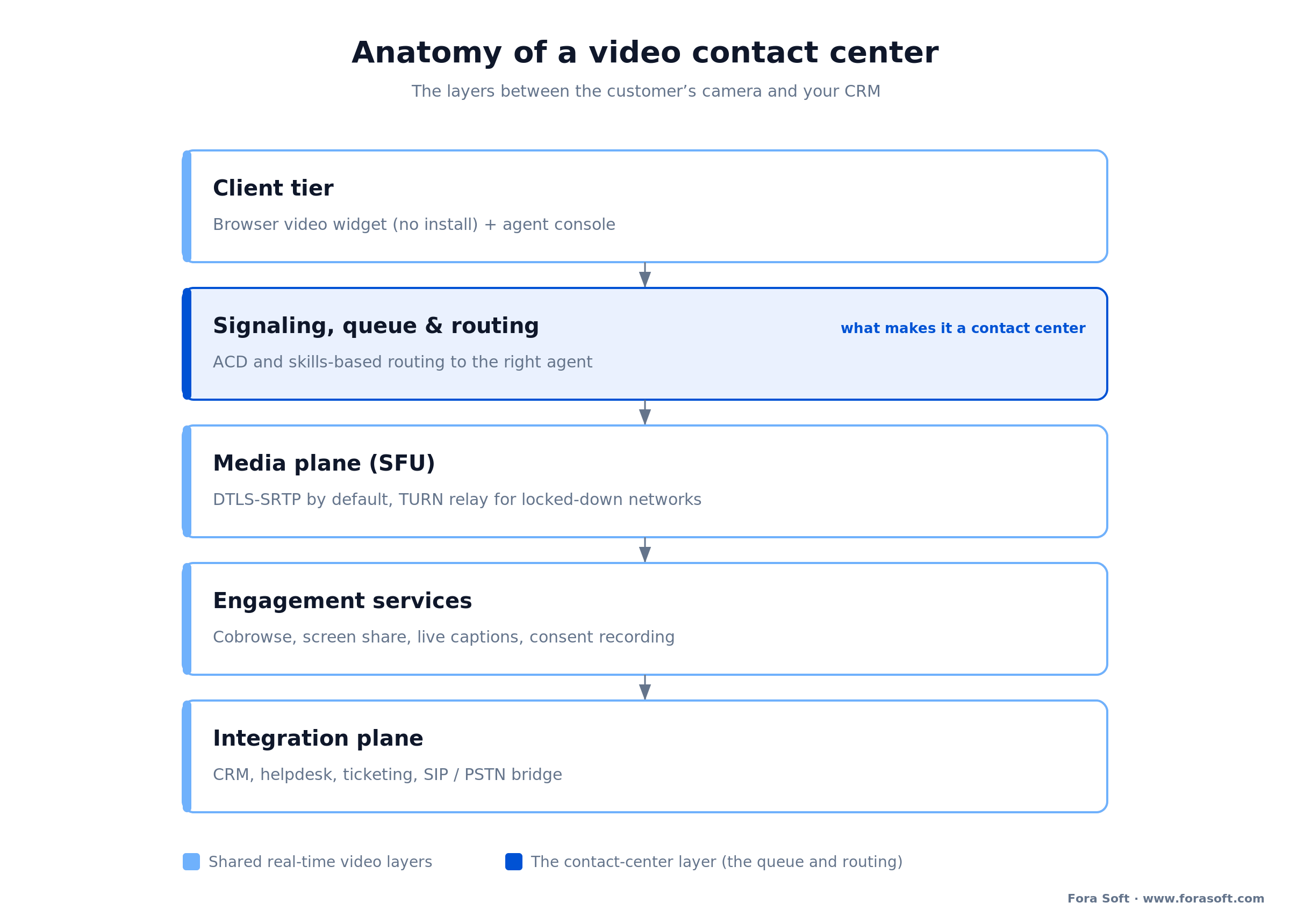
Figure 1. The layers of a video contact center. The video plane is a small slice; the queue, routing, recording, and CRM integration are the bulk of the build.
Reach for a dedicated TURN deployment when: your customers connect from locked-down corporate networks or flaky mobile data, a meaningful slice of calls needs a relay to connect at all — across our own WebRTC deployments relay rates land roughly 8–20% depending on how many customers sit behind symmetric NAT or corporate firewalls, and yours will differ, so measure it before sizing — and a shared free TURN tier is where those calls quietly fail.
Inside one voice-to-video escalation
The signature flow of a video contact center isn’t a scheduled video meeting, it’s the escalation: a customer who started on voice or chat moves into video without hanging up and calling back. Follow one end to end and the design decisions become obvious.
The customer reaches an agent through the normal queue on chat or voice. Partway through, it’s clear the issue is visual, so the agent clicks “escalate to video” and the platform sends an in-session link by SMS or in the chat window. The customer taps it and video opens in their browser, in the same conversation, with the agent already on screen and the ticket context intact. If needed, the agent starts a cobrowse pane to see the customer’s screen. Recording runs with a visible consent notice, and when the call ends the recording, the transcript, and the outcome all land on the same ticket.
The hard parts are the seams. The hand-off has to carry identity and context so the customer doesn’t re-explain everything; the link has to work on a locked-down phone without an app; and the recording has to pause or redact when a card number comes up. Get those three seams right and video feels like one continuous conversation. Get them wrong and it feels like being transferred, which is the exact thing customers hate about call centers.
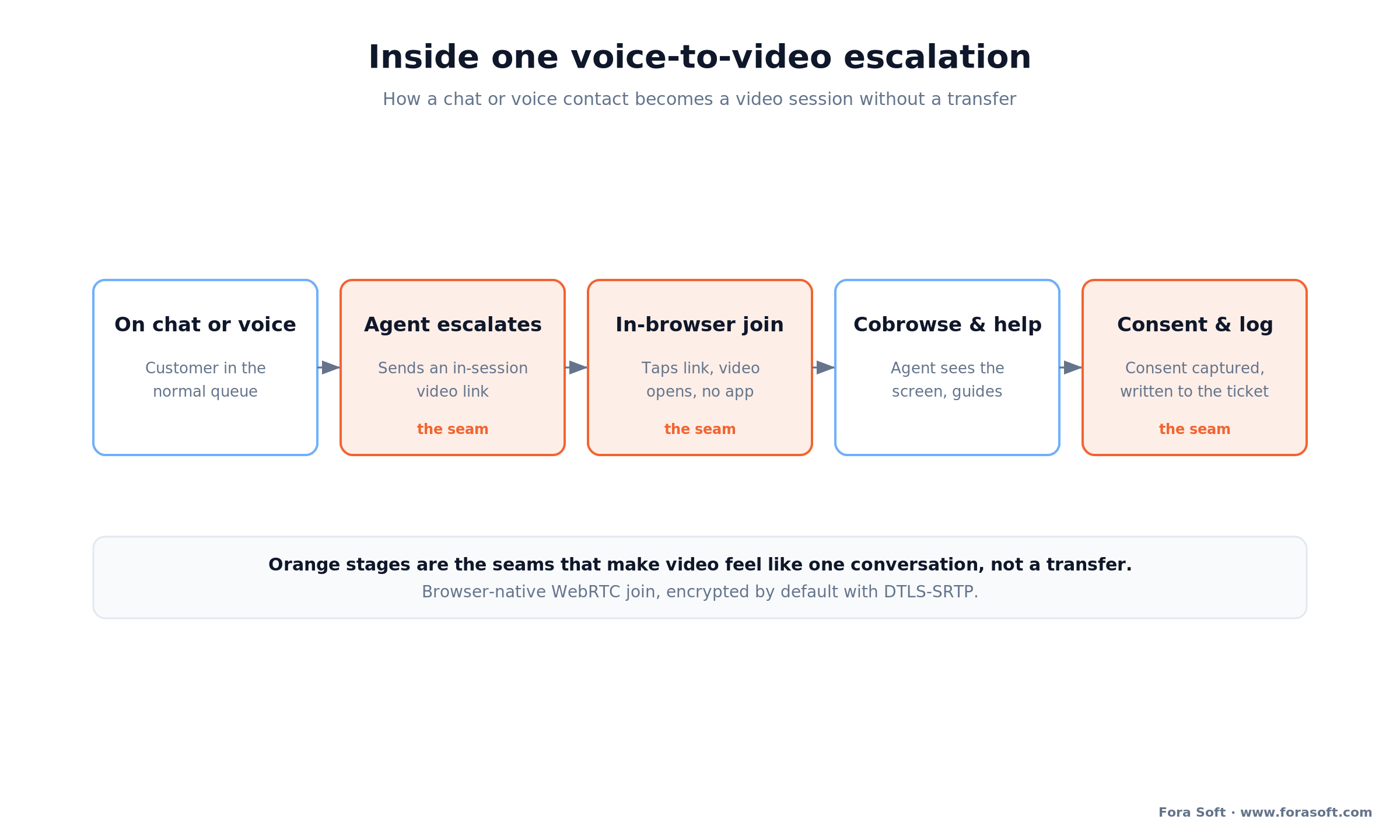
Figure 2. One escalation from chat to video. The orange stages are the seams that make or break the experience: the hand-off, the in-browser join, and consent-managed recording.
Skills-based routing and the queue
The queue is the thing that turns video into a contact center, and it’s the thing every “we added video” project underestimates. A meeting tool assumes both people already agreed to meet. A contact center assumes a stranger arrives at a random moment and has to be matched to whoever can help fastest.
Automatic call distribution. The ACD holds arriving customers, shows them a real wait estimate, offers a callback instead of a hold, and hands each one to the next suitable agent. On video this also means managing camera and bandwidth readiness before the agent connects, so nobody joins to a black screen.
Skills-based routing. Match on skill, language, product line, and priority tier. A Spanish-speaking billing question routes to a Spanish-speaking billing agent, not to whoever is free. Video adds one more attribute worth routing on: whether the agent is in a setting where turning a camera on is appropriate right now.
Concurrency and presence. A chat agent handles several conversations at once; a video agent handles one. Your routing has to know that a video session takes an agent fully out of the pool, or your wait times lie. This single fact reshapes staffing math and is the most common thing teams forget when they model a video channel on top of chat.
Cobrowsing and screen share on the call
Video shows the customer’s face; cobrowse and screen share show the customer’s problem. On a video support call they’re usually more valuable than the video itself, because most support problems live on a screen, not a face.
Cobrowsing lets the agent see and guide the customer through a web page or app on the customer’s own device, usually without installing anything, and with field masking so the agent never sees the password or card field. Screen share is broader and blunter: the customer shares their whole screen, which is more flexible and more dangerous, because whatever’s on it, including a banking tab or a card number, is now on camera and possibly in the recording.
The build decision is which one you offer and how you fence it. Cobrowse with field masking is the safer default for regulated data; full screen share is worth having for the cases cobrowse can’t reach, gated behind a clear prompt and the same recording controls. We treat this as its own layer, and our cobrowsing software development guide goes deep on the masking and DOM-mirroring mechanics.
Reach for cobrowse with field masking rather than full screen share when: the customer is inside your own web app and might expose a password or card field, masking keeps sensitive fields out of the agent’s view and out of the recording, which screen share can’t promise.
Not sure video vs cobrowse vs screen share?
We’ll map your top ticket types to the right visual channel and show you where masking and consent have to sit. 30 minutes, real engineering opinions.
Security, recording consent, and PCI DSS on video
Adding a camera changes your compliance surface. Three regimes shape the build for a US-facing video contact center: all-party recording consent, PCI DSS for card data spoken or shown on camera, and ADA/WCAG accessibility.
Recording consent. Roughly a dozen US states require all parties to consent to recording — the commonly cited list runs 11–13 depending on how Connecticut and Oregon are counted — including California, Florida, Illinois, Washington, and Massachusetts. Check the current statute for every state you operate in. On voice you announce it; on video you should show a visible recording indicator too, since a camera raises the expectation. The platform needs to know both parties’ states and apply the stricter rule, and it needs to log that consent was captured, because “we told them” without a record is not a defense.
PCI DSS for payments on camera. If a customer reads a card number aloud or holds the card up to the camera, that data is now in your recording and in PCI scope. PCI DSS v4.0.1 is the only active version of the standard — v4.0 retired on 31 December 2024 — and the future-dated v4.x requirements became mandatory on 31 March 2025 (PCI Security Standards Council, 2025). None of it cares that the leak arrived on video instead of audio. Pause-and-resume recording is the common fix and the common failure, because agents forget to hit the button. The stronger pattern is to descope the payment entirely: hand the card step to a PCI-compliant hosted page or IVR the agent can’t see, so the sensitive data never touches your video, your screen share, or your recording.
The engineering translation is concrete: DTLS-SRTP for media, TLS 1.3 for signaling, AES-256-GCM for recordings at rest with keys in a KMS, least-privilege access on the recording-export endpoint (the classic breach vector), field masking on cobrowse, and a payment path that keeps card data out of scope by design. For threat models where the media server itself must never see the picture, WebRTC Encoded Transform (RTCRtpScriptTransform, the standardised successor to Chrome’s Insertable Streams) hooks encoded frames so you can encrypt them before they reach the SFU; pair it with SFrame (RFC 9605, 2024) and the server forwards a payload it can’t read. You still own key management, and you give up server-side recording. Our secure video architecture guide walks each layer.
Reach for payment descoping rather than pause-and-resume when: agents take card payments on video with any regularity, a human who has to remember to pause the recording will eventually forget, and one missed pause is a PCI finding, so keep the card data off the call entirely.
Accessibility: video as an ADA channel
Video is one of the few channels where accessibility is a feature, not just an obligation. For Deaf and hard-of-hearing customers who use sign language, a video channel is the natural way to reach support, the same principle behind video relay services. Handled well, it widens who you can serve; handled carelessly, it’s a legal exposure.
Build to WCAG 2.2 AA — a W3C Recommendation since October 2023, last updated December 2024, and backwards compatible: W3C states that content conforming to 2.2 also conforms to 2.1 and 2.0. It adds nine success criteria and retires 4.1.1 Parsing, so it is not a strict superset. WCAG 2.1 AA is what the US Department of Justice adopted as the binding technical standard under ADA Title II (final rule, April 2024). There is no DOJ-adopted standard for Title III, but courts reference WCAG anyway, so treat it as in scope for a customer-facing US service. In practice that means live captions on the video call, a keyboard-navigable agent and customer UI, sufficient color contrast on controls, and screen-reader labels on the join and consent prompts. Live captioning also doubles as the transcript your CRM and your QA team want, so it earns its place twice.
CCaaS video vs custom build: the options
There are four ways to put video in front of your customers: a video add-on on a CCaaS suite you already run, usage-based cloud like Amazon Connect, CPaaS building blocks from Twilio, Vonage or Agora, or a custom WebRTC build on LiveKit, Janus or mediasoup. Picking wrong is expensive in a different way each time. Turn on a suite’s video add-on and you’re live fast but you rent it per seat forever. Build custom and you own it but you carry the engineering.
CCaaS video add-on. If you already run Five9, Genesys, Talkdesk, Vonage, or Bright Pattern, video is often a capability on the omnichannel or higher tier. Fastest path if the stock experience fits. The trade is per-seat economics that never stop, a customization ceiling, and a video experience you don’t control end to end.
Usage-based cloud (Amazon Connect). Amazon Connect prices by usage rather than per seat and supports video and screen share in a custom agent desktop via its Streams JS library and the Chime SDK. Model the whole stack, not the headline rate: AWS bills the voice service at $0.038 per minute on the Connect Customer tier ($0.018 on Customer Basic), in-app and web calling audio at $0.010 per minute, and video at $0.015 per minute per participant, and they add up on the same call (AWS pricing, 2026). There’s no seat license, but do the sum for a customer-and-agent call: $0.038 voice + ($0.010 audio × 2) + ($0.015 video × 2) = $0.088 a minute. Budget nearer $0.09 than $0.015. This is the middle path: more control than a suite, less to build than fully custom, but you’re assembling it yourself.
CPaaS building blocks. Twilio, Vonage, or Agora give you video, SIP, and messaging APIs; you build the queue, routing, agent console, and recording on top. The right call when your routing logic is unusual and you want to own it without maintaining a media server.
Custom WebRTC. Build on LiveKit, Janus, or mediasoup and you own the video, the queue, the recording, the branding, and the data. This is the path when you need deep integration, unusual routing, a unique UX, or better unit economics at volume, and it’s the only one where the escalation flow and the recording controls are exactly what you designed rather than what a vendor exposed.
| Option | Best for | Control & branding | Integration depth | Cost shape |
|---|---|---|---|---|
| CCaaS video add-on | Already on Five9/Genesys/Talkdesk | Themed, not owned | Prebuilt connectors | Per seat / month, forever |
| Amazon Connect | Usage-based, AWS shops | Custom agent desktop | AWS-native + APIs | Per minute, no seat fee |
| CPaaS (Twilio/Vonage/Agora) | Custom routing, own the app | High | Build on their APIs | Usage + build |
| Custom WebRTC | Own IP, deep integration, scale | Full | Any CRM / helpdesk | Upfront build + ops |
Reach for a CCaaS add-on when: you’re already on the suite, the stock video experience fits, and video is a small share of interactions, revisit custom when per-seat cost, a unique flow, or integration depth forces the move.
What it costs: seat-based SaaS vs custom build
Straight answer: a custom video contact center MVP typically lands around $70–150k, and the buy-vs-build crossover is a seat-count-times-time calculation. These are the ranges we quote. Treat any single number with suspicion, including ours; the honest output is a range against a written spec, not a figure in a blog post.
Build, custom WebRTC. A single-channel MVP, web customer widget plus agent console, SFU media, basic routing, recording, and one CRM integration, runs about $70–110k over 10–14 weeks. Add native mobile, cobrowse, skills-based routing, and payment descoping and you’re at $110–150k. Budget 15–20% of build cost per year for hosting and upkeep, plus media egress that scales with call minutes.
Buy, seat-based. Read the tier labels carefully. Genesys lists Cloud CX 1 at $75 per user per month, but that is the voice tier; its omnichannel tiers run $115, $155 and $240, and Five9 publishes Digital (digital channels only) at $119 and Core, its first all-channel bundle, at $159 (vendor pricing pages, 2026). Call it $115–240 per user per month for genuinely omnichannel seats. Neither vendor publishes which tier carries video, so confirm that in your quote before you model it. Put conservative numbers on it: 50 video-enabled agents at, say, $150 per seat per month is $7,500 a month, about $90,000 a year, every year, and it grows with headcount.
The crossover. Against that $90k a year, a $70–150k custom build plus $11–30k a year of ops (the same 15–20% rule) and call-minute egress on top pays back in roughly one to three years at 50 seats — about a year for a $70k MVP, closer to three for a $150k build once egress is counted — and the gap widens every year after because the build cost is behind you while the subscription keeps recurring. Below a dozen seats, buy. Above a few dozen with a multi-year horizon, build usually wins on money alone, before you count owning the roadmap. Our video conferencing app cost breakdown shows where the line items come from.
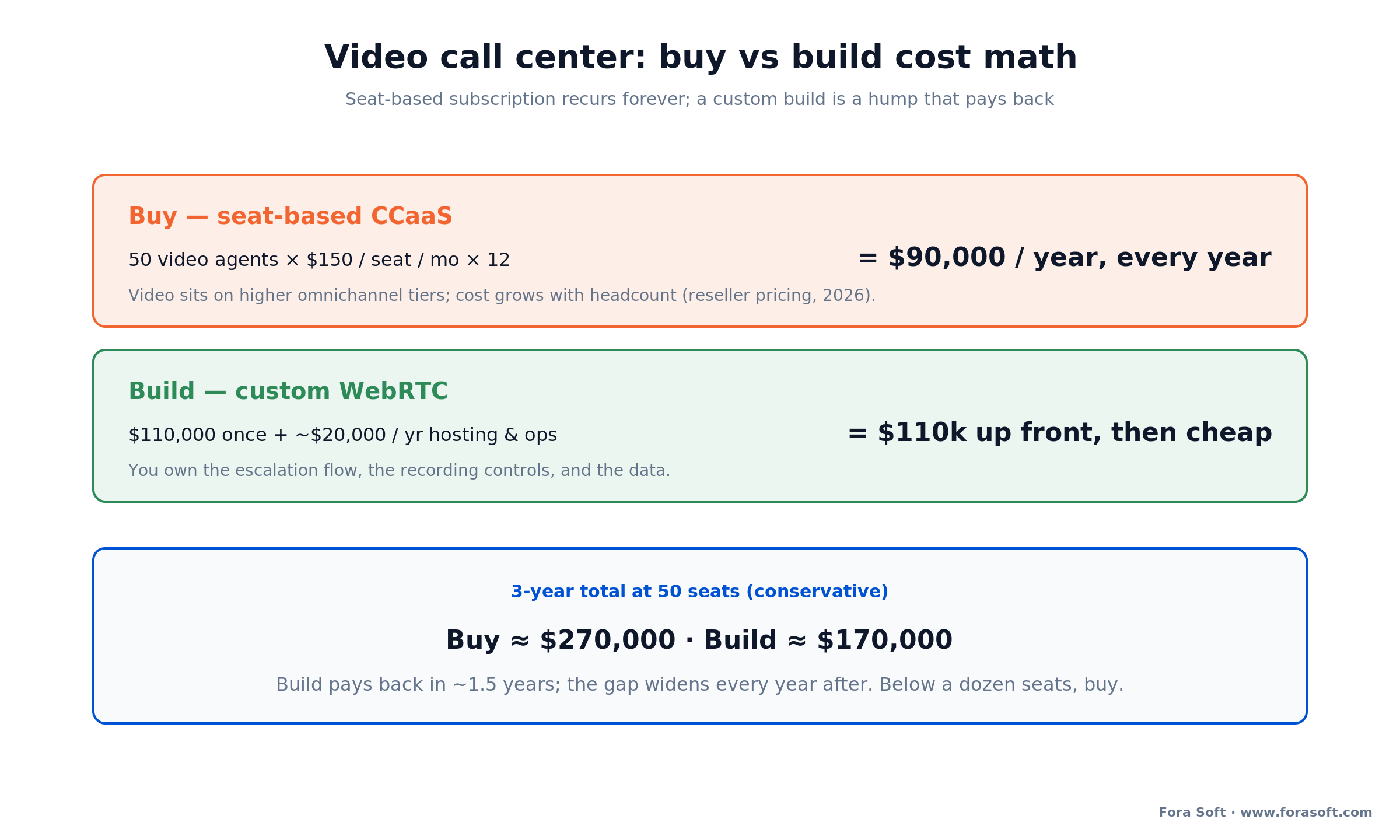
Figure 3. Buy vs build over three years at 50 seats. The subscription is a flat annual cost that never ends; the build is a hump that pays back and then runs cheap.
Does video actually move AHT, FCR, and CSAT?
Sometimes, and only on the right tickets. Video tends to lift first-contact resolution and customer satisfaction on visual problems, while pushing average handle time up, not down, because a video call is longer than a chat. The trade is worth it when a single longer video call replaces three shorter phone calls, and a waste when it just adds minutes to something a chat could close.
For reference points: SQM Group’s benchmark of roughly 500 North American contact centers, measured by post-call customer survey, puts a “good” first call resolution rate at 70–79% and world-class at 80%+, which only about 5% of centers reach; a “good” CSAT is 75–84% and world-class is 85%+ (SQM Group, 2025–2026). Note the denominator: a true cross-channel contact-resolution rate runs lower than FCR, so don’t hold your video channel to a call-only benchmark. Some vendor roundups report visual channels scoring higher CSAT than voice, but those numbers are self-reported, so we’d treat them as directional rather than a promise. The honest claim is narrow: on visual, high-stakes tickets, expect FCR and CSAT to rise and AHT to lengthen, and measure it against your own baseline before you scale.
Which means the KPI that actually decides whether video earns its cost isn’t any single channel score, it’s the ratio: resolution gain per extra minute of handle time, on the specific ticket types you route to video. Track that from day one and let it decide where the camera turns on.
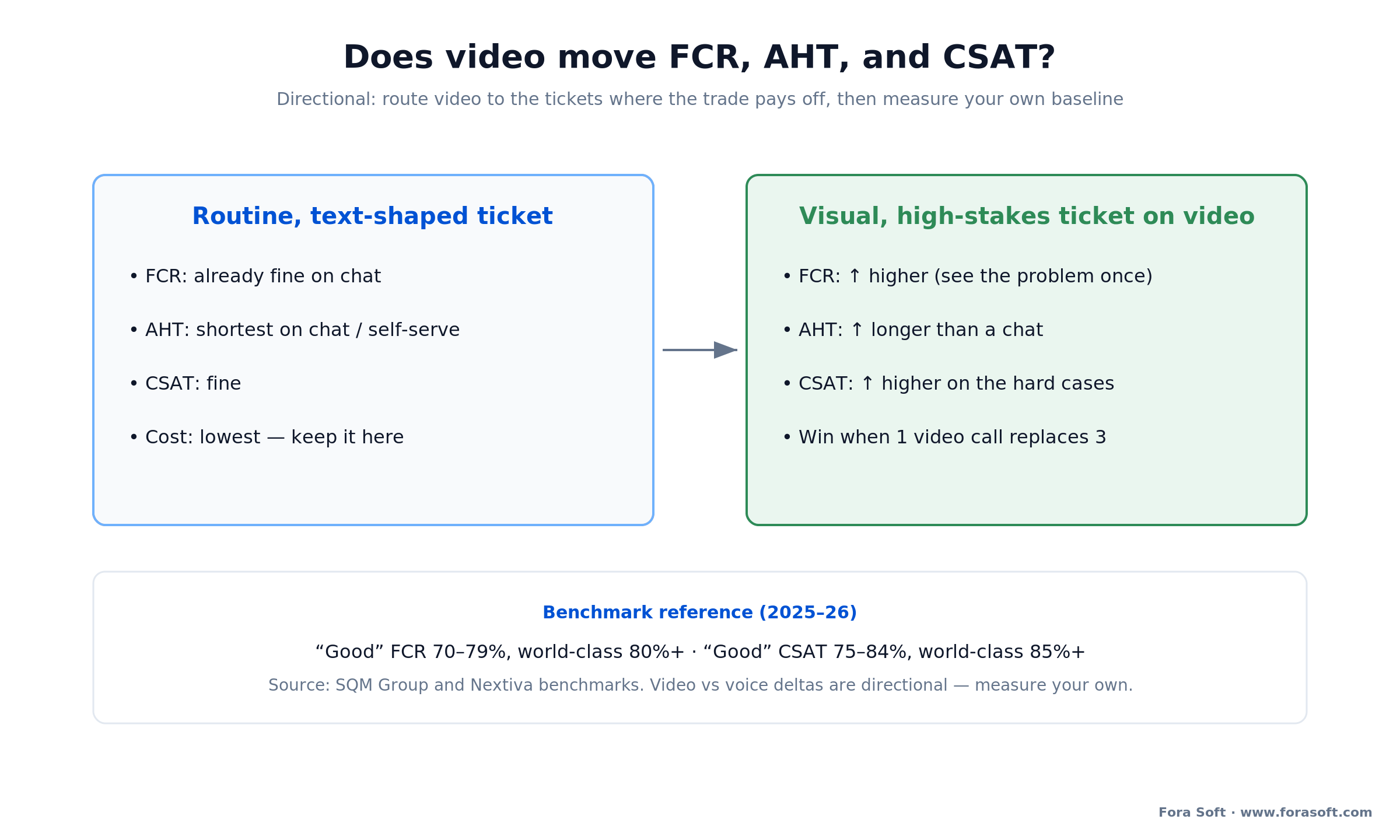
Figure 4. The pattern to expect, not a guarantee: video lifts resolution and satisfaction on visual tickets while lengthening handle time. Measure against your own baseline.
Mini-case: a support-ready video core
The fastest way to understand a video contact center build is to see how close a well-built conferencing product already sits to one. ProVideoMeeting is a WebRTC conferencing platform we built on WebRTC and FreeSWITCH. The brief was business meetings, but the feature list reads like the spine of a video support channel.
It lets people join by browser, phone, or SIP dial-in, so a customer on a weak connection or an old device can still get on the call, and it adapts video quality to the line so the picture holds when the network sags. It records sessions, signs documents inside the call, and ties each signature to an SMS or photo identity check with a per-document audit trail. Resilient join, adaptive video, recording, and an auditable record, four of the things a support team asks for, already shipped together on a WebRTC and FreeSWITCH stack we run in production.
The gap between that and a full video contact center is the contact-center layer: the ACD and skills-based routing, the voice-to-video escalation hand-off, cobrowse with field masking, and the CRM write-back. That’s a scoped project on top of a proven base, not a research project, and it’s the kind of video conferencing development we ship regularly. Want a similar assessment for your scope?
A decision framework in five questions
Five questions decide build vs buy faster than any feature matrix: what share of your tickets are actually visual, are you already on a CCaaS suite, how deep does the integration go, do you take payments or handle regulated data on the call, and what are your seat count and time horizon? Answer them out loud with your CX and compliance leads in the room. They decide build vs buy faster than any feature matrix.
1. What share of your tickets are actually visual? If it’s a small slice, a suite add-on is plenty. If video is central to how you serve, owning the experience starts to matter.
2. Are you already on a CCaaS suite? If Five9 or Genesys already runs your queue and their video tier fits, turning it on beats building. Custom is for when the stock experience hits a wall.
3. How deep does the integration go? Read-only CRM lookup is easy. Bespoke routing, custom agent workflows, and write-back into systems the suite doesn’t connect to are where custom or CPaaS win.
4. Do you take payments or handle regulated data on the call? If yes, payment descoping and consent controls lead the design, and you want to own them rather than trust a default.
5. What’s your seat count and time horizon? Below a dozen seats, buy. A few dozen seats over several years, and per-seat pricing crosses over. If you want a partner who has answered all five for real-time video before, that’s the conversation we have every week.
When NOT to add video to your contact center
Video isn’t always right, and a partner who says otherwise is selling. Four situations argue for keeping it small, or skipping it: your tickets are text-shaped, you can’t absorb the one-call-per-agent concurrency hit, you take card payments with no descoping plan, or a CCaaS add-on already covers your volume.
Your tickets are text-shaped. If most contacts are billing questions, password resets, and order status, video adds cost and handle time without lifting resolution. Put those on chat and self-service and keep video for the visual cases.
You can’t staff the concurrency hit. A video agent handles one interaction at a time, unlike a chat agent juggling several. If you can’t add headcount or accept longer waits, a video channel will quietly blow up your service levels.
You’re not ready for the compliance surface. If you take card payments and don’t have a descoping plan, or you operate across all-party-consent states without consent controls, adding video before those are solved is buying risk.
A suite add-on already covers it. If you’re on a CCaaS platform, the stock video tier fits, and volume is modest, building custom is owning IP you don’t need. Turn on the add-on and move on.
Five pitfalls in video contact center projects
1. Shipping a meeting tool, not a channel. Skip the ACD, skills-based routing, and wait estimates and you’ve built Zoom with a logo. Customers feel the missing queue instantly. The queue is the product.
2. Modeling video concurrency like chat. A video session takes an agent fully out of the pool. Staffing math borrowed from chat will understaff you and wreck your wait times.
3. Leaving payments on the recorded call. Pause-and-resume depends on a human remembering. Descope card handling to a PCI-compliant path or you’re one forgotten click from a finding.
4. Requiring an app to join. If the customer has to install something to start a video session, most won’t. Browser-native WebRTC join from a link is non-negotiable for a support channel.
5. An open recording-export endpoint. The most common breach vector we’ve audited in video products is an export API without a real access check. Default-deny, and verify role and ownership on every call.
FAQ
What is video call center software?
Video call center software is contact-center software that adds a live one-to-one video channel to voice, chat, and email. It routes a customer to the right agent by skill and language, lets the agent escalate from voice or chat into video mid-conversation, records with consent, supports cobrowse and screen share, and writes the interaction back to the CRM. The routing and record layer, not the video, is what makes it a contact center.
How is a video contact center different from Zoom?
Zoom connects people who already agreed to meet. A video contact center handles a stranger arriving at a random moment: it queues them, routes by skill and language, escalates from chat or voice into video without hanging up, records with consent, and logs everything to the ticket. That queue-and-routing layer is the difference, and it’s the part a meeting tool doesn’t have.
How much does it cost to build video call center software?
A custom video contact center MVP runs about $70–150k. A single-channel build (web widget, agent console, SFU, basic routing, recording, one CRM integration) is $70–110k over 10–14 weeks; adding mobile, cobrowse, skills-based routing, and payment descoping takes it to $110–150k. Budget 15–20% of build cost per year for hosting and upkeep, plus media egress that scales with call minutes.
Should we buy a CCaaS video add-on or build custom?
Buy the add-on when you’re already on a suite like Five9 or Genesys, the stock video experience fits, and video is a small share of interactions. Build custom when you need deep integration, unusual routing, a unique UX, payment descoping you control, or better unit economics at volume. At about 50 seats, a $70–150k build plus $11–30k a year of ops and call-minute egress pays back a $90k-a-year subscription in roughly one to three years: about a year at the $70k end, closer to three at $150k.
Do customers need to install an app to join a video call?
No, and they shouldn’t have to. A well-built video contact center uses WebRTC so the customer joins in the browser from a link in a text or chat, with no download. Requiring an app kills join rates on a support channel. Native mobile apps are worth adding for camera control and background handling, but browser-native join is the baseline.
How do we stay PCI-compliant if customers pay on a video call?
Keep card data off the call entirely. If a card number is spoken or shown on camera it enters your recording and PCI DSS scope. Pause-and-resume recording is allowed but fails when an agent forgets to pause. The stronger pattern is to descope: hand the payment step to a PCI-compliant hosted page or IVR the agent can’t see, so the sensitive data never touches your video, screen share, or recording.
Do we need consent to record a video support call?
In roughly a dozen US states — the commonly cited all-party list runs 11–13 depending on how Connecticut and Oregon are counted — including California, Florida, Illinois, Washington, and Massachusetts, all parties must consent to recording. Check the current statute for every state you operate in. On video, show a visible recording indicator in addition to an announcement. The platform should detect both parties’ jurisdictions, apply the stricter rule, and log that consent was captured, because telling the customer without a record isn’t a defense.
Does video improve first-contact resolution and CSAT?
On visual, high-stakes tickets, usually yes: video tends to lift first-contact resolution and CSAT while lengthening average handle time, since a video call runs longer than a chat. The win comes when one video call replaces several phone calls. On routine, text-shaped tickets it just adds minutes. Measure resolution gain per extra minute of handle time against your own baseline before scaling.
What to read next
Engagement
Cobrowsing Software Development
The screen-sharing layer under a video support call: DOM mirroring and field masking.
Vertical
Video Banking Platform Development
The regulated cousin: a video contact center hardened with KYC, e-sign, and audit for banks.
Security
Secure Video Communication Apps
Encryption, recording, and compliance for regulated video, the layer under a video channel.
Cost
Video Conferencing App Cost
What real-time video actually costs to build, with the line items broken out.
AI
AI-Driven Conferencing Solutions
Where transcription, summaries, and agent assist plug into a real-time video stack.
Ready to open a video channel?
Video call center software is a solved problem on the video side and an exacting one on the contact-center side. The WebRTC stack is mature; the work is in the queue, the skills-based routing, the voice-to-video escalation, and the compliance layer, recording consent, PCI descoping, and accessibility, that a plain meeting tool never has to think about.
The choice comes down to speed versus control and to seat count over time. A CCaaS add-on turns video on this quarter and bills per seat forever; a custom WebRTC build costs more up front and then runs cheap, owns the escalation flow, and wins on money past a few dozen seats. Either way, start by routing video only to the visual, high-stakes tickets where it earns its extra minutes, and measure resolution per minute before you scale. Get the queue and the compliance right first, and the rest is engineering we do all the time.


The handbook · 7 volumes
Fora Soft Video Engineering Handbook
Escalating a support call from voice to video touches the media path, the agent's audio and the recording you keep for compliance. Our seven-volume handbook covers that stack: start with the volume on WebRTC and real-time delivery, then echo cancellation and noise suppression in the voice volume, and recording and transcription in the next one. Written by Nikolay Sapunov, CEO at Fora Soft.
Browse the handbook on Amazon →7 volumes · 9,000+ pages · Kindle & paperback
Build a video channel your agents actually want
30 minutes, real engineering opinions, no slides. Bring your current platform and ticket mix; leave with an escalation-flow sketch and a fixed-range estimate.

