


Why This Matters
If you build or buy a learning product, grading is where a "nice video course" becomes a system people are paid or certified against — and a grade that fails to arrive is not a glitch, it is a disputed credit, a failed audit, or a refund. This article is the plain-language map of how grading works in a learning platform: how a score is produced, where it should live, and how it travels back to the LMS an institution actually trusts. It is written for an L&D director, founder, or product manager scoping an assessment feature — someone who has to decide what to build and what to integrate, and talk to engineers and instructional designers without getting lost. A senior LMS engineer will also read it and should find every standard named and versioned correctly.
The Assessment Loop: Four Steps, One of Which Everyone Forgets
Start with the shape of the whole thing, because every grading feature is the same loop.
A learner does a graded activity — answers quiz questions inside a video, submits an assignment, completes a simulation. A scoring step turns that performance into a number or a pass/fail. That result is written to a grade record. And then — the step teams forget until a customer complains — the result is passed back to the system the institution treats as the source of truth, usually the learning management system (LMS), the platform that hosts courses, enrolls learners, and owns the official gradebook. Finally the grade feeds learning analytics and, where the course awards one, a certificate or badge.
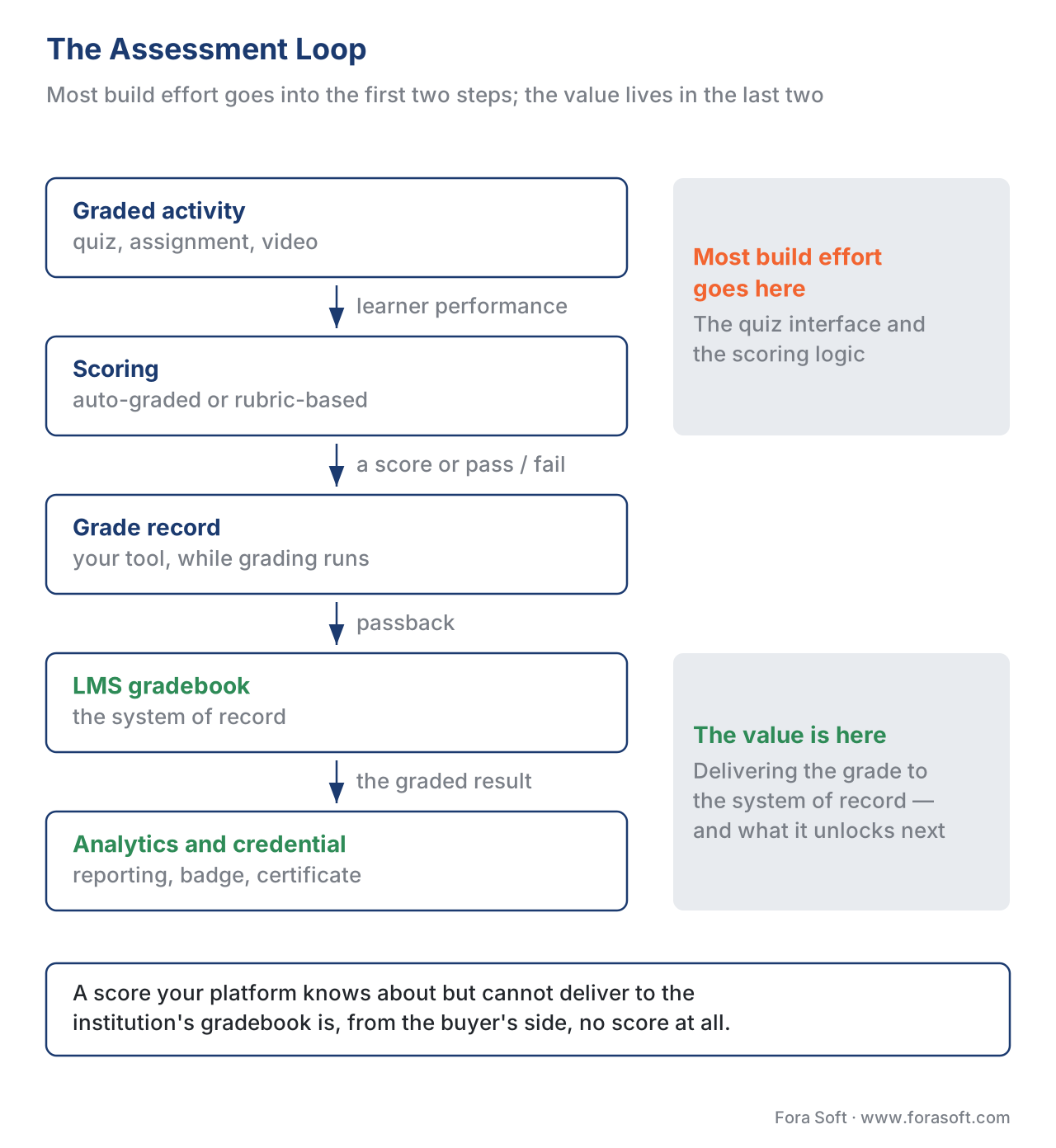 Figure 1. The assessment loop. Most build effort goes into the first two steps; the value lives in the last two — delivering the grade to the system of record and what it then unlocks.
The loop matters because most build effort goes into the first two steps — the quiz interface, the scoring logic — and the value lives in the last two. A score your platform knows about but cannot deliver to the institution's gradebook is, from the buyer's point of view, no score at all.
Two Ways to Grade, and Only One of Them Is Easy
"Grading" hides two very different jobs, and conflating them is the most common scoping mistake.
Auto-grading handles objective questions — multiple choice, true/false, numeric, matching — where the right answer is known in advance, so a computer can mark it instantly and identically every time. The interoperability standard here is QTI (Question and Test Interoperability), a 1EdTech standard now at version 3.0 that describes a question, its correct response, and the response processing rule that turns an answer into an outcome score. Because the rule is deterministic, auto-grading scales to a million learners at no extra cost and never disagrees with itself.
Rubric-based grading handles the work a machine cannot definitively mark — an essay, a recorded presentation, a design file, a clinical role-play captured on video. A rubric is a scoring guide: a set of criteria (say, "clarity", "evidence", "delivery"), each with levels and point values, so different graders judge the same work consistently. The rubric makes human judgment more consistent; it does not remove the judgment. Here is the honest part most vendors skip: there is no single dominant interoperability standard for the scoring rubric itself the way QTI standardizes objective items. QTI defines a rubricBlock, but that carries rubric guidance shown to a candidate or scorer — it is not a machine that applies the rubric and computes a defensible grade. Rubric models are mostly platform-specific (Canvas, Moodle, and others each have their own). So rubric scoring usually means a human grader, or an AI assistant that suggests a score a human confirms — never a silent automatic mark you would stake a certification on.
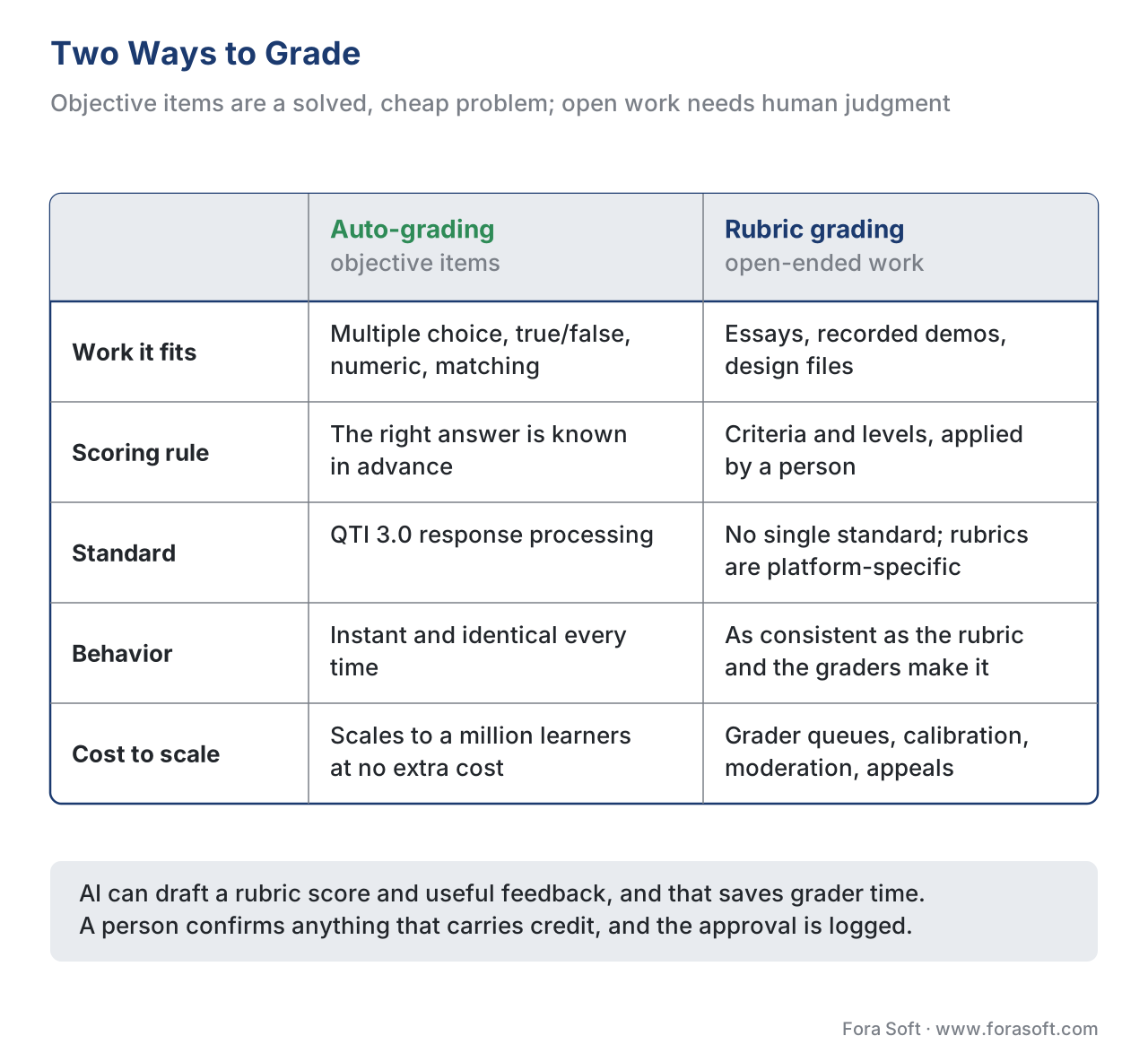 Figure 2. Two ways to grade. Objective items are a solved, cheap problem; rubric work is a judgment-and-workflow problem, and that is where the real engineering goes.
This split drives the build estimate. Objective auto-grading is a solved, cheap problem you should adopt from a QTI-capable engine. Rubric grading is a workflow problem — grader queues, calibration, moderation, appeals — and that workflow, plus how an AI suggestion is reviewed, is where your real engineering goes.
Common mistake: promising "AI auto-grades essays." A language model can draft a rubric score and useful feedback, and that genuinely saves grader time, but treating the machine's number as the final grade on a high-stakes assessment invites bias, gaming, and appeals you cannot defend. Keep a human in the loop on anything that carries credit, and log who approved the score.
Where Does the Grade Actually Live?
Before a grade can travel, you have to decide where it belongs — and "in our database" is the wrong default.
The gradebook of record is the single system whose grade is official. In a university or a corporate training program that is almost always the LMS, because that is where enrollment, credit, and compliance reporting already live. Your video tool may compute the score, but it should treat the LMS gradebook as the source of truth and write to it, not compete with it.
Three other stores hold copies for different jobs, and keeping their roles distinct saves you from the "which number is right?" support ticket. Your tool's own database holds the working score while grading is in progress. A Learning Record Store (LRS) — the database that holds xAPI statements, the "Maria scored 0.9 on the final" sentences — holds a rich event history for analytics, not the official grade. And a data warehouse holds the aggregated copy that feeds dashboards and the business. One system is authoritative; the rest are derived. Write that down before you integrate, because grading bugs are almost always disagreements between these copies.
How a Grade Travels Back: the Standards
Now the delivery problem. How the score reaches the gradebook of record depends on how your activity is connected to the LMS, and there are two worlds.
When your tool launches inside an LMS: LTI Advantage AGS
If your video assessment runs as an external tool the LMS launches — the LTI model, where your tool is shown a secure visitor badge and trusted inside Moodle, Canvas, or Blackboard — then grades travel back over LTI Advantage Assignment and Grade Services (AGS), version 2.0, a 1EdTech standard (Final Release, 16 April 2019). AGS is the modern replacement for the old LTI 1.1 "Basic Outcomes" service, which 1EdTech has deprecated in its favor.
AGS gives your tool three small web services, each gated by its own permission (an OAuth 2.0 scope — a labeled key that says what your access token may do):
- The Line Item service manages gradebook columns. A line item is one column — one gradable activity. Your tool can create the column itself (scope
…/lti-ags/scope/lineitem) or have it created at setup time through LTI Deep Linking, so an instructor never adds it by hand. - The Score service publishes a score for one learner into that column (scope
…/lti-ags/scope/score). - The Result service reads results back (scope
…/lti-ags/scope/result.readonly), GET-only — your tool can read the gradebook's view of a result but cannot overwrite it through this service.
The score your tool posts is a small JSON message (media type application/vnd.ims.lis.v1.score+json). Two of its fields cause more failed integrations than the rest combined, so define them precisely. activityProgress says how far the learner is through the activity — one of Initialized, Started, InProgress, Submitted, Completed. gradingProgress says how far grading has got — one of FullyGraded, Pending, PendingManual, Failed, NotReady. The LMS counts the number as a final grade only when gradingProgress is FullyGraded. Post a perfect score with gradingProgress: Pending and the learner sees nothing counted — the single most common "the grade didn't show up" bug.
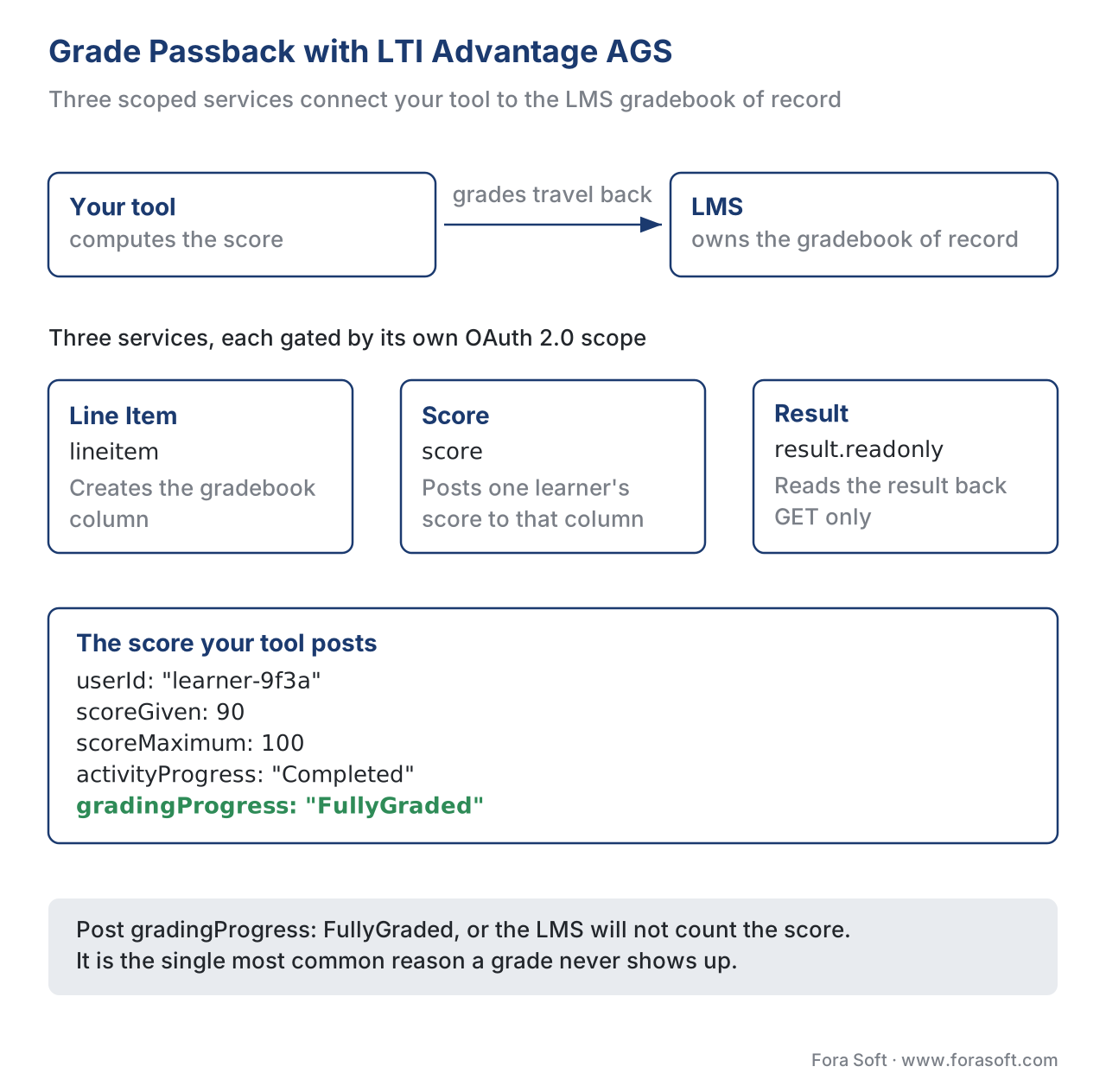 Figure 3. LTI Advantage AGS grade passback. Three scoped services connect your tool to the LMS gradebook; the LMS counts the score only when gradingProgress is FullyGraded.
POST {lineitem_url}/scores
Content-Type: application/vnd.ims.lis.v1.score+json

{
  "userId": "learner-9f3a",
  "scoreGiven": 90,
  "scoreMaximum": 100,
  "activityProgress": "Completed",
  "gradingProgress": "FullyGraded",
  "timestamp": "2026-06-21T14:05:00Z",
  "comment": "Module 4 video assessment"
}
When your content is a self-contained package: cmi5, SCORM, xAPI
If instead your course is a package the LMS imports and launches — not a live external tool — the score reports through the packaging standard. These are covered in depth in SCORM explained, xAPI explained, and cmi5 explained; here is only how each one carries the grade.
SCORM writes the score into the LMS through a fixed data model at run time. SCORM 1.2 uses a single status element, cmi.core.lesson_status (values such as passed, completed, failed, incomplete), and a 0–100 score in cmi.core.score.raw. SCORM 2004 splits status into two — cmi.completion_status (completed / incomplete) and cmi.success_status (passed / failed) — and adds a normalized cmi.score.scaled from −1 to 1. That split matters: a learner can complete every video and still fail the test, and SCORM 2004 can say so where 1.2 cannot.
xAPI (Experience API) carries the grade inside a statement's result object: a score with scaled (−1 to 1), raw, min, and max, plus booleans success (pass/fail) and completion. These fields deliberately mirror SCORM 2004's, and the statement lands in your LRS.
cmi5 is the bridge — an xAPI profile that defines the exact statements an LMS expects from a launched course (Passed, Failed, Completed, and others), so a packaged course reports pass/fail and score in a standard way. cmi5 adds a mastery score: a passing threshold the LMS sets, and the spec is strict about it — a Passed statement that carries a scaled score must have that score at or above the mastery score the LMS handed the course at launch. The course cannot declare a pass below the bar the institution set.
The comparison, on one screen
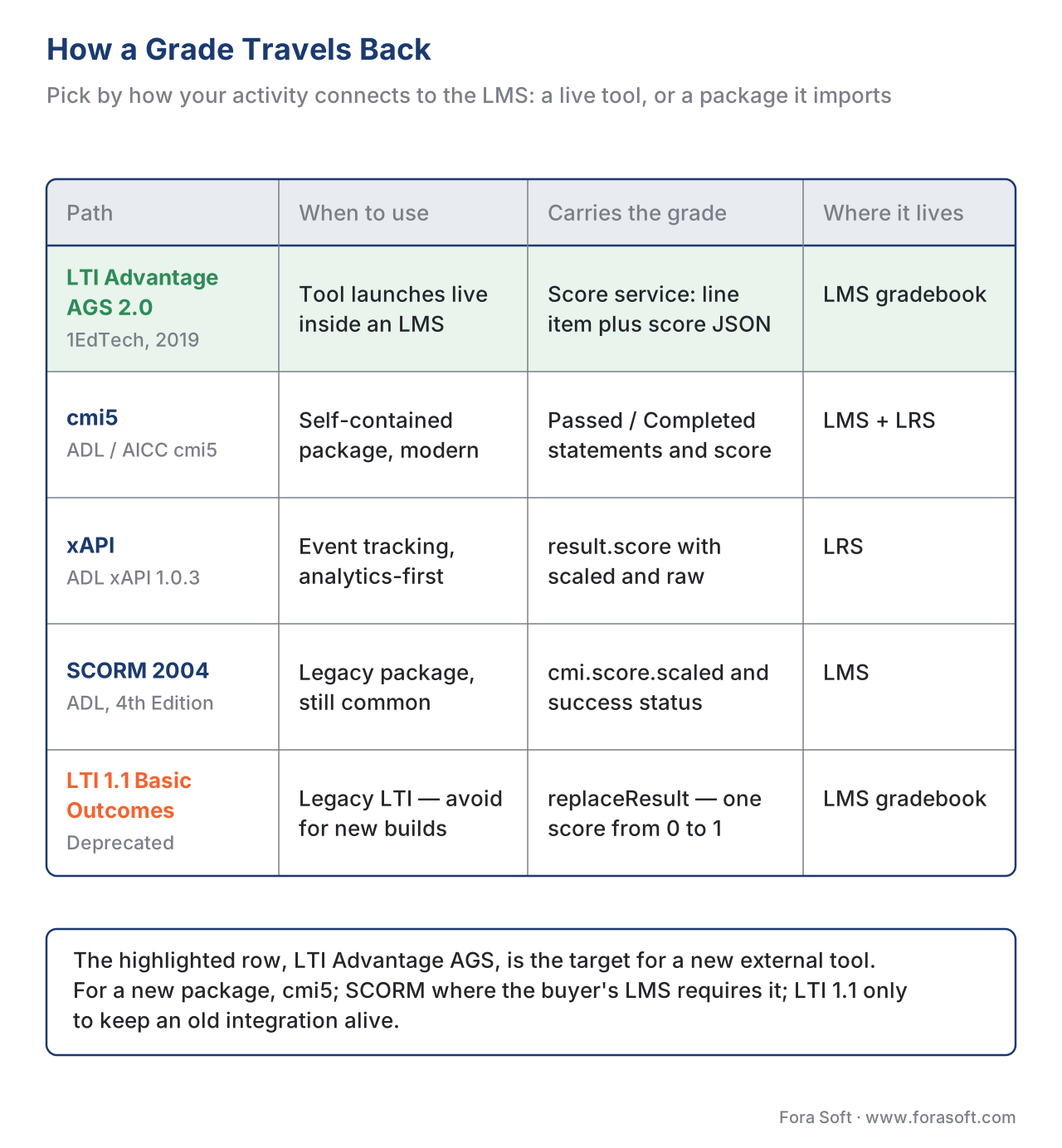 Figure 4. How a grade travels back, by integration type. For a new external tool, target AGS; for a new package, cmi5; SCORM where the buyer's LMS requires it; LTI 1.1 only to keep an old integration alive.
| Path | When you use it | What carries the grade | Where the grade lives | Standards |
|---|---|---|---|---|
| LTI Advantage AGS 2.0 | Tool launches live inside an LMS | Score service (line item + score JSON) | LMS gradebook (of record) | 1EdTech LTI Advantage AGS 2.0 |
| cmi5 | Self-contained package, modern | Passed/Completed statements + score |
LMS + LRS | ADL/AICC cmi5 · xAPI 1.0.3 |
| xAPI | Event tracking, analytics-first | result.score (scaled/raw/min/max) |
LRS | xAPI 1.0.3 (ADL) |
| SCORM 2004 | Legacy package, still common | cmi.score.scaled + success/completion |
LMS | ADL SCORM 2004 4th Ed. |
| LTI 1.1 Basic Outcomes | Legacy LTI — avoid for new builds | replaceResult, single 0–1 score |
LMS gradebook | Deprecated by 1EdTech (use AGS) |
The takeaway: for a new external tool, AGS is the target; for a new package, cmi5; SCORM where the buyer's LMS requires it; LTI 1.1 only to keep an old integration alive. Which standard, when, is the subject of SCORM vs xAPI vs cmi5 vs LTI.
The Arithmetic That Breaks Grade Passback
Numbers explain this better than prose, so walk one through. Suppose a learner answers 18 of 20 questions correctly on an in-video quiz.
raw score     = 18 correct out of 20
scaled score  = 18 ÷ 20 = 0.9        (the normalized 0–1 form xAPI and SCORM 2004 use)
Your gradebook column is worth 100 points. To post the right grade over AGS you rescale to the column's maximum:
scoreGiven    = 0.9 × 100 = 90
scoreMaximum  = 100
→ the learner sees 90 / 100 = 90%    ✓
Now the bug. A tired engineer posts the scaled value into scoreGiven but leaves scoreMaximum at 100:
scoreGiven    = 0.9                  (scaled value in the wrong field)
scoreMaximum  = 100
→ the learner sees 0.9 / 100 = 0.9%  ✗  — a class full of failing grades
The AGS spec lets the platform rescale scoreGiven to the line item's maximum, so a consistent pair (scoreGiven: 9, scoreMaximum: 10) is fine — the platform converts it. The failure is a mismatched pair: a scaled 0–1 number paired with a points maximum. Pick one convention — post raw points with a matching maximum — and the whole class of "everyone failed" tickets disappears.
Common mistake: treating "watched 100% of the video" as a grade. Watch-time is engagement, not mastery; completion is not a score. Map each to its own field — video progress to completion, the quiz to the score — or you will certify people for pressing play. This is the same confusion learning metrics 101 untangles.
Build vs Buy: Where the Line Sits
Lead with the trade-off, because it sets your roadmap. The passback plumbing — the LTI 1.3 security handshake, the OAuth 2.0 tokens, the AGS line-item and score calls, the SCORM and cmi5 run-time — is fiddly, security-sensitive, and certified by 1EdTech and ADL against conformance suites. Hand-rolling it is the classic way to ship an integration that passes your demo and fails in the customer's LMS. Buy or adopt a certified library for that layer, and let the LMS be your gradebook of record.
What you should own is the part specific to your product, the part that carries meaning: the scoring logic for your activity, the rubric definitions and the grader workflow, the mapping from your activity to a gradebook column, and the rule for what "passed" means. A worked cost sketch: a certified LTI Advantage library plus integration runs on the order of a few engineer-weeks; building and maintaining your own AGS, SCORM, and cmi5 stack to the same conformance is engineer-months up front and a standing maintenance cost as the specs version. For almost everyone, buying the plumbing and owning the judgment is the cheaper and safer split. The same logic runs through build vs buy vs extend an LMS.
Free download: Grade Passback Readiness ChecklistA one-page gate to run before shipping grading: define the gradebook contract (a line item per activity, an agreed score scale, a named gradebook of record), pick the grading method (QTI auto-grading for objective items, a human-confirmed rubric for open work), wire the passback path (LTI Advantage AGS scopes, activityProgress, gradingProgress: FullyGraded; cmi5 or SCORM for packages), and keep the score scale and data stores honest.Common mistake: building on LTI 1.1 Basic Outcomes in 2026. It is deprecated, carries only a single 0–1 score with no grading-status nuance, and locks you out of line items and rich results. New work targets LTI Advantage AGS.
Where Fora Soft Fits In
Fora Soft builds learning, assessment, and video products where a grade has to survive contact with a real institution's gradebook. The value we add is rarely a new scoring algorithm — it is the engineering judgment to wire grading correctly: to publish over LTI Advantage AGS with the right gradingProgress, to map an in-video quiz to a line item, to keep the LMS as the gradebook of record while an LRS holds the analytics history, and to design a rubric-and-review workflow that keeps a human accountable for high-stakes scores. We help teams decide what to buy — the certified passback plumbing — and what to own — what the grade means — so the number that reaches the gradebook is correct, defensible, and on time.



The handbook
Fora Soft Video Engineering Handbook
We wrote a seven-volume series that takes the whole video stack apart across 9,000+ pages — encoding, delivery, audio and AI — and someone who works through it can design and build the platform the graded activity in this article runs inside. Volume 3 sits closest: the player the in-video quiz lives in, delivery and CDN behaviour, DRM and key management, and the economics of running the thing you post grades from. Volume 7 covers the real-time and AI half — the assistant that drafts a rubric score a person then confirms, what serving it costs per stream-hour, and the regulatory surface around it — and volume 1 the encoding foundation the rest of the course stands on. Written by Nikolay Sapunov, CEO at Fora Soft.
Will the grade your product computes actually land in the customer’s gradebook?
Send us the activity you grade, the LMS your buyers run, and the standard their procurement team asks for — and we will come back with what to buy, what to own, and the score-scale convention that keeps the “everyone failed” ticket out of your inbox. 250+ video products shipped since 2005.
See our case studies
Case study
BrainCert
A WebRTC and HTML5 virtual-classroom LMS with 100K+ customers and 500M+ classroom minutes across 10 datacenters, with SCORM and xAPI support and proctored exams already in the product. It is the gradebook-of-record side of this article: when the LMS owns the official grade, your tool writes to it rather than competing with it.
Case study
Scholarly
Sydney’s selective-test prep platform: 15,000+ active users, live classes for up to 2,000 students at once, with quizzes, homework submission and review, LMS and CRM in one system on Kubernetes. Homework review at that volume is the rubric-and-workflow half of grading — queues, moderation, appeals — not the auto-marking half.
Case study
Tabsera
A multilingual K-12 LMS in English, French, Arabic and Turkish with quizzes, an interactive whiteboard and three roles — teachers, students with parental controls, and admins. Who may grade, who may see a score and in which language it is reported is the product-specific part you own even when the passback plumbing is bought.
What to read next
Standards
LTI Explained: Launching Tools Inside Any LMS
The launch and security model AGS rides on, one level down.
Decision
SCORM vs xAPI vs cmi5 vs LTI: Which Standard, When
The same five paths, decided instead of compared.
Interactive video
In-Player Quizzes and Polls: Design and Tracking
Where the score that travels back is produced in the first place.
Metrics
Learning Metrics 101: Completion, Progress, Mastery
Why watch-time is not a grade, and which field each one belongs in.
References
- Learning Tools Interoperability (LTI) Assignment and Grade Services Version 2.0 — Final Release, Spec Version 2.0, 16 April 2019 (Line Item, Score, and Result services; scopes; score JSON; activityProgress; gradingProgress; platform rescaling). 1EdTech Consortium (formerly IMS Global). Tier 1. https://www.imsglobal.org/spec/lti-ags/v2p0
- LTI Assignment and Grade Services 2.0 — OpenAPI specification (
application/vnd.ims.lis.v1.score+json; line item, score, and result endpoints). 1EdTech Consortium. Tier 1. https://www.imsglobal.org/spec/lti-ags/v2p0/openapi - Learning Tools Interoperability Basic Outcomes Version 1.1 — deprecated in favor of LTI AGS 2.0; migration from
replaceResult(single 0.0–1.0 score) to LTI 1.3 + AGS. 1EdTech Consortium. Tier 1. https://www.imsglobal.org/spec/lti-bo/v1p1 - Experience API (xAPI) Specification — Data (the Result object:
score.scaled−1..1,raw,min,max;success;completion; correspondence to SCORM 2004 CMI properties). Advanced Distributed Learning (ADL). Tier 1. https://github.com/adlnet/xAPI-Spec/blob/master/xAPI-Data.md - cmi5 Specification (Current) — "cmi5 defined" statements (
Passed,Failed,Completed,Satisfied); masteryScore rule: aPassedstatement's scaled score must be ≥ the masteryScore from LMS Launch Data; moveOn criteria. AICC / ADL. Tier 1. https://aicc.github.io/CMI-5_Spec_Current/ - Question and Test Interoperability (QTI) 3.0 — outcome declarations, response processing for automatic scoring of objective items,
rubricBlock, and Results Reporting. 1EdTech Consortium. Tier 1. https://www.imsglobal.org/spec/qti/v3p0/guide - Caliper Analytics 1.2 — Grading Profile:
GradeEvent(actionGraded), theScoreentity (scoreGiven,maxScore,attempt); auto-graded events take a SoftwareApplication actor. 1EdTech Consortium. Tier 1. https://www.imsglobal.org/spec/caliper/v1p2 - SCORM Run-Time Reference Chart — SCORM 1.2 (
cmi.core.lesson_status,cmi.core.score.raw) vs SCORM 2004 (cmi.completion_status,cmi.success_status,cmi.score.scaled). Rustici Software / SCORM.com. Tier 4 (vendor reference for the ADL SCORM data model). https://scorm.com/scorm-explained/technical-scorm/run-time/run-time-reference/ - cmi5: Technical 101 — Assignable Unit concepts (completion, pass/fail, score, duration), session/registration, "cmi5 defined" vs "cmi5 allowed" statements. Rustici Software / xAPI.com. Tier 4 (orientation). https://xapi.com/cmi5/cmi5-technical-101/
- LTI Advantage: Assignment and Grading Services — how a production LMS consumes AGS line items and scores. Instructure (Canvas) developer documentation. Tier 4 (deployer). https://developerdocs.instructure.com/services/canvas/external-tools/lti/file.assignment_tools
Per the editorial conflict rule, where popular articles claim a tool "logs the grade in," this article follows the spec: AGS posts a score to a line item and the LMS counts it only when gradingProgress is FullyGraded; and where vendors imply essays can be fully auto-graded, this article follows the standards' scope — QTI auto-scores objective items, while rubric scoring keeps human judgment in the loop.
