


Why This Matters
If you are an L&D director, an EdTech founder, or a product manager, note-taking and bookmarks look like a small "nice to have" — and that is exactly why they get built badly or skipped. They are one of the cheapest ways to lift the active-learning signal of a course: a learner who pauses to write a note is processing, not just playing the clip in the background. Shared annotation goes further, turning a solo video into a cohort conversation pinned to the exact second being discussed. But the moment a learner types a note, you are storing their words, tied to their identity and their progress — which makes this feature a quiet data-governance decision disguised as a UI widget. This article gives you the vocabulary to scope it correctly: what you are storing, how a note finds its way back to the right frame, how to sync it across a learner's devices, and the privacy rules that decide whether your note-taking feature is an asset or a liability. It is the learner-generated companion to Hotspots, overlays, and clickable video, which covers the layers you author; this one covers the layer your learners author.
First, What These Words Actually Mean
Start with a picture everyone knows: a paper textbook a student has actually used. There are sticky tabs marking pages they want to find again, a highlighter pen over the important sentences, and notes scribbled in the margin. Move that to video, and you get the three things this article is about.
A bookmark is the sticky tab. It is a saved position in the video — "remember 4 minutes 12 seconds" — with maybe a short label, that the learner can click to jump straight back. Its whole job is to find a moment again.
A note is the margin scribble. It is a piece of text the learner writes, attached to a moment (or a span) in the video — "this is the formula the exam asks about, at 4:12." A note carries the learner's own words; a bookmark just carries a position.
An annotation is the umbrella word for any learner-made marking laid over the content — it covers notes, highlights of a transcript passage, tags, drawings, and the threaded comments learners leave for each other. Bookmarks and notes are specific kinds of annotation. When a vendor says "annotation," ask which of these they actually mean, because the storage, the sync, and the privacy story differ.
Two more distinctions decide almost everything downstream. The first is private versus shared. A private note is for one learner's own study; a shared annotation is visible to a cohort, an instructor, or the public, and instantly becomes a social and a moderation feature. The second is point versus span. A note can hang on a single instant ("at 4:12") or on a range ("from 4:12 to 4:40") — and a tool that only does points cannot, for example, let a learner highlight a whole worked example.
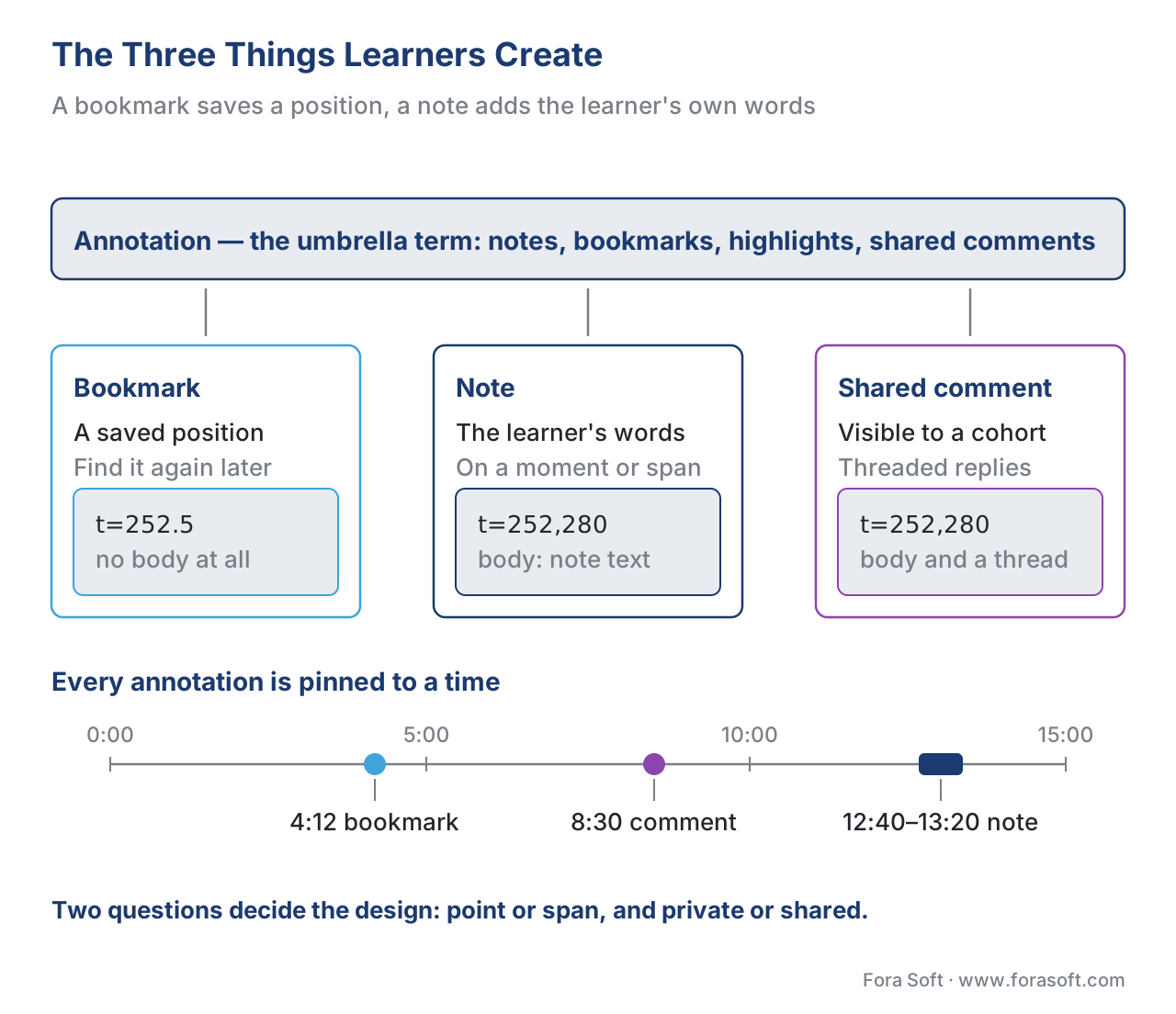 Figure 1. The three things learners create over a video. A bookmark saves a position, a note adds the learner's words to a moment or span, and "annotation" is the umbrella term covering both plus highlights and shared comments.
How a Timestamped Note Is Actually Stored
You do not need to be an engineer to make good build-vs-buy calls here, but one level of depth helps you ask the right questions and spot a weak implementation.
Every note, bookmark, and annotation reduces to the same two-part shape: where in the video it points, and what it carries. Get those two right and everything else is plumbing.
For the where, there is a web standard built precisely for pointing at a moment in a video: the Media Fragments URI specification from the W3C, the standards body for the web. It lets you address a slice of a media file by adding a fragment to its address. A temporal fragment looks like video.mp4#t=252.5 — meaning "the point 252.5 seconds in" — and a range looks like #t=252,280 — "from 252 to 280 seconds" (W3C Media Fragments URI 1.0). That single, tiny convention is all a bookmark needs to store, and all a note needs to know which frame it belongs to. Storing a raw timestamp number works too, but the Media Fragments syntax is the portable, standards-based form, and it handles spans as naturally as points.
For the what, and especially once notes get shared, there is a matching standard: the Web Annotation Data Model, published as a formal W3C Recommendation on 23 February 2017. Its core idea is exactly the separation this article keeps drawing: every annotation has a body — the content the person created, your note text — and a target — the thing being annotated, here the video. To pin the body to a precise slice of the target, the model uses a FragmentSelector whose conformsTo value is the Media Fragments specification — i.e., "this note targets the part of the video described by #t=252,280" (W3C Web Annotation Data Model, 2017). The two standards click together by design: Media Fragments says which slice, the Web Annotation Data Model says here is the note about that slice, in a portable JSON shape any other system can read.
Here is what one shared note looks like in that model, trimmed to the essentials:
{
  "@context": "http://www.w3.org/ns/anno.jsonld",
  "type": "Annotation",
  "creator": "https://lms.example.edu/users/lena",
  "created": "2026-06-20T10:32:00Z",
  "body": { "type": "TextualBody",
            "value": "This is the formula the exam asks about." },
  "target": {
    "source": "https://cdn.example.edu/calc-101/lecture-7.mp4",
    "selector": { "type": "FragmentSelector",
                  "conformsTo": "http://www.w3.org/TR/media-frags/",
                  "value": "t=252,280" }
  }
}
Read it in plain language and it is just a sentence: Lena created this text, about seconds 252–280 of lecture 7, at this time. A private bookmark is the same record with an empty body and a single-point selector (t=252.5). Because the shape is a published standard, a note created in one tool can in principle be read by another — which matters the day you migrate platforms or export a learner's data.
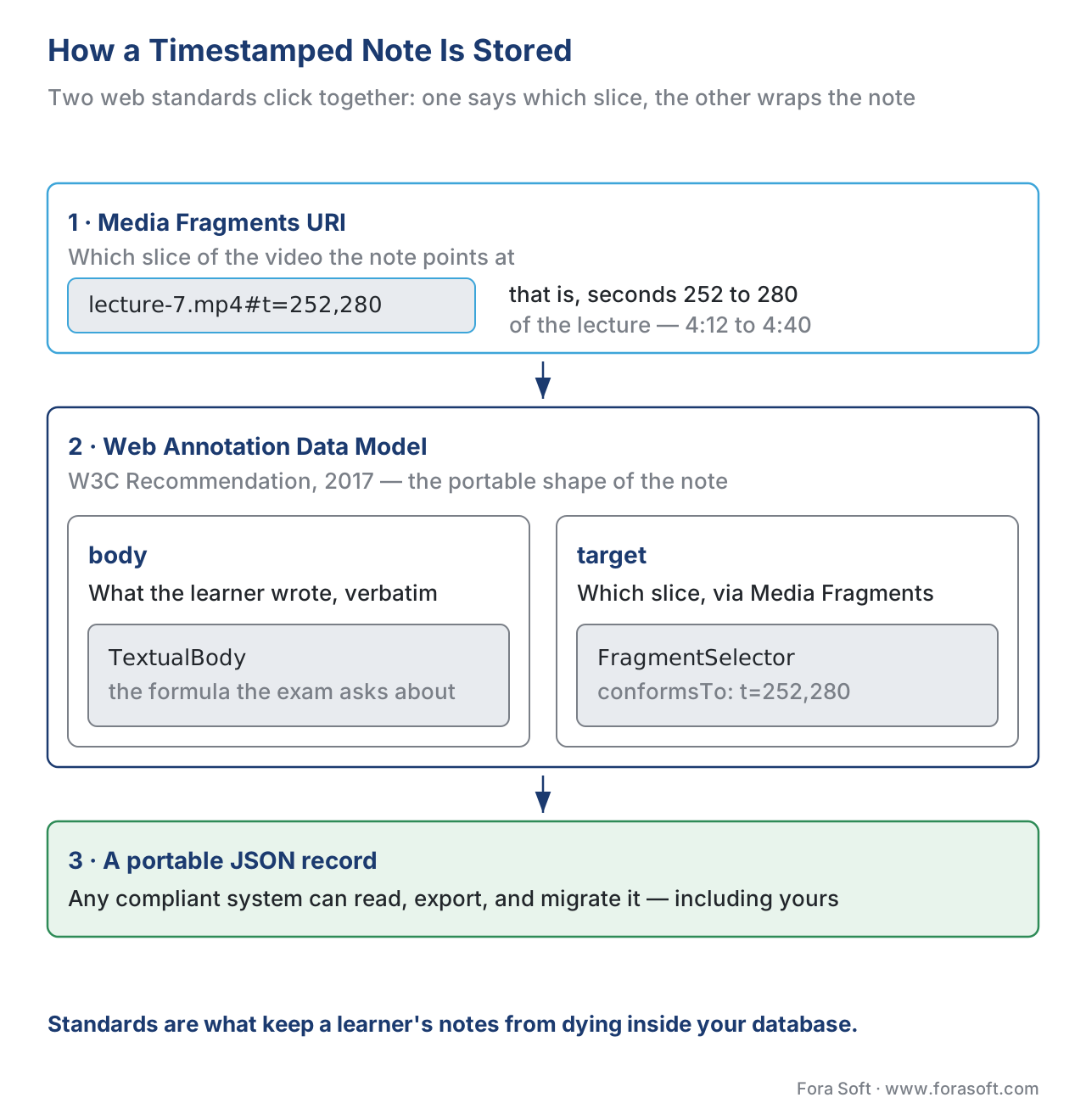 Figure 2. How a timestamped note is modelled. The Media Fragments URI says which slice of the video; the W3C Web Annotation Data Model wraps the learner's text (body) and the slice (target) into one portable JSON record.
Syncing Notes Across Devices and Learners
A note a learner writes on their laptop and cannot find on their phone is a broken feature. Sync is the part teams underestimate, so it is worth one clear pass.
Private notes need to follow the learner. The standard pattern is straightforward: the player keeps a local copy so the learner can write even on a flaky connection, and a small background service syncs those records to a server keyed to the learner's account. When they open the course on another device, their notes load from the server. The conflict cases are mild for private notes — one person editing their own text — so a "last write wins" rule, with the edit time you already store, is usually enough.
Shared annotation is a harder, more interesting problem, because now many people write against the same video and everyone needs to see each other's notes appear. This is where the third W3C document earns its place: the Web Annotation Protocol, the companion recommendation that defines how annotation systems exchange those JSON records over the web — create, read, update, delete, and discover annotations through ordinary web requests (W3C Web Annotation Protocol, 2017). Building shared annotation on that protocol, rather than a private format, is what lets your notes interoperate with other tools and survive a platform change. For near-real-time appearance during a live cohort session, you add a lightweight push channel (a WebSocket) so a new comment shows up for everyone within a second or two, the same way chat does.
The honest engineering note: private bookmarks and notes are a small, cheap feature; shared, moderated, real-time annotation across a cohort is a meaningful subsystem, with identity, permissions, threading, moderation, and notifications. Scope the two separately and do not let "let them take notes" quietly become "build a discussion platform" without a decision.
Tracking: Should a Note Count?
Because this whole section is about learning data, the question comes up: should the act of writing a note be tracked? It can be, and there is a clean standards path, but be deliberate about it.
The mechanism is the Experience API (xAPI) — a standard way for the player to write short sentences about what a learner did into a database called a Learning Record Store (LRS). Each sentence has the form actor – verb – object. For a note, ADL — the body that stewards xAPI — defines a ready-made verb: commented (http://adlnet.gov/expapi/verbs/commented), used to record that a learner added a comment, with the comment text carried in the statement's result (ADL xAPI verb vocabulary). So "Lena – commented – on lecture 7 at 4:12" can become a tracked, queryable event. Bookmarking is usually modelled with the more general interacted verb from the xAPI Video Profile, the same verb used for other player interactions (xAPI Video Profile, ADL). For the full treatment of video tracking, see Tracking video with the xAPI Video Profile.
Here is the deliberate part. Note-taking frequency is a genuine active-learning signal — learners who annotate tend to engage more deeply, a metric explored in Interaction frequency and active-learning signals. But the content of a private note is the learner's own thinking, and shipping every keystroke to an LRS turns a private study aid into surveillance. The defensible line: track that a note was made and where (the signal), and only store the note's text where the learner expects it to live — in their notes, or, with consent, in a shared cohort space. Tracking the act is analytics; harvesting the words is a privacy decision that needs a reason and a notice.
The Privacy Question You Cannot Skip
This is engineering guidance, not legal advice. Confirm specifics with qualified counsel.
The instant a learner writes a note, you are processing their personal data, and this is the part that most "let's add notes" plans miss. Two regimes set the floor for most learning products.
Under the EU's General Data Protection Regulation (GDPR, Regulation (EU) 2016/679), a learner's notes — text they wrote, tied to their identity — are personal data, and possibly more sensitive than they look if a note reveals health, beliefs, or opinions. GDPR's core duties apply: collect for a clear purpose, keep only as long as needed (storage limitation, Article 5(1)(e)), secure it, and let the learner access, export, and delete their own notes (the data-subject rights, Articles 15–17). Practically, that means a learner must be able to see all their notes, download them, and erase them — and "delete" must really delete, not just hide.
In the United States, where the product touches a school or university, the Family Educational Rights and Privacy Act (FERPA, 20 U.S.C. § 1232g) governs "education records." A learner's notes and annotations maintained by the institution can fall within that definition, which constrains who may see them and requires the school to be able to provide and amend them. If you sell to US education, your contract and your architecture must let the institution meet its FERPA obligations — including the "school official" arrangement that lets a vendor process the data on the school's behalf.
The design rules that keep you clear of both are not exotic. Default private: a learner's notes are theirs unless they choose to share. Make sharing an explicit, revocable act, and show clearly who can see a shared note before it is posted. Set a retention policy and honour deletion. Encrypt notes at rest and in transit. And keep shared annotation moderatable, because the moment learners can post to each other you have a harassment and a content-safety surface to manage. Region-specific add-on: products serving Russian users should also account for personal-data-localization duties under 152-ФЗ; the international GDPR/FERPA frame above remains the primary reference.
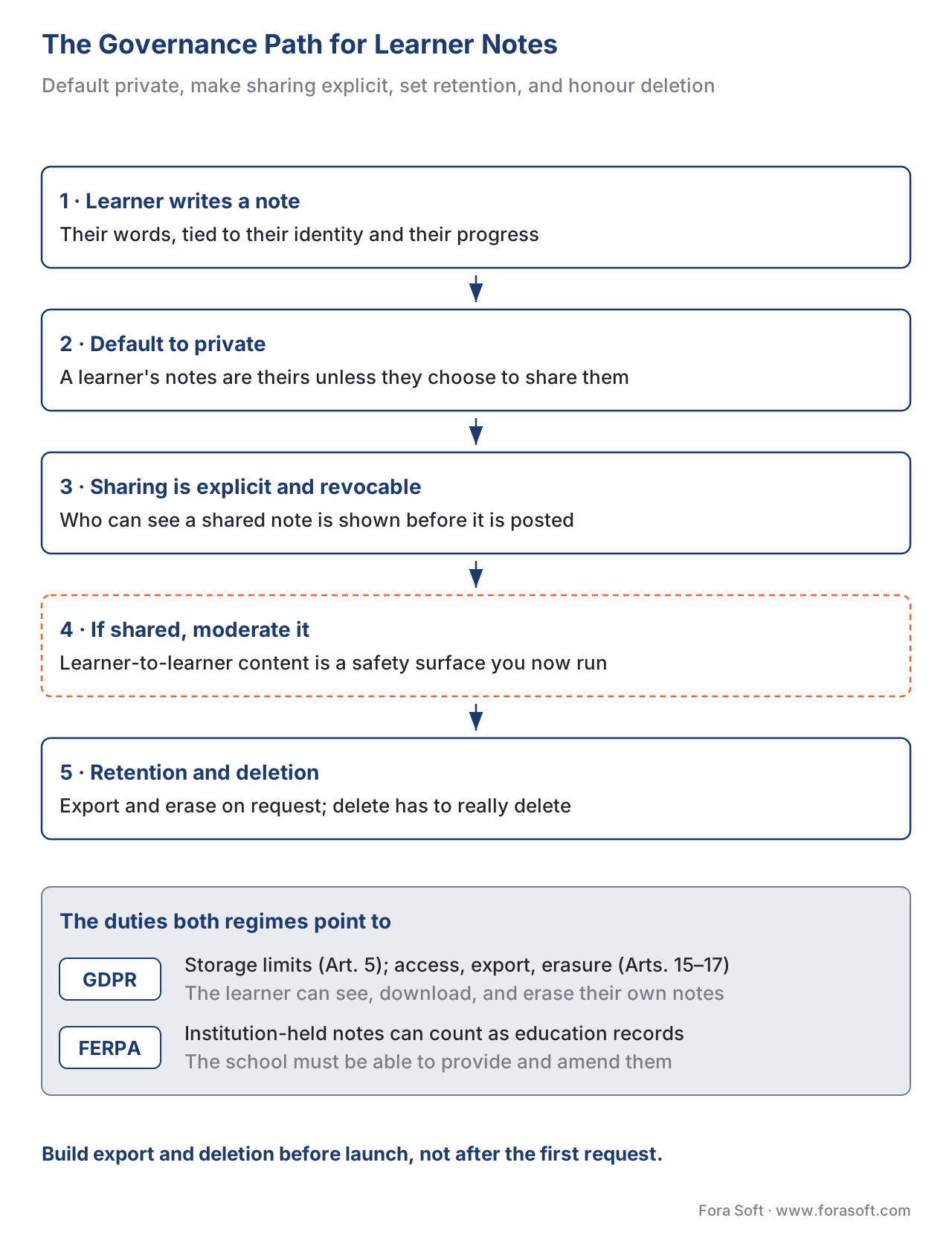 Figure 3. The governance path for learner-generated notes. Default to private, make sharing explicit and revocable, set retention and honour deletion — the duties GDPR and FERPA both point to.
Authoring and Build vs Buy
The good news for budgets: you rarely build note-taking from scratch, and you should not start by trying. The honest build-vs-buy picture looks like this.
| Option | What it is | Notes / bookmarks / shared annotation | Standards & tracking | Indicative cost (2026) |
|---|---|---|---|---|
| H5P | Open-source interactive content | Bookmarks and "submit screen"/notes-style fields; limited free-form annotation | xAPI built in; SCORM/cmi5/LTI via host | Free (self-host) / hosted plans |
| Annoto | In-video engagement layer | Threaded timestamped comments, notes, shared annotation for cohorts | xAPI, LTI; LMS integrations | Subscription / enterprise quote |
| Perusall | Social annotation platform | Collaborative annotation of documents and video for cohorts | LTI into the LMS | Institutional licence |
| VideoAnt (Univ. of Minnesota) | Free academic tool | Timestamped text comments and replies on a video's timeline | Standalone; limited export | Free (YouTube-focused) |
| Hypothesis | Open web-annotation standard tool | Shared annotation built on the W3C model; primarily web/PDF | Web Annotation standards, LTI | Free / institutional |
| Custom build | Your own notes layer on a player | Exactly what you design — private notes, sync, shared cohort annotation | Whatever you implement (recommend Web Annotation + Media Fragments + xAPI) | Project cost; full control |
Table 1. Note-taking and annotation options. The "standards & tracking" column is what decides whether notes can be tracked, exported, and moved between systems — a notes feature that locks the data in a proprietary blob is the one you will regret at migration time.
The pattern repeats the one this whole section keeps returning to: start with the cheapest tool that fits. Private bookmarks and notes are often a small addition to a player you already have. Shared, cohort-grade annotation is where hosted tools like Annoto or Perusall earn their fee — they have already solved threading, moderation, and LMS launch via LTI. You move to a custom build when you need private notes fully under your control, deep integration with your own analytics, branded UX, or — the most common trigger — privacy and data-residency control that an off-the-shelf tool cannot guarantee. When you do build, build on the standards above: the Web Annotation Data Model for the record, Media Fragments for the position, xAPI for the signal. That choice is what keeps the learner's notes portable and your product out of a lock-in corner.
A Common Mistake: Treating Notes as a Throwaway Widget
The pitfall that recurs is shipping note-taking as a quick UI feature — a text box and a save button — and discovering the consequences later. The notes live in a proprietary table no one can export, so a learner cannot take their study notes with them and the institution cannot meet a FERPA records request. There is no retention or deletion path, so a "delete my account" request leaves orphaned notes behind. Sharing was bolted on without moderation, and now there is unmoderated learner-to-learner content. And the notes never sync, so they vanish when the learner switches devices — the single fastest way to make learners stop trusting the feature.
The fix is to treat learner notes as learner data from day one. Decide private-versus-shared explicitly. Model the record on the Web Annotation Data Model so it is portable. Build deletion and export before launch, not after the first data-subject request. Default to private and make sharing a deliberate, revocable, moderatable act. And test sync on two devices before you call it done. The one-page checklist below walks the whole pre-flight.
Download the learner annotation privacy and sync checklist (PDF)
When Notes and Annotation Are the Right Tool
Because private notes and bookmarks are cheap, almost every learning video benefits from them — the question is whether to invest in shared annotation, which is a real subsystem.
Private notes and bookmarks earn their place in any self-paced course: they raise the active-learning signal, help learners build their own study artefact, and cost little. Reach for them by default. Shared annotation earns its cost when the pedagogy is social — a cohort-based course, a flipped classroom where learners discuss a lecture before class, a seminar that lives around a shared text or video. There, a comment pinned to 12:40 that three classmates reply to is the learning, not a sideshow. It is the natural partner of in-player quizzes and branching scenarios in the active-learning toolkit.
Shared annotation is not worth the moderation and privacy overhead for a one-way compliance video watched alone, and bookmarks alone are plenty when the goal is simply "let me find that part again." The honest default: ship private notes and bookmarks for everyone, and add shared annotation only where a cohort is genuinely learning together.
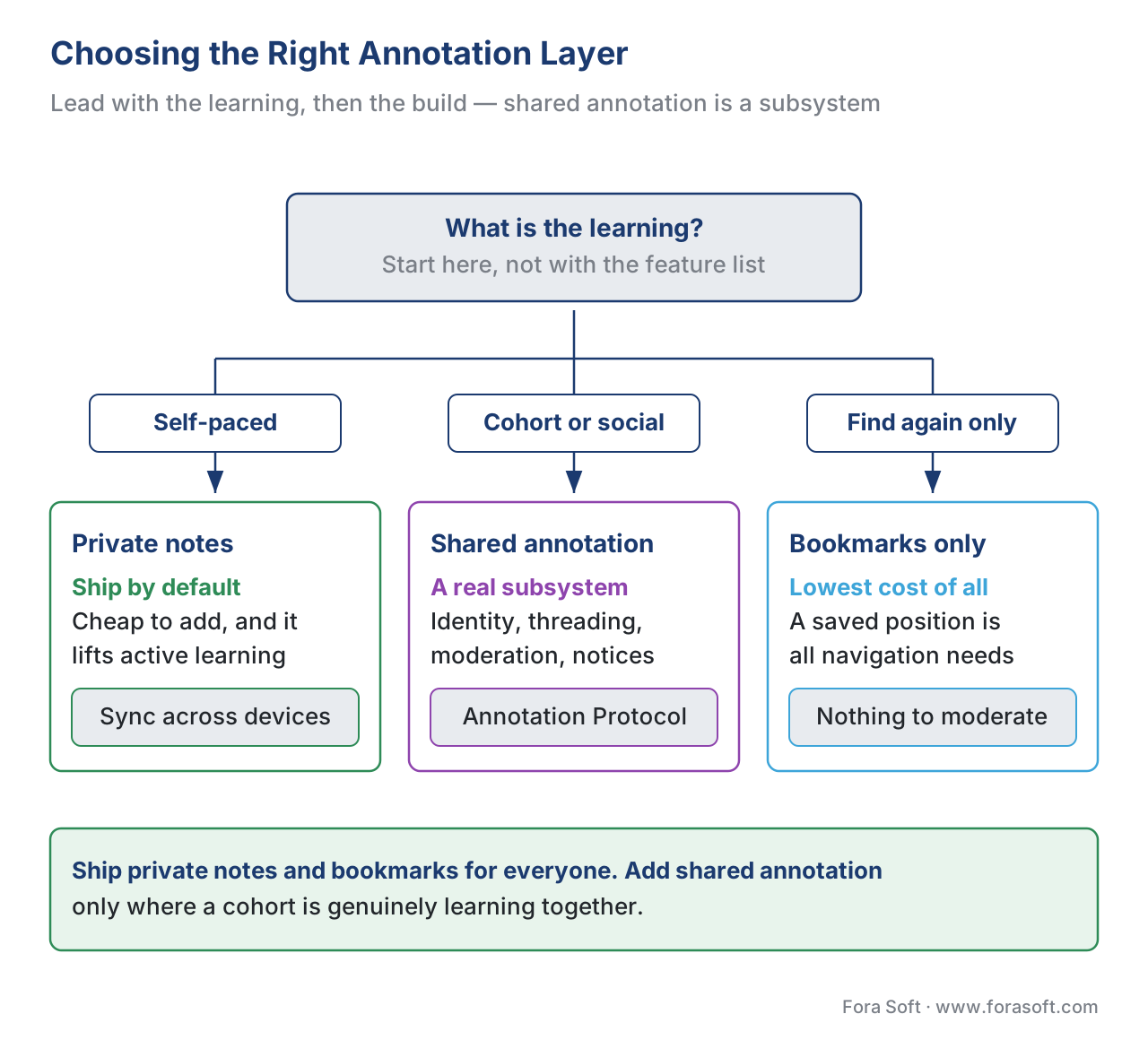 Figure 4. Choosing the right layer. Private notes and bookmarks fit any self-paced course; shared annotation fits cohort and social learning; bookmarks alone fit pure find-again navigation.
Where Fora Soft Fits In
Fora Soft has built custom video players and the data layers around them since 2005, and learner annotation sits exactly where two of our daily jobs meet: the player UI that captures a note against the right frame, and the storage, sync, and privacy layer that turns that note into safe, portable learner data. Teams come to us when an off-the-shelf annotation tool cannot give them the data-residency control, the private-by-default guarantees, or the integration with their own analytics that their buyers — often in regulated education or corporate L&D — require. We will say the honest thing first: for shared cohort annotation, start with a tool like Annoto or Perusall. When private notes fully under your control, full xAPI tracking, and GDPR/FERPA-grade governance genuinely warrant a custom build, we build it, with the same team that works across e-learning, video conferencing, OTT, telemedicine, and AR/VR.



The handbook
Fora Soft Video Engineering Handbook
We wrote a seven-volume series that takes the whole video stack apart across 9,000+ pages — encoding, delivery, audio and AI — so the layer that catches a learner’s note against the right frame is something you design on purpose. Volume 3 sits closest to this article: the player itself, its timeline and subtitle machinery, trick play, DRM, and the WebRTC path a shared comment rides on when a cohort watches together. Volume 6 covers the transcript and in-video search a note is usually anchored to, and volume 7 carries the same work into production — serving, cost, and the compliance rules that decide how learner data is stored and erased. Written by Nikolay Sapunov, CEO at Fora Soft.
Could a learner on your platform export every note they have written, and erase them?
Tell us what your player looks like today, whether notes stay private or a cohort shares them, and which regimes your buyers answer to — and we will come back with the record shape, the sync design, and the export and deletion paths that fit, plus what each part costs to build. 250+ video products shipped since 2005.
See our case studies
Case study
Tabsera
A multilingual K-12 LMS in English, French, Arabic and Turkish, whose mobile apps ship bookmarks and notes as a first-class feature rather than a text box bolted on late. It is the private half of this article in production: three user roles, and a learner’s own markings that follow them.
Case study
BrainCert
A WebRTC and HTML5 virtual-classroom LMS with 100K+ customers and 500M+ real-time classroom minutes, carrying SCORM and xAPI alongside SOC 2 Type II, ISO/IEC 27001, HIPAA and GDPR compliance. That pairing is the governance path above: learner records that are portable, and duties a buyer can audit.
Case study
Scholarly
Sydney’s selective-test prep platform for 15,000+ active users, running live classes for up to 2,000 students at once on LiveKit and WebRTC with a ClickHouse analytics layer behind them. That is the scale at which shared annotation stops being a widget and becomes the subsystem this article warns about.
What to read next
Interactive video
Hotspots, Overlays, and Clickable Video
The same timeline, but the layer you author instead of the one learners do.
Tracking
Tracking Video With xAPI: The Video Profile
How to record that a note was made without shipping the learner’s words.
Analytics
Interaction Frequency and Active-Learning Signals
What note-taking frequency actually tells you about a learner.
Privacy
Proctoring Data, Privacy, and the Legal Landscape
GDPR and FERPA again, on the highest-stakes learner data you will hold.
References
- Web Annotation Data Model — World Wide Web Consortium (W3C Recommendation, 23 February 2017). The body/target model, the
FragmentSelector, and theconformsTolink to Media Fragments used to pin a note to a slice of video. Tier 1. https://www.w3.org/TR/annotation-model/ - Web Annotation Protocol — W3C Recommendation, 23 February 2017. How annotation systems create, read, update, delete, and discover annotation records over HTTP — the basis for interoperable shared annotation. Tier 1. https://www.w3.org/TR/annotation-protocol/
- Media Fragments URI 1.0 (basic) — W3C Recommendation. The
#t=temporal fragment syntax (#t=252.5,#t=252,280) used to address a point or span in a video. Tier 1. https://www.w3.org/TR/media-frags/ - xAPI Video Profile — ADL Initiative (authored profiles). The
interactedverb for player interactions such as bookmarking, and the video activity type. Tier 1. https://github.com/adlnet/xapi-authored-profiles/tree/master/video - Experience API (xAPI) Specification, Version 1.0.3, Part 2: Statements (Data) — ADL Initiative. The actor–verb–object statement model and the Learning Record Store used to record that a note was made. Tier 1. https://github.com/adlnet/xAPI-Spec/blob/master/xAPI-Data.md
- ADL xAPI Verb Vocabulary —
commented— ADL Initiative. Thehttp://adlnet.gov/expapi/verbs/commentedverb, used to record that a learner added a comment, with the comment text in the statement result. Tier 1. https://registry.tincanapi.com/#home/verbs - Regulation (EU) 2016/679 (GDPR), Article 5 and Articles 15–17 — European Union. Personal-data principles (purpose and storage limitation) and the data-subject rights of access, rectification, and erasure that apply to learner notes. Tier 1. https://eur-lex.europa.eu/eli/reg/2016/679/oj
- Family Educational Rights and Privacy Act (FERPA), 20 U.S.C. § 1232g — U.S. Department of Education. The "education records" definition and the access/amendment duties that can cover institution-held learner annotations. Tier 1. https://www.ecfr.gov/current/title-34/subtitle-A/part-99
- Web Annotation API / using the Web Annotation Data Model — MDN Web Docs / W3C primers. Practical orientation on serializing annotations as JSON-LD. Tier 6. https://developer.mozilla.org/en-US/docs/Web/API
- Annoto — in-video engagement and collaborative annotation — Annoto. Hosted threaded timestamped comments, notes, and shared annotation layered onto existing players, with LTI/xAPI integration. Tier 4. https://www.annoto.net/
- VideoAnt — University of Minnesota. Free academic tool for timestamped text comments and replies along a video timeline. Tier 5. https://ant.umn.edu/
- Annotation Is Now a Web Standard — Hypothesis / web.hypothes.is. Context on the 2017 W3C Web Annotation recommendations and interoperable annotation. Tier 4. https://web.hypothes.is/blog/annotation-is-now-a-web-standard/
Where popular sources disagreed with the standards, the standards won: many vendor pages describe note-taking as a self-contained "feature" with its own private data format, but the W3C Web Annotation Data Model (2017) and Media Fragments URI specifications define a portable, interoperable way to store the same notes — and per GDPR Articles 15–17 and FERPA, the learner and the institution have rights over that data that a proprietary blob cannot satisfy. Those obligations come from the primary specs and laws, not the vendor summaries.
