


Why this matters
Of the two largest recurring compute lines in a streaming platform, egress decides most of the bill, but transcoding decides the rest — and unlike egress, you pay it again every time you add a codec, a resolution, or a new device target. A founder, product manager, or streaming CTO sizing a platform has to choose how the farm runs before a single title is encoded, and the wrong default quietly over-pays on every hour of content for the life of the catalog. This article is written for that decision-maker, not for the engineer tuning encoder flags: the codec mechanics live in the Video Encoding section, and we link out to them rather than re-derive. What stays here is the product-and-cost question — cloud versus on-prem, CPU versus GPU, real-time versus batch — and the arithmetic that tells you which one your catalog and audience actually need.
What the transcoding farm actually does
Start with the word. To transcode is to take one already-encoded master file — the high-quality intermediate the industry calls the mezzanine — decode it back to raw pictures, and re-encode it several times at the different resolutions and bitrates your players will request. Each of those re-encodes produces one rendition, one rung on the encoding ladder. A six-rung ladder means six encodes of every title. The transcoding farm is simply the fleet of machines that runs all those encodes in parallel, because doing them one at a time would take far too long for a real catalog.
Picture a print shop working from one master photograph. The photographer hands over a single high-resolution file, and the shop runs off a wallet print, a postcard, an A4, and a billboard — same image, many sizes, each cut for a different use. The transcoding farm is that shop for video: one mezzanine in, a ladder of sized-and-priced copies out. The shop's cost is the press time, not the original photo; the farm's cost is the compute, not the master.
Two properties of this cost matter before we price it. First, transcoding is a one-time cost per title in the sense that you encode a movie once and stream it a million times — but it is a recurring cost across the catalog and across time, because every new title pays it again, and so does every existing title the day you add a new codec (say AV1) or a new device tier. A catalog is never "done" being encoded. Second, the work is compute-bound, not storage-bound: the expensive part is the processor cycles spent compressing pixels, not the disk the result sits on. That is why the farm is its own line item, separate from the storage and the CDN.
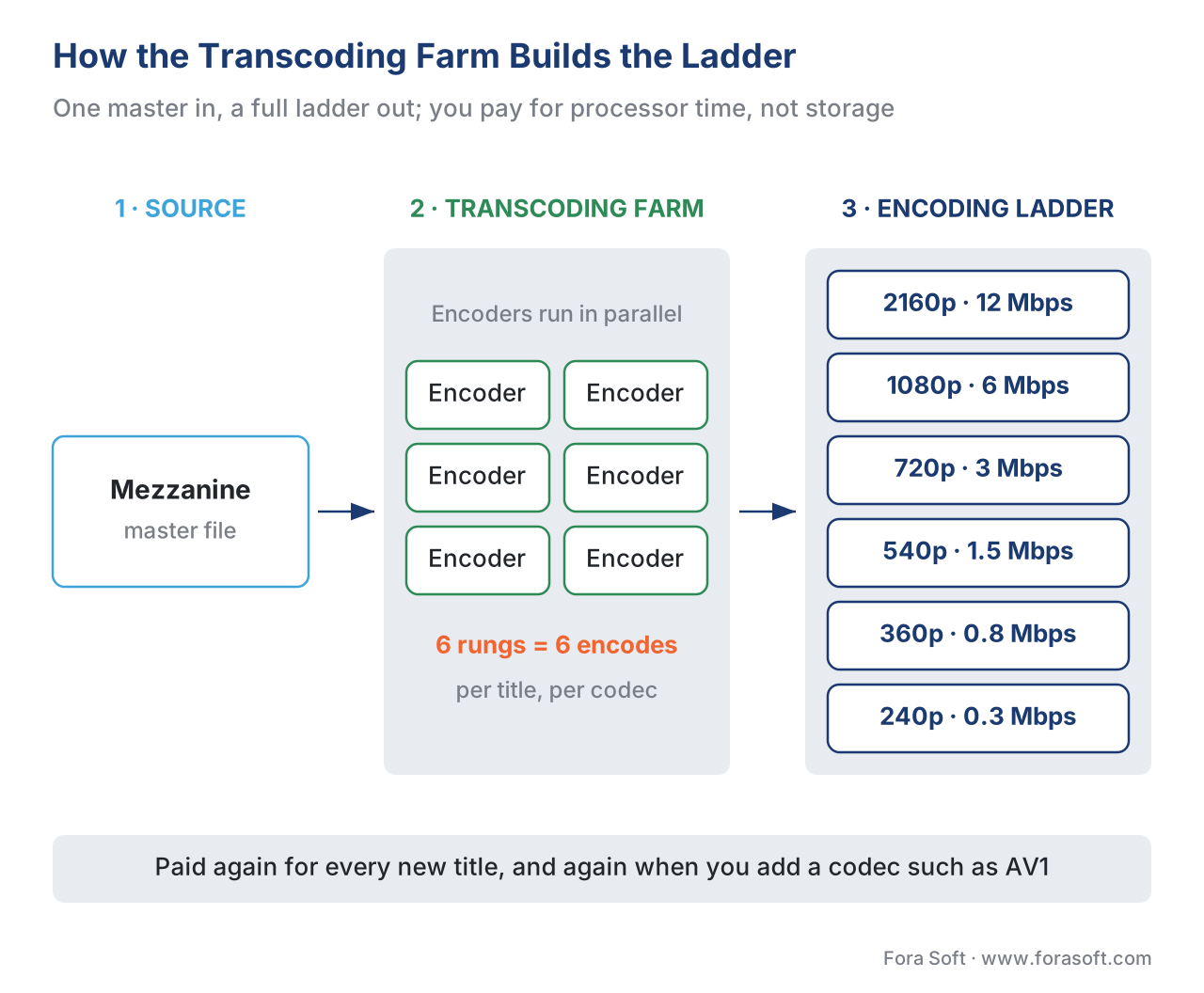 Figure 1. The transcoding farm turns one mezzanine into the whole ladder. Each rung is a separate encode; the farm runs them in parallel. The cost is processor time, paid again for every title and every new codec.
VOD and live are two different bills
Before choosing how to run the farm, separate the two jobs it can do, because they price completely differently.
Video-on-demand (VOD) transcoding is batch work. The file already exists; you can encode it faster than real time, in chunks, on whatever machines are cheapest, and if a machine dies mid-job you just retry the chunk. Nobody is waiting in real time for a specific second of output. This tolerance for interruption is what makes VOD transcoding cheap to run, and it is the reason the spot market (discussed below) fits it so well.
Live transcoding is real-time work. A camera feed arrives at one second per second and must leave at one second per second; the encoder can never fall behind, and there is no second chance at a missed moment. You pay for a machine to sit running for the whole broadcast whether the bitrate is busy or idle. That makes live a per-hour-of-channel cost rather than a per-hour-of-content cost, and it is structurally more expensive per delivered hour. The split between these two pipelines is the subject of live vs VOD: two pipelines, one platform; here we price each in turn, VOD first because it is where most catalogs spend most of their money.
The three ways to run the farm
There are three architectures, and most platforms end up using more than one. The cost model of each is different, so compare the models, not the logos.
1. Managed cloud services — you pay per minute of output
The simplest option is to hand the file to a cloud service and let it return the renditions. Two reference services, with their public 2026 list prices:
- AWS Elemental MediaConvert bills per minute of output. Its Basic tier lists at $0.0075 per minute for standard definition and $0.0150 per minute for HD using the H.264 codec, single-pass. Its Professional tier starts around $0.012 per minute of normalized output, with multipliers that compound — HD roughly doubles the base, the more efficient HEVC codec adds two-to-four times again, and multi-pass encoding adds another 3.5 times on top.
- Google Cloud Transcoder API bills per minute of output by resolution class: $0.015 per minute for SD (below 720p), $0.030 for HD (720p–1080p), and $0.060 for UHD/4K, with audio-only output at $0.005 per minute.
The crucial detail people miss is that the meter runs on output, not input. A one-hour master encoded into a six-rung ladder produces six hours of output, and you are billed for all six. Walk the arithmetic on the Google rates for a typical ladder of two SD rungs, three HD rungs, and one UHD rung:
one source hour → 6 output hours = 360 output minutes, split by rung:
  2 SD  rungs × 60 min × $0.015 = 120 min × $0.015 = $1.80
  3 HD  rungs × 60 min × $0.030 = 180 min × $0.030 = $5.40
  1 UHD rung  × 60 min × $0.060 =  60 min × $0.060 = $3.60
  ────────────────────────────────────────────────────────
  per source hour                                  = $10.80
The appeal is real: zero machines to run, instant elasticity, and you pay exactly nothing when no encoding is happening. The drawback is just as real: at a few cents per output minute, a large or fast-growing catalog watches the meter add up, and there is no idle discount because there is no idle.
2. Self-hosted ffmpeg — you pay per machine-hour
The second option is to rent ordinary cloud machines and run an open-source encoder — almost always ffmpeg — on them yourself, queuing jobs across the fleet. Now you are not paying per output minute; you are paying for machine time, and that changes the math because cloud machines have a deep discount most managed services cannot pass through: the spot market, where you rent a provider's spare capacity for a fraction of the standard on-demand price, with the catch that the provider can reclaim the machine on about two minutes' notice.
The discount is large. A compute instance that lists near $0.40 per hour on demand rents for roughly $0.10 per hour on the spot market — about a 75% cut. Because VOD transcoding is interruptible batch work, the two-minute reclaim notice is survivable: you split each title into chunks, and a reclaimed chunk simply re-runs elsewhere. One published cluster example put a 1,024-core fleet at about $51 per hour on demand versus roughly $15 per hour on spot — the difference between about $36,700 and $9,300 a month for the same throughput.
The appeal is the lowest unit cost at volume and full control over encoder settings. The cost you take on in exchange is operations: you run the job queue, handle spot interruptions, monitor failures, and keep the fleet patched. That engineering time is a real line item, which is why self-hosting rarely pays below a few hundred catalog-hours a month.
3. On-premises hardware — you pay up front
The third option is to buy the machines and run them in your own racks. This is a capital expense — pay once, then only power and maintenance — and it only beats rented cloud capacity at very large, steady volume, where the machines run hot enough, long enough, to amortize the purchase. For a streaming catalog with bursty encoding (a content drop, a back-catalog re-encode), the cloud's pay-for-what-you-use elasticity usually wins. On-prem earns its place for broadcasters and platforms with a constant, predictable encoding load that never goes idle.
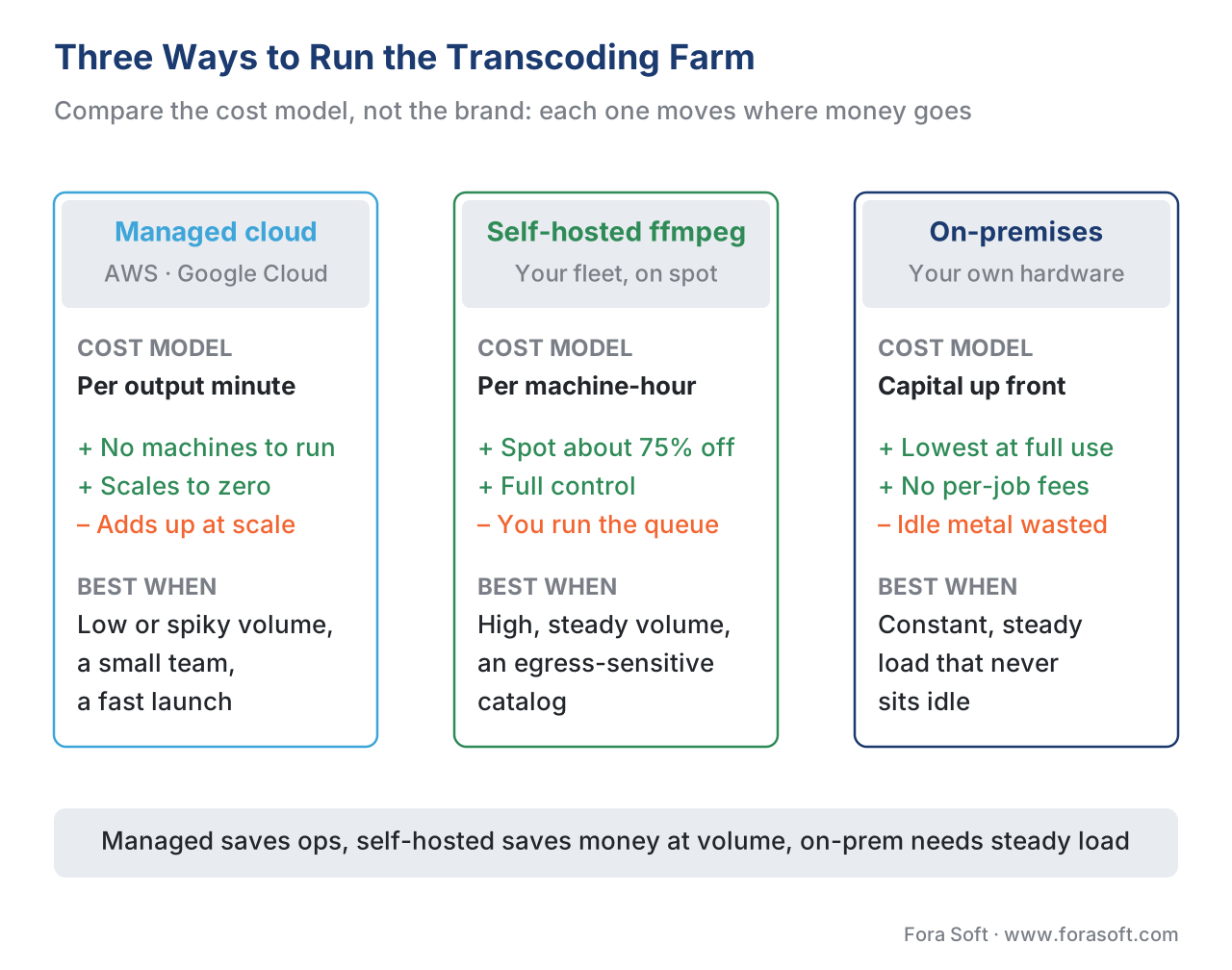 Figure 2. The same job, three cost shapes: managed cloud bills per output minute (no idle cost), self-hosted bills per machine-hour (cheap at volume, you run the ops), on-prem is capital up front (only at steady scale).
GPU versus CPU: speed and density against compression
Cutting across all three architectures is a second choice: encode on the machine's general-purpose processor (CPU) or on a graphics chip (GPU) built with a dedicated video encoder such as NVIDIA's NVENC. This is the trade-off that confuses the most teams, so state it plainly.
A GPU encoder is dramatically faster and denser. NVENC encodes 1080p at up to roughly 800 frames per second and 4K at up to roughly 200 frames per second, where a high-quality CPU encode (the x264 software encoder at its "slow" preset) on a 4K clip can run three to five times slower than the video's own runtime. The GPU also packs more simultaneous jobs onto one machine. For sheer throughput — a huge back-catalog to clear, or a long-tail library where speed matters more than the last byte — the GPU wins decisively.
The CPU's advantage is compression efficiency: at the same target quality, a slow software encode produces a smaller file than the GPU does. On most live-action content the gap is modest and modern NVENC lands close to the x264 "medium" preset in measured quality. But the GPU falls visibly behind on hard material — film grain, animation, fine high-detail textures — and for a preservation master or a broadcast-grade deliverable, a slow CPU encode with x264 or x265 is still the right tool. Which codec to reach for — H.264 for reach, HEVC or AV1 for efficiency — is the product decision in codec strategy for OTT, while the codec-by-codec mechanics live in Video Encoding; what matters for the farm is the cost consequence.
That consequence is the hinge of the whole article: a smaller file is not just a quality nicety — it is permanently lower egress. The CPU's extra compression saves bytes on every single view, forever. The GPU's speed saves processor time once, at encode. So the GPU-versus-CPU choice is really a question of which cost dominates for this title — the one-time encode or the lifetime delivery.
How much does it cost to transcode a catalog?
Put the two main options side by side on a real catalog: 10,000 hours of VOD, a six-rung ladder (two SD, three HD, one UHD). That is 60,000 output-hours, or 3.6 million output-minutes.
Managed cloud, at the per-rung Google rates we used above ($10.80 per source hour):
10,000 source hours × $10.80 per source hour = $108,000 to encode the catalog once
Self-hosted on spot, encoding the same ladder. Suppose one spot machine at ~$0.10/hour encodes a six-rung ladder for one source hour in about one hour of wall-clock time (a reasonable mid-range figure for CPU encoding several rungs in parallel per machine):
10,000 source hours × 1 machine-hour × $0.10 = $1,000 in raw compute
+ realistic overhead (failures, retries, orchestration, ~2×) ≈ $2,000
+ engineering time to build and run the queue (amortized) = the real cost
The raw-compute gap — roughly $108,000 against a few thousand dollars — looks decisive, and at this scale it is: a 10,000-hour catalog is comfortably past the break-even, and self-hosting saves real money. But notice what closes the gap at small scale. The managed bill is purely proportional — encode 100 hours and you pay about $1,080, with zero fixed cost. The self-hosted bill carries a fixed cost that has nothing to do with output: the engineering to build and operate the fleet. Below a few hundred hours a month, that fixed cost is larger than the entire managed bill, and the managed service is cheaper and simpler.
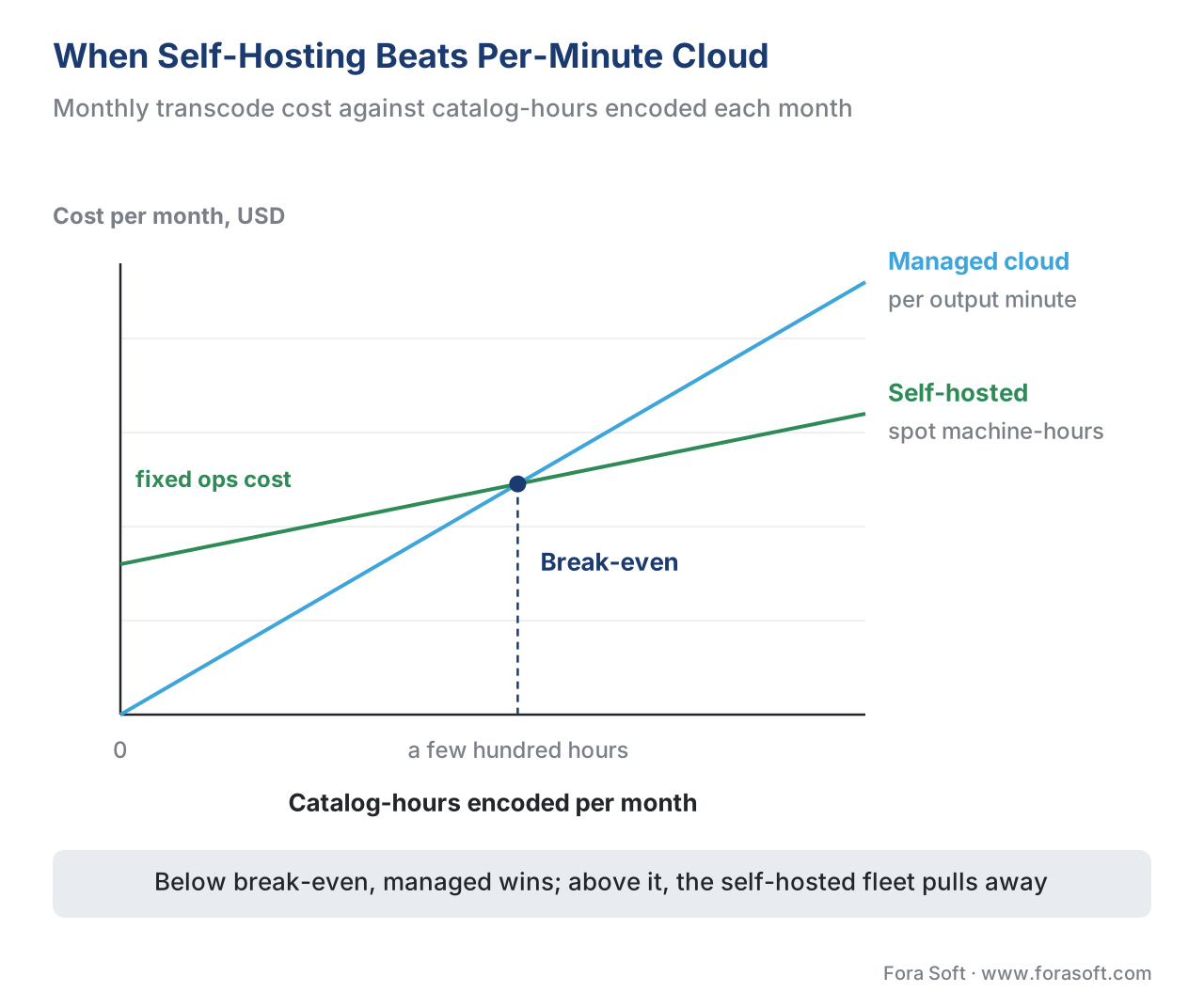 Figure 3. The break-even. Managed cloud is pure per-minute (no fixed cost, steep slope). Self-hosted carries a fixed ops cost but a far lower per-hour rate. Below the crossover, managed is cheaper; above it, self-hosting pulls away.
The number that actually decides: encode cost against lifetime egress
Here is the mistake that costs the most, and it is not picking the wrong service — it is optimizing the wrong cost. The encode is paid once; the egress is paid on every view. So the right encoding strategy for a title depends on how many times it will be watched.
Remember that egress is what the CDN charges to send bytes out to viewers, and it scales with file size times views — the single biggest recurring cost in streaming, unpacked in CDN cost engineering: egress, commits, and the 95th percentile. Take a tentpole title that will be streamed a million times. Spending more compute up front — a slow CPU encode, the efficient HEVC or AV1 codec, even per-title tuning — to shave 20% off the file size pays back a million times over in egress. For that title, you optimize bytes, and the encode cost barely registers against the delivery savings.
Now take a long-tail title that may be watched a hundred times, or never. Spending the same expensive compute to shrink it is money you will likely never recover, because there is almost no egress to save. For that title, you optimize the encode — fast GPU, a lighter preset — and accept a slightly larger file, because the bytes will rarely move. This is the same logic that drives per-title and context-aware encoding, and it is why a single farm strategy for the whole catalog leaves money on the table. The popular head wants the CPU; the long tail wants the GPU; the platform wants both, routed by predicted demand. All of it feeds the same bottom line in the OTT cost model.
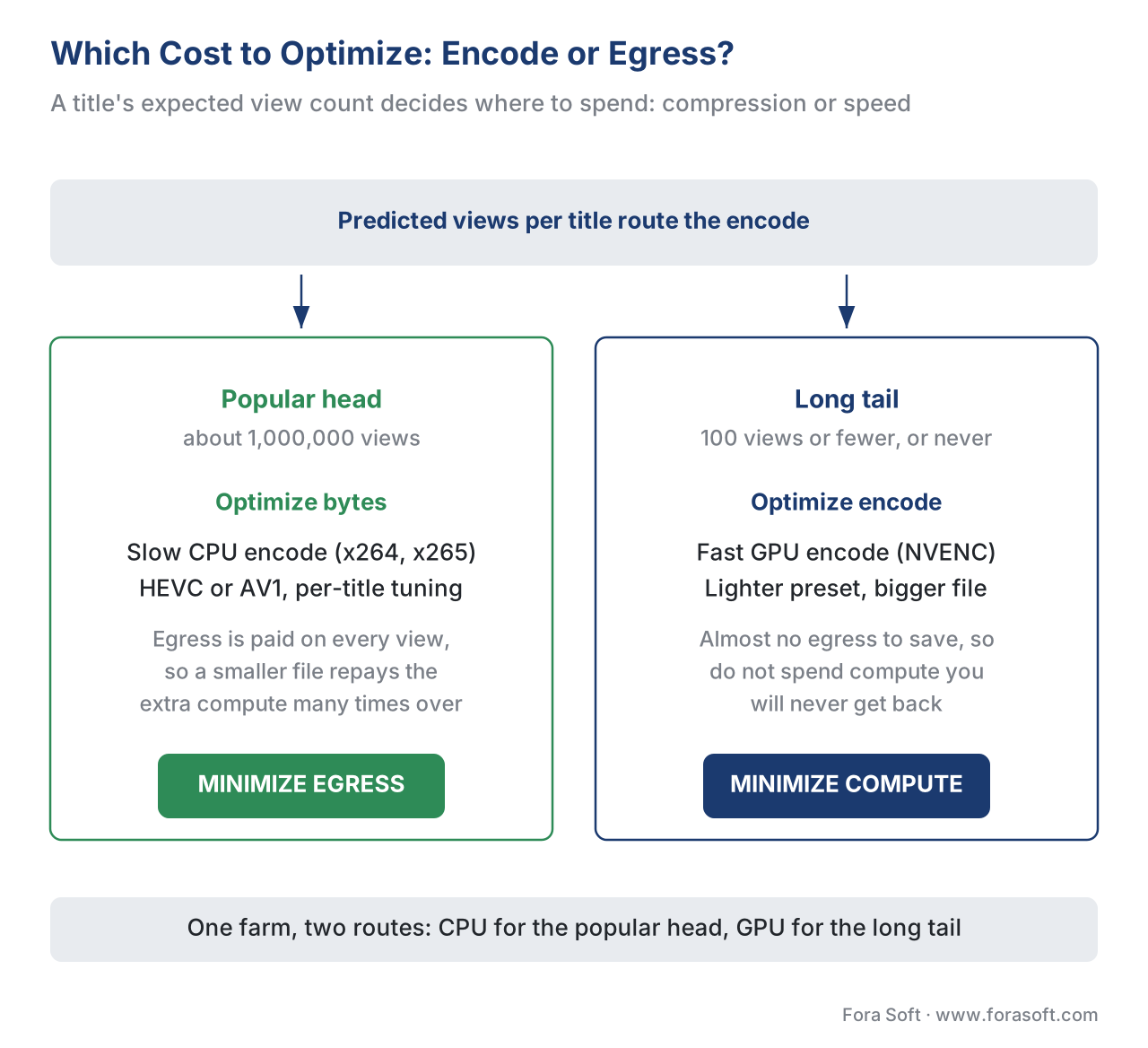 Figure 4. Let view count route the encode. A title bound for a million views earns expensive, byte-efficient CPU compression; a long-tail title that may never be watched gets fast, cheap GPU throughput instead.
Live transcoding is a separate, per-hour bill
Everything above prices VOD. Live is the other shape, and it is worth a number so the contrast is concrete. A managed live encoder such as AWS Elemental MediaLive bills per hour the channel runs: HD input lists around $0.77 per hour for the encode, and a realistic single channel with multiple inputs and a five-rung output ladder runs about $2.37 per hour all-in. A 24/7 HD channel is therefore roughly $550 to $1,250 a month for the encode alone, before any storage or CDN.
The point is not the exact figure — it is the shape. VOD compute scales with how much content you have; live compute scales with how many channel-hours you run, busy or idle. A platform that runs both needs to budget them separately, because a quiet live channel still costs a running machine while a quiet VOD library costs nothing to encode.
Choosing the farm: a comparison
| Approach | Cost model | Rough VOD cost, 1 source hr → 6 rungs | Ops burden | Elasticity | Best when |
|---|---|---|---|---|---|
| Managed cloud (MediaConvert, Transcoder API) | Per output minute | ~$5–$11 | Lowest — none | Instant, scales to zero | Low or spiky volume; small team; getting to market fast |
| Self-hosted CPU (ffmpeg on spot) | Per machine-hour | ~$0.10–$0.30 raw + ops | Highest — you run the queue | High, but you manage the fleet | High steady VOD volume; egress-sensitive catalog |
| Self-hosted GPU (NVENC fleet) | Per machine-hour | Lower still per job; denser | High — plus GPU tuning | High | Huge throughput; long-tail library; speed over last byte |
| On-premises hardware | Capital up front | Lowest at full use | High — you own the metal | None — fixed capacity | Constant, predictable load that never idles |
Table 1. The four farm approaches by cost shape and fit. The "best when" column is the decision: match the cost model to your volume pattern and your audience's view distribution, not to a vendor's brand. CPU saves egress; GPU saves time; managed saves ops; on-prem saves money only when it never sits idle.
A common mistake: pricing the farm on encode cost alone
The most expensive transcoding decisions come from comparing the wrong numbers. Three versions of the same error:
The first is choosing a service by its per-minute headline and forgetting the meter runs on output. A "cheap" $0.0150-per-minute HD rate becomes ten dollars a source hour once a six-rung ladder multiplies it — the ladder, not the rate, sets the bill.
The second is self-hosting too early. A team encoding 50 hours a month builds a spot-instance fleet to "save money," then spends more engineer-time babysitting spot interruptions than the entire managed bill would have cost. Below the break-even, the managed service is both cheaper and simpler; self-host when volume crosses the line, not before.
The third, and costliest, is optimizing encode when you should optimize egress, or the reverse. Running every title through a slow, multi-pass, top-codec encode "for quality" burns compute on long-tail content nobody will stream enough to justify it; running the whole catalog through the fastest GPU preset "for speed" inflates the file size of your most-watched titles and pays for it in egress a million times over. The fix is to let predicted demand route the title: bytes-first for the head, encode-first for the tail.
Free download: Transcoding-Farm Cost WorksheetA one-page worksheet for the managed-vs-self-hosted break-even on your own catalog: catalog-hours times ladder depth gives output-hours, then the managed per-minute rate against spot machine-hours plus ops — take the lower.Where Fora Soft fits in
Sizing and building a transcoding farm that holds its cost as a catalog grows — picking managed cloud versus a self-hosted spot fleet at the right break-even, routing popular titles to byte-efficient CPU encodes and the long tail to fast GPU throughput, and keeping the live and VOD pipelines budgeted apart — is the streaming engineering Fora Soft has done since 2005, across 625+ shipped projects for 400+ clients in video streaming, OTT/Internet TV, e-learning, telemedicine, and video surveillance. The work is exactly this: building the encode pipeline so its compute bill scales with the audience instead of outrunning it, and so every title is encoded the way its viewership justifies. When a media company needs a streaming platform whose transcoding cost stays sane from the first thousand hours to the first million, that pipeline engineering is the capability we bring.



The handbook
Fora Soft Video Engineering Handbook
We wrote a seven-volume handbook, 9,000+ pages, that takes the video stack from a single pixel to production, and someone who works through it can size and build the transcoding farm this article prices. Volume 1 sits closest to this page: what the x264, x265 and hardware encoders actually trade, why a slow preset buys a smaller file, and how the ladder multiplies every encode. Volume 3 follows those bytes to the CDN and the egress bill that decides which titles earn the slow encode, and volume 2 covers the ingest and HLS/DASH packaging the farm hands its renditions to. Written by Nikolay Sapunov, CEO at Fora Soft.
Managed cloud, a spot fleet or GPUs: where does your catalog cross the break-even?
Send us your catalog-hours per month, your ladder and your expected view distribution, and we will work out which titles belong on a managed service, which on a self-hosted CPU or GPU fleet, and what the encode bill and the egress bill look like together. 250+ video products shipped since 2005.
See our case studies
Case study
Mindbox
An AI video management system in 50+ deployments that pulls RTSP camera feeds through FFmpeg into HLS — a self-hosted ffmpeg pipeline that runs unattended, the ops side of the machine-hour model.
Case study
Speed.Space
Remote production recording at 1080p and 8 Mbps, used on Netflix, EA and HBO shoots, where the crew sets codec and bitrate per stream — encoder settings chosen for the output, not left at a default.
Case study
Worldcast Live
A concert platform pushing 1.5 Gbit/s to 10,000 simultaneous viewers at 0.4–0.5 s latency — the live, per-channel-hour shape of the bill, where every byte an encode saves is multiplied by the audience.
What to read next
Encoding economics
Per-Title Encoding Economics: Lower Your CDN Bill
Spend encode effort where the views will repay it in egress.
Cost model
OTT Platform Cost Model: Build & Run Costs (2026)
Where the transcoding line sits in the whole platform bill.
Pipelines
Live vs VOD: Two Pipelines, One Platform
Why live encoding is billed per channel-hour and VOD per title.
Codecs
Codec Strategy for OTT: H.264, HEVC, AV1 and VVC
The codec choices that multiply the ladder the farm encodes.
References
- AWS Elemental MediaConvert pricing — Amazon Web Services (2026). Per-minute-of-output billing; Basic tier $0.0075/min SD and $0.0150/min HD (AVC, single-pass); Professional tier from ~$0.012/min normalized output with compounding resolution/codec/frame-rate multipliers (HD ≈ 2×, HEVC +2–4×, multi-pass +3.5×); on-demand volume discounts. Dated vendor pricing — re-verify. Tier 3 (first-party vendor). https://aws.amazon.com/mediaconvert/pricing/ (accessed 2026-06-16)
- Google Cloud Transcoder API pricing — Google Cloud (2026). Per-minute-of-output by resolution class: SD (<720p) $0.015/min, HD (720p–1080p) $0.030/min, UHD/4K $0.060/min; audio-only $0.005/min; auto-subtitles $0.50/subtitle/min. Billed per output stream, so renditions multiply. Dated vendor pricing — re-verify. Tier 3 (first-party vendor). https://cloud.google.com/transcoder/pricing (accessed 2026-06-16)
- AWS Elemental MediaLive pricing — Amazon Web Services (2026). Live encode billed per channel-hour; HD input ~$0.77/hr; representative multi-input five-output channel ~$2.37/hr all-in; 24/7 HD channel ≈ $550–$1,250/month for encode before storage/CDN. The per-channel-hour shape of live vs per-content-hour VOD. Tier 3 (first-party vendor). https://aws.amazon.com/medialive/pricing/ (accessed 2026-06-16)
- Run open-source FFmpeg at lower cost on VT1 instances for VOD encoding — AWS Open Source Blog (2024). Purpose-built media-accelerator instances (Xilinx U30) deliver higher encode density and lower cost per stream than general CPU for VOD H.264/HEVC; reference architecture for a self-hosted farm. Tier 3 (first-party engineering). https://aws.amazon.com/blogs/opensource/run-open-source-ffmpeg-at-lower-cost-and-better-performance-on-a-vt1-instance-for-vod-encoding-workloads/ (accessed 2026-06-16)
- How to run FFmpeg on AWS Spot Instances for scalable, low-cost video processing — IMG.LY (2026). Spot capacity at a deep discount to on-demand (≈ $0.10 vs ≈ $0.40/hr on a representative instance); two-minute interruption notice; chunk jobs for resilience. The economics of a self-hosted spot fleet. Tier 5 (industry engineering blog). https://img.ly/blog/how-to-run-ffmpeg-on-aws-spot-instances-for-scalable-low-cost-video-processing/ (accessed 2026-06-16)
- Use Spot Instance pricing for video encoding workflows (Bitmovin containerized encoding) — AWS Startups Blog. Worked example: a 1,024-core encoding cluster at ~$51/hr on-demand versus ~$15/hr on spot (~$36.7k vs ~$9.3k/month) for equal throughput; spot fits interruptible VOD encoding. Tier 3 (first-party engineering). https://aws.amazon.com/blogs/startups/use-spot-instance-pricing-for-your-video-encoding-workflows-with-bitmovin-containerized-encoding/ (accessed 2026-06-16)
- NVIDIA Video Codec SDK — encoding benchmarks (Ada, July 2023) — NVIDIA (2023). NVENC throughput (1080p up to ~800 fps; 4K up to ~200 fps) and multi-session density per chip; quality near x264 "medium" on live-action with measured VMAF. The GPU speed/density case. Tier 3 (first-party engineering). https://developer.download.nvidia.com/designworks/video-codec-sdk/Video-Benchmark-Ada-July-2023.pdf (accessed 2026-06-16)
- NVENC vs CPU encoding — VMAF analysis — Igor's Lab (2023). Independent VMAF comparison: modern NVENC ≈ x264 medium on most content but falls behind slow CPU presets on fine detail, grain, and animation; CPU keeps the compression-efficiency edge that lowers egress. Tier 5 (independent benchmark). https://www.igorslab.de/en/nvidias-nvenc-vs-cpu-encoding-the-turing-video-encoder-for-twitch-streaming-co-comparison-analysis-with-netflix-vmaf/ (accessed 2026-06-16)
- FFmpeg vs AWS MediaConvert: cost-per-minute breakdown — 32blog (2026). Walks the per-output-minute managed model against self-hosted ffmpeg compute and locates a break-even in the low hundreds of jobs per month; useful as an order-of-magnitude check, not a universal constant. Tier 5 (industry blog). https://32blog.com/en/ffmpeg/ffmpeg-vs-aws-mediaconvert-cost (accessed 2026-06-16)
- Per-Title Encode Optimization — Netflix Technology Blog. The reference case for tuning encode effort to content (and, by extension, to demand): spend compute where the bytes will be delivered enough to repay it. Anchors the encode-cost-vs-lifetime-egress argument. Tier 4 (first-party engineering). https://netflixtechblog.com/per-title-encode-optimization-7e99442b62a2 (accessed 2026-06-16)
Source note (per §4.3.2): this is a cost/architecture article, so the controlling sources are first-party vendor pricing pages (refs 1–4, 6) and first-party encoder benchmarks (ref 7), dated because vendor prices and chip capabilities change. Codec mechanics are deliberately linked out to Video Encoding rather than re-derived. Independent benchmarks (ref 8) and industry cost breakdowns (refs 5, 9) are used for orientation and cross-check; the break-even figures are presented as order-of-magnitude planning ranges, not guarantees. No standards claim is made that would require a tier-1 spec; where one is touched (codec behavior) the article points to the section that owns it.
