


Why this matters
If you build a streaming service, a conferencing tool, or any product that records or plays sound, the frame is the unit your whole audio pipeline is built on — and almost nobody outside the codec team ever looks at it. Yet it explains the bugs you do see: why a call has a fixed floor of delay you can't tune away, why seeking in a podcast lands a fraction of a second off, why a dropped network packet silences a precise little gap rather than the whole stream, and why two audio tracks that should line up drift apart. This article gives a product manager or developer the vocabulary to reason about frames, packets, and the latency they create — enough to read a codec setting, talk to an engineer, and know which knob actually moves the delay.
The one idea: a codec can only work on a whole chunk at a time
Start with the fact that explains everything else. A modern audio codec cannot compress sound one sample at a time. It needs a block of samples to look at together, because the trick every codec uses — turning the wave into a set of frequencies and throwing away the ones your ear won't miss — only works on a chunk, never on a single point. That chunk is the frame: the smallest unit of audio the codec can encode or decode on its own, without needing any other frame to make sense of it.
The everyday analogy is a movie. A film is not one continuous image; it is a sequence of still frames shown fast enough to look like motion. Audio is the same idea in the time direction. The microphone produces a smooth stream of measurements — 48,000 of them every second for video audio (see sample rate) — and the codec scoops them up in fixed handfuls, compresses each handful into a small packet of bytes, and ships them out one after another. Play the packets back in order and the smooth sound returns.
Two things to keep from this section. First, the frame is a unit of time, even though it is measured in samples: 1,024 samples at 48,000 samples per second is a slice of time. Second, the frame is the atom of the whole pipeline — you cannot decode half a frame, you cannot seek to the middle of one, and you cannot send less than one over the network. Every number that follows is a consequence of that.
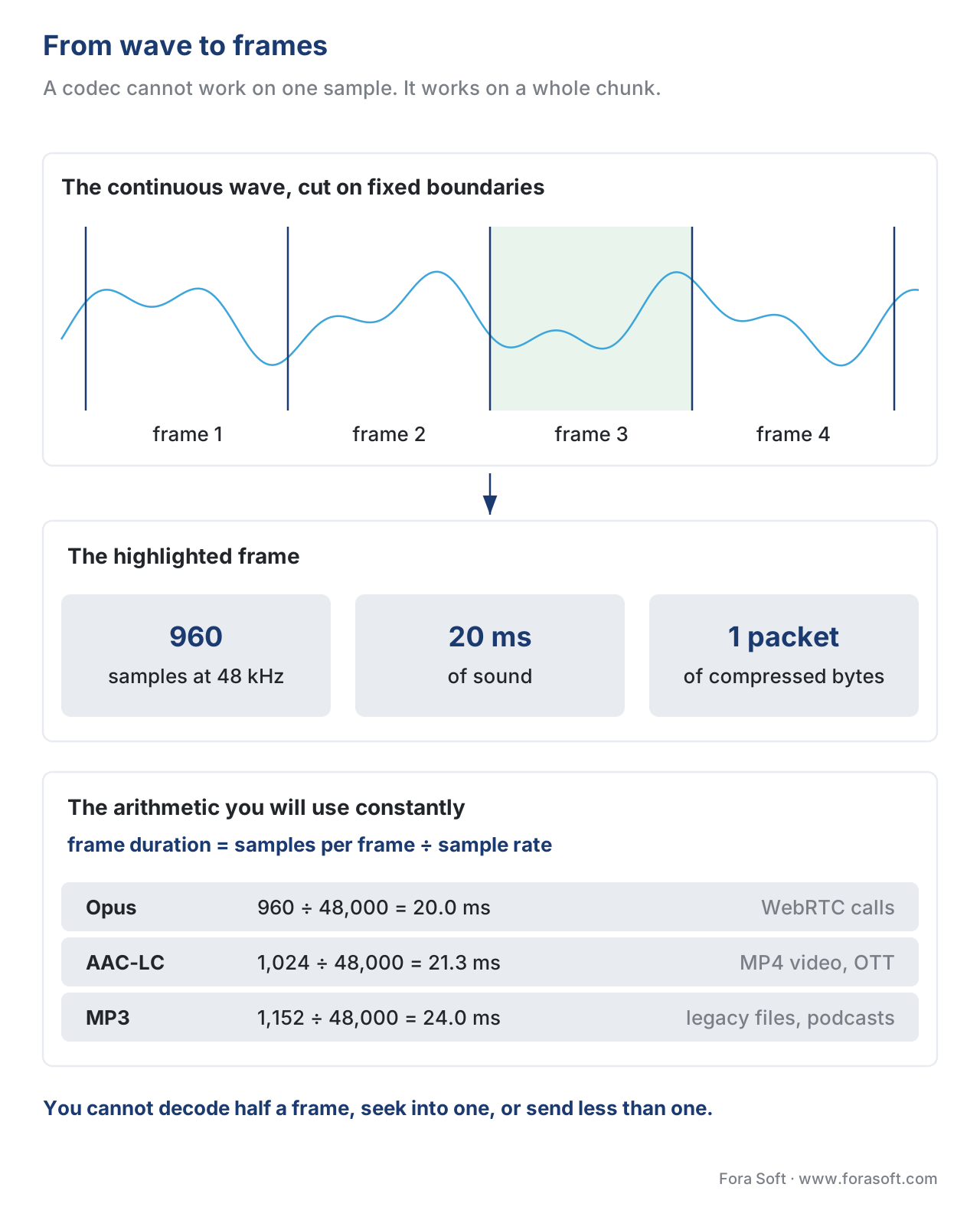 Figure 1. The codec scoops the continuous wave into fixed handfuls. Each frame becomes one small compressed packet of bytes.
From samples to milliseconds: the arithmetic you'll use constantly
A frame is given in samples, but what you care about is how many milliseconds of sound it holds, because milliseconds are what the user feels as delay. The conversion is one division, and it is worth doing out loud once so the numbers stop being mysterious.
Take AAC, the most common codec in video files, which uses a frame of 1,024 samples. At the standard video sample rate of 48,000 samples per second:
frame duration = samples per frame ÷ sample rate
               = 1,024 ÷ 48,000
               = 0.02133 seconds
               = 21.3 milliseconds
So one AAC frame is about 21.3 milliseconds of sound. Run the same division for MP3's 1,152-sample frame and you get 24 milliseconds; for an Opus frame set to 960 samples you get exactly 20 milliseconds. This is why "about 20 to 25 milliseconds" is the size of nearly every audio frame you will ever meet — it is not a coincidence or a standard committee's choice, it is what 1,000-ish samples works out to at the sample rates video uses. Smaller frames mean lower delay but worse compression; bigger frames compress better but add delay. Every codec picks a spot on that trade-off.
Granules: the extra layer inside MP3 (and why you'll see the word)
MP3 adds one wrinkle worth knowing because the term shows up in tools and confuses people. An MP3 frame of 1,152 samples is internally split into two halves of 576 samples each, and each half is called a granule — a sub-frame that the encoder can treat with its own settings. So MP3 has two levels: the frame is the unit that travels and that you seek to, and the granule is the unit the compression math actually runs on, twice per frame.
You do not need granules to use MP3, but the word leaks out in three places: in encoder logs, in gapless-playback discussions (the encoder delay and end-padding are measured in samples that don't divide evenly into granules), and in seeking code, because a seek can only land on a frame boundary, never on a granule. Newer codecs dropped the two-level scheme — AAC and Opus have just the frame — which is one reason they are cleaner to reason about. When you see "granule" in a log, read it as "half an MP3 frame" and move on.
A side-by-side of the frame sizes you'll actually meet
Here is the small set of numbers worth memorising. Every value is the codec's own frame definition at the 48 kHz sample rate that video uses; durations are rounded to one decimal.
| Codec | Frame size (samples) | Frame duration at 48 kHz | Internal sub-unit | Typical use |
|---|---|---|---|---|
| Opus | 120–2,880 (you choose) | 2.5 / 5 / 10 / 20 / 40 / 60 ms | none | WebRTC calls, modern streaming |
| AAC-LC | 1,024 | 21.3 ms | 8×128 short blocks on transients | MP4 video, OTT, broadcast |
| MP3 | 1,152 | 24.0 ms | 2 granules × 576 | legacy files, podcasts |
| AC-3 (Dolby Digital) | 1,536 | 32.0 ms | 6 audio blocks × 256 | broadcast, Blu-ray |
| G.711 (telephony) | 1 (no transform) | configurable, often 20 ms packets | none | legacy VoIP, PSTN |
The standout is Opus, the codec behind almost every browser-based call (see the Opus codec). It does not have one frame size — you pick it. Its low-delay CELT mode allows 2.5, 5, 10 and 20 ms frames; its speech-oriented SILK mode allows 10, 20, 40 and 60 ms; the hybrid mode that covers full-band voice allows 10 and 20 ms. The IETF specification, RFC 6716, defines all of these. In practice almost everyone uses 20 ms, because it is the sweet spot between delay and efficiency — short enough to keep a conversation feeling live, long enough to compress well.
What an audio packet looks like over the network
In a file, frames simply sit one after another. On a live call they have to cross the internet, and that is where the packet comes in. For real-time audio the transport is RTP (the Real-time Transport Protocol, defined in RFC 3550), and the rule is simple: one RTP packet usually carries one audio frame. The frame is the payload; RTP wraps a small header around it.
That header is what makes the frame survivable on a lossy network. It carries a sequence number so the receiver can tell if a packet went missing or arrived out of order, and a timestamp that says exactly when this frame's audio belongs on the timeline. For Opus the timestamp clock is fixed at 48,000 ticks per second no matter the actual audio rate — a rule set by RFC 7587, the Opus RTP payload format — so a 20 ms frame advances the timestamp by exactly 960. When a packet is lost, the receiver sees the gap in the sequence numbers and knows precisely which 20 ms of sound to conceal, rather than glitching the whole stream. That is the payoff of chunking on the network: loss becomes a small, locatable hole instead of a catastrophe. How the receiver hides that hole is its own topic — see packet loss concealment — and how it absorbs irregular arrival times is the job of the jitter buffer.
 Figure 2. One RTP packet carries one audio frame. The sequence number and 48 kHz timestamp let the receiver locate a lost frame to the exact 20 ms.
Why latency adds up: the frame is the unit of waiting
Here is the part that matters most to anyone shipping a live product, and the reason this article exists. Chunking buys you streaming and error recovery, but it has a cost: every stage of the pipeline has to wait for a whole frame before it can do its job. You cannot encode a frame you haven't finished collecting, and you cannot decode one that hasn't fully arrived. Those waits stack, and the sum is a delay floor you cannot tune away without changing the frame size itself.
Walk the path of one 20 ms frame from one person's mouth to another's ear. First the microphone has to capture a full 20 ms before the encoder even sees a complete frame — that is 20 ms gone before any work starts. The encoder then needs that whole frame plus a little look-ahead to compress it. The packet crosses the network, where it waits in a jitter buffer that deliberately holds a frame or two so late arrivals don't cause gaps. Finally the decoder reconstructs the frame and the sound device plays it out, itself in chunks. Let's add a representative set of numbers:
capture (one 20 ms frame must fill)      = 20 ms
encoder frame + look-ahead               ≈ 25 ms
network transit (one-way, good path)     ≈ 30 ms
jitter buffer (holds ~2 frames)          ≈ 40 ms
decoder + output device buffering        ≈ 20 ms
-------------------------------------------------
mouth-to-ear total                       ≈ 135 ms
The frame size sets the floor for three of those five rows. Halve the frame to 10 ms and capture, the jitter buffer, and the look-ahead all shrink, pulling the total down — at the cost of worse compression and more packets per second. Double it to 40 ms and you compress better and send fewer packets, but you have just added tens of milliseconds of unavoidable delay. This is the central tuning decision in real-time audio, and it lives entirely in the frame size. We size the full budget, hop by hop, in the real-time latency budget article.
A pitfall worth memorising: frames don't line up with your segments
The most common chunking bug is a mismatch between two different grids. Audio is chunked into frames of an odd duration — 21.3 ms for AAC — while streaming systems cut the timeline into segments of a round duration, like 2 or 6 seconds, and CMAF cuts those into even smaller chunks. The trouble is that 21.3 ms frames do not divide evenly into a 2-second segment: 2,000 ÷ 21.3 is about 93.75 frames, not a whole number. A frame straddles the boundary.
Encoders handle this by rounding each segment to a whole number of audio frames, which means audio segment boundaries land a few milliseconds off the video segment boundaries. Usually a player copes. But it is why audio and video can slowly drift in some streams, why an ad insert at a segment boundary can pop or click if the splice ignores the frame grid, and why gapless playback needs explicit padding metadata to hide the encoder's leftover partial frame. The lesson: when audio sync goes wrong near a boundary, suspect the frame-vs-segment grid mismatch before you suspect the codec. Audio's chunking and the container's segmenting are two different rhythms, and they have to be reconciled on purpose, not by luck. The container side of this story is in audio in containers.
Free download: Audio frame cheat sheetOne page with the numbers from this article: frame sizes per codec (Opus, AAC, MP3, AC-3, G.711), the samples-to-milliseconds formula, MP3 granules, the RTP packet anatomy, and the mouth-to-ear latency-stack checklist.Where Fora Soft fits in
Frame-level decisions surface in nearly every real-time and streaming product we build. In WebRTC conferencing and telemedicine, the Opus frame size is the first knob we reach for when a call feels laggy — dropping from a large frame to 20 ms, or trading a little compression for a shorter capture window, often buys back the responsiveness users notice. In OTT and e-learning streaming, the frame-versus-segment grid is exactly where audio drift and ad-splice clicks come from, so we align segment durations to whole audio frames as a matter of routine. In recording and transcription pipelines, knowing that the atom is the frame — not the sample — keeps seeks, trims, and splices landing where they should. Across all of them, treating the frame as a first-class concept, not an implementation detail, is what keeps audio from being the thing users complain about. Our audio processing engineers build frame-accurate trim, splice and recording pipelines, and our streaming software development team aligns segments to the audio frame grid.

The book
Audio for Video: A Complete Guide to Sound in Video Products: From PCM and Codecs to Loudness, Accessibility, and Real-Time Voice Processing
The frame is a codec's unit, so the frame sizes in the table above come out of this volume's codec chapters: what an encoder does with a block of samples, why AAC settled on 1,024 while Opus lets you pick anything from 2.5 to 60 ms, and what you give up at each end of that trade. It gets there from the material itself — sampling, bit depth, channels — so the 20 ms you set on a call is a number you can defend instead of one you copied. 1,229 pages, with the real-time voice chain that runs on those frames in the same book; what happens to them once they hit the network — jitter buffers, loss concealment, lip sync — is the next volume. Written by Nikolay Sapunov, CEO at Fora Soft.
Is there a floor of delay in your calls you cannot tune away?
Tell us what your pipeline captures, encodes, packetizes and buffers today, and we will show you which frame-size and buffer settings actually move the mouth-to-ear number — and which ones only cost you bitrate. 250+ video products shipped since 2005.
See our case studies
Case study
TransLinguist
Remote interpretation across 75+ languages with 30,000+ certified interpreters on the marketplace — the call where the Opus frame size and the buffer in front of the decoder decide whether an interpreter can stay with the speaker.
Case study
WorldCast Live
Concert streaming that carries five audio channels at 1.5 Gb/s to 10,000 simultaneous viewers at 0.4–0.5 s latency — the end of the chain, where audio frames have to line up with the segment grid and with the picture.
Case study
VocalViews
A market research platform with 5,000+ completed studies that records video interviews and transcribes them in 30+ languages — a pipeline where a seek, a trim and a splice can only land on a frame, never on a sample.
What to read next
Streaming
Audio in HLS, DASH and CMAF
Where the frame grid meets the segment grid, and what a player does about it.
Codecs
Opus: the open codec that ate WebRTC
The one codec whose frame size you get to choose, and how to choose it.
Latency
The WebRTC audio pipeline end-to-end
The full mouth-to-ear budget, hop by hop, with the frame at the bottom of it.
Packet loss
Packet loss concealment: hiding the missing frames
What the receiver plays in the 20 ms the lost packet was carrying.
References
- IETF RFC 6716, Definition of the Opus Audio Codec (IETF, September 2012). The controlling specification for Opus frame sizes: SILK frames of 10/20/40/60 ms, CELT frames of 2.5/5/10/20 ms, hybrid frames of 10/20 ms, and the rule that frames combine into packets. Source of truth for every Opus frame-duration figure in this article. https://www.rfc-editor.org/rfc/rfc6716.html
- IETF RFC 7587, RTP Payload Format for the Opus Speech and Audio Codec (IETF, June 2015). Defines that the RTP timestamp clock for Opus is fixed at 48,000 Hz for all modes and sample rates, and how one frame maps to one packet — the basis for the packet-anatomy and timestamp section. https://www.rfc-editor.org/rfc/rfc7587.html
- IETF RFC 3550, RTP: A Transport Protocol for Real-Time Applications (IETF, July 2003). The RTP specification: the sequence number and timestamp header fields that make a per-frame packet survivable on a lossy network. https://www.rfc-editor.org/rfc/rfc3550.html
- ISO/IEC 11172-3:1993, Coding of moving pictures and associated audio for digital storage media — Part 3: Audio (ISO/IEC, 1993). The MPEG-1 Audio specification defining the MP3 frame of 1,152 samples and its two granules of 576 samples each. https://www.iso.org/standard/22412.html
- ISO/IEC 14496-3:2019, Coding of audio-visual objects — Part 3: Audio (ISO/IEC, 2019). The AAC specification defining the 1,024-sample frame and the long/short (1,024 vs 8×128) MDCT block switching referenced in the frame-size table. https://www.iso.org/standard/76383.html
- ETSI TS 102 366 v1.4.1, Digital Audio Compression (AC-3, Enhanced AC-3) Standard (ETSI, 2017). Source for the AC-3 frame structure of 1,536 samples (six audio blocks of 256), cited in the codec frame-size comparison. https://www.etsi.org/deliver/etsi_ts/102300_102399/102366/01.04.01_60/ts_102366v010401p.pdf
- Opus Recommended Settings (Xiph.Org Foundation / Mozilla, accessed 2026-06-05). First-party maintainer guidance confirming 20 ms as the default/recommended Opus frame size for real-time use, corroborating the "20 ms everywhere" claim; RFC 6716 is authoritative where they differ. https://wiki.xiph.org/Opus_Recommended_Settings
- A brief history of gapless audio (and what you can do about it) (Thomas Daede, Vimeo Engineering Blog, accessed 2026-06-05). First-party deployer explanation of encoder delay, end-padding, and why partial frames at segment boundaries need explicit padding metadata — corroborates the gapless-playback note in the pitfall section. https://medium.com/vimeo-engineering-blog/a-brief-history-of-gapless-audio-and-what-you-can-do-about-it-ea9e1c343215
