


Why this matters
A codec decision made by guesswork shows up as a support ticket: a browser plays silence, an iPhone rejects your stream, a conference call wastes mobile data, or a film ships without its surround mix. This article is the decision procedure that turns the codec landscape into a single answer for your product, written for a product manager, founder, or operations lead who has to make the call, brief an engineer, or sanity-check a vendor's recommendation. It assumes no audio background and defines every term before it appears. If you have already read the 2026 audio codec comparison table, this article is the method that turns that reference data into a decision; if you have not, you can follow this one on its own.
The one rule that comes before the decision tree
Before any branch of the tree, hold one rule in mind, because it overrides everything that follows: decodability beats fidelity. A codec — short for coder-decoder, the agreed method that shrinks sound on one end of a link and rebuilds it on the other — is only useful if the device at the far end can turn it back into sound. A codec that sounds five percent better but plays on eighty percent of your audience is, for a mass-market product, worse than a codec that sounds merely adequate and plays everywhere.
This is the mistake teams make most often. They run a listening test at one bitrate, pick the winner, and ship it — then a third of their users get silence because the winning codec has no decoder on the target device. The decision tree below is built so that decodability is the first gate, not the last. You earn the right to optimize for quality only after you have confirmed the audio will actually play.
The four questions, in order
Every codec choice is the answer to four questions asked in a fixed order. The order is not arbitrary: each question removes options that the next question would otherwise have to reconsider. Ask them out of order and you will loop.
Question 1 — Where does the audio have to play? This is the decodability gate. List every endpoint: which browsers, which phones, which smart TVs, which set-top boxes, which embedded players. The narrowest, oldest device in that list sets your floor. If your audience includes a smart TV from 2019, that TV decides what your baseline codec can be, no matter how modern the rest of your fleet is.
Question 2 — Is the audio real-time or pre-recorded? A live conversation and a film you watch later are different engineering problems, and they need different codecs. Real-time audio needs the codec's own delay — its latency, the unavoidable lag the framing adds, measured in milliseconds — to be tiny, because two people talking cannot tolerate much delay. Pre-recorded audio does not care about codec latency at all, because the file is fully encoded before anyone presses play, so it optimizes for efficiency instead.
Question 3 — How many channels? A channel is one independent feed of audio: one for mono, two for stereo, six for 5.1 surround, and dozens for immersive object-based formats like Dolby Atmos. Stereo is the common case and almost every codec handles it. The moment you need surround or Atmos, the field narrows to a handful of codecs that can carry those channels, and most of them are licensed.
Question 4 — What is the licensing budget? Some codecs are royalty-free — you pay nothing to use them. Some carry patent-pool fees you pay per device or per stream, administered by a licensing body. At a few thousand devices the cost is noise; at ten million units shipped it becomes a line item that can change your answer to Question 1. Read this column at the start of the project, not in legal review the week before launch.
Notice the dependency chain. Question 1 sets the hard floor. Question 2 splits real-time from streaming. Question 3 narrows multichannel work. Question 4 breaks ties and catches cost surprises. You walk them top to bottom, once.
 Figure 1. The four questions in their fixed order — each one removes options the next would otherwise reconsider.
The decision tree
The tree below is the four questions drawn as branches. Start at the top, follow the branch that matches your product, and read the codec at the leaf. The tree is deliberately shallow — at most four levels — because a real decision rarely needs more.
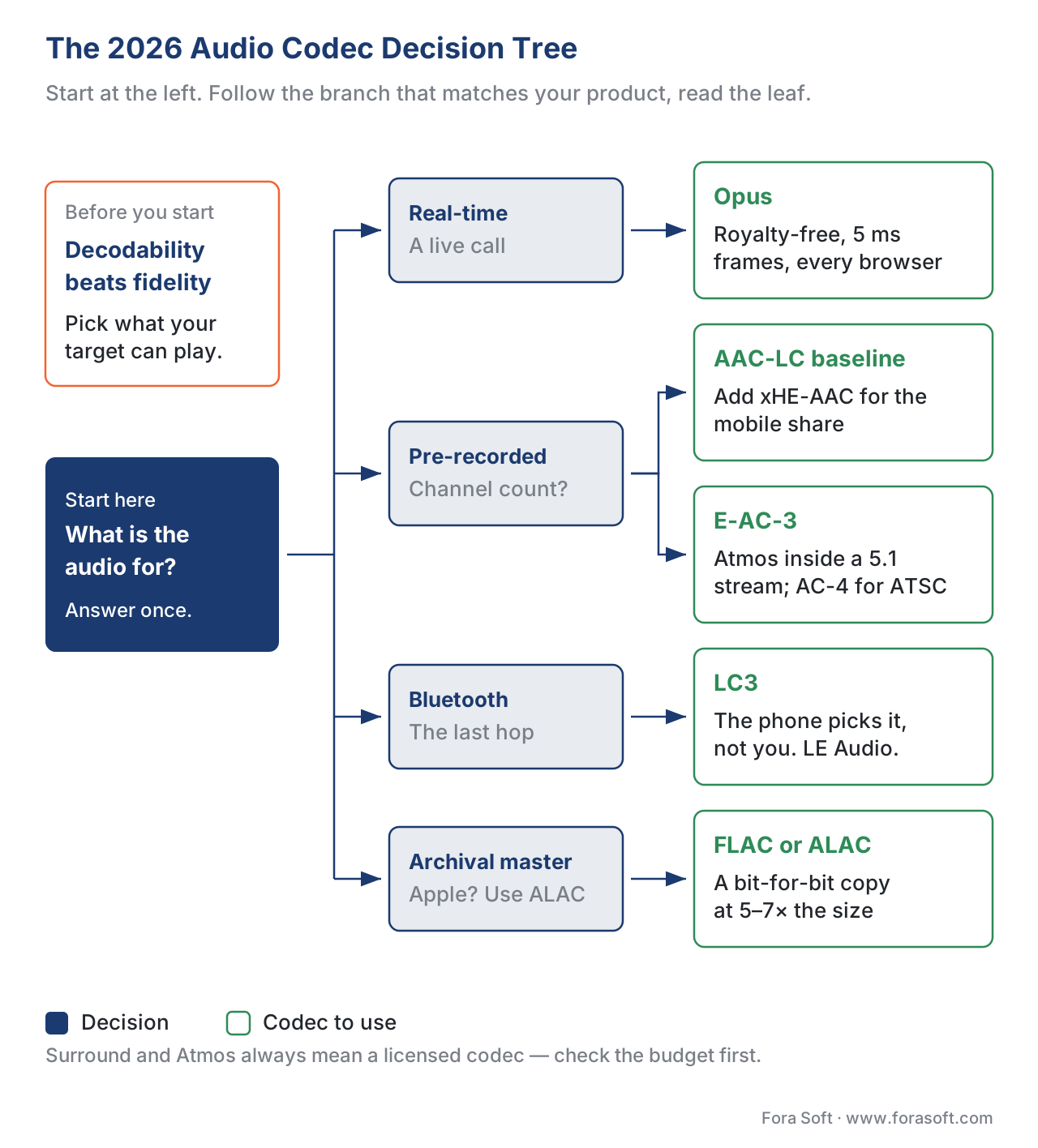 Figure 2. The decision tree: follow the branch that matches your product to the codec at the leaf.
The tree answers the common cases instantly. The sections that follow walk each branch in plain language, with the reasoning, so you can adapt when your product sits between two leaves — which happens more often than the tree alone suggests.
Walking the branches
Branch 1 — Real-time conversation
If your product is a video call, a live conferencing room, a telemedicine consultation, or a contact-center session, the answer is Opus, and the reasoning is short. Opus is the codec every browser ships for WebRTC, the technology browsers use for real-time audio and video; it is royalty-free under IETF RFC 6716; and it switches internally between a speech mode and a music mode, so it handles a talking head and shared background music without you changing a setting.
The latency math is what makes Opus right for conversation. Opus encodes audio in frames as short as 2.5 milliseconds (the configurable frame sizes are 2.5, 5, 10, 20, 40, and 60 ms, per RFC 6716). A live conversation stays comfortable as long as the total one-way delay — mouth to ear — stays under about 150 ms, the preferred range in ITU-T Recommendation G.114; from 150 to 400 ms a call is still usable but degrades, and beyond 400 ms it feels broken. The codec is only one term in that budget, but a codec that added 130 ms of framing on its own — as some efficient streaming codecs do — would spend most of the budget before the network even touched the packet. Opus spends almost none of it.
When a call drops down to a phone network, the audio falls back to G.711 or EVS. You do not choose those — the telephone network does — but you will see them in your logs, and now you know what they are. The full treatment is in Opus: the open codec that ate WebRTC; the four compression ideas underneath every codec, including Opus, are in how audio compression works.
Branch 2 — Pre-recorded, stereo: video-on-demand
If your product plays pre-recorded video — a course platform, an OTT app, a media library — and the audio is mono or stereo, start with AAC-LC as your baseline. AAC-LC dates to 1997, and that age is its strength: every browser, every phone, and every smart TV made since the iPod decodes it in hardware. It is the audio default for YouTube, Netflix, Apple, and Disney+. Pick AAC-LC and you will not find a device that cannot play your audio.
If your audience is heavily mobile and on variable networks, add xHE-AAC as a second rendition. The "x" extensions to AAC adapt the bitrate smoothly from about 12 kbit/s upward, so a listener on a weak connection still gets continuous audio. As of Android 17, released in 2026, both encoding and decoding of xHE-AAC ship by default on the platform, joining long-standing support on iOS, macOS, and Windows; Safari decodes it natively and Chrome decodes it inside HLS streams. The reason you ship both AAC-LC and xHE-AAC, rather than xHE-AAC alone, is the long tail of older devices that decode AAC-LC but not xHE-AAC — you serve them the baseline and let modern devices pick the efficient rendition. The full family tree is in the AAC family, and the storage trade-off is in audio adaptive bitrate ladders.
Branch 3 — Pre-recorded, surround or Atmos
If your audio is 5.1 surround or Dolby Atmos for living-room TVs, the streaming answer is E-AC-3, also called Dolby Digital Plus. It carries up to 15.1 channels, and through a technique called Joint Object Coding it packs a full Atmos mix inside a 5.1-compatible bitstream — which is exactly how Netflix, Disney+, and Apple TV+ deliver Atmos today. The deep dive is in AC-3 and E-AC-3.
For over-the-air next-generation broadcast, the codec is AC-4 (or MPEG-H 3D Audio in Korea), both mandated by the ATSC 3.0 standard. AC-4 is now reaching streaming as well: at CES in January 2026, NBCUniversal's Peacock announced it will be the first TV-and-movie streaming service to deliver AC-4, rolling out later in 2026, and Dolby positions AC-4 as up to fifty percent more efficient than its earlier codecs. Amazon Music and Tidal already use AC-4 for headphone spatial audio. See AC-4 explained and MPEG-H 3D Audio. All three of these — E-AC-3, AC-4, MPEG-H — are licensed, which is where Question 4 starts to bite: at broadcast scale the per-device fee is part of the business case, not an afterthought.
Branch 4 — The Bluetooth last hop
You do not encode for Bluetooth yourself — the listener's phone operating system does — but the codec on that last wireless hop sets the quality and latency the listener actually hears, so it belongs in your mental model. That codec is LC3, the Low Complexity Communication Codec inside Bluetooth LE Audio. LC3 delivers better quality than the older SBC codec at roughly half the bitrate, using 7.5 ms or 10 ms frames, and it is the codec behind Auracast broadcast audio and the new generation of LE Audio hearing aids. If your product is a telemedicine or conferencing app, your customer is likely listening through LC3 earbuds, and that hop adds its own latency on top of yours. The detail is in LC3 and LC3plus.
Branch 5 — The archival master
If you need to store a perfect master file or build a music-quality tier, the question changes from "what sounds good enough" to "how do I keep every bit". Use FLAC for an open, cross-platform catalog, or ALAC if you live in the Apple ecosystem. Both are lossless — they decode to a bit-for-bit copy of the original, so they sound identical to each other and to the source — at roughly five to seven times the size of a lossy file. The choice between them is platform, not quality: FLAC powers Tidal, Qobuz, and Amazon Music; ALAC powers Apple Music Lossless. Do not stream lossless to ordinary listeners on phone speakers; they cannot hear the difference and you pay many times the bandwidth for nothing. The lossless trio is covered in FLAC, ALAC, WavPack.
The math that turns Question 4 into a number
Question 4 — licensing — and the bitrate the codec runs at together set your monthly bill. Here is the calculation made concrete, so the trade-off is a number you can put in a spreadsheet rather than a vague worry.
Suppose you run a course platform streaming a one-hour lecture, stereo audio only, to 50,000 learners a month, and you are choosing whether to add an xHE-AAC rendition (48 kbit/s) alongside your AAC-LC baseline (128 kbit/s) for the mobile share of your audience, which is 60 percent.
Data moved per stream for the hour is the bitrate times the duration:
AAC-LC:   128 kbit/s × 3,600 s = 460,800 kbit ÷ 8 = 57,600 kB ≈ 57.6 MB
xHE-AAC:   48 kbit/s × 3,600 s = 172,800 kbit ÷ 8 = 21,600 kB ≈ 21.6 MB
For the 30,000 mobile learners, serving xHE-AAC instead of AAC-LC moves 21.6 MB instead of 57.6 MB each — a saving of 36 MB per learner per hour, or about 1,080 GB across the month. On a content delivery network billing on the order of a few cents per gigabyte, that is real money recovered every month, for a codec your modern mobile audience can already decode. The catch — and the reason you keep the AAC-LC baseline rather than dropping it — is the desktop and older-device share that decodes AAC-LC but not xHE-AAC. So the decision is not "switch", it is "add a second rendition and route modern devices to it", which is the adaptive-bitrate pattern in audio adaptive bitrate ladders.
The licensing side of the same calculation: AAC and xHE-AAC both carry patent-pool fees, so adding the second rendition does not change your licensing tier — you are already an AAC licensee. Switching to a royalty-free codec like Opus would remove the fee entirely, but Opus is not the right tool for broad video-on-demand because hardware decode is not universal. The lesson is that Question 4 rarely changes Branch 2's answer, but it dominates Branch 3, where every option is licensed.
 Figure 3. The worked example: adding an xHE-AAC rendition for mobile learners cuts per-stream audio data by 36 MB an hour.
Five worked scenarios
The decision tree handles clean cases. Real products sit between branches. Here are five common shapes and the codec plan each one points to.
Scenario 1 — A telemedicine platform with browser and app clients
Real-time, stereo, browser plus native mobile, and a clinical bar for clear speech. The answer is Opus everywhere, because every browser ships it for WebRTC and the native apps can embed it. Expect the network to fall back to G.711 or EVS on poor connections; that is the network's choice, not yours, and Opus's built-in handling of packet loss keeps speech intelligible until it recovers. Licensing is a non-issue: Opus is royalty-free.
Scenario 2 — An e-learning OTT app, mobile-first, global audience
Pre-recorded, stereo, a wide device fleet including old phones and smart TVs. Ship an AAC-LC baseline so nothing is left without audio, and add an xHE-AAC rendition for the mobile majority to cut egress, as the worked example showed. Both are AAC-family licensed, so you stay in one licensing tier. Route devices by capability: modern mobile gets xHE-AAC, everything else gets AAC-LC.
Scenario 3 — A premium film service with Atmos on TVs
Pre-recorded, immersive, living-room TVs and mobile. Use E-AC-3 to carry Atmos via Joint Object Coding for streaming to TVs and current mobile, and keep an AAC-LC stereo rendition as the universal fallback for devices without Atmos. This is a two-codec answer by design — surround for the living room, stereo for everything else. Budget for the Dolby license at your device scale up front.
Scenario 4 — A live-sports streamer planning for next-gen audio
Live or near-live, immersive, and forward-looking. Today the safe surround codec is E-AC-3; the codec to plan a migration toward is AC-4, now arriving on streaming through Peacock's 2026 rollout and already mandated for ATSC 3.0 broadcast. The pragmatic plan is to ship E-AC-3 now and treat AC-4 as a 2026–2027 add-on rendition, not a rip-and-replace. Watch device decode support before you commit a default.
Scenario 5 — A music-and-video app with a lossless tier
A mix of branches: lossy stereo for the free tier, lossless for the premium tier, real-time for any social features. Use AAC-LC for the free streaming tier, FLAC or ALAC for the lossless tier (FLAC for cross-platform reach, ALAC if you are Apple-first), and Opus for any real-time listening-party or call feature. Three codecs, each answering a different question — which is normal for a product that spans use cases.
Common mistakes when choosing a codec
The first and most expensive mistake is the one the opening rule warned against: treating the choice as a quality contest. Decodability is a hard gate; fidelity is an optimization you earn afterward. A team that ships the codec that won a single-bitrate listening test, without checking the decoder coverage of its real device fleet, will ship silence to a slice of its users.
The second is deferring licensing to the end. Opus and FLAC are royalty-free; the entire AAC family carries patent-pool fees administered through Via LA; the Dolby codecs (AC-3, E-AC-3, AC-4) require a Dolby license. At a few thousand devices the cost is noise, but at ten million units it can flip your answer. Ask Question 4 in week one.
The third is using one codec where the product needs two. A service that streams films to TVs and also runs a live chat does not have one codec problem; it has a surround-on-TV problem and a real-time-speech problem, and they have different answers. When a product needs surround in the living room and clear speech on a phone in the same session, the answer is usually two codecs, not a compromise that serves neither well.
The fourth is confusing real-time and streaming latency. A codec tuned for a film you watch later optimizes efficiency and accepts tens of milliseconds of framing delay; that same delay makes a live call feel like a bad phone line. Opus exists precisely because it does both well; most codecs do one or the other, and choosing a streaming codec for a real-time product is a quiet way to ruin a call.
Free download: 2026 audio codec decision worksheetOne page: the four questions in order — where it plays, real-time or not, channels, licensing — the decision tree, the use-case shortcuts, and the licensing summary in one line. The procedure on this page, condensed to a worksheet you can take into a planning meeting.
Where Fora Soft fits in
We have built audio into video products since 2005 — video conferencing, OTT and Internet TV, e-learning, telemedicine, video surveillance, and AR/VR — and the four-question procedure above is the one our engineers run at the start of every project. In real-time products we standardize on Opus with the right network fallbacks; in streaming products we ship an AAC-LC baseline and layer xHE-AAC or Dolby surround where the audience and the catalog justify it. The recurring lesson from shipped work is the rule this article opens with: the codec that matches your delivery target and your licensing budget beats the codec that wins a bitrate shoot-out. When a single product spans real-time speech and living-room surround, we plan for two codecs from the start rather than forcing one to do both jobs badly. Our WebRTC developers tune Opus for real-time calls, and our audio and video processing development covers the AAC, xHE-AAC and surround side of the streaming pipeline.

The book
Audio for Video: A Complete Guide to Sound in Video Products: From PCM and Codecs to Loudness, Accessibility, and Real-Time Voice Processing
Each of the four questions on this page opens into a chapter here: which devices decode what, how much delay a codec’s framing adds before the network sees a packet, what a channel layout costs you, and where the licence fees actually sit. Opus, the AAC family, the Dolby line and the lossless pair each get a chapter of their own, built on the sampling, bit-depth and channel-layout material that decides what a codec is allowed to carry in the first place. It is volume 4 of the seven-volume Fora Soft Video Engineering Handbook, which covers the video stack from the pixel to production; volume 5 picks up where the codec ends — jitter buffers, lip sync, Atmos and quality metrics. Written by Nikolay Sapunov, CEO at Fora Soft.
Not sure which codec your product actually needs?
Tell us where your audio has to land — a browser, a 2019 smart TV, a living-room Atmos setup, a phone network — and we will walk the four questions with you, name the codec or the pair of codecs that answer them, and price the licensing at your shipping volume before it reaches legal review. 250+ video products shipped since 2005.
See our case studies
Case study
WorldCast Live
Five channels of audio inside 1.5 Gb/s at 0.4–0.5 s latency for 10,000 concurrent viewers — Branch 1 and Question 3 at once, where the framing delay of the codec is most of the argument.
Case study
Speed.Space
Recording at 1080p and 8 Mbit/s for Netflix, Electronic Arts and HBO productions, with the crew choosing resolution, fps, codec and bitrate per session — Branch 2, decided deliberately rather than inherited from a default.
Case study
TransLinguist
Interpreting for the NHS national framework in 75+ languages with captions in 22 — every leg that touches a phone network falls back to G.711 or EVS, whatever the conference side encodes.
What to read next
Codecs
The 2026 Audio Codec Comparison Table
The reference data this procedure reads from: every codec with its bitrate, latency and licence.
Real-time
Opus: The Open Codec That Ate WebRTC
Branch 1 in full: why one royalty-free codec covers 5 ms speech and music at once.
Surround
AC-3 and E-AC-3 (Dolby Digital Plus)
Branch 3 in full: how Joint Object Coding packs an Atmos mix into a 5.1-compatible stream.
Streaming
Audio Adaptive Bitrate Ladders
The second rendition from the worked example: when a ladder pays for itself, and when it does not.
References
- IETF RFC 6716, Definition of the Opus Audio Codec, September 2012 — controlling specification for Opus, including the 2.5/5/10/20/40/60 ms frame sizes, the 6–510 kbit/s bitrate range, and royalty-free status. https://www.rfc-editor.org/rfc/rfc6716 (Tier 1). Updated by RFC 8251 (errata and low-delay clarifications), 2017 — https://www.rfc-editor.org/rfc/rfc8251.
- ITU-T Recommendation G.114, One-way transmission time, May 2003 — the source for the mouth-to-ear delay bands: 0–150 ms preferred, 150–400 ms acceptable with degradation, above 400 ms unacceptable. https://www.itu.int/rec/T-REC-G.114 (Tier 1).
- ISO/IEC 14496-3 (current edition), Coding of audio-visual objects — Part 3: Audio — controlling standard for the AAC family (AAC-LC, HE-AAC v1/v2); channel counts and profiles. https://www.iso.org/standard/76383.html (Tier 1; full text paywalled — facts confirmed against the published abstract and Fraunhofer IIS profile documentation).
- ISO/IEC 23003-3, MPEG-D Part 3: Unified Speech and Audio Coding (USAC) — the standard underlying xHE-AAC. https://www.iso.org/standard/79143.html (Tier 1; paywalled).
- ETSI TS 102 366 (current revision), Digital Audio Compression (AC-3, Enhanced AC-3) — controlling specification for AC-3 and E-AC-3, including channel limits and JOC. https://www.etsi.org/standards (Tier 1).
- ETSI TS 103 190-1 and 103 190-2, Digital Audio Compression (AC-4) — controlling specification for AC-4 immersive and object-based audio. https://www.etsi.org/standards (Tier 1).
- ISO/IEC 23008-3, MPEG-H Part 3: 3D Audio — controlling standard for MPEG-H 3D Audio. https://www.iso.org/standard/83525.html (Tier 1; paywalled).
- ITU-T Recommendations G.711 and G.722; 3GPP TS 26.441 (EVS) — controlling specifications for the telephony fallback codecs that a real-time call drops to on a phone network. https://www.itu.int/rec/T-REC-G.711 and https://www.3gpp.org/dynareport/26441.htm (Tier 1).
- IETF RFC 9639, Free Lossless Audio Codec (FLAC), December 2024 — the formal standard for FLAC; lossless exact reconstruction. https://www.rfc-editor.org/rfc/rfc9639 (Tier 1).
- Bluetooth SIG, LE Audio specifications (Core Specification 5.3+); ETSI TS 103 634 (LC3plus) — controlling specifications for LC3 / LC3plus, the Bluetooth LE Audio codec; 7.5/10 ms frames. https://www.bluetooth.com/specifications/le-audio/ (Tier 1).
- Fraunhofer IIS Audio Blog, xHE-AAC Audio Encoding becomes a Standard Feature in Android 17, 2026 — first-party deployment source from the codec's maker for the 2026 Android default-encoding fact. https://www.audioblog.iis.fraunhofer.com/xhe-aac-android-17 (Tier 4 — vendor deployment; used only for adoption status, not codec definition).
- Dolby Newsroom / NBCUniversal, Peacock to Be First Streamer to Integrate Dolby's Full Suite, CES January 2026 — first-party deployment source for the AC-4-on-streaming first-mover and the "up to 50% more efficient" positioning. https://news.dolby.com/en-WW/259255-nbcuniversal-s-peacock-to-be-first-streamer-to-integrate-dolby-s-full-suite-of-premium-picture-and-sound-innovations/ (Tier 4 — vendor; AC-4 codec definition defers to ETSI TS 103 190).
Discrepancy notes (per §4.3.2): popular "best audio codec" articles rank codecs on a single quality ladder; this article rejects that framing and anchors the decision to controlling standards and the decodability gate. Vendor sources (Fraunhofer, Dolby, Bluetooth SIG) are used only as adoption/deployment evidence — never as a codec definition. The "AC-4 up to 50% more efficient" figure is Dolby's own marketing claim and is presented as such, not as a measured spec property; the codec definition itself defers to ETSI TS 103 190.
