


Why This Matters
If you are scoping a corporate training platform — compliance training, onboarding, sales enablement, a regulated-industry certification system — you are commissioning something that looks like a video catalog but lives or dies on its integrations. Most teams budget for the course player and the videos, then discover the real work is the wiring: single sign-on from the corporate identity system, automatic enrolment driven by the HR org chart, standards-based tracking that survives an audit, and reports a compliance officer can defend to a regulator. This article gives an L&D director, HR-technology lead, or EdTech founder the complete architectural map, so you can brief engineers precisely, judge a vendor's "enterprise LMS" against a real reference design, and know which layers you can buy off the shelf and which — almost always the integrations — you will have to build or heavily configure. It is written for the non-engineer making the build-versus-buy call, but it stays accurate enough for the LMS architect and the video engineer who will build it.
First, the One Idea That Organizes Everything
A consumer course website and a corporate LMS look almost identical in a demo: a catalog, a video player, a quiz, a progress bar. The resemblance hides the entire point. A consumer course site only has to serve a learner who signed up with an email address. A corporate LMS has to serve an organization — it must know the company's people, roles, and reporting lines; it must assign the right training to the right employee automatically; and it must produce records solid enough to show an auditor that every required person completed every required course on time.
So the most useful way to picture a corporate LMS with video is not as one system but as a course player plus three bridges to systems it does not own: a bridge to the HR system (for identity and assignment), a bridge to the video platform (for content), and a bridge to the compliance function (for records that survive an audit). Those bridges, not the player, are what make it "corporate."
Spread across those bridges, the reference architecture is best understood as five cooperating layers, each with a different job, a different owner, and a different build-versus-buy answer:
The identity and org layer connects the LMS to the corporate identity and HR systems, so people sign in once and get assigned the right training automatically. The content and video layer stores, encodes, and delivers the actual learning media — on-demand lessons and live instructor-led sessions. The LMS core is the learning experience itself: the catalog, enrolment, learning paths, and the player. The tracking and records layer captures what each learner did, using the learning standards that make a record portable and trustworthy. And the compliance and reporting layer turns those records into completions, certificates, audit trails, and dashboards the business can act on.
Keep those five layers separate in your head and the rest of this article — and the rest of your build — falls into place. Blur them together and you get the classic corporate-LMS failure: a polished video catalog that cannot tell HR who is overdue for their annual safety training.
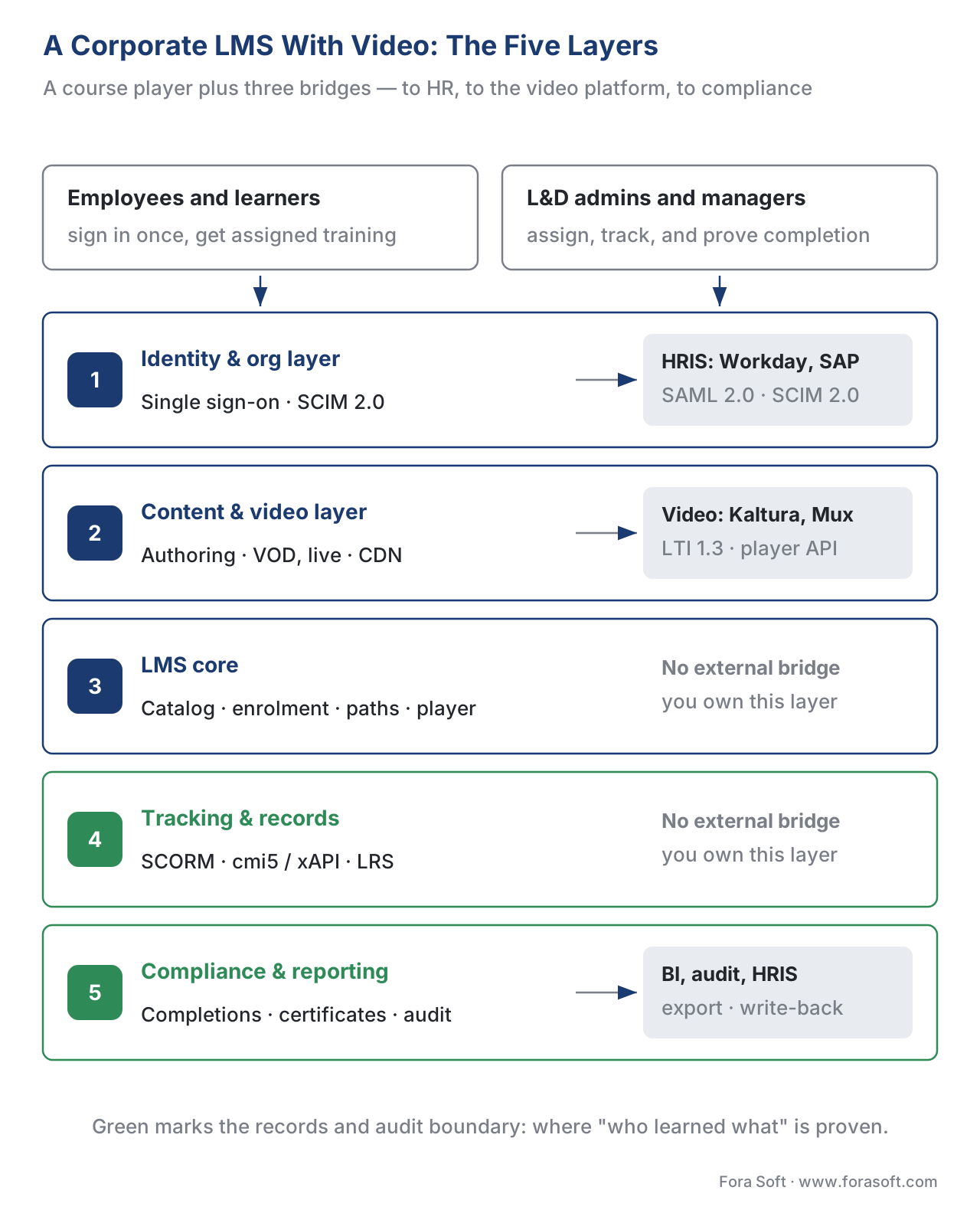 Figure 1. The full picture. Five layers connect employees and L&D admins on the left to the three enterprise systems a corporate LMS must bridge to — the HR system, the enterprise video platform, and the compliance/BI function. The green layers are the records-and-audit boundary, where "who learned what" is proven.
Layer 1: Identity and the HR Bridge — What Makes It "Corporate"
Start where every corporate learner starts: they do not create an account. They are already an employee, already in the company's systems, and the LMS has to recognize them automatically. This is the layer that most clearly separates a corporate LMS from a consumer course site, and it has two distinct jobs that teams constantly confuse.
The first job is authentication — proving, at sign-in, that the person is who they claim to be. In a corporate setting this is delegated to the company's identity provider (the system that already manages employee logins, such as Okta, Microsoft Entra ID, or Google Workspace). The mechanisms are two mature standards. The older and still dominant one is SAML 2.0 (Security Assertion Markup Language), ratified by the standards body OASIS in 2005 — think of it as a signed letter of introduction the identity provider hands the LMS, vouching for the employee. The newer one is OpenID Connect (OIDC), a thin identity layer built on the OAuth 2.0 authorization framework and maintained by the OpenID Foundation. Either way, the result the employee experiences is single sign-on: they click a course and they are in, with no separate LMS password. Single sign-on is the consequence of SAML or OIDC, not a feature you build separately.
The second job is provisioning — creating, updating, and removing the employee's account and keeping their role and department current. Authentication answers "is this really Maria?"; provisioning answers "does Maria still work here, in which department, reporting to whom?" Confusing the two is the most common identity mistake in corporate L&D. The standard that does provisioning is SCIM 2.0 (System for Cross-domain Identity Management), defined by the Internet Engineering Task Force in RFC 7643 (the data schema) and RFC 7644 (the protocol). SCIM is the automated feed that says "create user Maria Lopez, role Field Technician, department Operations" — and, just as importantly, "deactivate her account" the day she leaves.
Here is why this layer is the heart of a corporate system. The company's HR information system — its HRIS, typically Workday or SAP SuccessFactors — is the system of record for who works there, in what role, in which part of the org chart, reporting to which manager. That data flows out of the HRIS, into the identity provider, and on into the LMS, usually over SCIM. Once it arrives, the LMS can do the thing a consumer course site never does: assign training automatically by role and department. Every new Field Technician is enrolled in the safety course on day one without anyone touching a spreadsheet. Every manager sees their team's compliance status. Every leaver loses access the moment HR marks them inactive.
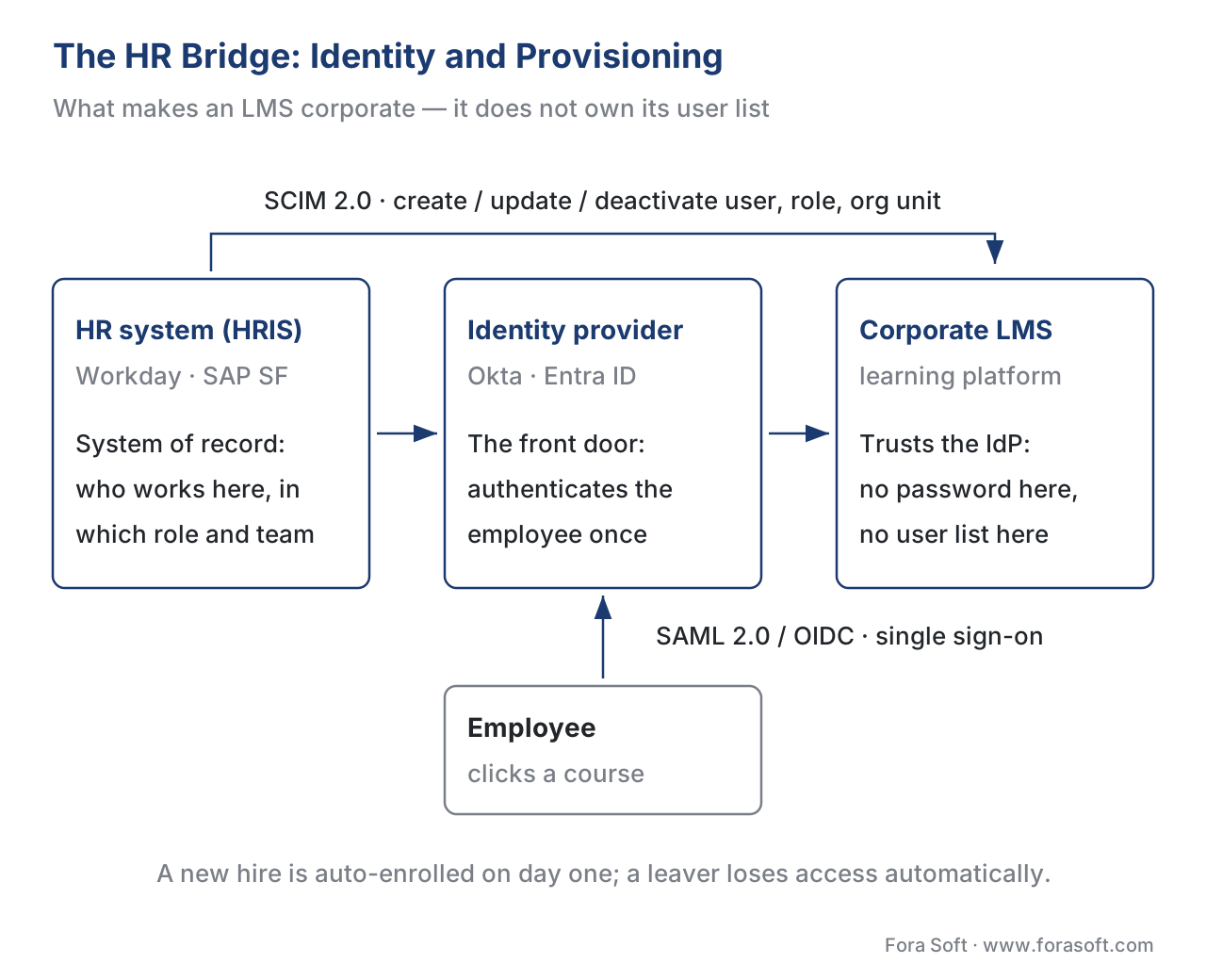 Figure 2. The HR bridge in detail. The HR system is the source of truth for people and roles; the identity provider authenticates the employee once over SAML 2.0 or OIDC (single sign-on), while SCIM 2.0 provisions and de-provisions accounts and keeps roles and org units current. This bridge is what auto-enrols a new hire and revokes a leaver.
A practical note on effort, because this layer is routinely under-scoped. Wiring up the first identity integration — one SSO connection plus SCIM provisioning — typically takes two to four weeks; each additional system after that is faster, on the order of one to two weeks, as the pattern becomes routine. That is real engineering time, and it is the price of admission for "corporate." Budget it explicitly.
Common mistake: building your own user list. A team that models the LMS as a standalone product builds its own sign-up, its own password reset, and its own user table — then spends the rest of the product's life keeping that table in sync with HR by hand, and explaining to security why a fired employee still had access for three weeks. In a corporate build, identity is delegated, never duplicated. Decide your SSO and SCIM model before you write a line of catalog code.
Layer 2: Content and the Video Layer
This is the layer people picture when they hear "video LMS," and it is the one most likely to be bought rather than built. Its job is to take raw learning media — a recorded lecture, a microlearning clip, a software walkthrough, a live instructor-led session — and store, encode, and deliver it reliably to every employee, whether they are at a desk on corporate fibre or on a phone in a warehouse.
Three distinct kinds of video live here, and they carry different delivery and cost models, so keep them separate. On-demand video (VOD) is the bulk of most corporate catalogs: pre-recorded lessons a learner watches whenever they like. Live instructor-led training (live ILT) is the real-time virtual classroom — scheduled sessions with an instructor, covered in depth by the live-learning reference architecture. Interactive video layers quizzes, branching, and hotspots onto either. They share a content store but diverge sharply downstream.
The architecture of this layer — authoring and ingest, a content store, an encoding and packaging step, and delivery through a content-delivery network — is the same one the anatomy of a learning-video platform lays out end to end, and the cost of delivering it at volume is the whole subject of scaling delivery: CDN, transcoding, and cost. The codec and bitrate-ladder choices belong to the Video Encoding section; this article does not re-derive them. What matters at the architecture level is the build-versus-buy line, which here is unusually clear.
The video layer is a commoditized capability. Enterprise video platforms such as Kaltura and Panopto specialize in exactly this — secure storage, automatic transcoding, captions, individual viewer tracking, retention policies, and the audit trails compliance teams need — and they integrate into LMSs out of the box. Lighter managed platforms such as Mux or api.video give you the same delivery with a simple per-minute price. For most corporate products, you buy the video layer and integrate it, rather than building a transcoding pipeline and a CDN strategy from scratch.
The integration mechanism deserves a precise name. When you embed an external video tool inside an LMS, the standard that makes the tool trusted is LTI 1.3 (Learning Tools Interoperability) from the standards body 1EdTech. LTI 1.3 is not a password login: it uses an OIDC launch carrying a signed token — a JSON Web Token (JWT) that names the user, their role, and the course context — so the LMS vouches for the user and your video tool trusts that signed message. On top of the launch, the optional LTI Advantage services let the tool pull the official roster (Names and Role Provisioning Services) and push scores back into the gradebook (Assignment and Grade Services). Describe LTI as "an OIDC launch with a signed JWT," never as "a login," or you will scope the integration wrong.
Layer 3: The LMS Core — The Learning Experience
Between identity and tracking sits the part everyone actually sees: the catalog of courses, the enrolment and assignment engine, the learning paths that string courses into a curriculum, the player, the reminders and notifications, and the administrative back office where L&D builds and assigns training. This is the LMS in the everyday sense of the word.
It is also the layer most likely to be bought off the shelf, because it is the most commoditized and the least differentiating. Dozens of mature corporate LMS products — Cornerstone, Docebo, SAP SuccessFactors Learning, Workday Learning, and many more — ship a competent catalog, enrolment, and learning-path engine on day one. Modern platforms increasingly run as cloud-native services (containerized, often on Kubernetes, with the catalog, enrolment, and reporting as separate services) so they scale horizontally as enrolment grows, but that is an implementation detail the buyer rarely touches.
The reason to build or heavily customize this layer is pedagogy or process that an off-the-shelf product cannot express: a bespoke learning-path logic tied to your operational certifications, a manager-approval workflow unique to your industry, or a learner experience that is the product. If your learning experience is interchangeable with everyone else's, buy it; if it is your differentiator, that is where custom work earns its keep. The build vs buy vs extend an LMS article walks the trade-off in detail.
Layer 4: Tracking and Records — SCORM, cmi5, and xAPI
Now the layer that turns "people watched videos" into "the organization knows who learned what." Everything above could describe a decent corporate video portal. The tracking-and-records layer is what makes it a learning system, and it is where the load-bearing standards decision of the whole architecture gets made. Get the framing wrong here and you will either under-track (and fail an audit) or over-build (and pay for an event pipeline you do not need).
There are two ways to record learning, and the right corporate architecture usually uses both.
The first is the standard that packages a course so any learning system can play and track it, called SCORM (Sharable Content Object Reference Model), maintained by Advanced Distributed Learning (ADL). SCORM is a shipping container for a course: a compliant LMS can load it without knowing what is inside. It comes in two living versions — SCORM 1.2 and SCORM 2004 4th Edition (the current edition, from 2009) — and the precise thing to understand is that SCORM tracks a fixed data model inside an LMS launch. SCORM 1.2 records a single status in one field (cmi.core.lesson_status); SCORM 2004 splits it into two, separating "did they finish" (cmi.completion_status) from "did they pass" (cmi.success_status), along with score and time. That fixed model is exactly why SCORM still dominates compliance training: for content that runs inside an LMS and needs a reliable "completed / passed / score," it is simple, universal, and battle-tested. What SCORM does not do is capture rich, granular behaviour, or anything that happens outside the LMS launch.
The second is the standard built for everything SCORM cannot see, called the Experience API (xAPI), version 1.0.3, also from ADL. (Its old project name was "Tin Can API"; the standard is xAPI.) An xAPI statement is a sentence — "Maria completed Module 3," "Maria scored 90 on the safety quiz" — written in a strict actor-verb-object form and stored in a dedicated database called a Learning Record Store (LRS). Because statements can describe anything and come from anywhere, xAPI captures learning that happens outside the LMS and the rich detail SCORM omits — including, crucially for this section, what a learner does inside a video.
Bridging the two is the standard that lets xAPI content launch and report cleanly from an LMS, called cmi5, an xAPI Profile from ADL/AICC — "cmi5 = xAPI + LMS." cmi5 defines how an LMS launches a unit of content (an Assignable Unit), authorizes it, and what it reports, using a defined set of verbs (launched, initialized, completed, passed, failed, terminated) on top of free xAPI statements. With cmi5, the LMS still gets the clean "completed / passed" it needs for compliance, and the LRS gets the full event stream. A cmi5 build makes the LRS mandatory.
For video specifically, the vocabulary is the xAPI Video Profile from ADL — a standard set of verbs and extensions (played, paused, seeked, completed, time-watched, and so on) so that "Maria watched 80% of the fire-safety video, paused twice, and re-watched the evacuation segment" becomes structured data instead of a guess. Tracking corporate video without it is the single most common reason a "video LMS" cannot answer real engagement questions; the tracking video with the xAPI Video Profile article covers it in depth.
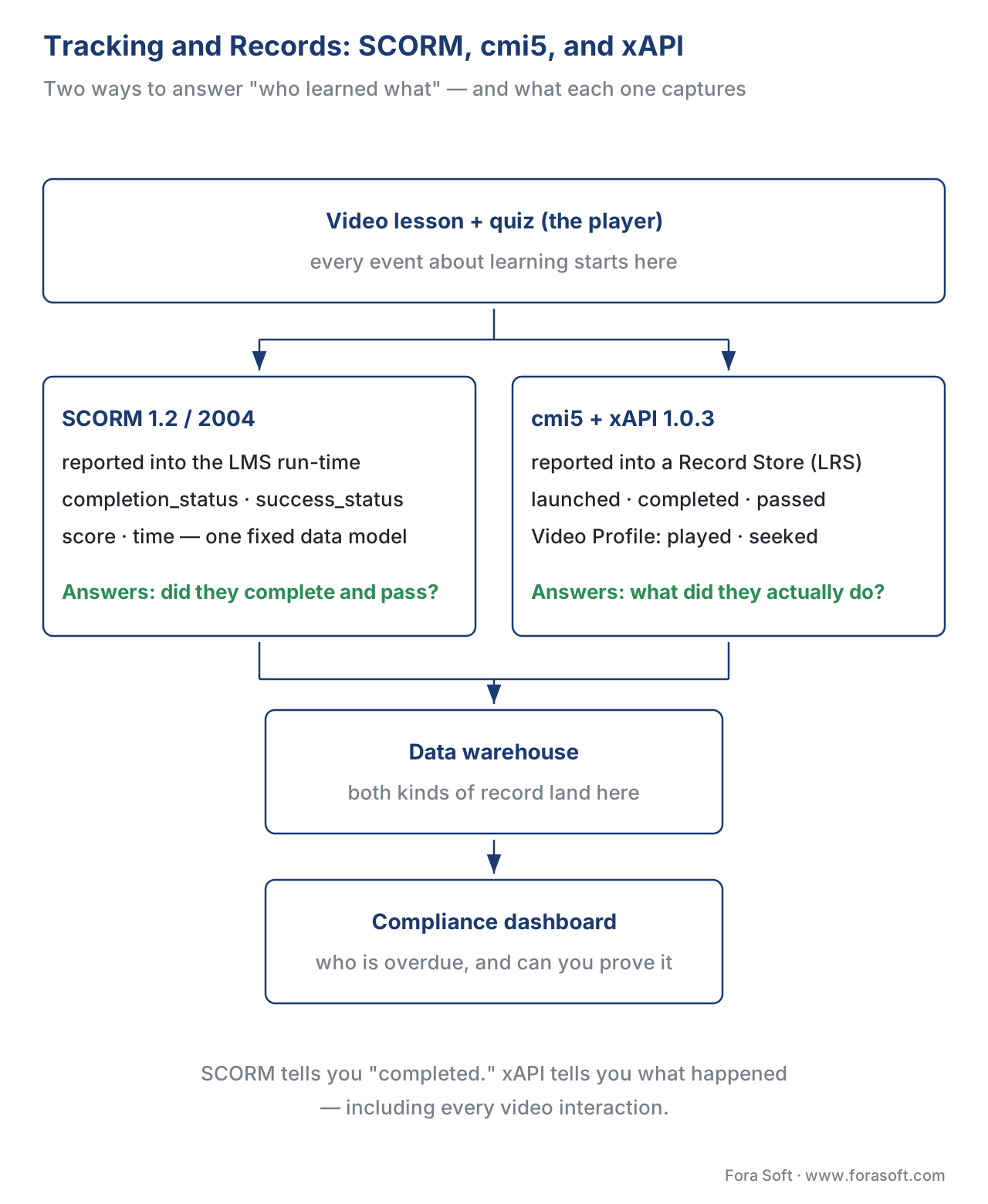 Figure 3. Two ways to answer "who learned what." SCORM reports a fixed completion and score into the LMS run-time; cmi5 and xAPI 1.0.3 — with the xAPI Video Profile for video events — report a rich event stream into the learning-record store. Both feed the warehouse and the compliance dashboard. SCORM tells you "completed"; xAPI tells you what happened.
The decision rule is simpler than the alphabet soup suggests. If a course is straightforward compliance content that runs inside the LMS and you need a defensible "completed / passed," SCORM is the right, cheap choice. If you need rich engagement data, video-level detail, learning that happens outside the LMS, or analytics beyond pass/fail, you need cmi5/xAPI and an LRS. Most serious corporate platforms run both: SCORM for the simple mandatory courses, cmi5/xAPI for the video-rich and analytics-heavy ones.
Common mistake: "watched 100% = completed." Playing every second of a video is not the same as completing a course, and neither is the same as passing it. SCORM, cmi5, and a raw video player each define "complete" differently, and the xAPI Video Profile's "completed" verb means the video finished, not that the learner mastered it. Decide your completion rule deliberately — "watched ≥ 90% and passed the quiz," for example — and implement it explicitly. Conflating watch-time with completion is the most common measurement error in corporate L&D, and it starts right here in the architecture.
Layer 5: Compliance and Reporting
The final layer is the one a consumer course site never needs and a corporate platform cannot ship without. Its job is to turn raw records into the outcomes the business and the regulator care about: completions against deadlines, pass/fail against a required score, certificates issued, recertification windows tracked, an immutable audit trail, and dashboards that let a compliance officer see at a glance who is overdue.
This is where the records from Layer 4 become decisions. A completion rule fires and marks a course done. A passing score triggers a certificate or a verifiable credential — and credentials have versions worth citing precisely when you claim tamper-evidence or portability (Open Badges 2.0 versus 3.0, or W3C Verifiable Credentials). A recertification clock starts, so that next year the employee is automatically re-enrolled before their certification lapses. Every one of these events is written to an audit trail — an append-only log of who completed what, when, and on which version of the content — because in a regulated industry the question is not "did they learn it" but "can you prove they learned it, two years later, to an auditor." Enterprise video platforms reinforce this with their own viewer-level tracking, version control (so only the approved version of a procedure is in play), and exportable completion data.
Finally, this layer reports outward. Completion and certification data flows back to the HRIS (so an employee's training record lives in their HR profile) and to the business-intelligence or data-warehouse stack (so L&D can analyze effectiveness across the whole organization). The learning-analytics article covers what to measure once the data lands; here, the architectural point is that the LMS is not the final destination for its own records. It is a producer of compliance data that other corporate systems consume.
One accessibility note that belongs in any corporate reference design: training video bought or built for an organization — especially a public-sector or regulated one — must meet WCAG 2.1 Level AA, including captions (Success Criteria 1.2.2 and 1.2.4) and, where required, audio description (1.2.5). Shipping un-captioned mandatory training to an enterprise buyer is both an accessibility failure and, increasingly, a procurement disqualifier. The WCAG 2.1 AA for educational video article details the criteria.
Putting the Layers Together: How One Assignment Actually Runs
Walk a single training assignment through all five layers, because the choreography is the architecture. HR hires Maria as a Field Technician and records it in Workday. The identity and org layer picks that up: SCIM provisions her LMS account with the role "Field Technician" in the Operations department, and the LMS's assignment engine automatically enrols her in the mandatory safety curriculum for that role. On her first day she clicks the course link; SAML or OIDC signs her in with no separate password. The content and video layer streams the safety video to her phone in the warehouse, transcoded and captioned, delivered from a nearby CDN edge. The LMS core presents it inside her learning path, next to the quiz that follows. As she watches, the tracking and records layer writes xAPI Video Profile statements to the LRS — played, paused, seeked, watched 95% — and when she passes the quiz, cmi5 records "passed" and the LMS marks the course complete. The compliance and reporting layer issues her safety certificate, starts a twelve-month recertification clock, writes the completion to the audit trail, and pushes the record back to Workday and the BI warehouse so her manager's compliance dashboard turns green.
That single walkthrough is the whole product. Every feature you will ever add — a new integration, a new report, a new content type — lands in one of those five layers.
The Build-vs-Buy Arithmetic, Shown Out Loud
The corporate question is rarely "build or buy" in the abstract; it is "what does each path cost at our scale." Make it concrete with a 20,000-employee rollout, and show the math out loud.
The buy path: per-seat licensing. Off-the-shelf corporate LMS and enterprise-video pricing is usually per-user-per-year, and at enterprise scale a combined LMS-plus-video figure in the range of $7–$10 per user per year is realistic. Take $8:
20,000 employees × $8 / user / year = $160,000 per year
Over 5 years:           $160,000 × 5 = $800,000
You are live in weeks, the vendor runs everything, and the cost is predictable — but it scales with every employee you add, forever.
The build path: upfront plus run. A custom corporate LMS with a video layer and the integrations this article describes lands, in 2026, somewhere between a focused build and an enterprise ecosystem — call it $250,000 to design and build, plus roughly $50,000 a year to host, maintain, and evolve:
Build:               $250,000 (one-time)
Run:                 $50,000 / year
Over 5 years:        $250,000 + ($50,000 × 5) = $500,000
Where the lines cross. Set the two cumulative costs equal to find the crossover:
Buy cumulative:    $160,000 × years
Build cumulative:  $250,000 + $50,000 × years
$250,000 + $50,000 y = $160,000 y
$250,000 = $110,000 y
y ≈ 2.3 years
After roughly two and a half years, the custom build is cheaper, and the gap widens every year after. But that result only holds if you genuinely have the scale (tens of thousands of seats), the engineering capacity to run a platform, and integration or pedagogy needs an off-the-shelf product cannot meet. For a few hundred or a few thousand employees, the per-seat bill is small and the buy path wins on every axis. The crossover is real, but it is a large-organization phenomenon — do not talk yourself into a build at 800 seats because the arithmetic looked good at 20,000. The learning-platform cost model turns this into a full calculator.
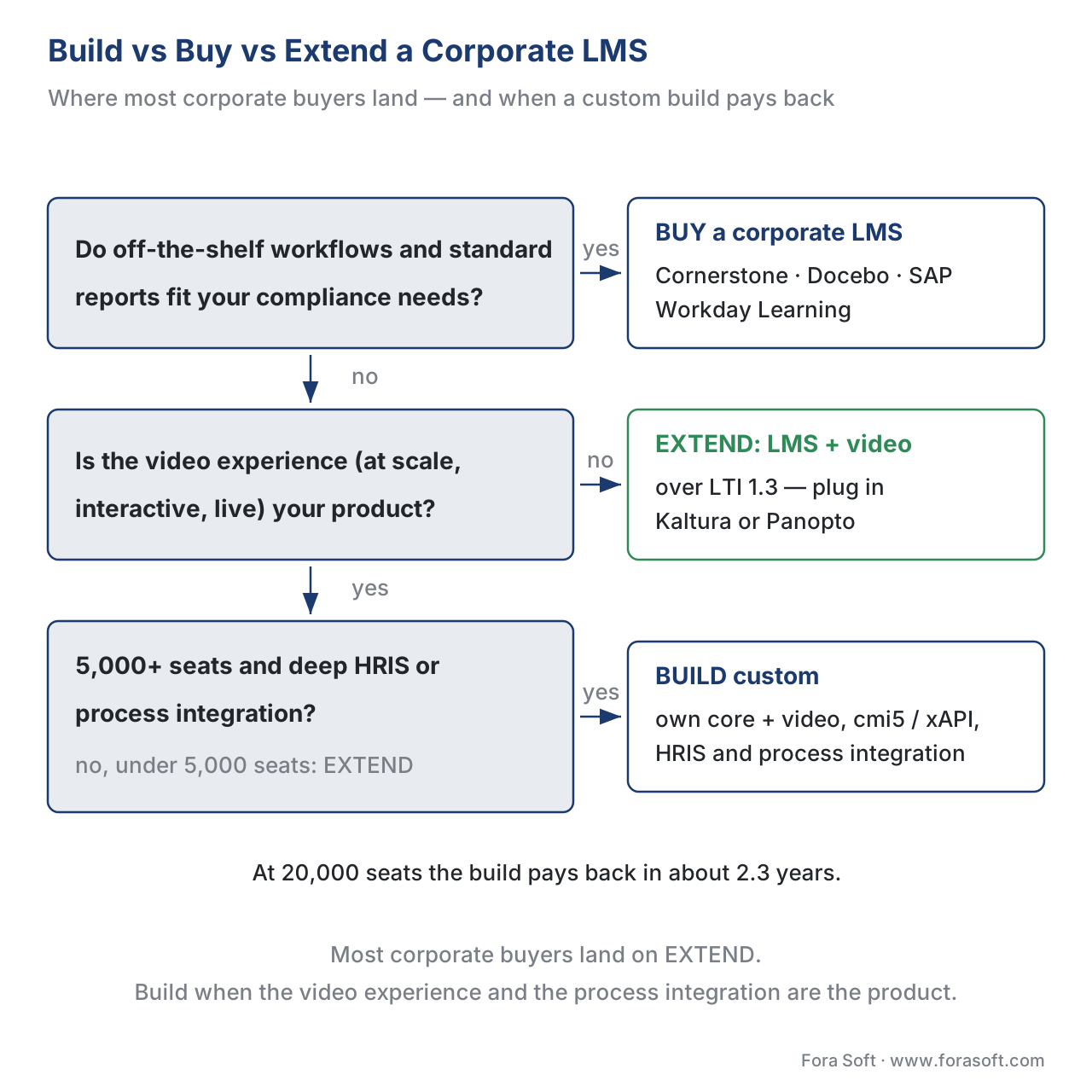 Figure 4. The realistic decision. Off-the-shelf workflows fit your compliance needs: buy. Video is not your differentiator: extend a bought LMS with a video platform over LTI 1.3. Video and deep process integration are the product, at scale: build. Most corporate buyers land on "extend."
The Pitfalls That Define a Bad Build
"It's a video catalog with logins." This is the root error. A catalog has no HR bridge — no SCIM provisioning, no role-based auto-enrolment, no deprovisioning — and no compliance layer. It demos beautifully and then cannot answer HR's first question: who is overdue for mandatory training?
"SSO and provisioning are the same thing." They are not. SAML or OIDC authenticates the employee at login; SCIM creates, updates, and removes their account and role. Skip SCIM and you are back to maintaining the user list by hand and leaving fired employees with access.
"SCORM tracks everything." SCORM tracks a fixed model — completion, score, time — inside an LMS launch. It cannot capture video interactions or learning outside the LMS. If you need that, you need cmi5/xAPI and a learning-record store, and you need to decide that before you pick content tooling.
"Tracking video without the xAPI Video Profile." A raw player emits play and pause events in its own private shape. Without the xAPI Video Profile's standard vocabulary, your "engagement data" is non-portable and your reports cannot compare one video to another. Adopt the profile up front.
"Watched 100% = completed = passed." Three different signals with three different sources. Define your completion rule explicitly — watch-threshold plus assessment — or your compliance reports will overstate who is actually trained.
"We'll add the audit trail later." The audit trail shapes your data model: what you log, how immutably, against which content version, for how long. Retrofitting it after launch means reworking the records layer under a regulator's deadline. In a regulated industry, design it first.
Comparing the Build-vs-Buy Options Per Layer
The corporate decision is not one decision; it is five, one per layer. The table makes the realistic options explicit, including the standards each layer must speak — and tooling and LMS comparisons in this section always carry a standards-support column for exactly this reason.
| Layer | Buy / off-the-shelf | Configure / extend | Custom build | Standards it must speak |
|---|---|---|---|---|
| Identity & org | IdP connectors (Okta, Entra) | SCIM + SSO config to your HRIS | Rare | SAML 2.0, OIDC, SCIM 2.0 |
| Content & video | Kaltura, Panopto, Mux | Embed via LTI 1.3 into the LMS | Only if video is the product | LTI 1.3 + Advantage; HLS/DASH |
| LMS core | Cornerstone, Docebo, SAP, Workday | Theme + workflow configuration | If pedagogy is your differentiator | SCORM, cmi5, LTI 1.3 |
| Tracking & records | LMS built-in + an LRS product | cmi5/xAPI content + Video Profile | Custom statement pipeline at scale | SCORM 1.2/2004, xAPI 1.0.3, cmi5, xAPI Video Profile |
| Compliance & reporting | LMS reports + BI connector | Custom dashboards on the warehouse | Bespoke audit + cert engine | Open Badges / W3C VC; WCAG 2.1 AA |
The pattern most successful corporate builds follow is visible in the middle column: buy the LMS core and the video platform, and spend your engineering on configuration and the integrations — the HR bridge, the tracking standards, and the compliance reporting. That is the "extend" path, and it is where most corporate buyers land. A full custom build is justified when video experience and deep process integration are the product, and the scale pays back the investment.
Free download: Corporate LMS With Video — Architecture Readiness ChecklistA one-page audit across all five layers — the HR bridge (SSO and SCIM), the content and video layer, the LMS core, standards-based tracking (SCORM versus cmi5/xAPI with the Video Profile), and compliance and reporting — to pressure-test an architecture before you commit to it.Where Fora Soft Fits In
Fora Soft has built video streaming, WebRTC, conferencing, and e-learning systems since 2005, and a corporate LMS with video sits at the exact intersection of those skills — a video layer that has to be enterprise-grade, wired into the learning standards and the corporate identity and HR systems that make it trustworthy. The build-versus-buy trade-off we help teams make is concrete and per-layer: an off-the-shelf LMS plus a managed video platform gets a compliance-training product live fast, while a custom video experience, a standards-correct cmi5/xAPI records layer, and the SCIM/SSO bridge into Workday or SuccessFactors are what make a platform genuinely differentiated and audit-ready. We work across e-learning, video conferencing, streaming, OTT, and telemedicine, so we are usually brought in when the video and the integrations are the hard part — not the catalog. No hype: for the LMS core the honest answer is often "configure an existing product," and we will say so, so the engineering you own is the part that actually differentiates you.



The handbook
Fora Soft Video Engineering Handbook
We wrote a seven-volume handbook, 9,000+ pages, that works through the whole video stack a corporate LMS stands on — encoding, delivery, audio, and AI. For Layer 2 of this architecture, Video Streaming Book 2 covers ingest and the segment protocols (HLS, MPEG-DASH, CMAF) and Book 3 covers ABR, CDNs, players and DRM — the decisions behind every “buy or build the video layer” conversation here. Audio for Video Book 4 covers loudness, captions and accessibility, which is where WCAG 2.1 AA mandatory training gets won or lost. Written by Nikolay Sapunov, CEO at Fora Soft.
Scoping a corporate LMS with video?
Tell us which layers you plan to buy and which you need built, and we will map the integration work behind them — SSO and SCIM provisioning, LTI 1.3, cmi5 and the xAPI Video Profile, the audit trail — and give you an estimate you can budget against. 250+ video products shipped since 2005.
See our case studies
Case study
BrainCert
A WebRTC virtual-classroom LMS we built from the ground up: 100K+ customers and 500M+ real-time classroom minutes across 10 datacenters at 99.995% uptime, with SOC 2 Type II, ISO/IEC 27001:2022, HIPAA and GDPR compliance — the build path, taken when the video experience and the compliance record are both the product.
Case study
Scholarly
One platform in place of Zoom plus Discord plus a separate LMS: 15,000+ active users and live classes for up to 2,000 students at once, with DASH/HLS and WebRTC (LiveKit) under the catalog, quizzes and CRM — Layers 2 and 3 designed as a single product rather than two integrations.
Case study
VALT
Recording and observation for 770+ U.S. organizations and 50,000+ active users, HIPAA- and GDPR-compliant, used for medical simulation and law-enforcement training — the records-and-audit layer of a training system, built and run by us as their sole development team for 10+ years.
What to read next
Integrations
Integrating With Corporate LMS and TMS Platforms
The integration work this architecture implies, taken platform by platform.
Standards
Tracking Video With xAPI: The Video Profile
What to capture from the player so Layer 4 can answer real engagement questions.
Decisions
Build vs Buy vs Extend an Existing LMS
The decision in Figure 4, worked through option by option.
Foundations
The Anatomy of a Learning-Video Platform
The generic platform this corporate design specializes, end to end.
References
- ADL. SCORM (Sharable Content Object Reference Model) — SCORM 1.2 and SCORM 2004 4th Edition: the Content Aggregation Model, Run-Time Environment (the fixed
cmidata model:cmi.core.lesson_statusin 1.2;cmi.completion_statusandcmi.success_statusin 2004), and Sequencing and Navigation. https://adlnet.gov/projects/scorm/ (Tier 1, primary standard). Accessed 2026-06-22. - ADL. Experience API (xAPI) Specification, version 1.0.3 — Part 2: Statements; the actor-verb-object statement model and the Learning Record Store. https://github.com/adlnet/xAPI-Spec (Tier 1, primary standard). Accessed 2026-06-22.
- ADL / AICC. cmi5 Specification (an xAPI Profile for LMS systems) — launch, authorization, the cmi5-defined verbs, and the Assignable Unit / course-structure model; "cmi5 = xAPI + LMS." https://github.com/ADL-AICC/cmi5 and https://github.com/AICC/CMI-5_Spec_Current (Tier 1, primary standard). Accessed 2026-06-22.
- ADL. xAPI Video Profile — the standard video-event vocabulary (played, paused, seeked, completed, time-watched) for tracking video interactions as xAPI statements. https://adlnet.gov/projects/xapi-video-profile/ (Tier 1, primary standard). Accessed 2026-06-22.
- 1EdTech (IMS Global). Learning Tools Interoperability (LTI) 1.3 and LTI Advantage Implementation Guide — the OIDC launch, the signed JWT, and the Advantage services (Names and Role Provisioning Services, Assignment and Grade Services, Deep Linking) used to embed a video tool inside an LMS. https://www.imsglobal.org/spec/lti/v1p3/impl (Tier 1, primary standard). Accessed 2026-06-22.
- IETF. System for Cross-domain Identity Management (SCIM) 2.0 — RFC 7643 (Core Schema) and RFC 7644 (Protocol): automated user provisioning, update, and de-provisioning between the HRIS/identity provider and the LMS. https://datatracker.ietf.org/doc/html/rfc7644 (Tier 1, primary standard). Accessed 2026-06-22.
- OASIS. Security Assertion Markup Language (SAML) v2.0 — the SSO assertion standard used to authenticate corporate employees into the LMS via the identity provider. https://docs.oasis-open.org/security/saml/v2.0/ (Tier 1, primary standard). Accessed 2026-06-22.
- W3C. Web Content Accessibility Guidelines (WCAG) 2.1 — Level AA, Success Criteria 1.2.2 (Captions), 1.2.4 (Captions, Live), and 1.2.5 (Audio Description) for compliant corporate training video. https://www.w3.org/TR/WCAG21/ (Tier 1, primary standard). Accessed 2026-06-22.
- Kaltura. Corporate Learning Management System and LMS video integrations — enterprise video platform capabilities (storage, transcoding, captions, viewer tracking, LMS integration) for the content-and-video layer. https://corp.kaltura.com/blog/corporate-learning-management-system/ (Tier 4, first-party engineering). Accessed 2026-06-22.
- Panopto. Enterprise video platform for training — viewer-level tracking, version control, retention policies, and exportable completion data for compliance. https://www.panopto.com/business/use-cases/video-training/ (Tier 4, first-party engineering). Accessed 2026-06-22.
- ADL. Overview and Application of xAPI, cmi5, and xAPI Profiles — guidance on when to use SCORM versus cmi5/xAPI and how profiles structure video and other event tracking. https://www.adlnet.gov/resources/ (Tier 2, standards-body guidance). Accessed 2026-06-22.
Where sources disagreed, the official standard won. Vendor descriptions of LTI as "a login" and of SCORM as tracking "everything" were overridden by the 1EdTech LTI 1.3 spec (an OIDC launch with a signed JWT) and the ADL SCORM run-time books (a fixed
cmidata model), respectively. The build-versus-buy figures ($7–$10/user/year off-the-shelf; ~$250,000 build + ~$50,000/year run; ~2.5-year crossover at 20,000 seats) are illustrative 2026 ranges synthesized from current LMS-pricing and custom-development sources — confirm against live vendor quotes and a real scoping exercise before budgeting.
