


Why this matters
If you are a founder, product manager, or first-time streaming CTO, "the pipeline" is a phrase your engineers and your vendors both use, and they rarely mean the same set of boxes. You cannot scope a build, read an invoice, or judge a proposal until you can name each component, say what it is responsible for, and know whether it is something you build, buy, or rent. This article gives you that part-by-part fluency in plain language. By the end you will be able to point at the box that is failing, the box that is overspending, and the box a vendor is quietly charging you twice for.
What "pipeline" actually means
The word pipeline borrows from a factory line: raw material enters one end, passes through a sequence of stations that each do one job, and a finished product leaves the other end. In streaming, the raw material is a video file or a live feed; the finished product is a smooth, paid, measured viewing session on a viewer's screen. Each station hands its output to the next, so a failure in one box shows up as a symptom in a later box — a packaging mistake looks like a playback error, an entitlement bug looks like a billing complaint. Knowing the boxes in order is what lets you trace a symptom back to its cause.
Our end-to-end OTT article drew the line at the level of eight conceptual stages. This article works at the next level down: the actual running components an engineer would draw on a whiteboard, including three that the high-level map folded away — the origin, the entitlement service, and the analytics sink. We will walk them in the order content travels, and for each give you four things: what it does, the typical failure, the build-versus-buy decision, and where it sits in the cost picture.
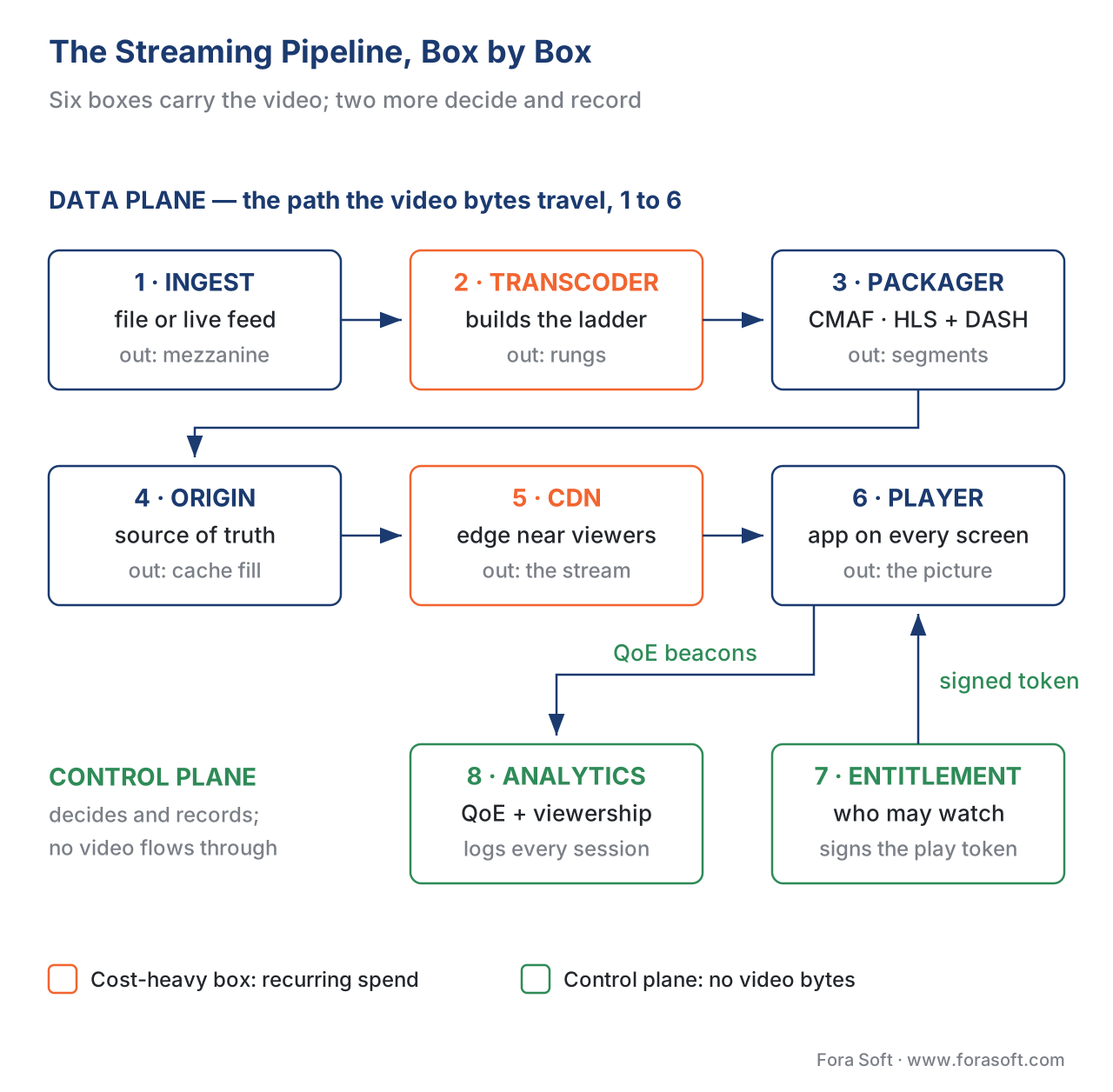 Figure 1. The streaming pipeline at component level. The control-plane services — entitlement and analytics — sit beside the media path, not inside it.
A useful distinction before we start: most pipelines have two halves. The data plane is the path the video bytes actually travel — ingest, transcode, package, origin, CDN, player. The control plane is the set of services that decide and record, without the heavy video ever passing through them — the entitlement service that says "yes, this viewer may watch" and the analytics sink that records "here is what happened." Mixing the two up is the single most common architecture mistake we see, so we will keep them visibly separate.
Box 1 — The ingest point: where video arrives
Ingest is the act of getting source video into your platform, and the ingest point is the door it comes through. There are two doors, and they are built differently.
For on-demand content, the ingest point is a file-upload endpoint backed by object storage. A content team hands you a high-quality master — the mezzanine, the pristine "negative" you re-encode from and never show a viewer directly — and you store it. The mezzanine is large (a feature film runs tens to hundreds of gigabytes) and you keep it forever, because every future codec, resolution, or device re-encodes from it, not from a viewer-facing copy.
For live content, the ingest point is a real-time endpoint speaking a contribution protocol — the link that carries video to your platform, as opposed to distribution, which carries it onward to viewers. Three protocols matter in 2026, and the professional default is now to support all three:
- RTMP (Real-Time Messaging Protocol) — old, runs over TCP, supported by every encoder and software like OBS and vMix. It recovers from packet loss by retransmitting the whole TCP stream, which causes latency spikes on a congested link. Still the most common studio contribution path.
- SRT (Secure Reliable Transport) — the modern broadcast-grade choice. It runs over UDP and recovers from packet loss with selective retransmission, holding up through roughly 25% loss at a one-second buffer, and carries built-in AES-256 encryption. SRT is the 2026 standard for field contribution over the public internet and cellular links.
- WHIP (WebRTC-HTTP Ingestion Protocol) — the lowest-latency door, 200–500 milliseconds, ideal for browser-based input and interactive formats.
The mechanics of these contribution protocols belong to our Video Streaming section; here the point is that live video has to arrive before any other box can run, and there is no second chance to re-pull a frame dropped on the way in.
Typical failure: treating the viewer-facing rendition as the master, then being unable to re-encode for a new device years later — or, on the live side, a single ingest endpoint with no backup feed, so one dropped contribution link ends the broadcast. Build vs buy: file ingest is trivial to build on object storage (Amazon S3 and equivalents). Live ingest is where most teams rent — a media server or a streaming platform that terminates RTMP/SRT/WHIP and hands you a clean feed is usually cheaper than operating one. Cost note: low. Mezzanine storage is cheap per gigabyte and grows slowly; ingest bandwidth in is minor next to delivery bandwidth out.
Box 2 — The transcoding farm: turning one source into a ladder
A camera feed or a mezzanine file is far too large to stream as is. Transcoding converts it, using a codec — the coder-decoder algorithm that discards visual detail the eye will not miss — into the compressed renditions a player can stream. The component that does this at volume is the transcoding farm: a fleet of machines, often GPU-accelerated, that grind through video minutes. It is the most compute-heavy box on the line and one of the three that decide your margin.
You do not transcode once. You transcode into a ladder.
The encoding ladder
An encoding ladder is a set of versions of the same video at different resolutions and bitrates — think of the seat classes on a plane: same flight, several prices and comfort levels, and the passenger takes the one they can afford. Here the "passenger" is the viewer's network connection, and the player climbs or drops the ladder in real time to avoid the spinning wheel. That technique is adaptive bitrate streaming (ABR), whose internals live in our adaptive bitrate streaming guide. A modest ladder:
| Rung | Resolution | Bitrate | Who it serves |
|---|---|---|---|
| 1 | 1920×1080 (1080p) | 5,000 kbps | Fast home Wi-Fi, big screen |
| 2 | 1280×720 (720p) | 3,000 kbps | Solid broadband |
| 3 | 854×480 (480p) | 1,200 kbps | Mobile on a good cell signal |
| 4 | 640×360 (360p) | 600 kbps | Weak or congested connection |
The codec choice sets quality-per-bit and device reach. H.264 (AVC) is the universal floor every device decodes; HEVC (H.265) is 40–50% more efficient and strong on TVs and Apple hardware; AV1 is royalty-free and the most efficient of the mainstream codecs; VVC (H.266) is newest and least deployed. Codec internals belong to our Video Encoding section — see how to choose a codec in 2026. The product fact for this box: a deeper ladder and a newer codec both raise transcode cost while cutting delivery cost, so the farm's workload is a lever you tune, not a constant.
The math of a transcode bill
Transcoding is billed per minute of output, per rung. Walk it once. Suppose a cloud transcoder charges about $0.015 per output minute for an HD rung (a representative 2026 list rate; per-title and reserved pricing run lower). For a four-rung ladder on a 100-hour catalog:
output minutes = 100 hours × 60 min × 4 rungs = 24,000 output minutes
cost = 24,000 × $0.015 = $360 to encode the catalog once
That is a one-time cost per title version — cheap next to delivery, until you multiply it by re-encodes for new codecs and a catalog of thousands of hours. The lever that controls it is the ladder: a fixed ladder applied to every title wastes compute on simple content, which is why per-title encoding earns its own article in Block 2.
Typical failure: a fixed ladder applied to every title — encoding a static talk show at the same high bitrate as a fast sports clip, wasting compute going in and egress going out. Build vs buy: this is the clearest buy decision in the pipeline for most teams. Cloud transcode services (AWS Elemental MediaConvert, Google Transcoder, Bitmovin) charge per minute with no fleet to run. Self-hosting an ffmpeg or GPU farm wins only at very large, steady volume where the per-minute rate beats amortized hardware. The transcoding-farm trade-off gets its own article in Block 2. Cost note: compute-heavy. Paid per minute per rung; controlled by ladder design and codec choice.
Box 3 — The packager: boxing video for shipping
Transcoding produces compressed renditions. Packaging wraps those renditions into the container and the small downloadable chunks a streaming player understands. Streaming never sends one giant file; the packager cuts each rendition into segments — short pieces, typically 2 to 6 seconds — and writes a manifest, a text index listing every segment and every rung so the player knows what to request next.
Two formats dominate, each with its own manifest:
- HLS (HTTP Live Streaming) — Apple's format, specified in IETF RFC 8216 (August 2017, protocol version 7, with a second edition in draft). Its manifest is the
.m3u8playlist. HLS is required for good playback on Apple devices. - MPEG-DASH (Dynamic Adaptive Streaming over HTTP) — the ISO standard ISO/IEC 23009-1 (current fifth edition, 2022). Its manifest is the
.mpdfile. Common on Android, smart TVs, and the open web.
Supporting both once meant packaging twice — two sets of segment files, double the storage. CMAF (Common Media Application Format), standardized as ISO/IEC 23000-19 (2017), ended that. CMAF defines a single fragmented-MP4 segment format that both an HLS .m3u8 and a DASH .mpd can point at. You package one set of segments and address them from two manifests. The deeper mechanics live in our HLS-versus-DASH comparison; the takeaway for this box is: package once with CMAF, serve every device.
The packager is also where encryption is applied for protected content. Common Encryption (CENC, ISO/IEC 23001-7) lets you encrypt the segments once with the cbcs scheme and then issue Widevine, PlayReady, and FairPlay licenses from those same files — "encrypt once, license many." The full multi-DRM workflow is this section's unique core; see multi-DRM: one workflow, every device. The point here is that encryption is a packaging-time step, not a separate encode.
Typical failure: packaging separate HLS and DASH files when CMAF would serve both, doubling storage and cache footprint; or a badly chosen segment duration that hurts either latency (too long) or cache efficiency (too short). Build vs buy: packaging is light compute, so open-source packagers (Shaka Packager, ffmpeg) are viable to run yourself, but most teams take it bundled with their transcode service (AWS MediaPackage, Bitmovin) because the two steps are tightly coupled. Cost note: modest compute; its real leverage is letting one set of files serve all devices, lowering storage and improving downstream cache efficiency.
Box 4 — The origin: the source of truth the edge pulls from
Here is the first box the high-level map folded away. The origin is the authoritative server that holds the packaged, segmented, manifest-indexed content and answers requests the CDN's edge cache cannot. Think of it as the central warehouse: the edge caches are corner stores stocked with popular items, and the origin is the warehouse they restock from when a customer asks for something the shelf does not have.
Why does the origin deserve its own box rather than being lumped with storage? Because at scale it is the component most likely to melt. Every request the edge cannot serve from cache — a cache miss — travels back to the origin. For a popular VOD title with a high cache-hit ratio, that is a trickle. For a live premiere where a hundred thousand viewers all request the newest segment in the same two seconds, it is a flood — the thundering herd. An unprotected origin buckles under it, and when the origin buckles, every viewer buffers at once.
The defense is origin shielding: a designated mid-tier cache sits between the edge and the origin, so that a cache miss is absorbed by the shield instead of hitting the origin directly. A thousand simultaneous edge misses for the same segment become one request to the origin. Origin design and shielding get a full article in Block 3; the live-premiere spike gets another. For this map, hold the idea: the origin is where cache misses land, and a cache miss at scale is a denial-of-service attack you launched on yourself.
Typical failure: an unshielded origin behind a single CDN, melted by a live premiere or a sudden hit, taking the whole service down with no failover origin to take the load. Build vs buy: a VOD origin can be as simple as an object-storage bucket the CDN pulls from — cheap to "build." A live or high-concurrency origin with shielding and failover is real engineering, and managed origin services (AWS MediaPackage origin, CDN-provided origin shield) are usually worth renting until you have the traffic to justify your own. Cost note: low in storage, but the architecture decision (shielded vs not, single vs multi-region) is what protects you from a far larger CDN and reliability cost later.
Box 5 — The CDN: getting bytes to the viewer at scale
With segments sitting on the origin, the CDN (content delivery network) is the system that moves them to a viewer who might be anywhere on earth. It is a network of edge servers worldwide that keep copies of your popular segments close to viewers, so a viewer in Berlin is served from a German edge rather than your origin in Virginia. This is the largest recurring line on most streaming bills.
The metric that decides whether the CDN saves you money or just relays your origin is the cache-hit ratio (also called the offload ratio): the share of requests the edge serves from its own cache without bothering the origin. A 95% hit ratio means the origin sees one request in twenty; a 50% hit ratio means it sees one in two, and your origin and your egress bill both suffer.
Why egress decides your margin
The recurring charge that matters is egress — what the CDN bills to send bytes out to viewers. Egress is tiered (price per gigabyte drops as volume rises), commit-dependent (you negotiate lower rates by promising volume), and on some plans billed against a percentile of peak traffic rather than a flat per-gigabyte rate. A single quoted price is never the whole story — always cite the model and the date.
Walk the arithmetic, because the number surprises people. Take a public list rate: AWS CloudFront charges about $0.085 per gigabyte for the first 10 TB each month in the US and Europe, tiering down to $0.080 for the next 40 TB and $0.060 beyond that (AWS, Q2 2026). Now suppose 10,000 viewers each watch one hour at the 3,000 kbps rung:
bytes per viewer-hour = 3,000 kbps ÷ 8 × 3,600 s = 1,350,000 KB ≈ 1.35 GB
total = 1.35 GB × 10,000 viewers ≈ 13,500 GB ≈ 13.5 TB
cost ≈ 10,000 GB × $0.085 + 3,500 GB × $0.080 ≈ $850 + $280 = $1,130
One ordinary hour for a modest audience is over a thousand dollars in egress, and it recurs on every play. That is why CDN cost engineering — multi-CDN, cache offload, the 95th-percentile bill — gets its own deep article, and why most teams run multi-CDN: two or more providers for resilience and price leverage. The multi-CDN architecture itself lives in our Video Streaming section's multi-CDN article.
Typical failure: single-CDN lock-in with no failover, so one provider's regional outage takes the whole service down — and no second vendor to negotiate price against; or a poor cache-key design that drops the hit ratio and inflates both origin load and egress. Build vs buy: nobody builds a CDN. This box is always rented; the only decisions are which providers and how to orchestrate between them. Cost note: usually the single largest recurring cost. Protected by cache discipline, bitrate discipline, and commit negotiation.
Box 6 — The player: the app on every screen
Everything so far is invisible to the viewer. The player is the part they touch — the app on the phone, the web page, the smart-TV channel — and it does far more than show pixels. It fetches the manifest, runs the ABR logic that hops up and down the ladder, requests a DRM license to decrypt protected segments, manages the buffer so playback stays smooth, and reports what happened back to your analytics.
The hard part is that the player lives on many screens at once, and they share little code. A serious OTT platform supports some mix of: the web (HTML5 video using the browser's Media Source Extensions and Encrypted Media Extensions — W3C standards, with EME a 2017 Recommendation), iOS and Android apps, and the high-value living-room targets — Roku, Samsung Tizen, LG webOS, Apple tvOS, and Amazon Fire TV. Each has its own player framework, its own DRM quirks, and its own certification process. Because connected TVs now carry most streaming watch time, the TV apps are where the audience is, not optional polish.
A subtle point that trips up first builds: the player is also a data source, not just a data sink. The QoE beacons it emits — startup time, rebuffering events, bitrate delivered, errors — are the raw material the analytics box turns into the dashboards you run the platform from. A player that plays video beautifully but reports nothing leaves you blind.
Typical failure: shipping a great web and mobile player and a weak TV app — exactly where most viewing now happens; or building each platform's player from scratch and drowning in eleven separate codebases to maintain. Build vs buy: mature open-source player cores exist (hls.js and Shaka Player on web, ExoPlayer/Media3 on Android, AVPlayer on Apple) and most teams build on top of them rather than from zero. Commercial player SDKs (Bitmovin, THEOplayer, JW Player) buy you cross-platform consistency and support for a per-stream or license fee. Cost note: client development is a build cost that scales with the number of platforms you support; each new screen is a new codebase, not a recurring per-viewer charge.
Box 7 — The entitlement service: who is allowed to watch
Now we cross from the data plane to the control plane. The entitlement service is the component that answers one question for every playback request: is this viewer allowed to watch this content right now? It is not the paywall UI the viewer sees, and it is not the billing system that charges the card — it is the authority both of those defer to. It sits beside the media path, not inside it: the heavy video never flows through entitlement; only the small yes-or-no decision does.
This box is small in bytes and enormous in consequence, because it is where four different concerns converge into a single answer:
- Subscription status — has this account paid, and is the payment current? (From the billing system.)
- Content rights — does the platform have the right to show this title, in this territory, in this window? (From the rights metadata.)
- Access rules — concurrent-stream limits, geo-blocking, parental controls, device caps.
- Token issuance — once the answer is yes, the entitlement service issues the short-lived token the player presents to the CDN and the DRM license server, so neither of those has to re-check the business rules.
The deep mechanics of subscription billing and the entitlement engine get their own article in Block 5 — see subscription billing and entitlement. The reason entitlement deserves its own box in the pipeline, rather than being filed under "monetization," is that almost every confusing viewer-facing bug — "I paid but it says I can't watch," "it plays in one country and not another," "my third device gets locked out" — is an entitlement bug, not a billing or a delivery bug. Drawing it as its own box is what lets you find those quickly.
Typical failure: baking entitlement logic into the player or the paywall UI instead of a central service, so the rules disagree across platforms — the web says yes and the TV says no for the same account. Build vs buy: entitlement is usually built, because it encodes your specific business rules and rights, but it is built on bought parts — an identity provider for accounts, a billing platform for subscription status, a token/JWT library for signing. The orchestration is yours; the primitives are rented. Cost note: low in infrastructure, high in correctness risk. The cost of getting it wrong is churn and support load, not a cloud bill.
Box 8 — The analytics sink: knowing what happened
The last box closes the loop, and like entitlement it lives in the control plane. The analytics sink is where every event in the pipeline lands to be counted: plays, pauses, completions, and the quality-of-experience (QoE) beacons from the player — startup time, rebuffering ratio, bitrate delivered, play-failure rate. "Sink" is the engineering word for the destination all those event streams flow into; from there they feed dashboards, billing reconciliation, content decisions, and the recommendation system.
Two families of question land here. The business questions: how many people watched, for how long, did they churn, which titles earned their storage. The quality questions, grouped under QoE: how fast did playback start, how often did it stall, what quality did viewers actually receive. QoE matters because it maps straight to revenue — a slow start or a mid-show rebuffer is the most common reason a viewer abandons, and an abandoned stream is lost watch time and, for ad-supported models, lost ad revenue. The QoE discipline lives in our video QoE metrics article; the OTT analytics map gets its own block here.
One precision point, because it bites everyone: "a play" is a defined event, not a guess. Autoplay, bots, and the gap between "video element loaded" and "viewer actually watched 30 seconds" can inflate your numbers two- or threefold if you do not define the metric first. Decide what counts as a play before you report one.
Typical failure: counting autoplays as plays and making programming decisions on inflated engagement; or capturing events but never closing the loop, so the data sits in a warehouse and changes nothing. Build vs buy: the player-side QoE layer is usually bought (Mux Data, Conviva, Datazoom) because the SDKs and benchmarks are mature; the business-analytics warehouse is usually built on cloud data tools because it is specific to your questions. Cost note: low relative to encode and egress, but the data it produces is what tells you where to spend the other budgets.
How a single request flows through all eight boxes
To make the boxes concrete, follow one tap on "play" for a protected on-demand title:
- The player asks the entitlement service: may this viewer watch this title? Entitlement checks subscription, rights, and access rules, then issues a signed token.
- The player fetches the manifest — produced earlier by the packager, sitting on the origin, delivered through the CDN edge.
- The player reads the ladder, picks a starting rung, and requests the first segments — transcoded by the transcoding farm, served from the CDN edge (a cache hit) or pulled from the origin (a cache miss).
- For the protected segments, the player presents its token to the DRM license server and receives a decryption key — the encryption applied at packaging time.
- Playback starts; ABR moves up and down the ladder as the network changes.
- Throughout, the player emits QoE beacons to the analytics sink, which records the session for dashboards, billing, and recommendations.
Eight boxes, two planes, one tap. When that session goes wrong, the box-by-box model tells you where to look: a license error is DRM, a long startup is CDN or origin, a "not allowed" message is entitlement, a missing number is analytics.
Common mistake: collapsing the control plane into the data plane
The most expensive pipeline mistake we see is not in any single box — it is treating entitlement and analytics as afterthoughts bolted onto the media path, instead of first-class control-plane services beside it. When entitlement logic is scattered across each platform's player, the rules drift apart and viewers hit contradictory answers. When analytics is an afterthought, you ship a platform you cannot see into. Both boxes are cheap in bytes and decisive in outcome. Draw them as their own boxes from day one; the OTT reference architecture shows them wired in correctly.
Free download: Streaming Pipeline Build-vs-Buy WorksheetA one-page worksheet that walks each of the eight pipeline boxes — ingest, transcoder, packager, origin, CDN, player, entitlement and analytics — and records the build, buy or assemble decision and the rationale for your platform.Where Fora Soft fits in
The reason this pipeline reads as second nature to us is that we have built each box, repeatedly, at scale. Fora Soft has shipped video streaming, OTT and Internet-TV, WebRTC and conferencing, e-learning, telemedicine, and AR/VR software since 2005 — 625+ projects for 400+ clients. The recurring engineering problem in OTT is not making one box work; it is making all eight work together when a hundred thousand viewers tap play in the same minute — the moment the origin, the CDN, and the entitlement service are all tested at once. When a media company needs a pipeline that holds together under that load, with a protected catalog and a control plane that does not lie to viewers, that intersection of streaming, encoding, content protection, and operations is exactly where we work.



The handbook
Fora Soft Video Engineering Handbook
We wrote a seven-volume handbook, 9,000+ pages, that takes the video stack from a single pixel to production — encoding, delivery, audio and AI — and someone who works through it can design and build every box in this pipeline. Volume 2 covers the front half: ingest over RTMP, SRT and WHIP, and HLS, MPEG-DASH and CMAF packaging. Volume 3 covers the back half — origin, CDN, players, DRM and the economics of delivery — and volume 1 covers the transcoder and the encoding ladder it builds. Written by Nikolay Sapunov, CEO at Fora Soft.
Which of the eight boxes should you build, and which should you buy?
Send us your catalogue size, your live and on-demand mix and the screens you need to reach, and we will walk your pipeline box by box: what to rent from a vendor, what to assemble from open-source parts, where the transcode and CDN spend will land, and how to keep entitlement and analytics as their own services from day one. 250+ video products shipped since 2005.
See our case studies
Case study
Drundoo
A Bulgarian internet-TV service carrying 60 live channels on every subscription plan, plus catch-up and a video-on-demand library of movies, series, sports and concerts — the full pipeline from live ingest to player, with entitlement deciding which plan sees what.
Case study
Vodeo
A movie-rental platform for Janson Media's catalogue of independent films, with an adaptive ladder switching between 480p, 720p and 1080p and ticket-based rentals instead of subscriptions — the transcoder and the entitlement service doing their jobs side by side.
Case study
Worldcast Live
An HD concert-streaming platform serving 10,000 simultaneous viewers at 0.4–0.5 s latency and up to 1.5 Gbit/s, with pay-per-view tickets — live ingest, delivery at scale and a paywall that all have to hold when the show starts.
What to read next
Packaging
CMAF Packaging: Serve HLS and DASH From One Master
Box 3 up close: one set of segments, two manifests, and where encryption is applied.
Delivery
Origin Shield Explained: Protect Your Streaming Origin
Box 4 up close: why the origin melts on a cache miss storm and how a shield stops it.
Delivery
How a CDN Delivers Video: Origin, Edge, and Cache
Box 5 up close: edge caching, cache hits and the egress bill behind every stream.
Architecture
The OTT Reference Architecture: The Full Picture
All eight boxes wired together, with the control plane placed beside the media path.
References
- IETF. RFC 8216 — HTTP Live Streaming (HLS). August 2017. https://www.rfc-editor.org/rfc/rfc8216 — HLS manifest (
.m3u8) and media-segment format; protocol version 7; second edition in draft. (Tier 1.) - ISO/IEC. 23009-1 — Dynamic Adaptive Streaming over HTTP (MPEG-DASH). Fifth edition, 2022. https://www.iso.org/standard/83314.html — DASH
.mpdmanifest and adaptive delivery over HTTP. (Tier 1.) - ISO/IEC. 23000-19 — Common Media Application Format (CMAF). 2017. https://www.iso.org/standard/85623.html — single fragmented-MP4 segment format serving both HLS and DASH. (Tier 1.)
- ISO/IEC. 23001-7 — Common Encryption in ISO base media file format files (CENC). https://www.iso.org/standard/68042.html — defines the
cencandcbcsschemes; the "encrypt once, license many" basis applied at packaging. (Tier 1.) - W3C. Encrypted Media Extensions. Recommendation, 18 September 2017. https://www.w3.org/TR/encrypted-media/ — the browser API a web player uses to request a DRM license. (Tier 1.)
- W3C. Media Source Extensions. https://www.w3.org/TR/media-source/ — the browser API for adaptive-bitrate playback on the web. (Tier 1.)
- Haivision et al. SRT (Secure Reliable Transport) Protocol — overview and packet-loss recovery. SRT Alliance, 2026. https://www.srtalliance.org/ — UDP-based contribution protocol; selective retransmission and AES-256; field-contribution standard. (Tier 3.)
- IETF. WebRTC-HTTP Ingestion Protocol (WHIP). https://datatracker.ietf.org/doc/draft-ietf-wish-whip/ — sub-second WebRTC contribution ingest. (Tier 2.)
- Amazon Web Services. CloudFront Pricing. Q2 2026. https://aws.amazon.com/cloudfront/pricing/ — US/EU egress ≈ $0.085/GB first 10 TB, tiering to $0.080 then $0.060; illustrates the tiered, commit-dependent egress model. (Tier 4.)
- Amazon Web Services. Elemental MediaConvert Pricing. 2026. https://aws.amazon.com/mediaconvert/pricing/ — per-output-minute transcode pricing; basis for the transcode arithmetic. (Tier 4.)
- Apple. HTTP Live Streaming — authoring specification and FairPlay Streaming. https://developer.apple.com/streaming/ — FairPlay requires the
cbcsscheme; HLS required for Apple-device playback. (Tier 3.)
Per the section's conflict rule, where popular articles imply "multi-DRM means three encodes," this article follows the spec: with
cbcsCommon Encryption (ISO/IEC 23001-7) the segments are encrypted once at packaging and licensed to all three DRMs. The "three encodes" framing from vendor listicles was overridden by the standard.
