


This is engineering guidance, not legal advice. Confirm specifics with qualified counsel.
Why this matters
If you run retail operations, build a video management platform, or integrate cameras for store chains, "add analytics" is the request you hear most and the one most likely to disappoint. The disappointment is almost always an expectation problem: a counter installed at the wrong height, a single accuracy percentage taken as gospel, a loss-prevention feature that quietly needs a biometric-privacy review before it can ship, or a camera bought to "do analytics" that was never sharp enough to identify anyone. This article gives you the vendor-neutral reference design — what each retail analytic actually does, where the cameras go, where the processing runs, what accuracy to expect, and where the privacy line sits — so you can scope a build, talk to engineers, and avoid the mistakes that turn a six-figure deployment into a shelf of unused features.
The retail analytics stack: four jobs, one pipeline
Strip away the marketing and retail video analytics does four jobs. It counts people (how many came in, and the conversion math that follows). It maps them (heatmaps of where they go and where they linger). It watches flow (queue length and wait time at the checkout). And it catches loss (scan-avoidance at the till, sweeps at the shelf, and organized theft). Every one of these jobs runs on the same underlying pipeline.
That pipeline has five stages. A camera captures the scene. A detection model finds people (and sometimes objects) in each frame. A tracker links those detections across frames into a path through the store. An aggregation layer rolls those paths up into counts, dwell times, and zone activity over minutes, hours, and days. And the video management system — the software that ingests and records many camera streams, called a VMS — surfaces the result as a number, a heatmap, or an alert. The detection and tracking happen increasingly on the camera itself; the aggregation and reporting happen on a server or in the cloud.
 Figure 1. The one pipeline behind all four retail analytics jobs: capture, detect, track, aggregate, surface. The detection and tracking models live in the AI for Video Engineering section; this article covers how they plug into the store.
A note on scope before we go deep. The detection and tracking models — how a network finds a person or re-identifies the same shopper across two cameras — are engineering topics in their own right, covered in our video-analytics map and in the AI for Video Engineering section. Here the focus is the retail application: where the cameras go, where the analytics run, what accuracy a store actually gets, and the privacy posture a serious retailer takes.
People-counting: how it works, and how accurate it really is
People-counting is the foundation, because almost every retail metric is a ratio with a count in the denominator. Conversion rate is transactions divided by visitors. Sales per visitor, capture rate, and staffing ratios all start from a reliable headcount.
There are two camera architectures. A 2D (monoscopic) counter uses a single overhead sensor and identifies people by their size and movement as they cross a virtual line. A 3D (stereoscopic) counter uses two sensors a few centimetres apart to build a depth map, the way your two eyes judge distance. The depth map lets the counter ignore shadows and strong sunlight — which a 2D system can mistake for a person — and exclude objects below a set height, so a shopping cart or a child in a stroller does not register as an adult. Stereo systems handle crowds and glare better; 2D systems are cheaper and, mounted correctly, very good.
Mounting is where most counts go wrong. Vendor guidance is consistent: the camera goes directly overhead, facing straight down, with the counting line perpendicular to the path of travel. Axis specifies a minimum mounting height of 2.7 metres (about 8.9 feet) for its people-counting application and, as a rule of thumb, a coverage width roughly equal to the mounting height. Tilt the camera, mount it too low, or point it at an angle and accuracy collapses, because two people walking side by side merge into one blob.
Now the number everyone wants, handled honestly. Well-installed counters land in the 90–98% range under good conditions. Axis publishes its people-counter at around 95% accuracy when correctly installed; RetailNext contractually guarantees a minimum 95% verified by post-install audit. But the most useful source on accuracy is Axis itself, which refuses to publish a single overall accuracy figure, writing that such a number "would be correct only in a laboratory test setup" and that counting accuracy "neither can nor should be reduced to a general accuracy percentage." RetailNext makes the same point bluntly: vendors claim "97, 98, and even 100% — but consider this: how accurate are these accuracy levels?" The honest framing is a range that degrades with crowding, lighting, and angle — never a single perfect number.
You can measure your own accuracy without trusting any datasheet. Count people in and out separately, then check the balance. Over a full day a doorway should see almost as many exits as entries.
Daily in/out balance check (one entrance, one day):
  Recorded IN  = 4,820
  Recorded OUT = 4,790
  Imbalance    = |IN − OUT| ÷ average((IN + OUT)/2)
               = 30 ÷ 4,805
               ≈ 0.6%  → within tolerance
A persistent imbalance above a few percent means the counter is missing crossings — usually a height, angle, or crowding problem, not a software bug. Investigate the install before you trust the conversion report built on top of it.
Heatmaps: turning paths into a picture of the store
A heatmap is the aggregation layer made visible. The system takes thousands of tracked paths over hours or days and renders them as a colour gradient over the store's floor plan — warm colours where activity is high, cool where it is low. Two kinds matter in retail. A traffic heatmap shows how many people passed through each zone. A dwell heatmap shows where people stopped and for how long, where dwell time is the average duration a shopper stays in a zone.
The value is decision-making, not decoration. Hot and cold zones reveal whether the store's layout matches how people actually move. A high-margin endcap that sits in a cold zone is in the wrong place. A promotional display can be judged by the dwell it generates before and after a campaign. Planogram decisions — which product goes on which shelf — stop being guesses. Because a heatmap is built from the same detections and tracks as the counter, it adds analytics value without adding cameras, provided the ceiling cameras already cover the floor.
Queue and dwell analytics: measuring the wait
Queue analytics counts the people standing in a checkout line, estimates the wait, and fires a staffing trigger — "open another register" — when the line crosses a threshold. The retail logic is direct: long lines are where finished shoppers abandon full carts, so a wait that nobody is watching is lost revenue at the most expensive possible moment. Vendor rules of thumb put the abandonment tipping point around seven people in a line or several minutes of waiting; treat those as indicative, not as a measured law, because the real threshold depends on the store. Queue and dwell analytics benefit most from running at the edge — on or near the camera — so the staffing alert arrives close to the moment of need rather than after a cloud round-trip.
Loss prevention: from scan-avoidance to organized theft
Loss prevention is where retail analytics earns its budget, because shrink — inventory lost to theft, fraud, and error — is a large and growing number. The most-cited US figure is the National Retail Federation's: shrink reached 1.6% of sales in fiscal 2022, about $112.1 billion, up from 1.4% the year before. Handle that number with care: the NRF retired its long-running annual security survey in 2024, replacing it with a narrower "Impact of Retail Theft and Violence" report, which found shoplifting incidents up roughly 93% in 2023 versus 2019. Be skeptical of round "global shrink" figures that float around the web — many trace to aggregations, not primary surveys — and cite the NRF primary number with its year.
Analytics attacks shrink at two points. At the point of sale, computer vision links the video of a checkout to the transaction log and flags scan-avoidance — an item that crossed the scanner but never rang up — and sweethearting, where a cashier deliberately under-rings for an accomplice. The mature version of this is exception-based reporting: software that flags suspicious transactions (voids, manual price overrides, excessive refunds) and automatically pairs each one with its video clip, so an investigator reviews thirty seconds instead of thirty hours. On the sales floor, gesture- and behaviour-detection models flag concealment and shelf-sweeps and send a short video alert to a manager's phone. Self-checkout, which moved the scanning labour to the customer, moved the loss risk there too, and is a primary target for scan-avoidance analytics.
Two honesty notes belong here. First, loss-prevention vendors quote dramatic figures — "up to 50% shrink reduction," "99% detection" — that are self-reported and unaudited; treat them as marketing, not measurement. Second, the moment loss prevention moves from detecting a behaviour to identifying a person — matching a face against a watchlist of known offenders — it crosses a legal line that has nothing to do with the technology working. We will draw that line explicitly below.
| Retail analytic | What it detects | Where it runs | Realistic accuracy | Privacy weight |
|---|---|---|---|---|
| People-counting | Anonymous entries/exits | Edge (overhead) | ~90–98% well-installed | Low — anonymous count |
| Heatmap / dwell | Zone traffic & lingering | Edge + server | Directional, not exact | Low — aggregate |
| Queue / wait | Line length, wait time | Edge | Good; degrades in crowds | Low — anonymous |
| Scan-avoidance LP | Unscanned item at POS | Edge + server | Flags for review, not proof | Medium — links to transaction |
| Watchlist face-match | Known-offender identity | Server / cloud | Range, high false-positive risk | High — biometric, Art. 9 / BIPA |
Table 1. The retail analytics catalogue. Accuracy is a range that depends on scene and tuning, and the privacy weight rises sharply on the last row — the only one that identifies a specific person. For the precision/recall discipline behind these analytics, see tuning analytics: false alarms and accuracy.
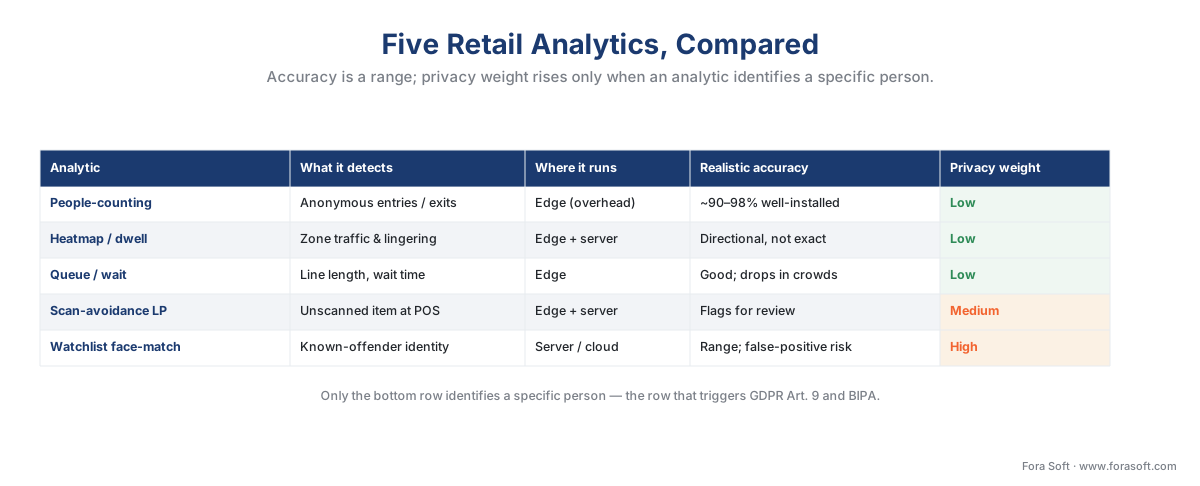 Figure 5. The same catalogue as a visual, with the privacy weight shaded from low to high — a reminder that only the bottom row identifies a specific person.
Where the cameras go: the retail reference design
This is the heart of a Block 8 reference design, and the single idea that saves the most projects: the camera that counts people is not the camera that identifies a thief. They are different installs with different optics, mounted in different places.
The reason is pixel density — how many pixels land on the target, measured in pixels per metre of target width. The IEC 62676-4 standard (the DORI scale, for Detect, Observe, Recognise, Identify) sets the thresholds: detecting a person needs about 25 pixels per metre; recognising someone you already know needs 125; identifying a stranger from the footage needs 250. Identifying a face is roughly ten times the pixel density of detecting a body. An overhead entrance camera framed wide enough to count everyone walking through is, by design, nowhere near sharp enough to identify any of them — and that is fine, because counting does not need identity.
So the reference store has cameras grouped by job:
- Entrance counter — one camera directly overhead at the door, ~2.7–4 m high, facing straight down, framed on the threshold. Detection-grade resolution is enough.
- Aisle and floor cameras — ceiling-mounted cameras covering the sales floor, feeding heatmaps and dwell. Detection-grade, wide coverage.
- Point-of-sale cameras — overhead at each till and self-checkout, framed on the scan zone, for scan-avoidance and sweethearting analytics tied to the POS log.
- Security and identification cameras — at choke points (entrance at face height, exits, high-value displays), at recognition or identification pixel density, for the security and evidentiary job. These are the only cameras that can support a face workflow, and they carry the legal weight that comes with it.
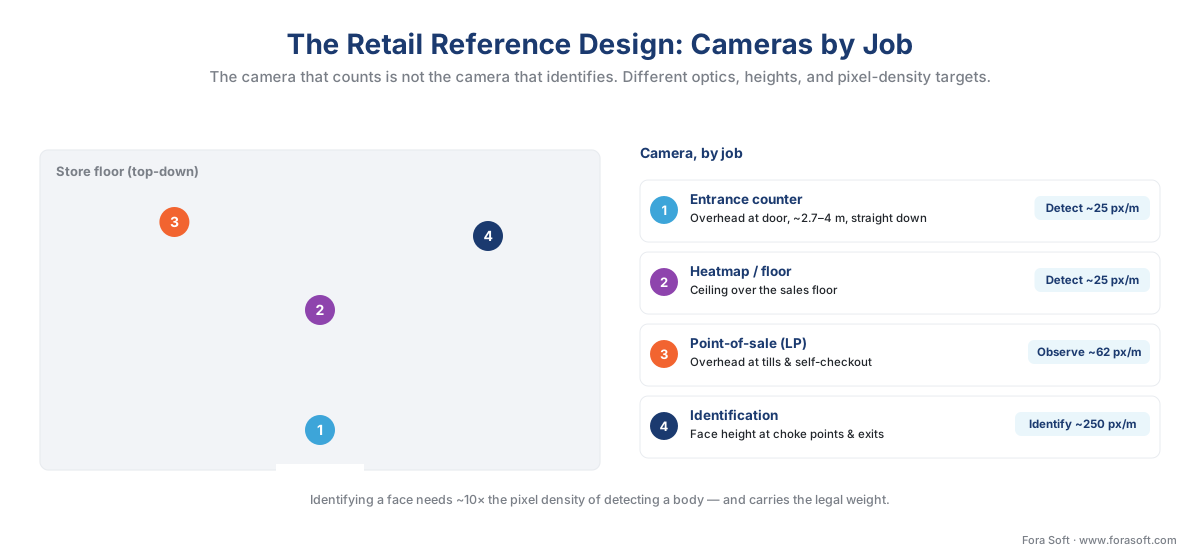 Figure 2. The retail reference design: cameras grouped by job, not bought as one type. Counting and heatmap cameras are detection-grade and overhead; only the identification cameras carry the resolution — and the legal weight — to support a face workflow.
Edge or cloud: where the analytics run
Modern analytics cameras run detection and counting on the camera itself — at the edge. Axis Object Analytics, for example, ships preinstalled and counts people and vehicles on the camera, so "the only data leaving the camera is metadata describing the objects counted." That single design choice drives the economics of a multi-store rollout.
The math is bandwidth. A single continuously streamed camera consumes serious network capacity; an overhead 4K camera can run 12–15 Mbps of video. The metadata describing what that camera counted — a running tally of people in and out — stays well under 100 kbps. Sending counts instead of video is therefore two orders of magnitude cheaper on the wire.
Per-store rollup, 12 analytics cameras:
  Stream all video to HQ:   12 × ~12 Mbps   ≈ 144 Mbps  (impractical per store)
  Send metadata only:       12 × <0.1 Mbps  <  1.2 Mbps  (trivial)
  Saving on the WAN:        ~99% of the traffic
For a chain, the pattern is clear: record video locally at each store, run detection at the edge, and send only the counts, heatmap aggregates, and loss-prevention events up to a central cloud dashboard that rolls hundreds of stores into one view. This is the retail face of the edge-versus-cloud analytics decision the whole section turns on.
How do those counts and events reach the VMS in a vendor-neutral way? Through ONVIF Profile M, the ONVIF profile (released June 2021) that standardises the transport of metadata and analytics events — including object counting and classification — between cameras and the VMS, including JSON events over the lightweight MQTT messaging protocol. The critical caveat, the one most articles miss: Profile M standardises the transport of the event, not the accuracy of the detection behind it. Two Profile-M cameras can both emit a "people-count" event while counting at very different accuracy. Interoperability is not comparable quality. For how events and metadata move from camera to VMS, see events, metadata, and the ONVIF analytics interface and the commercial overview of ONVIF profiles in security systems.
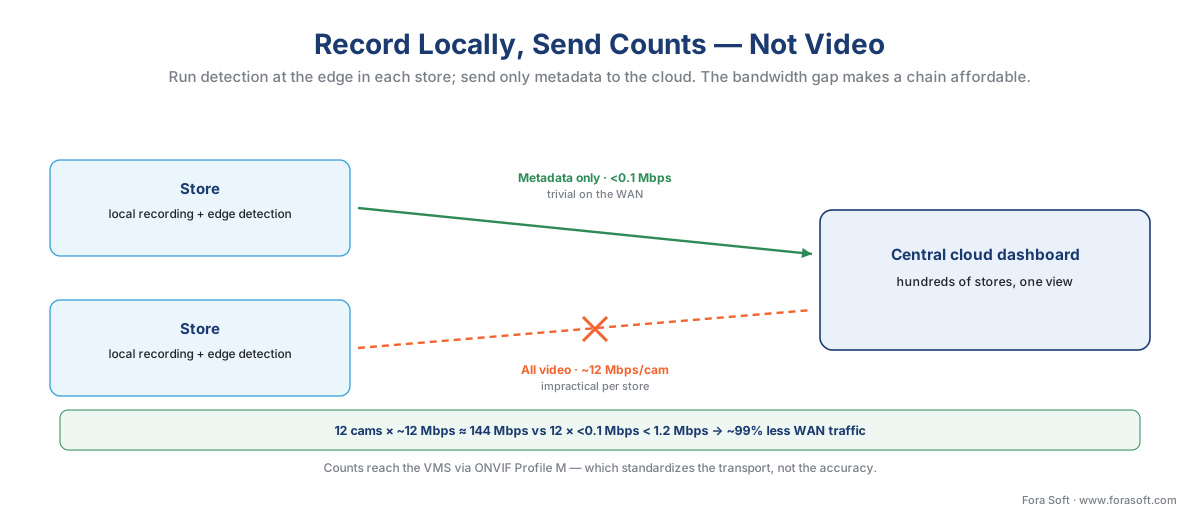 Figure 3. Record video locally, run detection at the edge, send only metadata to the cloud. The bandwidth gap between streaming video and streaming counts is what makes a multi-store rollout affordable.
The privacy line: anonymous counting vs identifying shoppers
Here is the distinction that decides your legal exposure, and it is sharper than most retailers realise. Counting anonymous people and identifying specific people are different acts under privacy law, even when they use the same camera.
Under the EU's General Data Protection Regulation (GDPR, Regulation (EU) 2016/679) and the European Data Protection Board's Guidelines 3/2019 on video devices, footage in which individuals cannot be identified falls outside the regulation entirely. And data becomes special-category biometric data under Article 9 only when three conditions are all met: it concerns physical or behavioural characteristics, it results from specific technical processing, and that processing is for the purpose of uniquely identifying a person. Anonymous people-counting fails the third test — it tallies bodies, it does not single anyone out — so it is generally not Article 9 processing, and a well-designed counter need not retain any personal data at all.
Add a watchlist face-match, and all three conditions are met at once. The system now processes biometric data to uniquely identify a person, which triggers the full Article 9 regime: a lawful basis, an Article 9 condition, a Data Protection Impact Assessment, and a necessity-and-proportionality test. The enforcement reality is not theoretical. In February 2024 the UK's Information Commissioner's Office ordered Serco Leisure to stop using facial recognition to monitor staff across 38 sites — its first such action against an employer. The ICO's scrutiny of the Facewatch retail facial-recognition system the same year ended with use narrowed to serious or repeat offenders. In the US, Illinois's Biometric Information Privacy Act (BIPA, 740 ILCS 14) carries a private right of action and statutory damages of $1,000 per negligent and $5,000 per reckless violation — the engine behind nine-figure settlements — so face-matching for loss prevention in Illinois is a litigation decision, not just a product decision.
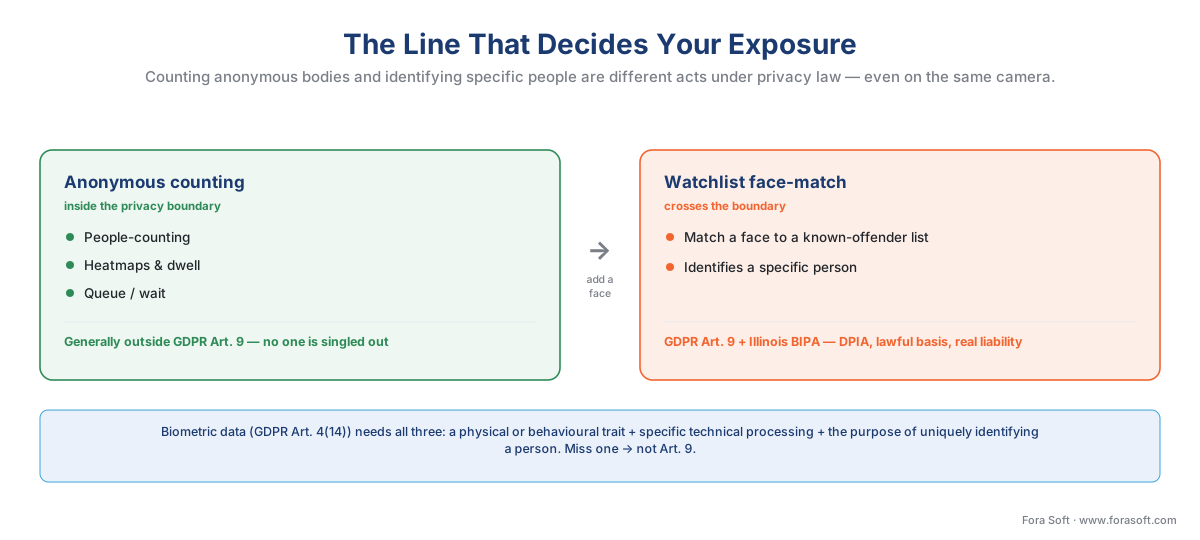 Figure 4. The line that decides your exposure. Anonymous counting and dwell analytics sit inside the privacy boundary; watchlist face-matching crosses it into Article 9 / BIPA territory. Cross the line on purpose, with a review — never by accident.
Common mistake: treating "add face recognition for loss prevention" as a feature toggle. It is a legal gate. The same store can run people-counting, heatmaps, and queue analytics with little privacy weight, then cross into GDPR Article 9 and BIPA exposure the moment a single watchlist match is switched on. Decide which side of the line your product sits on before you build it, and route any biometric workflow through face recognition in surveillance, GDPR for video surveillance, and BIPA and US biometric privacy law — with counsel.
A worked example: cameras, cost, and the return
Put numbers on a mid-size store. Say it runs 10 cameras, of which 4 are dedicated analytics channels (one entrance counter, two heatmap, one POS), and the store does $5 million a year in sales.
Storage / bandwidth (local recording, H.265, motion + event):
  10 cameras × ~4 Mbps avg          = 40 Mbps recorded locally
  Analytics metadata to cloud:       4 × <0.1 Mbps  < 0.4 Mbps

Analytics licensing (order-of-magnitude):
  4 analytics channels × ~$300/ch    ≈ $1,200 one-time (often bundled free)

Loss-prevention ROI:
  Store sales                        = $5,000,000 / yr
  Shrink at 1.6% (NRF FY2022 rate)   = $80,000 / yr lost
  A conservative 20% reduction       = $16,000 / yr recovered
A $16,000 annual shrink recovery from a four-figure analytics spend is the kind of return that makes loss-prevention analytics the easiest retail case to justify — and that is before the conversion uplift from acting on the counting and heatmap data. The cost figures are order-of-magnitude and vary widely by region and vendor; size the build with our surveillance cost model and the retail analytics planning worksheet below, which lays the camera-by-job plan, the DORI targets, and the privacy gate on one page.
Where Fora Soft fits in
Fora Soft has built video streaming, real-time video, and computer-vision software since 2005, across 625+ projects, and retail analytics sits at the intersection of all three. When we build a counting or loss-prevention system, we lead with how it behaves under real load — the counter's accuracy range at the actual mounting height and crowd density, the false-positive rate the store's staff will live with, the bandwidth a multi-store rollup really consumes — and only then the feature list. We treat the privacy line as an architecture decision made early, not a compliance scramble late, because a retail analytics product that ships anonymous counting cleanly and gates its biometric features deliberately is the one that survives both a busy Saturday and a regulator's question.
What to read next
- Perimeter and intrusion detection — the next reference design in the block.
- Edge vs cloud video analytics — where retail analytics should run, and why.
- Estimating a surveillance project: scope to number — turn this design into a cost.
Call to action
- Talk to a surveillance engineer — book a 30-minute scoping call to talk through your retail video analytics plan.
- See our case studies — 250+ shipped projects across video streaming, WebRTC, OTT, telemedicine, e-learning, surveillance, and AR/VR.
- Download the Retail Analytics Planning Worksheet — One-page planning tool for a retail video-analytics build: the camera-by-job placement table (entrance counter, heatmap, point-of-sale, identification) with placement notes and DORI pixel-density targets; the pixel-density ladder….
References
- ONVIF Profile M Specification v1.0 (2021). ONVIF. Tier 1. Standardises the transport of metadata and analytics events — including object counting and classification, and JSON events over MQTT — between cameras and the VMS; the basis for the "transport, not accuracy" point. https://www.onvif.org/profiles/profile-m/
- General Data Protection Regulation (Regulation (EU) 2016/679), Art. 4(14), Art. 9, Art. 35. European Union (EUR-Lex). Tier 1. Defines biometric data by the three cumulative criteria and treats data used to uniquely identify a person as special-category; the legal gate behind the anonymous-vs-identifying distinction. https://eur-lex.europa.eu/eli/reg/2016/679/oj
- Guidelines 3/2019 on processing of personal data through video devices (v2.0, 2020). European Data Protection Board. Tier 2. Confirms that non-identifying footage falls outside GDPR and that counting without unique identification is not Article 9 processing. https://www.edpb.europa.eu/our-work-tools/our-documents/guidelines/guidelines-32019-processing-personal-data-through-video_en
- Biometric Information Privacy Act, 740 ILCS 14. Illinois General Assembly. Tier 1. Private right of action and statutory damages of $1,000 (negligent) / $5,000 (reckless) per violation; the US risk if face-matching is used for loss prevention. https://www.ilga.gov/legislation/ilcs/ilcs3.asp?ActID=3004&ChapterID=57
- ICO orders Serco Leisure to stop using facial recognition (23 Feb 2024). UK Information Commissioner's Office. Tier 1. First ICO enforcement against an employer over biometric monitoring; evidence that live facial recognition is high-risk. https://ico.org.uk/about-the-ico/media-centre/news-and-blogs/2024/02/ico-orders-serco-leisure-to-stop-using-facial-recognition-technology/
- IEC 62676-4: Video surveillance systems — application guidelines (DORI). IEC. Tier 1. Sets the pixel-density thresholds (Detect ~25, Recognise ~125, Identify ~250 px/m) behind the counting-camera-vs-identification-camera distinction. https://webstore.iec.ch/en/publication/6671
- People counting technologies — aspects for system integrators and end customers. Axis Communications. Tier 3. 2D vs 3D stereo architecture, mounting requirements, and the explicit refusal to publish a single accuracy percentage. https://www.axis.com/dam/public/ca/ae/70/axis-people-counting-technologies--aspects-for-system-integrators-and-end-customers-en-US-191292.pdf
- AXIS People Counter and AXIS Object Analytics — product documentation. Axis Communications. Tier 3. ~2.7 m minimum mounting height, ~95% accuracy when correctly installed, and edge counting where "only metadata leaves the camera." https://help.axis.com/en-us/axis-people-counter
- The Impact of Retail Theft and Violence 2024; and "Shrink accounted for over $112 billion" (FY2022). National Retail Federation. Tier 2. The $112.1 billion / 1.6%-of-sales shrink figure and the discontinuation of the annual security survey. https://nrf.com/research/the-impact-of-retail-theft-violence-2024
- How accurate is your people counter? RetailNext. Tier 4. A first-party but well-reasoned treatment of counting accuracy: a 95% audited guarantee, variance thresholds, and the case against trusting "97, 98, 100%" claims. https://retailnext.net/blog/how-accurate-is-your-people-counter
- Evercheck self-checkout and POS loss prevention. Everseen. Tier 4. Computer vision linking non-scan events to the POS log for scan-avoidance and sweethearting; used for the LP-mechanism description, not as an accuracy source. https://everseen.com/solutions/evercheck
