


This is engineering guidance, not legal advice. Confirm specifics with qualified counsel.
Why this matters
If you secure a site, build a video management platform, or integrate cameras for industrial, logistics, utility, or campus clients, perimeter protection is the request with the highest stakes and the highest failure rate. The failure is almost never "the camera didn't see anything" — it is the opposite: the system saw everything, alarmed on all of it, and within a month the guards had muted it, so the one real intrusion at 3 a.m. scrolled past unwatched. This article gives you the vendor-neutral reference design for perimeter and intrusion detection — the detect-delay-respond logic the whole thing rests on, the two accuracy numbers that decide whether it works, why deep-learning classification changed the game, how the sensor layers fit together, and the false-alarm tuning that turns a noisy install into a system people trust — so you can scope a build, read a vendor claim critically, and avoid the mistakes that quietly make a six-figure fence line useless.
The job is to buy time: detect, delay, respond
Start with the single idea that organizes everything else. A perimeter system does not stop an intruder. A fence, a wall, and a locked gate slow them down; cameras and sensors only notice them. The point of noticing is to start the clock on a response — a guard, a remote operator, or the police — while there is still time to intervene. Security engineers call this detect, delay, respond, and it is the framework behind every serious perimeter design, formalized decades ago in the physical-protection-system work at Sandia National Laboratories.
Here is the logic in one line. An intrusion is interrupted only if the time left on the delay (how long the barriers slow the intruder down after the moment of detection) is longer than the time the response force needs to arrive. Detection that comes too late — after the intruder is already past the barriers — buys no time at all, no matter how accurate it is. This is why early detection at the outer edge is worth more than perfect detection at the inner wall: the earlier you catch the approach, the more delay is still in front of the intruder when the clock starts.
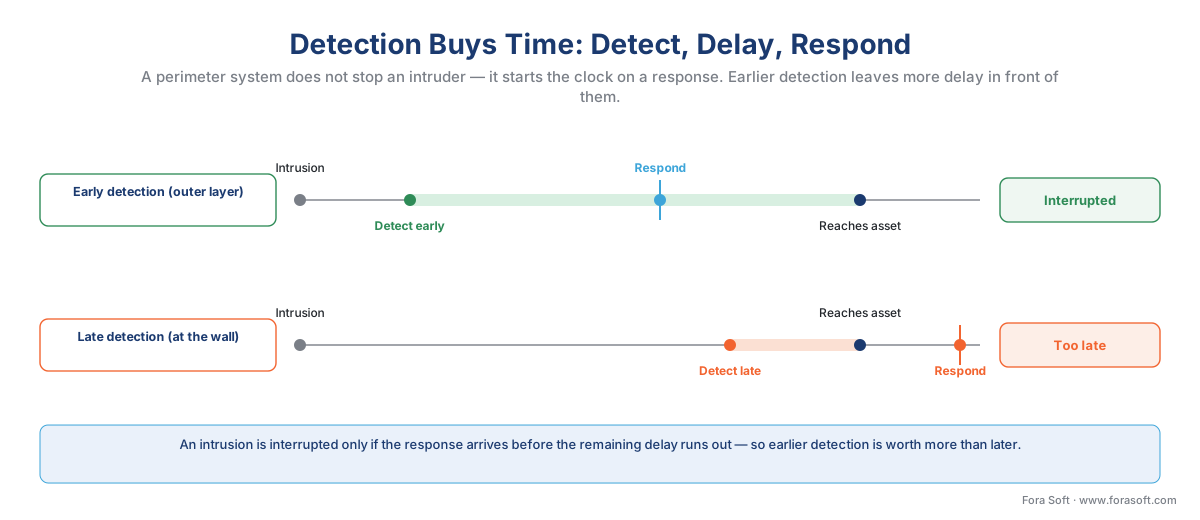 Figure 1. A perimeter system buys time, it does not stop anyone. Detection only helps if it happens early enough that the response arrives before the intruder defeats the remaining barriers. Earlier detection at the outer layer is worth more than later detection at the wall.
That reframes what you are buying. You are not buying "a camera that sees the fence." You are buying the earliest reliable, actionable alarm you can afford — early enough to leave delay in front of the intruder, reliable enough to trust, and connected to a response that can actually arrive. Hold that test in mind for the rest of this article; every design choice below is in service of it.
The two numbers that decide everything: detection vs false alarms
Every perimeter sensor lives on a tradeoff between two metrics, and you cannot maximize both at once.
The first is the probability of detection (often written Pd) — of the intrusions that really happen, what fraction does the system catch? The second is the nuisance-alarm rate (NAR), sometimes lumped together with false-alarm rate — how often does the system raise an alarm when nothing of concern is there? A nuisance alarm is technically a real detection of a harmless cause (a fox, a windblown bag, a swaying branch); a false alarm is a sensor error (a glitch, a reflection). For the buyer the effect is identical: the operator is interrupted for nothing.
Turn a sensor's sensitivity up and you catch more real intrusions — and more rabbits, shadows, and raindrops. Turn it down and the nuisance alarms fall — along with your odds of catching a careful intruder crawling along the base of the fence. The entire engineering craft of perimeter detection is finding the setting, per zone and per condition, where detection stays high while nuisance alarms drop to a level operators will tolerate.
What level will they tolerate? Less than most people guess. A high-security site might engineer for a probability of detection in the high-90s percent under defined conditions, but the binding constraint is almost always the nuisance side: a widely used operational target is fewer than one nuisance alarm per sensor zone per day, or roughly one per day per kilometre of well-designed fence line. Cross that line and a human truth takes over.
Common mistake: treating false alarms as a tuning detail instead of the whole game. A perimeter system that fires twenty nuisance alarms a night does not get fixed — it gets muted. Guards stop walking out to check, the monitoring contract gets downgraded, and the system that "has 99% detection" on the datasheet now protects nothing, because nobody is listening to it. The number that kills perimeter projects is not a low detection rate; it is a high nuisance rate that destroys trust. Design for the nuisance rate first.
And never accept a single perfect accuracy figure. A vendor that advertises "99.95% false-alarm filtering" or "zero false alarms" is quoting an unaudited number from a favourable test. The real performance is a range that depends on weather, season, lighting, the length and shape of the perimeter, and how carefully the system was tuned and calibrated on your site. Ask for probability of detection and nuisance rate, both with the conditions attached; treat any number without conditions as marketing.
Why old motion detection failed, and what deep learning changed
For twenty years the default perimeter analytic was video motion detection (VMD): the software watched for pixels changing between frames and alarmed when enough of them moved. It is cheap, it runs on anything, and on an outdoor perimeter it is close to useless on its own — because everything moves. Wind in the trees moves pixels. A cloud crossing the sun moves pixels across the whole scene. Headlights, rain, snow, a flag, a plastic bag, a cat, a spider building a web across the lens at dusk — all of it trips pixel-change motion detection. This is the source of the nuisance-alarm flood that gave perimeter analytics a bad name.
The shift that changed perimeter security is object classification. A modern analytic built on a deep-learning model does not ask "did pixels change?" It asks, in order: is there an object here, and what is it — a person, a vehicle, an animal, or environmental noise? Only after it has classified the object does it check whether that object broke a rule. A swaying branch is never a person, so it never alarms. A fox is an animal, filtered out. A human climbing the fence is classified as a person in a forbidden zone, and that alarms. By gating the rule check behind classification, deep-learning analytics cut the nuisance flood by a large margin — the practical reason perimeter video analytics became trustworthy enough to put in front of police-dispatch decisions.
The model internals — how a network is trained to detect and classify a person against a cluttered night-time background — are an engineering topic in their own right, covered in our AI for Video Engineering section. Here the focus is the surveillance application: what rules you build on top of the classifier, and how you tune them.
There are three rule types you will configure on almost every perimeter, and they map cleanly onto the behaviours an intruder shows:
- Line crossing (also called a tripwire): an invisible line drawn along or just inside the boundary; an object of the chosen class crossing it, in the chosen direction, alarms. This is the classic fence-line trigger.
- Intrusion zone (area intrusion): a closed region — a yard, a substation, a no-go strip between two fences — where any person or vehicle of the chosen class appearing or entering raises an alarm. Direction and dwell can be added.
- Loitering: an object of the chosen class staying inside a zone longer than a set time, which catches the person studying the fence rather than crossing it.
These rule types — line, zone, loitering, plus crowd and direction variants — are the shared vocabulary of behavioural analytics across the whole field; we cover the rule logic in depth in behavioural analytics: loitering, intrusion, and zones. On a perimeter, the classification gate in front of them is what makes them usable outdoors.
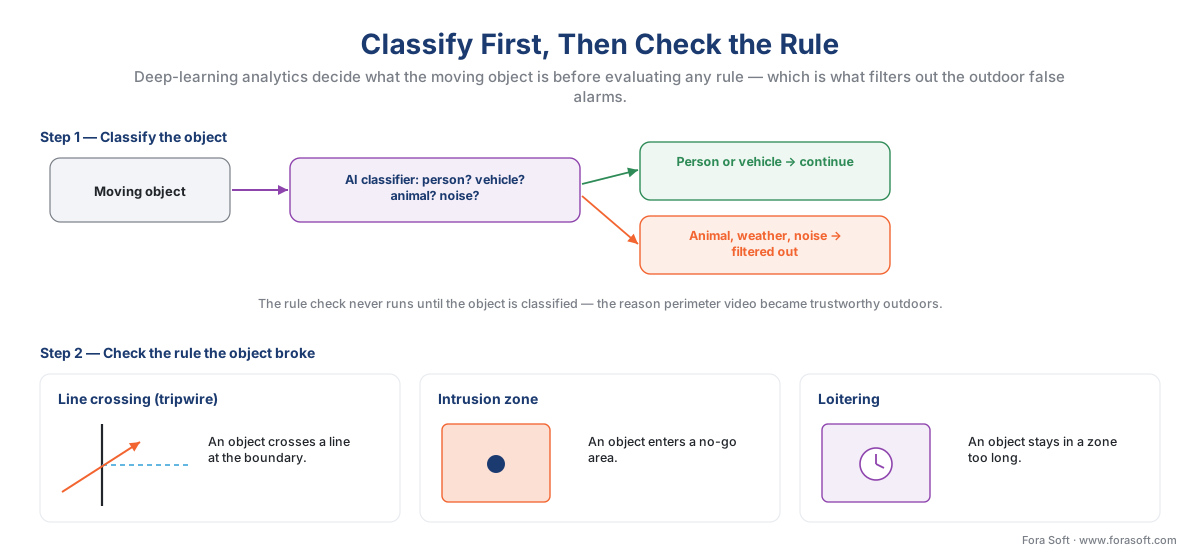 Figure 2. The classifier comes first. Only after the moving object is confirmed as a person or vehicle does the system check the rule it broke — a crossed line, an entered zone, or loitering. Animals and environmental motion are filtered before any rule is evaluated, which is what tames the outdoor false-alarm problem.
The sensor layers: video, thermal, radar, and fence — and why you fuse them
No single sensor is good at everything, so serious perimeters layer several, each covering another's blind spot. This is defense-in-depth applied at the sensor level, and it is how you push detection probability up and nuisance alarms down at the same time — because a target that trips two different sensor types is far more likely to be real than one that trips only one.
A visual camera with analytics is the cheapest layer and the one that lets a human see and identify what is there — but it needs light, and at night that means lighting the perimeter or accepting degraded performance. A thermal camera sees the heat of a body, not reflected light, so it detects a person in total darkness, through light fog, and against camouflage, and it detects them much farther away than a visual camera can — which is exactly what "detect early" demands. Thermal pairs naturally with analytics: the same person/vehicle classification runs on the heat image. Radar does not see images at all; it detects movement and range across a wide area, is almost unaffected by darkness, shadows, small animals, rain, or blowing debris, and can hand the precise coordinates of a target to a pan-tilt-zoom camera so the camera swings to it automatically. Physical fence sensors (fibre or accelerometer cable woven into the fabric) and buried cable sensors detect the vibration of someone climbing or the disturbance of someone crossing a line in the ground — they confirm contact with the barrier itself.
The modern reference pattern fuses three of these into a triad: radar for early wide-area detection, thermal for the fence line in the dark, and visual/PTZ for verification and identification. Radar catches the approach far out and slews a camera to it; thermal confirms a human shape at the fence; the visual camera (or the visible channel of a bispectral camera) gives the operator a picture clear enough to verify the threat and, where needed, identify the person or read a plate.
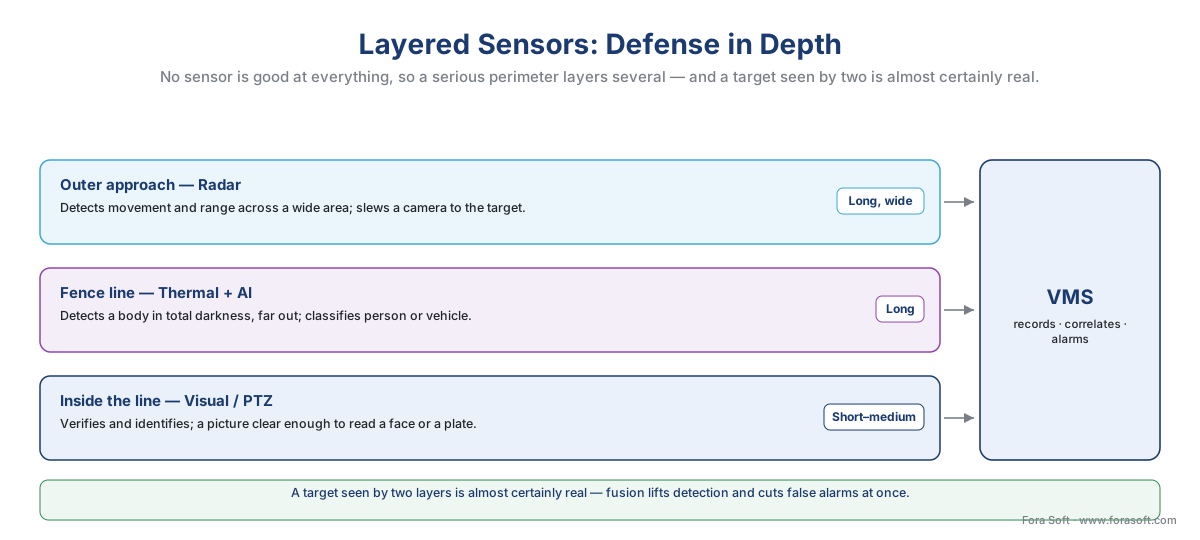 Figure 3. Defense in depth at the sensor level. Each layer covers the layer behind it: radar detects the approach at distance and points a camera at it, thermal confirms a body at the fence in darkness, and the visual camera verifies and identifies. A target seen by two layers is almost certainly real — fusion lifts detection and cuts false alarms at once.
| Sensor layer | What it does best | Typical range | Nuisance behaviour | Day / night | Where it fits |
|---|---|---|---|---|---|
| Visual camera + AI | Verify, identify, read plates | Short–medium | Needs light; AI cuts false alarms | Day (or lit) | Verification, identification |
| Thermal camera + AI | Detect a body in darkness, far out | Long | Low with classification | Day & night | Fence line, long approaches |
| Radar | Wide-area detection, slew a PTZ | Long, wide | Very low; immune to weather/animals | Day & night | Outer approach, large open areas |
| Fence sensor | Confirm contact with the barrier | The fence itself | Weather/foliage can trip it | Day & night | The physical boundary |
| Buried cable | Covert line-of-crossing detection | The buried line | Low; hidden from intruders | Day & night | Covert lines, gaps between fences |
Table 1. No sensor wins every column — which is the argument for layering. Ranges are indicative and depend heavily on the model, the optics, and the site; confirm against the specific product and a site survey. Fusing two layers is what lifts detection while holding the nuisance rate down.
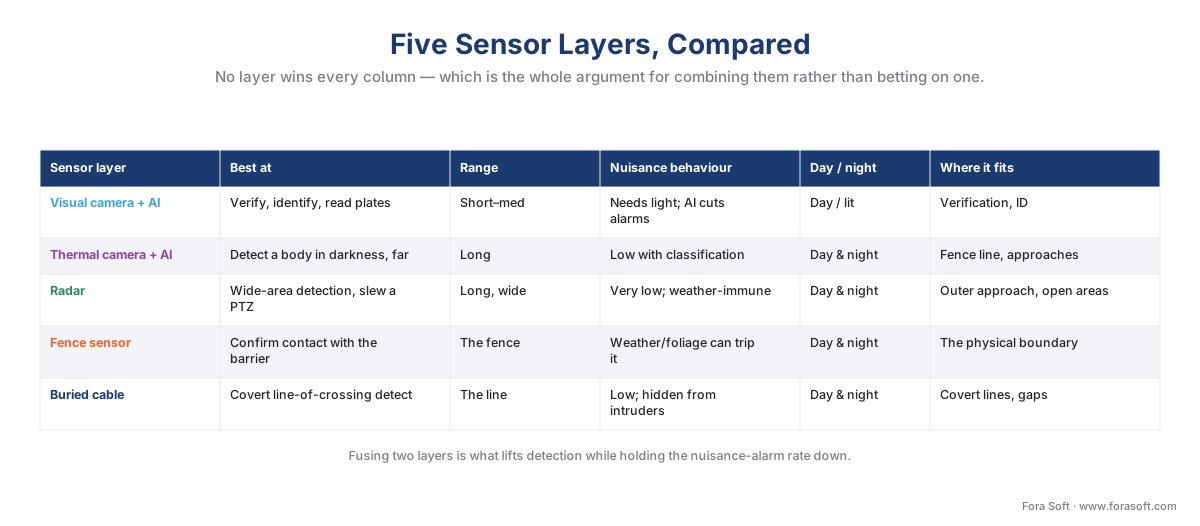 Figure 5. The same comparison as a visual: no row is strong in every column, which is the whole argument for layering rather than betting a perimeter on one sensor type.
Camera placement: the pixel-density reality at the fence line
A recurring perimeter mistake is buying one camera to do two incompatible jobs. The camera that detects a person crossing a wide stretch of fence is framed too wide to identify that person's face — and identification needs roughly ten times the pixel detail. The governing standard is IEC 62676-4, the video-surveillance application guideline, whose DORI scale (Detect, Observe, Recognise, Identify) sets the pixel-density thresholds: detecting a person needs about 25 pixels per metre of scene width, recognising someone you already know about 125, and identifying a stranger from the footage about 250.
Put numbers on it. Suppose one analytics camera must cover a 50-metre run of fence:
Camera covering a 50 m fence run, horizontal resolution 1920 px:
  Pixel density = 1920 px ÷ 50 m = 38.4 px/m
  → Above the ~25 px/m Detect threshold: good enough to ALARM on a person.
  → Far below the ~250 px/m Identify threshold: cannot recognise a face.
That camera will reliably detect an intruder anywhere along the 50 metres — exactly what the alarm needs — and it will be hopeless for identifying who they are. Both facts are fine, as long as you planned for them. The reference design therefore separates the jobs: wide detection cameras (or thermal/radar) raise the alarm across the whole boundary, and a smaller number of identification cameras — fixed at choke points, or a PTZ that the alarm automatically slews to the target — carry the resolution to show a face or a plate once something has tripped. Buy cameras to the job, never the job to the camera. (For the camera-to-VMS ingest path behind all of this, see the anatomy of a video surveillance system.)
Why detection runs at the edge
Perimeter response is measured in seconds, so where the analytics run matters. Running detection on the camera or a nearby appliance — at the edge — means the alarm fires locally, in near-real time, instead of after the video has been shipped to a distant server or the cloud and analysed there. Edge detection also slashes bandwidth, because the camera sends a small event ("person, zone 3, 02:14:07") rather than a continuous high-bitrate stream.
The bandwidth gap is large enough to change a design. A continuously streamed thermal-plus-visual camera can run well over 10 Mbps; the metadata describing what it detected is a few kilobits.
Per-site uplink, 16 perimeter cameras:
  Stream all video to a central SOC:  16 × ~12 Mbps  ≈ 192 Mbps  (impractical on most WANs)
  Send events + verification clips:   16 × <0.2 Mbps  <  3.2 Mbps  (trivial)
  Saving on the wide-area link:       ~98% of the traffic
So the pattern is: record and detect locally at the edge, send the alarm event and a short verification clip upstream, and pull full live video only when an operator chooses to verify. This is the perimeter face of the edge vs cloud analytics decision the whole section turns on, and it is why low-latency edge classification is the default for security-grade perimeters.
From alarm to response: integration and verified dispatch
An alarm that lights up a screen nobody is watching changes nothing. The value is created in the last link: turning a classified detection into a response. In a complete perimeter system the analytic event flows from the camera into the video management system (the software that records and manages many cameras, the VMS) and then fans out to the rest of the security stack.
How does the event reach the VMS in a way that works across different camera brands? Through ONVIF Profile M — the ONVIF profile (released June 2021) that standardises how analytics metadata and events, including object classification, travel from camera to VMS, with events carried over the lightweight MQTT messaging protocol. The caveat most articles miss: Profile M standardises the transport of the event, not the quality of the detection behind it. Two Profile-M cameras can both emit a "person in zone" event while detecting at very different reliability. Interoperability is not comparable accuracy. For how events and metadata move from camera to VMS, see events, metadata, and the ONVIF analytics interface, and the commercial overview of ONVIF profiles in security systems.
From the VMS, the verified alarm drives the response: it can lock a gate or trigger an access-control response, automatically slew a PTZ camera to the target for a clear picture, push the clip to an operator, and forward the alarm to a central monitoring station over the alarm-signalling standard SIA DC-09. That last hop is where a quietly important shift is happening. Because municipalities are drowning in false alarms, a growing number of police jurisdictions now apply verified response — they prioritise, or outright require, that an alarm be confirmed by video, audio, or a human before they dispatch. The Security Industry Association reported in 2024 that some US cities have moved to require verification for police response. A video-verified perimeter alarm is dispatched as a likely crime-in-progress and arrives while it still matters; an unverified alarm may go to the back of the queue or be ignored. Verification is no longer a nicety — it is increasingly the price of getting a response at all.
 Figure 4. The last link is where the value is. A classified detection becomes a VMS event (ONVIF Profile M), which slews a PTZ to verify, triggers access control, and forwards a video-verified alarm to the monitoring centre (SIA DC-09) — where verification increasingly determines whether police respond at all.
The false-alarm tuning that makes it usable
Perimeter analytics are not plug-and-play, and the gap between a noisy install and a trusted one is almost entirely tuning. Factory defaults are deliberately sensitive so the system "sees everything" in a demo; left at those settings on a live perimeter, it will flood operators within a night. Commissioning a perimeter is the work of pulling the nuisance rate down without dropping real detection, and it is iterative:
- Draw zones to the threat, not the whole scene. A line or zone that hugs the actual boundary ignores the busy road, the neighbour's yard, and the swaying tree-line behind the fence.
- Use the object filters. Restrict each rule to the classes that matter — person and vehicle — so animals and debris never reach the rule check.
- Calibrate perspective. Telling the analytic how big a person should look at each distance lets it reject objects that are the wrong size to be human, a major nuisance cut on long fence runs.
- Schedule and adapt. Different sensitivity by day and night, by zone, and by season; foliage in summer and low winter sun are different problems.
- Field-test against reality. Walk-test every zone for detection (does a real intruder reliably trip it?) and watch it across bad weather for nuisance alarms. Then review the nuisance rate weekly and re-tune — a perimeter is commissioned over weeks, not in an afternoon.
This tuning discipline — the precision-versus-nuisance balance, measured and adjusted — is the same craft we treat in general in tuning analytics: false alarms and accuracy. On a perimeter it is the difference between a system the guards rely on and one they switched off in week two.
A worked example: a 600-metre site
Put the pieces together on a mid-size industrial site with a 600-metre perimeter fence, monitored from a small on-site control room with a guard who can also call verified police response.
Sensor plan (600 m perimeter):
  Radar units (wide-area, ~120 m each)     4 units  → outer-approach detection
  Thermal + AI cameras (fence line)         8 cams   → person/vehicle classification in the dark
  Visual PTZ (auto-slew to verify/identify) 2 cams   → verification & face/plate at choke points

Nuisance-alarm budget:
  Target < 1 nuisance alarm / zone / day across ~12 detection zones
  → aim for < ~12 nuisance alarms / day total after tuning, trending down weekly

Edge uplink (events + verification clips, not full streams):
  14 detection/verification cams × < 0.2 Mbps  <  2.8 Mbps   (well within a modest WAN)

Response-window logic:
  Radar detects an approach ~100 m out  →  ~30–60 s of "delay" before the fence is reached
  → enough time to slew PTZ, verify on video, and dispatch a verified alarm while it matters
The numbers are illustrative and move a lot with terrain, fence type, climate, and vendor — size a real build with our surveillance cost model and the perimeter detection planning checklist below, which lays the detect-delay-respond logic, the sensor-layer plan, the Pd/NAR targets, and the privacy gate on one page. The shape of the design, though, is stable: layer the sensors so detection happens early and is confirmed by more than one, run classification at the edge for speed, tune relentlessly to hold the nuisance rate down, and wire the verified alarm into a response that can arrive in time.
The privacy line for perimeter cameras
Perimeter cameras point outward, which means they routinely capture ground you do not own — a public footpath, a road, a neighbour's garden. That is a privacy question with settled law behind it, and it is sharper than most installers assume. In the EU, the Court of Justice's Ryneš judgment (C-212/13, 2014) held that a home camera which films a public space is not covered by the "household" exemption and so falls under data-protection law in full. The European Data Protection Board's Guidelines 3/2019 on video devices build on this: most surveillance relies on the legitimate-interest basis (GDPR Article 6(1)(f)), which demands a documented necessity and proportionality test — you must show the cameras are necessary for a real security purpose and aimed no wider than needed.
In practice that means three things on a perimeter. Minimise what you capture — angle cameras inward and use privacy masking to black out a neighbour's windows or the public pavement that the camera does not need. Document the purpose — a legitimate-interest assessment, signage, and a retention period that is no longer than necessary. And where the site monitors a publicly accessible area systematically and at scale, a Data Protection Impact Assessment (GDPR Article 35) is likely required before you switch it on. A separate and heavier gate applies the moment a perimeter analytic moves from detecting a person to identifying one — face recognition, or licence-plate recognition at a vehicle gate. Those cross into special-category biometric and personal-data rules (GDPR Article 9; in the US, state biometric laws such as Illinois BIPA), and they belong behind a deliberate review, not a default toggle. Route any identification workflow through GDPR for video surveillance, privacy by design for surveillance, and licence-plate recognition (LPR/ANPR) — with counsel.
Where Fora Soft fits in
Fora Soft has built video streaming, real-time video, and computer-vision software since 2005, across 625+ projects, and perimeter detection sits squarely at that intersection. When we build or integrate a perimeter system, we lead with how it behaves under real load — the detection probability and the nuisance rate at the site's actual weather and fence geometry, the response-window math, the bandwidth a multi-zone edge rollout truly consumes — and only then the feature list, because a perimeter that alarms on every fox is a perimeter that gets muted. We treat the privacy line and the verified-response chain as architecture decisions made early, not compliance and integration scrambles bolted on late, so the system survives both a stormy night and a regulator's question.
What to read next
- Industrial and critical-infrastructure surveillance — the high-reliability reference design next door.
- Behavioural analytics: loitering, intrusion, and zones — the rule logic in depth.
- Estimating a surveillance project: scope to number — turn this design into a cost.
Call to action
- Talk to a surveillance engineer — book a 30-minute scoping call to talk through your perimeter intrusion detection plan.
- See our case studies — 250+ shipped projects across video streaming, WebRTC, OTT, telemedicine, e-learning, surveillance, and AR/VR.
- Download the Perimeter Detection Planning Checklist — One-page planning tool for a perimeter and intrusion-detection build: the detect-delay-respond logic and response-window rule; the probability-of-detection vs nuisance-alarm-rate targets (the <1 nuisance alarm/zone/day discipline); the….
References
- IEC 62676-4: Video surveillance systems — Part 4: Application guidelines (DORI). IEC (current edition EN IEC 62676-4:2025). Tier 1. Sets the pixel-density thresholds — Detect ~25, Observe ~62.5, Recognise ~125, Identify ~250 px/m — behind the detection-camera-vs-identification-camera distinction. https://webstore.iec.ch/publication/28442
- ONVIF Profile M Specification (released June 2021). ONVIF. Tier 1. Standardises the transport of analytics metadata and events — including object classification, with events over MQTT — from camera to VMS; the basis for the "transport, not accuracy" point. https://www.onvif.org/profiles/profile-m/
- EN 50131-1: Alarm systems — Intrusion and hold-up systems. CENELEC. Tier 1. The European standard for intruder alarm systems; defines four security grades (Grade 1 low risk to Grade 4 high risk) used to specify perimeter and intrusion systems. https://www.cenelec.eu/
- Court of Justice of the EU, František Ryneš v Úřad pro ochranu osobních údajů, C-212/13 (11 Dec 2014). CJEU. Tier 1. A fixed home camera filming a public space is not covered by the GDPR/Directive "household" exemption; the operator is a controller with full data-protection obligations. https://curia.europa.eu/juris/liste.jsf?num=C-212/13
- Guidelines 3/2019 on processing of personal data through video devices (v2.0, 2020). European Data Protection Board. Tier 2. Restrictive household exemption; legitimate-interest basis (GDPR Art. 6(1)(f)) with a necessity-and-proportionality test; data minimisation and privacy masking for areas not under the controller's responsibility. https://www.edpb.europa.eu/our-work-tools/our-documents/guidelines/guidelines-32019-processing-personal-data-through-video_en
- General Data Protection Regulation (Regulation (EU) 2016/679), Art. 6(1)(f), Art. 9, Art. 35. European Union (EUR-Lex). Tier 1. Legitimate-interest legal basis; special-category biometric data; the requirement for a Data Protection Impact Assessment for systematic large-scale monitoring of a publicly accessible area. https://eur-lex.europa.eu/eli/reg/2016/679/oj
- Physical Protection Systems — detection, delay, response and the EASI model. Sandia National Laboratories (SAND2008-5730 and related). Tier 2. The detect-delay-respond framework and the principle that an intrusion is interrupted only when response time is shorter than the remaining delay after detection. https://www.osti.gov/biblio/983673
- Perimeter protection with intelligent surveillance (white paper); AXIS Perimeter Defender; thermal and radar for perimeter protection. Axis Communications. Tier 4. Edge-based AI classification of humans/vehicles, the radar+thermal+visual fusion pattern, radar's near-immunity to weather/animals, and edge latency/bandwidth benefits. https://www.axis.com/solutions/perimeter-security-and-intrusion-detection
- Some Cities Are Requiring Alarm Verification for Response (7 Oct 2024). Security Industry Association (SIA). Tier 2. Documents the move by some US jurisdictions toward verified response — prioritising or requiring video/audio/human verification before police dispatch. https://www.securityindustry.org/2024/10/07/some-cities-are-requiring-alarm-verification-for-response-what-it-means-for-the-security-industry/
- Perimeter Intrusion Detection with AI-based Video Analytics. Davantis. Tier 4. Vendor engineering description of classification-gated perimeter analytics and the nuisance-alarm-reduction mechanism; used for the mechanism, not as an accuracy source. https://www.davantis.com/en/blog/technology/intrusion-detection/
- The Security Math: thermal cameras for perimeter; pairing thermal cameras and radar. Hanwha Vision / Security Sales & Integration. Tier 4. Thermal detection at distance and in darkness, and the thermal-plus-radar pairing for cost-effective long-perimeter coverage. https://hanwhavision.eu/the-security-math-why-expensive-thermal-cameras-are-actually-the-most-cost-effective-way-to-protect-a-perimeter/
