


Why this matters
If you run or are planning an over-the-top (OTT) platform — a service that streams video over the internet rather than through a cable box — the night of your biggest live event is the night the platform is most likely to break, and the night a failure is most expensive. A sports final or a series premiere drives a sudden spike of concurrent viewers, and a platform that cannot see what is happening, or that drowns its on-call engineer in noise, loses viewers in the minutes that matter most. This article is for the non-technical operator — the founder, product lead, or streaming executive — who has to understand what the operations team watches, approve the service levels the business commits to, and know whether the alerting is set up to catch real problems or just to generate noise. It is the operations companion to the OTT analytics map, which laid out the whole measurement landscape; this article is about the live, minute-by-minute slice of it.
The one idea: a dashboard informs, an alert interrupts
Start with the distinction that organizes everything else, because confusing the two is the most common operational mistake there is. A dashboard is a screen that gives a person situational awareness — a summary view of the platform's core numbers that someone chooses to look at. An alert is a notification that interrupts a person — an email, a chat message, or a pager buzz — because something needs attention now. Google's Site Reliability Engineering book, the reference text for this discipline, defines them in exactly these terms: a dashboard is "a summary view of a service's core metrics," and an alert is "a notification intended to be read by a human."
The reason the difference matters is cost. Looking at a dashboard is cheap; a person can glance at it, or ignore it, with no consequence. Interrupting a person is expensive — it breaks their focus during the day and their sleep at night. So the rule is simple to state and hard to live by: put everything on the dashboard, but only let the urgent, actionable, user-visible things ring the pager. A platform that pages on everything has, in practice, no alerting at all, because the on-call engineer learns to skim past the buzzing.
Think of it like the instrument panel of a car versus the warning chime. The panel shows you speed, fuel, and engine temperature all the time, and you check it when you want to. The chime only sounds when a door is open at speed or the fuel is nearly gone — something you must act on now. Nobody would design a car whose chime sounded once a second; they would tape over the speaker within a day, and then miss the one chime that mattered. Real-time streaming operations is the same design problem.
The four golden signals, in streaming terms
You cannot watch everything, so the field has settled on a minimum viable set of four metrics to watch on any live service. Google SRE named them the four golden signals — latency, traffic, errors, and saturation — and the book explicitly works the streaming case, noting that for an audio or video streaming system the traffic signal "might focus on network I/O rate or concurrent sessions." Here is each signal translated into what an OTT platform actually measures.
Latency is how long things take. For streaming it splits into a few measures the viewer feels: video startup time (how long from pressing play to the first frame), the time to fetch the manifest (the small text file that lists the video's quality options), and segment delivery time (how long each few-second chunk of video takes to arrive). A critical refinement from the SRE book applies directly here: track the latency of failed requests separately from successful ones. An error that fails fast and an error that hangs for thirty seconds are very different experiences, and blending them hides the worse one.
Traffic is how much demand is on the platform. For OTT the headline number is concurrent viewers — how many people are watching at the same instant — alongside requests per second hitting the origin and the CDN, and egress (the volume of bytes the content delivery network is sending out to viewers). Concurrency is the number that spikes on a live event, and it is the one the whole operations view is organized around. Remember, a content delivery network, or CDN, is the global network of cache servers that stores copies of your video close to viewers so it does not have to travel from one origin every time.
Errors is the rate of requests that fail. In streaming these are concrete: playback failures reported by the player, HTTP 4xx and 5xx error codes returned by the CDN (a 404 means a segment was missing; a 503 means a server was overloaded), and license-acquisition failures from the digital-rights-management system that unlocks protected content. The key word is rate — errors as a share of total requests, not a raw count — because a raw count of errors always grows when traffic grows, telling you nothing about whether the platform is actually getting worse.
Saturation is how "full" the platform is — how close the most constrained resource is to its limit. For OTT that is origin server capacity, transcoder (the machines that compress video into its various qualities) headroom during a live ingest, CDN cache-hit ratio, and license-server throughput. Saturation is the forward-looking signal: the SRE book notes that rising tail latency is often the first warning of impending saturation, which is why a platform watches its 99th-percentile startup time as an early indicator that something is about to fill up.
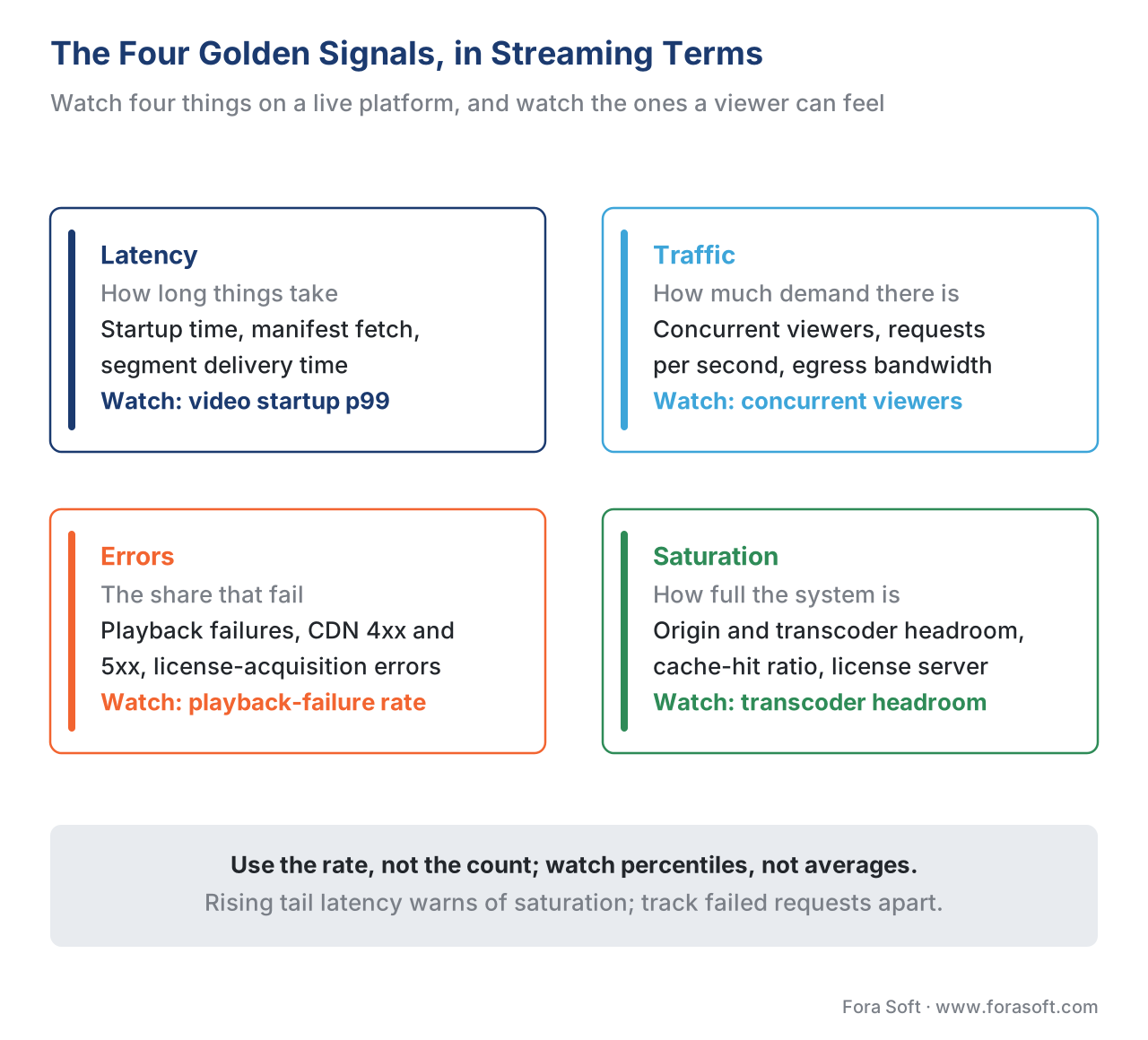 Figure 1. The four golden signals, translated to OTT. Latency, traffic, errors, and saturation each map to concrete streaming metrics — and the example metric the player or CDN actually reports.
A practical note on where these numbers come from. The player on each device and the servers along the path can report standardized telemetry, so you are not guessing. The Consumer Technology Association's CTA-5004, Common Media Client Data (CMCD) standard (published 2020) defines a uniform way for a media player to attach data — such as the bitrate it is playing, its buffer length, and a session id — to every request it sends to the CDN, which the spec describes as "useful in log association/analysis, quality of service/experience monitoring and delivery enhancements." Its companion, CTA-5006, Common Media Server Data (CMSD) (2022), defines the same idea in the other direction: each server attaches data to its responses so downstream systems can read it consistently. Together they are why a modern operations view can show per-session quality without every vendor inventing its own format.
The live-event NOC view: what the wall shows during a premiere
The most demanding moment for any streaming platform is a live event, when concurrency climbs from a steady baseline to a sharp peak in minutes. The view the operations team watches during that window is often called the network operations centre (NOC) view — historically a literal wall of screens, now usually a single cloud dashboard. The point is not to have a person stare at it hoping to spot trouble; the SRE book is blunt that teams should "carefully avoid any situation that requires someone to stare at a screen to watch for problems." The point is shared situational awareness: when an alert fires, everyone responding looks at the same picture.
A good live-event view is organized around the four signals, sliced the ways that let you localize a problem fast. The concurrency curve sits at the top, because it is the heartbeat of the event and the context for everything else — a rebuffering spike at 2 million concurrent viewers means something different than the same spike at 50,000. Below it sit the slices that turn "something is wrong" into "something is wrong here": quality-of-experience metrics broken out by region, by device type, and by CDN, so a fault that hits only one CDN or only smart-TV apps is visible immediately rather than averaged away into the global number.
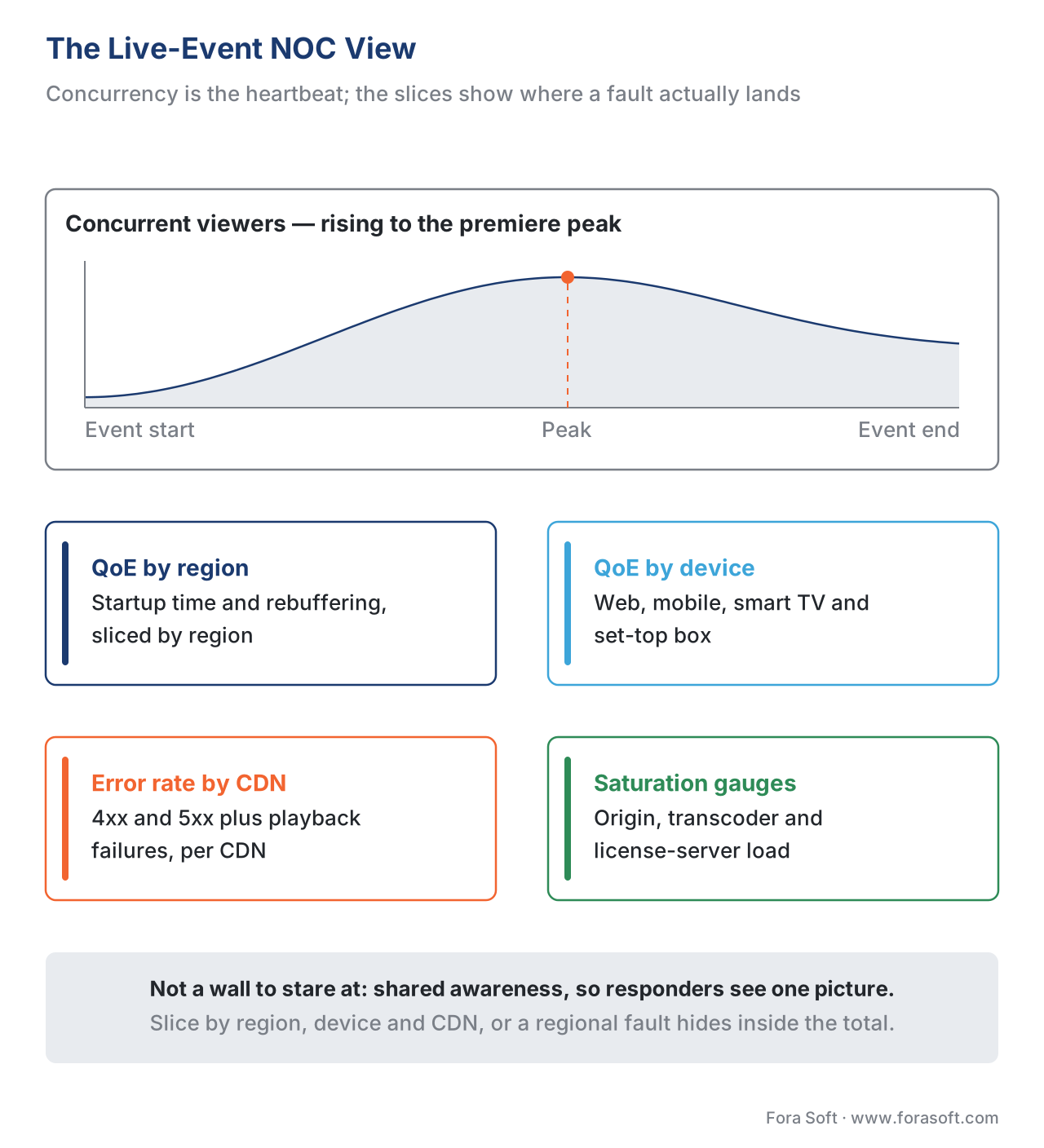 Figure 2. The live-event NOC view. Concurrency is the heartbeat; QoE, errors, and saturation are sliced by region, device, and CDN so a localized fault stands out instead of being averaged away.
This is the same minute-by-minute discipline as the broader delivery story — the mechanics of surviving the concurrency spike itself live in live event delivery and the premiere spike, and the delivery-side instrumentation in delivery observability. The definitions of the quality metrics on these panels — startup time, rebuffering ratio — are covered in the QoE quartet, and the tools that collect them in the QoE measurement stack. The job of this article is the layer above all of them: turning those numbers into a view a human can act on, and a pager that fires only when they should.
Alerting that works: symptoms, not causes
Here is the rule that separates alerting that helps from alerting that harms: page on symptoms, not causes. A symptom is what the viewer experiences — "playback is failing for 8% of viewers in Germany." A cause is the internal reason — "the origin shield in Frankfurt is returning 503s." The SRE book calls the symptom-versus-cause distinction "one of the most important" in monitoring, and the reason is that there are a near-infinite number of causes but a small, finite number of symptoms the viewer can actually feel. Alert on the handful of symptoms and you catch every problem that matters, including ones you never anticipated. Alert on causes and you both miss novel failures and bury yourself in pages for internal conditions that no viewer ever noticed.
The discipline gets sharper when you decide what to alert on. The book offers four tests for any new pager rule, and they are worth stating plainly. Does this alert detect a condition that is urgent, actionable, and actively or imminently user-visible? Will the responder always need to do something intelligent, or could the response be automated away? Does it definitely indicate users are being hurt, or could it fire during a harmless test deployment? And is someone else already being paged for the same thing? An alert that fails these tests is noise, and noise is not harmless — it is the mechanism by which a real page gets ignored.
There is also a precise way to get the representation of each signal wrong, and it is the most common technical error in alerting. Alerting on average latency instead of the 99th percentile hides the slow tail of requests that a fraction of viewers actually suffer; the SRE book's worked example shows that a service averaging 100 ms can easily be serving 1% of requests at 5 seconds. Alerting on a count of errors instead of an error rate fires every time traffic grows, regardless of health. And alerting on current saturation instead of its rate of change robs you of the early warning. Get the representation right and a handful of alerts cover the platform; get it wrong and no number of alerts will.
Common mistake: the alert-fatigue spiral. The classic failure is a pager that fires dozens of times a shift for conditions that are not user-visible — a single transcoder node restarting, a brief CPU spike, a cause-level blip that self-heals. Each false page costs a real interruption, and the SRE book is explicit that "when pages occur too frequently, employees second-guess, skim, or even ignore incoming alerts, sometimes even ignoring a real page that's masked by the noise." The fix is not a better notification app. It is to delete every cause-level page that is not urgent and actionable, move that information to the dashboard, and keep only symptom-based alerts that pass the four tests. A team that can react to every page with genuine urgency has alerting; a team that has learned to skim does not.
SLOs, error budgets, and burn-rate alerting
To decide when a symptom is bad enough to page, you need a target to measure against, and the streaming industry borrows three terms from reliability engineering. A service level indicator (SLI) is a precise measurement of one aspect of quality — for example, the share of video starts that begin within two seconds, or the share of segment requests that succeed. A service level objective (SLO) is the internal target for that indicator — say, "99.9% of segment requests succeed over any 30-day window." A service level agreement (SLA) is the external promise you make to a customer or partner, usually set looser than the SLO so the internal target trips first, with money attached if you miss it.
The powerful idea that falls out of an SLO is the error budget: the amount of failure you are allowed before you miss the target. The arithmetic is worth doing out loud once. If your SLO is 99.9% success, the budget is the remainder: 100% − 99.9% = 0.1% of requests are allowed to fail. Over a month of, say, 10 billion segment requests, that is 10,000,000,000 × 0.001 = 10,000,000 requests you can lose before the SLO is breached. The error budget reframes reliability from "never fail," which is impossible, to "fail no more than this," which is a number a team can manage and a business can reason about.
The budget is what makes alerting precise, through a measure called burn rate — how fast you are spending the budget relative to the pace that would exactly exhaust it over the period. A burn rate of 1× spends the whole month's budget in exactly a month; a burn rate of 10× spends it in three days. Google's SRE Workbook recommends a multiwindow, multi-burn-rate approach instead of a single fixed threshold: page the on-call engineer urgently when the one-hour burn rate exceeds about 14.4× (a pace that would burn 2% of the monthly budget in an hour and exhaust it in roughly two days), open a lower-priority ticket when the six-hour burn rate exceeds about 6×, and merely review trends when the three-day burn rate creeps above 1×. The effect is that a fast, severe outage pages immediately, while a slow, low-grade degradation creates a ticket instead of waking someone — which is exactly the right human response to each.
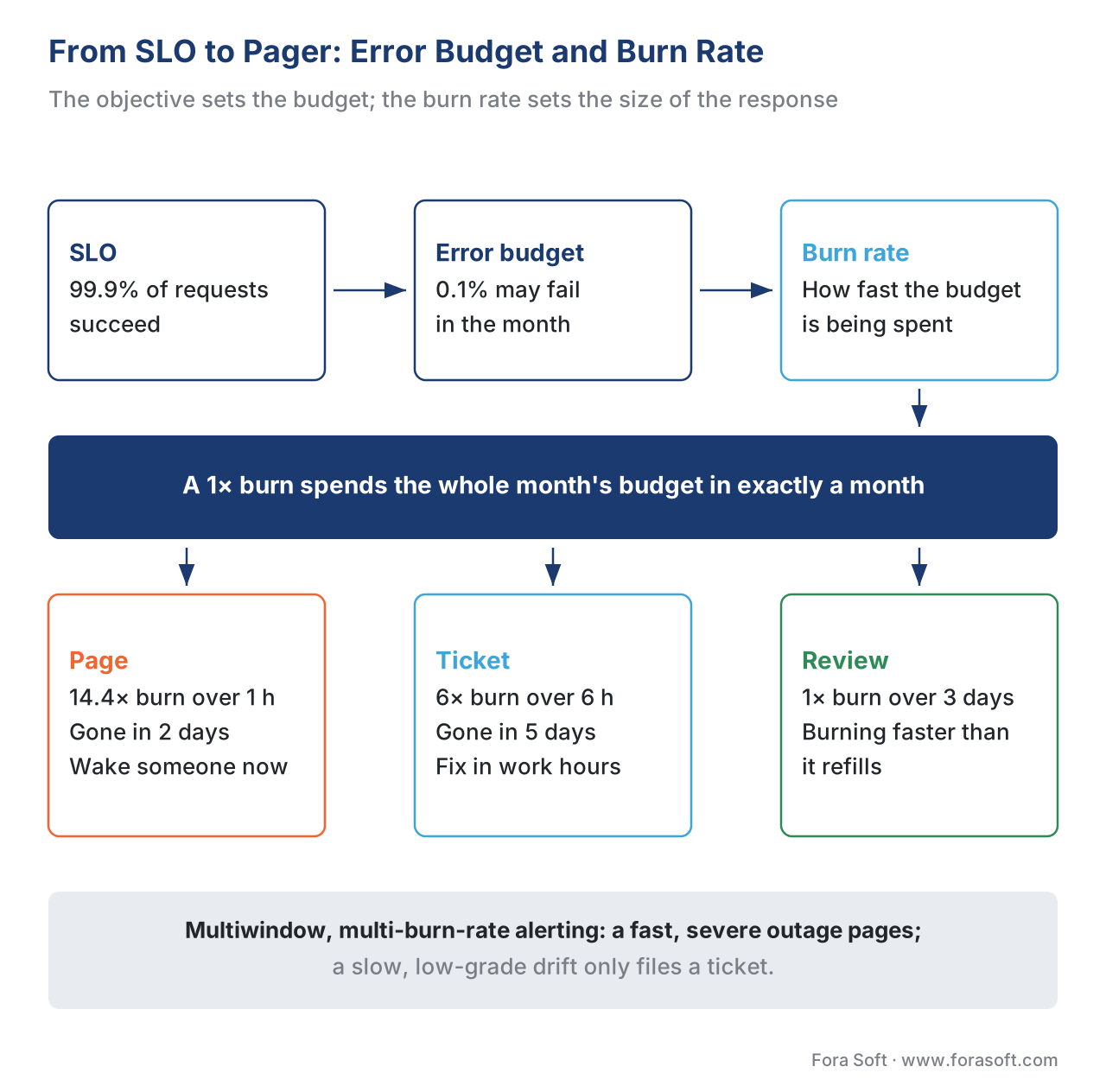 Figure 3. From SLO to pager. The objective defines an error budget; the burn rate — how fast that budget is spent — decides whether the right response is a page, a ticket, or a weekly review.
The SLAs OTT operators sign — and the ones the CDN signs back
Service-level agreements run in two directions for a streaming business, and an operator needs to understand both. Outward, you may promise availability to a content partner, an advertiser, or an enterprise customer. Inward, your infrastructure vendors promise availability to you — and those promises are where many operators discover how little a headline "99.9%" actually guarantees.
Take the most common example. Amazon CloudFront, a widely used CDN, commits to a monthly uptime of at least 99.9% and, if it misses, refunds a service credit — 10% of the bill for uptime between 99% and 99.9%, and 25% for uptime below 99%. Two things are worth understanding here. First, what 99.9% means in real downtime: it allows roughly 43 minutes of outage per month, and a looser 99.5% allows about 3.6 hours. Those minutes can all land during your premiere. Second, what the remedy is: a service credit refunds a slice of your bill, not the revenue or goodwill you lost during the outage. An SLA is a billing-risk instrument, not an insurance policy against a bad night, and pricing the gap between the two is a business decision, not an engineering one.
The table below translates common availability tiers into the downtime they actually permit, so the number on a contract stops being abstract.
| Availability (SLO/SLA) | Downtime per month | Downtime per year | Typical remedy if breached | Meets a "broadcast-grade" bar? |
|---|---|---|---|---|
| 99% ("two nines") | ~7.3 hours | ~3.65 days | Larger service credit | No |
| 99.9% ("three nines") | ~43 minutes | ~8.77 hours | Service credit (often 10%) | Marginal |
| 99.95% | ~22 minutes | ~4.38 hours | Service credit | Closer |
| 99.99% ("four nines") | ~4.4 minutes | ~52.6 minutes | Larger credit / negotiated | Broadcast-grade target |
| 99.999% ("five nines") | ~26 seconds | ~5.26 minutes | Rare; bespoke contracts | Telco/critical bar |
The lesson is not "demand five nines." Each extra nine costs disproportionately more to build and operate, and most OTT services neither need nor can afford telco-grade availability. The lesson is to set the SLO at the level the business genuinely requires, set the customer-facing SLA looser than that internal SLO so you trip your own alarm first, and read every vendor SLA for what it actually pays out. A single CDN's 99.9% is also one reason mature platforms run more than one CDN — the failover story lives in multi-CDN architecture and orchestration, and the cost side in CDN cost engineering.
The human side: on-call, severity, and the blameless postmortem
A dashboard and a pager are only as good as the people and process behind them. The operational model the industry has converged on has a few moving parts, none of them complicated.
An on-call rotation shares the burden of being the person the pager wakes. A typical setup has a primary on-call who responds first and a secondary who is paged if the primary does not acknowledge within a few minutes, with rotations short enough — often a week — that no one burns out. The SRE book treats pager load as a managed quantity, reviewed in "quarterly reports with management" as incidents per shift, precisely because a rotation that pages people awake every night will lose its people.
Severity levels sort incidents so the response matches the damage. A common scheme runs from Sev-1 (a major outage — playback broadly broken, the live event down) through Sev-2 (significant degradation in a region or on a platform) to Sev-3 (minor or cosmetic). Severity decides who is woken, how fast, and who is told — a Sev-1 during a marquee event pulls in an incident commander and a communications path to leadership; a Sev-3 waits for business hours. Two timing measures track how well this works: mean time to detect (MTTD), how long from a problem starting to someone knowing, which good symptom-based alerting drives down, and mean time to resolve (MTTR), how long from detection to fix, which runbooks and practice drive down.
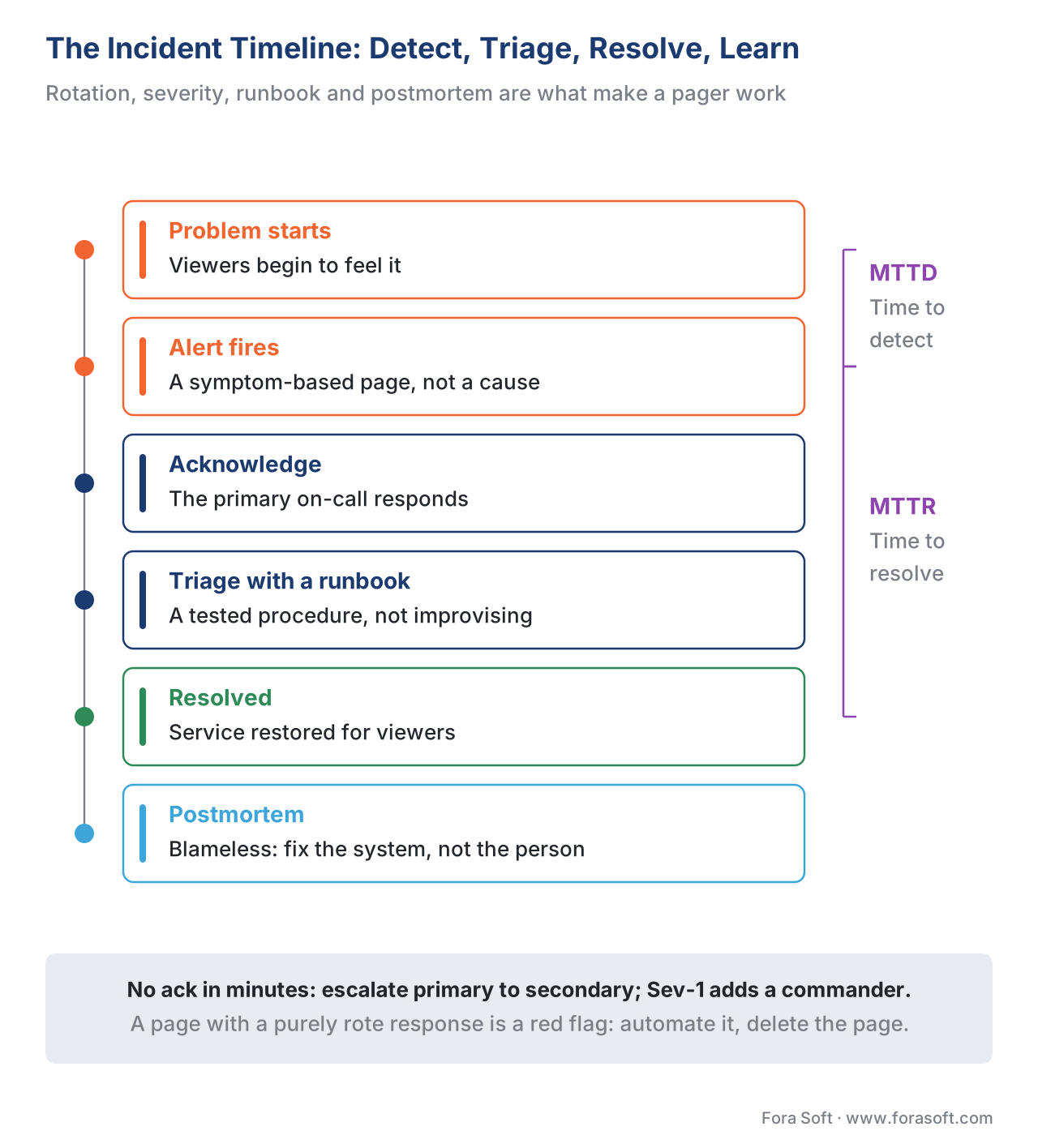 Figure 4. The incident timeline. Symptom-based alerting shrinks the time to detect (MTTD); runbooks and practice shrink the time to resolve (MTTR); the blameless postmortem turns each incident into a permanent fix.
A runbook is a short, pre-written guide for a known alert — what it means, what to check, what to try — so the responder at 3 a.m. is following a tested procedure rather than improvising. And after a significant incident, the blameless postmortem asks what in the system allowed the failure, not who to blame, on the principle that engineers hide mistakes in a blame culture and surface them in a learning one. The SRE book's monitoring chapter makes the connected point that a "page with a rote, algorithmic response should be a red flag" — if the runbook is purely mechanical, the work should be automated and the page deleted, freeing the human for the novel problems that genuinely need judgment.
Free download: Streaming Operations & Alerting RunbookOne page for running an OTT platform live: the four golden signals as streaming metrics (startup-time p99, concurrent viewers, playback-failure rate, origin and transcoder saturation), the rule that a dashboard informs while an alert interrupts, and the burn-rate thresholds that decide page, ticket or weekly review.Where Fora Soft fits in
Real-time operations earns its keep at scale, where a single CDN's 43 allowed minutes of monthly downtime can fall during a premiere watched by millions, and where the difference between catching a regional fault in one minute and twenty is thousands of lost viewers. Fora Soft has built video streaming, OTT/Internet TV, live-event, e-learning, and telemedicine platforms since 2005 — 625+ shipped projects for 400+ clients over 20+ years — so we treat the operations layer as core platform engineering: golden-signal dashboards organized for live events, symptom-based and burn-rate alerting that pages on what viewers feel rather than on internal noise, CMCD/CMSD-fed per-session telemetry, and the SLO and on-call structure that keeps a team sustainable. We are vendor-neutral; we wire the observability and alerting to the platform, not to a single monitoring product. The aim is a platform that sees trouble early and wakes the right person only when it should.



The handbook
Fora Soft Video Engineering Handbook
We wrote a seven-volume handbook, 9,000+ pages, that takes the video stack from a single pixel to production — encoding, delivery, audio and AI. Work through it and you can design and run a platform like the one on this page. Volume 3 is the one to open next to this article: CDNs, players and the economics of delivery, where most numbers on an operations dashboard come from. Volume 2 covers the transport, ingest and HLS/DASH layer that a saturation gauge is really watching, and volume 1 explains the quality metrics behind a QoE panel. Written by Nikolay Sapunov, CEO at Fora Soft.
Would you know within a minute if one region started buffering?
Tell us which signals you graph today, what actually pages your on-call at 3 a.m. and which SLO you would be willing to defend, and we will say what to instrument, what to alert on, and which pages to delete. 250+ video products shipped since 2005.
See our case studies
Case study
Worldcast Live
10,000 simultaneous viewers at 0.4–0.5 s latency and 1.5 Gb/s of HD concert video — a concurrency curve that climbs to a premiere peak is exactly the heartbeat an operations view is built around.
Case study
TradeCaster
A live desktop-streaming platform for 46,000+ traders that auto-scales through the load spike at market open — saturation headroom you have to watch before the spike, not after it.
Case study
Mindbox
An RTSP to FFmpeg to HLS video system in 50+ deployments where detected anomalies notify an operator instantly and trigger recording — an alert that interrupts a human, not one more panel to stare at.
What to read next
Telemetry
The QoE Measurement Stack: Mux, Conviva & Telemetry
Where the numbers on these dashboards are collected before anyone graphs them.
Observability
Delivery Observability: Who Is Buffering and Where
How CMCD and CMSD let you slice a fault down to a region, a CDN or one player.
Live events
Live Event Streaming at Scale: The Premiere Spike
The night the concurrency curve and every saturation gauge are tested at once.
Multi-CDN
Multi-CDN Architecture and Orchestration Explained
The switch an error-rate-by-CDN panel exists to trigger.
References
- Beyer, B., Jones, C., Petoff, J. and Murphy, N. R. (eds.). Site Reliability Engineering — Chapter 6: Monitoring Distributed Systems. Google / O'Reilly, 2017 — defines dashboard vs alert, the four golden signals (latency, traffic, errors, saturation; traffic for streaming = concurrent sessions / network I/O), symptom-vs-cause alerting, percentile-over-average, and the four tests for a pager rule plus alert-fatigue. Tier 3 (first-party engineering doctrine, canonical reference). https://sre.google/sre-book/monitoring-distributed-systems/
- Consumer Technology Association. CTA-5004: Web Application Video Ecosystem — Common Media Client Data (CMCD), 2020 — standard for player-reported telemetry (bitrate, buffer, session id) attached to each CDN request for QoS/QoE monitoring and log association. Tier 1 (standard). https://shop.cta.tech/products/cta-5004
- Consumer Technology Association. CTA-5006: Web Application Video Ecosystem — Common Media Server Data (CMSD), 2022 — standard for server-reported telemetry attached to each media response, read consistently by intermediaries and players. Tier 1 (standard). https://cdn.cta.tech/cta/media/media/resources/standards/pdfs/cta-5006-final.pdf
- Consumer Technology Association. CTA-2066: Streaming Quality of Experience Events, Properties and Metrics, 2020 — defines the QoE/error event terminology (startup time, rebuffering, Play Time) underlying the metrics on an operations dashboard. Tier 1 (standard). https://shop.cta.tech/products/cta-2066
- Beyer, B., Murphy, N. R., Rensin, D., Kawahara, K. and Thorne, S. (eds.). The Site Reliability Workbook — Alerting on SLOs. Google / O'Reilly, 2018 — the multiwindow, multi-burn-rate alerting recommendation (page at ~14.4× 1-hour burn, ticket at ~6× 6-hour burn) and the error-budget framing. Tier 3 (first-party engineering doctrine). https://sre.google/workbook/alerting-on-slos/
- Amazon Web Services. Amazon CloudFront Service Level Agreement — 99.9% monthly uptime commitment; service credits of 10% (99%–99.9%) and 25% (<99%); error rate computed per five-minute period. Cited as a dated, vendor-specific example; re-verify. Tier 3 (first-party vendor contract). https://aws.amazon.com/cloudfront/sla/
- Krishnan, S. S. and Sitaraman, R. K. Video Stream Quality Impacts Viewer Behavior. ACM Internet Measurement Conference (IMC) 2012 — the QoE-to-behaviour link (abandonment after ~2s startup; +5.8% per added second) that justifies startup time and rebuffering as the symptoms worth paging on. Tier 5 (foundational academic). https://dl.acm.org/doi/10.1145/2398776.2398799
- Bentaleb, A. et al. Common Media Client Data (CMCD): Initial Findings. ACM NOSSDAV 2021 — independent evaluation of CMCD's use for delivery monitoring and QoE analysis. Tier 5 (peer-reviewed academic). https://dl.acm.org/doi/10.1145/3458306.3461444
- Google Cloud. Alerting on Budget Burn Rate (SLO Monitoring). Google Cloud documentation — operational reference for computing burn rate as actual error rate ÷ tolerated error rate and configuring burn-rate alert windows. Tier 3 (first-party platform docs). https://docs.cloud.google.com/stackdriver/docs/solutions/slo-monitoring/alerting-on-budget-burn-rate
