


Why This Matters
The codec, container, protocol, and profile vocabulary is the single biggest source of confusion for anyone learning streaming, and it stays confusing for years because vendors, blog posts, and even some standards documents use the words interchangeably. A product manager who can't tell a codec from a container will pick the wrong default in the encoder dialog, ship a stream that won't play on half the devices, and have no idea why the engineering team keeps asking which profile the player supports. The misuse is not harmless: it leads to wasted CDN spend, broken playback on Apple devices, ad-tech integrations that silently fail at the SCTE-35 boundary, and contracts that promise "4K HDR streaming" without specifying which combination of codec, container, and profile will actually carry it. This article gives you a four-layer mental model so that when an engineer says "we encode H.264 high profile, package it in fMP4, and deliver over LL-HLS", you can immediately picture the four independent decisions that sentence describes, decide which ones you control, and ask the right follow-up questions.
The four layers, in one sentence each
Before any depth, four one-sentence definitions. Memorise these and most streaming conversations become readable.
A codec is an algorithm that takes raw video frames and squeezes them down to a much smaller stream of bits — and then expands that stream back into frames on the other end. The word is short for coder–decoder, and the codec is the layer that does the actual compression maths. H.264, H.265, AV1, VP9, and H.266 are codecs. So are MP3, AAC, Opus, and FLAC on the audio side.
A container is a file format that packages one or more compressed streams — usually a video stream and an audio stream, often subtitles and metadata too — into a single bundle that knows how its parts fit together in time. The container does not compress anything. It carries what the codec produced, plus the timing, sample tables, and metadata that let a player find the right frame at the right moment. MP4, fragmented MP4 (fMP4), MPEG-2 Transport Stream (MPEG-TS), Matroska/MKV, WebM, and Ogg are containers.
A protocol is a set of rules for moving the container's bytes from a server, an encoder, or a peer to a player, an ingest server, or another peer over a network. The protocol decides how the bytes are chunked, addressed, requested, paced, retransmitted, and authenticated on the wire. HLS, MPEG-DASH, RTMP, SRT, WHIP, WHEP, WebRTC, RTSP, RIST, and Media over QUIC are protocols.
A profile is a labelled subset of the rules defined by a codec, container, or protocol that restricts what an encoder, packager, or player is allowed to use from that layer. A profile is a contract — "if you stick to this subset, every conforming decoder can play your stream". H.264 Baseline, Main, and High are codec profiles. CMAF is a container profile of the ISO Base Media File Format. The DASH Live and On-Demand profiles are protocol profiles of MPEG-DASH. The word "profile" is reused at every layer and never means the same thing twice.
The first three layers compose top-down. The codec turns video into bits. The container wraps those bits with timing and metadata. The protocol moves the container across a network. The profile then attaches sideways at any of the three layers, narrowing what the layer is allowed to do.
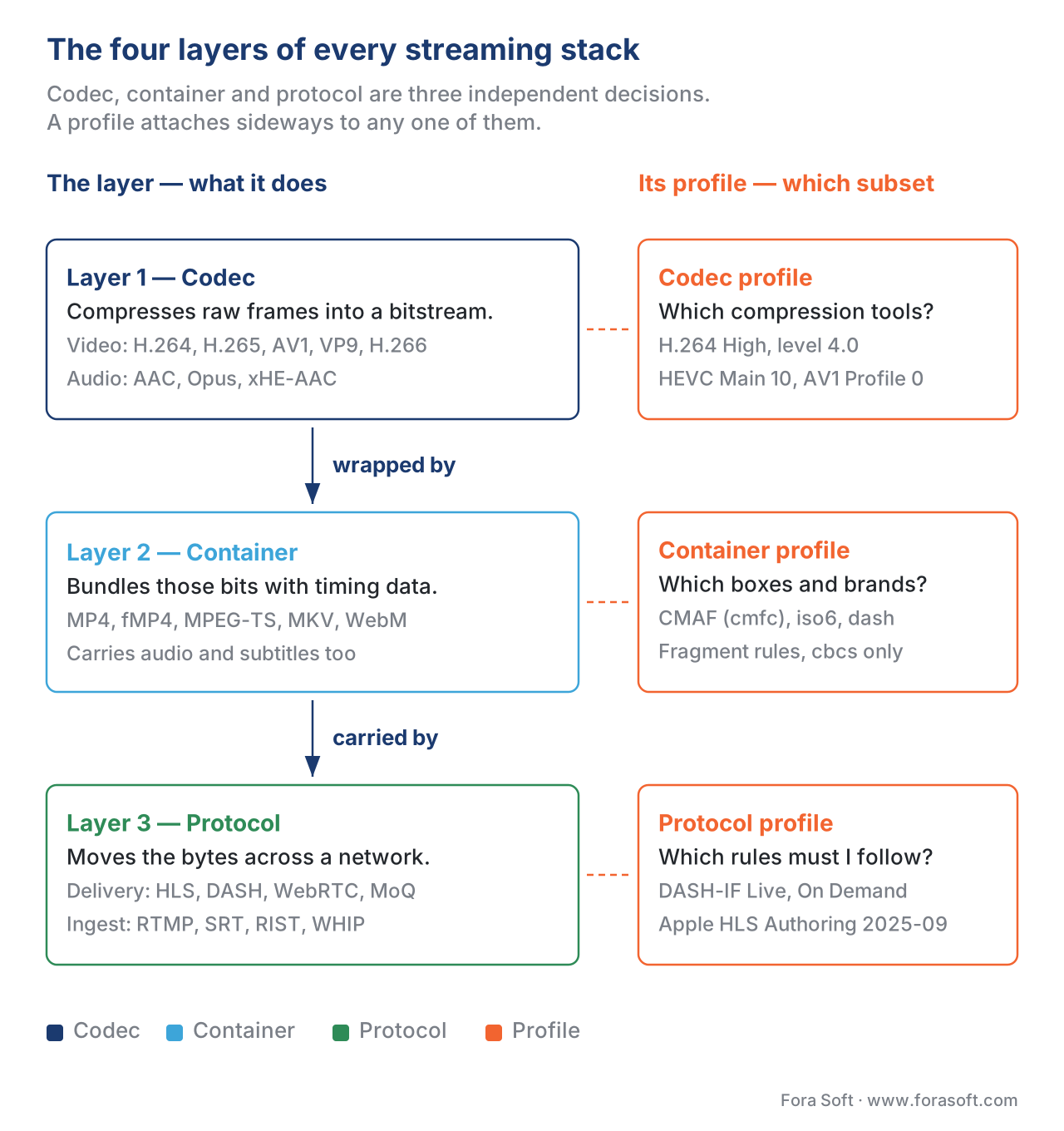 Figure 1. The four-layer model that resolves every codec/container/protocol/profile confusion. Each layer makes an independent decision. The profile attaches sideways to any one of them.
Layer 1 — Codecs: the layer that does the compression
A codec is the only layer that touches the actual pixels. Everything above the codec works on bits the codec produced, never on raw video.
Think of raw video as a stack of photographs taken 30 or 60 times a second. At 1080p, 30 fps, 8-bit color, each photograph is roughly 1080 × 1920 × 3 bytes ≈ 6.2 MB. Thirty of those per second is about 186 MB/s — almost 1.5 Gbps. Nobody can store, ship, or stream that. A codec's only job is to turn that 1.5 Gbps stream into something tolerable — typically 1–10 Mbps for 1080p — without the viewer noticing the loss.
The arithmetic of the saving is dramatic. The codec achieves it by exploiting four kinds of redundancy: pixels next to each other inside a frame look similar (spatial redundancy), pixels in the next frame look almost identical to pixels in the previous frame (temporal redundancy), human vision is more sensitive to brightness than to color (psycho-visual redundancy), and the statistics of the resulting symbols can be packed using entropy coding. Every modern codec — H.264 from 2003, H.265 from 2013, AV1 from 2018, H.266 from 2020 — uses variations on the same four ideas. We cover the full mechanism in How video compression works — see the Video Encoding section for codec-internal detail; this article stays on the streaming side.
What the codec produces is called an elementary stream: a long sequence of compressed bits with no timing, no audio, no metadata. An elementary stream of H.264 is just NAL units one after another. You cannot play an elementary stream directly because there is nothing in it that tells the player when each frame should be displayed or which audio belongs with which video. That's the container's job, one layer up.
The codecs that matter for streaming in 2026:
- H.264 (AVC), ISO/IEC 14496-10, finalised 2003 and still updated. Universally supported across every device built since roughly 2010. The default codec for streaming when you don't have a reason to pick something newer. Royalty-bearing through MPEG-LA but the patents on the most-used features began expiring in 2025.
- H.265 (HEVC), ITU-T H.265 / ISO/IEC 23008-2, finalised 2013. Roughly 30–50% smaller files than H.264 at the same visual quality. Universal hardware support on phones and TVs from 2017 onward, but a tangle of patent pools (MPEG-LA, HEVC Advance, Velos Media, plus dozens of independent holders) made it unpopular for free web streaming. Apple Safari plays it natively; Chrome added it only in 2023.
- VP9, RFC 6386 (the framing format) plus Google's bitstream spec, finalised 2013. Royalty-free, used by YouTube as the primary 4K codec from 2014 until AV1 displaced it. Supported in Chrome, Firefox, Edge, Android — not by default in Safari.
- AV1, AV1 Bitstream and Decoding Process Specification, finalised by the Alliance for Open Media in 2018. Royalty-free, 20–40% better than HEVC, native browser support across Chrome / Firefox / Edge / Safari (since iOS 17), hardware decode on essentially every TV and phone shipped since 2024. The Netflix tech blog reported in 2024 that AV1 carried roughly 30% of their stream-hours globally; that share is higher in 2026. The default new-deployment choice when you don't need legacy support.
- H.266 (VVC), ITU-T H.266 / ISO/IEC 23090-3, finalised 2020. Another 30–40% better than HEVC. Patent licensing is still contested, hardware decoders are scarce in 2026, and adoption is mostly in broadcast trials. Worth tracking; not yet worth deploying.
Audio codecs follow the same pattern. AAC-LC (1997) is the universal default for streaming. Opus (RFC 6716, 2012) is the WebRTC default and a strong AAC replacement for HLS and DASH. xHE-AAC is gaining traction for streaming because of its adaptive bitrate tolerance. We cover the audio side in detail in Codec vs container vs protocol vs profile: extras.
The single most important thing to remember about codecs: a codec is a compression algorithm, not a file format. An H.264 stream is not a file you can double-click. It's a sequence of bits that needs a container around it before it becomes a playable file.
Layer 2 — Containers: the layer that bundles streams together
A container is a file format whose job is to hold one or more elementary streams (one video, one or more audio, optional subtitles, optional metadata) along with the timing information that says exactly when each video frame and each audio sample should be played. The container does not compress anything. It is a structured envelope.
A useful analogy: the codec produces a stack of compressed pages, in order. The container is the binder that holds the pages, adds page numbers, prints the table of contents, marks which pages are chapters, and labels which language the text is in. Without the binder you can't easily find page 47; without the codec the binder is empty.
Five containers carry essentially all 2026 streaming:
MP4 (ISO/IEC 14496-14), built on the ISO Base Media File Format (ISOBMFF, ISO/IEC 14496-12). The dominant container for stored video. Inside an MP4 the data is organised as a tree of "boxes": an ftyp box at the start declares which brand and version the file conforms to; a moov box carries all timing metadata (the sample tables for each track); mdat boxes carry the actual compressed media bytes. A regular MP4 is non-streamable out of the box because the moov box can sit at the end of the file, meaning a player must download the whole file before it can index any of it.
Fragmented MP4 (fMP4), defined within ISO/IEC 14496-12 as a "fragmented" extension. fMP4 splits the long mdat into many small fragments, each preceded by its own moof (movie fragment) box carrying only the timing for that fragment. A player can start playback after fetching the initial ftyp + moov (the initialization segment) plus the first fragment. fMP4 is the modern streaming container — it backs HLS, DASH, and CMAF.
MPEG-2 Transport Stream (TS), ISO/IEC 13818-1, originally designed for over-the-air broadcast in 1995. A TS file is a sequence of fixed 188-byte packets, each carrying a Packet Identifier (PID) that says which elementary stream it belongs to. TS was the original container for HLS and is still used in legacy HLS deployments and broadcast contribution. It has significant overhead (roughly 2–5%) compared to fMP4 because of its packet structure.
Matroska (MKV) and its web subset WebM. MKV is a flexible container popular for stored video and recording; WebM is MKV constrained to VP8/VP9/AV1 video and Vorbis/Opus audio, used as the default web container by Chrome. MKV is uncommon for streaming because no major streaming protocol uses it as a segment format.
CMAF, ISO/IEC 23000-19, finalised 2018 and updated in 2024. CMAF is not a wholly new container — it's a tightly constrained profile of fMP4. CMAF says: "if you make your fMP4 segments look exactly like this, the same segments can be used by HLS and by DASH at the same time." Before CMAF, an OTT provider had to encode two parallel libraries (one in MPEG-TS for HLS, one in fMP4 for DASH); after CMAF, one library serves both. That CDN-cost-cutting consolidation is why CMAF matters. We cover it in detail in CMAF: the packaging format that unified HLS and DASH.
The single most important thing to remember about containers: a container is a file format, not a delivery mechanism. An fMP4 file sitting on a hard drive is a container. The protocol that ships its bytes across the internet to a player is the next layer up.
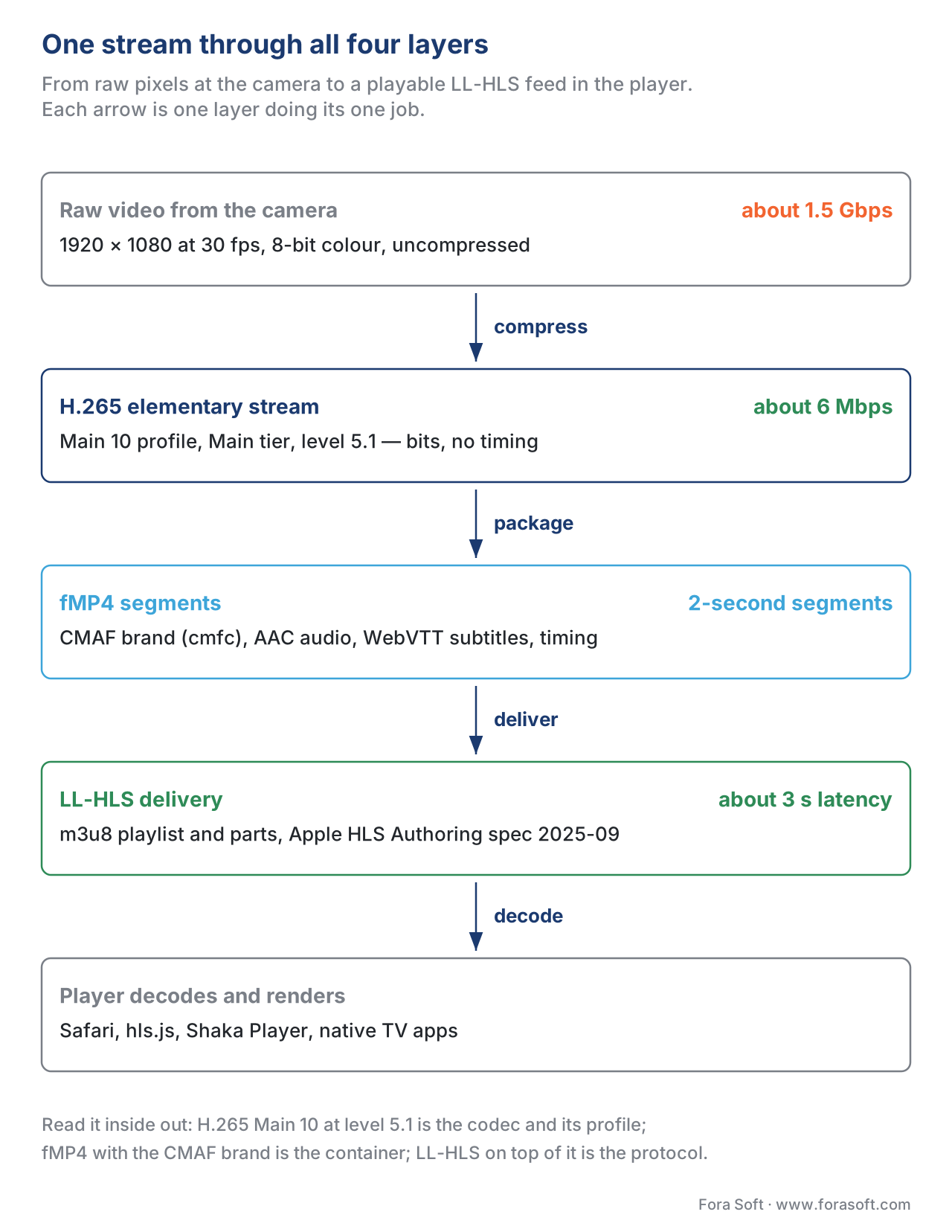 Figure 2. One stream through all four layers. The codec produces an elementary stream of H.265 bits. The fMP4 container wraps the H.265 stream alongside AAC audio and WebVTT subtitles. The CMAF profile constrains the fMP4 so HLS and DASH can share it. LL-HLS is the protocol that delivers the resulting segments to the player.
Layer 3 — Protocols: the layer that moves the bytes
A protocol is a set of rules — usually published as a standards document with a long number — for moving a container's bytes from one machine to another across a network. The protocol decides how the bytes are chunked, addressed, requested, paced, encrypted, retransmitted, and authenticated. It does not compress and it does not bundle. It transports.
Protocols on the streaming side of the cloud (delivering to the viewer's player) and protocols on the contribution side of the cloud (moving one feed from an encoder into the cloud) are very different families. We covered the split in Push vs pull, contribution vs distribution; here we summarise where each protocol sits and how it relates to the container and codec it carries.
HLS — HTTP Live Streaming. IETF RFC 8216, August 2017, with Apple's HLS Authoring Specification (revision 2025-09) layering normative requirements on top for the Apple ecosystem. HLS is a delivery protocol that works by serving short media segments (2–10 seconds typical) plus a plaintext playlist file (extension .m3u8) that lists them. The container inside the segments is either MPEG-TS or fMP4 (Apple added fMP4 support in 2016). The codec inside the container is up to the publisher — H.264 and HEVC are the most common, AV1 has been valid in HLS since iOS 17.
MPEG-DASH — Dynamic Adaptive Streaming over HTTP. ISO/IEC 23009-1:2022. Same general idea as HLS — segments plus a manifest — but the manifest is an XML file called an MPD (Media Presentation Description) and the segment container is almost always fMP4. DASH is the dominant protocol outside Apple's ecosystem. DASH-IF, the industry body, publishes Implementation Guidelines that are the de-facto profile.
Low-Latency HLS (LL-HLS) and Low-Latency DASH (LL-DASH). Extensions to HLS and DASH that publish partial segments — fragments of a few hundred milliseconds — instead of complete segments, cutting end-to-end latency from 20+ seconds down to roughly 3 seconds. Both lean heavily on CMAF chunked encoding to make partials interoperable. Covered in LL-HLS deep dive and LL-DASH and CMAF chunked.
WebRTC (W3C Recommendation plus RFCs 8825–8866). A real-time protocol family designed for sub-500-ms latency. WebRTC does not transport file segments — it transports RTP packets carrying frames directly, over UDP, with its own pacing, encryption (SRTP), and congestion control. The container concept barely applies: there is no MP4 or TS in flight. The codec must come from the WebRTC-mandatory list (H.264, VP8, VP9, AV1, Opus, G.711). Covered in WebRTC explained.
RTMP — Adobe's Real-Time Messaging Protocol, 1996, formally deprecated by Adobe but still the most-used contribution protocol because every encoder speaks it. RTMP is exclusively a contribution-side protocol now; its delivery use is dead.
SRT, RIST, WHIP — modern contribution protocols. SRT (Internet-Draft draft-sharabayko-srt-01) is a UDP-based reliable transport with tunable FEC and retransmission. RIST (SMPTE TR-06-1/2/3) is a broadcast-grade alternative. WHIP (IETF RFC 9725, March 2025) is WebRTC-based HTTP signalling for ingest into a media server. None of them is a delivery protocol.
Media over QUIC (MoQ) — draft-ietf-moq-transport-17 (January 2026), the experimental future of low-latency streaming. MoQ runs over QUIC, treats the stream as a tree of named objects rather than a list of segments, and aims for sub-second latency at CDN scale. Not yet production-ready in 2026.
The single most important thing to remember about protocols: a protocol carries bytes; it doesn't make them. If your colleague says "we deliver over HLS", they have told you nothing about the codec or the container — those are independent choices. Conversely, "we encode H.264 in fMP4" tells you nothing about the protocol.
Layer 4 — Profiles: the labelled subsets that constrain each layer
A profile is a contract written by the people who defined a codec, container, or protocol that says: "if you stick to this subset of the rules, anybody else who supports this profile can decode or process your stream." Every layer has profiles, and the word means a slightly different thing each time, which is why "profile" is the single most confused word in this whole vocabulary.
Codec profiles
Codec profiles define which compression tools an encoder is allowed to use. The standard defines dozens of tools — different transforms, different entropy coders, different prediction modes — and a profile is a labelled subset.
H.264 profiles are the canonical example.
| Profile | What's enabled | Where it's used |
|---|---|---|
| Baseline | I and P slices, CAVLC entropy coding, no B-frames | Legacy video conferencing, very low-end devices |
| Main | Adds B-frames, CABAC | Largely superseded by High |
| High | Adds 8×8 transform, monochrome support, custom quantisation | Default for streaming, Blu-ray, YouTube uploads |
| High 10 | Adds 10-bit sample depth | HDR mastering, some broadcast |
| High 4:4:4 | Adds 4:4:4 chroma sampling | Post-production, almost never streaming |
HEVC profiles are organised the same way: Main, Main 10, Main Still Picture, plus several professional extensions. HEVC also adds an orthogonal concept called tier — Main tier for consumer-grade bitrates, High tier for professional bitrates. A 4K stream might be "HEVC Main 10 profile, Main tier".
AV1 profiles are simpler: Profile 0 (Main, 4:2:0 8/10-bit), Profile 1 (High, adds 4:4:4), Profile 2 (Professional, adds 12-bit and full range). Profile 0 covers essentially all streaming.
Codec profiles also carry levels — orthogonal numerical labels that cap maximum resolution, frame rate, bitrate, and buffer size. An H.264 stream advertised as avc1.640028 is High profile (6400), level 4.0 (28 in hex). A player whose hardware supports up to level 5.1 can decode any level 5.1-or-lower stream in that profile but might choke on a level 6.2 stream because the buffer requirements exceed its hardware. The full string is what gets passed in HLS CODECS= attributes and DASH @codecs attributes; we cover the syntax in HLS deep dive.
Container profiles
Container profiles narrow what's allowed inside a container. CMAF is the canonical example. CMAF is technically a profile of fMP4 (which is itself an extension of the ISO Base Media File Format). CMAF says, among other things: each fragment must start with an IDR sample, the box order must be moof then mdat only, encryption must be either cbcs or cenc, the audio sample entry must be one of a fixed list. The result is a strict-enough fMP4 that any HLS player and any DASH player can use the same files.
The ftyp box at the start of an MP4 carries a list of brand identifiers naming which profiles the file claims to conform to. Common brands you'll see: isom (ISO Base Media), iso6 (sixth revision, required for HLS fMP4 per RFC 8216 §3.3), cmfc (CMAF Common Encryption track), mp42 (MP4 v2), dash (DASH-conformant). A single file can advertise multiple brands.
Protocol profiles
Protocol profiles narrow what an implementation of a delivery protocol is allowed to do.
MPEG-DASH has multiple profiles defined in ISO/IEC 23009-1 §8: the ISO Base Media File Format On Demand profile (single-segment-per-representation, byte-range requests, designed for on-demand), the ISO Base Media File Format Live profile (template-based segment URLs, designed for live), the MPEG-2 Transport Stream profile (for legacy TS-based DASH), and CMAF profiles (added in the fifth edition, 2022) that mandate the CMAF container. DASH-IF Implementation Guidelines layer additional profile constraints on top — DASH-IF IOP CMAF Live, DASH-IF IOP On Demand, etc.
HLS doesn't formally use the word "profile" but Apple's HLS Authoring Specification publishes mandatory constraints (variant stream rules, segment durations, codec strings, encryption parameters) that function as a profile in practice. Apple updates the spec 1–3 times a year; the September 2025 revision is the most recent.
WebRTC has implicit profiles in the form of codec mandatory-to-implement lists in RFC 7742 (video) and RFC 7874 (audio), plus the SDP profile-level-id parameter for H.264.
The single rule that resolves all profile confusion
When someone says "profile" in a streaming conversation, your first reaction should be: which layer? If they mean the H.264 High profile, that's a codec profile. If they mean CMAF, that's a container profile. If they mean DASH-IF Live, that's a protocol profile. The same word, three different layers. Ask which one.
The four-layer recipe in practice
The four layers compose. A real streaming product picks one option from each layer.
| Layer | Choice | Example value |
|---|---|---|
| Codec (video) | H.264 / H.265 / AV1 / VP9 / H.266 | H.265 Main 10 profile, Main tier, level 5.1 |
| Codec (audio) | AAC-LC / Opus / xHE-AAC / Dolby Atmos | AAC-LC |
| Container | fMP4 / TS / WebM / MKV | fMP4 |
| Container profile | CMAF / DASH brand / MP4 brand | CMAF (cmfc) |
| Protocol | HLS / DASH / WebRTC / RTMP / SRT / WHIP | LL-HLS |
| Protocol profile | DASH-IF Live / Apple HLS Authoring 2025-09 / WebRTC mandatory | Apple HLS Authoring 2025-09 |
H.265 Main 10 profile at level 5.1, AAC-LC audio, packaged in fMP4 conformant to the CMAF brand, delivered via Low-Latency HLS following Apple HLS Authoring Specification revision 2025-09.
Read it from the inside out and every one of the four layers maps to a phrase: codec ("H.265 Main 10 ... level 5.1"), container ("fMP4 ... CMAF brand"), protocol ("Low-Latency HLS"), profile choices at every layer ("Main 10", "CMAF", "HLS Authoring 2025-09").
Common mistake — confusing codec strings with file extensions
A common pitfall, especially in vendor documentation, is confusing the codec with the file extension. The file bigbuckbunny.mp4 could contain H.264 video, H.265 video, AV1 video, or even a non-Apple-supported codec like FLV legacy — .mp4 says nothing about which codec is inside. Conversely, an .mkv file might hold H.265 video that an HLS pipeline would happily transcode and serve. The extension names the container, not the codec.
The right way to express what's actually inside is the MIME type with the codecs= parameter, defined in RFC 6381. For an H.264 High profile level 4.0 + AAC-LC stream in MP4 the full MIME type is:
video/mp4; codecs="avc1.640028, mp4a.40.2"
That string is what an HLS manifest puts in its CODECS= attribute and what a DASH MPD puts in its @codecs attribute. The string tells the player exactly which codec, which profile, and which level live inside the container. Same idea for AV1 (av01.0.04M.08), HEVC (hev1.1.6.L93.B0), and Opus (opus).
If your codec strings are wrong, players that strictly validate the manifest — which includes most smart-TV apps — will reject the stream before they ever try to play it. We cover the codec-string syntax in HLS deep dive and MPEG-DASH deep dive.
A quick comparison: where each word lives
A single table that you can keep at hand. Codec, container, protocol, profile, side by side.
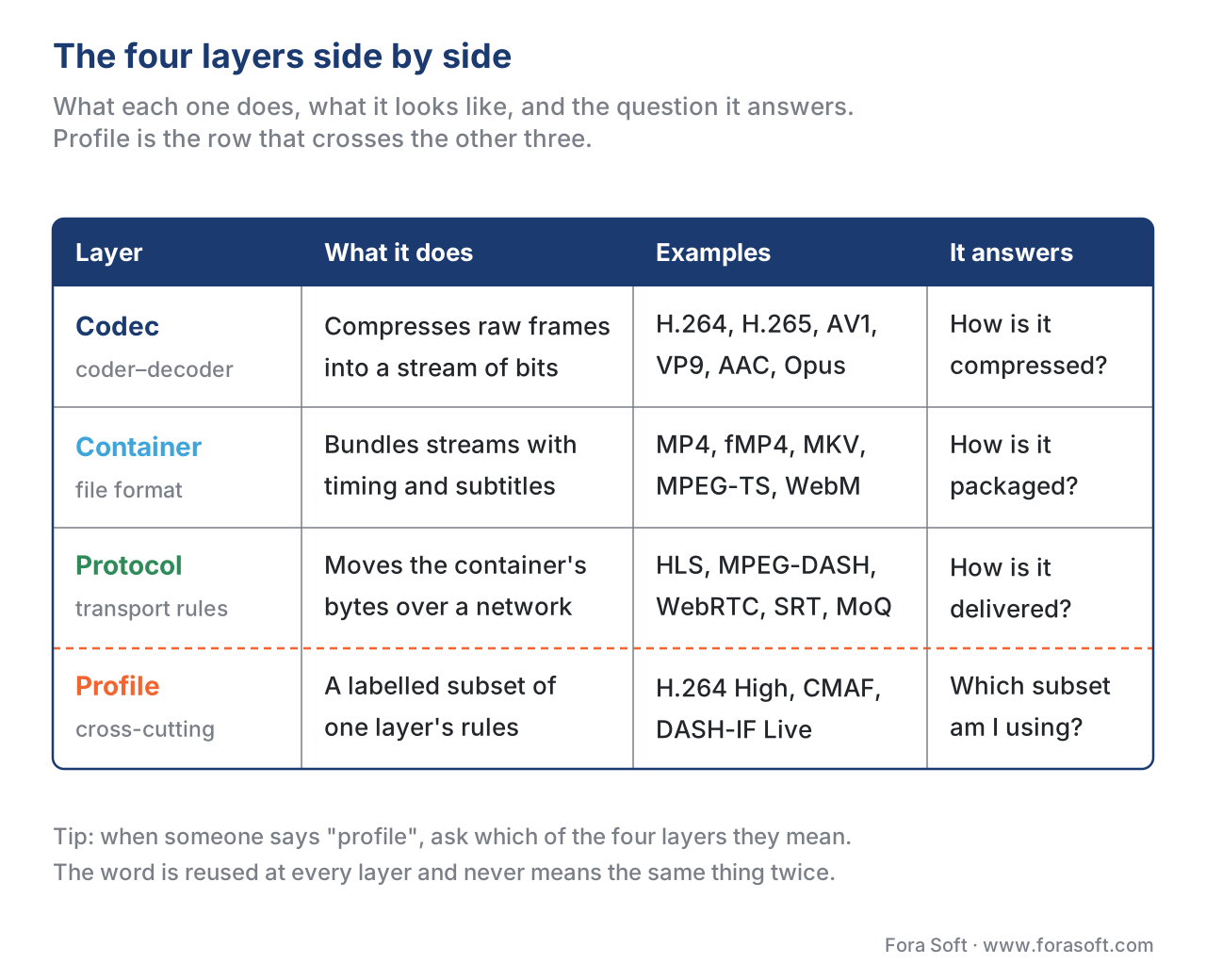 Figure 3. The four layers side by side. The "Question it answers" column is the easiest way to remember which word goes on which layer when somebody uses the wrong one in a meeting.
Free download: Codec / Container / Protocol / Profile Cheat SheetA one-page reference card: the four layers, the canonical examples of each, the question each one answers, and the spec document that defines it — enough to settle the argument in the meeting you are sitting in.
Figure 3. The four layers side by side. The "Question it answers" column is the easiest way to remember which word goes on which layer when somebody uses the wrong one in a meeting.
Free download: Codec / Container / Protocol / Profile Cheat SheetA one-page reference card: the four layers, the canonical examples of each, the question each one answers, and the spec document that defines it — enough to settle the argument in the meeting you are sitting in.
Where Fora Soft fits in
We have shipped video streaming, video conferencing, OTT/Internet TV, e-learning, telemedicine, and surveillance products since 2005, and "which layer does that decision live on?" is one of the first questions we ask at scoping. We've migrated OTT clients from MPEG-TS HLS to CMAF fMP4 to halve their CDN storage; we've moved telemedicine and e-learning conferencing pipelines from RTMP ingest to WHIP for sub-second latency; and we've helped surveillance clients pick between H.265 and AV1 for archive storage with quantified bandwidth and licensing trade-offs. The four-layer model in this article is the model we use internally — it's what stops codec, container, protocol, and profile choices from getting tangled up at the architecture stage. When those choices need to be made for a real product, our video and audio streaming development team owns the container and protocol layers, and our video and audio processing software work covers codec and profile selection, encoding and transcoding.
The book
Video Streaming: A Complete Guide to Video Delivery: From Network Protocols and Transport to Ingest, HLS, and MPEG-DASH
This article draws the four layers; volume 2 walks each of them end to end — what an ftyp brand actually promises, why iso6 is mandatory for fMP4 in HLS, how the same .m4s files end up listed in both an .m3u8 and an .mpd, and where RTMP, SRT and WHIP sit on the contribution side. It carries the vocabulary forward into the decisions it controls, so "which profile?" stops being a question you have to ask and becomes one you can answer from the manifest. Written by Nikolay Sapunov, CEO at Fora Soft.
Not sure which layer your problem lives on?
Send us the codec string, the container, the protocol and the device list you have to reach, and we will tell you which of the four decisions is actually causing the playback you are seeing — and which one to change. 250+ video products shipped since 2005.
See our case studies
Case study
Mindbox
RTSP off the cameras, FFmpeg in the middle, HLS out to web, iOS and Android across 50+ deployments — three different protocols around one codec, which is exactly what the four-layer model is for.
Case study
Worldcast Live
Concert streaming at 0.4–0.5 s glass-to-glass on a 1.5 Gb/s feed for 10,000 simultaneous viewers, on WebRTC — the case where the protocol choice removes the container from the picture altogether.
Case study
Speed.Space
Remote production at 1080p and 8 Mbps for Netflix, EA and HBO shoots, with resolution, fps, codec and bitrate exposed as separate controls — the codec layer handed to the crew instead of hidden behind a preset.
What to read next
Foundations
What Is Video Delivery, and Why Is It Harder Than Serving a JPEG?
The pillar article these four definitions sit inside.
Packaging
CMAF: The Packaging Format That Unified HLS and DASH
The container profile that let one set of files serve both.
Protocols
HLS in Depth: m3u8, Segments, Multi-Variant Playlists
Where the CODECS= string is written, and what breaks when it is wrong.
Protocols
MPEG-DASH in Depth: MPD, Periods, Adaptation Sets, Representations
The same four layers described by an XML manifest instead.
References
- ISO/IEC 14496-10:2022, Information technology — Coding of audio-visual objects — Part 10: Advanced Video Coding (H.264/AVC). The base standard for H.264. https://www.iso.org/standard/83529.html — paywalled; H.264 profiles defined in Annex A. Overrides every blog claim about "Baseline vs Main" — Annex A is the source of truth.
- ITU-T H.265 (V9), 2023, High efficiency video coding. The HEVC standard, free-to-download mirror via ITU-T. Tier and profile definitions in §A.3 and §A.4. https://www.itu.int/rec/T-REC-H.265
- AV1 Bitstream and Decoding Process Specification v1.0.0 with Errata 1 (2024), Alliance for Open Media. Profile definitions in §6.4.1. https://aomediacodec.github.io/av1-spec/
- ISO/IEC 14496-12:2022, ISO Base Media File Format. The structural standard underlying MP4 and fMP4. https://www.iso.org/standard/83102.html
- ISO/IEC 14496-14:2020, MP4 file format. https://www.iso.org/standard/79110.html
- ISO/IEC 23000-19:2024, Common media application format (CMAF) for segmented media. https://www.iso.org/standard/85623.html — the CMAF brand list and structural requirements live in §6 and §7.
- ISO/IEC 13818-1:2023, MPEG-2 Transport Stream. https://www.iso.org/standard/83239.html — TS packet structure, PIDs.
- IETF RFC 8216, HTTP Live Streaming, August 2017. https://datatracker.ietf.org/doc/html/rfc8216 — the HLS protocol. fMP4 segment requirements in §3.3.
- Apple HLS Authoring Specification, revision 2025-09, Apple Inc. https://developer.apple.com/documentation/http-live-streaming/hls-authoring-specification-for-apple-devices — Apple's HLS-on-Apple constraints. We cite Apple's revision date because the spec is living and Apple ships 1–3 updates per year. RFC 8216 is the protocol; this is the de-facto profile.
- ISO/IEC 23009-1:2022, Dynamic adaptive streaming over HTTP (DASH) — Media presentation description and segment formats, fifth edition. https://www.iso.org/standard/83314.html — DASH protocol profiles defined in §8.
- DASH-IF Implementation Guidelines: Live Services, DASH Industry Forum, 2023 edition. https://dashif.org/guidelines/ — DASH-IF Live profile (the de-facto operating profile, layered on top of ISO/IEC 23009-1).
- IETF RFC 6381, The "Codecs" and "Profiles" Parameters for "Bucket" Media Types, August 2011. https://datatracker.ietf.org/doc/html/rfc6381 — the canonical syntax for codec strings used in HLS
CODECS=and DASH@codecs. - IETF RFC 9725, WHIP — WebRTC-HTTP Ingestion Protocol, March 2025. https://datatracker.ietf.org/doc/html/rfc9725 — modern contribution protocol.
- Alliance for Open Media, AV1 in production — Netflix tech blog, 2024. https://netflixtechblog.com/aviating-av1-streaming-2c2b5d0a06c0 — deployment data; cross-checked against the official spec for codec claims.
- W3C WebRTC 1.0: Real-time Communication Between Browsers, Candidate Recommendation Snapshot 2023-03-13. https://www.w3.org/TR/webrtc/ — the WebRTC protocol surface; the codec lists in RFCs 7742 (video) and 7874 (audio) are the mandatory-to-implement profiles.
